
LIVA One Plus CL - 2106 ECS - Panduan pengguna gratis
Temukan panduan perangkat secara gratis LIVA One Plus CL ECS dalam format PDF.


Pertanyaan pengguna tentang LIVA One Plus CL ECS
0 pertanyaan tentang perangkat ini. Jawab yang Anda tahu atau ajukan milik Anda sendiri.
Ajukan pertanyaan baru tentang perangkat ini
Unduh instruksi untuk 2106 dalam format PDF gratis! Temukan panduan Anda LIVA One Plus CL - ECS dan ambil kembali perangkat elektronik Anda. Di halaman ini diterbitkan semua dokumen yang diperlukan untuk penggunaan perangkat Anda. LIVA One Plus CL merek ECS.
PANDUAN PENGGUNA LIVA One Plus CL ECS
Mini PC
Quick Guide

natural_image
Illustration of a black electronic device with various accessories and hardware components (no text or symbols visible)▶ Ports and Buttons

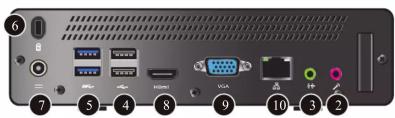
| 1 | 2 | 3 | 4 | 5 | 6 | 7 | 8 | 9 | 10 | |
| EN | Power button | MIC in | Line out | USB2.0 | USB3.1 Gen1 | Kensington lock | DC-in | HDMI | VGA | Gigabit Lan |
| ZH | 电源钮 | 麦克风接口 | 线路输出 | USB2.0 | USB3.1 Gen1 | 安全锁 | 直流输入 | HDMI | VGA | 千兆以LAN |
| JP | パワーボタン | マイクロホン入力 | ライン出力 | USB2.0 | USB3.1 Gen1 | ケジントロック | DC電源入力 | HDMI | VGA | ギガビット LAN |
| KO | 전린 버튼 | 마이크 입력 | 라인 입력 | USB2.0 | USB3.1 Gen1 | 엔싱턴 상금 장치 | DC입력 | HDMI | VGA | 기가비트 LAN |
| ID | Tombol nyala | MIC in | Line out | USB2.0 | USB3.1 Gen1 | Kunci Kensington | DC-in | HDMI | VGA | Gigabit Lan |
| VN | Nút nguồn | Ngô vào MIC | Ngô vào đáy | USB2.0 | USB3.1 Gen1 | khóa Kensington | DC-in | HDMI | VGA | Gigabit Lan |
| TC | 電源鋸 | 麥克風插孔 | 音源輸出 | USB2.0 | USB3.1 Gen1 | 防盗鎖 | 直流输入 | HDMI | VGA | Gigabit 有線網路 |
| Thai | t_[ μασμείνητην MIC | t_[ μασμέλη | Line μασμέλη | USB2.0 | USB3.1 Gen1 | t_[ μασμέλη Kensington | DC μασμέλη | HDMI | VGA | Gigabit Lan |
▶ Open the case


natural_image
3D illustration of a computer tower internal structure showing ventilation and ports (no text or symbols)
natural_image
Technical diagram of a mechanical assembly with no visible text or symbols
natural_image
Top-down view of a computer motherboard with visible circuitry and components (no text or symbols)▶ HDD or SSD installation
1

2

flowchart
graph TD
    A["Device"] --> B["Hardware Module"]
    B --> C["Monitor"]
    D["Hardware Component"] --> B
    E["External Port"] --> B
    F["External Port"] --> B
    G["External Port"] --> B
    H["External Port"] --> B
    I["External Port"] --> B
    J["External Port"] --> B
    K["External Port"] --> B
    L["External Port"] --> B
    M["External Port"] --> B
    N["External Port"] --> B
    O["External Port"] --> B
    P["External Port"] --> B
    Q["External Port"] --> B
    R["External Port"] --> B
    S["External Port"] --> B
    T["External Port"] --> B
    U["External Port"] --> B
    V["External Port"] --> B
    W["External Port"] --> B
    X["External Port"] --> B
    Y["External Port"] --> B
    Z["External Port"] --> B
▶ CPU cooler installation
1

2

natural_image
Diagram of a computer motherboard showing CPU socket, drive bays, and connector (no text or labels)▶ Memory installation
1

2
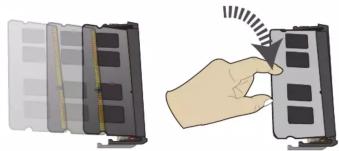
natural_image
Illustration of a hand interacting with a device panel, showing a button and motion indicator (no text or symbols)▶ Stand installation
1

2

natural_image
Front view of a black desktop computer tower with ventilation grille and control buttons (no visible text or symbols)▶ Mount to your monitor

natural_image
3D diagram of a device with screw and indicator lights, no text or symbols present2
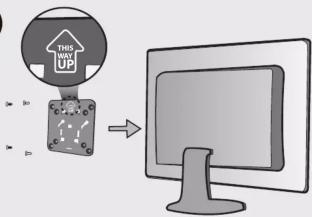
flowchart
graph TD
    A["THIS WITH UP"] --> B["Computer monitor"]
3

natural_image
Diagram showing a device with a door panel connected to a wall-mounted control panel (no text or symbols visible)4

natural_image
Illustration of a computer monitor with a black square on top, no text or symbols present1
| 1 | |
| EN | Fasten the screws firmly with Mini PC. |
| ZH | 在 Mini PC 上确实地锁上螺丝。 |
| JP | ネジを Mini PC にしっかり締めます。 |
| KO | Mini PC 을 나사로 단단히 조입니다. |
| ID | Kencangkan sekrup beserta Mini PC dengan kuat. |
| VN | Siết chất các ốc vit với Mini PC. |
| TC | 將螺絲確實地鎖在 Mini PC 上。 |
| Thai | đičสกรู้ไห้นันกับ Mini PC |
2
| EN | Tighten the screws with the VESA mount to the monitor. |
| ZH | 将 VESA 安装座用螺丝锁在显示器上。 |
| JP | モニターに VESA マウンティングプレートをネジでとめます。 |
| KO | 모니티에 VESA 마운트를 나사로 조입니다. |
| ID | Kencangkan sekrup beserta dudukan VESA ke monitor. |
| VN | Siết các ốc vit với khung lấp VESA vào màn hình. |
| TC | 將 VESA 安装套件用螺絲鎖在顯示器上。 |
| Thai | ขันแน่นสรุษย์ดังคีวิต VESA ที่ข้อภาพ |
3
| 3 | |
| EN | Hang up Mini PC to the mounting plate properly. |
| ZH | 将 Mini PC 对准井挂在安装座上。 |
| JP | Mini PCをプレートに合うように引っ掛けます。 |
| KO | Mini PC을 마운팅 플레이트에 적절하게 잡니다. |
| ID | Gantung Mini PC ke pelat dudukan dengan benar. |
| VN | Treo Mini PC lên tám lắp düng cách. |
| TC | 將 Mini PC 掛在安裝套件之上。 |
| Thai | jeความ Mini PC เข้ายับแน่ยื้อให้ถูกต้อง |
4
| 4 | |
| EN | Slide Mini PC along the trench to make sure it has been mounted firmly to the monitor. |
| ZH | 沿着沟槽滑动 Mini PC 以确保地安装牢固。 |
| JP | Mini PCを講に沿って底までスライドさせることで固定します。 |
| KO | Mini PC 이 모니티에 단단하게 장착될 때까지 흥을 따라 밀어 envelop습니다. |
| ID | Geser Mini PC di sepanjang alur untuk memastikannya terpasang dengan kuat pada monitor. |
| VN | Trượt Mini PC đọc theo rānh để đảm bảo nó đã được lắp chặt vào màn hình. |
| TC | 頗著套件上的溝槽,將 Mini PC 滑到底,使其確實固定。 |
| Thai | 절은 Mini PC 이 podiumenenร่วงเพื่อไห้เนไสวัยขึ้นขอกATH ได้อย่างแนบทนา |


Merek : ECS
Model : LIVA One Plus CL
Kategori : 2106