EF-M22MM F2 STM - 6127 CANON - Panduan pengguna gratis
Temukan panduan perangkat secara gratis EF-M22MM F2 STM CANON dalam format PDF.


Pertanyaan pengguna tentang EF-M22MM F2 STM CANON
0 pertanyaan tentang perangkat ini. Jawab yang Anda tahu atau ajukan milik Anda sendiri.
Ajukan pertanyaan baru tentang perangkat ini
Unduh instruksi untuk 6127 dalam format PDF gratis! Temukan panduan Anda EF-M22MM F2 STM - CANON dan ambil kembali perangkat elektronik Anda. Di halaman ini diterbitkan semua dokumen yang diperlukan untuk penggunaan perangkat Anda. EF-M22MM F2 STM merek CANON.
PANDUAN PENGGUNA EF-M22MM F2 STM CANON
ENG EF-M LENS Instructions
EF-M22mm f/2 STM
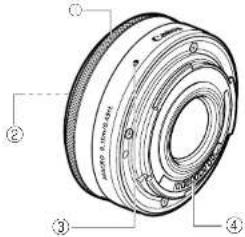
Nomenclature
① Focusing ring
② Hood/Filter Mounting Thread
③ Lens mount index
④ Contacts
Thank you for purchasing a Canon product. The Canon EF-M22mm f/2 STM lens is a small fixed focus length lens developed for interchangeable-lens digital cameras compatible with EF-M lenses*.
* Only the following cameras are compatible with EF-M lenses (as of July 2012); EOS M
- "STM" stands for stepping motor.
Safety Precautions
- Do not look at the sun or a bright light source through the lens. Doing so could result in vision loss or blindness.
- Whether it is attached to the camera or not, do not leave the lens under the sun without the lens cap attached. This is to prevent the lens from concentrating the sun's rays, which could cause a fire.
Handling Cautions
- If the lens is taken from a cold environment into a warm one, condensation may develop on the lens surface and internal parts. To prevent condensation in this case, first put the lens into an alight plastic bag before taking it from a cold to warm environment. Then take out the lens after it has warmed gradually. Do the same when taking the lens from a warm environment into a cold one. - Do not leave the lens in excessive heat such as in a car in direct sunlight. High temperatures can cause the lens to malfunction. - Please also refer to the handling cautions found in your camera's instructions.
Conventions used in this instruction
Warning to prevent lens or camera malfunction or damage. Supplementary notes on using the lens and taking pictures.
This device complies with Part 15 of the FCC Rules. Operation is subject to the following two conditions: (1) This device may not cause harmful interference, and (2) this device must accept any interference received, including interference that may cause undesired operation.
Do not make any changes or modifications to the equipment unless otherwise specified in the instructions. If such changes or modifications should be made, you could be required to stop operation of the equipment.
This equipment has been tested and found to comply with the limits for a class B digital device, pursuant to part 15 of the FCC Rules. These limits are designed to provide reasonable protection against harmful interference in a residential installation. This equipment generates, uses and can radiate radio frequency energy and, if not installed and used in accordance with the instructions, may cause harmful interference to radio communications.
However, there is no guarantee that interference will not occur in a particular installation. If this equipment does cause harmful interference to radio or television reception, which can be determined by turning the equipment off and on, the user is encouraged to try to correct the interference by one or more of the following measures:
- Reorient or relocate the receiving antenna. - Increase the separation between the equipment and receiver. - Consult the dealer or an experienced radio/TV technician for help.
This Class B digital apparatus complies with Canadian ICES-003.
1. Mounting and Detaching the Lens
Please mount and detach the lens only with the camera turned OFF. See your camera's instructions for details on mounting and detaching the lens.
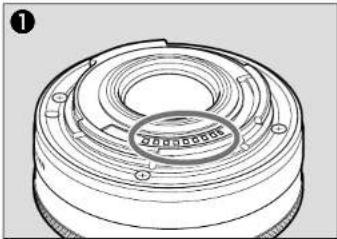
After detaching the lens, place the lens with the rear end up to prevent the lens surface and contacts from getting scratched. (fig.①) If the contacts get soiled, scratched, or have fingerprints on them, corrosion or faulty connections can result. The camera and lens may not operate properly. If the contacts get soiled or have fingerprints on them, clean them with a soft cloth. If you remove the lens, cover it with the dust cap. To attach it properly, align the lens mount index and the O index of the dust cap as shown in the diagram, and turn clockwise. (fig.②) To remove it: reverse the order.
2. Manual Focus
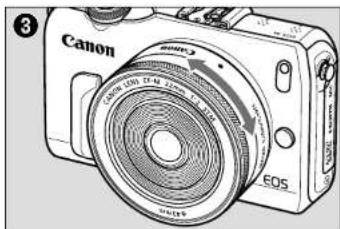
When the camera's focus mode is set to [MF], focus manually by turning the focusing ring (fig.①).
Quickly rotating the focusing ring may result in delayed focus.
- Focus mode is set using the camera. Please refer to the camera's instructions. - After autofocusing in [AF+MF] mode, focus manually by pressing the shutter button halfway and turning the focusing ring (full-time manual focusing).
natural_image
Technical line drawing of a mechanical component with concentric rings and mounting holes (no text or symbols)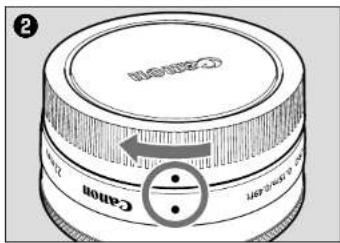
3. Hood (sold separately)
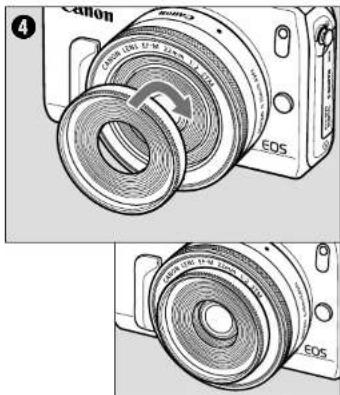
The EW-43 hood cuts out unwanted light and protects the front of the lens from rain, snow, and dust. Please attach the hood securely by either screwing it into the lens' filter thread (43 mm in diameter) located at the front of the lens or screwing it into the filter thread (43 mm in diameter) of a filler that is attached to the lens (fig. ①).
- Please attach and detach the hood and filter only with the camera turned OFF. - When attaching or detaching the hood, grasp the base of the hood to turn it. To prevent deformation, do not grasp the rim of the hood to turn it.
4. Filters (sold separately)
A filter is attached by either screwing it into the lens filter thread or the front filter thread of the hood (43 mm in diameter).
- Only one filter may be attached. - The hood and filter can be attached in any order.
Specifications
| Focal Length/Aperture | 22mm f/2 |
| Lens Construction 6 groups, 7 elements | |
| Minimum Aperture | f/22 |
| Angle of View | Diagonal: 63°30'Vertical: 37°50'Horizontal: 54°30' |
| Min. Focusing Distance | 0.15 m/0.49 ft. |
| Max. Magnification 0.21 x | |
| Field of View | Approx. 72 x 109 mm/2.83 x 4.29 inch(at 0.15 m/0.49 ft.) |
| Filter Diameter 43 mm | |
| Max. Diameter and Length | 60.9 x 23.7 mm/2.40 x 0.93 inch |
| Weight Approx. 105 g/3 | 7 oz |
| Hood EW-43 (Sold Separately) | |
| Lens Cap E-43 | |
| Dust Cap Lens Dust Cap EB | |
| Case LP811 (Sold Separately) | |
• Equivalent to 35 mm in the 35mm film format.
- The lens length is measured from the mount surface to the front end of the lens. Add 19.5 mm when including the lens cap and dust cap.
- The size and weight listed are for the lens only, except as indicated.
- Extenders cannot be used with this lens.
- Aperture settings are specified on the camera. - All data listed is measured according to Canon standards.
- Product specifications and appearance are subject to change without notice.