Boom Rock PWMAB210 - Hangszóró Pyle - Ingyenes használati útmutató
Találja meg az eszköz kézikönyvét ingyenesen Boom Rock PWMAB210 Pyle PDF formátumban.


Felhasználói kérdések a következőről Boom Rock PWMAB210 Pyle
0 kérdés erről a készülékről. Válaszolj azokra, amiket ismersz, vagy tedd fel a sajátod.
Tegyél fel egy új kérdést erről a készülékről
Töltse le az útmutatót a következőhöz Hangszóró PDF formátumban ingyenesen! Találja meg kézikönyvét Boom Rock PWMAB210 - Pyle és vegye vissza elektronikus eszközét a kezébe. Ezen az oldalon közzé van téve az eszköze használatához szükséges összes dokumentum. Boom Rock PWMAB210 márka Pyle.
HASZNÁLATI ÚTMUTATÓ Boom Rock PWMAB210 Pyle
PYLE®
PyleAudio.com
718.535.1800 718.236.2400(fax)
1600 63rd Street, Brooklyn NY 11204
PYLE®
PWMAB210
OPPERATING INSTRUCTIONS
300Watts Bluetooth Boom Rock Portable PA 6.5" Speaker System and Recorder w/FM.Remote,USB/SD Flash Drive, Rechargeable Battery, Wireless Mic
natural_image
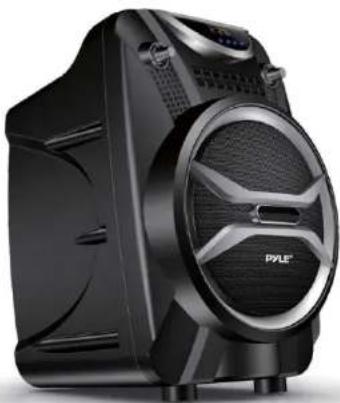
Black Pyle brand electronic device with speaker grille and ventilation slots (no visible text or symbols)BOOMROCK
User's manual
User's manual
User's manual
Panel design
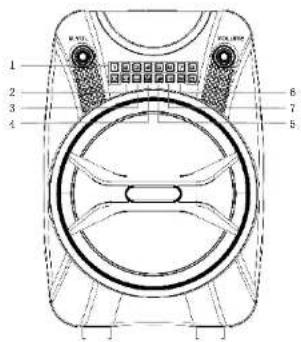
- 0-9 USB/SD or preset radio station selector
- Previous song selector
-
Next song selector
-
All tracks repeat
5.Single repeat function - Input selectors
- Play/Pause audio sources
Rear Panel design
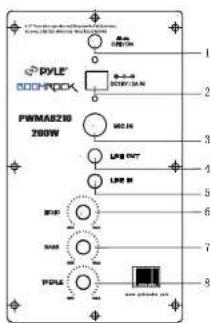
- Power ON/OFF switch
- DC 15V/2A Input
- MIC input slot
4.Line out - Line in
- Mic ECHO volume controller
- Bass volume controller
- Treble volume controller
Remote control
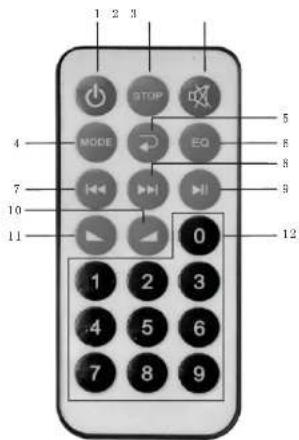
- Power switch
- Stop
3.Mutc
4.Input selectors
5.Single repeat function
6.EQ:equalizer
7.Previous song selector - Next song selector
9.Play/Pause audio sources
10.volume: increase
11.volume: reduce
12.0-9 USB/SD or preset radio statons selector
User's manual
User's manual
Instructions
Turning ON/OFF
The PA speaker can be powered when connected to main power or using the internal 12V battery.
- Connect the power cable to the top of the unit.
- Connect the other end of power cable to main power.
- Turn on the switch at the main power point.
- The unit will automatically power on when connected to main power.
Notes: If you wish to use the internal battery to power the unit, just simply turn on the Battery switch located on the top of unit to ON Charging
Before using the PA speaker for the first time, charge the unit at least 8 hours.
- Connect the power cable at the top of the panel.
- Turn off the battery switch on the top of the panel.
- Recharge indicator light will be on when it is charging.
Notes: The internal battery will charge while the unit is being operated and the power switch is on. It is better to charge the unit while the power switch is off.
Instructions
Using the Wireless Microphone (Not Available with Some Units)
The PA speaker comes with a wireless microphone to get you started straight out of the box.
- Tunc on the unit.
- Unsnap the cover on the receiver pack to access the battery enclosure. Insert batteries into the receiver. Take note of the battery polarity when inserting the batteries.
- Replace the battery cover of the receiver.
- The wireless microphone will automatically pair with the
PA speaker, it is ready to use. If unit does not work please be sure you have inserted the batteries correctly or replace old batteries. - Adjust the volume of the microphone by turning the MIC VOL knob located on top control panel
Notes: Please do not operate the microphone directly in front of the PA speaker, please set the MIC VOL/ECHO at a lower level before turning on the wireless microphone. Operating the microphone incorrectly will cause a loud squealing noise.
Please turn off the power switch when the wireless microphone is not in use. This will save the battery.
Instructions:
Using the Wired Microphone
You can connect the wired microphone to this unit using the MIC INPUT located on the top of control panel.
- Turn off the unit.
- Connect your wired microphone to the MIC INPUT located on top of the control panel.
- Adjust the microphone volume by tuning the MIC VOL/ECHO knobs located on top control panel.
NOTES: You can use the wired microphone and wireless microphone at the same time.
Connecting a Guitar
You can connect your Guitar to unit using the 1/4" GUITAR INPUT plug.
- Turn on the unit.
- Connect your guitar cable to GUITAR INPUT port on top control panel.
- Adjust the volume by turning the GUITAR VOL on top control panel.
Instructions
USB/SD Card Playback
You can play music from USB stick or SD Card using the USB/SD slot on the PA speaker.
- Turn on the unit.
User's manual
User's manual
- Insert your USB or SD card into the slot.
- Once inserted the USB or SD card unit will automatically play.
- You can use the PRE/NEXT/PLAY/PAUSE to control and play music. NOTES: The speaker system can play the following audio file formats: MP3, MP4, WMA. The USB/SD Card no more than 32GB. Operation may be slower when searching large memory files. It will need several seconds to respond when your USB/SD Card full of contents.
BLUETOOTH playback
You can connect your Bluetooth phone or other device to the PA speaker.
- Turn on the unit.
- Press the INPUT button which is located on top control panel, next to the USB/SD slot.
- The Bluetooth is on when you hear two "tone" indicator sound.
- Use your Bluetooth phone or other device to search for the PA speaker. It will displayed as PWMAB210.
- Connect your device by selecting PWMAB210, it will require you to enter a four digit code, the code is 0000.
- Enter the code and connect with unit.
- Play music on your phone or device, sound will come from the speaker through the BLUETOOTII wireless connection.
- You can use the VOLUME/BASS/TREBLE to adjust the sound level for BLUETOOTH, also you can adjust the Bluetooth music sound through your own phone or other device.
NOTES: If there is no sound through the PA speaker during Bluetooth, Check the volume controller both on the unit and on your phone or other device.
Using the Radio
- Turn on the unit.
-
Press INPUT once, to select FM Radio.
-
Press PRE/NEXT to select your desired radio station. Ensure that you have the extended the antenna located on the rear of the speaker. It will ensure the best possible radio quality and signal strength.
-
When you first use the radio, press NEXT button twice, it will auto search and store the radio stations with the strongest signal.
Instructions
Use of the External Battery Option To use the PA speaker longer than the internal battery life, you can connect the PA speaker to a external 12V Battery Source.
- Find the INPUT DC 12V on the top control panel.
- Use the correct cable connect the INPUT DC 12V. NOTES: The PA speaker will consume the internal battery first, when it is low, the LOW BATTERY indicator light located on the control panel will turn on, you can use the external 12V battery to power on the unit. The external 12V battery will also charge the internal battery while in use.
Using the Recording function
You can record audio from microphone and play it back on this unit by using the recording function.
- First insert your USB flash drive or SD card.
- Turn on the unit and press the Record button on unit, using the wired microphone or wireless microphone.
- The audio will be the last file listed on your flash drive file.
- Press the record button again to stop recording.
- If you want play your recorded files, please select USB mode, find the last file select the last file to play recording.
Notes: Please make sure your flash drive has enough space for the recorded files. You must use microphone and amplified speaker during recording.