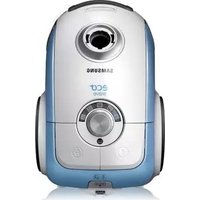
KÄYTTÖOHJE SC6750 SAMSUNG
Vacuum Cleaner user manual
* Before operating this unit, please read the instructions carefully.
* For indoor use only.
English
imagine the possibilities
Thank you for purchasing a Samsung product.
To receive a more complete service,
please register your product at
www.samsung.com/register
SAMSUNG
- Before operating the appliance, please read this manual thoroughly and retain it for your reference.
- Because these following operating instructions cover various models, the characteristics of your vacuum cleaner may differ slightly from those described in this manual.
CAUTION/WARNING SYMBOLS USED
WARning Indicates that a danger of death or serious injury exists. cAuTiOn Indicates that a risk of personal injury or material damage exists.
OTHER SYMBOLS USED
Represents something you must NOT do. Represents something you must follow. Indicates that you must disconnect the power plug from the socket.
iMpORTAnT sAFEguARds
Read all instructions carefully. Before switching on, make sure that the voltage of your electricity supply is the same as that indicated on the rating plate on the bottom of the cleaner.
WARNING : Do not use the vacuum cleaner when rug or floor is wet.
Do not use to suck up water.
Close supervision is necessary when any appliance is used by or near children. Do not allow the vacuum cleaner to be used as a toy. Do not allow the vacuum cleaner to run unattended at any time. Use the vacuum cleaner only for its intended use as described in these instructions.
Do not use the vacuum cleaner without a dust bin. Empty the dust bin before it is full in order to maintain the best efficiency.
Slide to the Stop(or Min)position before inserting a plug into the electrical outlet.
Do not use the vacuum cleaner to pick up matches, live ashes or cigarette butts. Keep the vacuum cleaner away from stoves and other heat sources. Heat can deform and discolour the plastic parts of the unit.
Avoid picking up hard, sharp objects with the vacuum cleaner as they may damage the cleaner parts. Do not stand on the hose assembly. Do not put weight on the hose. Do not block the suction or the exhaust port.
Switch the vacuum cleaner off on the body of the machine before unplugging from the electrical outlet. Disconnect the plug from the electrical outlet before changing the dust bag or dust container. To avoid damage, please remove the plug by grasping the plug itself, not by pulling on the cord.
This appliance is not intended for use by persons (including children) with reduced physical, sensory or mental capabilities, or lack of experience and knowledge, unless they have been given supervision or instruction concerning use of the appliance by a person responsible for their safety.
Children should be supervised to ensure that they do not play with the appliance.
The plug must be removed from the socket outlet before cleaning or maintaining the appliance.
The use of an extension cord is not recommended.
If your vacuum cleaner is not operating correctly, switch off the power supply and consult an authorized service agent.
If the supply cord is damaged, it must be replaced by the manufacturer or its service agent or a similarly qualified person in order to avoid a hazard.
Don't carry the vacuum cleaner by holding the hose. Use the handle on the vacuum cleaner set.
ASSEMBLING THE CLEANER
OPERATING THE CLEANER
06 Power cord
07 Power control
MAINTAIN TOOLS AND FILTER
08 Using accessory
09 Maintain floor tools (Option)
11 Emptying the dust bin
12 Cleaning the dust pack
14 Cleaning the motor protection filter
14 Cleaning the outlet filter
TROUBLESHOOTING
assembling the cleaner
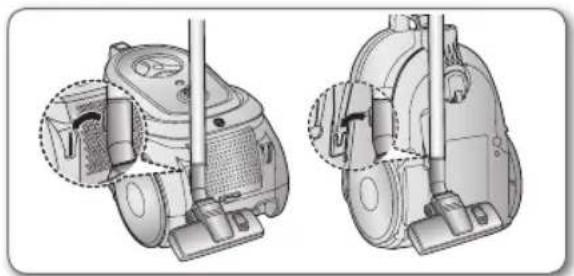
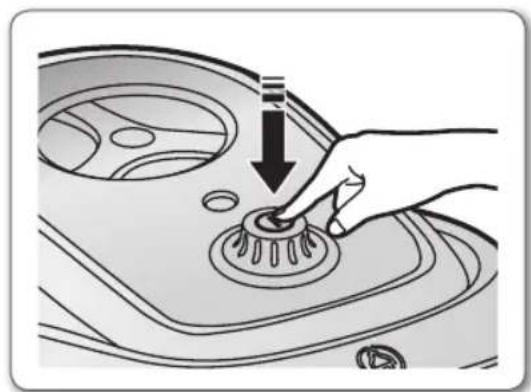
- Please do not press the button of dust bin handle when carrying machine.
- For storage, park the floor nozzle.
operating the cleaner
pOWER cORd
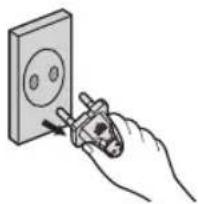
- When removing the plug from the electrical outlet, grasp the plug, not the cord.
SILDE CONTROL TYPE ONLY (Optional)
SLIDE TO THE STOP POSITION
Vacuum-cleaner switches off (stand by mode)
SLIDE FORWARD TO MAX
Suction capacity increases smoothly up to maximum.
BODY-CONTROL TYPE / ON/OFF TYPE
To reduce suction for cleaning draperies, small rugs, and other light fabrics, pull the tap air until the hole is open.
BODY-CONTROL TYPE (Only) ON/OFF type (Only)
MIN = For delicate surface e.g. net curtains.
MAX = For hard floors and heavily soiled carpets.
maintain tools and filter
USING ACCESSORY
Accessory (option)
- Push the accessory on to the end of the hose handle.
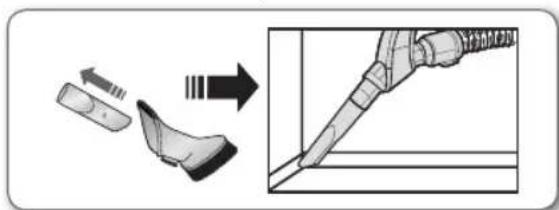
• To use the dusting tool, push the accessory on to the end of the hose handle.
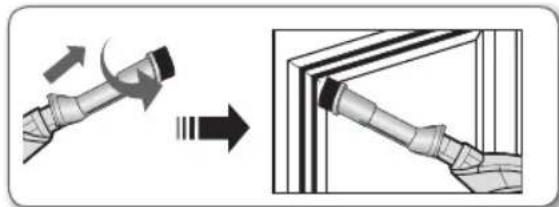
- To use the upholstery tool, push the accessory on to the end of the hose handle.
Pipe
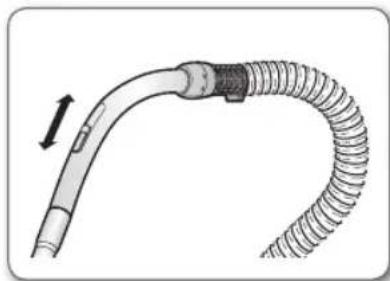
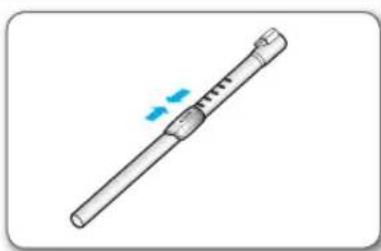
- Adjust the length of the telescopic pipe by sliding the length control button located in the center of the telescopic pipe back and forth.
- To check for blockages, separate the telescopic pipe and adjust to shorten. This allows for easier removal of waste clogging the tube.
-


Carpet Cleaning Floor Cleaning
- Adjust the inlet lever according to the floor surface.
- Remove waste matter completely if the inlet is blocked.
-

For improved
pickup of pet
hair and fibre on
carpets


Frequent vacuuming of hair or pet fur may cause a falling-off of the rotation due to matters tangled around the drum. In this case, clean the drum with care.
1. Push the Open button of the transparent screen cover to separate the cover.
2. Remove the brushbar from the transparent screen.
3. Remove waste matter such as dust and hair tangled around the brushbar using scissors.
4. Remove dust inside the brush housing using a dry duster or crevice tool.
5. Insert brushbar into rotating belt and assemble.
6. Click the transparent screen cover back into place to reassemble.
maintain tools and filter
1 23 4 5¢ maintain tools and filter
CLEANING THE DUST PACK
When to clean the dust pack
\- If suction is noticeably reduced during cleaning, please check the dust pack as indicated below.
Turn the vacuum power to 'MAX'.


HANDLE CONTROL POWER CONTROL
\- If the filter check indicator turns red with the inlet floating 10 cm above flat floor, clean it.

\- When the indicator light comes on, please empty the Dust Pack as shown in the following illustrations.

1 2 3 4 5 6 7 8

Make sure the filter is completely dry before putting it back into the vacuum cleaner. Allow 12 hours for it to dry.
maintain tools and filter
cIEAning ThE MOTOR pROTEcTiOn FILTER
• Take out both the dust bin and the dust pack.

\- Remove the motor protection filter from the vacuum cleaner. Shake and tap the dust from it and put back in machine.

cLEAning ThE OuTIET FilTER
1. Press the fixed frame part at the back of the main body to remove.

2. Pull out the HEPA Filter using the tab. Clean the HEPA filter.

3. Put the HEPA filter into the main body until you hear a 'click' sound.

Remove and replace the blocked outlet filter.

Replacement filters are available at your local Samsung distributor.

- IF YOU HAVE A PROBLEM
PROBLEM REMEDY Motor does not start. Check cable, plug and socket.Leave to cool. Suction force is gradually decreasing. Check for blockage and remove. Cord does not rewind fully. Pull the cord out 2-3m and push down the cord rewind button. Vacuum cleaner does not pick up dirt. Check hose and replace if required. Low or decreasing suction. Please check filter and, if required, clean as illustrated in the instructions. if filters are out of condition change them to new ones. Body overheating. Please check filters, If required clean as illustrated in the instruction. Static electricity discharge. Please decrease power suction.
This Vacuum cleaner is approved the following.
EMC Directive : 2004/108/EEC
Low Voltage Directive : 2006/95/EC

Dammsugare bruksanvisning
* Läs igenom anvisningarna noggrant innan du använder den här enheten.
* Endast för inomhusbruk.
svEnskA
imagine the possibilities
Tack för att du köpt en Samsung-produkt.
Vinn när du registrerar din produkt på
www.samsung.com/register
SAMSUNG

\- Innan du använder enheten ska du läsa igenom bruksanvisningen noggrant och spara den för framtida referens.

\- Eftersom de här anvisningarna täcker flera olika modeller kan egenskaperna hos din dammsugare variera något från de som beskrivs i den här bruksanvisningen.
SYMBOLER SOM ANVÄNDS FÖR VAR FÖRSIKTIG/VARNING
vARning Indikerar att det finns risk för dödsfall eller allvarlig skada. vAR FöRsikTig Indikerar att det finns risk för personskada eller materialskada.
ANDRA SYMBOLER SOM ANVÄNDS
Representerar något du INTE får göra. Representerar något du måste följa. Indikerar att du måste koppla ur strömkontakten ur uttaget.
vikTigA sÄkERhETsFRågOR
1. Läs instruktionerna noggrant. Innan du slår på dammsugaren ska du se till att spänningen i el-källan är samma som den som anges på märkplattan på dammsugarens undersida.
2. WARNING: Använd inte dammsugaren när mattan eller golvet är vått.
Använd den inte för att suga upp vatten.
3. Noggrann övervakning krävs när en enhet används av eller i närheten av barn. Låt inte dammsugaren användas som en leksak. Låt inte dammsugaren gå utan att någon övervakar den. Använd bara dammsugaren för avsett syfte, enligt vad som beskrivs i de här anvisningarna.
4. Använd inte dammsugaren utan dammuppsamlaren. Töm dammuppsamlaren innan den är full för att bibehålla bästa effektivitet.
5. Dra till stoppposition eller (mini) innan du för in kontakten i ett el-uttag.
6. Använd inte dammsugaren för att plocka upp tändstickor, brinnande aska eller cigarettefimpar. Håll dammsugaren på avständ från spisar och andra värmekällor. Hetta kan deformera och missfärga enhetens plastdelar.
7. Undvik att plocka upp hårda, vassa föremål med dammsugaren, eftersom de kan skada dammsugarens delar. Stå inte på slangen. Anlägg ingen vikt mot slangen. Blockera inte in- eller utsug.
8. Slå av dammsugaren på huvudenheten innan du kopplar ur den ur el-uttaget. Koppla ur kontakten ur vägguttaget innan du byter dammuppsamlare eller dammbehållare. För att undvika skador ska du ta ur kontakten genom att dra i själva kontakten och inte i sladden.
9. Den här enheten är inte avsedd att användas av några personer (inklusive barn) med nedsatt fysisk, psykisk eller mental förmåga, eller avsaknad av erfarenhet och kunskap, om personen eller personerna inte har någon som övervakar och instuerar angående enhetsanvändningen av en person som ansvarar för deras säkerhet.
Barn ska övervakas för att säkerställa att de inte leker med enheten.
10. Kontakten måste tas ur el-uttaget före rengöring eller underhåll av enheten.
11. Användning av förlängningssladd rekommenderas ej.
12. Om dammsugaren inte fungerar som den ska slår du av strömmen och kontaktar ett behörigt serviceombud.
13. Om strömsladden skadas måste den bytas av tillverkaren eller dess serviceombud eller en liknande behörig person för att undvika skada.
14. Bär inte dammsugaren i slangen. Använd handtaget som sitter på dammsugaren.
MONTERA DAMMSUGAREN
05
ANVÄNDA DAMMSUGAREN
06
06 Strömsladd
07 Strömkontroll
FÖRVARA VERKTYG OCH FILTER
08
08 Använda tillbehör
09 Förvara golvverktyg (tillval)
11 Tömma dammbehållaren
12 Rengöra dammsatsen
14 Rengöra motorskyddsfiltret
14 Rengöra utloppsfiltret
FELSÖKNING
16
montera dammsugaren


\- Tryck inte på knappen på dammbehållarens handtag när du bär maskinen.

\- För förvaring, parkera golvmunstycket.


använda dammsugaren
sTRöMslAdd


\- När du drar ur kontakten ur el-uttaget ska du dra i kontakten, inte i sladden.

SKJUTREGLAGE (tillval)
• FÖR TILL STOPPOSITION
Dammsugaren slås av (standby-läge)
• FÖR MOT MAX
Sugförmågan ökar steglöst upp till max.


KROPPSKONTROLLTYP /PÅ-/AV-TYP
För att minska sugförmågan för rengöring av exempelvis draperier, små mattor och andra lätta textilier, dra i kranen tills hålet är öppet.

KROPPSKONTROLL (enkel) PÅ-/AV-typ (enkel)
MIN = För ömtåliga ytor, exempelvis gardiner.
MAX = För hårda golv och kraftigt smutsade mattor.


förvara verktyg och filter
ANVÄNDA TILLBEHÖR
Tillbehör (tillval)
\- Dra ut tillbehörsdelen på slanghandtaget.


\- Om du vill använda dammverktyget trycker du in tillbehöret i ena änden av slanghandtaget.


\- Om du vill använda textiltyget trycker du in tillbehöret i ena änden av slanghandtaget.


Rör
\- Justera längden på det teleskopiska röret genom att vrida längdkontrollknappen som sitter i mitten av det teleskopiska röret fram och tillbaka.

\- För att kontrollera blockeringar, separera det teleskopiska röret och justera för att förkorta. Detta medger enklare borttagning av avfall som sätter igen röret.

-< TILLVAL >

För förbättrad
uppsugning av
päls och fibrer i
mattor


Om du ofta dammsuger hår eller päls kan det göra att rotationsfunktionen ramlar av på grund av att de fastnar i trumman. Rengör i så fall trumman noggrant.
1. Tryck på knappen Open (Öppna) på den genomskinliga skärmen för att dela på kåpan.
2. Ta bort borsten från den transparenta skärmen.
3. Ta bort smuts, såsom damm och hår som fastnat runt borsten med en sax.
4. Ta bort damm inut i borstkåpan med entorr dammtrasa eller borste.
5. För in borsten i den roterande remmen och fäst ihop dem.
6. Tryck ihop den transparenta skärmens käpa tills det klickar till för att fästa ihop dem.
förvara verktyg och filter

\- Ta loss det transparenta trummskyddet för enkel rengöring.
< TILLVAL

För uppsugning av påls och fibrer i textilier och bäddlinne.

Om det bildas smuts på turbinen hindras borsten från att vridas och detta måste i så fall åtgärdas.
1. Ta bort avfall helt om inloppet är blockerat.
2. Vrid låsknappen till läget 'UNLOCK' (LÅS UPP) och ta bort den
3. För att montera igen riktar du in skyddet mot huvudenhetens front och stänger sedan ihop dem. Efter att du har stängt kåpan ska du se till att läsknappen i positionen för 'LOCK' (LÅS).

Används endast för lakan. Var försiktig så att du inte skadar borsten genom att den sätter igen.
1 2 3 4 5 €
\- Töm i en plastpåse
(rekommenderas för personer med astma/allergi)


Du kan skölja ur dammbehållaren med kallt vatten.
förvara verktyg och filter
RENGÖRA DAMMSATSEN
När ska dammsatsen rengöras
\- Om sugeffekten minskar betydligt under dammsugning ska du kontrollera dammsatsen enligt nedan.
Slå på dammsugaren till 'MAX'.


HANDTAGSKONTROLL STRÖMKONTROLL
\- Om filterkontrollindikatorn blir röd med inloppet flytaande 10 cm ovanför plant golv, ska du rengöra den.

\- När indikatorlampan tänds ska du tömma ur dammsatsen så som visas i följande bilder.

1 2 3 4 5 6 7 8

Se till att filtret är helt torrt innan du sätter tillbaka det i dammsugaren. Låt det gå 12 timmar för att det ska torka.
förvara verktyg och filter
REngöRA MOTORskYddsFilTRET
• Ta ut både dammbehållaren och dammsatsen.

\- Ta bort motorskyddsfiltret från dammsugaren. Skapa och tryck bort dammet och sätt tillbaka det i maskinen.

REngöRA uTIOppsFilTRET
1. Tryck på den fasta delen av ramen på baksidan av huvudenheten för att ta bort den.

2. Dra ut HEPA-filtret med fliken.
Rengör HEPA-filtret.

3. Placera HEPA-filtret i huvudkroppen tills du hör ett klickljud.

Ta bort och byt ut det igensatta utloppsfiltret.

Ersättningsfilter finns att köpa hos din lokala återförsäljare för Samsung.

- OM DU HAR PROBLEM
PROBLEM ÅTGÄRD Motorn startar inte. Kontrollera kabel, kontakt och uttag.Låt svalna. Sugeffekten minskar gradvis. Kontrollera om något sätter igen och ta bort det i så fall. Sladden dras inte in helt. Dra ut sladden 2-3 m och tryck sladdens indragningsknapp nedåt. Dammsugaren suger inte upp smuts. Kontrollera slangen och byt vid behov. Låg eller minskande sugeffekt. Kontrollera filtret och rengör om det behövs enligt de anvisningar som ges. Om filtren är skadade ska de bytas mot nya. Överhettning av huvudenheten. Kontrollera filtren och rengör dem vid behov enligt anvisningarna. Statisk elektricitet. Minska sugeffekten.
Dnna dammsugare är godkänd enligt följande.
EMC-direktiv: 2004/108/EEC
Direktiv för säkerhet vid lågspänning: 2006/95/EC
Om du har några frågor eller synpunkter om Samsungs produkter, är du välkommen att kontakta Samsung Support.
0771 726 7864 (SAMSUNG)
www.samsung.com/se

Støvsuger brugervejledning
* Læs brugervejledningen omhyggeligt, inden du bruger denne enhed.
* Må kun anvendes indendørs.
dAnsk
imagine the possibilities
Tak fordi du har købt et Samsung produkt.
Vind når du registrerer dit produkt på
www.samsung.com/register
SAMSUNG

\- Inden du bruger dette apparat, skal du læse denne vejledning omhyggeligt og gemme den til senere brug.

\- Da følgende brugervejledning omfatter forskellige modeller, kan egenskaberne ved din støvsuger være lidt anderledes end det, der er beskrevet i denne vejledning.
ANVENDTE FORSIGTIG/ADVARSEL-SYMBOLER
AdvARsEI Indikerer, at der er fare for død eller alvorlig personskade. FORsigTig Indikerer, at der er risiko for personskade eller skade på ting.
ANDRE ANVENDTE SYMBOLER
Repræsenterer noget, du IKKE må gøre. Repræsenterer noget, du skal følge. Indikerer, at du skal tage strømstikket ud af stikkontakten.
vigTigE sikkERhEdsFORAnsTAITningER
1. Læs alle instruktioner omhyggeligt. Inden du tænder for strømmen, skal du sikre dig, at spændingen på strømforsyningen er den samme som den, der er angivet på mærkepladen i bunden af støvsugeren.
2. ADVARSEL: Brug ikke støvsugeren, när tæppet eller gulvet er vådt.
Brug ikke støvsugeren til at suge vand op med.
3. Det er nødvendigt at holde nøje opsyn, når apparatet bruges af eller i nærheden af børn.
Støvsugeren må ikke bruges som legetøj. Støvsugeren må aldrig køre uden opsyn.
Støvsugeren må kun bruges til det, den er beregnet til, og som beskrevet i denne vejledning.
4. Brug ikke støvsugeren uden en støvbeholder. Tøm støvbeholderen, inden den er fuld, for at opnå den bedste funktion.
5. Skub frem til positionen Stop (eller Min), inden du sætter et stik i stikkontakten.
6. Brug ikke støvsugeren til at opsamle tændstikker, aske med gløder eller cigaretteskod.
Hold støvsugeren væk fra komfurer og andre varmekilder. Varme kan deformere og misfarve enhedens plastikdele.
7. Undlad at opsamle hårde, skarpe genstande med støvsugeren, da de kan beskadige støvsugerens dele. Undlad at stå på slangesamlingen. Undlad at lægge vægt på slangen. Undlad at blokere suge- eller udsugningsåbningen.
8. Sluk støvsugeren på selve maskinen, før du tager stikket ud af stikkontakten. Tag stikket ud af stikkontakten, inden du skifter støvsugerposen eller støvbeholderen. For at undgå skade skal du tage stikket ud ved at tage fat i selve stikket og ikke ved at trække i kablet.
9. Dette apparat er ikke beregnet til brug af personer (herunder børn) med nedsatte fysiske, sanse- eller mentale færdigheder eller manglende erfaring og viden, med mindre de har fået oplæring eller instruktion vedr. brug af apparatet af en person, der er ansvarlig for deres sikkerhed.
Børn bør overvåges for at sikre, at de ikke leger med apparatet.
10. Stikket skal tages ud af stikkontakten, inden apparatet rengøres eller vedligeholdes.
11. Det anbefales ikke at bruge en forlængerledning.
12. Hvis støvsugeren ikke fungerer korrekt, skal du slukke for strømforsyningen og kontakte et autoriseret serviceværksted.
13. Hvis strømkablet er beskadiget, skal det udskiftes af producenten eller et serviceværksted eller en tilsvarende kvalificeret person for at undgå fare.
14. Undlad at bære støvsugeren ved at holde i slangen. Brug håndtaget på støvsugersættet.
SAMLING AF ST∅VSUGEREN
05
BETJENING AF ST∅VSUGEREN
06
06 Strømkabel
07 Styrkekontrol
VEDLIGEHOLDELSE AF VÄRKTÖJER OG FILTER
08
08 Brug af tilbehør
09 Vedligeholdelse af gulvværktøjer (valgfrit)
11 Tømning af støvbeholderen
12 Rengøring af støvpakken
14 Rengøring af motorbeskyttelsesfilteret
14 Rengøring af udledningsfilteret
FEJLFINDING
16
samling af støvsugeren


\- Undlad at trykke på knappen på støvbeholderens håndtag, mens du bærer maskinen.

• Parkér mundstykket under opbevaring.


betjening af støvsugeren
sTRøMkAbEI

FORsigTig
\- Tag fat i stikket og ikke i kablet, når du tager stikket ud af stikkontakten.

KUN SKYDEKNAPTYPE (valgfrit)
- SKUB FREM TIL POSITIONEN STOP Støvsugeren slukkes (standbytilstand)
- SKUB FREMAD TIL MAX
Sugekapaciteten øges jævnt op til maksimal sugestyrke.


TYPE MED KONTAKT PÅ HOVEDDEL/ON/OFF-TYPE
Træk i luftdækslet, til hullet er åbent, for at reducere sugestyrken ved rengøring af gardiner, små tæpper og andre lette stoffer.

TYPE MED KONTAKT PÅ HOVEDDEL (kun)
MIN = Til sarte overflader, som f.eks. tynde gardiner.
MAX = Til hårde gulve og stærkt tilsmudsede tæpper.

ON/OFF-type (kun)

vedligeholdelse af værktøjer og filter
BRUG AF TILBEH∅R
Tilbehør (valgfrit)
\- Tryk tilbehøret fast på enden af slangehåndtaget.


\- Tryk tilbehøret fast på enden af slangehåndtaget for at bruge afstøvningstilbehøret.


\- Tryk tilbehøret fast på enden af slangehåndtaget for at bruge tilbehøret til møbelstof.


Rør
\- Juster længden på det teleskopiske rør ved at skyde længdejusteringsknappen midt på det teleskopiske rør frem og tilbage.

\- Kontroller for blokeringer ved at skille det teleskopiske rør ad og justere det, så det bliver kortere. Dette gør det lettere at fjerne affald, der blokerer røret.

- < EKSTRATILBEH∅R >


Rengøring af gulvtæpper

Rengøring af gulve

- Indstil mundstykket i forhold til gulvoverfladen.
- Fjern affaldsstoffet helt, hvis mundstykket er blokeret.
- < EKSTRATILBEH∅R >

Til forbedret
opsamling af
dyrehår og -fibre
på tæpper


Hyppig støvsugning af hår og dyrepels kan betyde formindsket rotation, fordi der er viklet hår o.l. rundt om tromlen. Rengør i så fald tromlen forsigtigt.
1. Tryk på knappen Open (Åbn) på det gennemsigtige dæksel for at tage dækslet af.
2. Tag børstestykket af den gennemsigtige skærm.
3. Fjern affaldsstoffer som støv og hår, der er viklet rundt om børstestykket, ved hjælp af en saks.
4. Fjern støv inde i børsterummet med entør støvekost eller et spalteværktøj.
5. Indsæt børstestykket i rotationsbåndet, og saml delen igen.
6. Klik det gennemsigtige dæksel tilbage på plads for at samle stykket igen.
vedligeholdelse af værktøjer og filter
< EKSTRATILBEH∅R >

\- Tag det gennemsigtige tromledæksel af, så det er nemmere at rengøre.
< EKSTRATILBEH∅R >

Til opsamling af dyrehår og -fibre på møbelstof og sengelinned.

Klodser på turbinen forhindrer børsten i at dreje rundt, hvilket betyder, at de beskytter den.
1. Fjern affaldsstoffet helt, hvis mundstykket er blokeret.
2. Drej låseknappen til "UNLOCK" (lås op), og tag stykket af.
3. Saml stykket igen ved at justere dækslet i forhold til forsiden af hoveddelen og lukke det. Når dækslet er lukket, skal du sørge for, at låseknappen er drejet til position "LOCK" (lås).

Bruges kun til sengetøj. Pas på ikke at beskadige børsten, når du fjerner tilstopningen.
1 23 4 5¢
\- Tøm indholdet ud i en plastikpose
(anbefales til personer, der lider af astma/allergi)


Støvbeholderen kan rengøres med koldt vand.
vedligeholdelse af værktøjer og filter
RENG∅RING AF ST∅VPAKKEN
Hvornår skal støvpakken rengøres?
\- Hvis sugestyrken er markant reduceret under rengøring, skal du kontrollere støvpakken som angivet herunder.
Sæt sugestyrken på "MAX".


STYRING AF HÅNDTAG STYRKEKONTROL
\- Hvis indikatoren for kontrol af filter bliver rød, när mundstykket befinder sig 10 cm over et fladt gulv, skal støvpakken rengøres.

\- Når indikatorlampen lyser, skal støvpakken tømmes som vist i de følgende illustrationer.

1 2 3 4 5 6 7 8

Sørg for, at filteret er helt tørt, før du sætter det tilbage i støvsugeren. Lad det tørre i 12 timer.
vedligeholdelse af værktøjer og filter
REngøRing AF MOTORbEskYTTEIsEsFilterET
\- Tag både støvbeholderen og støvpakken ud.

\- Tag motorbeskyttelsesfilteret ud af støvsugeren. Ryst og bank støvet af det, og sæt det tilbage i støvsugeren.

REngøRing AF udIEdningsFilterET
1. Tryk på den faste rammedel bag på hoveddelen for at tage filteret ud.

2. Træk HEPA-filteret ud ved hjælp af tappen. Rengør HEPA-filteret.

3. Sæt HEPA-filteret tilbage i hoveddelen, og tryk, til du hører et klik.

Fjern og udskift det blokerede udledningsfilter.

Du kan få erstatningsfiltre hos din lokale Samsung-forhandler.

- HVIS DU HAR ET PROBLEM
PROBLEM L∅SNING Motoren starter ikke. Kontroller kablet, stikket og stikkontakten.Lad støvsugeren køle af. Sugestyrken mindskes gradvist. Kontroller, om der er blokeringer, og fjern dem i givet fald. Kablet rulles ikke helt op. Træk kablet 2-3 m ud, og tryk på knappen til kabeloprulning. Støvsugeren opsamler ikke snavs. Kontroller slangen, og udskift den om nødvendigt. Lav eller reduceret sugestyrke. Kontroller filteret, og rengør det om nødvendigt som illustreret på tegningerne. Udskift filtrene, hvis de ikke fungerer. Overophedning af støvsugeren. Kontroller filtrene, og rengør dem om nødvendigt som vist på tegningerne. Udledning af statisk elektricitet. Reducer sugestyrken.
Denne støvsuger overholder følgende:
EMC-direktiver: 2004/108/EEC
Lavspændingsdirektiver: 2006/95/EC
Kontakt SAMSUNG
Hvis du har spørgsmål eller kommentarer vedrørende Samsung produkter,
venligst kontakte Samsung Support.
70 70 19 70
www.samsung.com

Støvsuger
brukerhåndbok
* Les disse instruksjonene nøye før denne enheten tas i bruk.
* Bare for innendørs bruk.
nORsk
imagine the possibilities
Takk for at du kjøpte et Samsung-produkt.
Vinn när du registrerer ditt produkt på
www.samsung.com/register
SAMSUNG

\- Les denne veiledningen grundig før du tar apparatet i bruk, og ta vare på den for fremtidig referanse.

\- Siden de følgende bruksanvisningene dekker forskjellige modeller, kan egenskapene til din støvsuger variere noe fra de som beskrives i denne håndboken.
FORSIKTIG-/ADVARSEL-SYMBOLER I DENNE HÅNDBOKEN
AdvARsEI Viser at det finnes fare for dødsfall eller alvorlige personskader. FORsikTig Viser at det finnes fare for personskader eller materielle skader.
ANDRE SYMBOLER I DENNE HÅNDBOKEN
Representerer noe du IKKE må gjøre. Representerer noe du må følge. Indikerer at du må koble støpselet fra vegguttaket.
vikTigE bEskYTTEIsEsTilTAk
1. Les alle instruksjoner nøye. Før du slår på apparatet må du kontrollere at spenningen i din strømforsyning er den samme som angitt på kapasitetsplaten nederst på støvsugeren.
2. ADVARSEL: Ikke bruk støvsugeren när teppet eller gulvet er vått.
Ikke bruk den til å suge opp vann.
3. Det er nødvendig med nøye oppsyn når apparatet brukes av eller i nærheten av barn. Ikke la støvsugeren brukes som et leketøy. Ikke la støvsugeren være på uten tilsyn under noen omstendigheter. Bruk støvsugeren kun til sitt tiltenkte formål som beskrevet i disse instruksjonene.
4. Ikke bruk støvsugeren uten en støvholder. Tøm støvholderen før den er full for å opprettholde effektiviteten.
5. Skyv til posisjonen Stop (eller Min) før du setter støpselet i vegguttaket.
6. Ikke bruk støvsugeren til å suge opp fyrstikker, aske eller sigarettstumper. Hold støvsugeren unna ildsteder og andre varmekilder. Varme kan deformere og misfarge plastdelene til enheten.
7. Unngå å suge opp harde, skarpe gjenstander med støvsugeren siden de kan skade delene. Ikke stå på slangen. Ikke legg vekt på slangen. Ikke blokker innsugings- eller utslippsporten.
8. Slå av støvsugeren på selve maskinen før du kobler den fra vegguttaket. Ta ut støpselet fra vegguttaket før du skifter støvpose eller støvbeholder. For å unngå skader må du dra ut støpselet ved å holde i selve støpselet og ikke dra i ledningen.
9. Dette apparatet er ikke beregnet for å brukes av personer (inkludert barn) som er svekket fysisk, sansemessig eller mentalt, eller som mangler erfaring og kunnskap, med mindre de er under oppsyn eller har fått opplæring av en person som er ansvarlig for deres sikkerhet.
Barn må ha tilsyn for å sikre at de ikke leker med apparatet.
10. Støpselet må fjernes fra stikkontakten før rengjøring eller vedlikehold av støvsugeren.
11. Bruk av en skjøteledning anbefales ikke.
12. Hvis støvsugeren ikke fungerer som den skal, slår du av strømforsyningen og kontakter en autorisert servicetekniker.
13. Hvis ledningen er skadet, må den skiftes ut av produsenten eller en servicetekniker eller annen kvalifisert person for å unngå farer.
14. Ikke bær støvsugeren ved å holde den i slangen. Bruk håndtaket på støvsugeren.
ASSEMBLING THE CLEANER
05
OpERATING THE CLEANER
06 Power cord
07 Power control
06
MAINTAIN TOOLS AND FILTER 08 Using accessory
09 Maintain floor tools (Option)
11 Emptying the dust bin
12 Cleaning the dust pack
14 Cleaning the motor protection filter
14 Cleaning the outlet filter
TROUBLESHOOTING
16
sette sammen støvsugeren


\- Ikke trykk på knappen til støvholderhåndtaket når du bærer maskinen.

\- Ved oppbevaring parkerer du munnstykket.


bruke støvsugeren
sTRøMIEdning


\- Når du tar støpselet ut av vegguttaket, må du holde i selve støpselet og ikke i ledningen.

KUN SKYVEKONTROLLTYPE (valgfri)
- SKYV TIL STOP-POSISJONEN
Støvsugeren slår seg av (standbymodus)
- SKYV FREMOVER TİL MAX
Innsugingskapasiteten øker jevnt opp til maksimalt.

MASKINKONTROLLTYPE / PÅ/AV-TYPE
For å redusere innsugingen ved støvsuging av tekstiler, små tepper og andre lette stoffer drar du luftetappen til hullet er åpent.

MASKINKONTROLLTYPE (bare) PÅ/AV-type (bare)
MIN = For ømfintlige overflater som gardiner.
MAX = For harde gulv og tilsmussede tepper.


vedlikeholde verktøy og filter
BRUKE TILBEH∅R
Tilbehør (alternativ)
\- Dytt tilbehøret på enden av slangehåndtaket.


\- For å bruke støvtørkeverktøyet dytter du tilbehøret på enden av slangehåndtaket.


\- For å bruke møbelverktøyet dytter du tilbehøret på enden av slangehåndtaket.


Rør
\- Juster lengden på det teleskopiske røret ved å skyve lengdekontrollknappen midt på det teleskopiske røret frem og tilbake.

\- For å se etter blokkeringer tar du av det teleskopiske røret og justerer det så det blir kortere. Dette gjør det enklere å fjerne avfall som tilstopper røret.

< ALTERNATIV >


Tepperengjøring Gulvrengjøring
- Juster inntaksspaken i henhold til gulvoverflaten.
- Fjern avfallet helt hvis inntaket er blokkert.
< ALTERNATIV >

For forbedret
oppsuging av
dyrepels og -fibre
på tepper


Jevnlig støvsuging av hår eller dyrepels kan føre til at rotasjonen faller av på grunn av at dette setter seg fast rundt trommelen. I dette tilfellet rengjør du trommelen forsiktig.
1. Trykk på Åpne-knappen på det gjennomsiktige skjermdekselet for å ta av dekselet.
2. Fjern børsten fra den gjennomsiktige skjermen.
3. Fjern avfallet som støv og hår som sitter fast i børsten ved hjelp av saks.
4. Fjern støv fra innsiden av børsten med enstøvtørker eller et annet lite verktøy.
5. Sett børsten inn i det roterende båndet og monter.
6. Klikk det gjennomsiktige skjermdekselet tilbake på plass for å montere på nytt.
vedlikeholde verktøy og filter
< ALTERNATIV >

• Ta av det gjennomsiktige trommeldekselet for enkel rengjøring.
< ALTERNATIV >

For oppsuging av dyrepels og -fiber på møbler og sengetøy.

Blokkeringer i turbinen hindrer børsten i å rotere, og i dette tilfellet må du ordne opp i det.
1. Fjern avfallet helt när inntaket er blokkert.
2. Vri låseknappen til "LÅS OPP" og ta av.
3. For å sette det på igjen justerer du dekselet med forsiden av enheten og lukker det. Etter at du har lukket dekselet må du kontrollere at låseknappen er vridd til "LÅS".

AdvARsEI
Bruk kun til sengetøy. Vær forsiktig så du ikke skader børsten ved fjerning av blokkeringen.
1 23 4 5 €
- Tøm den i en plastpose
(anbefales for astmatikere/allergikere)


Du kan skylle støvholderen i kaldt vann.
vedlikeholde verktøy og filter
RENGJ∅RE ST∅VPAKKEN
Når du skal rengjøre støvpakken
\- Hvis innsugingen reduseres merkbart under støvsuging må du kontrollere støvpakken som angitt nedenfor.
Skru støvsugeren på 'MAX'.

HÅNDTAKSKONTROLL STYRKEKONTROLL
\- Hvis indikatorlampen for filterkontroll blir rød når inntaket holdes 10 cm over flatt gulv, rengjør du den.

\- Når indikatorlampen lyser, tømmer du støvpakken som vist i følgende illustrasjoner.

1 2 3 4 5 6 7 8

Kontroller at filteret er helt tørt før du setter det tilbake i støvsugeren. La det tørke i 12 timer.
vedlikeholde verktøy og filter
REngjøRE MOTORbEskYTTEIsEsFilTERET
• Ta ut både støvholderen og støvpakken.

\- Ta ut motorbeskyttelsesfilteret fra støvsugeren. Rist og bank støvet ut fra det og legg det tilbake i maskinen.

REngjøRE uTslippsFilTERET
1. Trykk på den faste rammedelen på baksiden av støvsugeren for å fjerne det.

2. Dra ut HEPA-filteret med knotten.
Rengjør HEPA-filteret.

3. Trykk HEPA-filteret ned i støvsugeren til du hører en klikkelyd.

Ta av og bytt ut det blokkerte utslippsfilteret.

Du får kjøpt nye filtere hos din lokale Samsung-forhandler.

- HVIS DU HAR ET PROBLEM
PROBLEM L∅SNING Motoren starter ikke. Kontroller kabelen, støpselet og vegguttaket.La kjøle ned. Innsugingskraften minsker gradvis. Se etter blokkeringer og ta ut. Ledningen trekker seg ikke helt inn. Dra ledningen ut 2-3 meter og trykk ned ledningsknappen. Støvsugeren suger ikke opp støv. Kontroller slangen og bytt den ut om nødvendig. Lite eller minskende sugekraft. Kontroller filteret og om nødvendig må du rengjøre som illustrert i instruksjonene. Hvis filtrene er ute av stand, bytter du dem ut med nye. Støvsugeren overopphetes. Kontroller filtrene. Om nødvendig rengjør du dem som illustrert i instruksjonen. Frigjør statisk elektrisitet. Senk sugekraften.
Denne støvsugeren er kompatibel med følgende:
EMC-direktivet: 2004/108/EEC
Lavspenningsdirektivet: 2006/95/EC
Kontakt SAMSUNG
Om du har spørsmål eller synspunkter om Samsungs produkter,
er du velkommen å kontakte Samsung Support
815-56 480
www.samsung.com

Pölynimurin käyttöopas
* Lue ohjeet huolellisesti, ennen kuin käytät tätä laitetta.
* Vain sisäkäyttöön.
suOMi
imagine the possibilities
Kiitos kun hankit Samsung tuotteen.
Osallistu kilpailuun ja voita! Rekisteröi
Samsung-tuotteesi osoitteessa
www.samsung.com/register
SAMSUNG
TuRvAllisuusOhjEET

\- Ennen kuin käytät laitetta, lue tämä käyttöopas huolellisesti ja pidä se tallessa tulevaa tarvetta varten.

\- Koska seuraavat käyttöohjeet koskevat useita eri malleja, oman pölynimurisi ominaisuudet saattavat poiketa jonkin verran ohjeissa kuvatuista.
OPPAASSA KÄYTETYT VAARA- JA VAROITUSMERKIT
vAROiTus Viittaa kuolemanvaaraan tai vakavien vammojen mahdollisuuteen. vAARA Viittaa henkilövahinkojen tai aineellisten vahinkojen mahdollisuuteen.
MUUT OPPAASSA KÄYTETYT MERKIT
Osoittaa jotakin, mitä El pidä tehdä. Osoittaa jotakin, mitä on noudatettava. Osoittaa, että virtapistoke pitää irrottaa pistorasiasta.
TÄRkEiTÄ vAROTOiMiA
1. Lue kaikki ohjeet huolellisesti. Varmista ennen virran kytkemistä, että virtalähteen jännite on sama kuin imurin pohjassa olevassa arvokilvessä mainittu.
2. VAROITUS: Älä käytä pölynimuria, kun matto tai lattia on märkä. Älä käytä veden imemiseen.
3. Tarkka valvonta on välttämätöntä, jos mitä tahansa laitetta käyttää lapsi tai sitä käytetään lasten lähettyvillä. Älä anna käyttää pölynimuria leikkikaluna. Älä koskaan jätä pölynimuria käymään valvomatta. Käytä pölynimuria vain sen käyttötarkoitukseen, kuten näissä ohjeissa kuvataan.
4. Älä käytä pölynimuria ilman pölysäiliötä. Tyhjennä pölysäiliö ennen täyttymistä, jotta imuri toimii tehokkaasti.
5. Siirrä säädin Stop (Pysäytä) (tai Min) -asentoon, ennen kuin kytket pistokkeen pistorasiaan.
6. Älä käytä pölynimuria tulitikkujen, kuuman tuhkan tai tupakan tumppien keräämiseen. Pidä imuri etäällä liesistä ja muista lämmön lähteistä. Lämpö voi turmella laitteen muoviosien muodot ja värit.
7. Vältä imuroimasta kovia, teräviä esineitä, koska ne voivat vahingoittaa imurin osia. Älä seiso letkun päällä. Älä aseta painoa letkun päälle. Älä tuki imu- tai poistoaukkoa.
8. Katkaise imurista virta koneen katkaisimella, ennen kuin irrotat pistokkeen pistorasiasta.. Irrota pistoke pistorasiasta, ennen kuin vaihdat pölypussin tai pölysäiliön. Vahinkojen välttämiseksi irrota pistoke tarttumalla itse pistokkeeseen ei sähköjohtoon.
9. Tätä laitetta ei ole tarkoitettu fyysisesti tai psyykkisesti rajoittuneiden eikä kokemattomien henkilöiden (esim. lasten) käytettäväksi, ellei heidän turvallisuudestaan vastaava henkilö ole läsnä tai opastanut heitä käyttämään laitetta oikein.
Lasten ei saa antaa leikkiä laitteella.
10. Pistoke on irroitettava pistorasiasta ennen laitteen puhdistamista tai huoltoa.
11. Jatkojohdon käyttöä ei suositella.
12. Jos imuri ei toimi oikein, katkaise virta ja ota yhteyttä valtuutettuun huoltoedustajaan.
13. Jos virtajohto vahingoittuu, valmistajan tai tämän huoltoedustajan tai vastaavan pätevän henkilön on vaihdettava se vaaran vältttämiseksi.
14. Älä kanna imuria pitämällä kiinni letkusta. Käytä imurin kantokahvaa.
IMURIN KOKOAMINEN
05
IMURIN KÄYTTÖ
06
06 Virtajohto
07 Virtakatkaisin
HUOLTOTYÖKALUT JA SUODATIN
08
08 Lisävarusteen käyttö
09 Lattiasuuttimien (valinnaisia) huolto
11 Pölysäiliön tyhjentäminen
12 Pölykasetin puhdistaminen
14 Moottorin suojasuodattimen puhdistaminen
14 Poistoilmasuodattimen puhdistaminen.
VIANMÄÄRITYS
16
imurin kokoaminen


\- Älä paina pölysäilion kahvan painiketta, kun kannat laitetta.

\- Kiinnitä lattiasuutin, kun laitat laitteen säilöön.


viRTAjOhTO


\- Kun irrotat pistokkeen pistorasiasta, tartu pistokkeeseen, ei virtajohtoon.

VAIN LIUKUSÄÄDINTYYPPI (valinnainen)
- SIIRRÄ STOP (PYSÄYTÄ) -ASENTOON
Imurista katkeaa virta (imuri siirtyy valmiustilaan).
- SIIRRÄ MAX (MAKSIMI) -ASENTOON
Imuteho kasvaa tasaisesti maksimiin.

SÄÄDIN-/KATKAISINTYYPPI
Pienennä imutehoa verhoja, pieniä mattoja ja muita kankaita varten avaamalla ilma-aukko.

SÄÄDINTYYPPI (ainoastaan) KATKÄISINTYYPPI (Ainoastaan)
MIN = Vain herkille pinnoille kuten verhoille.
MAX = Koville lattioille ja erittäin roskaisille matoille.


huoltotyökalut ja suodatin
LISÄVARUSTEEN KÄYTTÖ
Lisävaruste (valinnainen)
\- Työnnä lisävaruste letkun kahvan päähän.


\- Jos haluat käyttää pölynpyyhkimislisävarustetta, työnnä se letkun kahvan päähän.


\- Jos haluat käyttää päällystyslisävarustetta, työnnä se letkun kahvan päähän.


Putki
\- Säädä teleskooppiputken pituutta siirtämällä pituudensäädintä putken keskellä eteen tai taakse.

\- Jos haluat tarkistaa tukokset, irrota teleskooppiputki ja lyhennä se. Näin tukos on helpompi poistaa putkesta.

huoltotyökalut ja suodatin
1 23 4 5 €
- Tyhjennä pölypussiin
(suositellaan astmasta/allergiasta kärsiville)


Voit huuhdella pölysäiliön
kylmällä vedellä
huoltotyökalut ja suodatin
PÖLYKASETIN PUHDISTAMINEN
Koska pölykasetti pitää puhdistaa
\- Jos imurin teho on selvästi heikentynyt, tarkista pölykasetti seuraavassa kuvatulla tavalla. Käännä imurin teho MAX-asentoon.


KAHVASÄÄDIN VIRTAKATKAISIN
\- Jos suodattimen merkkivalo palaa punaisena, kun imuaukko on 10 cm lattian yläpuolella, puhdista pöykasetti.

\- Kun merkkivalo syttyy, tyhjennä pölykasetti seuraavien kuvien näyttämällä tavalla.

1 2 3 4 5 6 7 8

Varmista, että suodatin on täysin kuiva, ennen kuin laitat sen takaisin pölynimuriin. Anna sen kuivua 12 tuntia.
huoltotyökalut ja suodatin
MOOTTORin suOjAsuOdATTiMEn puhdisTAMinEn
\- Irrota sekä pölysäiliö että pölykasetti.

\- Irrota moottorin suojasuodatin imurista. Ravista ja taputtele pöly suodattimesta ja laite se takaisin paikalleen.

pOisTOilMAsuOdATTiMEn puhdisTAMinEn.
1. Irrota painamalla kiinteää kehystä koneen rungon takana.

2. Vedä HEPA-suodatin ulos kielekkeen avulla.
Puhdista HEPA-suodatin.

3. Laita HEPA-suodatin paikalleen niin, että kuulet napsahduksen.

MikROhiilisuOdATin (vAlinnAinEn)
Poista ja vaihda tukkeutunut poistoilmasuodatin.

Vaihtosuodattimia on saatavilla paikalliselta Samsung-myyjältä.

- JOS KOHTAAT ONGELMAN
ONGELMA KORJAUS Moottori ei käynnisty. Tarkista johto, pistoke ja pistorasia.Anna jäähtyä. Imuteho heikkenee vähitellen. Tarkista tukokset ja poista. Johto ei kelaudu kokonaan sisään. Vedä johtoa ulos 2 - 3 m ja paina takaisinkelauspainike alas. Pölynimuri ei ime roskia. Tarkista letku ja vaihda tarvittaessa. Heikko tai heikkenevä imuteho. Tarkista suodattimet ja puhdista tarvittaessa ohjeiden mukaan. Jos suodattimet eivät ole käyttökelpoisia, vaihda ne uusiin. Runko kuumenee. Tarkista suodattimet ja puhdista tarvittaessa ohjeiden mukaan. Staattisen sähkön purkauksia. Vähennä imutehoa.
Pölynimuri on hyväksytty seuraavien standardien mukaisesti.
EMC-direktiivi: 2004/108/EEC
Pienjännitedirektiivi: 2006/95/EC
Ota yhteyttä Samsungiin
Jos sinulla on kysymyksiä tai kommentteja koskien Samsung tuotteita
voitte ottaa yhtyettä Samsung tukeen.
030 - 6227 515
www.samsung.com
muistio
muistio
muistio
SAMSUNG