RC-88 - Valvontakamera Joblotron - Ilmainen käyttöohje ja opas
Löydä laitteen käyttöohje ilmaiseksi RC-88 Joblotron PDF-muodossa.


Käyttäjien kysymyksiä aiheesta RC-88 Joblotron
0 kysymys tästä laitteesta. Vastaa tuntemiisi tai esitä omasi.
Esitä uusi kysymys tästä laitteesta
Lataa ohjeet laitteellesi Valvontakamera PDF-muodossa ilmaiseksi! Löydä käyttöohjeesi RC-88 - Joblotron ja ota elektroninen laitteesi takaisin hallintaan. Tällä sivulla julkaistaan kaikki laitteidesi käyttöön tarvittavat asiakirjat. RC-88 merkiltä Joblotron.
KÄYTTÖOHJE RC-88 Joblotron
The RC-88 wireless wall button
The RC-88 is a component of Jablotron's Oasis 80 alarm system. It is designed to be a remote control for setting/unsetting (arming/disarming) an alarm system, triggering panic alarms or remotely controlling other appliances. The battery-powered wireless button communicates via OASIS radio protocol.
Installation
If it is to be used as a panic button, then it must be installed together with the bottom part of its housing and the tamper contacts must be switched on. Do not install the button on a metal surface (it adversely affects the range of its transmitter).
- Remove the top part of the housing (using a screwdriver from the right/left side).
- Release the bottom part of the housing by pressing the 4 tabs in the corners.
• Install the bottom part to the desired place. - Reunite the housing containing the electronics with the installed part of the housing (the tamper spring should press against the wall where the unit is to be installed, via the hole in the bottom housing).
- Configure the functionality using the DIP switches (see the below section called 'Setting the DIP switches').
- Enroll the RC-88 button to its receiver or control panel according to the relevant manual.
- Reunite the top housing with the rest of the housing to complete installation.
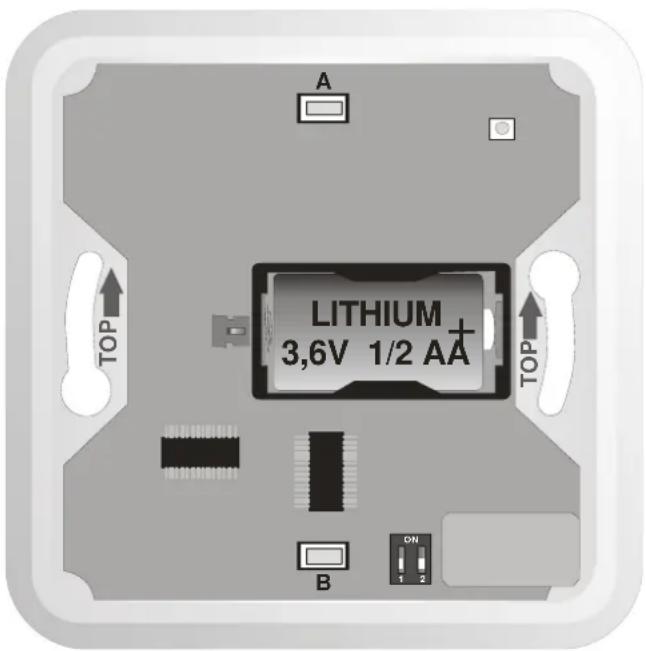
Setting the DIP switches
Set DIP switches #1 and #2 before finally closing the RC-88 unit as below:
| # | OFF | ON |
| 1 | Tamper contacts and radio communication supervision switched OFF | Tamper contacts and radio communication supervision switched ON |
| 2 | Remote control function - button A (push the button's top)= set, B (push the button's bottom) = unset | Panic button function (button A or B sends a panic signal, i.e. any pushing) |
Using the button with an Oasis JA-80K panel
When used with a control panel, the tamper contacts should be switched on (DIP switch # 1 in the ON position).
- Enter enrollment mode on the control panel by keying in "1" in Service mode (the desired device address can be chosen by the arrow keys).
- Install a battery into the RC-88 to activate enrollment.
- Exit enrollment mode by pressing “#”.
If DIP switch # 2 is OFF, the Natural reaction of the control panel is remote control - button A = set and button B = unset. If any other reaction is set in the control panel, it will only be valid for button A.
If DIP switch # 2 is ON, then the natural reaction of the control panel is a panic alarm – triggered by pressing button A or B.
Testing the RC-88 using a control panel
In service mode, an Oasis control panel can check the radio signal strength of an enrolled RC-88 button (see control panel manual).
Using the RC-88 as a doorbell button
If the RC-88 is to be used with a JA-80L indoor siren as a door bell button, set DIP switches #1 and #2 to the OFF position. Enrollment is described in the JA-80L manual.
Using the RC-88 to control electrical appliances
The RC-88 button can also be used with other Jablotron products which communicate via Oasis radio protocol, e.g. relay receiving modules series UC-8x and AC-8x (see the manuals of these particular products for details). For these applications we recommend switching DIP switches #1 and #2 OFF.
Note: The RC-88 can be enrolled to several receivers at once.
Battery replacement
If the button is used with an Oasis control panel, then the control panel monitors the voltage of the RC-88's battery and if too low, the control panel informs the installer or user. The button continues to function but battery replacement should not be delayed by more than two weeks. This should be done by a qualified technician with the control panel in Service mode.
Expired batteries should not be thrown into the garbage, but disposed of according to local regulations.
Always test the proper functioning of the RC-88 after battery replacement.
Technical specifications
Voltage: Lithium battery type LS14250 SAFT (3.6V ½ AA)
Typical battery lifetime: approximately 3 years (20 daily activations)
Communication band: 868 MHz, Oasis protocol
Communication range approx. 300 metres (open area)
Dimensions 80 x 80 x 29 mm
Operational environment according to EN 50131-1
class II. Indoor general
Operational temperature range -10 to +40 °C
Complies with EN 50131-1, EN 50131-5-3
Can be operated according to
grade 2
EKC REC 70-03
FCC ID VL6RC88

Jablotron Ltd. hereby declares that the RC-88 is in compliance with the essential requirements and other relevant provisions of Directive 1999/5/EC and complies with part 15 of the FCC rules. Operation is subject to the following two conditions: 1. This device may not cause harmful interference, and 2. This device must accept any interference received, including interference that may cause undesired operation.
CAUTION: Changes or modifications not expressly approved by Jablotron could void the user's authority to operate the equipment.
The original of the conformity assessment can be found on the web site www.jablotron.com, Technical Support section.
Note: Although this product does not contain any harmful materials we suggest you return the product to the dealer or directly to the manufacturer after use.


Jablotron Ltd., Pod Skalkou 33
466 01 Jablonec nad Nisou
Czech Republic
Tel.: +420 483 559 911
fax: +420 483 559 993
Internet: www.jablotron.com