
DS-UB31 - Kõvaketta dokk Sabrent - Tasuta kasutusjuhend
Leidke seadme juhend tasuta DS-UB31 Sabrent PDF-formaadis.


Kasutajate küsimused teemal DS-UB31 Sabrent
0 küsimus selle seadme kohta. Vastake nendele, mida teate, või esitage oma.
Esita uus küsimus selle seadme kohta
Laadige alla juhend oma Kõvaketta dokk PDF-formaadis tasuta! Leidke oma juhend DS-UB31 - Sabrent ja võtke oma elektrooniline seade uuesti kätte. Sellel lehel on avaldatud kõik teie seadme kasutamiseks vajalikud dokumendid. DS-UB31 kaubamärgi Sabrent.
KASUTUSJUHEND DS-UB31 Sabrent

Technical Data
Power: DC 12V/2.0A
Operating Systems:
Windows Mac OS X
Features
• 2.5" / 3.5" SATA Hard Drive Docking Station
- USB 3.1 transfer rates
- Plug & Play, Hot Swappable - Supports 0.5" & 2.5" SATA
supports E.5 & 6.0 GRIA HBD
Parts
1-Hard Drive Slots
2-Power LED
3-Power Switch 4-Head Power Fi
4-Hard Drive Eject Button 5-USB 3.1 Cable Interface
6-Power Cable Interface

USB 3.1 SATA 2.5" & 3.5" HARD DRIVE DOCKING STATION
- Check your Hard Drive to make sure it has the correct connector. This dock supports SATA only.

- Insert the Hard Drive into the dock. The Eject Button will pop up when the Hard Drive is inserted fully.

- Next, connect the Power Adapter to a wall socket. Then, connect the USB cable from the Dock to the Computer.

USB 3.1 SATA 2.5" & 3.5" HARD DRIVE DOCKING STATION
Package Contents
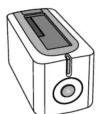
HARD DRIVE DOCK
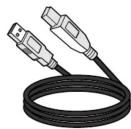
USB 3.1 CABLE

USER MANUAL
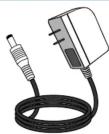
POWER ADAPTER


Kaubamärk : Sabrent
Mudel : DS-UB31
Kategooria : Kõvaketta dokk