ESE6078 - Külmik ELECTROLUX - Tasuta kasutusjuhend
Leidke seadme juhend tasuta ESE6078 ELECTROLUX PDF-formaadis.


Kasutajate küsimused teemal ESE6078 ELECTROLUX
0 küsimus selle seadme kohta. Vastake nendele, mida teate, või esitage oma.
Esita uus küsimus selle seadme kohta
Laadige alla juhend oma Külmik PDF-formaadis tasuta! Leidke oma juhend ESE6078 - ELECTROLUX ja võtke oma elektrooniline seade uuesti kätte. Sellel lehel on avaldatud kõik teie seadme kasutamiseks vajalikud dokumendid. ESE6078 kaubamärgi ELECTROLUX.
KASUTUSJUHEND ESE6078 ELECTROLUX

natural_image
Abstract illustration of blue snowflake patterns with flowing curved lines, no text or symbols presentINTRODUCTION 3
PARTS OF YOUR REFRIGERATOR
Manual models 4
Ice & water models 4
GENERAL INSTALLATION
Clearances around your refrigerator....5
Installation 5
Adjusting door alignment....7
INSTALLATION ICE AND WATER MODELS
Water supply for ice and water dispenser ....8
Plumbing instructions for the automatic ice maker ....9
INSTALLATION CLAD MODELS
Handle Fitting Instructions....10
Decorative Top Cap Fitting Instructions....11
INTIAL START UP
Refrigerator / Freezer operation 12
Ice maker start up 12
USING YOUR REFRIGERATOR
Controlling temperature....13
Pizza shelf 15
Deli-Bin 15
Crisper bin 15
Storing vegetables, fruit & smallgoods 15
Storing meat or vegetables in the chilled bin 15
Bottle Snugger 15
AUTOMATIC ICE AND WATER DISPENSER
Ice & water dispenser features 16
Dispenser Light....16
How the water dispenser works 16
How the ice dispenser works .... 16
Ice dispenser tips....17
Cleaning the ice dispenser 17
CHANGING THE WATER FILTER
When to change the filter 18
To change the filter....18
CHANGING THE LIGHT BULB
To change the food compartment light bulb 19
To change the freezer compartment light bulb 19
To change the ice maker light bulb....19
CLEANING....20
HELPFUL HINTS 22
FOOD STORAGE GUIDE 25
BEFORE CALLING FOR SERVICE....28
WARRANTY INFORMATION......31
All rights in this publication are reserved and no part may be reproduced without the prior written permission of Electrolux Home Products Pty Ltd ("Electrolux"). The contents of this publication are believed to be correct at the time of publication but any information, products or services mentioned may be modified, supplemented or withdrawn at any time. Due to its' policy of continuous product development and improvement Electrolux reserves the right in its' sole discretion to change products specification and materials without notice
Dear Customer
Congratulations on the purchase of your new refrigerator.
Follow the instructions below to ensure that you install it safely and that it runs efficiently.
Important :- before you install your refrigerator, PLEASE CHECK FOR ANY DAMAGE OR MARKS. If you find that the refrigerator is damaged or marked, you must report this within 7 days if you wish to claim for the damage/marks the manufacturers warranty. This does not affect your statutory rights.
STOP & READ
READ THESE INSTRUCTIONS BEFORE YOU INSTALL YOUR REFRIGERATOR
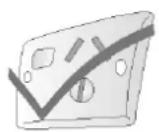
The power point
DOs
- Ensure that your power points are earthed. Ask an electrician to check if you are not sure.
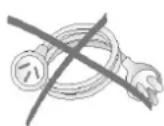
- Check the refrigerator cord can reach the power point.
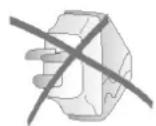
DON'Ts
- Don't plug your refrigerator into an extension cord or double adaptor.
- Don't plug your refrigerator into a timer fitted to the power point.
Location
DOs
- Choose a place that is not too cold - the temperature should be above 10^ .
- Put the refrigerator in a dry place, avoiding areas of high moisture or humidity.
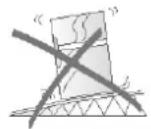
DON'Ts
- Don't put the refrigerator in frosty or unprotected areas, for example in a garage or on a veranda.
- Don't put the refrigerator in direct sunlight.
- Don't put the refrigerator near stoves, fires or heaters.
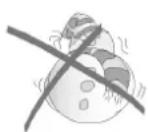

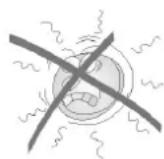
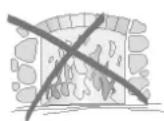
The parts of your refrigerator.
Please look at the diagram below before reading about how to care for your refrigerator
Standard Model
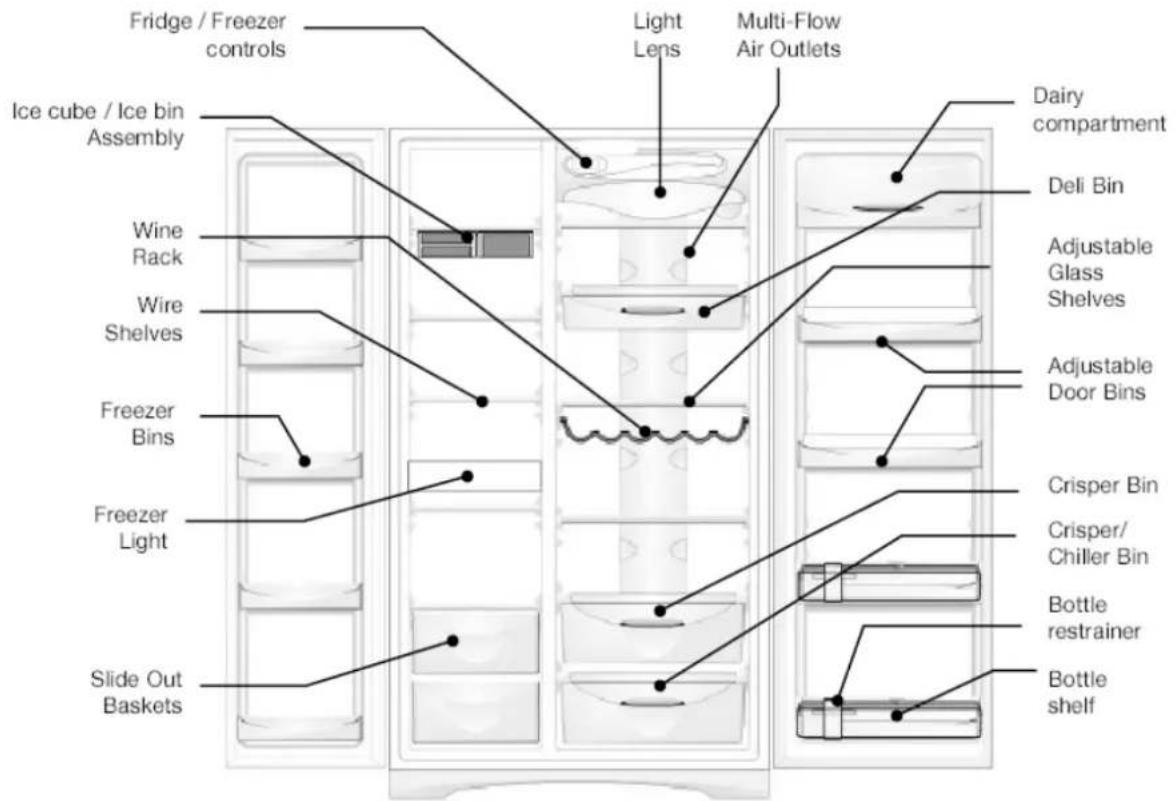
Electronic / Icemaker Model
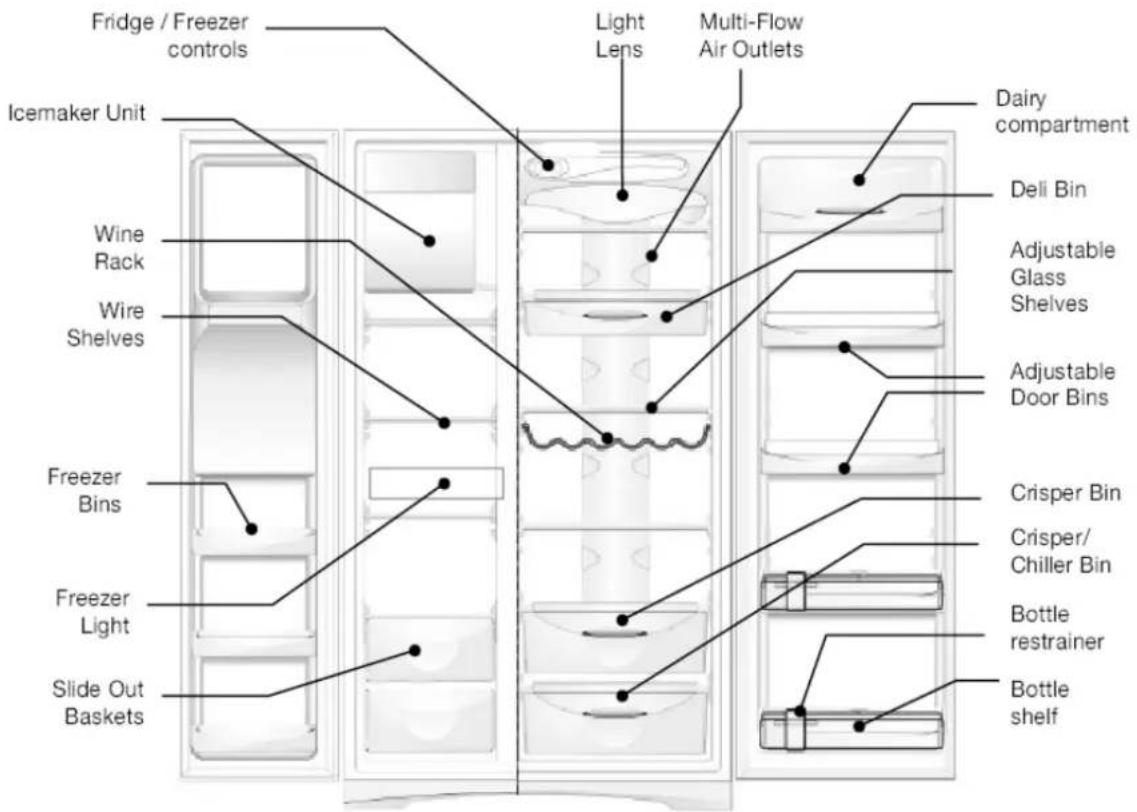
When correctly installed, your refrigerator should:
• have adequate clearance to the back, sides and top for air circulation.
• have doors that will self close from a partially open position.
Clearances around your refrigerator
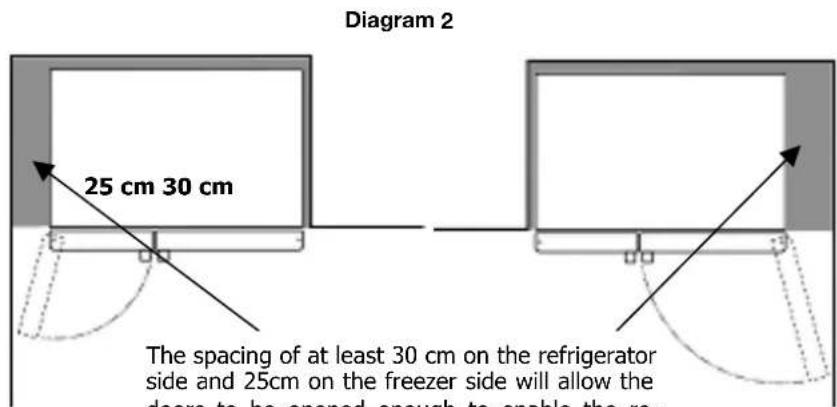
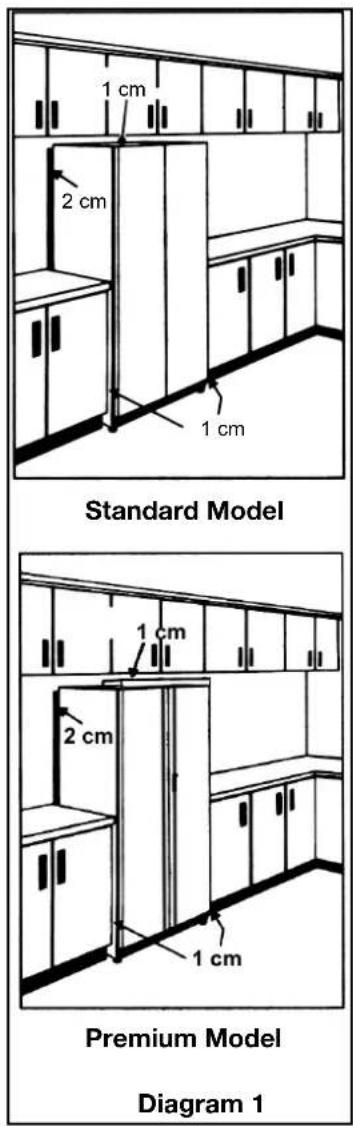
Your Side by Side Refrigerator can be installed between cupboards or fixtures but you must allow for the following spaces around the cabinet.
- Allow a minimum of 1 centimetre clearance on both sides so you can move the refrigerator easily. (see Diagram 1)
- Allow a minimum of 1 centimetre clearance above the refrigerator. (see Diagram 1) Note: For ice and water models allow 5 centimetres clearance at the back of the refrigerator for connection to a water supply.
- Allow clearance (see diagram 2) on the hinge side of the doors, if you place the refrigerator next to the wall. This will make cleaning easier.
- Make sure that cupboards or fixtures do not stick out further than the refrigerator cabinet (see Diagram 2)
Installation
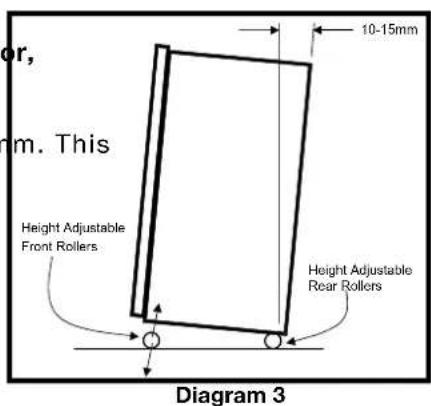
The refrigerator should arrive with the front adjustable rollers wound down to tilt the top of the refrigerator backwards by about 10-15 millimetres (see Diagram 3).
When you want to install your refrigerator, take the following steps.
- Roll the refrigerator into its final position.
WARNING: The rollers are designed for forward or backward movement only. They are not castors. Moving the refrigerator sideways may damage your floor, and the rollers.
- The top of the refrigerator should be tilted back by approximately 0-15m will allow the doors to self close providing a consistent door seal. (see Diagram 3) It is normal for the freezer door to momentarily open and re-close when the food compartment door is closed firmly. If the freezer door stays open you will need to tilt the refrigerator backwards a little further
3. To adjust refrigerator rollers, two people are required.
• You may need two people, one to adjust rollers and one to tilt the refrigerator slightly back
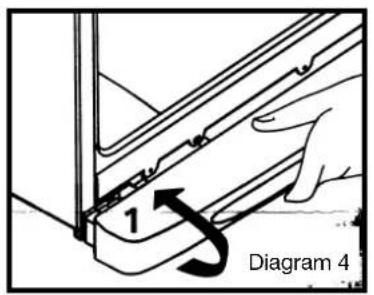
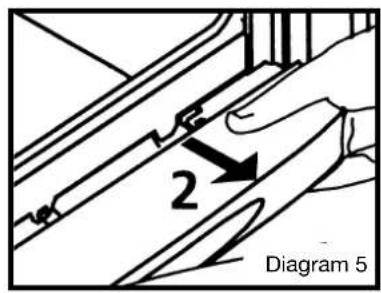
- Remove the air grille by rotating upwards (see diagram 4)
- Then pull the air grille forward (see diagram 5) to disengage the spring steel clips that mount the air grille to the refrigerator. Once you have removed the air grille you will be able to see the roller nut
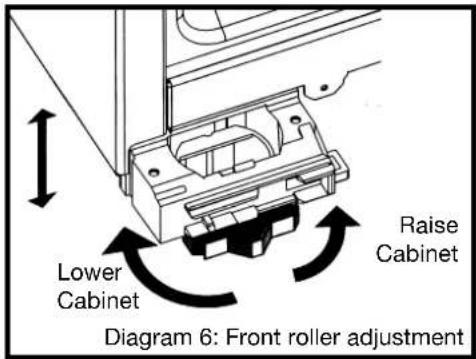
- If you want to change the amount that the refrigerator is tilted back, adjust the two front rollers by turning the large, plastic roller nut (see Diagram 6: front roller adjustment). This will increase or decrease the height of the rollers. One turn of the nut will change the tilt of the refrigerator by approximately 10mm. If you have difficulty turning the roller nut, you can have someone tilt the refrigerator slightly back, so that you have better access.
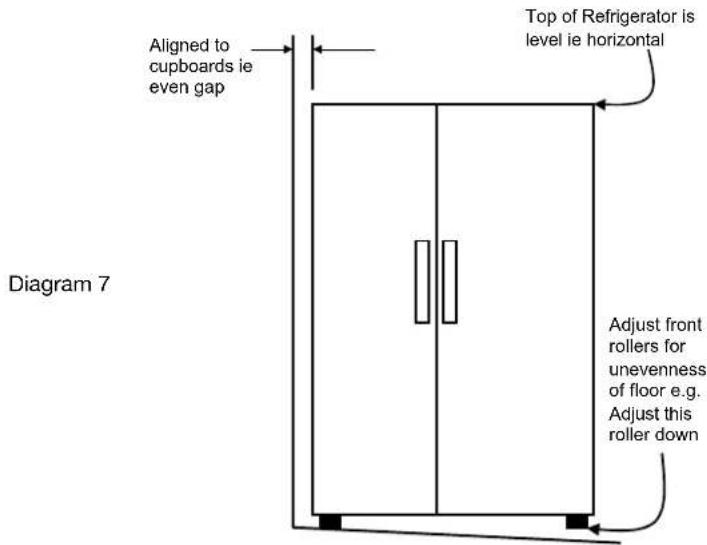
- Check the alignment of the refrigerator to surrounding cupboards. The top of the refrigerator should be level from side to side (see diagram 7).
If you need to adjust the level, use the adjustable rollers as discussed in Step 4.
- If the refrigerator now rocks from one corner to the opposite rear corner, this means that the floor is uneven and will require adjustment of the rear rollers (shown in diagram 3). Have someone tilt the cabinet slightly to one side to take the weight off the rollers. You then turn the black plastic nut (by hand) to lower or raise the roller.
Adjusting door alignment
- If the freezer door is higher, (see diagram 8) turn the roller adjusting nut to lower the cabinet and freezer door.
- If the food compartment door is higher (see diagram 9) turn the roller adjusting nut to lower the cabinet and food compartment door.
- You may need to repeat some of the installation adjustments if alignment to cupboards has changed or the cabinet now rocks
Note: When the height of the rollers is correctly adjusted the refrigerator will stand firmly on the floor and the doors will be in line with one another
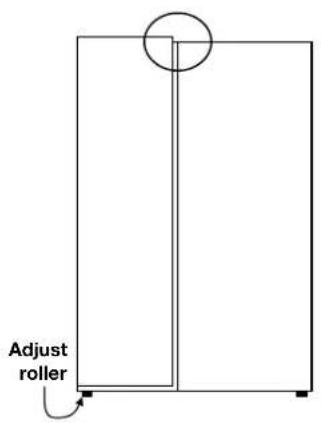
Diagram 8
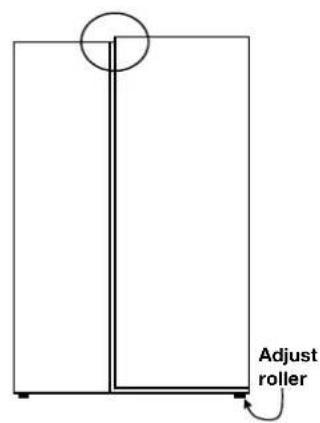
Diagram 9
4.Once the doors are aligned, refit the air grille. To do this:
- line the spring clips up with the slots at the base of the refrigerator. (see diagram 10)
- to ensure the air grille is in position, strike it firmly with your hand to fully engage the spring clips.
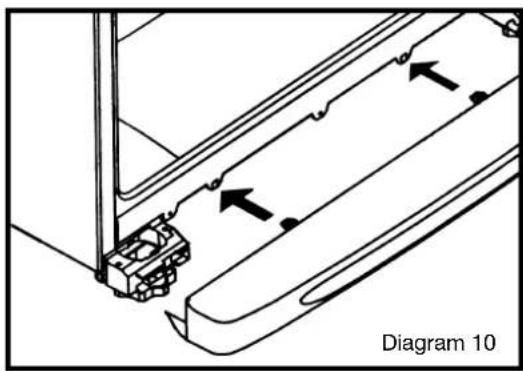
- Clean your refrigerator thoroughly following the instructions on page 20 and wipe off any dust that has accumulated during shipping.
• Install accessories, such as the ice cube storage bin. The accessories are packed together to prevent damage during transit. - Plug the refrigerator into the power point. Don't use a double adaptor.
We recommend that you let your refrigerator run for two to three hours before you put any food in it. This will allow you to check that it is operating properly and that enough cool air is going to the freezer
Congratulations! You have successfully installed your refrigerator.
Water supply for ice and water dispenser (if fitted)
The automatic ice and water dispenser needs a drinkable water supply with a pressure of:
• Minimum 206 kPa (30 PSI, 2.11 kgf/cm ^4 )
• Maximum 689 kPa (100 PSI, 7.04 kgf/cm ^3 )
If water pressure is below 206 kPa (30 PSI), then you will need to have a separate pump installed.
If the water pressure is exceeds 689 kPa (100 PSI) a pressure reducing restrictor may need to be fitted to the water supply tubing.
Water enters the refrigerator through a filter which is located in the control housing. It is then cooled In the water tank and then sent to the dispenser.
Ice is made in the automatic ice maker and sent to the dispenser then depending on your selection is dispensed as either crushed or cubed ice.
(Note: kPa = kilo Pascals and PSI = pounds per square inch)
If you are using your refrigerator for the first time, or if you have not used the dispenser for some time:
- Discard the first seven or eight cups of water, and
- Discard any ice that the ice maker produces in the first 24 hours (contaminants could have settled in the water pipes
Plumbing instructions for the automatic ice maker (If fitted).
Check these things before you install the icemaker:
• Check the local plumbing codes. You MUST comply with these.
- Check there is a cold water supply. The automatic icemaker MUST NOT be connected to an under sink high pressure push through type hot water system.
- Check the water pressure. It MUST be between 206 kPa and 689 kPa.
• If you have recently moved, check that the local water is fit to drink straight from the tap.
The water connection kit.
A water connection kit is supplied with the refrigerator. It contains:
- copper tubing
• a water supply adaptor - two (2) P clips for fitting the copper tubing
- two (2) ferrules and two (2) compression nuts
You MUST use the copper tubing to connect the icemaker to the water supply. DO NOT use plastic tubing, it will increase the potential for leaks. The manufacturer will not be responsible for any damage if plastic tubing is used for the water supply line.
To install the icemaker
- Disconnect the refrigerator's power cord.
- Turn off the main water supply.
- Remove the protective cap from the valve at the back of the refrigerator.
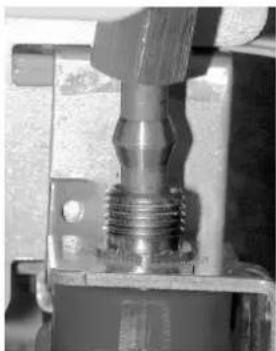
- Use one ferrule and compression nut to connect the copper tubing to the valve. (See the diagrams on the right)
Note: If possible DO NOT trim the copper tubing. Leave as much tubing as possible coiled.
- Connect the other end of the tubing to the water supply adaptor.
- Connect the adaptor to the water supply.
- Attach the copper tubing to the refrigerator using a P clip (See the diagrams on the right).
8.Plug in the power cord and turn on the power supply. - Turn on the water supply for the refrigerator and check all joints for leaks.
- Move the refrigerator back to the wall. Make sure you leave the recommended clearance.
- Make sure the copper tubing does not touch the wall or refrigerator; if it does it may vibrate
After you have attached your refrigerator to the water supply you must clean out any impurities. This means you MUST throw away:
• the first litre of water through the water dispenser
• the first few batches of ice.
natural_image
Close-up of a mechanical component with threaded shaft and flange (no visible text or symbols)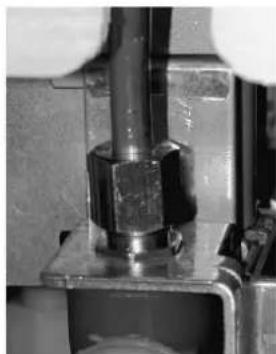
natural_image
Close-up of a mechanical assembly with a bolt and nut (no visible text or symbols)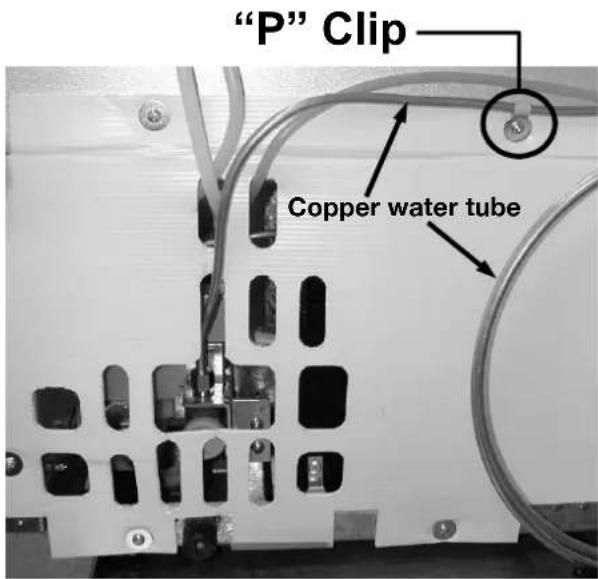
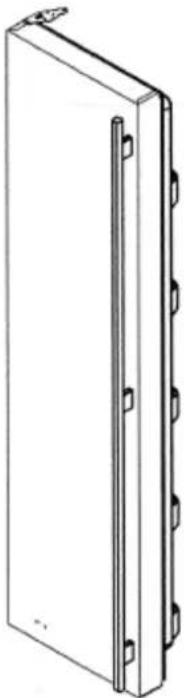
Handle Fitting Instructions
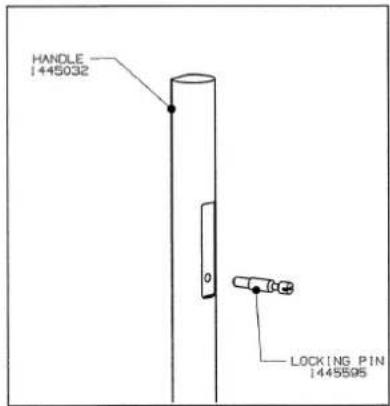
Step 1. Fit Locking Pin to Handle
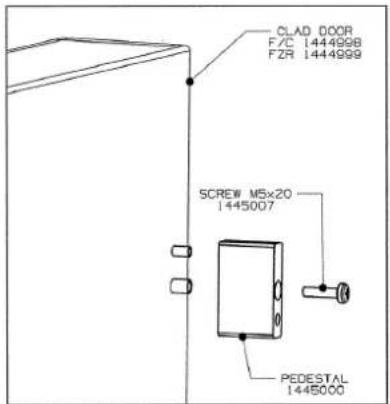
Step 2. Fit Pedestal to Door using M5 x 20 Screw
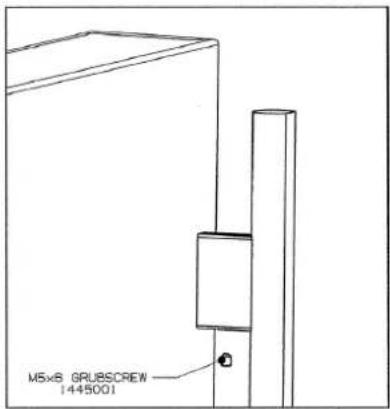
Step 3. Fit Handle & Locking Pin Assembly to Door & Pedestal Assembly
Step 4. Fit Grub Screw using Allen Key provided
Warning: Take care when using Allen Key to avoid scratches to Door face or Back of Handle
natural_image
Technical line drawing of a rectangular panel with side connectors and mounting holes (no text or symbols)Decorative Top Cap Fitting Instructions
natural_image
Technical line drawing of a table with a circular component on top (no text or symbols)This face forward of Support Brace
natural_image
Technical line drawing of a mechanical assembly with no visible text or symbolsSupport Brace
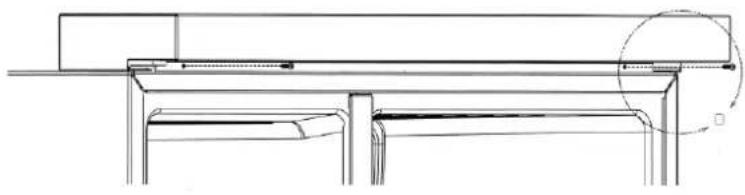
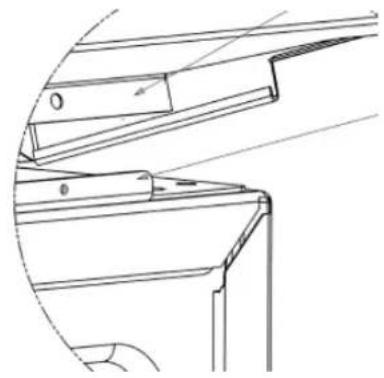
Step 1. Slide top cap into position from the front
Step 2. Lift rear edge of top cap and position behind support bracket
Step 3. Fit M3 Screws
Air Grille Fitting Instructions
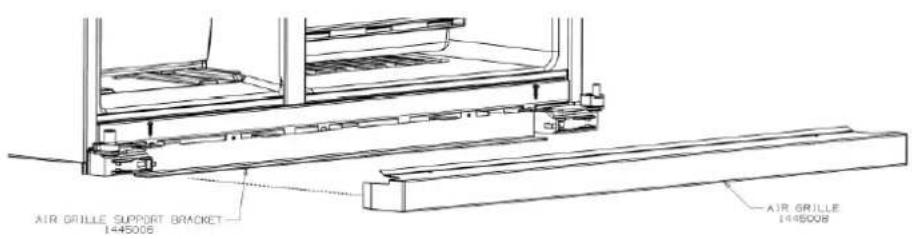
Step 1. Slide Air Grille over support bracket
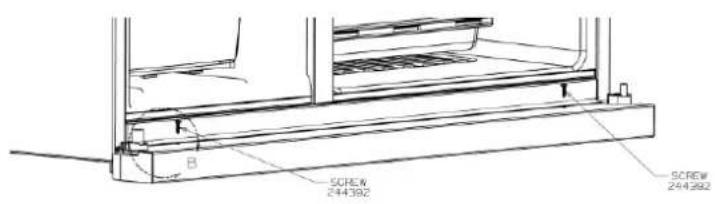
Step 2. Fit M5 x 20 Screws
Refrigerator/freezer operation
It is normal for the rear and sides of the refrigerator to feel warm
These areas are warm because the refrigerator transfers heat from food placed inside the refrigerator to the outside air.
There is a cooling coil located behind the rear wall of the freezer section. This coil cools and removes moisture from the air. A fan at the rear of the freezer section then circulates cold, dry air throughout the refrigerator.
This air circulation means that foods are refrigerated far more quickly than in refrigerators where there is less air circulation.
Avoid placing food against air outlets as this will affect air circulation.
A light frosting will occasionally appear on the interior of the freezer when the door if the freezer door is opened frequently. This is normal and will disappear after a few days in most climates.
Make sure you fully close the freezer and fresh food doors after you load or remove food from these compartments. If the doors are left partly open, a heavy frost will coat the inside of the freezer. If a frost develops, remove it. Take care to properly close the doors and the frost will not reoccur.
Your new energy efficient refrigerator uses a high-speed compressor and other efficient components that may produce different noises to your old refrigerator. These sounds are normal and include:
• compressor running noise
• air movement noise from the small fan motor
• occasional gurgling, similar to water boiling
- a popping noise, heard during defrosting
- a clicking noise, just prior to the compressor starting up
These noises are normal and no cause for alarm.
Further details can be found on page 28.
Ice maker start-up
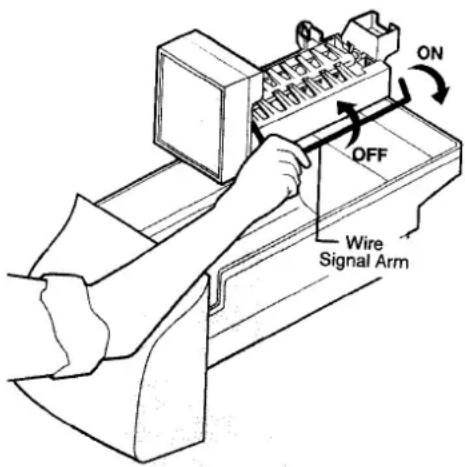
If the ice maker is not connected to a water supply, check that the ice maker is turned off. To do this you must remove the ice bucket, (for details on removal see page 20—Cleaning the ice dispenser.), then check that the wire signal arm is in the OFF position, if not, raise the wire signal arm to the OFF position (see diagram below)
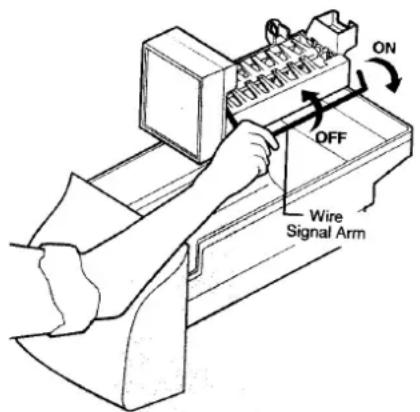
If the ice maker is connected to a water supply, check that the ice maker is turned on. To do this you must remove the ice bucket, (for details on removal see page 17—Cleaning the ice dispenser.), then check that the wire signal arm is in the ON position, if not lower the wire signal arm to the ON position (see diagram above)
Controlling the temperature—manual model
Using the Manual (rotary) controls
You need to adjust the temperature of your refrigerator freezer to your climate. The two temperature control knobs are located in the top of the refrigerator compartment.
The left hand knob controls:
• The temperature of the freezer
• The quantity of air going into both compartments
The right hand knob:
• controls the temperature of the refrigerator.
- checks the temperature in the refrigerator and switches the system on or off
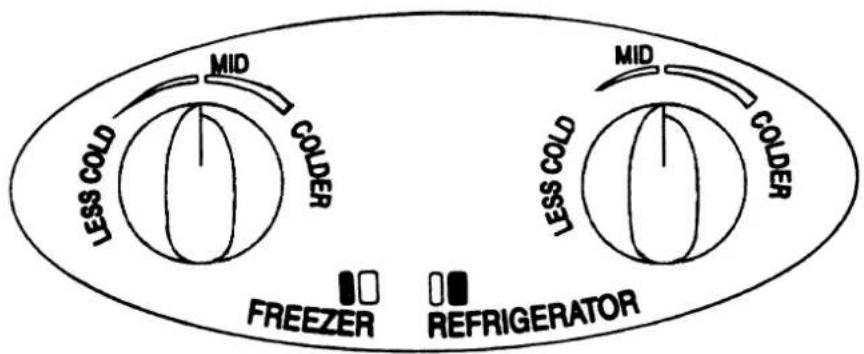
Note: setting both controls to 'COLDER' when you first start, will NOT cool your refrigerator any faster than when set at the MID settings. It is therefore NOT recommended. In general follow recommended procedures when you adjust temperatures.
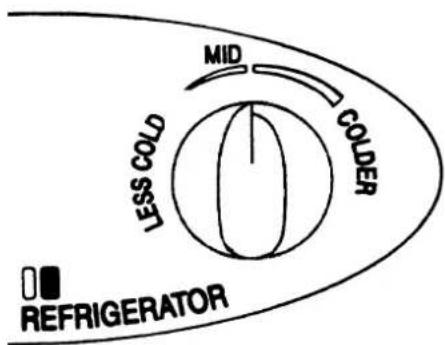
Refrigerator temperature control:
See the diagram of the fridge control on the left.
To make the fridge / fresh food section colder, turn the control knob clockwise slightly towards 'COLDER'.
To make the fridge / fresh food section warmer, turn the control knob anticlockwise slightly towards 'LESS COLD'
Note: This temperature control will also alter the temperature of the freezer. Allow the refrigerator to run for 24 hours after you alter the temperature control. Then reassess the temperature before making any further adjustments.
Freezer temperature control:
See the diagram of the freezer control on the right.
To make the freezer food section cooler, turn the control knob clockwise slightly towards 'COLDER'
To make the freezer food section warmer, turn the control knob anticlockwise slightly towards 'LESS COLD'
Note: This temperature control will also alter the temperature of the refrigerator. Allow the refrigerator to run for 24 hours after you alter the temperature control. This sess the temperature before making any further adjustments.
The coldest freezer setting is not recommended in warm and very hot climates as it will limit the cooling air to the refrigerator compartment.
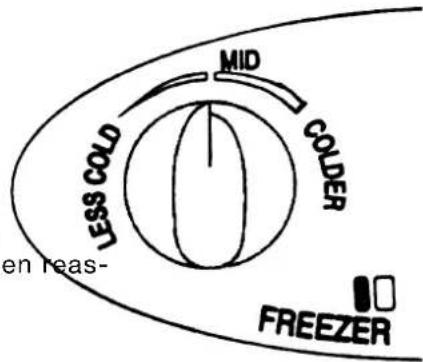
Controlling the temperature
At start up:
When you first turn your refrigerator on:
- Turn both temperature controls to MID. DO NOT set the temperature at COLDER (manual models).
- Wait for 2 to 3 hours
- Check that the refrigerator and freezer compartments are cool.
- Put food into the refrigerator and freezer compartments.
- Run the refrigerator for at least 8 hours
- Check the temperature of the refrigerator compartment by checking the temperature of drinking water.
- Check the temperature of the freezer compartment by checking the softness of ice cream.
- If the refrigerator is too cold or too warm adjust the temperatures.
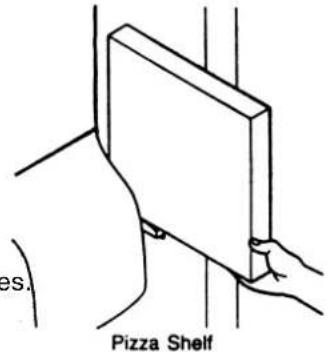
Pizza shelf (where fitted)
This shelf is attached to the freezer wall beside the ice dispenser container. This area allows for convenient storage of pizza and other tall items
The Deli Bin
You can use the deli bin to store foods such as small goods, fresh/cooked meat and cheeses. The bin will reduce strong food odours or smells going into the rest of the refrigerator.
To remove the deli bin, pull it forward, then lift it up and pull it further forward.
Crisper bin.
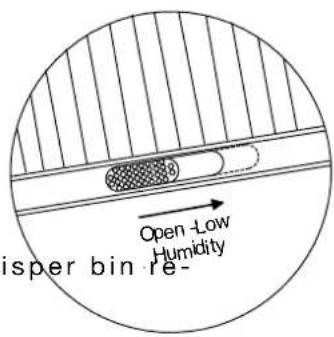
You can use the crisper bin to store vegetables, fruit or small goods. You can change the humidity inside the bin by adjusting a humidity slide control.
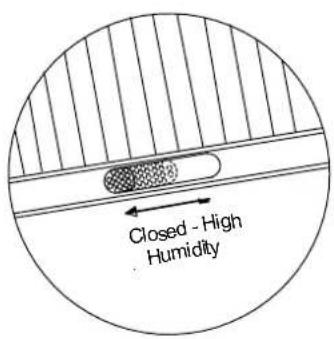
Storing vegetables
You should store the vegetables in the crisper bin remembering to set the humidity slide control so that fewer ventilation holes are exposed. This will ensure high humidity in the bin. (See the diagram on the left)
Storing fruit and smallgoods
You can also store fruit or small goods in the membering to set the humidity slide control to expose all the ventilation holes. This will ensure low humidity in the bin. (See the diagram on the right)
Bottle Snugger operation (where fitted)
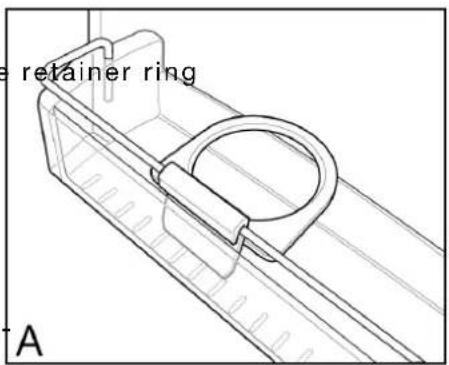
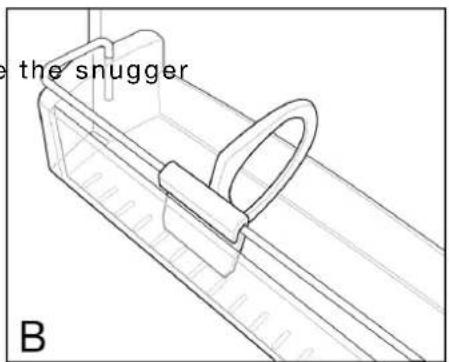
The bottle snugger is used to prevent bottles from falling over. The snugger consists of two parts, a sliding front, and a rotating retainer ring. The can be rotated through 360° but has positive locations for horizontal and vertical positions.
The snugger can be used in two positions:
Horizontal
When the snugger ring is horizontal (A), any item that fits within the ring can simply be placed inside it.
Vertical
When the snugger ring is vertical (B), it is possible to simply slide along the bottle retainer bar until it is pushed up against a bottle.
Note: the bottle should be constrained on the other side by either the end of the bin or other adjacent bottles.
Ice and water dispenser features
natural_image
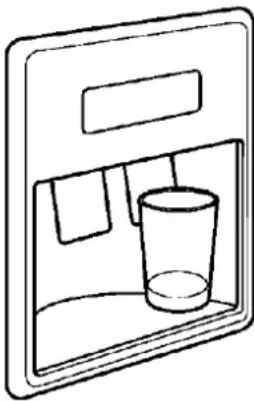
Simple line drawing of a front-loading door with a glass inside (no text or symbols)The ice and water dispenser conveniently dispenses chilled water, and ice cubes or crushed ice.
To operate the ice dispenser, select an ice option using the touchpad. Press a glass against the dispensing paddle. Hold the top of the glass as close as possible to the ice outlet, so that you will catch all the ice. To stop dispensing ice, pull the glass away from the dispensing paddle. Do not remove the glass until the ice has finished coming out.
To operate the water dispenser, press a glass against the dispensing paddle. To stop dispensing water, pull the glass away from the dispensing paddle. A drip tray located at the base of the dispenser will catch small spills and allow them to evaporate. The drip tray is removable and dishwasher safe. Do not pour water or excess cubes into the drip tray because there it has no drain.
Dispenser light.
The dispenser has a light which can be turned on and off by pressing the Light touchpad. When the bulb from this light wears out, you need to replace it with an identical bulb (available from your nearest Electrolux Service Centre)
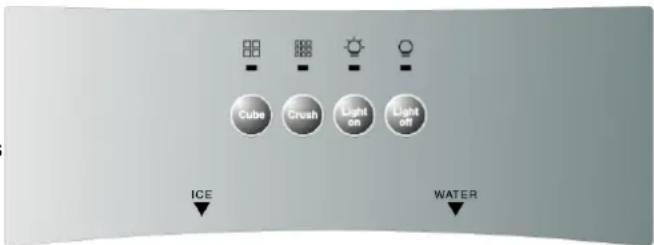
Touchpad
How the water dispenser works.
The water dispenser has a water tank, located behind the crisper bin in the refrigerator compartment. The tank automatically refills as you dispense water. For the dispenser to operate properly, water supply pressure should fall between 30 Pounds per square inch (PSI) and 100PSI.
After the refrigerator is connected to the water supply, fill the water tank by holding a glass against the dispenser paddle. You may need to hold the glass against the paddle for about 1 ½ minutes water begins to flow.
Do not drink this water as it may still have impurities in it
Continue drawing water for 3 minutes to rid the tank and plumbing connections of any impurities. The water has a built-in shutoff device that will stop water flow after 3 minutes of continuous use. Simply release the dispenser paddle to reset the shut off mechanism.
CAUTION:
Chemicals from a malfunctioning softener can damage the ice maker. If the ice maker is connected to soft water, ensure that the softener is maintained and working properly
How the ice dispenser works.
The ice maker and ice container are located in the top of the freezer compartment. After the refrigerator is installed properly and has cooled for several hours, the ice maker can begin making ice and the first batch will be ready within 24 hours. A full tray of ice may not be created for the first few batches, due to air in the refrigerators new plumbing lines.
To begin ice production, lower the wire signal arm to the ON position. If no ice is dispensed it will take about 2 days to fill the container. The ice maker turns off automatically when the ice container is full. To stop ice production, lift the wire signal arm until it clicks, and locks in the OFF position.
The first batches of ice cubes may be discoloured or have an odd flavour, due to the refrigerators new plumbing connections. Discard this ice until batches are free of discolouration or taste problems.
Ice dispenser tips.
- Ice cubes stored too long may develop an odd flavour. Empty the ice container and ensure that the wire signal arm is in its “down” or ON position. The ice maker will then produce more ice.
- Occasionally shake the ice container to keep ice separated.
- After you take delivery of the refrigerator, keep the wire signal arm in its ‘up’ or OFF position until the refrigerator is connected to the water supply. Also keep the signal arm in the ‘OFF’ position whenever the water supply is turned off.
Caution: If the dispensing paddle is pushed for more than 4 minutes, the dispenser motor may overload and stop. The overload protector will reset automatically after 3 or 4 minutes.
- If a large quantity of ice is needed at one time, it is best to remove cubes directly from the ice container.
-
When the ice maker is operating, it is normal to hear the sound of:
-
the motor running
- ice dropping into the ice container
• the water valve opening or closing - ice loosening in the tray
- running water
Cleaning the ice dispenser
Clean the dispenser and ice container at regular intervals, particularly before you take a vacation or move, also clean the dispenser if it sticks.
To clean the dispenser
- Remove the ice container by lifting it up and out. Empty and carefully clean the container with mild detergent. Rinse it with clear water. Do no abrasive cleaners. Allow the ice container to dry completely before replacing it in the freezer.
- Stop ice production by lifting the wire signal arm to the 'up' or OFF position.
- Remove ice chips from the shelf and chute that support the clean these areas.
- Replace the ice container. Lower the wire signal arm on the ice maker to the 'down' or ON position and the ice maker will resume production.
WARNING
Do not use the ice chute as a handle when removing or replacing the ice storage bin. Surfaces there may be sharp
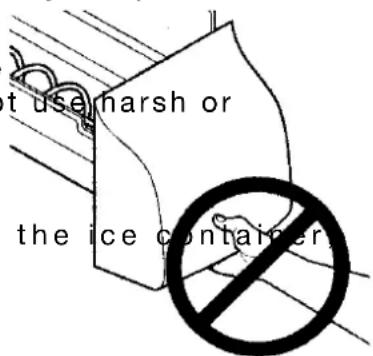
Do not put fingers up ice ch Surfaces there may be sharp

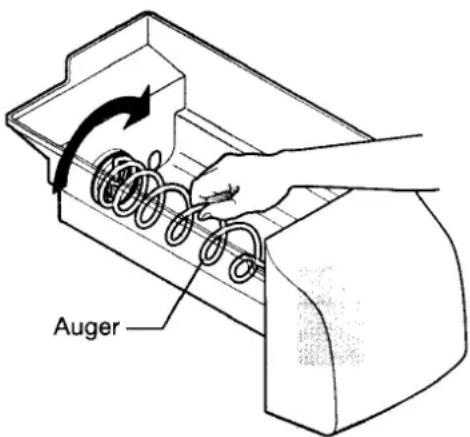
IMPORTANT: When removing or replacing the ice bin, do not rotate the auger in the ice bin. If the auger is accidentally turned, you must realign the auger by turning it in 90° turns until the ice bin fits into place with the drive mechanism.
Remove and empty the ice storage bin if:
- An extended power failure (one hour or longer) causes ice cubes in the ice storage bin to melt and freeze together and jam the dispenser mechanism.
- If the ice dispenser is not used frequently, ice cubes will freeze together in the bin and jam the dispenser mechanism. If this happens remove the ice storage bin and shake it to loosen the cubes.
NEVER use an ice pick or similar sharp instrument to break up the ice. This could damage the ice s age bin and dispenser mechanism.
If you purchased a refrigerator with an ice and water filter, please read the following care and use information.
Your ice and water filter system filters water to your ice maker and water dispenser. It is located in the upper right hand corner of the food compartment.
When to change the filter.
Water conditions vary throughout the world, but changing the water filter every 6-9 months will ensure the highest possible water quality. If the filter has been in a refrigerator that has not been in use for awhile (because of a move for example), change the filter before you reinstall the refrigerator. Even though the dispenser system will operate without filtration (that is with the filter removed), it is not recommended.
To change the filter
The water supply does not need to be turned off when you change the filter, however, do not use ice and water dispenser while installing filter. To change the filter:
-
Take a new filter cartridge (purchased from an Electrolux Service Centre).
-
Open the freezer door and leave it open until filter change is complete.
-
Remove light lens. (See the section on changing the light bulb).
-
Using the plastic spanner provided, unscrew the filter cup by turning it to the left. (Some water could leak out as you remove the cup. This is normal). The filter cartridge should come down with cup. If the filter cartridge remains in the housing, pull the filter cartridge down gently, while twisting filter cartridge back and forth.
-
Discard the old filter cartridge.
-
Rinse out the cup under running water.
-
The large o-ring that seals the filter system sits in the o-ring groove down inside the cup. If the o-ring falls out during filter cartridge replacement, simply place it back in the groove before you screw the cup back in place. If the o-ring becomes damaged, you will need to order one from the Electrolux Service Centre.
-
Remove the new filter cartridge from it's packing and place it in cup. The end with the small o-ring should be up, out of the cup.
-
Screw the cup, with filter, back onto the housing. Do not use the plastic spanner to reinstall the cup. The filter cartridge will self-align as the cup is tightened. Be sure the cup is completely tightened.
-
Check for leaks. Wipe any water droplets from the filter cup. Fill a glass with water. If there is a leak, unscrew the filter cup, and reinsert the filter cartridge. Check the placement of the large o-ring. Reinstall the filter cup, making certain it is tightened completely.
-
To condition the filter system and purge air from the water line, fill a glass with water. Continue flushing the system for 30 seconds to assure that the purest water possible is stored in the water tank.
natural_image
Line drawing of a toilet handle with a circular button and arrow indicating rotation (no text or symbols)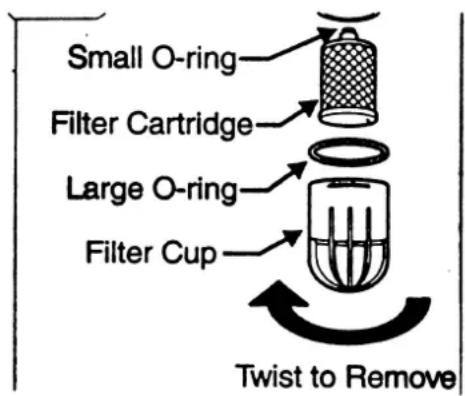
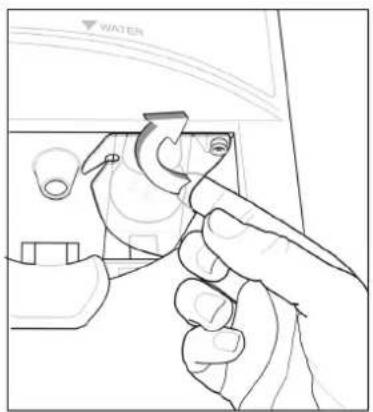
To change the food compartment light bulb:
- Switch the refrigerator off
- Remove the plug from the power point
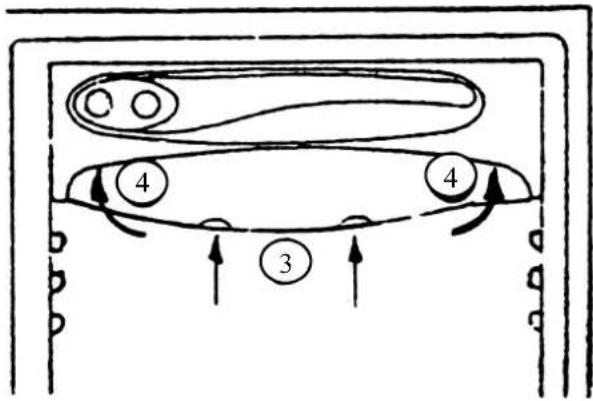
- Unclip the light lens carefully by pushing in the two clips at the bottom of the light lens (see point 3 in the diagram opposite)
- Lift the light lens until it is clear of the housing (see point 4 in the diagram opposite)
- Remove the light bulb
- Replace the light bulb with a bulb of the same type and wattage.
- Replace the light lens.
- Turn the refrigerator back on.
To change the freezer compartment light bulb:
- Switch the refrigerator off.
- Remove the plug from the power point.
- Pull the top edge of the light cover carefully towards you.
- Tilt the cover forward
- Lift the cover vertically out of the two retainers on the bottom edge
- Remove the light bulb
- Replace the light bulb with the same type and wattage of bulb
- Replace the light cover
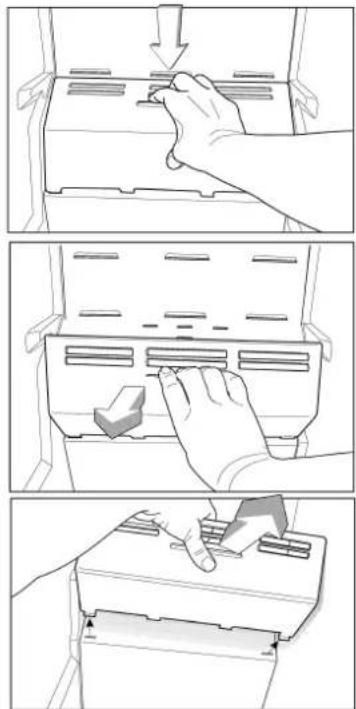
To change the ice maker light bulb:
- Switch the refrigerator off.
- Remove the plug from the power point.
- Using your finger, slide the cover to the open position (do not remove the screw)
- Remove the light bulb
- Replace the light bulb with the same type and wattage of bulb
6.Slide the cover back into position. - Turn the refrigerator back on
natural_image
Line drawing of a hand using a tool to adjust or install a component, no text or symbols present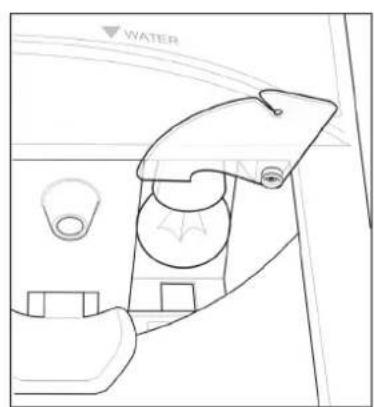
natural_image
Line drawing of a car interior showing dashboard, seatbelt, and water vent (no text or symbols)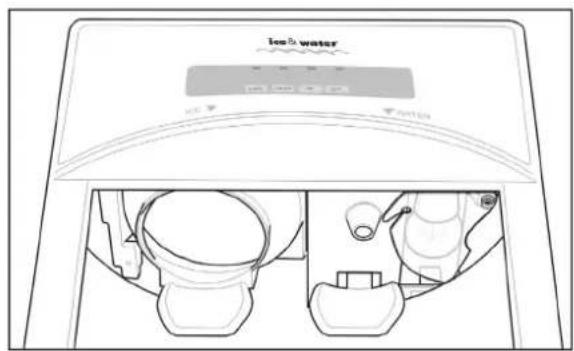
Cleaning the refrigerator

BEFORE CLEANING:- REMOVE THE POWER CORD FROM THE POWER SOCKET. THIS WILL MAKE SURE THERE IS NO CHANCE OF GETTING AN ELECTRIC SHOCK.
Exterior
CABINET
It is a good idea to polish the cabinet at least once a year, using a high grade wax like the one you use on your car. After that, an occasional wipe over with a clean, damp cloth will help remove finger marks.
NOTE: Do not wax plastic parts or decorative trim. Wash these in warm (not hot) water using an unscented detergent.
DOORS - PAINTED
Clean as described above for the cabinet.
DOORS - STAINLESS STEEL
Your stainless steel appliance is manufactured from a mark resistant stainless steel. This stainless steel has a special advanced protective coating that eases the removal of marks such as finger prints and water spots. To keep your stainless steel refrigerator looking at its best, you should clean it regularly. You should only clean the stainless steel doors with luke-warm soapy water and a soft cloth, rinsing with clean water and then wipe the surface with clean water and a soft clean cloth to remove soap residue. It is important to wipe in the direction of the grain of the stainless steel to avoid undue marking of the surface.

DO NOT USE STAINLESS STEEL CLEANERS, ABRASIVE PADS OTHER CLEANERS AS THEY ARE LIKELY TO SCRATCH THE SURFACE.
DAMAGE TO THIS PRODUCT AFTER DELIVERY IS NOT COVERED BY YOUR WARRANTY
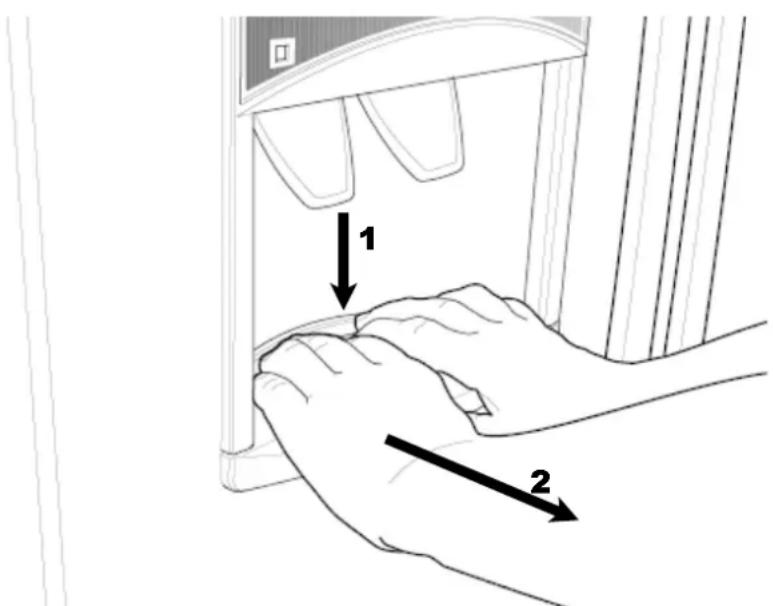
DRIP TRAY REMOVAL
Water may accumulate in the sump located under the drip tray. If this occurs the sump can be sponged out to prevent water overflowing down the front of the door. Remove the tray as described below:
- Press down at the back of the drip tray with the tips of your fingers
- then pull the tray forward.
- To refit, slide the drip tray back into position and push home.
Page 20
Interior
You should clean the refrigerator interior regularly. It will be easiest to clean when the food supply is low. Wash the interior with a soft cloth and use an unscented mild soap with luke-warm water. Thoroughly dry all surfaces and removable parts. Avoid getting water on refrigerator controls. If you have taken out any removable parts, replace them and switch the power on before re-stocking the refrigerator with food. Naturally, you should keep the interior of your refrigerator hygienic by promptly and thoroughly wipir spills.
Keep door seals clean
Take care to keep door seals clean. Sticky food and drink can cause seals to stick to the cabinet and tear when you open the door. Wash the seal with a mild detergent and warm water. Rinse thoroughly and dry.
WARNING:- never use hot water, solvents, commercial kitchen cleaners, aerosol cleaners, metal polishes, caustic or abrasive cleaners, or scourers to clean this appliance, as they will damage it. Many commercially available cleaning products and detergents contain solvents that will damage your refrigerator. When cleaning, use only a soft cloth with an unscented mild soap and luke warm water.
Energy consumption (electricity costs)
The following guide will help you reduce the running cost of your new refrigerator. This will save you money and help conserve our valuable energy resources.
• If you keep your old refrigerator, save power by switching it off when not in use.
- Do not set your freezer temperature too low. After 24 hours, ice cream should be firm but able to be scooped out with a spoon without bending the handle. If ice cream is firmer than this (or too soft), adjust the freezer temperature control knob (see CONTROLLING TEMPERATURE).
- Ensure that the refrigerator door seals properly when you close the door.
- Before you open the refrigerator door, decide what you want to put in or take out. That will minimize the time you have the door open.
- It is best to have the refrigerator in a place that is out of direct sunlight and away from heating appliances of any kind. For example, do not place the refrigerator next to a cooker, stove or dishwasher.
- Allow hot foods to cool to room temperature before you put them in your freezer.
- Thaw frozen food in the refrigerator section.
- If you keep the freezer compartment filled to capacity, your food mass will help maintain the freezer temperature when you open the door.
- Do not block air vents. Doing so causes the refrigerator to run longer and uses more energy.
Turning off the refrigerator.
If you are leaving for a short holiday, there is no need to turn off your refrigerator.
If you are going on a long holiday, you may want to turn the refrigerator off, following the steps below.
Step 1 - Take all the food out of the refrigerator and freezer compartments.
Step 2 - Switch off the refrigerator and remove the electric cord from the power point.
Step 3 - Clean the inside
DISPOSAL
WARNING When you dispose of refrigerators and freezers, remove any doors. Children can suffocate if they get trapped inside. This refrigerator contains insulation formed with flammable blowing gases. Avoid safety hazards by carefully disposing of this appliance.
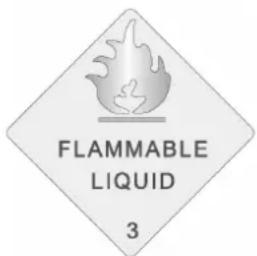
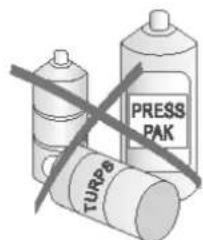
IF PRESSURIZED AEROSOL CONTAINERS BEAR THE WORD 'FLAMMABLE' AND/OR A SMALL FLAME SYMBOL, DO NOT STORE THEM INSIDE ANY REFRIGERATOR. IF YOU DO SO YOU MAY CAUSE AN EXPLOSION
Power failure.
If there is a power failure in your area, keep the door to the freezer closed. Most foods in your freezer will stay frozen for 24 hours.
Safety
It is important to use your refrigerator safely. This means you need to supervise young children and infirm persons when they use it. You need to make sure that young children do not play with the refrigerator. Follow the tips below.
DOs
- Check the power point is properly earthed - if you are not sure get an electrician to check it. An unearthed power point can cause an electric shock.
- Switch off the refrigerator at the power point before you clean or move it.
- If the supply cord is damaged you should have it replaced by the manufacturer, it's service agent or similarly qualified person. This will prevent a safety hazard.
DON'Ts
- Never let children play with the refrigerator.
- Never store spray cans, explosive liquids or flammable liquids in the refrigerator.
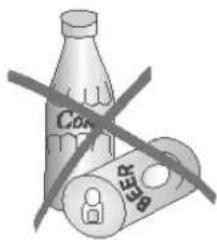
- Never store fizzy drinks in the freezer compartment
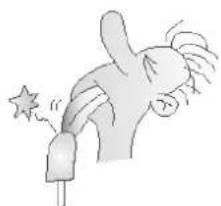
- Never lick icy foods when they first come out of the freezer. This can freeze burn your lips and mouth.
- Never try to repair the refrigerator yourself.
- Never use electric heaters or dryers to defrost the freezer because you can receive an electric shock.
- Never use electrical appliances inside the food storage areas.
- This refrigerator contains insulation formed with flammable blowing gases. For safety reasons, take care when you dispose of it.
- Do not damage the refrigeration circuit.
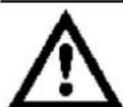
WARNING:- When you dispose of your old refrigerator, remove any doors. Children can suffocate if they get trapped inside.
natural_image
Illustration of a person blowing a star from a stick (no text or symbols)Helpful hints for storing food.
Dos
- Buy the freshest, best quality food and put it in the refrigerator as soon as possible.
- Cover food with plastic wrap or foil to stop it drying out.
- Cover food with plastic wrap or foil to prevent smells.
- Rinse and wrap fish and poultry before you put them in the refrigerator.
- Minimise bacteria by removing stuffing from poultry before you put it in the refrigerator.
- When you store eggs in the refrigerator compartment, store them with the pointed end down.
DON'Ts
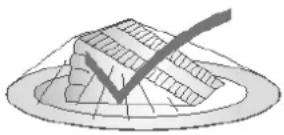
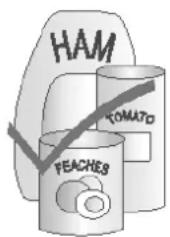
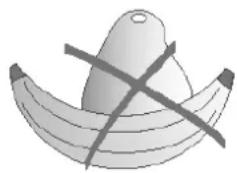
- Don't store bananas, avocados or mangoes in the refrigerator. This can cause them to go black or to go soft.
- Don't put hot or warm food in the refrigerator. Allow it to cool first.
Helpful hints for freezing food.
natural_image
Illustration of a banana with a halved egg and crossed lines (no text or symbols)You can use the freezer to store food which you buy in bulk when prices are low. You can also cook extra food and freeze it for later use.
DOs
- Buy the freshest, best quality food and put it in the freezer as soon as possible.
- Place food in plastic bags or plastic wrap before you put it in the freezer.
- Squeeze the air out of plastic bags as this prevents frost.
- When you buy frozen foods in the supermarket, keep them in their packaging when you store them.
- Defrost food, especially chicken and fish, in the refrigerator compartment. This stops bacteria from growing.
- Leave food in its wrapping while it defrosts.
- Use defrosted food immediately.
DON'Ts
- Never refreeze defrosted food.
| FREEZING MEAT | Separate pieces of meat with plastic wrap. Put the meat into plastic bags and remove air from under the wrap. | Store up to 6 months |
| Separate sausages and hamburger patties on a tray for an hour until hard. Wrap them separately in plastic wrap. Put them into plastic bags and remove air from under the wrap. | Store sausages, mince and cured meats up to 1 month | |
| Wrap joints, large pieces of meat, steaks and chops separately in plastic wrap or put them into plastic bags and remove air. Joints and large pieces of meat should be defrosted before cooking. Steaks and chops may be cooked while still frozen. | Store up to 6 months | |
| Wrap liver, kidney and other offal separately in plastic wrap or put them into plastic bags and remove air. | Store up to 2 months | |
| FREEZING POULTRY | 1. Wash fresh poultry with cold water. Dr into it the refrigerator compartment overnight. Wrap it in plastic wrap or put into plastic bags and air. | Store up to 6 months |
| Separate whole and half birds into plastic bags and remove air.Do not stuff birds before freezing | Store up to 6 months | |
| Pack chicken pieces into plastic bags in a single layer and remove air.Chicken pieces may be cooked while still frozen. | Store up to 4 months | |
| 2. Freeze crumbed chicken pieces on a tray for one or two hours. Pack the pieces into plastic bags in a single layer and remove air. | Store up to 4 months | |
| Put cooked chicken dishes into sealed containers | Store up to 3 months | |
| FREEZING SEA-FOOD | Buy only fresh seafood to freeze. | |
| FISHClean and prepare fish so that it will be ready to cook when you take it out of the freezer. Separate pieces of fish with plastic wrap. Pack into plastic bags and remove air. Fish fillets can be cooked when frozen although you won't be able to batter or crumb them. | Store 2-4 months | |
| PRAWNSShell and clean cooked prawns. Put them into watertight containers. Cover with them salt water, seal and freeze quickly. Green prawns can be frozen whole and cooked while still frozen. | Store up to 4 months | |
| CRABS AND CRAYFISHDrop fresh crabs and crayfish into boiling salted water (add 1 tablespoon of salt per litre of water) Cook gently for 10-20 minutes. Drain well and cool. Open and clean. Remove all flesh and pack into watertight containers. Cover with salt water . Seal and freeze quickly. | Store up to 2 months | |
| FREEZING CAKES & PAS-TRY | BISCUITSPack baked or unbaked biscuits into plastic bags or containers before storing them. | Store up to 3 months |
| CAKES AND SPONGESPack in them plastic wrap or plastic bags. Freeze whole or cut cakes and sponges. Cakes with whipped cream can also be frozen. | Iced cakes can be stored up to 4 months Un iced cakes can be store up to 6 months. | |
| FREEZING CAKES & PAS-TRY | FRESH BREAD AND ROLLSPack separately in plastic wrap or plastic bags.Leave in wrapping and defrost at room temperature unwrap and reheat in an oven for 15-20 minutes. | Store up to 12 monthsor |
| PIES AND TARTSPack pies and tarts in strong plastic bags before or after baking. Put them into freezer. | Store up to 3 months. | |
| SCONESCool them quickly after baking. Pack them into plastic bags an put them into the freezer. After you remove frozen scones from the freezer, you can reheat them in an oven for 15-20 minutes. | Store up to 3 months. |
What to do before calling for service.
If you think something may be wrong with your refrigerator, you can carry out some easy checks before calling for service. You may locate the problem, sparing yourself inconvenience and saving time and money.
| Problem Solution | |
| When your appliance is not operating | If your refrigerator does not seem to be running, try adjusting the temperature control to a slightly ‘colder’ position. It is normal for the freezer fan NOT to operate during the automatic defrost cycle, or for a short time after the refrigerator is switched on. The refrigerator may start up as it tries to lower the temperature. If this does not work, check that the power cord is plugged into the power outlet properly and that the outlet is switched ‘ON’. Try running a other appliance from the power outlet to test if there is a problem with the outlet. If no power is coming from the outlet you may have blown a fuse or tripped a circuit of your household power supply. If you call for service and it is found that the power point is faulty, you may be charged for the service call. |
| When there is refrigerator noise | Modern refrigerator/ freezers with increased storage capacity use high speedThis can provide a seemingly high level of sound but it is quite normal.Normal operational sounds include:occasional gurgling, similar to water boiling.air flow noise (air circulates because of a small fan)a popping noise heard during automatic defrosta clicking noise heard just before the compressor starts (this is merely the automatic switching action of the temperature control, turning the compressor on or off).The following sounds are normal when the ice maker is operating:the motor runningice dropping into the ice containerthe water valve opening or closingice loosening from trayrunning waterOther strange sounds may mean that you need to check and take action. For example, noises may mean that:the cabinet is not levelthe floor is uneven or weakbottles are badly placed and rattlingthere are vibrations from an object on top of, behind or beside the refrigeratorthe back of the refrigerator cabinet is touching the wall.Remember it is quite normal for noise to seem louder just after the refrigerator starts operating. |
| If there are odours inside the refrigerator | the interior may need cleaningsome foods produce odourssome containers and wrapping can cause odoursask yourself if the odour started about the same time you started storing something unusual. |
| When the motor seems to operate more than expected | Your new refrigerator provides you with large capacities in both the refrigerator section and the separate freezer. It is normal for the motor to operate frequently. However, eration to a minimum, check the following:Are doors kept open too long or too often?Are controls set too cold? See “CONTROLLING THE TEMPERATURE”.Have large amounts of warm food just recently been stored? Summer, festi and holidays usually mean a lot more work for your refrigerator.If the day is hot or the room is very warm, the refrigerator will need to run more than nor-mal.The refrigerator will run more that normal just after you install it or when it has been turned off for a long time |
| Warm air | Check that the refrigerator has enough clearance at the sides, back and top. Check the in-stallation Instructions at the front of this booklet. |
| If the temperature in the refrigerator is too warm | See “CONTROLLING THE TEMPERATURE”. You may have kept the door open too long or too frequently. Food containers or packaging may be holding a door open. |
| If the temperature in the refrigerator is too cold | See to “CONTROLLING THE TEMPERATURE”increase the temperature to avoid high energy consumption. |
| If the doors will not close | Check whether the top of the refrigerator is tilted back 10-15mm to allow the doors to self closeCheck whether something is holding the door open.It is normal for the freezer door to momentarily open and re-close, when the food compa-ment door is closed. If the freezer stays open, it indicates that the refrigerator cabinet needs to be tilted backwards a little further. If you call a service person to solve this problem you will be charged for the cost of the service call, as this is not a warranty fault. |
| If heavy frosting occurs in the freezer | Make sure you fully close the freezer & fresh food doors after you load or remove food from these compartments. If the doors are left partly open, a heavy frost will coat the inside of the freezer. If a frost develops, remove it. Take care to properly close the doors and the frost will not reoccur |
| If water drips on the floor | The defrost water tray, (located on the compressor at the back of the cabinet) may not be properly positioned. |
Ice Maker Problem Checklist
| Problem Possible Causes Action | ||
| Automatic Ice Maker | ||
| The ice maker not making any ice | 1 Ice maker wire signal arm is in the ‘up’ or OFF position.2 Household water line valve is not open.3 Freezer is not cold enough.4 The water dispenser may not be dispensing water. | 1 Move the wire signal arm to the ‘down’ or ON position.2 Turn on the household water line valve.3 See the PROBLEM section TEMPERATURES ARE TOO WARM.4 If it isn’t, the ice & water filter clogged or restricted by foreign material, and would need to be replaced. |
| The ice maker is not making enough ice | 1 The ice maker is producing less ice than you expect.2 The freezer is not cold enough.3 The household water line valve is not completely open.4 The water dispenser is dispensing slower than normal. | 1 The ice maker should produce approximately 2 – 3 kilograms of ice every 24 hours.2 See PROBLEM section TEMPERATURES ARE TOO WARM.3 Turn on the household water line valve.4 Replace the ice & water filter cartridge. |
| The ice maker will not stop making ice. | 1 Ice maker wire signal arm is being held down by some item in the freezer. | 1 Move the item and release the wire signal arm. Remove any ice cubes that have frozen together over the wire signal arm. |
| The ice maker is not separating the ice cubes. | 1 Ice cubes are not being used frequently enough.2 Ice cubes are hollow or smaller than normal. | 1 Remove and shake the ice container to separate cubes.2 Replace the filter cartridge, as the ice & water filter cartridge may be clogged. |
| The ice has bad odour and taste. | 1 The ice has picked up odour or flavour from strongly flavoured food stored in the refrigerator or freezer.2 The Water running into the ice maker has poor taste or odour.3 Ice not used frequently enough. | 1 Cover foods tightly. Discard stale ice. The ice maker will produce a fresh supply.2 Add a filter to water supply line. Consult a water purifying company.3 Discard stale ice. |
| Ice Dispenser | ||
| The dispenser will not dispense ice. | 1 The ice storage container is empty.2 The freezer temperature is set too warm.3 The household water line valve is not open.4 The freezer door is not closed.5 The Ice dispensing arm has been held in for more than 4-5 minutes. | 1 When the first supply of ice drop into the container, the dispenser should operate.2 Turn the freezer control to a higher setting so that ice cubes will be made. When first supply of ice is made, dispenser should operate.3 Open the household water line valve. Allow sufficient time for the ice to be made. When ice is made, the dispenser should operate.4 Ensure the freezer door is closed.5 The motor is overloaded. The motor overload protects will reset in approximately 3 minutes. Ice can then be dispensed. |
| The ice dispenser is jammed | 1 Ice has melted and frozen around the auger due to infrequent use, temperature fluctuations, and/or power outages.2 Ice cubes are jammed between the ice maker and back of ice container.3 Ice cubes are frozen together.4 Ice cubes are hollow or smaller than normal. | 1 Remove the ice container, thaw it , and empty the contents. Clean the container, wipe it dry, and replace in the proper position. When new ice is made, the dispenser should operate.2 Remove ice cubes that are jamming the dispenser. Use the dispenser often so that cubes do not freeze together.3 The ice & water filter cartridge could be clogged.4 Replace the filter cartridge.The dispensing system operates best at 30 – 100 psi water pressure. Well water pressures should fall within this range. |
Electrolux Warranty
FOR SALES IN AUSTRALIA AND NEW ZEALAND
APPLIANCE: ELECTROLUX REFRIGERATOR/FREEZER
This document sets out the terms and conditions of product warranties for Electrolux branded appliances. It is an important document. Please keep it with your proof of purchase documents in a safe place for future reference should you require service for your Electrolux appliance. General Terms and Conditions
- In this warranty
(a) 'Electrolux' means Electrolux Home Products Pty Ltd ABN 51 004 762 341 in respect of Appliances purchased in Australia and Electrolux (NZ) Limited in respect of Appliances purchased in New Zealand;
(b) 'Appliance' means any Electrolux product purchased by you accompanied by this document;
(c) 'Warranty Period' means
(i) where you use the Appliance for personal, domestic or household purposes in Australia the period of '24' months and in New Zealand the period of '24' months;
(ii) where you use the Appliance for commercial purposes, the period of '0' months, (if the period stated is 0 months you are not covered by this product warranty)
following the date of original purchase of the Appliance;
(d) 'you' means the purchaser of the Appliance not having purchased the appliance for re-sale, and 'your' has a corresponding meaning.
- This warranty only applies to Appliances purchased and used in Australia or New Zealand and is in addition to (and does not exclude, restrict, or modify in any way) any non-excludable statutory warranties in Australia or New Zealand.
- Electrolux warrants that, when dispatched from an Electrolux warehouse, the Appliance is free from defects in materials and workmanship for the Warranty Period.
- During the Warranty Period Electrolux or its Authorised Service Centre will, at no extra charge and subject to these terms and conditions, repair or replace any parts which it considers to be defective. You agree that any replaced Appliances or parts become the property of Electrolux. This warranty does not apply to light globes, batteries, filters or similar perishable parts.
- Parts and Appliances not supplied by Electrolux are not covered by this warranty.
- Where you are within an Electrolux service area, this warranty covers the cost of transport of the Appliance to and from Authorised Service Centres of Electrolux and travelling costs for representatives of the Authorised Service Centre to and from your home or business. If you are outside an Electrolux service area, you will bear these costs. For information about whether you are within an Electrolux service area, please phone 13 13 49 in Australia, or 0800 10 66 10 in New Zealand.
- Proof of purchase is required before you can make a claim under this warranty.
- You may not make a claim under this warranty unless the defect claimed is due to faulty or defective parts or
workmanship. Electrolux is not liable in the following situations (which are not exhaustive):
(a) The Appliance is damaged by:
(i) accident
(ii) misuse or abuse, including failure to properly maintain or service
(iii) normal wear and tear
(iv) power surges, electrical storm damage or incorrect power current
(v) incomplete or improper installation
(vi) incorrect, improper or inappropriate operation
(vii) insect or vermin infestation.
(b) The Appliance is modified without authority from Electrolux in writing.
(c) The Appliance's serial number or warranty seal has been removed or defaced.
(d) The Appliance was serviced or repaired by anyone other than Electrolux or its Authorised Service Centres.
- This warranty, the contract to which it relates and the relationship between you and Electrolux are governed by the law applicable in the Australian State where the Appliance was purchased or the law applicable in New Zealand if the Appliance was purchased in New Zealand. Where the Appliance was purchased in New Zealand for business purposes the Consumer Guarantee Act does not apply.
Limitation of Liability
- To the extent permitted by law:
(a) Electrolux excludes all warranties other than as contained in this document;
(b) Electrolux shall not be liable for any loss or damage whether direct or indirect or consequential arising from your purchase, use or non-use of the Appliance.
- Provisions of the Trade Practices Act and State consumer legislation in Australia, and the Consumer Guarantees Act, the Sale of Goods Act and the Fair Trading Act in New Zealand, imply warranties or conditions, or impose obligations, upon Electrolux which cannot be excluded, restricted or modified. To the extent permitted by law, the liability of Electrolux (if any) arising out of or in relation to the Appliance or any services supplied by Electrolux shall be limited (where it is fair and reasonable to do so);
(a) in the case of Appliances, at its option, to the replacement or repair of the Appliances or the supply of equivalent products or the payment of the cost of replacing the Appliances or having the Appliances repaired or of acquiring equivalent Appliances. Upon being replaced, parts and Appliances become the property of Electrolux; or
(b) in the case of services, at its option, to the supply of the services again or the payment of the cost of having the services re-supplied; and in the case of Appliances or services supplied in New Zealand, loss or damage whether direct or indirect or consequential that is reasonably foreseeable.
Privacy
You acknowledge that in the event that you make a warranty claim it will be necessary for Electrolux and its Authorised Service Centres to exchange information in relation to you to enable Electrolux to meet its obligations under this warranty.
Important Notice
Before Calling a Service Technician please check carefully the operating instructions, service booklet and the warranty terms and conditions.
| FOR SERVICEOR TO FIND THE ADDRESSOF YOUR NEAREST STATESERVICE CENTRE INAUSTRALIAPlease call 13 13 49For the cost of a local call (Australia only) | SERVICE AUSTRALIAElectroluxELECTROLUX HOME PRODUCTS | FOR SPARE PARTSOR TO FIND THE ADDRESSOF YOUR NEAREST STATESPARE PARTS CENTRE INAUSTRALIAPlease call 13 13 50For the cost of a local call (Australia only) |
| FOR SERVICEOR TO FIND THE ADDRESSOF YOUR NEARESTAUTHORISED SERVICECENTRE INNEW ZEALANDFree call 0800 10 66 10(New Zealand only) | NEW ZEALAND SPARE PARTS CENTRESAUCKLAND Prime Distributors Ltd. 8 Highbrook Drive, East Tamaki....(09) 273 3580WELLINGTON Prime Distributors Ltd. 68 Victoria Street, Petone....(04) 586 2150CHRISTCHURCH Prime Distributors Ltd. Unit 1, 127 Montreal Street....(03) 377 1009R. Redpath Ltd. 55 Ferry Road....(03) 379 0446DUNEDIN South City Champion, 590 Hillside Road....(03) 455 5443Electrolux ELECTROLUX HOME PRODUCTS | |
©2004 ELECTROLUX HOME PRODUCTS PTY LTD A.B.N 51 004 762 341

The Electrolux Group. The world's No.1 choice.
KITCHEN. CLEANING AND OUTDOOR APPLIANCES
www.electrolux.com.au
EAN number :
9314163677759