RM12G-1 - Kõlar Osprey - Tasuta kasutusjuhend
Leidke seadme juhend tasuta RM12G-1 Osprey PDF-formaadis.


Kasutajate küsimused teemal RM12G-1 Osprey
0 küsimus selle seadme kohta. Vastake nendele, mida teate, või esitage oma.
Esita uus küsimus selle seadme kohta
Laadige alla juhend oma Kõlar PDF-formaadis tasuta! Leidke oma juhend RM12G-1 - Osprey ja võtke oma elektrooniline seade uuesti kätte. Sellel lehel on avaldatud kõik teie seadme kasutamiseks vajalikud dokumendid. RM12G-1 kaubamärgi Osprey.
KASUTUSJUHEND RM12G-1 Osprey
User Guide
RM12G-1
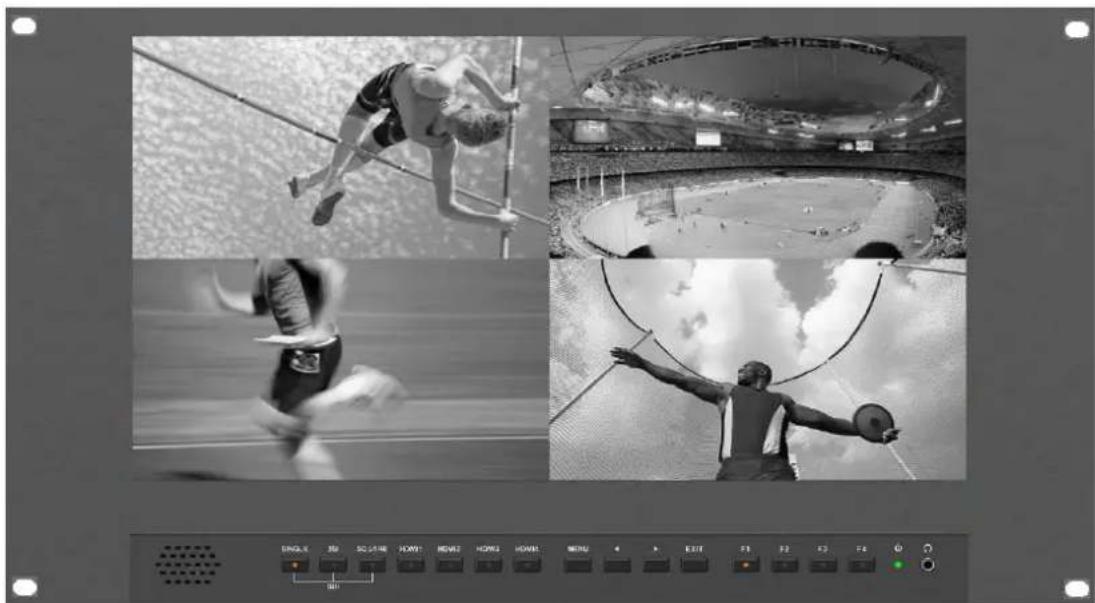
natural_image
Black-and-white collage of four sports scenes: high pole vault, stadium view, track crossing, and athlete arm swing (no visible text or symbols)
FEATURES
• 15.6" Display 4K 3840x2160 Resolution
- 2x 12G-SDI inputs plus 2x 3G/HD-SDI inputs (Level A/B)
• Quad Link 12G Square Division.
- Quad Link 12G Two-Sample Interleave (2SI)
• 1x HDMI2.0 up to 4K60
- Quad View and PIP
• 3x HDMI1.4 up to 4K30
- Tally
Content
1.Product Description 2
2. Sund Shade Installation ....5
3. Menu Settings ......6
4. Connecting the SDI signals ......9
5. Signal Formats ...... 10
6. Accessories....12
7. Specifications .... 13
1. PRODUCT DESCRIPTION
![4K [12G-SDI] 1 SINGLE 2SI SQUARE HDMI1 HDMI2 HDMI3 HDMI4 MENU EXIT F1 F2 F3 F4 Φ Ω SDI 2 3 4 5 6 7 8 9 10](/content/2026/05/1094092/images/79f4ef96cf27a31b85996c78feca2fe7ed033452cae611b35ae6b4ccaf9db723.jpg)
-
Speaker
-
SDI
Press to monitor the signal input to each connector.
[SINGLE] Button
- Press the button to select SDI input for one channel.
- Mode changes in the order of [12G SDI 1], [12G SDI 2], [3G SDI 3], [3G SDI 4].
[2SI] Button
-Press the button to select 2-SAMPLE Interleave SDI input signal through two or four SDI input connectors.
- Mode changes in the order of [Dual-Link 2SI], [Quad-Link 2SI].
[SQUARE] Button
- Press the button to select Quad-Link Square Division mode.
3. HDMI 1 \~ 4
Press the button to select HDMI input.
4. MENU/ENTER
Press to enter menu.
Press to enter option in the menu.
5.
Select option in the menu.
Decrease the option value.
Before enter the menu, single press to activate volume, press again to switch between volume, brightness, contrast, color, hue, sharpness and backlight.
6. ▶
Select option in the menu.
Increase the option value.
7. EXIT
Back or exit.
8. F1\~F4 User defined buttons
Default function options:
F1: Display Mode
F2: Display Rotate
F3: Safety Marker
F4: Aspect
(functions can be customized by long pressing any one of the 4 buttons)
9. Power Switch
10. Earphone jack
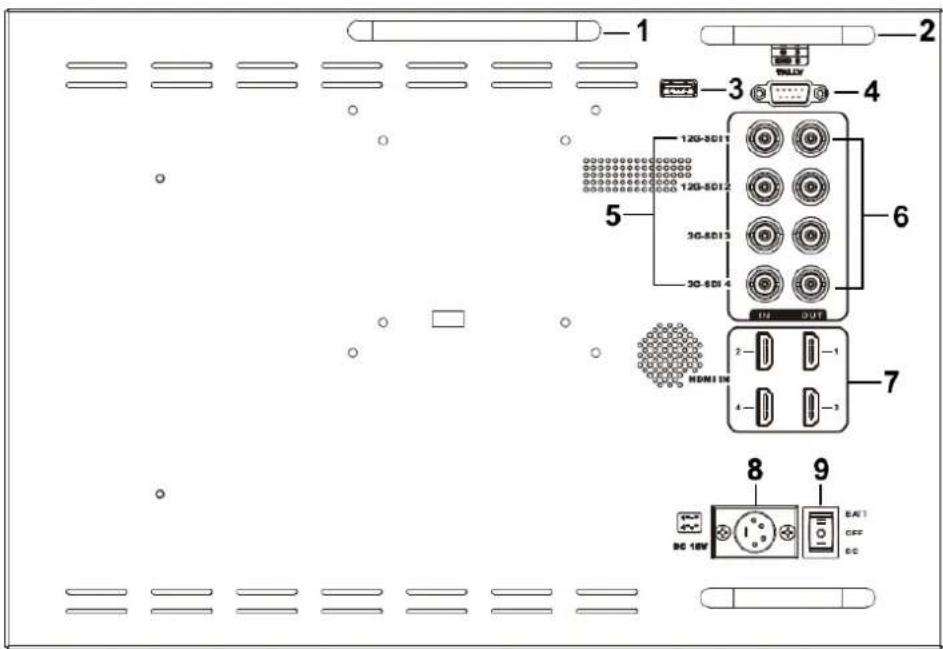
- Handle
- Connector protector
Preventing connectors from damage.
- USB port (Only for firmware upgrades).
- TALLY port
- SDI (BNC)
Input connectors for SDI
- SDI (BNC)
Loopout connectors for SDI.
Note – Loopouts are only active when the power is on.
- HDMI input connectors
Input connectors for HDMI signals.
HDMI 1: HDMI2.0, supports 4K 60Hz
HDMI 2, HDMI 3&HDMI 4: HDMI1.4, supports 4K 30Hz
- DC IN (XLR) terminal
Connects the DC power supply to the monitor.
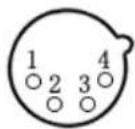 | Pin number | Signal |
| 1 | GND | |
| 23 | ...... | |
| 4 | +15V |
- Power switch
|| battery power; ○ power off; | DC power
2. SUN SHADE INSTALLATION
Put the sun shade on the suitcase, and match the magnets on both sides.
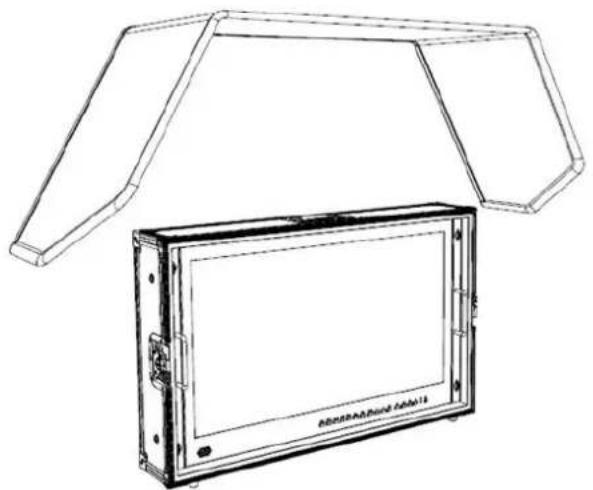
natural_image
Line drawing of a device with a canopy structure and a rectangular panel (no text or symbols)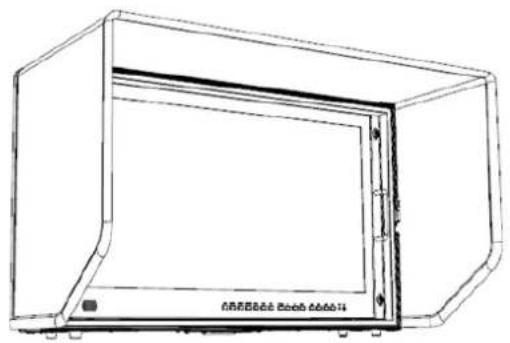
natural_image
Technical line drawing of a 3D rectangular enclosure or enclosure with no visible text or symbols3. MENU SETTINGS
3-1. F1\~F4 user definable shortcut buttons
Long press any one of the 4 buttons for 3-5 seconds to activate shortcut menu setting. Selected Setting will be highlighted in white, options will be highlighted in yellow, unavailable options will be highlighted in gray.
Select option via “◀/▶” buttons.
Then press "MENU" button to confirm to set as default option.
Functions can be customized to meet user's needs: center marker, safety marker, aspect marker, aspect, underscan, check field, freeze, pixel to pixel, peaking, false color, display mode, disp rotate, disp mirror.
Default options:
F1: Display Mode
F2: Display Rotate
F3: Safety Marker
F4: Aspect
3-2. ◀ / ▶ Buttons Operation
Press ◀/▶ buttons to activate volume bar,
Within Menu use ◀ / ▶ buttons to select and change the desired options.
3-3. MENU Operation
When power on, press "MENU" on the device – Menu will display
Press ◀ / ▶ button to choose the menu item;
Then press "MENU" button to confirm; Press "EXIT" button to return / exit
menu.
| Picture | Brightness | 0~100 | |
| Contrast | 0~100 | ||
| Saturation | 0~100 | ||
| Hue | 0~100 | ||
| Sharpness | 0~4 | ||
| Temperature | 9300, 7500, 6500, 5800, User | ||
| Backlight | 0~100 | ||
| Function | Center Marker | ON, OFF | |
| Safety Marker | OFF, 95%, 93%, 90%, 88%, 85%, 80% | ||
| Aspect Marker | Full, 17:9, 16:9, 4:3, 1.85:1, 2.35:1 | ||
| Aspect | Full, 17:9, 16:9, 4:3, 1.85:1, 2.35:1 | ||
| Underscan | ON, OFF | ||
| Pixel To Pixel | ON, OFF | ||
| Check Field | OFF, Red, Green, Blue | ||
| Freeze Input | ON, OFF | ||
| Peaking | ON, OFF | ||
| False Color | ON, OFF | ||
| Display Mode | 1P, 2P LR, 2P TB, 2P PIP, 4P | ||
| Display Setting | Display Rotate | 0°, 90°, 180°, 270° | Available only in single display mode. |
| Display Mirror | OFF, L/R, U/D | Available only in dual display mode | |
| Select Region | Menu setting to region selected according to users' needs. | ||
| Input | SDI 1, SDI 2, SDI 3, SDI 4, 2SI, SQUARE, HDMI 1, HDMI 2, HDMI 3, HDMI 4 | ||
| Audio | Volume | 0~100 | |
| Audio CH | CH0&CH1, CH2&CH3, CH4&CH5, CH6&CH7, CH8&CH9, CH10&CH11, CH12&CH13, CH14&CH15 (HDMI mode unavailable) | ||
| System | Reset | Press to confirm after selected. | |
| Menu Time | 5~60s | ||
| OSD H Position | 0~100 (To set menu display area) | ||
| OSD V Position | 0~100 (To set menu display area) | ||
| Language | English, Chinese | ||
| Transparency | 0~255 (To set menu transparency) | ||
| OSD Rotate | 0°, 90°, 270° | ||
| Border Width | 0~10 | ||
| Border Color | R, G, B, W | ||
| Info | To display current information. | ||
4. Connecting the SDI signals
The monitor accepts Single Link 12G/6G/3G/HD/SD-SDI, Dual-Link 3G-SDI, and Quad-Link 3G/HD-SDI. Use the appropriate input connectors depending on the input signal, referring to the tables on the next page.
12G -SDI Single-Link Signal
| Connector | Input signal |
| SDI 1 | 12G SDI |
| SDI 2 | 12G SDI |
3G-SDI Dual-Link signal
* 2-sample interleave signals
| Connector | Input signal |
| SDI 1 | 3G SDI Link 1 |
| SDI 2 | 3G SDI Link 2 |
Quad-Link 3G/HD -SDI Signal
* 2-sample interleave signals
| Connector | Input signal |
| SDI 1 | 3G SDI Link1 |
| SDI 2 | 3G SDI Link2 |
| SDI 3 | 3G SDI Link3 |
| SDI 4 | 3G SDI Link4 |
*Square division signals
| Connector | Input signal |
| SDI 1 | Sub-image 1(upper left screen)Sub-image 2(lower left screen) |
| SDI 2 | Sub-image 3(upper right screen)Sub-image 4(lower right screen) |
*Square division signals
| Connector | Input signal |
| SDI 1 | Sub-image 1(upper left screen) |
| SDI 2 | Sub-image 2(lower left screen) |
| SDI 3 | Sub-image 3(upper right screen) |
| SDI 4 | Sub-image 4(lower right screen) |
Image of square division signals
| Sub-image1 (upper left screen) | Sub-image 3 (upper right screen) |
| Sub-image 2 (lower left screen) | Sub-image 4 (lower right screen) |
5. Available Signal Formats
SD-SDI
| Signal system | Signal format |
| 525i | 4:2:2 YCbCr 10bits |
| 625i | 4:2:2 YCbCr 10bits |
HD-SDI
| Signal system | Signal format |
| 1280×720(23.98/24/25/29.97/30/50/59.94/60p) | 4:2:2 YCbCr 10bits |
| 1920×1080 / 2048×1080(50/59.94/60i)(23.98/29.97/24/25/30p)(23.98/29.97/24/25/30Psf) | 4:2:2 YCbCr 10bits |
3G-SDI
| Signal system | Signal format | |
| 1920×1080/2048×1080(47.95/48/50/59.94/60p) | 4:2:2 YCbCr 10bits | 3G-LevelA /DL 3G-Level B |
| 1920×1080/2048×1080(50/59.94/60i)(23.98/24/25/29.97/30p)(23.98/24/25/29.97/30Psf) | 4:4:4 GBR 10bits4:4:4 GBR+A 10bits4:4:4 YCbCr 10bits4:4:4 YCbCr+A 10bits4:4:4 GBR 12bits4:4:4 YCbCr 12bits | 3G-LevelA /DL 3G-Level B |
| 1280×720(23.98/24/25/29.97/30/50/59.94/60p) | 4:4:4 GBR 10bits4:4:4 GBR+A 10bits4:4:4 YCbCr 10bits4:4:4 YCbCr+A 10bits | 3G-LevelA /DL 3G-Level B |
| 1920×1080/2048×1080(50/59.94/60i)(23.98/24/25/29.97/30p)(23.98/24/25/29.97/30Psf) | 4;2:2 YCbCr 10bits | DS 3G-Level B |
| 1280×720(23.98/24/25/29.97/30P) | 4:2:2 YCbCr 10bits | DS 3G-Level B |
6G-SDI Single Link
| Signal system | Signal format |
| 3840×2160/4096×2160(23.98/24/25/29.97/30p) | 4:2:2 YCbCr 10bits |
| 1920×1080/2048×1080 | 4:4:4 GBR 10bits |
| (47.95/48/50/59.94/60p) | 4:4:4 GBR+A 10bits4:4:4 YCbCr 10bits4:4:4 YCbCr+A 10bits4:4:4 GBR 12bits4:4:4 YCbCr 12bits4:2:2 YCbCr 12bits |
6G-SDI Dual Link
| Signal system | Signal format |
| 3840×2160/4096×2160(47.95/48/50/59.94/60p) | 4:2:2 YCbCr 10bits |
| 3840×2160/4096×2160(23.98/24/25/29.97/30p) | 4:4:4 GBR 10bits4:4:4 GBR+A 10bits4:4:4 YCbCr 10bits4:4:4 YCbCr+A 10bits4:4:4 GBR 12bits4:4:4 YCbCr 12bits4:2:2 YCbCr 12bits |
12G-SDI Single Link
| Signal system | Signal format |
| 3840×2160/4096×2160(47.95/48/50/59.94/60p) | 4:2:2 YCbCr 10bits |
| 3840×2160/4096×2160(23.98/24/25/29.97/30p) | 4:4:4 GBR 10bits4:4:4 GBR+A 10bits4:4:4 YCbCr 10bits4:4:4 YCbCr+A 10bits4:4:4 GBR 12bits4:4:4 YCbCr 12bits4:2:2 YCbCr 12bits |
HD-SDI Quad Link
| Signal system | Signal format |
| 3840×2160/4096×2160(23.98/24/25/29.97/30p) | 4:2:2 YCbCr 10bits |
3G-SDI Dual Link (2SI)
| Signal system | Signal format |
| 3840×2160/4096×2160(23.98/24/25/29.97/30p) | 4:2:2 YCbCr 10bits |
3G-SDI Dual Link (Square Division)
| Signal system | Signal format |
| 3840×2160/4096×2160(23.98/24/25/29.97/30p) | 4:2:2 YCbCr 10bits |
3G-SDI Quad Link (Square Division)
| Signal system | Signal format |
| 3840×2160/4096×2160(47.95/48/50/59.94/60p) | 4:2:2 YCbCr 10bits |
| 3840×2160/4096×2160(23.98/24/25/29.97/30p) | 4:4:4 GBR 10bits4:4:4 GBR+A 10bits4:4:4 YCbCr 10bits4:4:4 YCbCr+A 10bits4:4:4 GBR 12bits4:4:4 YCbCr 12bits4:2:2 YCbCr 12bits |
3G-SDI Quad Link (2SI)
| Signal system | Signal format |
| 3840×2160/4096×2160(47.95/48/50/59.94/60p) | 4:2:2 YCbCr 10bits |
| 3840×2160/4096×2160(23.98/24/25/29.97/30p) | 4:4:4 GBR 10bits4:4:4 GBR+A 10bits4:4:4 YCbCr 10bits4:4:4 YCbCr+A 10bits4:4:4 GBR 12bits4:4:4 YCbCr 12bits4:2:2 YCbCr 12bits |
6. Included ACCESSORIES
- Folding sun shade cover 1 piece
- Rugged Carry-on suitcase 1 piece
- 15V DC adapter 1 piece
- Battery plate bracket 1 piece
- V-mount 1 piece
- Base bracket 1 pair
- TALLY connector (in bulk) 1 piece
7. Specifications
| Display Screen | 15.6" 8bit IPS |
| Physical Resolution | 3840×2160 |
| Aspect Ratio | 16: 9 |
| Brightness | 330cd/m2 |
| Contrast | 1000: 1 |
| Viewing Angle | 176°/ 176°(H/V) |
| Input Voltage | DC 12~24V (XLR) |
| Input Signal | 3G-SDI, 12G-SDI, HDMI and TALLY |
| Output Signal | 3G-SDI loop, 12G-SDI |
| Power Consumption | ≤34W |
| Operating Temperature | 0°C~60°C |
| Storage Temperature | -20°C~60°C |
| Dimension (LWD) | 389×267×38mm |
| Weight | 3.2kg/ 12 kg (with case) |
Note: due to constant efforts to improve products and product features, specifications may change without notice.