
Lighter - External hard drive Xigmatek - Free user manual and instructions
Find the device manual for free Lighter Xigmatek in PDF.


| Product Type | External Hard Drive |
| Brand | Xigmatek |
| Model | Lighter |
| Available Capacities | 60 GB, 80 GB, 100 GB, 160 GB, 180 GB |
| Interface | USB 2.0 High Speed (480 Mb/s) |
| File System | NTFS (varies by model; some models use NTFS) |
| Operating System Support | Windows 2000, Windows XP, Windows Vista, Mac OS |
| Dimensions (L x W x H) | 78 mm x 58 mm x 13.8 mm (3.1 x 2.3 x 0.5 in) |
| Weight | 82 g (0.16 lb) |
| LED Indication | Power On: LED On; Read/Write: LED Blinking; Power Off: LED Off |
| Accessories Included | USB 2.0 cable, leather pouch |
| Life Expectancy | 300,000 hours (MTBF) |
| Color Options | Black (BK), White (WH), Pink (PK) |
| Power Source | Bus-powered via USB |
| Data Transfer Rate | Up to 480 Mb/s |
| Form Factor | Portable, 2.5-inch (typical) |
| Compatibility | Plug and play with Windows and Mac (may require reformatting) |
| Maintenance | No regular maintenance required; keep dry and avoid shocks |
| Safety | Handle with care; avoid dropping or exposing to liquids |
| Repairability | Not user-serviceable; contact support for issues |
Frequently Asked Questions - Lighter Xigmatek
User questions about Lighter Xigmatek
0 question about this device. Answer the ones you know or ask your own.
Ask a new question about this device
Download the instructions for your External hard drive in PDF format for free! Find your manual Lighter - Xigmatek and take your electronic device back in hand. On this page are published all the documents necessary for the use of your device. Lighter by Xigmatek.
USER MANUAL Lighter Xigmatek
Connect the USB cable between
LIGHTER and computer,
and it is ready to use.

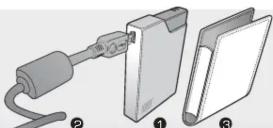
Package includes:
- LIGHTER 2. USB Cable 3. Leather Pouch
Specification LIGHTER 60GB LIGHTER 160GB
| Product Name | LIGHTER 60GB | LIGHTER 160GB |
| Product Number | HDXILI060GB-BK / -WH / -PK | HDXILI160GB-BK / -WH / -PK |
| Capacity | 60GB | 160GB |
| Accessories | USB 2.0 cable and leather pouch | USB 2.0 cable and leather pouch |
| Interface | High speed USB 2.0 - 480Mb/s data transfer | High speed USB 2.0 - 480Mb/s data transfer |
| File system | NTFS | NTFS |
| OS Support | Window 2000, Windows XP, Windows Vista & MAC | Window 2000, Windows XP, Windows Vista & MAC |
| Dimension | 78(L)x59(W)x13(H) mm / 3.1"(L)x2.3"(W)x0.5"(H) | 78(L)x59(W)x13(H) mm / 3.1"(L)x2.3"(W)x0.5"(H) |
| Weight | 82g / 0.18lb | 82g / 0.18lb |
| Life Expectancy | 300,000 hrs | 300,000 hrs |
| LED indication | Power On = LED OnRead/Write = LED BlinkPower Off = LED Off | Power On = LED OnRead/Write = LED BlinkPower Off = LED Off |
| Product Name | LIGHTER 60GB | LIGHTER 160GB |
| Product Number | HDXILI060GB-BK / -WH / -PK | HDXILI160GB-BK / -WH / -PK |
| Capacity | 60GB | 160GB |
| Accessories | USB 2.0 cable and leather pouch | USB 2.0 cable and leather pouch |
| Interface | High speed USB 2.0 - 480Mb/s data transfer | High speed USB 2.0 - 480Mb/s data transfer |
| File system | NTFS | NTFS |
| OS Support | Window 2000, Windows XP, Windows Vista & MAC | Window 2000, Windows XP, Windows Vista & MAC |
| Dimension | 7BLx59(W)x13(H) mm / 3.1"(L)x2.3"(W)x0.5"(H) | 7BLx59(W)x13(H) mm / 3.1"(L)x2.3"(W)x0.5"(H) |
| Weight | 82g / 0.18lb | 82g / 0.18lb |
| Life Expectancy | 300,000 hrs | 300,000 hrs |
| LED indication | Power On = LED OnRead/Write = LED BlinkPower Off = LED Off | Power On = LED OnRead/Write = LED BlinkPower Off = LED Off |

Brand : Xigmatek
Model : Lighter
Category : External hard drive