
Capital G Series - Alarm system Godrej - Free user manual and instructions
Find the device manual for free Capital G Series Godrej in PDF.


| Brand | Godrej |
| Model | Capital G Series |
| Product Type | Alarm System |
| Power Supply | AC Adapter with Battery Backup (12V, 1A) |
| Battery Backup Duration | Up to 8 hours |
| Main Functions | Intrusion detection, panic alarm, arming/disarming via keypad or remote |
| Number of Zones | 8 wired zones, expandable to 16 |
| Communication | GSM/GPRS and PSTN (dual-path) |
| Keypad | LCD display with backlit keys |
| Siren Output | Built-in siren (100 dB max) |
| Dimensions (Main Panel) | 250 x 200 x 60 mm |
| Weight (Main Panel) | 1.2 kg |
| Operating Temperature | -10°C to 50°C |
| Certifications | CE, RoHS |
| Maintenance | Regular battery check and cleaning of sensors |
| Safety Features | Tamper detection, anti-jamming, encrypted wireless |
| Spare Parts | Available through authorized Godrej service centers |
| Repairability | Modular design; repairs by trained technicians recommended |
| Installation | Professional installation recommended; user manual for basic setup |
| Warranty | 2 years from date of purchase |
Frequently Asked Questions - Capital G Series Godrej
User questions about Capital G Series Godrej
0 question about this device. Answer the ones you know or ask your own.
Ask a new question about this device
Download the instructions for your Alarm system in PDF format for free! Find your manual Capital G Series - Godrej and take your electronic device back in hand. On this page are published all the documents necessary for the use of your device. Capital G Series by Godrej.
USER MANUAL Capital G Series Godrej
User Instructions
TABLE OF CONTENTS
- About Capital Safe.... 1
1.1 Important Instructions.... 2
1.2 Accessories Description.... 2 - Know Your Product.... 3
- Operating the Safe.... 3
- To Change The Personal Code...... 4
- To Change The Master Code.... 4
- Mounting....5
- Replacing The Batteries.... 6
- Emergency Override Key...... 6
- Error Messages....7
- Information On E-waste Handling And Management.... 8
CAPITAL SAFE
I am small enough to fit anywhere, big enough to protect your valuables.

Capital
Capital is a compact, secure and affordable option to safeguard your precious possessions.
Ideal for

Daily use valuables
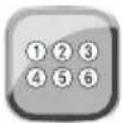
Electronic Locking System

Low Battery Indicator

Two Solid Steel
Shooting Bolts

Mechanical
Override

External Power
Source For Emergency Use
-
Interior carpet
• Digital locking mechanism -
Secret password
- Can be grouted / Anchored
| 8L | 15L | |
| Dimensions in cm (HxWxD) | 20 x 31 x 20 | 25 x 35 x 25 |
| Net weight (Kg.) | 4.8 | 6.6 |
| Volume (ltr.) | 8 | 15 |
1.1 IMPORTANT INSTRUCTIONS
Please keep this manual and override keys in a safe place (NOT INSIDE THE SAFE)
DO NOT use any liquid while cleaning the keypad, you could use a damp cloth if required. Make sure the safe is anchored properly as it can fall and hurt people and property
DO NOT place any liquid on top of the safe, a spill on the keypad may render the safe inoperable
DO NOT overstuff the safe or you can damage the motor mechanism or the contents
DO NOT place the safe in direct sunlight in case of Biometric
For security purposes, you should change the factory default code i.e. Personal Code AND Master Code as soon as possible. Godrej Security Solution shall not be responsible for any theft caused by such negligence.
DO NOT open the back cover or try to repair the safe yourself. In case of any problem contact GSS call center at 1800 20 999 55
1.2 ACCESSORIES DESCRIPTION
| Items (accessories) | Items (accessories) | Qty |
| Safe | Standard configuration | 1 set |
| 1.5V AA alkaline battery | Standard configuration | 4 pcs |
| User Manual | Standard configuration | 1 copy |
| Fastening screws | Standard configuration | 4 pcs |
| Protection pad | Standard configuration | 1 Sheet |
| Mechanical Override Key | Standard configuration | 2 Keys |

Safe

Warranty Card

Anchoring Bolts

Override Keys

1.5 V Alkaline Battery
2. KNOW YOUR PRODUCT
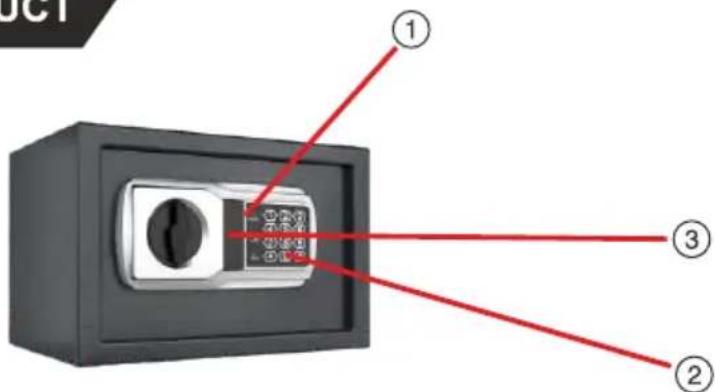
Front view of the safe
-
Digital monitor
-
Operation button key pad
-
Mechanical emergency keyhole
Note: The reset button for the safe has been provided next to the battery holder
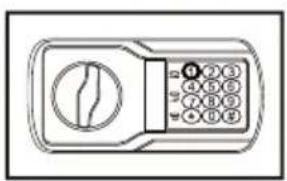
Opening the safe with Personal Code
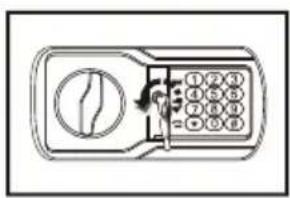
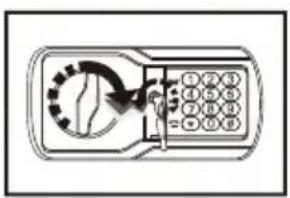
- To open the safe: Enter personal code and press (#) to confirm. When the display shows green colour (READY), rotate the knob clockwise then open the door. (Solenoid is unlocked for 5 seconds and after 5 seconds solenoid gets locked and (READY) disappears from display)
- To lock the safe: Close the door and rotate the knob anti-clockwise.


Opening the safe with Master Code
- To open the safe: Enter master code and press (#) to confirm. When the display shows green colour (READY), rotate the knob clockwise then open the door. (Solenoid is unlocked for 5 seconds and after 5 seconds solenoid gets locked and (READY) disappears from display)
- To lock the safe: Close the door and rotate the knob anti-clockwise.
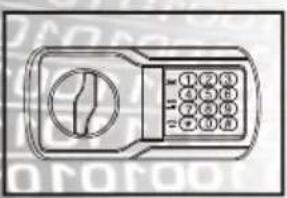

WARNING:
If wrong code is entered 3 times continuously, the safe will be locked and alarm will sound for 20 seconds, after 20 seconds you can enter personal/ master code. If again wrong code is entered 3 times continuously, the safe will be locked and the alarm will sound for 5 minutes. During lockout, the safe goes in auto freeze mode.
4. TO CHANGE THE PERSONAL CODE
- Open the safe.
- Press Reset button once, display will show yellow (PROCEED) and with 2 beeps.
- Enter 4 to 8 digit new code and press (#) to confirm, display shows yellow (PROCEED) with 2 beeps, then (PROCEED) will disappear from display, it means personal code is accepted.
- Now you can use the Personal Code to open the safe.
Note:
Default Personal Code is "1234"
5. TO CHANGE THE MASTER CODE
- Open the safe.
- Press (0) twice and then press Reset button once, Display will show Yellow indicator (PROCEED) with 3 beeps.
- Enter six digit new code and press (#) to confirm, display shows yellow (PROCEED) with two beeps, then (PROCEED) will disappear from display, it means master code is accepted.
- Now you can use the Master Code to open the safe.
Note:
Default Master Code is "800000"
WARNING:
For security purposes, you should change the factory default code as soon as possible. Godrej Security Solution shall not be responsible for only theft caused by such negligence.
6. MOUNTING
Mounting Through The Bottom Of The Safe:
- Check the floor for what type it is (wood, tile, concrete)
• Get the appropriate anchors for the type of floor
• Check location on floor for concealed wires or pipes
• Mark the floor to drill for your anchor
• Drill the appropriate size hole for the anchors you have
• Mount the safe, making sure it is secure - For mounting to the top of a cabinet you may want to use carriage bolts through the top of the cabinet
• DO NOT mount to a shelf in a cabinet or closet without anchoring to wall behind the safe
Mounting Through The Back Of The Safe:
• Check the wall or cabinet for structural Soundness
• For safety, have someone help to hold the safe during mounting
• Check location for concealed wires or pipes
• Mark the surface to drill holes for the anchors you will be using
• Drill the appropriate size holes for the anchors you are using
• Having someone hold the unit, anchor the safe to the wall
• Test the strength of the mounted safe so it will not fall off the wall or cabinet
• DO NOT place safe on a shelf without proper mounting into a wall
Mounting Tips:
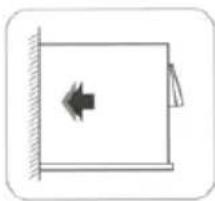
• The safe may be mounted to a wall or the inside of a cabinet or on the floor
- When mounting to a wall or cabinet, be sure of the load bearing capacity so as to hold the weight of the safe and the contents
(Failure to do so could result in the safe falling and damaging property and people)

Fig I: Fix through baseboard

Fig II: Fix through backboard
7. REPLACING THE BATTERIES
- Open the Safe using your personal code. If the batteries are dead, use the Emergency Override key.
- Remove the battery cover on the back panel by unscrewing the Phillips screw.
- Remove all four used batteries.
- Replace the batteries with four 1.5V AA size alkaline batteries.
- Put back the battery cover.
- Dispose the used batteries in an environment friendly way.
- Put back the Phillips screw to secure the battery cover.
- Keeping the door open, test the safe to make sure it works.
Note: A micro External Power Supply jack has been provided on the lock unit to Power ON the lock externally incase the battery drains out completely.
8. EMERGENCY OVERRIDE KEY
When you first get the safe or in emergency like batteries running out, codes unknowns etc. you can open the safe using the following method:
- Gently press the top of the emergency cover to open it.
- Using one of the emergency override keys, insert into the cylinder and turn anticlockwise and turn the knob clockwise to open the door.
- While the door is open, follow the instructions to set your personal code.
WARNING:
Keep the override keys in a safe place other than inside this safe. These keys are to be used in emergencies.
10. INFORMATION ON E-WASTE HANDLING AND MANAGEMENT
Dear Customer,
The Ministry of Environment and Forests have published The E-waste (Management and Handling) Rules 2010 which comes in effect from 1st May 2012.
E-waste is defined as any electrical or electronic component of products in whole or in part, or rejects from their manufacturing or repair process which are intended to be discarded.
These rules apply to every producer; consumer or bulk consumer involved in the manufacture, sale, and purchase and processing of electrical and electronic equipment or components as specified in Schedule 1 (please refer to our website www.godrej.com under the 'Green Think' sec of Godrej Security Solutions Division Page for more details). Under these rules, specific roles and responsibilities are defined for producers, consumers and recycles handling and managing e-waste.
E-waste is to be managed in an environmentally sound manner which means, taking steps to ensure that health and environment are protected from adverse effects of hazardous substance contained in such wastes.
Rule 6 of the E-waste (Management and Handling) Rules 2010 states that bulk consumers of electrical and electronic equipment shall be responsible for recycling of the e-waste generated by them. Bulk consumer means bulk users of electronic and electrical equipment such as Central Government or State Government Departments, public sector undertakings, banks, educational institutions, multinational organisations, and international agencies, private companies that are registered under the Factories Act, 1948 and Companies Act, 1956. The bulk consumers have to ensure that the e-waste generated by them is channelised to authorised collection centres or is taken back by the producers. They shall maintain records of e-waste generated by them in Form 2 and make such records available for scrutiny by the State Pollution Control or the Pollution Control Committee concerned.
All consumers of electrical and electronic equipment irrespective of their status as bulk consumers or not, shall ensure that e-waste generated by them is channelized to authorized collection centres (s) or registered dismantler(s), or recycler(s) or is returned to the pick-up/take back services provided by the producers. (Please refer to our website www.godrej.com under the 'Green Think' sec of Godrej Security Solutions Division Page for more details).
All our products intended to be recycled under the category of e-waste (as defined above) carry a label or stamp of the WEEE symbol (A wheelie bin with a cross), which states that it falls under the hazardous waste category and is not to be disposed of along with normal garbage.
We seek your support in ensuring environmentally sound management of e-waste and aid us in sustaining our earth's natural resources and maintaining the earth's green cover intact for the benefit of our future generations.

Note
RECORD OF PURCHASE
Please fill your details below for future reference:
Date of Purchase: ____
Product Model:
Name & Address of Distributor/Dealer: ____
Distributor Phone Number: ____
FOR SAFETY, PLEASE READ THIS MANUAL PRIOR TO USE.

Godrej & Boyce Mfg. Co. Ltd., Godrej Security Solutions
Regd. Office: Plant No. 17, Pirojshanagar,
Vikhroli, Mumbai - 400079
Toll Free: 1800 209 9955 (Sales & Service)
Whatsapp Support: +91 9321665511 (Service)
Visit: www.godrejsecure.com
Email: secure@godrej.com (Sales), secare@godrej.com (Service)
Follow us: www.facebook.com/GodrejSecure
Follow us. www.twitter.com/godrejsecure
- TABLE OF CONTENTS
- CAPITAL SAFE
- CAPITAL
- 1.1 IMPORTANT INSTRUCTIONS
- 1.2 ACCESSORIES DESCRIPTION
- KNOW YOUR PRODUCT
- OPENING THE SAFE WITH PERSONAL CODE
- OPENING THE SAFE WITH MASTER CODE
- WARNING
- TO CHANGE THE PERSONAL CODE
- NOTE
- TO CHANGE THE MASTER CODE
- MOUNTING
- MOUNTING THROUGH THE BOTTOM OF THE SAFE
- MOUNTING THROUGH THE BACK OF THE SAFE
- MOUNTING TIPS
- REPLACING THE BATTERIES
- EMERGENCY OVERRIDE KEY
- INFORMATION ON E-WASTE HANDLING AND MANAGEMENT
- RECORD OF PURCHASE
Brand : Godrej
Model : Capital G Series
Category : Alarm system