
EKFA - Accessoire pour climatisation DAIKIN - Free user manual and instructions
Find the device manual for free EKFA DAIKIN in PDF.


| Product Type | Wired Remote Controller |
| Compatible Indoor Units | Daikin EK series and select split/multi-split models |
| Dimensions (W x H x D) | 120 mm x 80 mm x 20 mm |
| Weight | 150 g |
| Power Supply | 24V DC via communication cable from indoor unit |
| Display | Backlit LCD with icons and temperature display |
| Controls | On/Off, Temperature (16-30°C), Fan Speed (Auto/Low/Med/High/Quiet), Mode (Cool/Heat/Fan/Dry/Auto), Timer |
| Timer | 24-hour on/off programmable timer |
| Communication Wiring | 2-wire or 4-wire, polarity sensitive, max 100m |
| Mounting | Wall-mounted with included screws |
| Material | ABS plastic |
| Color | White |
| Operating Temperature | -10°C to 50°C |
| Storage Temperature | -20°C to 60°C |
| Humidity Range | Up to 90% relative, non-condensing |
| Safety and Certification | CE, RoHS, designed to meet relevant standards |
| Package Contents | Controller, mounting screws, user manual |
| Cleaning | Wipe with soft dry cloth; do not use water or solvents |
| Spare Parts & Repairs | Available through authorized Daikin distributors; contact service center for repairs |
| Warranty | 2 years (subject to terms and conditions) |
Frequently Asked Questions - EKFA DAIKIN
User questions about EKFA DAIKIN
0 question about this device. Answer the ones you know or ask your own.
Ask a new question about this device
Download the instructions for your Accessoire pour climatisation in PDF format for free! Find your manual EKFA - DAIKIN and take your electronic device back in hand. On this page are published all the documents necessary for the use of your device. EKFA by DAIKIN.
USER MANUAL EKFA DAIKIN
Feet kit for vertical wall mounted installation

This instruction is an integral part of the booklet of the appliance on which the kit is installed. Please consult this booklet for general warnings and fundamental safety rules.
This accessory covers the hydraulic pipes coming up through the floor. They should be fitted on FWXVseries anchored to the back wall.
They have a sleek design and are also easy to remove for maintenance or cleaning.
These Feet should not be used to anchor the terminal to the ground; EKFA is not designed for this purpose.
EKFA Feet RAL 9010 white.
To mount the aesthetic feet kit:
- Rest the back of the appliance on a horizontal surface;
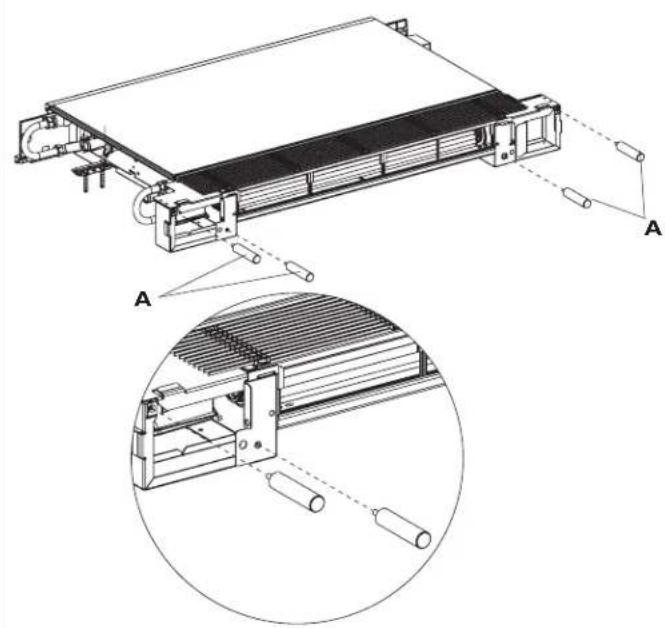
- screw the four threaded supports provided to the structure;
- stand the appliance up again and fasten it to the wall;
- fit the two covers to the supports.
| A | threaded supports |
| B | supports cover |
natural_image
Technical line drawing of a heat exchanger or cooling unit with labeled components and an inset close-up showing internal structure (no text or symbols present)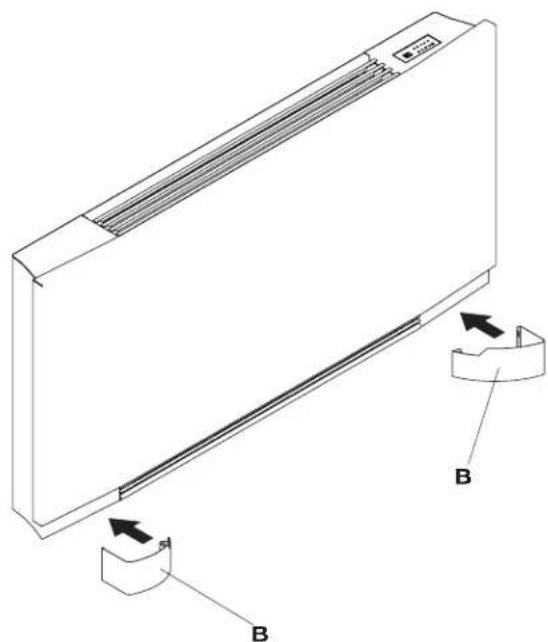
natural_image
Technical line drawing of a rectangular air conditioner unit with labeled components (no text or symbols present)The technical data and aesthetic features of the product can be modified and Daikin Europe NV reserves the right to modify them without notice at any time.
Brand : DAIKIN
Model : EKFA
Category : Accessoire pour climatisation