
Altusen KA8288 - Computer hardware ATEN - Free user manual and instructions
Find the device manual for free Altusen KA8288 ATEN in PDF.


| Product Type | KVM Switch |
| Number of Ports | 8 |
| Interface | DB25 (Keyboard, Mouse, Video) |
| Maximum Resolution | 1920 x 1440 |
| Dimensions (W x D x H) | 11.5 x 3.5 x 1.75 inches (292 x 89 x 44 mm) |
| Weight | 2.5 kg (5.5 lbs) |
| Power Adapter | External, 9V DC / 1A (100-240V AC) |
| Operating Temperature | 0°C to 50°C |
| Storage Temperature | -20°C to 60°C |
| Enclosure Material | Metal |
| LED Indicators | Power, Port Selection |
| Port Selection | Push-buttons on front panel |
| Daisy-Chain Support | Up to 8 units (64 computers) with optional adapters |
| Supported PC Connection | PS/2 or USB keyboard/mouse (via adapter cable) |
| Cleaning | Dry cloth; avoid liquids |
| Spare Parts | Power adapter (model specific) |
| Repair Service | Contact authorized ATEN service center |
Frequently Asked Questions - Altusen KA8288 ATEN
User questions about Altusen KA8288 ATEN
0 question about this device. Answer the ones you know or ask your own.
Ask a new question about this device
Download the instructions for your Computer hardware in PDF format for free! Find your manual Altusen KA8288 - ATEN and take your electronic device back in hand. On this page are published all the documents necessary for the use of your device. Altusen KA8288 by ATEN.
USER MANUAL Altusen KA8288 ATEN
KVM over IP Console Station User Manual
Compliance Statements
FEDERAL COMMUNICATIONS COMMISSION INTERFERENCE STATEMENT
This equipment has been tested and found to comply with the limits for a Class A digital device, pursuant to Part 15 of the FCC Rules. These limits are designed to provide reasonable protection against harmful interference when the equipment is operated in a commercial environment. This equipment generates, uses, and can radiate radio frequency energy and, if not installed and used in accordance with the instruction manual, may cause harmful interference to radio communications. Operation of this equipment in a residential area is likely to cause harmful interference in which case the user will be required to correct the interference at his own expense.
The device complies with Part 15 of the FCC Rules. Operation is subject to the following two conditions: (1) this device may not cause harmful interference, and (2) this device must accept any interference received, including interference that may cause undesired operation.
FCC Caution
Any changes or modifications not expressly approved by the party responsible for compliance could void the user's authority to operate this equipment.
Warning
Operation of this equipment in a residential environment could cause radio interference.
Achtung
Industry Canada Statement
This Class A digital apparatus complies with Canadian ICES-003.
CAN ICES-003 (A) / NMB-003 (A)
HDMI Trademark Statement
The terms HDMI, HDMI High-Definition Multimedia Interface, and the HDMI Logo are trademarks or registered trademarks of HDMI Licensing Administrator, Inc.

RoHS
This product is RoHS compliant.
User Information
Online Registration
Be sure to register your product at our online support center:
International http://eservice.aten.com
Telephone Support
For telephone support, call this number:
| International 886-2-86 | 92-6959 |
| China 86-400-810-0-8 | 10 |
| Japan 81-3-5615-581 | 1 |
| Korea 82-2-467-6789 | |
| North America 1-888-999-ATEN ext 4988 | |
| 1-949-428-1111 | |
User Notice
All information, documentation, and specifications contained in this manual are subject to change without prior notification by the manufacturer. The manufacturer makes no representations or warranties, either expressed or implied, with respect to the contents hereof and specifically disclaims any warranties as to merchantability or fitness for any particular purpose. Any of the manufacturer's software described in this manual is sold or licensed as is. Should the programs prove defective following their purchase, the buyer (and not the manufacturer, its distributor, or its dealer), assumes the entire cost of all necessary servicing, repair and any incidental or consequential damages resulting from any defect in the software.
The manufacturer of this system is not responsible for any radio and/or TV interference caused by unauthorized modifications to this device. It is the responsibility of the user to correct such interference.
The manufacturer is not responsible for any damage incurred in the operation of this system if the correct operational voltage setting was not selected prior to operation. PLEASE VERIFY THAT THE VOLTAGE SETTING IS CORRECT BEFORE USE.
Product Information
For information about all ATEN products and how they can help you connect without limits, visit ATEN on the Web or contact an ATEN Authorized Reseller. Visit ATEN on the Web for a list of locations and telephone numbers:
| International http://www.aten.com |
| North America http://www.aten-usa.com |
Package Contents
Check to make sure that all components are in working order. If you encounter any problem, please contact your dealer.
1 KVM over IP Console Station (KA8270 / KA8278 / KA8280 / KA8288)
1 power adapter
1 power cord
1 mounting kit
1 foot pad set (4 pcs)
1 user instructions*
Contents
Compliance Statements ...... ii
User Information ....iii
Online Registration ....iii
Telephone Support ....iii
User Notice ....iv
Product Information ....iv
Package Contents v
Contents ...... vi
About This Manual x
Conventions . . . . . . . . . . . . . . . . . . . . . . . . . . . . . . . . . . . . . . . . . . . . . . . . . . . . . . . . . . . . . . . . . . . . . . . . . .
Chapter 1. Introduction
Overview....1
Features 2
Requirements 3
Console....3
Components 4
Front View....4
Rear View 5
Chapter 2.Hardware Setup
Overview....7
Before You Begin 7
Mounting....8
Rack Mount....8
Wall Mount 9
Single-Stage Installation 10
Hot Plugging....11
Powering Off and Restarting....12
Chapter 3.Operation
Overview....13
Logging In 13
Upgrading KVM over IP Switch via Console Station. 15
Dashboard 18
Page Components 18
Dashboard Operation....20
Monitor Unit Option....21
Primary / Secondary Display 21
GUI 22
Disconnect....22
Reconnect....22
Device / Panel Array Display and Management ..... 23
Device Options 23
Device Display....24
Panel Array Options 24
Panel Array Display 25
Manage Device / Panel Array View. 26
Adding a Device / Panel Array View 26
Adding another Device View 28
Editing a Device View .....29
Deleting a Device View 29
Boundless Switching with Cascade 30
Selecting a Display 30
Stopping the Cascade....31
Extended Desktop....32
Chapter 4.Device Management
Overview 35
Device List....36
Search 36
Remove Device 36
Adding Devices 36
Adding KVM over-IP Devices 38
Changing Connection Information....39
Chapter 5. System Configuration
Overview 41
User Management....42
Users and Groups....42
Add User 43
Copy User 46
Modify User 46
Delete User 46
Managing (Assigning) Users and Groups .....47
Using User Configuration Page 47
Using Group Configuration Page. 48
Device Assignment 50
Using Device Configuration Page .....50
Assigning SSH / Telnet Device Access to Users. 52
System Management ....53
System Information ....53
Network....53
IP Installer 54
IPv4 Settings 55
IPv6 Settings 56
Finishing Up....56
ANMS 56
RADIUS Settings 57
AD / LDAP Settings 58
Finishing Up 59
Security 60
Login Failures 60
Account Policy....61
Working Mode 62
Finishing Up 62
Cascade 63
Finishing Up 63
Maintenance 64
Upgrade Main Firmware 64
Firmware Upgrade Recovery 66
Backup / Restore....66
Backup 67
Restore 68
Push / Pull Configuration....69
Pull Configuration 70
Push Configuration 70
Terminal 71
System Operation 73
Reset Default Values....73
Reset on exit: 73
Switch Video Output 74
Quick User Configuration 75
Chapter 6. Toolbar Interface
Overview....77
Exit Remote Location 78
Video Settings 79
Macros 81
Hotkeys 81
User Macros 83
Import / Export Macros 86
Delete Macros 87
Search Macros 87
System Macros 87
Further Configuration 88
Virtual Media 89
Message Board 91
Mouse Sync Mode....93
Appendix
Safety Instructions 95
General 95
Rack Mounting 96
Technical Support. 98
International....98
North America 98
Specifications 99
Troubleshooting 100
General Operation....100
Mouse Problems ....101
Virtual Media 102
Panel Array Mode ....102
Supported KVM Switches....103
Remote Access/Monitor Restriction .....103
Remote Access ....103
Remote Monitor 103
Optional Rack Mounting 103
VE-RMK1U 103
Limited Warranty....104
About This Manual
This manual is provided to help you get the most out of your KVM over IP Console Station. It covers all aspects of the device, including installation, configuration, and operation.
The models covered in this manual include:
| Model Product Name |
| KA8270 VGA KVM over IP Console Station |
| KA8278 VGA / HDMI KVM over IP Console Station |
| KA8280 HDMI KVM over IP Console Station |
| KA8288 Dual HDMI KVM over IP Console Station |
An overview of the information found in the manual is provided below.
Chapter 1, Introduction, introduces you to the KVM over IP Console Station, its purpose, features, and benefits, with its front and back panel components described.
Chapter 2, Hardware Setup, provides step-by-step instructions for setting up the KVM over IP Console Station, and explains some of its basic operation procedures.
Chapter 3, Operation, explains the fundamental concepts involved and provides a complete description of how to operate the product.
Chapter 4, Device Management, explains how to add or remove KVM over IP switches to or from the product.
Chapter 5, System Configuration, explains its system settings, which are categorized into General, ANMS, AD/LDAP, RADIUS, F/W Upgrade, Backup/Restore.
Chapter 6, Toolbar Interface, explains how to use the toolbar interface upon accessing a connected port.
Appendix, provides the technical and troubleshooting information at the end of the manual.
Note:
- Read this manual thoroughly and follow the installation and operation procedures carefully to prevent any damage to the unit or connected devices.
- ATEN regularly updates its product documentation for new features and fixes. For an up-to-date KVM over IP Console Station documentation, visit
http://www.aten.com/global/en/
Conventions
This manual uses the following conventions:
Monospaced Indicates text that you should key in.
[] Indicates keys you should press. For example, [Enter] means to press the Enter key. If keys need to be chorded, they appear together in the same bracket with a plus sign between them: [Ctrl+Alt].
- Numbered lists represent procedures with sequential steps.
◆ Bullet lists provide information, but do not involve sequential steps.
Indicates selecting consecutive options (such as on a menu or dialog box). For example, Start > Run means to open the Start menu, and then select Run.

Indicates critical information.
This Page Intentionally Left Blank
Chapter 1
Introduction
Overview
The ATEN KVM over IP Console Station (KA8270/KA8278/KA8280/KA8288) is a standalone console that replaces PC or NB, enabling users to remotely access, monitor, and control all servers connected to multiple ATEN KVM over IP switches* with impenetrable security against virus threats. It also supports various types of data encryption for ensuring impervious data protection. The KVM over IP Console Station can be deployed to anywhere instant access and stringent security is required, and is ideal for applications such as studios, offices, data centers, broadcast stations, control rooms, and network operations centers (NOC).
KA8270, KA8278, KA8280, and KA8288 all support USB mouse/keyboard and two USB ports for Virtual Media function, and respectively support 1 VGA video output, 1 VGA plus 1 HDMI video outputs, 1 HDMI video output, and 2 HDMI video outputs at resolutions up to 1920 x 1200 @ 60 Hz. With KA8278 and KA8288, users can multitask across two displays with a single keyboard and mouse.
The KVM over IP Console Station is compatible with ATEN's KN KVM over IP Switch series. The KN KVM over IP Switches series are IP-based KVM control units that allow both local and remote operators to monitor and access multiple servers from a single console (refer to ATEN's website to get more information on the KVM over IP Switch).
In addition, the KVM over IP Console Station provides Panel Array Mode ™ function, enabling administrators to monitor the video output of up to 64 servers simultaneously. The feature enables users to preview the contents of all desired ports at the same time, which is especially suitable for environments such as manufacturing and surveillance that often require monitoring of a much higher number of ports.
Among its enhanced functions, the extended desktop function can display remotely connected PCs on its dual screens, offering users a wider view during control. For easy collaboration between multiple KVM over IP Console Stations, the users can not only share screen contents from one console station to another, but also share the necessary contents to a big TV, for acknowledgment by all operators, during an urgent event. In addition, the KVM over IP Console Station supports Telnet / SSH for management of
console devices to allow users to have flexible control of all connected devices. To ensure security, its lock screen password function can effectively prevent unauthorized users from accessing an unattended console station to keep any critical data protected.
The KVM over IP Console Station can be set on a desk, mounted on a wall or at the rear of a rack with its space-saving 0U rack mount design. It is flexible and easy to install, and provides a GUI with multi-language support for device management, user profile customization, as well as hassle-free configuration for large deployments.
Note: Please refer to the Compatible Products section on the product web page for the list of compatible KVM over IP switches.
Features
- A standalone console that replaces PC or NB, enabling users to remotely access and control ATEN’s KVM over IP switches
◆ Impenetrable security against virus threats with impervious data protection - Single sign-on to consolidate the management of multiple ATEN KVM over IP switches
◆ Advanced FPGA graphics processor — with a Full HD resolution of 1920 x 1200
◆ Supports 1 VGA video output (KA8270) or 1 HDMI video output (KA8280) - Supports 1 VGA plus 1 HDMI video outputs (KA8278) or 2 HDMI video outputs (KA8288) — enables users to multitask across two displays with a single keyboard and mouse
- Panel Array Mode™ — allows administrators to monitor the video output of up to 64 servers on one screen simultaneously
◆ Supports Virtual Media (removable Disks and ISO files)
◆ Wall mountable — standard rack mount kit included
◆ Space-saving 0U rack mount design for rear mounting -
GUI with multi-language support — provides easy access and management, user profile customization, and flexible configuration for large deployments
◆ Supports USB smart card -
Supports Boundless Switching in Cascade with another KA8270 / KA8278 / KA8280 / KA8288
- Extended desktop — supports extended display for remotely connected PCs on the dual screens of KA8278 / KA8288
- Share screen — shares screen content from one console station to another for real-time collaboration
- Supports Telnet / SSH for connecting to and management of console devices
- Lock screen password — prevents unauthorized users from accessing the console station when unattended
Requirements
Console
- A VGA monitor (KA8270); an HDMI monitor (KA8280 or KA8288); a VGA or HDMI monitor (KA8278)
A USB mouse
A USB keyboard
◆ Microphone and speakers
Components
Front View

| No. Component | |
| 1 reset button | |
| 2 USB ports (peripherals) | |
| 3 USB ports (keyboard and mouse) | |
| 4 audio ports | |
| 5 cascade port | |
| 6 power pushbutton (press to stop video outputs; press again to resume video outputs) | |
| 7 power LED (power on: blue; video outputs off: orange) |
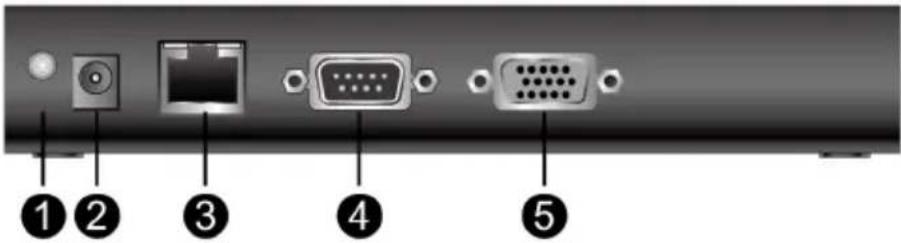
Rear View
KA8270 Rear View
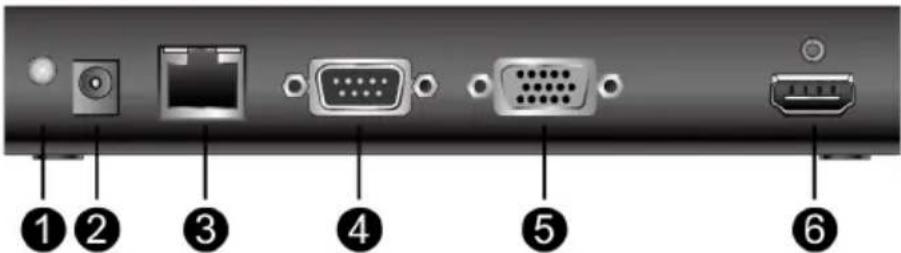
KA8278 Rear View
KA8280 Rear View

KA8288 Rear View

| No. Component |
| 1 grounding terminal |
| 2 power jack |
| 3 LAN port |
| 4 COM port |
| 5 VGA port (KA8270 and KA8278 only) |
| 6 HDMI port(s) (KA8278, KA8280 and KA8288 only) |
This Page Intentionally Left Blank
Chapter 2
Hardware Setup
Overview
This chapter outlines different ways of mounting your KVM over IP Console Station as well as a quick hardware connection summary for single-stage installation.
Before You Begin

-
Important safety information regarding the placement and grounding of this device is provided on page 95 and onwards. Please review it before proceeding.
-
Make sure that power to all the devices you will be connecting up have been turned off. You must unplug the power cords of any computers that have the Keyboard Power On function.
Mounting
The KVM over IP Console Station can be rack mounted or wall mounted. The following sections take you through the procedures for each method.
Rack Mount
The KVM over IP Console Station is designed to be mounted at the rear of a rack, where it occupies 0U to save space.
- Remove two screws from the bottom of the unit and use them to attach the mounting bracket to the unit as shown in the diagram below:

- Screw the mounting bracket to any convenient location on the rack.

natural_image
Isometric line drawing of a server rack with a door and control panel (no text or symbols)Note: Rack screws are not provided. The use of M5 x 12 Phillips type I cross screws is recommended.
Wall Mount
- Remove two screws from the bottom of the unit and use them to attach the mounting bracket to the unit as shown in the diagram below:
M3 x L5 (Countersunk Head)
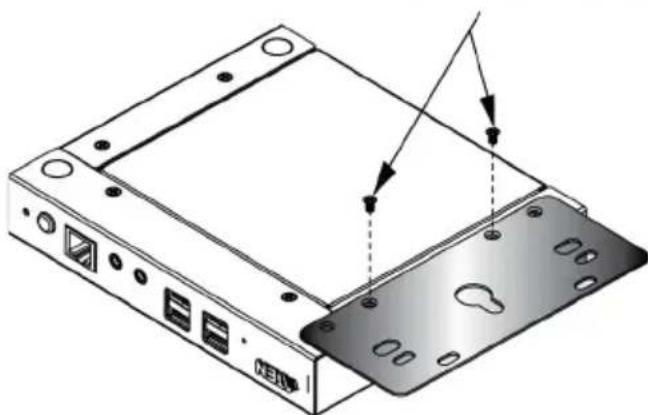
natural_image
Diagram of a computer drive chassis showing front panel, rear panel, and internal components (no text or labels)- Use the mounting bracket's center screw hole to mount the unit onto a wall.
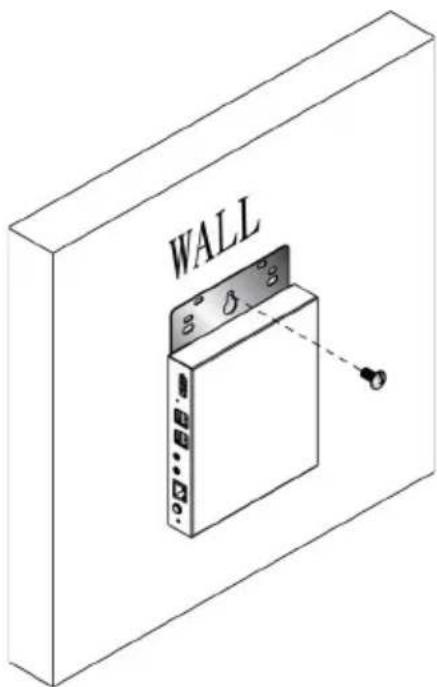
Single-Stage Installation
For single-stage installation, refer to the installation diagram and procedures below (KA8278 is used as an example):
Note: The numbers shown in the diagram correspond to the installation procedure step numbers.
- Plug the connectors of your USB mouse, USB keyboard, microphone, and speakers into their respective ports on the front of the KVM over IP Console Station. Each port is color coded and marked with an icon.
- Plug the monitor into the VGA or the HDMI port on the rear of the KVM over IP Console Station.
Note:
- KA8270 supports 1 VGA video output, KA8278 supports 1 VGA and 1 HDMI video outputs, KA8280 supports 1 HDMI video output, and KA8288 supports 2 HDMI video outputs.
- For models that support two video outputs (KA8278 and KA8288), the video interface at the inner side (e.g., the VGA video interface of KA8278) is the Primary Display, and the video interface at the outer side is the Secondary Display.
-
The Login page will appear on the Primary Display from which users can log in.
-
Plug an Ethernet cable from the LAN into the KVM over IP Console Station's LAN port.
- (Optional) Plug USB drives into the dedicated USB ports located on the front panel.
- (Optional) To cascade one more unit, plug one end of a Cat 5e cable into the cascade port on the front panel, and then plug the other end of the cable to the LAN port of another KVM over IP Console Station. The added unit will receive Internet connection from the first unit.
Configuration / control of each unit is separate.
Note: Do not connect the cascade port to a network switch or it will cause a switching loop.
-
(Optional) Use a grounding wire to connect the grounding terminal on the rear panel of the KVM over IP Console Station to a suitable grounded object.
-
Plug the power adapter into an AC source with the power cord; then plug the other end into the KVM over IP Console Station's power jack.

Hot Plugging
KVM over IP console stations support hot plugging — components can be removed and added back into the installation by unplugging and replugging cables from the ports without the need to shut the unit down.
Powering Off and Restarting
If it becomes necessary to power off the console station, please use the shut down function (see Shutdown on page 75), disconnect the power adapter and wait for 30 seconds before reconnecting it back.
Chapter 3
Operation
Overview
The KVM over IP console station can be used as a central control station to monitor several KVM switches. Available interfaces are described in the sections that follow.
Logging In
A valid Username and Password are required for login.
Note: If the number of invalid login attempts exceeds a specified number of times, a timeout period is invoked. You must wait until the timeout period expires before you can attempt to log in again. See Login Failures on page 60 for further details.
The KVM over IP console station supports two modes:
a) Console station mode: Logging into the console station to manage KVM devices centrally.
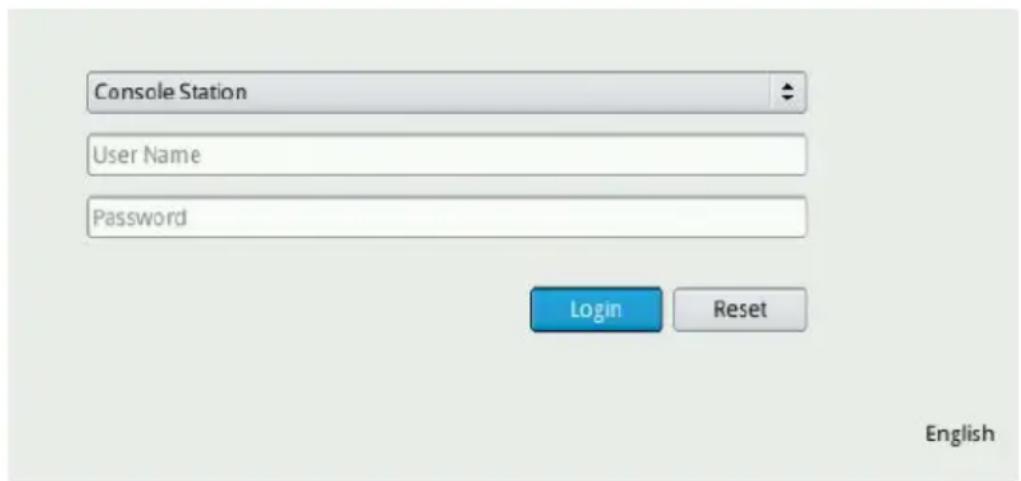
b) KVM over IP switch mode: Logging into a KVM device directly.
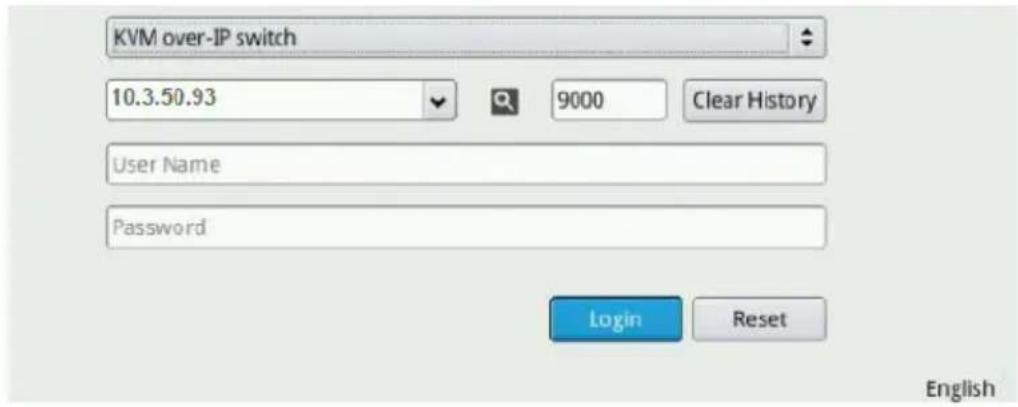
Note: 1. Please use the KVM credentials to login.
- Click on "Clear History" to remove the history of all connected devices.
Follow the steps below to log in:
- If you wish to log into a KVM device directly, select “KVM over-IP Switch” from the drop down menu, specify the device’s IP address and port, and go to the next step.
Or
For the KVM over IP console station login, select “Console Station” from the drop down menu and go to the next step.
Note:1. As an alternative, you can drag your mouse over the magnifying glass symbol to find the addresses of the devices on the same local area network; or.
-
Click the drop-down menu for a device list. The device list shows the device login history. The history can be cleared using a terminal command, please see Terminal on page 71.
-
Enter a Username and Password (by default Username and Password are administrator and password, respectively) and click Login.
Note: For security purposes, you should change the Username and Password. (See Users and Groups on page 42)
- (Optional) At the bottom-right corner, a language option is available (English is shown as it is the default language). Click to select a preferred language for the interface.
After you successfully login, the dashboard of the console station appears. Please refer to Dashboard on page 18 for details.
Upgrading KVM over IP Switch via Console Station
As new versions of the firmware become available, they can be downloaded from our website. Check the website regularly to find the latest information and packages for KVM over IP Switch.
To upgrade the KVM over IP Switch's firmware:
-
Get the newest firmware by downloading it from ATEN's website to a computer.
-
Transfer the downloaded file to a USB flash drive.
Note: Please use FAT file system formatted USB flash drive(s).
-
Remove the USB flash drive from the computer and insert it to a USB port of the console station.
-
From the console station's login page, select KVM over-IP switch from the drop-down menu, and specify the device's IP address and its port. Enter the Username and Password of the KVM over IP Switch and click Login.

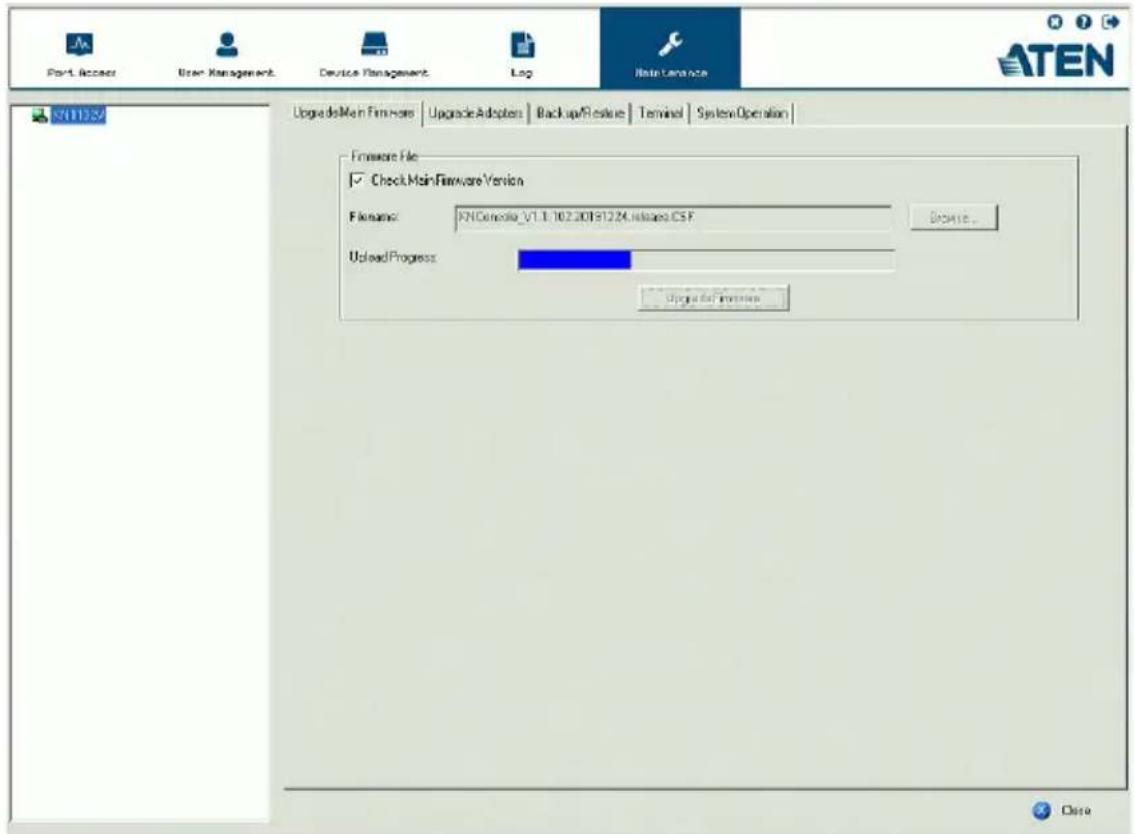
- From the KVM over IP Switch local console GUI main page, navigate to Maintenance and select Upgrade Main Firmware.
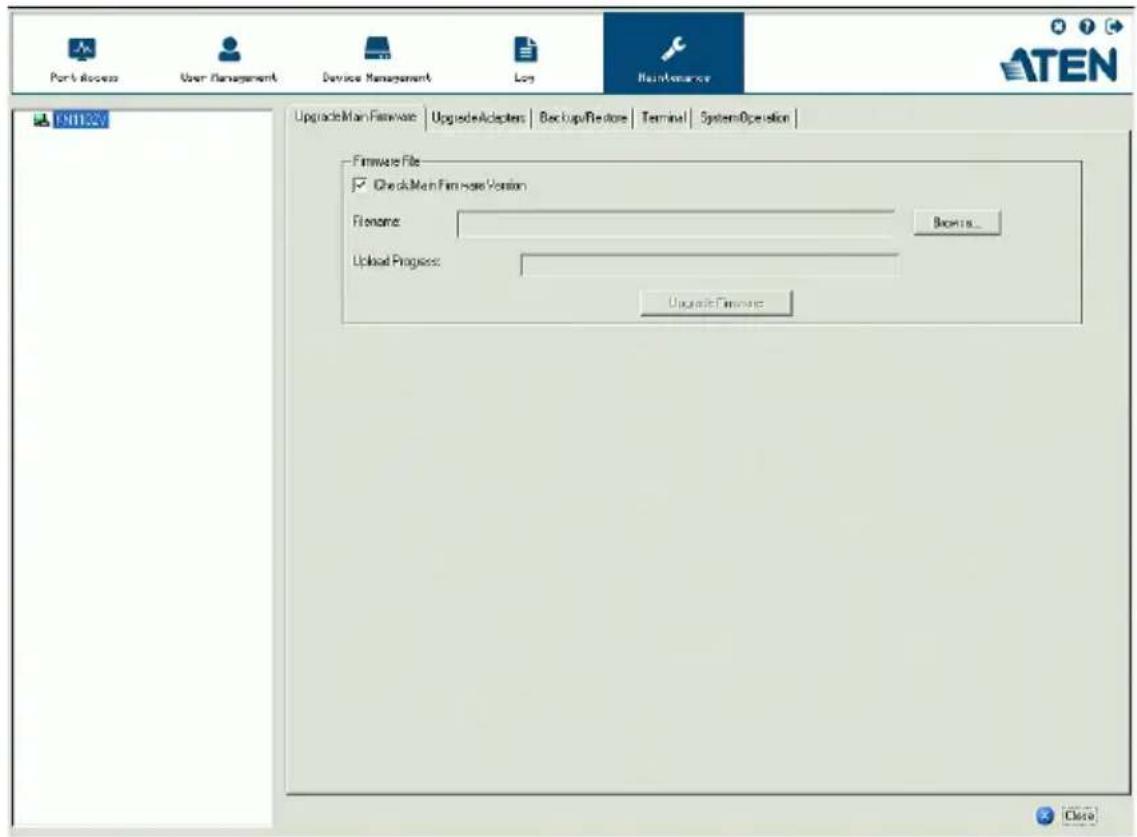
- Click Browse to select the downloaded firmware file and click Open.

- Click Upgrade Firmware.
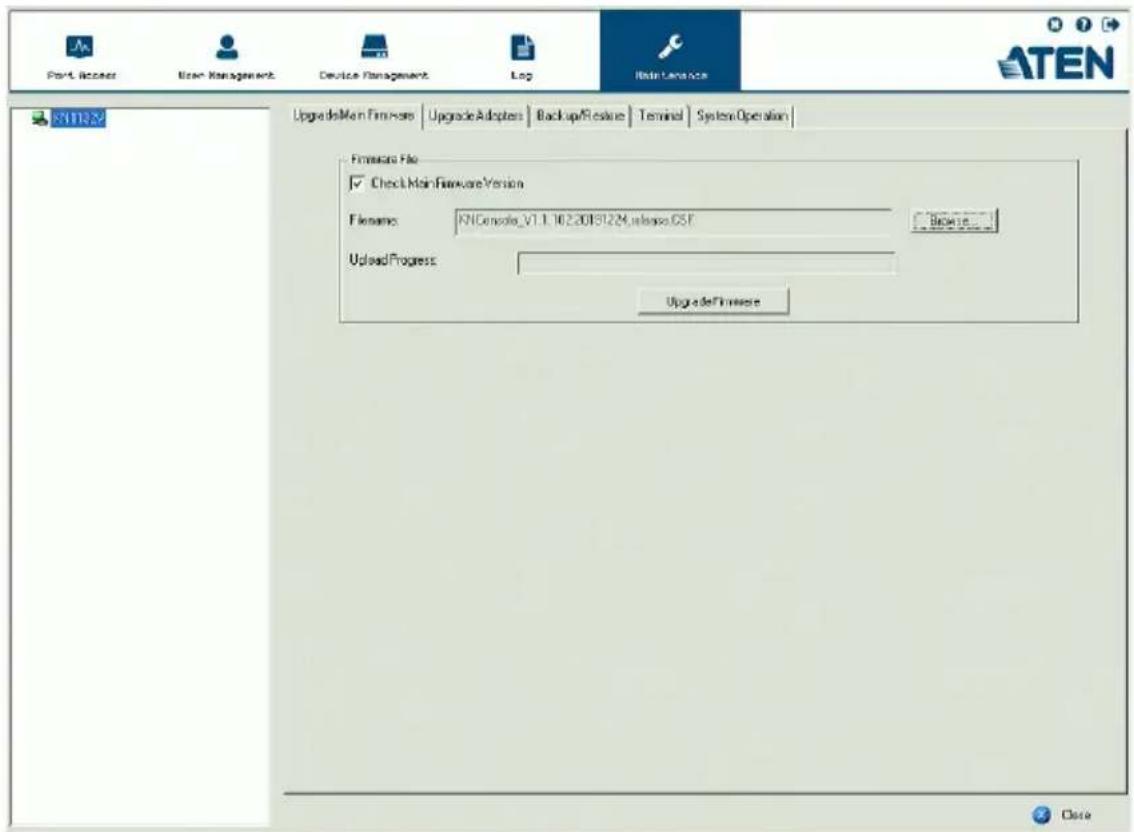
- The KVM over IP Switch will reboot after the firmware upgrade is complete.
Dashboard
Once you have successfully logged in, the KVM over IP console station's user interface dashboard appears:

Note: The screen depicts an Administrator's page. Depending on the user's account type and permissions, not all of these elements will appear.
Page Components
The page components of the dashboard are described in the table below:
| No. | Item Description | |
| 1 | All Devices | Clicking All Devices will bring out an option “Reconnect All Devices”. Click the option for the reconnection operation.Note: This option is only available when the total number of devices added does not exceed 16. |
| 2 | Individual Monitor Option | Individual monitor option allows users to select which port is to be displayed on an assigned display, open the GUI or disconnect from the KVM over IP switch.If the switch is disconnected, you can also click Reconnect to reconnect the switch to the console station.For example, if you have a primary and secondary display (KA8278 or KA8288), you can choose to display one of the ports on the primary display while another port on the secondary display. See Primary / Secondary Display on page 21. |
| 3 | Manage Device View | Manage Device View allows users to separate KVM over IP switches currently being monitored into different device views to be displayed.Note: The maximum number of devices that can be displayed within a device view (including All Devices) is 16. If you have more than 16 devices added, make sure to create additional device views for displaying devices beyond 16. |
| 4 | Manage Panel Array View | Manage Panel Array View allows users to simultaneously display the ports connected to the KVM over IP switches. The ports can also be grouped into different groups and only simultaneously display the ports in the chosen group. |
| 5 | Device Management | Device management allows users with administrative authority to add devices to or remove devices from the console station. |
| 6 | System Configuration | System configuration allows users with administrative authority to manage users or groups, display device information, configure network, advanced network management (ANMS) or security settings, or manage firmware upgrade, system backup / restore, push / pull configurations to or from other devices, access terminal, or reset system to factory default settings. |
| 7 | Administrator administrator | Administrator allow users to change password, configure preferences, logout, restart the system, shut down the system, or display quick information about the console station. |
| 8 | Available KVM over IP Switch Monitor | Available KVM over IP switch monitor displays the available KVM over IP switch at a glance. Each monitor will consecutively rotate through the device's connected ports. |
Dashboard Operation
The dashboard of the console station usually displays the connected devices in an array of monitor units. Each of the unit corresponds to a connected device. The unit will continuously alternate between all connected ports.
![ATEN | KA8278 All Devices KN1132V(10.3.50 Hz) Status: offline KN8164(10.0.90.55) Jostaport KN8132V(10.3.41.221) [0]25778 Description - NAVF Modeling - Microsoft Router File path: - 10.0% - 10.0% - 10.0% - 10.0% - 10.0% - 10.0% - 10.0% - 10.0% - 10.0% - 10.0% - 10.0% - 10.0% - 10.0% - 10.0% - 10.0% -10.0% - 10.0% - 10.0% - 10.0% - 10.0% - 10.0% - 10.0% - 10.0% - 10.0% - 10.0% - 10.0% - 10.0% - 10.0% - 10.0% - 1 - 1 - 1 - 1 - 1 - 1 - 1 - 1 - 1 - 1 - 1 - 1 - 1 - 1 - 1 - 1 - 1 - 1 - 1 - 1 - 1 - 1 - 1 - 1 - 1 - 1](/content/2026/05/999000/images/c2809c525fec61dd1e7e33f8c9ceb07f80807f4798e9d952190e405d61786270.jpg)
Double-clicking a monitor will bring you to the port's page.
For individual monitor options of a particular device, move your mouse over its corresponding monitor unit. A menu icon will be shown on the top-right corner of each unit.
= Menu icon
Monitor Unit Option
Clicking the Menu icon displays available options:

Primary / Secondary Display
Depending on your console station model (whether you have one or two display ports), the menu may show a Primary Display option or both a Primary Display option and a Secondary Display option, for displaying a port on the primary or secondary display:
- Mouse over the display (primary or secondary):
![[1]testport [3] Primary Display Open GUI Disconnect](/content/2026/05/999000/images/f7e10e8fd7ea749f28a3ea2e7349cb954979652da515cc2d9d3c6638708086c7.jpg)
- Click to select the port. The selected display should now show the port's screen. Your keyboard and mouse can now also control the server connected to the port.
For controlling the server, the KVM over IP console station's interface provides a toolbar to help you with the remote control operations. Please refer to Toolbar Interface on page 77.
GUI
If you wish to use the KVM over IP switch's GUI, click Open GUI. Please refer to the KVM switch's user manual for the GUI's operation.
Note: To upgrade the firmware of the KVM over IP Switch via the console station, see Upgrading KVM over IP Switch via Console Station, page 15.
Disconnect
Click Disconnect to disconnect from this KVM switch device.
Reconnect
Click Reconnect to reconnect to an offline KVM switch device.
Device / Panel Array Display and Management
Manage Device View allows users to separate KVM over IP switches currently being monitored into different groups or select which device group is to be displayed on the dashboard.
Manage Panel Array View allows users to separate available ports into different groups or select which panel array group is to be displayed on the panel array page.
Device Options
Click the Device icon to display the device options.

| Option Description | |
| Manage Device View | Click this option to add, delete, or modify custom device views. |
| All Devices Click this option to display all connected KVM over IP switches on the dashboard. | |
| Created Device View | Select a created device view to display the KVM over IP switches on the dashboard. |
Device Display
An example showing the KVM over IP switches in a device display is shown on the dashboard below (device 1 is the selected device):

Panel Array Options
Click the Panel Array icon to display the panel array options:

| Option Description | |
| Manage Panel Array View | This option allows you to add, delete, or modify panel array (groups). The maximum number of panel array views can be created is 16. |
| All Devices All ports of the connected KVM over IP switches are displayed on the panel array page. | |
| Created panel arrays | Select a created panel array. All ports connected to the KVM over IP switches in the panel array are displayed. |
Note: Audio is not supported.
Panel Array Display
An example showing the ports of connected KVM over IP switches in a panel array is displayed (array1 selected):
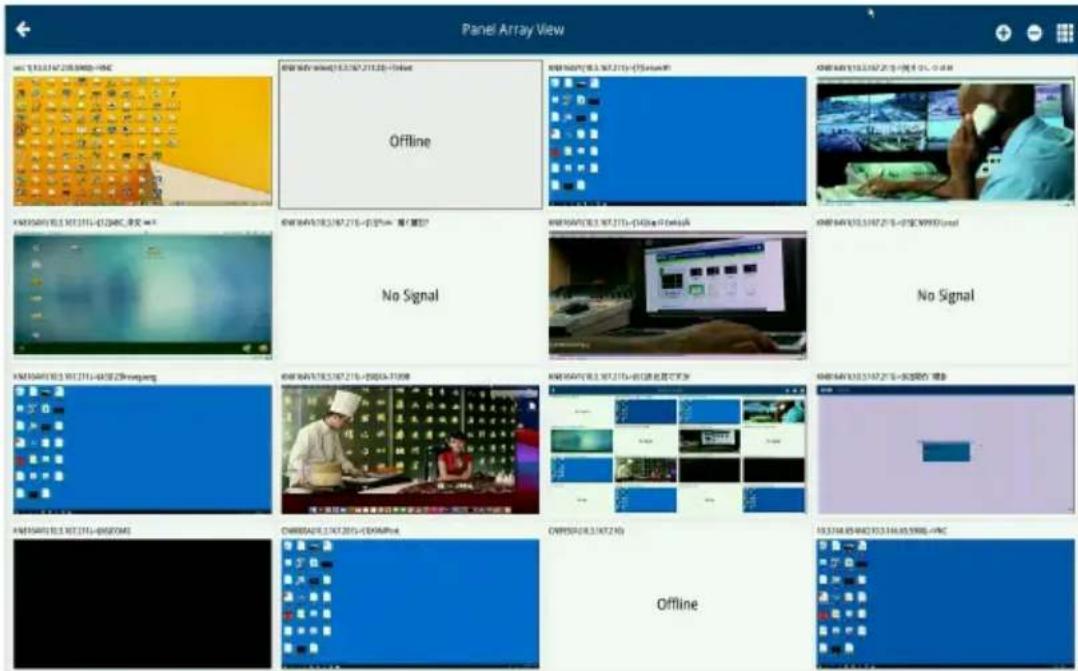
Press the + icon to display more device ports (up to 64 ports) on a smaller scale. Press the - icon to display less device ports on a larger scale. The diagram below displays an example of smaller scale.
The panel array icon is also shown on the top-right corner of the panel array page. Clicking it will allow you to select which array you would like to display, or display all device ports:
![Panel Array (0.90.55)->[1]testport All Devices ✓ array1 array2](/content/2026/05/999000/images/3d8eaadbb2492407d030534e7c939f7d2fed388e5c468afe050901d227b3b935.jpg)
Click the back arrow to go back to the dashboard.
Manage Device / Panel Array View
Click the Device or Panel Array icon to show their corresponding options. Due to their similarity, Manage Device View is used as the example below. Click Manage Device View (or Manage Panel Array View) for the following page:

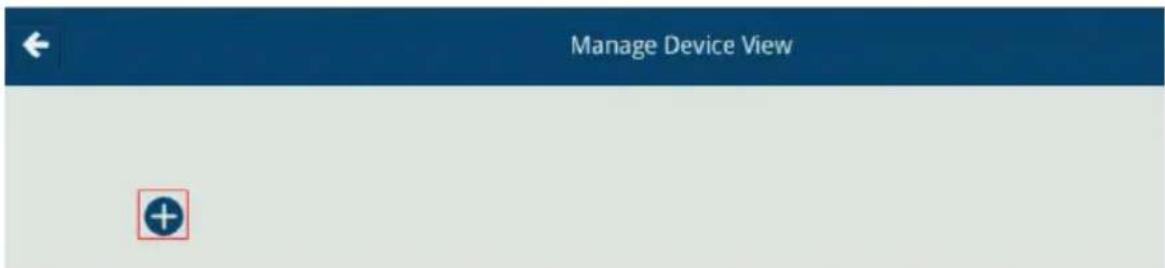
This page allows you to add / edit / delete device views.
Adding a Device / Panel Array View
- To add a device / panel array view, click the + icon. A new window is displayed:
Note: The maximum number of panel array view can be created is 16.
![Array Device Configuration Name array1 Available Devices: CN99501(10.3.167.210) [1] 10.3.166.65-VNC(10.3.166.65) VNC KN8164V-telnet(10.3.167.211) Telnet CN9000(10.3.167.208) [1] CN8000A(10.3.167.200) [1]KVMPort 10.3.167.236(10.3.167.236) RDP 10.3.167.245(10.3.167.245) RDP SN0116CO-SSH(10.3.166.136) SSH SN0148CO-SSH(10.3.166.133) SSH CN9900_abc(10.3.167.209) [1] SN9108CO-SSH(10.3.166.139) SSH CN8600-Telnet(10.3.167.205) Telnet SN3101-Telnet(10.3.166.152) Telnet KN8164V(10.3.167.211) Array Devices: KN8164V(10.3.167.211) [1]お元気ですか [3]重与オル已測完了 [7]已測完了 [9]ペロムパッサ [12]ABC_中文図ス [15]CN9900 Local [43]123freargaerg [66]COM2 [58]KA-7189B [62]VM3200Output4_089D2 vnc 1(10.3.167.235) VNC 10.3.166.12(10.3.166.12) RDP OK Cancel](/content/2026/05/999000/images/2bcfecc39a4024b0499d39f5e2e8927dcad9b8c86b44857cdfdca3df851c4058.jpg)
- Enter a name for the new device / panel array view.
Note: The maximum number of character can be entered is 32.
-
Under Available Devices, select the devices you wish to add in this device / panel array view and click the > button. Alternatively, select any device you want to remove from this device / panel array view and click the < button.
-
Optionally change the order of the devices by clicking the up and down arrows.
-
Click OK to finish. The device view is shown:

Adding another Device View
If you wish to add another device view, click the + icon again and go through the steps outlined in Adding a Device / Panel Array View.

Editing a Device View
If you wish to edit a device view, click the pen icon beside the Device View.

The Tab Device Configuration window is displayed, as in Adding a Device / Panel Array View.
Edit its name, shift the devices around using the > or < icons and click OK when done.
Note: The maximum number of characters can be entered is 32.
Deleting a Device View
If you wish to delete a device view, click the X icon beside the Device View.

Boundless Switching with Cascade
Boundless Switching with cascade allows users to move mouse cursor across screens between two console stations. In boundless switching, the cascaded unit is controlled by the parent unit, and does not operate independently. Keyboard and mouse are required to connect to the parent unit for boundless switch to work.

flowchart
graph TD
    A["ATEN"] --> B["Cascade"]
    B --> C["ATEN"]
    D["User"] --> B
    E["Desktop"] --> B
    F["Mobile Device"] --> B
    G["Computer"] --> B
    H["Switch"] --> I["ATEN"]
    J["ATEN"] --> K["ATEN"]
    L["ATEN"] --> M["ATEN"]
    N["ATEN"] --> O["ATEN"]
    P["ATEN"] --> Q["ATEN"]
    R["ATEN"] --> S["ATEN"]
    T["ATEN"] --> U["ATEN"]
    V["ATEN"] --> W["ATEN"]
    X["ATEN"] --> Y["ATEN"]
    Z["ATEN"] --> AA["ATEN"]
    AB["ATEN"] --> AC["ATEN"]
    AD["ATEN"] --> AE["ATEN"]
    AF["ATEN"] --> AG["ATEN"]
    AH["ATEN"] --> AI["ATEN"]
    AJ["ATEN"] --> AK["ATEN"]
    AL["ATEN"] --> AM["ATEN"]
    AN["ATEN"] --> AO["ATEN"]
    AP["ATEN"] --> AQ["ATEN"]
    AR["ATEN"] --> AS["ATEN"]
    AT["ATEN"] --> AU["ATEN"]
    AV["ATEN"] --> AW["ATEN"]
    AX["ATEN"] --> AY["ATEN"]
    AZ["ATEN"] --> BA["ATEN"]
    BB["ATEN"] --> BC["ATEN"]
    BD["ATEN"] --> BE["ATEN"]
    BF["ATEN"] --> BG["ATEN"]
    BH["ATEN"] --> BI["ATEN"]
    BJ["ATEN"] --> BK["ATEN"]
    BL["ATEN"] --> BM["ATEN"]
    BN["ATEN"] --> BO["ATEN"]
    BP["ATEN"] --> BQ["ATEN"]
    BR["ATEN"] --> BS["ATEN"]
    BT["ATEN"] --> BU["ATEN"]
    BV["ATEN"] --> BW["ATEN"]
    BX["ATEN"] --> BY["ATEN"]
    BZ["ATEN"] --> CA["ATEN"]
    CB["ATEN"] --> CC["ATEN"]
    DD["ATEN"] --> EE["ATEN"]
    FF["ATEN"] --> DG["ATEN"]
    DH["ATEN"] --> DI["ATEN"]
    DJ["ATEN"] --> DK["ATEN"]
    DL["ATEN"] --> DM["ATEN"]
    DB["ATEN"] --> DE["ATEN"]
    DF["ATEN"] --> DG
    DG --> DG
Note: 1. Boundless switching supports up to 4 displays between two console stations.
-
It is unnecessary to cascade two console stations, boundless switching works as long as both console stations are within the same network segment.
-
Audio output is delivered from the console station where the source screen is located. For example, the audio output is delivered from the cascaded unit if the audio source is coming from the 3rd display.
-
Virtual media is supported from the console station where the source screen is located. For example, the virtual media is supported from the cascaded unit if the USB storage is mounted on it.
To set up boundless switching, please see Cascade, page 63.
Selecting a Display
To select a display, click on ≡ and the below page appears.
![ATEN | KA8270 View: tsb1 KA81640[10.3.166.162] [5]KA7169-20191220 Primary Display Second Display Third Display Fourth Display Open GUI Disconnect](/content/2026/05/999000/images/069e21550d3d79e7668d9634fd3afc7a0943cef78d91b2356ba309c9cc38ebee.jpg)
Stopping the Cascade
To stop the cascade, simply mouse over the cascaded screen and click Stop Cascading.
Note: If the cascade is disconnected, or one of the unit is powered off. The boundless switching will resume to the previous settings whenever the connection or power is reestablished.
Extended Desktop
Extended Desktop allows any remote servers connected via KN2116VA / KN4116VA / KN2124VA / KN4124VA / KN2132VA / KN4132VA / KN8132V / KN2140VA / KN4140VA / KN4164V / KN8164V that are configured as 2 video sources, in horizontal layout under Multi-View, to be displayed onto the dual screens of the KVM over IP console station as extended desktop upon access.

flowchart
graph LR
    A["Server"] --> B["KN4140VA"]
    B --> C["Network"]
    C --> D["KA8278/KA8288"]
    D --> E["Computer"]
Note: 1. When using extended desktop, 2 buses of the KN2116VA / KN4116VA / KN2124VA / KN4124VA / KN2132VA / KN4132VA / KN8132V / KN2140VA / KN4140VA / KN4164V / KN8164V is used.
- The Extended Desktop function cannot be used in conjunction with Boundless Switching.
- For Extended Desktop to function properly, make sure of the following:
a. The mouse pointer must be set to manual mode.
b. Both of the video sources must have the same resolution settings, with the size of text, apps, and other items set to 100% under Windows' Display settings.
c. When configuring on the KN device, the numbers assigned to the video sources must correspond to that of Windows' Display settings.
![Port Property Associated Link Multi-View Number Port 1 [04] Video#1 2 [03] Video#2 3 4 Customise your display 1 2 Newly Direct](/content/2026/05/999000/images/b21ca1557a8ccad23988910d1bc0eef6d7ce9748fd426e7d79edf869d8087e24.jpg)
- When the mouse pointers are out of sync, between the remote servers and the KVM over IP console station, users can move the pointers to the toolbar section for resynchronization.

First, make sure the remote server's two video sources have been properly connected to and configured on the KN device, as illustrated below.
![Port Property Associated Link Multi-View Number Port 1 [04] Video.#1 2 [03] Video.#2 3 4 Update Remove Up Down Advanced Layout [4]1920x1080 [3]1920x1080](/content/2026/05/999000/images/042dcdbb3177d339fe57b17733ac00102cdbcedc423a3afc04d65c518fd063e7.jpg)
To access the extended desktop with KVM over IP console station, select any one of the 2 video sources., the primary or secondary display, as exemplified below.

![Primary display Secondary display Open GUI Disconnect [1] test11 [3] 2003_LDAPS](/content/2026/05/999000/images/8e0bd895b27396a2f75082560fa7f59b9147dd030d14f5003b1a41895b402d6b.jpg)
This Page Intentionally Left Blank
Chapter 4
Device Management
Overview
Device management allows users with administrative authority to add devices to or remove devices from the console station. The KVM over IP console station can manage up to 256 KVM over-IP switches and simultaneously display previews for up to 16 devices.
Note: The maximum number of devices that can be displayed within a device view (including All Devices) is 16. If you have more than 16 devices added, make sure to create additional device views for displaying devices beyond 16.

Click on the Device Management icon to enter its main page.

Device List
The device list is displayed at the center of the Device Management page.
| Device Name | Devices | IP Address | |
| 1 | KN8164V | KVM | 10.3.167.211 |
| 2 | CN9600 | KVM | 10.3.167.204 |
| 3 | CNB000A | KVM | 10.3.167.201 |
| 4 | CNB000A | KVM | 10.3.167.200 |
| 5 | RCMDIP101 | KVM | 10.3.167.209 |
| 6 | Serial Console Server | SSH | 10.2.3.4:22 |
Search
The rectangular field at the top of the device list is the search box. Enter the IP address of the device you wish to search for to find that device.
Remove Device
If you wish to remove a device from the list, select it and click Delete.

Adding Devices
To add a device, click Add. The following options are displayed, as explained in the table below.
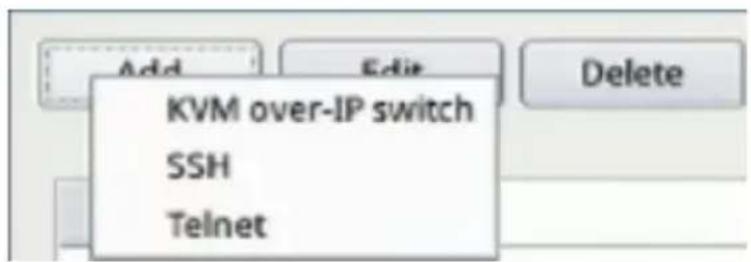
| Option Description | |
| KVM over-IP switch | Click to add KVM over-IP switches (see Adding KVM over-IP Devices, page 38). |
| SSH Click to add serial console devices via SSH protocol for remote management. | |
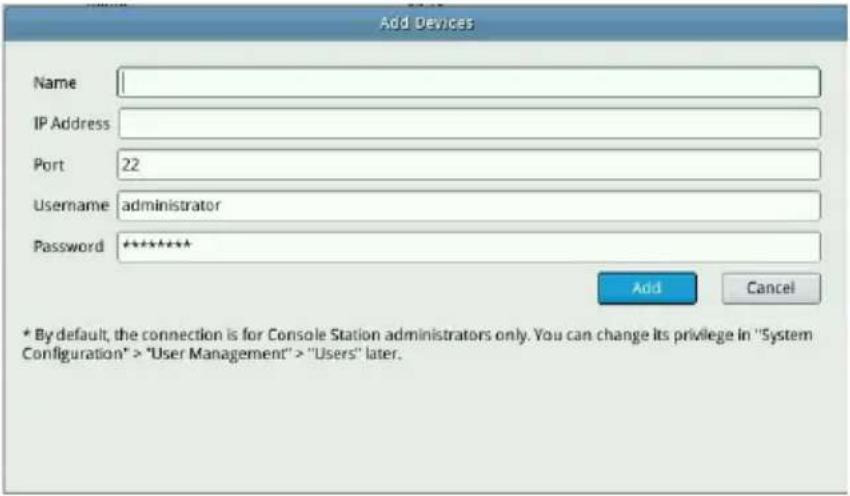 | |
| Telnet Click to add serial console devices via Telnet protocol for remote management. | |
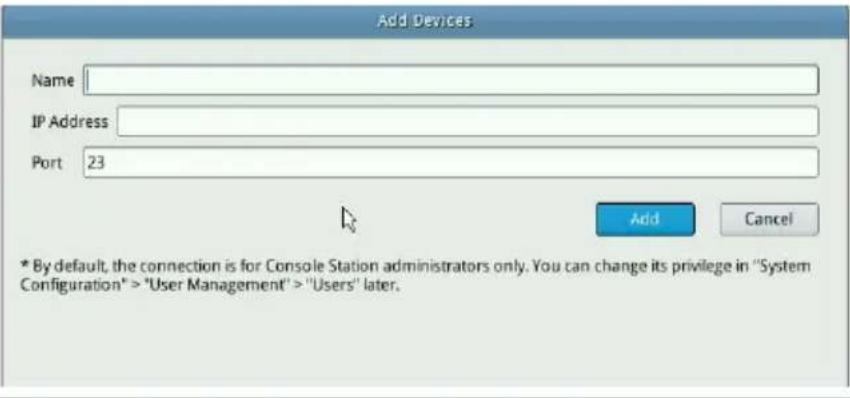 | |
Adding KVM over-IP Devices

Mouse over the search button (magnifying glass). A list of KVM device(s) within the same local area network (LAN) will be shown, as exemplified below:
![Device Name IP Address IPv6 Address KN8132V 10.3.41.221 [fe80::210:74ff.feb5:12]](/content/2026/05/999000/images/700bf92b056b73bc101b0d82d3f25155ac46bf212eaa8bf0846135fc9383a98b.jpg)
Select the desired device or simply enter the IP address of a known device; enter its Username and Password, and click Save to add the device to the system.
Note: 1. The entered username and password will determine the access rights of the KVM over-IP Switch.
2. If you select the desired device by clicking the Device Name or IP address section, the displayed name will show the device's IPv4 address. If you click the IPv6 address section, its IPv6 address is displayed instead.
3. If a KVM over-IP Switch is also added to CC2000 and has Disable Other Authentication enabled on the CC2000, the KVM over IP Console Station will not be able to access or control that switch.
Click Reset if you wish to re-enter the information.
The system will attempt to connect to the device. If successful, the device will be listed in the device list.
Changing Connection Information
If you wish to change the login account accessing an added device, for different access rights, you will need to change to a user with the desired access rights.
Follow the steps below:
- Select the device from the device list.
- Edit the settings in the Device Information section:

- Click Save to update the information.
- Log out of the KVM over IP Console Station and log in again to see the updated settings / display / access right.
This Page Intentionally Left Blank
Chapter 5
System Configuration
Overview
System configuration allows users with administrative authority to manage users and groups, display device information, configure network, advanced network management (ANMS), security settings, manage firmware upgrade, system backup / restore, push / pull configurations to or from other devices, access terminal, and reset system to factory default settings.

Click on the System Configuration icon to enter its main page.
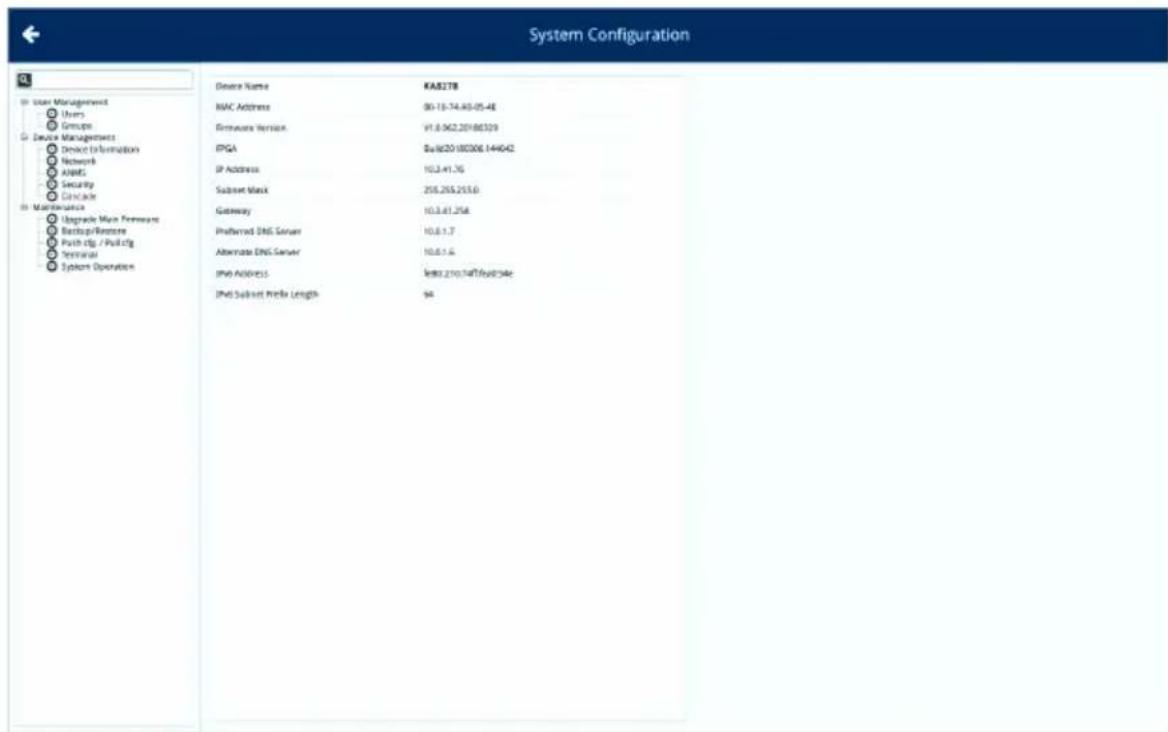
The page consists of a side menu and a information / configuration body.
By default, device information is displayed upon entering system configuration, page as shown above.
If an item in the side menu has a + or - symbol, a submenu is available and can be expanded or collapsed. Expand the submenu by clicking the + symbol, and collapse the submenu by clicking the - symbol.
User Management
This section allows you to manage users and groups.
Users and Groups
Groups allow administrators to easily and efficiently manage users and devices. Since device access rights apply to anyone who is a member of the group, administrators only need to set them once per group, instead of having to set them for each user individually. Multiple groups can be defined to allow some users access to specific devices, while restricting other users from accessing them.
The KVM over IP console station supports two privilege categories as determined by “User Types”. User types are selected during user creation. The description is shown in the table below:
| User Types Role | |
| Administrator Access and manage devices. Manage Users and Groups.Configure the overall installation. Configure personal working environment. | |
| User Access authorized devices. Configure personal working environment. | |
Click “Users” or “Groups” under “User Management” in the side menu to bring out their respective configuration page.
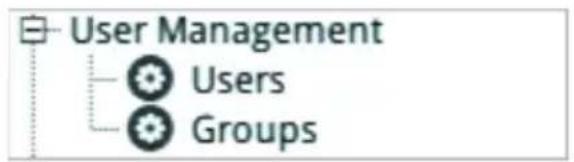
flowchart
graph TD
    A["User Management"] --> B["Users"]
    A --> C["Groups"]
User Page

Group Page
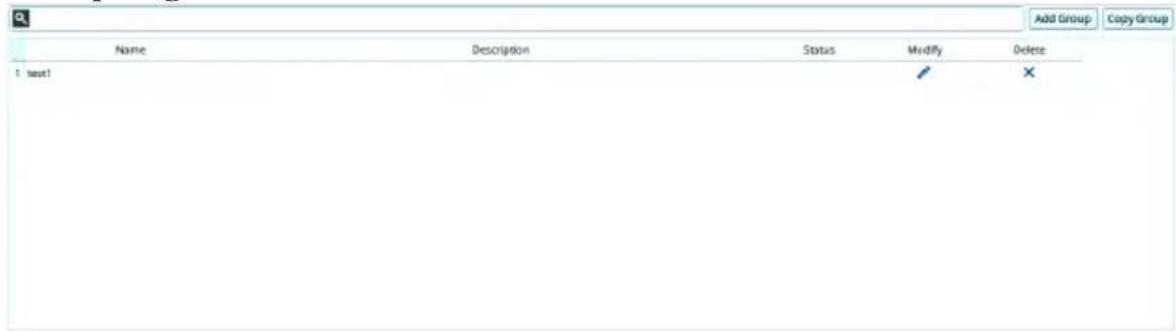
Add User
Since the management of users and groups are very similar, User is the example used for the operations below.
Note:1. The maximum number of user can be created is 64.
- The maximum number of group can be created is 16.
To add a user:
- Click "Add User" on the upper-right corner of the page.

The following will be displayed:
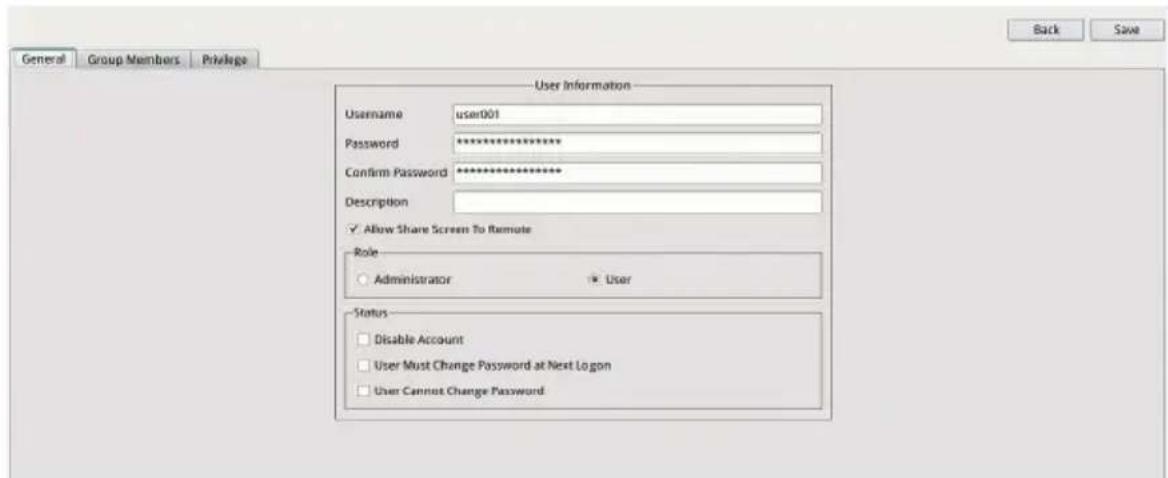
- Enter the required information in the appropriate fields. A description of the required user fields are given in the table below:
| Field Description | |
| Username | 1 to 32 characters are allowed depending on the Account Policy settings. See Account Policy on page 61. |
| Password 0 to 32 | characters are allowed depending on the Account Policy settings. See Account Policy on page 61. |
| Confirm Password | To make sure there is no mistake in the password, please enter it again. The two entries must match. |
| Description Additional information about the user that you may wish to include. | |
| Allow Share Screen to Remote | Select to allow sharing of port screen contents to another KVM over IP Console Station within the network.Note: This function is enabled by default. |
| Role There are two categories: Administrator and User. There is no limitation on the number of accounts that can be created in each category.The Administrator is responsible for the overall installation configuration and maintenance; user management; and device assignments.Each user assigned to administrator role will have the privilege of adding KVM over IP switches by default.Please refer to Using User Configuration Page on page 47. | |
| Status Status allows you to control the user's account and access to the installation, as follows:Disable Account lets you suspend a user's account without actually deleting it, so that it can be easily reinstated in the future.To require a user to change his password at the next logon, select User must change password at next logon. This can be used by the administrator to give the user a temporary password to log in for the first time, and then let the user set the password of his choice for future logins.To make a password permanent, so that the user cannot change it to something else, select User cannot change password. | |
If you choose Groups in the side menu, click Add Group for the page below:

A description of the required fields are given in the table below:
| Field Description | |
| Group Name Up to | 32 characters are allowed. |
| Description Additional information about the user that you may wish to include.A maximum of 45 characters is allowed. | |
- You can assign the new user to a group by selecting the Groups tab – the Groups page is discussed on page 48. You can also assign the user's port access rights by selecting the Devices tab – the Devices page is discussed on page 51.
Note: Optionally, you can skip this step now to add more users and create groups, and come back to it later.
-
When your selections have been made click Save.
-
When the Operation Succeeded message appears, click OK.
Click Back on the upper-right corner of the configuration body or click Users in the side menu to return to the User Management page.
The newly added user will appear in the configuration body.
- The information / configuration body shows the username, the description that was given when the account was created, whether the account is currently active or has been disabled and give you the option to modify or delete the user.

Copy User
To save time creating a user with similar settings / information, you may use the Copy User function. A “Copy User” button is shown on the upper-right corner of the configuration body.

Select the user you wish to copy and click the “Copy User” button; follow the information in Add User to complete the configuration.
Modify User
If you wish to modify the user's information, click the pen icon under the "Modify" column of the information / configuration body.
For configurable fields, please refer to Add User above.
Delete User
If you wish to delete a user, click the X icon under the “Delete” column of the information / configuration body.
The system will ask for confirmation as shown below:
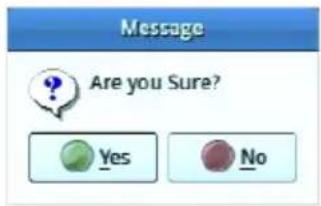
Click "Yes" to go ahead, or "No" to cancel action.
Managing (Assigning) Users and Groups
There are two ways to assign users to groups: from the Users configuration page; and from the Group configuration page.
Note: Before you can assign users to groups, you must first create them. See Add User on page 43 for details.
Using User Configuration Page
Follow the steps below to go to the User's configuration page:
- Click “Users” under “User Management” in the side menu to bring out the configuration page.
- Click the pen icon under the "Modify" column.
- In the configuration page, select the Group Members tab as shown:

Assign a User to a Group
- In the Available column, select the group that you want the user to be in.
- Click the >> icon button to put the group's name into the Selected column to add the user to group.
- Repeat the above for any other groups that you want the user to be in.
- Click Save when you are done.
Remove Users from a Group
- In the Selected column, select the group that you want the user to be removed from.
- Click the << icon button to remove the group's name from the Selected column to remove the user from the group.
- Repeat the above for any other groups that you want the user to be removed from.
- Click Save when you are done.
Using Group Configuration Page
Follow the steps below to go to the Group's configuration page:
- Click “Groups” under “User Management” in the side menu to bring out the configuration page.
- Click the pen icon under the "Modify" column.
- In the configuration page, select the Members tab as shown:

Assign Users to a Group
-
In the Available column, select the members (users) that you want the group to have.
-
Click the >> icon button to put the members into the Selected column (thereby adding into the group).
- Repeat the above to assign members to each group.
- Click Save when you are done.
Remove Users from a Group
- In the Selected column, select the members (users) to be removed from the group.
- Click the << icon button to put the members into the Available column (thereby removing from the group).
- Repeat the above to remove members from each group.
- Click Save when you are done.
Device Assignment
This function assigns access rights to users or groups and can be achieved from Device configuration page. Administrators can assign users to a particular user's privileges of an added KVM over IP Switch and access ports.
Using Device Configuration Page
Follow the steps below to go to the User's configuration page:
- Click “Users” under “User Management” in the side menu to bring out the configuration page.
- Click the pen icon under the "Modify" column.
- In the configuration page, select the Privilege tab as shown:
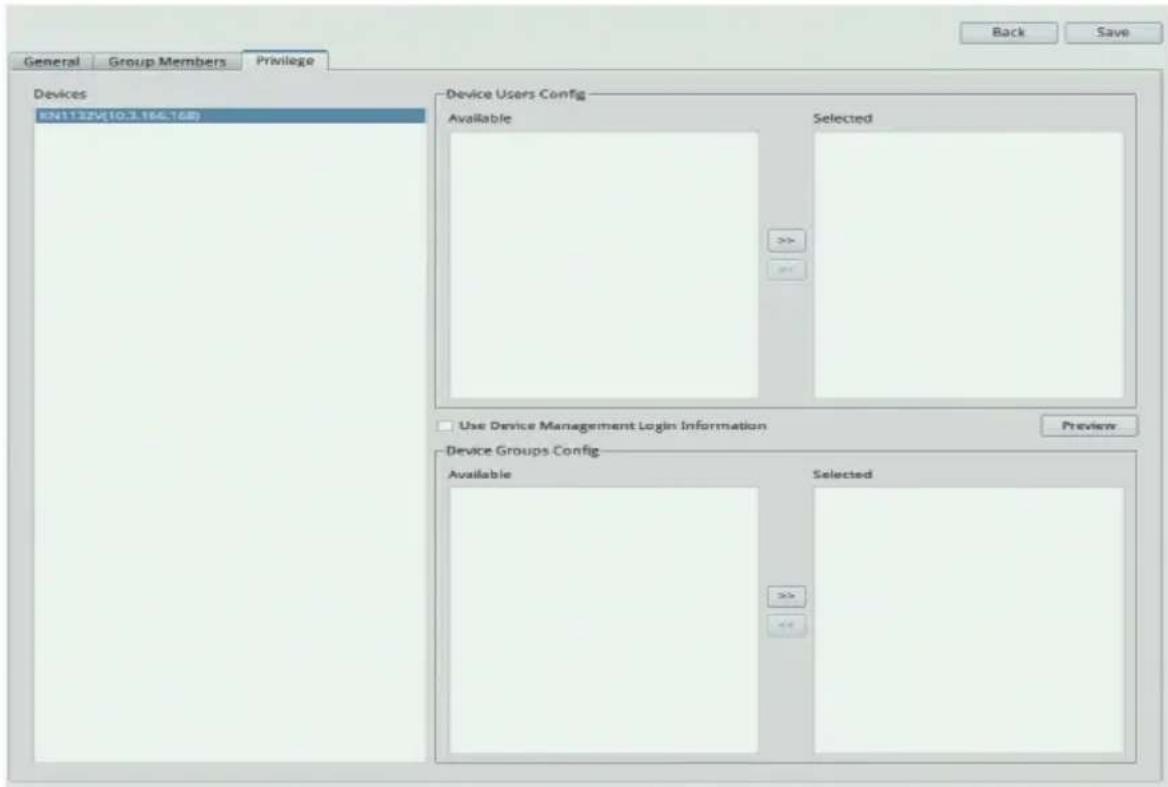
Each of the elements on this page is described below.
Devices
◆ The list displays the currently available device(s).
- When there is a change in the user accounts and groups for a device, please click the “Refresh” icon to refresh the user list of that device.
Device Users Config
- After selecting a device, the Available column (left column) lists the available users (of the device).
- The Selected column (right column) shows the selected user (of the device).
- Click the >> or << icon buttons to shift between Available and Selected.
- The user/group of the console station will gain the permission of the selected user (of the device).
- Each KVM over IP console station user can only be assigned to one user account privilege of the KVM over IP switch device.
Device Group Config
- After selecting a device, the Available column (left column) lists the available groups (of the device).
- The Selected column (right column) shows the selected groups (of the device).
- Click the >> or << icon buttons to shift between Available and Selected.
- The user/group of the console station will gain the permission of the selected groups (of the device).
User Device Management Login Information
- Checking this will block all selections in the Device Users Configuration and Device Groups Configuration sections, and grant the access rights of the user used to add this device.
- Please refer to Adding Devices on page 36 with regards to the access rights.
Preview
- Clicking this button will show the access rights of the above selections as exemplified below:
![Preview Name Access USB Config PON ENBT32V [01] PC Port Full access Full access Permitted Permitted [02] System Server-HQ Full access Full access Permitted Permitted [03] Full access Full access Permitted Permitted [04] System Server IP Full access Full access Permitted Permitted [05] Full access Full access Permitted Permitted [06] Full access Full access Permitted Permitted [07] Full access Full access Permitted Permitted [08] Full access Full access Permitted Permitted [09] KA7176 Full access Full access Permitted Permitted [10] KA7175 Full access Full access Permitted Permitted [11] Full access Full access Permitted Permitted [12] Full access Full access Permitted Permitted [13] Full access Full access Permitted Permitted [14] KA7175 Full access Full access Permitted Permitted [15] VM3200Output19_011D2 Full access Full access Permitted Permitted [16] Test Full access Full access Permitted Permitted [17] Full access Full access Permitted Permitted [18] Full access Full access Permitted Permitted [19] Full access Full access Permitted Permitted [20] Dell Full access Full access Permitted Permitted [21] IBM Full access Full access Permitted Permitted [22] HP Full access Full access Permitted Permitted](/content/2026/05/999000/images/700dedb30ccab703db5cfaa85f1e6412621e157740f7bb1df63ce17096006dc8.jpg)
Assigning SSH / Telnet Device Access to Users
By default, any devices added via SSH / Telnet can only be accessed by Administrator accounts.
To allow access of a such devices for a User, select the device under the Privilege tab as shown below.

On the right of the configuration page, check the Allow Connection to the Device option to allow access to this device for the User, and select one of the following:
- Use Device Management Login: use the same login credentials as configured within Device Management for accessing the serial console device.
- Use the Following Login Information: use another set of login credentials for accessing the serial console device, by entering the Username and Password.
System Management
This page shows device information and allows you to configure network, ANMS and security settings.
Note: Whenever a new setting is saved, the system will reboot.
System Information
Click “System Information” under “System Management” in the side menu to bring out the information page.

| Device Name | KA8270 |
| MAC Address | 00-10-74-17-81-01 |
| Firmware Version | V1.1.102.20191224 |
| FPGA | Build20191210.151114 |
| IP Address | 192.168.0.60 |
| Subnet Mask | 255.255.255.0 |
| IPv6 Address | fe80::210:74ff:fe17:8101 |
| IPv6 Subnet Prefix Length | 64 |
The System Information page displays the name of the selected device, its firmware version, the FPGA (Field-Programmable-Gate-Array) and information about its network configuration.
Double-click the Device Name (KA8278 in our example) to change the device name.
Network
The Network page is used to specify the network environment.
Click “Network” under “System Management” in the side menu to bring out the information page.

![IP Installer ● Enabled ○ View Only ○ Disabled IPv4 Settings IP Address ● Obtain IP address automatically [DHCP] ○ Set IP address manually [Fixed IP] IP Address 194.485.0.00 Subnet Mask 258.258.258.0 Gateway 0.0.0.0 DNS Server ● Obtain DNS server address automatically ○ Set DNS server address manually Preferred DNS Server 0.0.0.0 Alternate DNS Server 0.0.0.0 IPv6 Settings IPv6 Address ● Obtain IPv6 address automatically [DHCP] ○ Set IPv6 address manually [Fixed IP] IPv6 Address 1e80-210-74/1e-17-8/10+ IPv6 Subnet Prefix Length 64 Gateway DNS Server ● Obtain DNS server address automatically ○ Set DNS server address manually IPv6 Preferred DNS Server IPv6 Alternate DNS Server Save](/content/2026/05/999000/images/7e0b68fa3f63602704b3c3343c062f2dee5ce31f3e65093b159992b706a03306.jpg)
Each of the elements on this page is described below.
IP Installer
The IP Installer is an external Windows-based utility for assigning IP addresses to the KVM over IP switch.
Click one of the radio buttons to select Enable, View Only, or Disabled for the IP Installer utility. See IP Installer, page 268, for IP Installer details.
Note:
- If you select View Only, you will be able to see the KVM over IP switch in the IP Installer's Device List, but you will not be able to change the IP address.
- For security, we strongly recommend that you set this to View Only or Disable after each use.
IPv4 Settings
IP Address:
IPv4 is the traditional method of specifying IP addresses. The KVM over IP Console Station can either have its IP address assigned dynamically (DHCP), or it can be given a fixed IP address.
- For dynamic IP address assignment, select Obtain IP address automatically (default).
- To specify a fixed IP address, select Set IP address manually and fill in the fields with values appropriate for your network.
Note:
- If you choose Obtain IP address automatically, when the console station starts up it waits to get its IP address from the DHCP server. If it has not obtained the address after one minute, it automatically reverts to its factory default IP address (192.168.0.60.)
- If the switch is on a network that uses DHCP to assign network addresses, and you need to ascertain its IP address, see Supported KVM Switches on page 103 for information.
DNS Server
- For automatic DNS Server address assignment, select Obtain DNS Server address automatically.
- To specify the DNS Server address manually, select Set DNS server address manually, and fill in the addresses for the Preferred and Alternate DNS servers with values appropriate for your network.
Note: Specifying the Alternate DNS Server address is optional.
IPv6 Settings
At present, the KVM over IP console station supports three IPv6 address protocols: Link Local IPv6 Address, IPv6 Stateless Autoconfiguration, and Stateful Autoconfiguration (DHCPv6).
IP Address:
IPv6 is the new (128-bit) format for specifying IP addresses. The KVM over IP console station can either have its IPv6 address assigned dynamically (DHCP), or it can be given a fixed IP address.
- For dynamic IP address assignment, select Obtain IP address automatically (default).
- To specify a fixed IP address, select Set IP address manually and fill in the fields with values appropriate for your network.
DNS Server
- For automatic DNS Server address assignment, select Obtain DNS Server address automatically.
- To specify the DNS Server address manually, select Set DNS server address manually, and fill in the addresses for the Preferred and Alternate DNS servers with values appropriate for your network.
Note: Specifying the Alternate DNS Server address is optional.
Finishing Up
After making any network changes, be sure to click "Save" at the bottom of the configuration page.
ANMS
The ANMS (Advanced Network Management Settings) page is used to set up login authentication and authorization management from external sources.
Click “ANMS” under “System Management” in the side menu to bring out the information page.

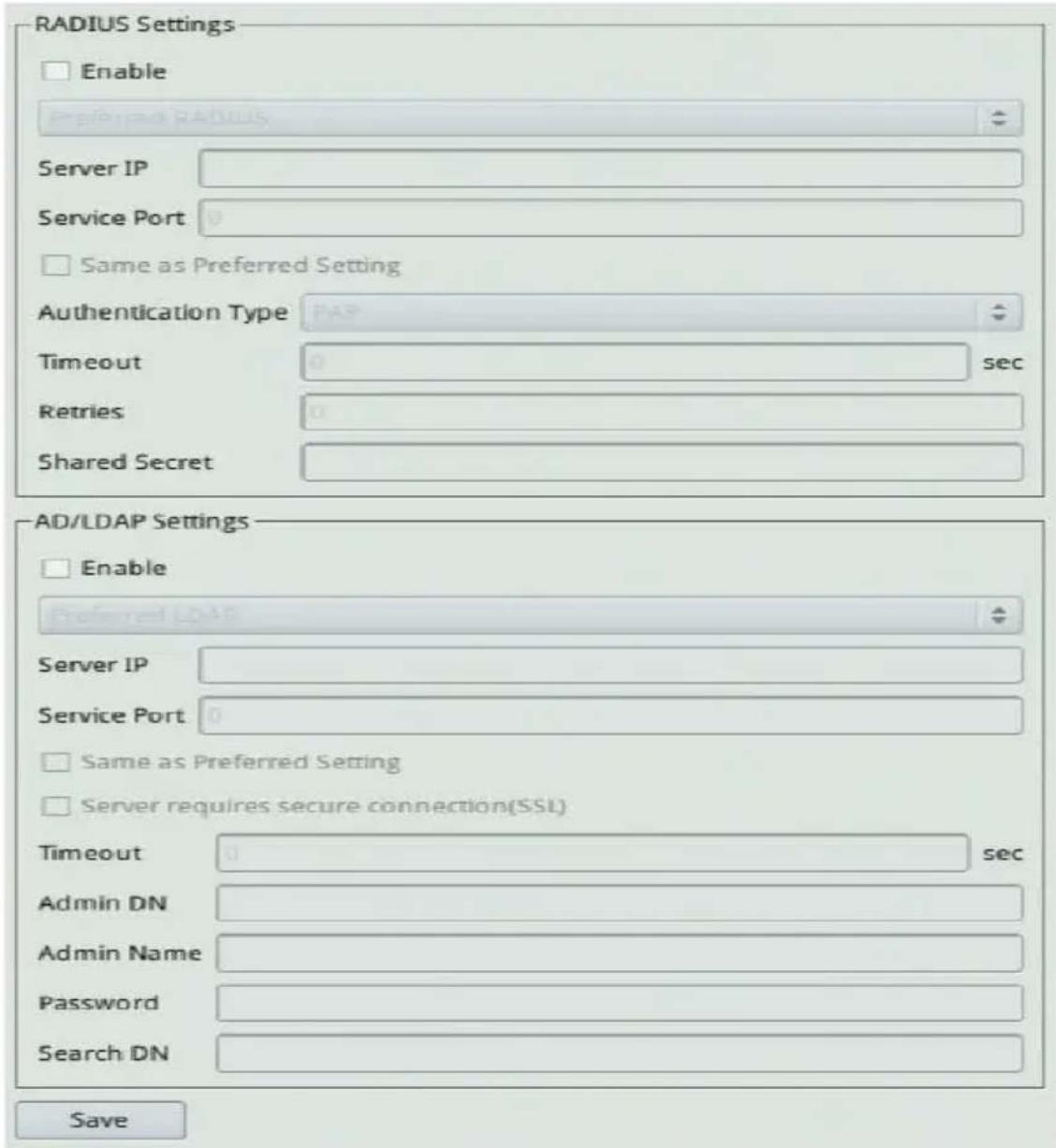
RADIUS Settings
To allow authentication and authorization for the KVM over IP Console Station through a RADIUS server, do the following:
- Check Enable.
- Select Preferred or Alternate RADIUS server.
- Fill in the IP addresses and service port numbers for the Preferred and Alternate RADIUS servers. You can use the IPv4 address, the IPv6 address or the domain name in the IP fields.
-
Select the Authentication Type: PAP or CHAP.
-
In the Timeout field, set the time in seconds that the KVM over IP console station waits for a RADIUS server reply before it times out.
- In the Retries field, set the number of allowed RADIUS retries.
- In the Shared Secret field, key in the character string that you want to use for authentication between the KVM over IP console station and the RADIUS Server. A minimum of 6 characters is required.
- On the RADIUS server, Users can be authenticated with any of the following methods:
◆ Set the entry for the user as su/xxxx
Where xxxx represents the Username given to the user when the account was created on the KVM over IP console station.
- Use the same Username on both the RADIUS server and the KVM over IP console station.
- Use the same Username name on both the RADIUS server and the KVM over IP console station.
In each case, the user's access rights are the ones assigned that were assigned when the User of Group was created on the KVM over IP console station (see Adding Devices on page 36).
AD / LDAP Settings
To allow authentication and authorization for the KVM over IP console station via AD / LDAP, refer to the information in the table, below:
| Item Action | |
| Enable Check the | checkbox to enable AD / LDAP authentication and authorization. |
| Type Click the drop | down menu to select between AD / LDAP. |
| Server IP Select P | Preferred or Alternate LDAP Server and fill in the IP address and port number for the LDAP or LDAPS server.You can use the IPv4 address, the IPv6 address or the domain name in theLDAP Server field.For LDAP, the default port number is 389. |
| Timeout This is the | time in seconds that the KVM over IP console station waits for an AD or LDAP server reply before it times out. |
| Admin DN Consult | the AD / LDAP administrator to ascertain the appropriate entry for this field. For example, the entry might look like this: ou=kn8132,dc=aten,dc=com |
| Admin Name Key in the administrator username. | |
| Password Key in the administrator password. | |
| Search DN Set the | distinguished name of the search base. This is the domain name where the search starts for user names. |
LDAP attribute is required for complete setup. LDAP attribute can be retrieved from the GET command using the Terminal interface. Please refer to Terminal on page 71 for more details.
On the AD / LDAP server, users can be authenticated with any of the following methods:
- With MS Active Directory schema.
- Without schema – Only the Usernames used on the KVM over IP console station are matched to the names on the LDAP server. User privileges are the same as the ones configured on the switch.
- Without schema – Only Groups in AD are matched. User privileges are the ones configured for the groups he belongs to on the switch.
- Without schema – Usernames and Groups in AD are matched. User privileges are the ones configured for the User and the Groups he belongs to on the switch.
Note: For more information on configuring LDAP, you can download the full LDAP instructional manual from our website.
Finishing Up
After making any ANMS changes, be sure to click "Save" at the bottom of the configuration page.
Security
The Security page is divided into 3 main panels, as described in the sections that follow.
Click “Security” under “System Management” in the side menu to bring out the information page.


Login Failures
For increased security, the Login Failures section allows administrators to set policies governing what happens when a user fails to log in successfully. To set the Login Failures policy, check the Enable checkbox (the default is for Login Failures to be enabled). The meanings of the entries are explained in the table below:
| Entry Explanation | |
| Allowed Sets the number of consecutive failed login attempts that are permitted from a remote computer. The default is 5 times. | |
| Timeout | Sets the amount of time a remote computer must wait before attempting to login again after it has exceeded the number of allowed failures. The default is 3 minutes. |
Note: If Login Failures is not enabled, users can attempt to log in an unlimited number of times with no restrictions. For security purposes, we recommend that you enable this function and enable the lockout policies.
Account Policy
In the Account Policy section, system administrators can set policies governing usernames and passwords.
The meanings of the Account Policy entries are explained in the table below:
| Entry Explanation | |
| Minimum Username Length | Sets the minimum number of characters required for a username from 1 to 32. The default is 6. |
| Minimum Password Length | Sets the minimum number of characters required for a password from 0 to 32. A setting of 0 means that no password is required. Users can login with only a username. The default is 6. |
| Password must Contain at least | Checking any of these items requires users to include at least one uppercase letter, one lowercase letter, or one number in their password.Note: This policy only affects user accounts created after this policy has been enabled and password changes to existing user accounts. |
| Enforce Password History | Check this to disallow users from reusing the past passwords when defining a user account's new passwords, as compared with its password history. |
Working Mode
An explanation of the Working Mode items is given in the table below:
| Item Explanation | |
| Enable ICMP Check / uncheck to allow / disallow the KVM over IP console station to be pinged. The default is Enabled. | |
| Allow Push Request from Remote | Check / uncheck to allow / disallow another KVM over IP console station to push configuration or FW to your console station. |
| Allow Pull Request from Remote | Check / uncheck to allow / disallow another KVM over IP console station to pull configuration from your console station. |
| Confirm before Receiving Shared Screen from Remote | ◆ Check to notify and requiring a confirmation from the user before receiving a shared screen from other KVM over IP console stations.◆ Uncheck to automatically receive shared screen from other KVM over IP console stations without requiring a confirmation. |
| Log out when Pressing POWER button | ◆ Check to enable automatic logout upon pressing the console station's power button to turn its screen off and pressing again to turn it back on. Once logged out, the user is required to type the login credentials, and log in, again.◆ Uncheck to disable automatic logout upon pressing the console station's power button to turn its screen off and pressing again to turn it back on. When turning the screen back on, the user is required to type the account's password to resume where he/she left off. |
| Console Keyboard Language | Click the drop down menu to select the console's local keyboard language. |
Finishing Up
After making any Security changes, be sure to click “Save” at the bottom of the configuration page.
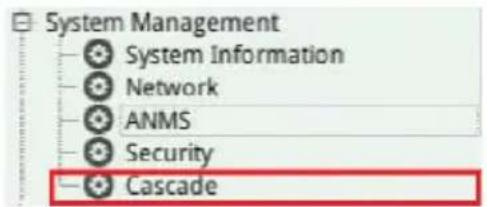
Cascade
The Cascade page is used to set up the boundless switching with Cascade.
Click “Cascade” under “System Management” in the side menu to bring out the information page.
You can cascade with another Console Station for boundless switching that allow you to control between units' displays with one set of keyboard/mouse.
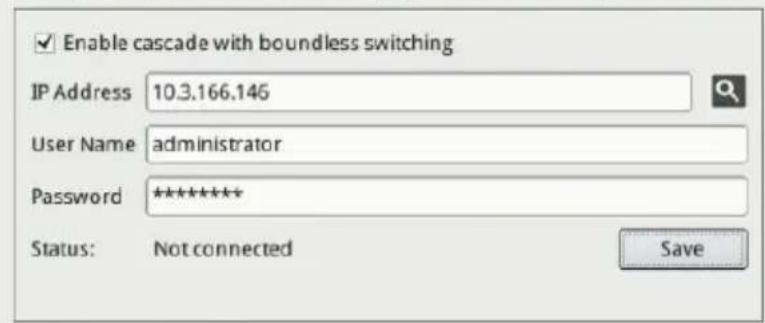
Note: To cascade one more unit, plug one end of an Ethernet cable into the Cascade port on the front panel, and then plug the other end of the cable to the LAN port of another Console Station.
The meanings of the Cascade entries are explained in the table below:
| Entry Explanation | |
| Enable cascade with boundless switching | Check/unchecked to enable/disable the cascade with boundless switching. The default is Disabled. |
| IP Address Enter the IP address of the KA8270 / KA8278 / KA8280 / KA8288 that you wish to do boundless switching with your Parent Unit from. | |
| User Name Key in the administrator username. | |
| Password Key in the administrator password. | |
| Status Status shows the cascade connection from Not connected / Cascaded with KA8270, KA8278, KA8280, or KA8288(IP) / Connecting. | |
Finishing Up
After entering the required entries, be sure to click "Save".
Maintenance
The Maintenance function is used to upgrade firmware; backup and restore configuration and account information; Push/pull configurations; send terminal commands, ping network devices; and restore default values.
Upgrade Main Firmware
As new versions of the firmware become available, they can be downloaded from our website. Check the website regularly to find the latest information and packages.
Click “Upgrade Main Firmware” under “Maintenance” in the side menu to bring out the information page.


To upgrade the main firmware:
- Gett the newest firmware by downloading the firmware from ATEN's website to a computer.
- Unzip the .zip file for the .csf file and transfer it to a USB flash drive.
Note: Please use FAT file system formatted USB flash drive(s).
-
Remove the USB flash drive from the computer and insert it to a USB port of the console station.
-
On the console station firmware page, click "Choose File" and a file management window will pop-up:

- Navigate to the directory that the new firmware file is in, click to select the file and click "Open".
The file will be displayed in the Filename field of the configuration page as shown below:

-
Click Upgrade Main Firmware to start the upgrade procedure.
-
If you enabled Check Main Firmware Version the current firmware level is compared with that of the upgrade file. If the current version is equal to or higher than the upgrade version, a popup message appears, to inform you of the situation and stops the upgrade procedure.
- If you didn't enable Check Main Firmware Version, the upgrade file is installed without checking what its level is.
- Upgrade progress information is shown in a Progress bar.
-
Once the upgrade completes successfully, the console station will restart.
-
Log in again and check if the firmware version is the newest one.
Note: To recover from a “failed upgrade” situation, see Firmware Upgrade Recovery on page 66.
Firmware Upgrade Recovery
Should the console station's main firmware upgrade procedure fail, and the console station becomes unusable, follow the firmware upgrade recovery procedure below to recover the console station to its original firmware version:
- Power off the console station by unplugging the power adapter.
- Press and hold the Reset Switch in using a sharp object.
- Download and save the firmware file you want to upgrade the console station with onto a USB flash drive, name it firmware.csf.
- Plug the USB flash drive containing firmware.csf into the console device.
- While holding the Reset Switch in, power up the console station by replugging the power adapter.
This upgrades the console station's firmware using the firmware file saved on the USB drive.
Backup / Restore
Backup/Restore gives you the ability to back up the console station's configuration and user profile information.
Click “Backup/Restore” under “Maintenance” in the side menu to bring out the information page.

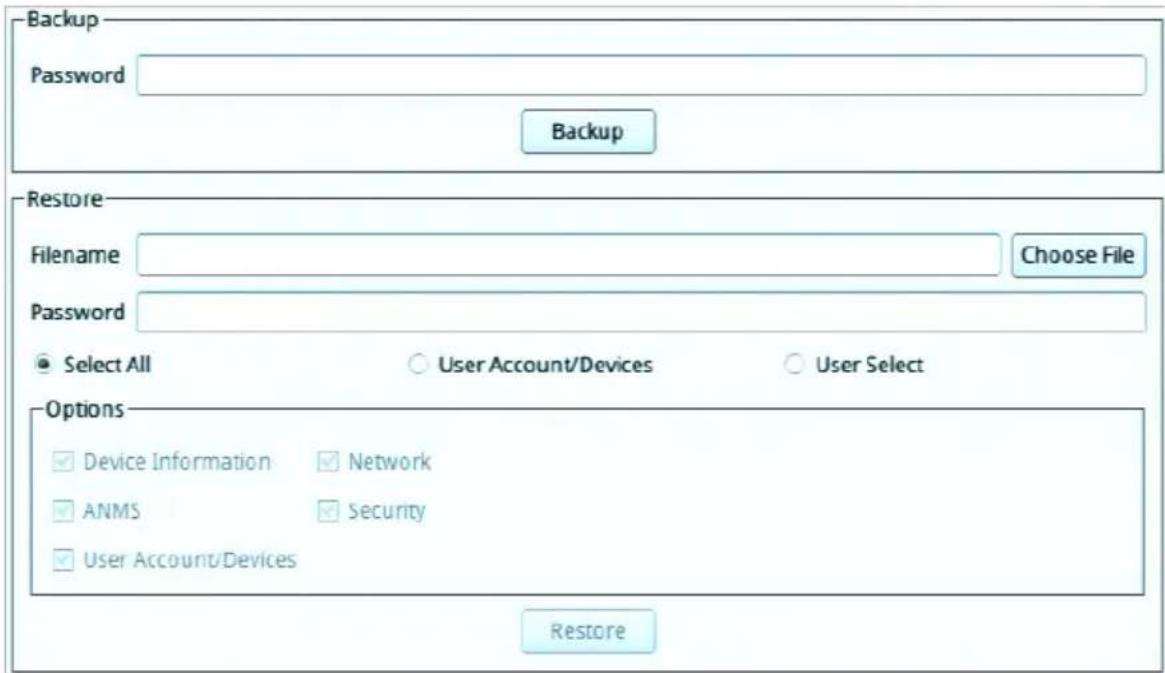
Backup
To backup the device's settings:
Note: A USB flash drive is required to be connected to the console station to store the backup file.
- (Optional) In the Password field, key in a password for the file.
Note:
-
Setting a password is optional. If you do not set one, the file can be restored without specifying a password.
-
If you do set a password, make a note of it, since you will need it to be able to restore the file.
-
Click "Backup". A file management window will pop-up as shown below:

- In the File name field, enter a backup file name and click "Save".
The system will display a success message to indicate successful backup.
Restore
To restore a previously-saved settings:
Note: A USB flash drive with the previously backed-up file is required to be connected to the console station for backup file retrieval.
- Click the "Choose File" button for the file management window:

-
Where applicable, go to the directory with the backup file (.cfg), click to select the file (highlighted as shown above) and click "Open".
-
If you set a password when you created the file, key it in the Password field.
-
Select as many of the options that are presented as you wish to restore.
-
Click "Restore".
The system will display a success message to indicate the restoration was successful.
A “Your system will automatically restart in one minute” message will follow the success message above before the system restarts.
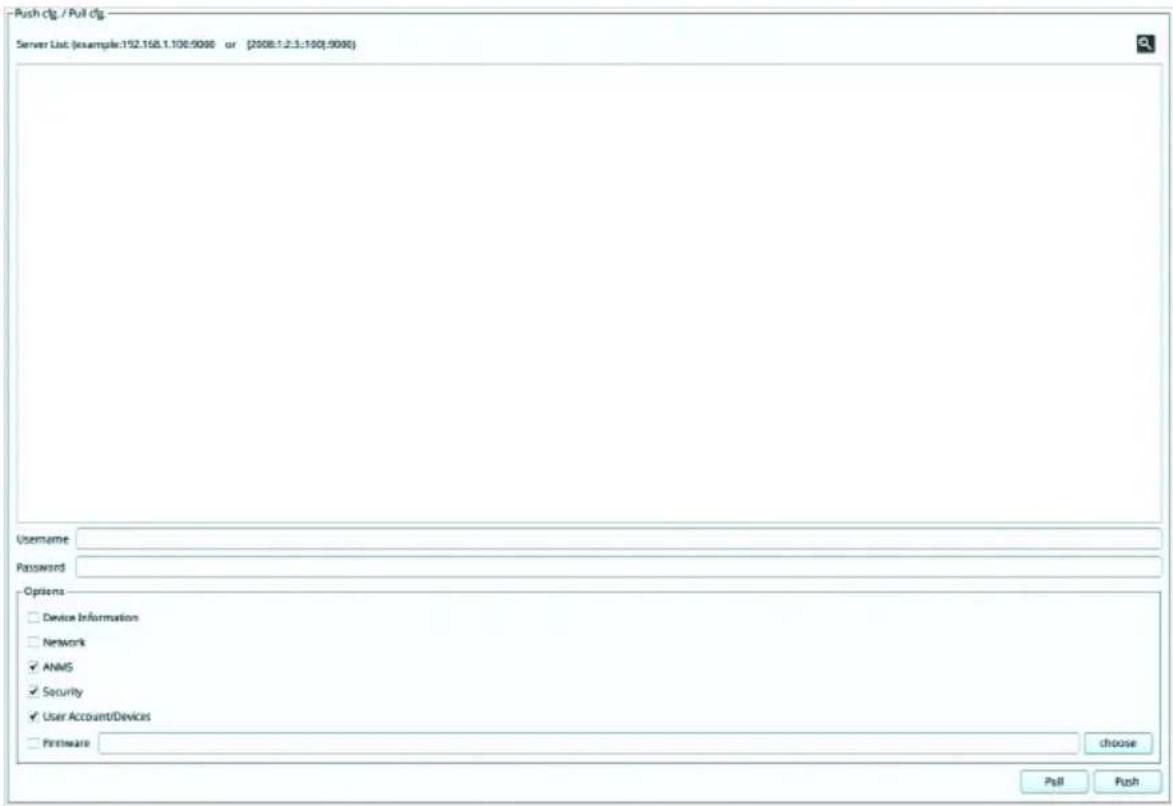
Push / Pull Configuration
Push / Pull Configuration gives you the ability to deploy or retrieve your settings to or from other console stations.
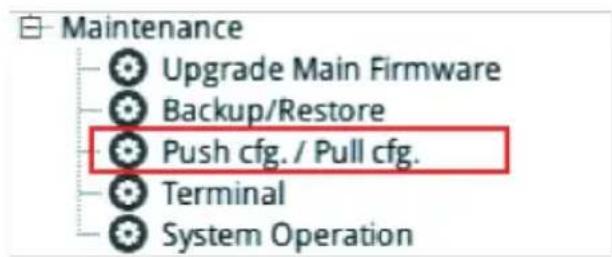
Click "Push cfg. / Pull cfg." under "Maintenance" in the side menu to bring out the information page.
Pull Configuration
To pull (retrieve) a configuration to your console station:
- Enter the device's IP address or IPv6 Address you wish to retrieve the configuration from.
Alternatively, you can mouse over the magnifying glass to find a list of the devices on the same LAN and click the device's IP or IPv6 address:
![Push cfg / Pull cfg. Server List (example:192.168.1.100:9000 or [2008:12:3:100]:9000) 10.3.41.140:9000 Device Name IP Address IPv6 Address KA8278 10.3.41.141 [fe80:210:74ff: -] KA8288 10.3.41.140 [fe80:210:74ff: -] KA8288 10.3.41.142 [fe80:210:74ff: -]](/content/2026/05/999000/images/dbe1d6c3148a72c39d4a4f5142122330c443efc704df5e0d9e232155f7e45538.jpg)
-
Enter the administrative username and password of the selected device.
-
Select the information you would like to retrieve to your console station by checking the checkbox(es).
Note: Firmware files cannot be retrieved. If you check the Firmware checkbox, the Pull button will not be available.
- Click Pull to retrieve the information.
The console station will restart after successfully retrieving the information.
Push Configuration
To push (deploy) a configuration from your console station:
Note: You can deploy the configuration / FW to multiple devices using one procedure (shown below) instead of one procedure for every device.
- Enter the device's IP address(es) or IPv6 Address(es) you wish to deploy the configuration to.
Alternatively, you can mouse over the magnifying glass to find a list of the devices on the same LAN and click the device's IP or IPv6 address:
![Push cfg / Pull cfg Server List:(example:192.168.1.100:9000 or [2008:1:2:3:100]:9000) 10.3.41.140:9000 Device Name IP Address IPv6 Address KA8278 10.3.41.141 [fe80:210:74fft] KA8288 10.3.41.140 [fe80:210:74fft] KA8288 10.3.41.142 [fe80:210:74fft]](/content/2026/05/999000/images/f34ce97628f1e1cae208c7b3fd8e2a8e22dd476be38c444de94af7968aac9a1d.jpg)
- Enter the administrative username and password of the selected device(s).
- Select the information you would like to deploy from your console station by checking the checkbox(es).
Note: If you checked the Firmware checkbox, please remember to click the Choose button to select a firmware from a USB flash drive.
- Click Push to deploy the information.
The console station(s) will restart after successfully receiving the deployment information.
Terminal
Terminal provides a command line to execute options using a terminal interface. Type a command in the window and hit [Enter] to execute it.
Click “Terminal” under “Maintenance” in the side menu to bring out the terminal page.
Note: Expand the submenu by clicking the + symbol if “Terminal” is not shown.


natural_image
Completely black image with no visible content or text.Available commands include:
♦ GET => Gets current configuration.
◆ HELP => Provides Help information for commands.
♦ CLEAR => Clears the screen.
◆ PING => Displays ping host information.
SETLDAPMEMBER => Sets new value for ldap member.
SETLDAPMEMBEROF => Sets new value for ldap memberof.
♦ SETPROMPT => Sets prompt string.
- TRACERT => Displays trace route information.
◆ DEVICEHISTORY => Clear/Enable/Disable device list history
♦ SELFDIAGNOSTIC => Self Diagnostic
♦ SETMOUSEACC => Check if mouse acceleration is enabled or not
♦ SETMOUSEACC 1 / 0 => Enable / disable mouse acceleration
Note: 1. For support and use of CM1284, mouse acceleration must be disabled.
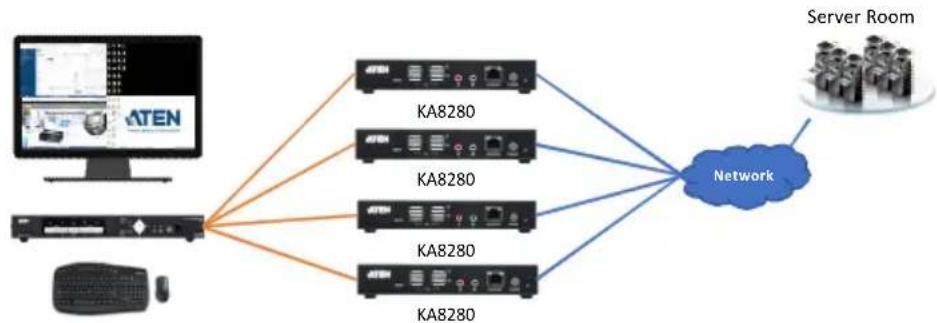
flowchart
graph TD
    A["Server Room"] --> B["KA8280"]
    A --> C["KA8280"]
    A --> D["KA8280"]
    A --> E["KA8280"]
    B --> F["Network"]
    C --> F
    D --> F
    E --> F
- When not using CM1284, mouse acceleration should be enabled.
System Operation
The System Operation page lets you restore certain configuration changes that were made to the KVM over IP console station back to their original factory default values.


flowchart
graph TD
    A["ATEN"] --> B["Switch Video Output"]
    C["Device 1"] --> B
    D["Device 2"] --> B
Reset Default Values
Clicking this button undoes all Customization page changes that have been made to the KVM over IP console station and returns the parameters to the original factory default settings.
The system will ask for confirmation:

Click Yes to go ahead. The system will restart after the reset.
Click No to cancel operation.
Reset on exit:
If you checked the checkbox, the system will ask if you would like to reset the KVM over IP console station (and implement all the new settings) upon exiting the System Configuration page.
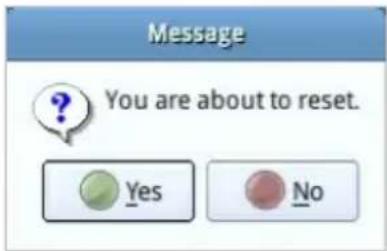
Click Yes to go ahead with the reset (the system will also reboot).
Click No if you do not want the system to be reset.
If you change the console station's IP Address (see Network on page 53), the checkbox is automatically checked and the console station will reset when you exit the page.
If you clear the check mark before exiting the page, the changed IP settings will be ignored and the original IP address settings will remain in effect.
Note: Even though the changed IP settings are ignored, they still remain in the network settings fields. Which means that the next time you open this page the Reset on exit checkbox will automatically be enabled, and when the console station resets, the new IP settings that you thought you discarded will become the ones used by the console station. To avoid this problem, you should go back to the network settings page and be sure that the IP settings that appear in the fields are the ones you want to use.
Switch Video Output
Clicking this button to switch the video output for KA8278 / KA8288 only. To be able to use Switch Video Output, both display ports are required to connect to a display.
Quick User Configuration
The user icon allows quick access to password change, configure preferences, logout, restart the system, shut down the system, or display quick information about the console station.

Click the User icon for its menu:

| Option Description | |
| Change Password | Click this option to change the password of the current user. |
| User Preferences | Select the preferred language from the scroll menu. Language change will be shown immediately.Logout Timeout is the idle time period (no actions) where the system automatically logs you out. Set a logout timeout time in minutes. Enter 0 if you do not want the system to log you out from idling. |
| Logout Click this option to log out of the system. | |
| Restart Click this option to restart the system. | |
| Shutdown Click this option to safely shut down the system.This is recommended way to shut down the system. Pull the power adapter after the system display a safe-to-shutdown message. | |
| About Click this option to display the KVM over IP console station's device name, firmware version, IP address, and IPv6 address | |
This Page Intentionally Left Blank
Chapter 6
Toolbar Interface
Overview
The KVM over IP console station's interface provides a toolbar to help you with the remote control operations on the captured port. The toolbar is usually hidden.
To bring up the toolbar, locate a down arrow symbol as shown:

natural_image
Blue background with a white cursor pointer and a red rectangular border (no text or symbols)Mouse over the down arrow symbol to bring up the toolbar.

The meanings of the toolbar icons are explained in the table below:
| Icon Purpose | |
 | Video iconThis icon brings up the video settings. Please see Video Settings on page 79 for more details. |
  | Macros iconThis icon provides access to three functions found in the Macros dialog box: Hotkeys, User Macros, and System macros. Please see Macros on page 81 for more details.Mouse Sync Mode iconThis provides automatic locked-in synching of the remote and local mouse pointers – eliminating the need to constantly resync the two movements.Click the icon to toggle between Auto Mouse Sync Mode (mouse icon with an A) and Manual Mouse Sync Mode (mouse icon with an M).Please see Mouse Sync Mode on page 93 for more details. |
 | Connect iconClick for a list of available ports. Click to select the port you wish to connect to. |
 | Configuration iconClick for further configurations.Please see Further Configuration on page 88. |
Exit Remote Location
There are two ways to exit from the remote control operations on the captured port.
1. Click Back
On the toolbar interface, click the "Configuration icon" for more operation options. Click Back to exit remote location.
2. Use Macros
By default, pressing the “Exit Remote Location” hot keys (F2, F3, F4) will also exit remote location.
Note: Use the updated hot keys should there be a change to this function's hot key.
Video Settings
Click the Video icon on the toolbar to bring up the Video Settings dialog box. The options in the basic dialog box allow you to adjust the Screen Position, set Auto Sync, slide-to-adjust Performance bar setting, Enhanced Text Mode, slide-to-adjust Video Quality bar, and Set to Grayscale.

The meanings of the video adjustment options are given in the table below:
| Options Description / Operation | |
| Screen Position | Adjust the horizontal and vertical position of the remote server window by clicking the Arrow buttons. |
| Video Auto-Sync | Click Video Auto Sync to have the vertical and horizontal offset values of the remote screen detected and automatically synchronized with the local screen.Note:If the local and console station mouse pointers are out of sync, in most cases, performing this function will bring them back into sync.This function works best with a bright screen.If you are not satisfied with the results, use the Screen Position arrows (on the right) to position the remote display manually. |
| Preset / Customization | Using the Preset and Custom buttons allow you to set and save custom video settings, and revert back to default video settings. |
| Performance Use | the slide bar to select the type of Internet connection that the console station uses. Dragging the performance bar will also automatically adjust the Video Quality settings to optimize the quality of the video display.Since network conditions vary, if none of the preset choices seem to work well, you can use the Video Quality slide bar to adjust the settings to suit your conditions. |
| Enhanced Text Mode | Check to enhance color and video quality, especially for texts. |
| Video Quality Drag | the slider bar to adjust the overall Video Quality. The larger the value, the clearer the picture and the more video data goes through the network. Depending on the network bandwidth, a high value may adversely effect response time. |
| Set to Grayscale | Check to set video display to grayscale. |
Macros
The Macros icon provides access to three functions found in the Macros dialog box: Hotkeys, User Macros, and System Macros. Each of these functions is described in the following sections.

Hotkeys
Various actions related to manipulating the remote server can be accomplished with hotkeys. The Hotkey Setup utility (accessed by clicking this icon), lets you configure which hotkeys perform the actions.
Each action in the Actions column corresponds to the hot keys in the HotKey column on the same row. Check the checkbox in the Enable column on the same row to enable its hotkey.
To change the hotkey for an action:
-
If you are not in the "Hotkeys" tab, click to select to go into the Hotkeys page.
-
Highlight the Action and click Set Hotkey for the window dialog below:

-
Press your selected Function keys (one at a time). The key names will appear in the Hotkeys field as you press them.
-
You can use the same function keys for more than one action, as long as the key sequence is not the same.
-
To cancel setting a hotkey value, click Cancel; to clear an action's Hotkeys field, click Clear.
-
When you have finished keying in your sequence, click Save.
To reset all the hotkeys to their default values, click Reset.
An explanation of the Hotkey actions is given in the table below:
| Action | Explanation |
| Exit Remote Location | Breaks the connection to the KVM over IP console station and returns you to console station operation. This is equivalent to clicking the Back option under the Configuration icon of the toolbar. The default keys are F2, F3, F4. |
| Adjust Video | Brings up the Video Settings dialog box. This is equivalent to clicking the Video Settings icon on the console station toolbar. The default keys are F5, F6, F7. |
| Adjust Mouse This | synchronizes the local and remote mouse movements. The default keys are F8,F7,F6. |
| Video Auto-Sync | This combination performs an auto-sync operation. It is equivalent to clicking the Video Auto Sync button in the Video Settings dialog box. The default keys are F6,F7,F8. |
| Action Explanation | |
| Show / Hide Local Cursor | Toggles off and on: hides local cursor and locks the mouse pointer and keyboard use within the Windows/Java Client AP window, plus hides the control panel. This is equivalent to selecting the Single pointer type from the Mouse Pointer option under the Configuration icon of the toolbar. The default keys are F4,F5. |
User Macros
User Macros are created to perform specific actions on the remote server. To create a macro, do the following:
- If you are not in the “Macros” tab, click to select to go into the Macros page.
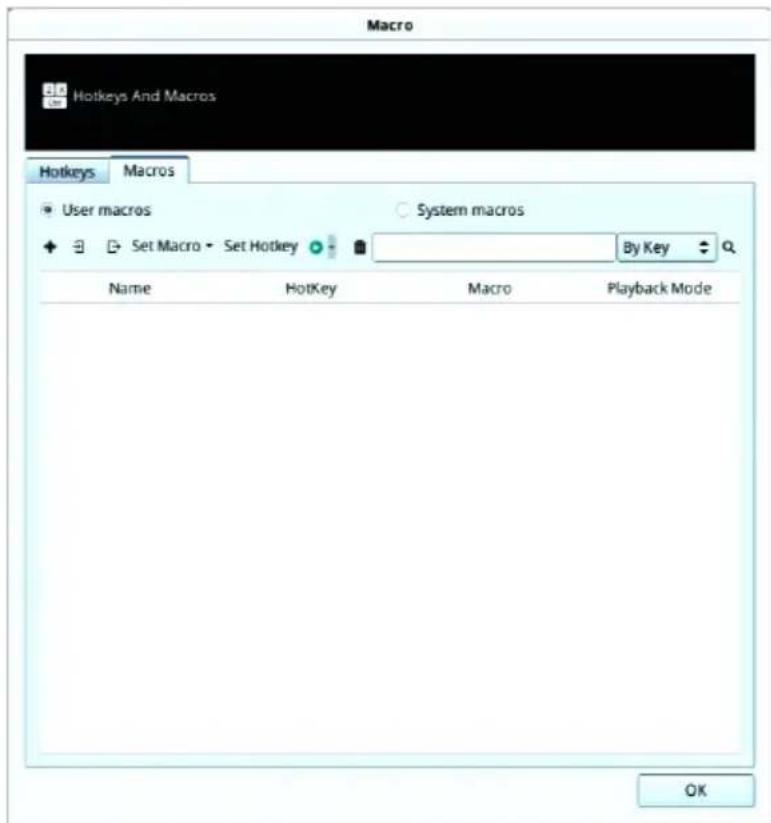
- Select User Macros and click the + symbol.

-
In the dialog box, you can choose to replace the “New Macro” text with a name of your choice for the macro.
-
Click Set Macro followed by Record.
The dialog box disappears as a small panel appears at the top left of the screen:

- Press the keys for the macro.
◆ To pause macro recording, click Pause. To resume, click Pause again.
- Clicking Cancel cancels all keystrokes.
Note:
- Case is not considered - typing A or a has the same effect.
-
Only the default keyboard characters may be used. Alternate characters cannot be used. For example, if the keyboard is Traditional Chinese and default character is A the alternate Chinese character obtained via keyboard switching is not recorded.
-
When finished, click Stop. You will return to the Macros dialog box with your macro key presses displayed in the Macro column:
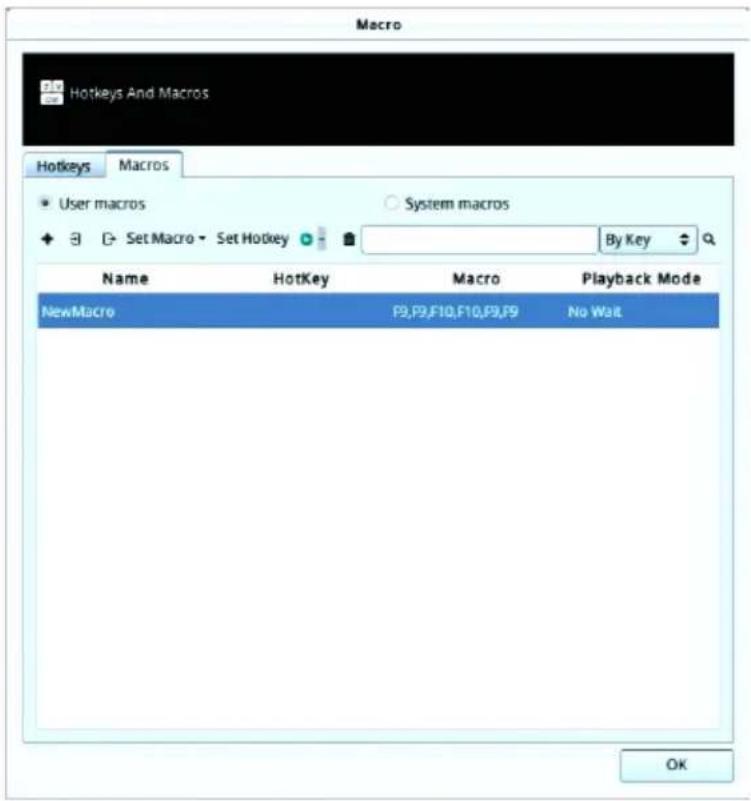
- If you want to change any of the keystrokes, select the macro, click Set Macro followed by Edit. This brings up a dialog box. You can change the content of your keystrokes, change their order, etc.
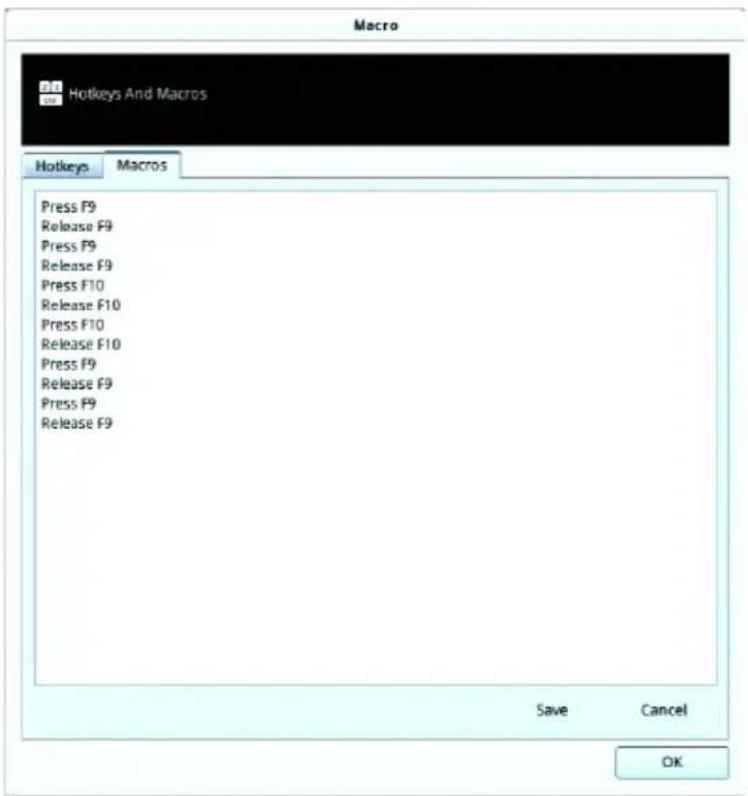
-
Click Save to save the changes, or click Cancel to cancel the changes. Both option will return you to the Macros dialog box.
-
Repeat the procedure for any other macros you wish to create.
After creating your macros, you can run them in any of three ways:
-
By using the hotkey (if one was assigned).
-
By playing it in this dialog box.
If you run the macro from this dialog box, you have the option of specifying how the macro runs. Click the down arrow symbol to select your option.

- No Wait: The macro runs the key presses one after another with no time delay between them.
- Time Ctrl (time control): The macro waits for the amount of time between key presses that you took when you created it.
- If you click the Play symbol without selecting an option, the macro runs with the default choice (No Wait or Time Ctrl), which is shown in the Playback Mode column.
You can change the default choice by clicking on the current choice (No Wait in the screenshot above), and selecting the alternate choice.
Import / Export Macros
The import / export function allows you to import or export macros from or to a USB flash drive.

- Click the import symbol → to search through the USB flash drive to import the macros.
- Click the export symbol → and enter a name to save the macros to the USB flash drive.
Delete Macros
To delete a macro, click to select the macro and click the trash can symbol to delete a macro.

Search Macros
The search function (on the top right-hand side of the dialog box) lets you filter the list of macros that appear in the list. Click the drop-down arrow (next to the magnifying glass icon) to choose whether you want to search by name or by key; enter a string in the search field for the search; then click the Search symbol (magnifying glass symbol). All instances that match your search string appear in the list.
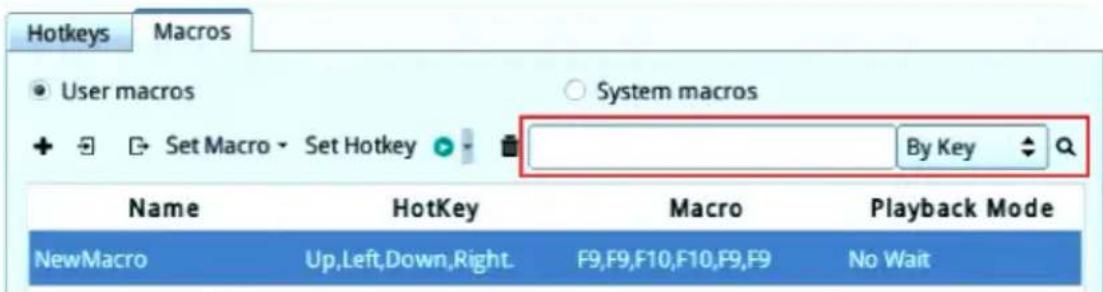
System Macros
System Macros are used to create exit macros for when you close a session. For example, as an added measure of security, you could create a macro that sends the Winkey-L combination which would cause the remote server's login page to come up the next time the device was accessed.
Ways to create, delete or search for macros are the same as User Macros, please refer to User Macros on page 83. System macros cannot be imported or exported.
For more information on system macros for different KVM over IP switches, please refer to their user manuals.
Further Configuration
More configuration options are available when clicking the configuration icon:
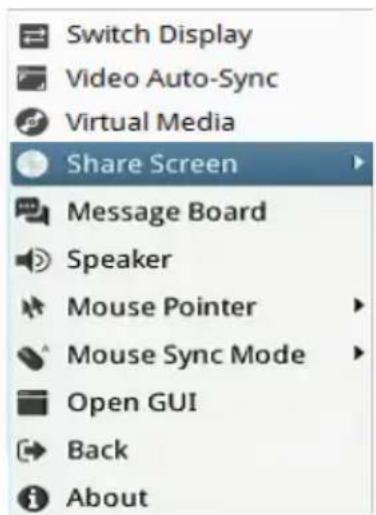
| Options Description | |
| Switch Display When you have a dual-display model (KA8278 or KA8288) and have both displays connected, this option will appear to allow you to switch between the two displays. | |
| Video Auto-Sync Click to perform a video and mouse autosync operation. It is the same as clicking the Auto Sync button in the Video Options dialog box (see Video Settings on page 79). | |
| Virtual Media | Click to bring up the Virtual Media dialog box. See Virtual Media on page 89 for specific details. |
| Note: This icon displays in gray when the function is disabled or not available. | |
| Share Screen | When there are multiple console stations connected within the network, you can share your current screen contents to another console station by selecting it under Share Screen. |
| Note: When shared, the console station receiving the shared contents is granted the same access and operation privileges as you, which will be lost when he closes or switches to another port. | |
| Message Board | Click to bring up the Message Board (see Message Board on page 91). |
| Speaker Click to toggle sound from the remote server to be heard on the client computer's speakers on or off. The option is grayed out when the speaker is toggled Off. The KA8278 / KA8288 only allows either one of the connected source to transmit sound. | |
| Mouse Pointer Mouse over the option and click to select the mouse pointer type.Note: In the main GUI page, only Dual and Crosshairs are available. In a port page, three pointers are available. | |
| Mouse Sync Mode | Mouse over the option and click to select the mouse sync mode.Please see Mouse Sync Mode on page 93. |
| Open GUI Click to open the GUI of the connected KVM over IP switch. Please refer to the user manual of the connected KVM over IP switch for more details. | |
| Back Click to return to the page on the KVM over IP Console Station that brought you here. | |
| About Click to get information about this connection.The information include Device Name, IP Address, Current Port, Video Mode and Channel / User Numbers. | |
Virtual Media
The Virtual Media feature allows a USB removable disk or a smart card reader on a user's system to appear and act as if it were installed on the remote server.
Note: ISO files of FAT 16/32 format saved on the inserted USB are also supported to be used on the remote servers.
To mount a virtual media device:
- Click the Virtual Media icon to bring up the Virtual Media dialog box:

- Click the + symbol and select the media source.

-
If your device only supports full speed USB, check the Disable High Speed USB Operation Mode checkbox.
-
To add additional media sources, click the + symbol, and select the source as many times as you require. Up to two virtual media choices can be mounted. The top three in the list are the ones that are selected. Virtual Media and Smart Card readers can be mounted at the same time. To rearrange the selection order, highlight the device you want to move, then click the Up or Down Arrow button to promote or demote it in the list.
-
Read refers to the redirected device being able to send data to the remote server; Write refers to the redirected device being able to have data from the remote server written to it. For the redirected device to be writable as well as readable, click to put a check in the Enable Write checkbox:
Note: If a redirected device cannot be written to, it appears in gray.
-
To remove an entry from the list, select it and click the trash can icon.
-
After you have made your media source selections, click Mount. The dialog box closes. The virtual media devices that you have selected are redirected to the remote server, where they show up as drives on the remote server's file system.
Once mounted, you can treat the virtual media as if they really existed on the remote server – drag and drop files to/from them; open files on the remote server for editing and save them to the redirected media, etc.
- To end the redirection, bring up the Control Panel and click on the Virtual Media icon. All mounted devices are automatically unmounted.
Message Board
The KVM over IP console station supports multiple user logins, which may cause access conflicts. To alleviate the problem, a message board has been provided, which allows users to communicate with each other.

Buttons
The buttons in the dialogue box toggles actions and are described in the table below:
| Button Action | |
 | Enable/Disable Chat. When disabled, messages posted to the board are not displayed. The button is shadowed when Chat is disabled. The icon displays next to the user's name in the User List panel when the user has disabled Chat. |
 | Occupy/Release Keyboard/Video/Mouse. When you Occupy the KVM, other users cannot see the video, and cannot input keyboard or mouse data. The button is shadowed when the KVM is occupied. The icon displays next to the user's name in the User List panel when the user has occupied the KVM. |
 | Occupy/Release Keyboard/Mouse. When you Occupy the KM, other users can see the video, but cannot input keyboard or mouse data. The button is shadowed when the KM is occupied. The icon displays next to the user's name in the User List panel when the user has occupied the KM. |
 | Show/Hide User List. When you Hide the User List, the User List panel closes. The button is shadowed when the User List is open. |
Message Display Panel
Messages that users post to the board - as well as system messages - display in this panel. If you disable Chat, however, messages that get posted to the board will not appear.
Compose Panel
Key in the messages that you want to post to the board in this panel. Click Send to post the message to the board.
User List Panel
The names of all the logged in users are listed in this panel.
- Your name appears in blue; other users' names appear in black.
- By default, messages are posted to all users. To post a message to one individual user, select the user's name before sending your message.
If a user's name is selected, and you want to post a message to all users, select All Users before sending your message.
If a user has disabled Chat, the disable chat icon will be displayed on the left of user's name.
- If a user has occupied the KVM or the KM, the corresponding icon will be displayed on the left of the user's name.

Mouse Sync Mode
Synchronization of the local and remote mouse pointers is accomplished either automatically or manually.
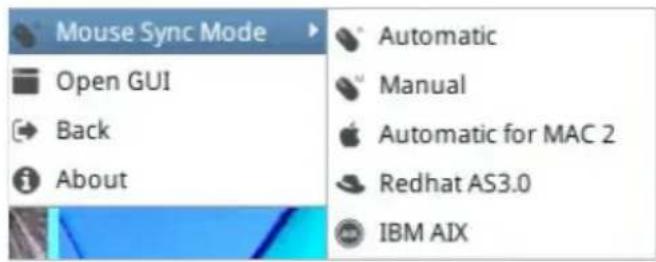
Automatic Mouse Synchronization
This provides automatic locked-in synching of the remote and local mouse pointers – eliminating the need to constantly resync the two movements.
Manual Mouse Synchronization
If the local mouse pointer goes out of sync with the remote system's mouse pointer there are a number of methods to bring them back into sync:
- Perform an Auto Sync with the Video Adjustment function (see Video Settings, page 79, for details).
- Invoke the Adjust Mouse function with the Adjust Mouse hotkeys (see Adjust Mouse on page 82 for details).
- Set the mouse speed and acceleration for each problematic server attached to the switch. See the user manual of the corresponding KVM over IP switch for instructions.
Mac and Linux Considerations
- For Mac OS versions 10.4.11 and higher, there is a second Sync setting to choose from. If the default Mouse Sync result is not satisfactory, try the Mac 2 setting. To select Mac 2, click the Further Configuration icon, mouse over Mouse Sync Mode → Automatic for Mac 2:
- Linux does not support Sync Mode, but there is a setting on the Mouse Sync Mode menu for Redhat AS3.0 systems. If you are using a USB Adapter Cable, with an AS3.0 system and the default mouse synchronization is not satisfactory, you can try the Redhat AS3.0 setting. In either case, you must perform the manual mouse synchronization procedures described above.
Safety Instructions
General
- This product is for indoor use only.
- Read all of these instructions. Save them for future reference.
◆ Follow all warnings and instructions marked on the device. - Do not place the device on any unstable surface (cart, stand, table, etc.). If the device falls, serious damage will result.
♦ Do not use the device near water. - Do not place the device near, or over, radiators or heat registers.
- The device cabinet is provided with slots and openings to allow for adequate ventilation. To ensure reliable operation, and to protect against overheating, these openings must never be blocked or covered.
- The device should never be placed on a soft surface (bed, sofa, rug, etc.) as this will block its ventilation openings. Likewise, the device should not be placed in a built-in enclosure unless adequate ventilation has been provided.
- Never spill liquid of any kind on the device.
- Avoid circuit overloads. Before connecting equipment to a circuit, know the power supply’s limit and never exceed it. Always review the electrical specifications of a circuit to ensure that you are not creating a dangerous condition or that one doesn’t already exist. Circuit overloads can cause a fire and destroy equipment.
- Unplug the device from the wall outlet before cleaning. Do not use liquid or aerosol cleaners. Use a damp cloth for cleaning.
- The device should be operated from the type of power source indicated on the marking label. If you are not sure of the type of power available, consult your dealer or local power company.
- To prevent damage to your installation it is important that all devices are properly grounded.
- Do not allow anything to rest on the power cord or cables. Route the power cord and cables so that they cannot be stepped on or tripped over.
- Position system cables and power cables carefully; Be sure that nothing rests on any cables.
- When connecting or disconnecting power to hot-pluggable power supplies, observe the following guidelines:
- Install the power supply before connecting the power cable to the power supply.
- Unplug the power cable before removing the power supply.
-
If the system has multiple sources of power, disconnect power from the system by unplugging all power cables from the power supplies.
-
Never push objects of any kind into or through cabinet slots. They may touch dangerous voltage points or short out parts resulting in a risk of fire or electrical shock.
- Do not attempt to service the device yourself. Refer all servicing to qualified service personnel.
-
If the following conditions occur, unplug the device from the wall outlet and bring it to qualified service personnel for repair.
-
The power cord or plug has become damaged or frayed.
♦ Liquid has been spilled into the device. - The device has been exposed to rain or water.
- The device has been dropped, or the cabinet has been damaged.
- The device exhibits a distinct change in performance, indicating a need for service.
-
The device does not operate normally when the operating instructions are followed.
-
Only adjust those controls that are covered in the operating instructions. Improper adjustment of other controls may result in damage that will require extensive work by a qualified technician to repair.
Additional protection to secure and fix the equipment is needed if the equipment is installed by stacking; by locking it to the rack, screwing it to the frame, or other similar methods. - Keep the Cat 5e/6 cable as far away as possible from potential sources of EMI, such as electrical cables, transformers, and light fixtures. Do not tie the cables to electrical conduits or lay the cables on electrical fixtures.
Rack Mounting
Before working on the rack, make sure that the stabilizers are secured to the rack, extended to the floor, and that the full weight of the rack rests on the floor. Install front and side stabilizers on a single rack or front stabilizers for joined multiple racks before working on the rack.
- Always load the rack from the bottom up, and load the heaviest item in the rack first.
- Make sure that the rack is level and stable before extending a device from the rack.
- Use caution when pressing the device rail release latches and sliding a device into or out of a rack; the slide rails can pinch your fingers.
- After a device is inserted into the rack, carefully extend the rail into a locking position, and then slide the device into the rack.
- Do not overload the AC supply branch circuit that provides power to the rack. The total rack load should not exceed 80 percent of the branch circuit rating.
- Make sure that all equipment used on the rack – including power strips and other electrical connectors – is properly grounded.
- Ensure that proper airflow is provided to devices in the rack.
- Ensure that the operating ambient temperature of the rack environment does not exceed the maximum ambient temperature specified for the equipment by the manufacturer
- Do not step on or stand on any device when servicing other devices in a rack.
Technical Support
International
- For online technical support – including troubleshooting, documentation, and software updates: http://eservice.aten.com
- For telephone support, see Telephone Support on page iii.
North America
| Email Support support@aten-usa.com | ||
| Online Technical Support | Troubleshooting Documentation Software Updates | http://eservice.aten.com |
| Telephone Support 1-888-999-ATEN | ext 49881-949-428-1111 | |
When you contact us, please have the following information ready beforehand:
◆ Product model number, serial number, and date of purchase.
- Your computer configuration, including operating system, revision level, expansion cards, and software.
◆ Any error messages displayed at the time the error occurred.
◆ The sequence of operations that led up to the error.
◆ Any other information you feel may be of help.
Specifications
| Function | KA8270 KA8278 | KA8280 KA8288 | ||
| Connectors | ||||
| Video | 1 x HDB-15 Female | 1 x HDB-15 Female 1 x HDMI Female | 1 x HDMI Female 2 | x HDMI Female |
| RS-232 1 x DB-9 Male | ||||
| Power 1 x DC | Jack | |||
| Audio 2 x Audio | Jack Female | |||
| LAN Ports 1 x | RJ-45 Female | |||
| Keyboard 1 x | USB Type-A Female | |||
| Mouse 1 x USB | Type-A Female | |||
| USB Port 2 x | USB Type-A Female | |||
| Cascade Port | 1 x RJ-45 Female | |||
| LEDs | ||||
| Power 1 (Blue) | ||||
| Switches | ||||
| Power 1 x Pushbutton | ||||
| Reset 1 x Semi-recessed Pushbutton | ||||
| Video | 1920 x 1200 @ 60 Hz | |||
| Power Consumption | DC 5 V 4.66 W | DC 5 V 6.53 W | DC 5 V 4.66 W | DC 5 V 6.53 W |
| Environmental | ||||
| Operating Temperature | 0 - 40 °C | |||
| Storage Temperature | -20 - 60 °C | |||
| Humidity | 0 - 80% RH, Non-condensing | |||
| Physical Properties | ||||
| Housing | Metal | |||
| Weight | 0.75 kg | 0.8 kg | 0.75 kg | 0.8 kg |
| Dimensions (L x W x H) | 17.42 x 15.54 x 2.88 cm | 17.42 x 15.54 x 2.88 cm | 17.42 x 15.54 x 2.88 cm | 17.42 x 15.54 x 2.88 cm |
Troubleshooting
General Operation
| Problem Resolution | |
| I have been given an account but I am unable to log in. | ♦ Make sure that you have correctly specified your Username and Password.♦ Make sure that the administrator has given you the necessary permission to access the console station. |
| Sudden loss of network connection. | Close your connection to the KVM over IP console station. Wait approximately 30 seconds, and log in again. |
| The display on the client computer is distorted and performing an Autosync doesn't resolve the problem. | Switch ports to a port with a different resolution, then switch back.If the above didn't resolve the problem, change the resolution and refresh rate for the system running on the port. Afterward, you can either run at the new resolution, or switch back to the original resolution. |
| My ATEN over IP unit is not listed in the Device List of IP Installer. | ♦ Make sure the Broadcast function is enabled from your switch or router in order for the auto-discover to work properly.♦ Make sure to turn off your firewall and/or antivirus software temporarily in order for the audio-discover to work properly.♦ Make sure the ATEN over IP unit and the PC are under same network segment. |
| Sudden restart / reboot of my ATEN over IP unit. | Recall if you have done any of the following and refrain from doing such.♦ Repeatedly clicking multiple functions and switching between various ports within a short period of time (~< 2 minutes).♦ Attempting to operate the unit in the middle of saving system settings and/or firmware upgrade. |
Mouse Problems
| Problem Resolution | |
| Mouse and/or Keyboard not responding. | Unplug the cable(s) from the console port(s), then plug it/ them back in. |
| Mouse movement extremely slow | There is too much data being transferred for your connection to keep up with. Lower the video quality (Video Settings on page 79) so that less video data is transmitted. |
| There are two mouse pointers after the remote server is accessed. | You can select another pointer type. See Mouse Pointer on page 89. |
| Why is there a Dual Pointer mode? | When you are not in Mouse Sync Mode, you need the two pointers so that you know the remote server pointer is actually at the location you think it is at. Otherwise, you might perform a mouse operation and, because of net lag, the remote server pointer may not be at the location that your client computer pointer is at. |
| Mouse pointer confusion If you find the display of two mouse pointers (local and remote) to be confusing or annoying, you can use the Toggle Mouse Display function to shrink the non-functioning pointer. See Mouse Pointer on page 89. | |
Virtual Media
| Problem Resolution | |
| Virtual Media doesn’t work. | The remote server’s mainboard does not support USB. If there is a newer firmware and BIOS version for the remote server’s mainboard – one that supports USB – get it from the manufacturer and upgrade the server’s mainboard firmware and BIOS. |
Panel Array Mode
| Problem Resolution | |
| Low resolution video – the screens don’t display clearly. | This sometimes occurs due to the screens being scaled to fit in the panels. Decrease the number of panels that are displayed. |
Supported KVM Switches
Please visit our official web site for the fully supported KVM over IP switches that the console station is able to remotely access, monitor, and control.
Note: The aforementioned KVM over IP switches require firmware version v1.6.151 or above to support the KVM over IP Console Station.
Remote Access/Monitor Restriction
When adding remote access/monitor on the KA8270 / KA8278 / KA8280 / KA8288, the number of ports available for remote is restricted by how many buses the KVM over IP switch supports.
To distinguish the supported buses from the KVM over IP switch, please refer to the first digit of the model number. For example, if the KVM over IP switch that you are using is KN8164V, 8 is the number of remote buses supported.
Remote Access
For example, 8 is the number of remote buses KN8164V supports. A waring message “Not available” appears when accessing the KN8164V from the console station as 8 remote buses are occupied.
Remote Monitor
A waring message “Not available” appears on each panel in the panel array mode when 8 remote buses of KN8164V are occupied.
Optional Rack Mounting
VE-RMK1U
Other than the standard rack mounting and wall mounting, the VE-RMK1U is also available for KA8270 / KA8278 / KA8280 / KA8288. Please refer to the VE-RMK1U user manual for details.
Limited Warranty
ATEN warrants its hardware in the country of purchase against flaws in materials and workmanship for a Warranty Period of two [2] years (warranty period may vary in certain regions/countries) commencing on the date of original purchase. This warranty period includes the LCD panel of ATEN LCD KVM switches. Select products are warranted for an additional year (see A+ Warranty for further details). Cables and accessories are not covered by the Standard Warranty.
What is covered by the Limited Hardware Warranty
ATEN will provide a repair service, without charge, during the Warranty Period. If a product is detective, ATEN will, at its discretion, have the option to (1) repair said product with new or repaired components, or (2) replace the entire product with an identical product or with a similar product which fulfills the same function as the defective product. Replaced products assume the warranty of the original product for the remaining period or a period of 90 days, whichever is longer. When the products or components are replaced, the replacing articles shall become customer property and the replaced articles shall become the property of ATEN.
To learn more about our warranty policies, please visit our website: http://www.aten.com/global/en/legal/policies/warranty-policy/
© Copyright 2021 ATEN® International Co., Ltd.
Released: 2022-01-19
ATEN and the ATEN logo are registered trademarks of ATEN International Co., Ltd. All rights reserved. All other brand names and trademarks are the registered property of their respective owners.


- Compliance Statements
- FEDERAL COMMUNICATIONS COMMISSION INTERFERENCE STATEMENT
- FCC Caution
- Warning
- Achtung
- Industry Canada Statement
- CAN ICES-003 (A) / NMB-003 (A)
- HDMI Trademark Statement
- RoHS
- User Information
- Online Registration
- Telephone Support
- User Notice
- Product Information
- Package Contents
- Contents
- Chapter 1. Introduction
- Chapter 2.Hardware Setup
- Chapter 3.Operation
- Chapter 4.Device Management
- Chapter 5. System Configuration
- Chapter 6. Toolbar Interface
- Appendix
- About This Manual
- Note:
- Conventions
- Chapter 1
- Introduction
- Overview
- Features
- Requirements
- Console
- Components
- Front View
- Rear View
- Chapter 2
- Hardware Setup
- Before You Begin
- Mounting
- Rack Mount
- Wall Mount
- Single-Stage Installation
- Hot Plugging
- Powering Off and Restarting
- Chapter 3
- Operation
- Logging In
- Upgrading KVM over IP Switch via Console Station
- Dashboard
- Page Components
- Dashboard Operation
- Monitor Unit Option
- Primary / Secondary Display
- GUI
- Disconnect
- Reconnect
- Device / Panel Array Display and Management
- Device Options
- Device Display
- Panel Array Options
- Panel Array Display
- Manage Device / Panel Array View
- Adding a Device / Panel Array View
- Adding another Device View
- Editing a Device View
- Deleting a Device View
- Boundless Switching with Cascade
- Selecting a Display
- Stopping the Cascade
- Extended Desktop
- Chapter 4
- Device Management
- Device List
- Search
- Remove Device
- Adding Devices
- Adding KVM over-IP Devices
- Changing Connection Information
- Chapter 5
- System Configuration
- User Management
- Users and Groups
- User Page
- Group Page
- Add User
- Copy User
- Modify User
- Delete User
- Managing (Assigning) Users and Groups
- Using User Configuration Page
- Assign a User to a Group
- Remove Users from a Group
- Using Group Configuration Page
- Assign Users to a Group
- Device Assignment
- Using Device Configuration Page
- Devices
- Device Group Config
- User Device Management Login Information
- Preview
- Assigning SSH / Telnet Device Access to Users
- System Management
- System Information
- Network
- IP Installer
- IPv4 Settings
- IP Address:
- DNS Server
- IPv6 Settings
- Finishing Up
- ANMS
- RADIUS Settings
- AD / LDAP Settings
- Security
- Login Failures
- Account Policy
- Working Mode
- Cascade
- Maintenance
- Upgrade Main Firmware
- Firmware Upgrade Recovery
- Backup / Restore
- Backup
- Restore
- Push / Pull Configuration
- Pull Configuration
- Push Configuration
- Terminal
- System Operation
- Reset Default Values
- Reset on exit:
- Switch Video Output
- Quick User Configuration
- Chapter 6
- Toolbar Interface
- Exit Remote Location
- Click Back
- Use Macros
- Video Settings
- Macros
- Hotkeys
- User Macros
- Import / Export Macros
- Delete Macros
- Search Macros
- System Macros
- Further Configuration
- Virtual Media
- Message Board
- Buttons
- Message Display Panel
- Compose Panel
- User List Panel
- Mouse Sync Mode
- Mac and Linux Considerations
- Safety Instructions
- General
- Rack Mounting
- Technical Support
- International
- Troubleshooting
- Supported KVM Switches
- Remote Access/Monitor Restriction
- Remote Access
- Remote Monitor
- Optional Rack Mounting
- VE-RMK1U
- Limited Warranty
- What is covered by the Limited Hardware Warranty
Brand : ATEN
Model : Altusen KA8288
Category : Computer hardware