Q65 Max - Keyboard Keychron - Free user manual and instructions
Find the device manual for free Q65 Max Keychron in PDF.


| Product Type | Mechanical Keyboard |
| Brand | Keychron |
| Model | Q65 Max |
| Layout | 65% (68 keys) |
| Dimensions | Approx. 12.6 x 4.2 x 1.5 inches (320 x 107 x 38 mm) |
| Weight | Approx. 2.2 lbs (1 kg) |
| Connectivity | Bluetooth 5.2, USB-C, 2.4 GHz (wired mode) |
| Battery | 4000 mAh rechargeable lithium-ion |
| Charging | USB-C, 5V/2A, full charge in ~3 hours |
| Battery Life | Up to 80 hours (no backlight) / 35 hours (backlight on) |
| Switch Type | Hot-swappable Gateron (Red, Blue, Brown options) |
| Keycap Material | PBT double-shot, OEM profile |
| Backlight | RGB per-key, 18+ lighting effects |
| Polling Rate | 1000 Hz (wired), adjustable (wireless) |
| Operating System Support | Windows, macOS, Linux, iOS, Android |
| Cable Included | Detachable USB-C to USB-A cable, 1.5m |
| Programmable Keys | VIA software compatible, fully customizable |
| Maintenance | Clean with soft dry cloth; avoid liquids. Store in dry environment. |
| Safety | Use original charger; do not disassemble; keep away from water. |
| Spare Parts | Keycaps, switches, USB cable available online |
| Repairability | Hot-swappable switches; disassembly with standard tools |
| General Information | Wireless mechanical keyboard with aluminum frame, designed for productivity and gaming. |
Frequently Asked Questions - Q65 Max Keychron
User questions about Q65 Max Keychron
0 question about this device. Answer the ones you know or ask your own.
Ask a new question about this device
Download the instructions for your Keyboard in PDF format for free! Find your manual Q65 Max - Keychron and take your electronic device back in hand. On this page are published all the documents necessary for the use of your device. Q65 Max by Keychron.
USER MANUAL Q65 Max Keychron
Fully Assembled Version
Keyboard
Including
1x Fully Assembled Keyboard
1x Aluminum Case
1x PCB
1x Steel Plate
1x Sound Absorbing Foam
1x PET Foam
1x IXPE Foam
1x Latex Bottom Pad
1x Bottom Case Acoustic Foam
1x Bottom Case PET Foam
12x Gaskets (8 Installed and 4 in the Box)
4 Sets x Stabilizers
1 Set x Keycaps (PBT Double-shot)
1 Set x Switches
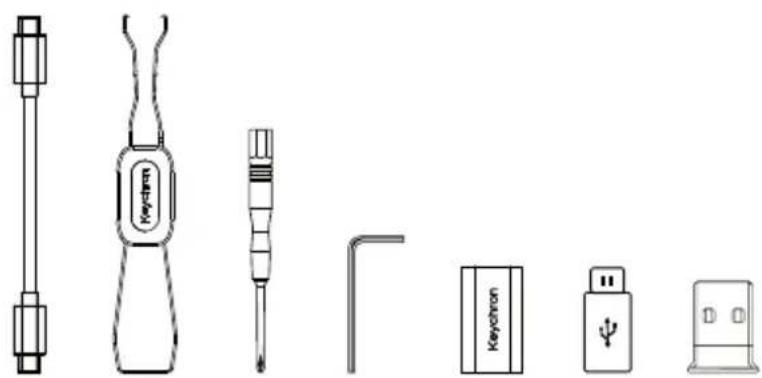
Cable
1x Type-C to Type-C Cable
1x Type-A to Type-C Adapter
1x Extension Adapter For Receiver
Receiver
1x Type-A 2.4GHz Receiver
Tools
1x Keycap & Switch Puller
1x Screwdriver
1x Hex Key


natural_image
Line drawings of various screwdriver and battery components (no text or symbols)Barebone Version
Keyboard Kit
1x Keyboard Kit (Without Keycaps & Switches)
Including
1x Aluminum Case
1x PCB
1x Steel Plate
1x PET Foam
1x IXPE Foam
1x Latex Bottom Pad
1x Sound Absorbing Foam
1x Case Foam
12x Gaskets (8 Installed and 4 in the Box)
4 Sets x Stabilizers
Cable
1x Type-C to Type-C Cable
1x Type-A to Type-C Adapter
1x Extension Adapter For Receiver
Receiver
1x Type-A 2.4GHz Receiver
Tools
1x Keycap & Switch Puller
1x Screwdriver
1x Hex Key

flowchart
graph TD
    A["Start"] --> B{Decision 1}
    B -->|Yes| C["Process Unit"]
    B -->|No| D["Output"]
    C --> E["Final Step"]
    D --> F["End"]
natural_image
Technical line drawings of various screwdriver and plug components (no text or symbols)QUICK START GUIDE
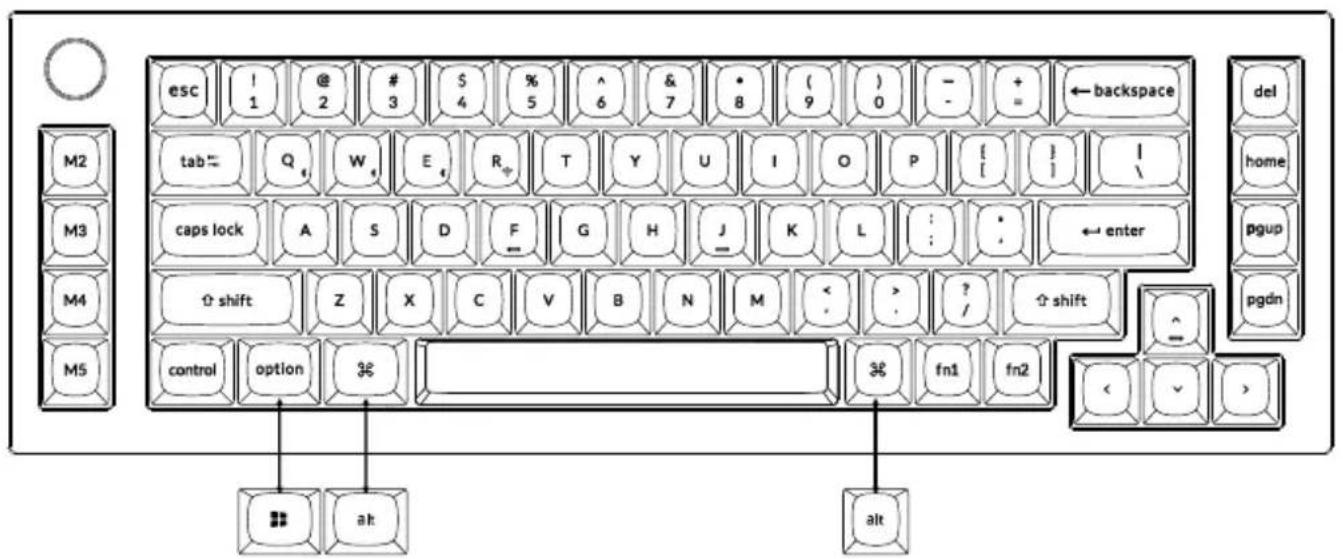
If you are a Windows user, please find the appropriate keycaps in the box, then follow the instructions below to find and replace the following keycaps.
Mac / Windows
1 Switch To The Right System
Please make sure the system toggle on the top left corner has been switched to the same system as your computer's operating system.


+

2 Connect 2.4 GHz Receiver
Connect the 2.4 GHz receiver to the device USB port.

natural_image
Line drawing of a laptop with an arrow pointing to a document or folder (no text or symbols present)Switch toggle to 2.4 GHz mode

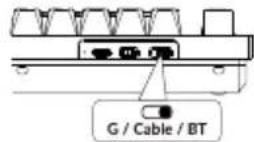
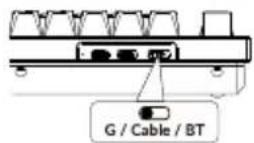
G = 2.4 GHz
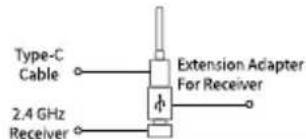

Note: For the best wireless experience, we recommend using the extension adapter for receiver and putting the 2.4 GHz receiver somewhere on your desk close to your keyboard for a low rate of latency and fewer signal interferences.
3 Connect Bluetooth

Switch toggle to Bluetooth
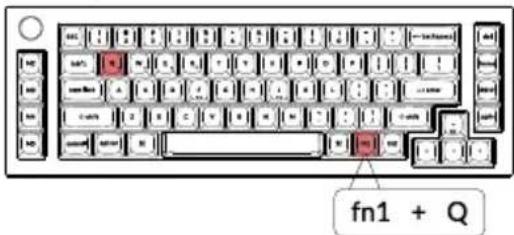
Press fn1 + Q (for 4 seconds) and pair with device named Keychron Q65 Max
4 Connect Cable


natural_image
Front view of a standard computer keyboard with no visible text or symbols on the keys
5 The Layers
There are five layers of key settings on the keyboard.
The layer 0 is for the Mac system.
The layer 1 is for the Windows system.
The layer 2 is for the Mac Multimedia keys.
The layer 3 is for the Windows Multimedia keys.
The layer 4 is for the Function keys.

If your system toggle is switched to Mac, then the layer 0 will be activated.

If your system toggle is switched to Windows, then the layer 1 will be activated.

6 The VIA Key Remapping Software
Please visit usevia.app to use the online
VIA software to remap the keys.
If the VIA cannot recognize your keyboard,
please reach our support to get the instruction.

* The online VIA software can only run on the latest version of Chrome, Edge, and Opera browsers yet.
* VIA only works when the keyboard is connected by wire to the computer.
7 Multimedia Key and Function Key
Multimedia keys
In order to get Multimedia Key, you need to press fn1 and ____ key.
In order to get Function Key, you need to press fn2 and key.
8 The Backlight
Press fn1 + A to change the lighting effect
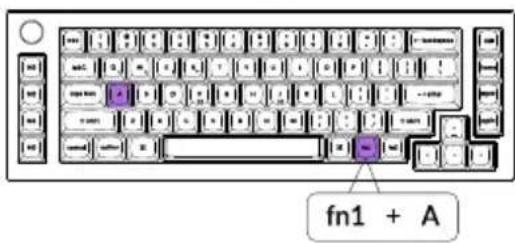
Press fn1 + caps lock to turn the backlight on/off

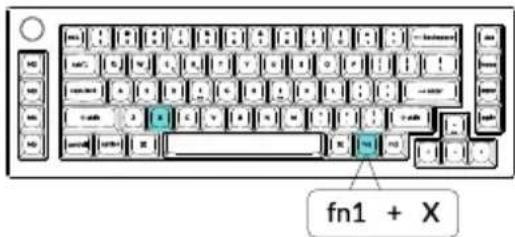
9 Adjust The Backlight Brightness
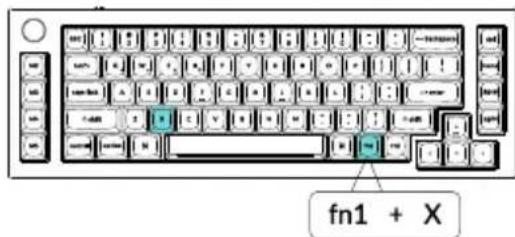
Press fn1 + S to increase the backlight brightness

Press fn1 + X to decrease the backlight brightness
10 Warranty
The keyboard is highly customizable and easy to be rebuilt. If anything goes wrong with any of the keyboard components of keyboard during the warranty period, we will only replace the defective parts of the keyboard, not the whole keyboard.

11 Watch The Building Tutorial On Our Website
If you are building the keyboard for the first time, we highly recommend you watch the building tutorial video on our website first, then start building the keyboard yourself.

12 Factory Reset

natural_image
Line drawing of a standard computer keyboard with no text or symbolsTroubleshooting? Don't know what's going on with the keyboard?
- Download the right firmware and QMK Toolbox from our website.
- Unplug the power cable and switch the keyboard to Cable mode.
- Remove the space bar keycap to find the reset button on the PCB.
- Hold the reset key first, then plug the power cable into the keyboard. Release the reset key after 2 seconds, and the keyboard will now enter DFU mode.
- Flash the firmware with the QMK Toolbox.
- Factory reset the keyboard by pressing fn2 + J + Z (for 4 seconds).
* Step by step guide can be found on our website.
Q65 MAX WIRELESS KEYBOARD SPECIFICATIONS
| Specifications | |
| Layout | 65% |
| Switch type | Mechanical |
| Width | 121 mm |
| Length | 363 mm |
| Front height | 20 mm (without keycaps)33.8 mm (with keycaps installed) |
| Back height | 33.6 mm (without keycaps)45.6 mm (with keycaps installed) |
| Keyboard feet height | 2.7 mm |
| Angle | 6.5 degree |
Q65 MAX WIRELESS KEYBOARD OVERVIEW
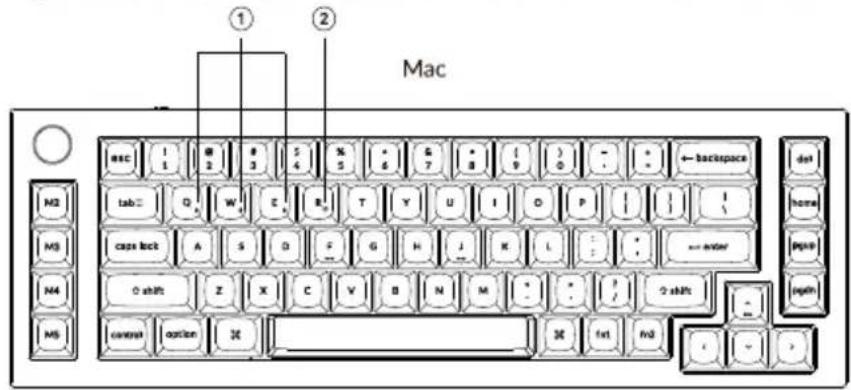
Windows

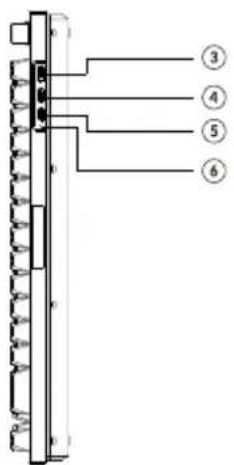
① Bluetooth indicator
② 2.4 GHz indicator
③ G Cable BT (Mode Toggle)
④ Win/Android Mac/iOS (OS Toggle)
⑤ Type-C Port
⑥ Charging Indicator
DEFAULT KEY LAYOUT:
LAYER 0: This layer will be activated when your keyboard's system toggle is switched to Mac.

Layer 1: This layer will be activated when your keyboard's system toggle is switched to Windows.
![esc ! @ # $ % ^ & * ( ) - + ← backspace del 1 2 3 4 5 6 7 B 9 0 - - - M2 Q W E R T Y U I O P [ ] I \ M3 caps lock A S D F G H J K L : : ← enter pgup M4 Left Shift Z X C V B N M < ? / Right Shift pgdn M5 Left Ctrl LWin LAb Space RAb MD(3) MD(4) < - >](/content/2026/05/998984/images/86b770cfafc710b71072edc3515fe6dbf95e6ca72c5fa51fc2717ef56c696314.jpg)
LWin=Left Windows LAlt=Left Alt RAlt=Right Alt
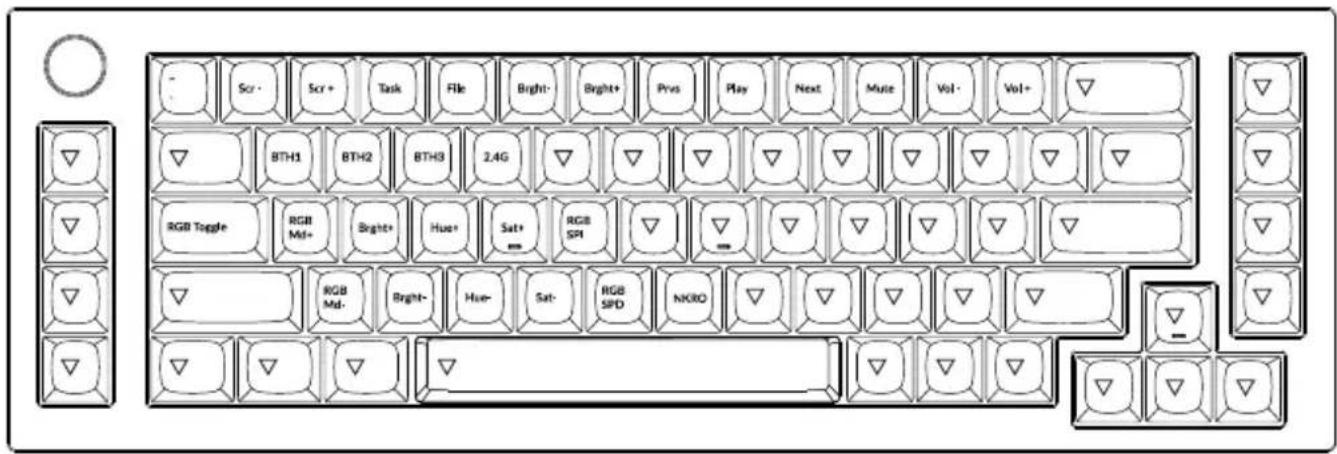
Layer 2: This layer will be activated when your keyboard's system toggle is switched to Mac and press the fn1/MO(2) key.

LAYER 3: This layer will be activated when your keyboard's system toggle is switched to Windows and press the fn1/MO(3) key.
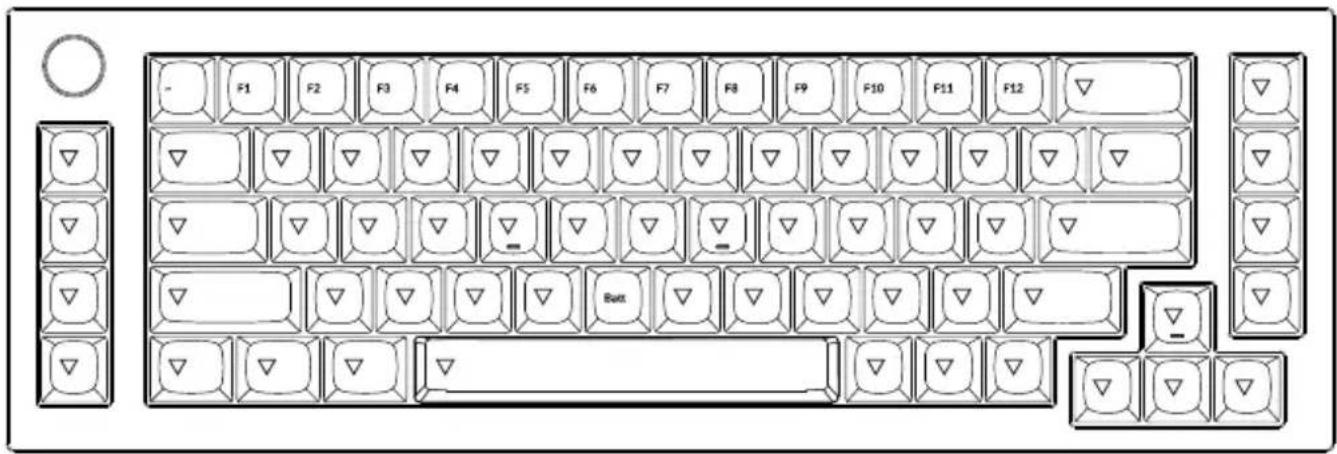
Layer 4: This layer will be activated when your press the fn2/MO(4) key.
KEY DESCRIPTION
| Key Description | |
| Scr- | Screen Brightness Decrease |
| Scr+ | Screen Brightness Increase |
| Bright- | Backlight Decrease |
| Bright+ | Backlight Increase |
| Prvs | Previous |
| Play | Play/Pause |
| Next | Next |
| Mute | Mute |
| Vol- | Volume Decrease |
| Vol+ | Volume Increase |
| RGB Toggle | Turn Backlight on/off |
| RGBMd+ | RGB Mode Next |
| Key Description | |
| RGBMd- | RGB Mode Previous |
| Hue+ | Hue Increase |
| Hue- | Hue Decrease |
| RGB SPI | RGB Speed Increase |
| RGB SPD | RGB Speed Decrease |
| MO(1) | Layer 1 will be activated when holding this key |
| MO(2) | Layer 2 will be activated when holding this key |
| MO(3) | Layer 3 will be activated when holding this key |
| MO(4) | Layer 4 will be activated when holding this key |
| BTH1 | Bluetooth Host 1 |
| BTH2 | Bluetooth Host 2 |
| BTH3 | Bluetooth Host 3 |
| Key Description | |
| 2.4G | 2.4 GHz Host |
| Batt | Battery life |
| NKRO | N-key rollover |
LED STATUS OVERVIEW
| LED Location | Function | Status |
| Battery Indicator | Charging | Charging - Static RedFully charged - Static Green |
| Bluetooth / 2.4 GHz Indicator | Bluetooth / 2.4 GHz | Reconnecting - Fast BlinkingPaired - Light offPairing - Slow Blinking |
| Caps Lock Indicator | Caps Lock | Enable Caps Lock - Static WhiteDisable Caps Lock - Light Off |
FUNCTION DESCRIPTION: CHARGING
Plug the cable into a USB port and plug the other end into the keyboard port. Charging Indicator: A red light will stay on while charging; Charging is completed in about 5 hours, a green battery indicator will appear.
*The Keychron Q65 Max keyboard is compatible with all USB ports. Please use a 5V 1A adapter or USB 3.0 for the best performance. The Keychron Q65 Max can be charged in 2.4 GHz/Cable/Bluetooth mode.
**This product supports up to 5V charging voltage and 1A charging current. We are not responsible for any problems caused by improper charging.
2.4GHZ / CABLE / BLUETOOTH MODE (MODE TOGGLE SWITCH)
2.4GHZ MODE
- Connect the 2.4GHz receiver to your device's USB Port.
- Switch the toggle switch to the 2.4GHz option. The keyboard will automatically connect to your device.
* Press the key combination "fn1" + "R" to enter the forced pairing mode. During this period, it is recommended that the keyboard be within 20cm of the receiver.
BLUETOOTH MODE
- Switch the toggle switch to the Bluetooth option.
- Backlighting will be turned on.
- Hold "fn1+Q" key for 4 seconds to activate Bluetooth pairing (the Bluetooth indicator fast flashes for 3 minutes to detect pairing).
- Search for the Bluetooth device "Keychron Q65 Max" on your device and connect it (the Bluetooth indicator goes off after successful pairing).
Note: This keyboard supports pairing up to 3 devices simultaneously via key combination "fn1" + "Q" / "fn1" + "W" / "fn1" + "E".
*The Bluetooth indicator will continue to flash for 3 minutes.
**Slow or failed connections may exist due to different Bluetooth versions, please make sure all the settings are correct.
SWITCH BLUETOOTH DEVICES
Short press key combination "fn1" + "Q" / "fn1" + "W" / "fn1" + "E" to switch to other device.
RECONNECT:
- Switch the keyboard to the Bluetooth option to activate the keyboard.
- The Bluetooth indicator flashes for 3 seconds and automatically pairs with the last paired device.
- If the Bluetooth indicator is off, press any button to enter the connection again.
* The keyboard must have been paired with the device to perform this function.
WIRED MODE
- Switch the toggle switch to the Cable option.
- Connect our cable with your PC and keyboard.
- Backlighting will be turned on.
*Under Wired Mode, keyboard will not enter into Battery Saver Mode.
Switch the keyboard to the Cable option and unplug the power cable.
BACKLIGHT SETTING
- Short press key combination "fn1" + "caps lock" / "fn1" + "Knob" to turn the backlight on/off.
- Short press key combination "fn1" + "A" / "fn1" + "Z" to switch between different types of lighting effects.
TROUBLESHOOTING
If unable to pair keyboard to device, confirm that the device you're trying to pair with is Bluetooth-capable. If so, restart the device and try pairing it with the keyboard again.
Note: On a Windows computer, a new Bluetooth connection will sometimes require additional software updates—a process that may still be ongoing after a message appears indicating a successful completion. Wait at least 20 minutes after pairing to make sure all updates are completed before restarting the computer.
Confirm that the device is configured to accept Bluetooth connections (Windows) and supports an external keyboard (HID profile).
Go to Bluetooth Devices > Open Settings and select the following:
Allow Bluetooth devices to find this computer
Allow Bluetooth devices to connect to this computer
Alert me when a Bluetooth device wants to connect
My keyboard isn't working in Bluetooth mode.
For the computer/smartphone:
Go to your device Bluetooth settings>Select the keyboard and remove/delete/unpair it.
Then restart your device.
For the keyboard:
Turn the keyboard off and back on. Then reconnect it to your device.
Wireless connection is interrupted even within 10 meters.
Check if the keyboard is resting on a metal surface that can interfere with the wireless signal.
Third-party input tools are not compatible with the keyboard.
Due to compatibility, versions, brands and drivers of Windows/macOS, functionalities of third-party input tools may be affected while using the keyboard. Please make sure your operating system and drivers are up to date.
Certain multimedia keys or function keys do not work.
Functions of certain multimedia keys may be disabled due to compatibility, versions, brands, and drivers of devices.
| *Multimedia keys: | ※/※/□/□□/□□/□□/□□/□□/□□/□□ |
| Function keys: | F1 / F2 / F3 / F4 / F5 / F6 / F7 / F8 / F9 / F10 / F11 / F12 |
Safety Precaution:
Keep the product, accessories and packaging parts out of the reach of children to prevent any accidents and choking hazards.
Always keep the product dry to avoid corrosion.
Do not expose the product to extreme temperatures below -10^(5^) or above 50^(131^) to preserve the lifespan of the keyboard.
Keychron, Inc.
Dover, DE 19901, United States
Find us at:
https://www.keychron.com
Support@keychron.com
@keychron
@keychron
@keychronMK
Designed by Keychron
Made in China

Keychron
Q65 Max无线键盘用户手册
完全组装版本
键盘
1x 已组装成品键盘
包含
1x铝合金金属外壳
1x PCB
1x 铁质定位板
1x PCB与定位板夹心吸音泡棉
1x PET垫
1xIXPE垫
1x乳胶底垫
1x 底壳吸音泡棉
12x Gaskets缓冲垫(8个缓冲垫已安装
在键盘本体、4个放置在包装内部)
4套PCB卫星轴
1套键帽(PBT材质-双色注塑)
1套机械轴体
线材
1x Type-C to Type-C 接口线材
1x Type-A to Type-C 转接头
1x 接收器延长器
接收器
natural_image
Technical line drawings of various screwdriver and electronic components (no text or symbols)套件版本
键盘
1x 键盘本体 (不包含键帽、轴体)
包含
1x铝合金金属外壳
1x PCB
1x 铁质定位板
1x PET垫
1xIXPE垫
1x 乳胶底垫
1x底部吸音泡棉
1x PCB与定位板夹心吸音泡棉
12x Gaskets缓冲垫(8个缓冲垫已安装
在键盘本体、4个放置在包装内部)
4套PCB卫星轴
线材
1x Type-C to Type-C 接口线材
1x Type-A to Type-C 转接头
1x 接收器延长器
接收器

natural_image
Technical line drawings of keychain components including screwdriver, switch, and battery (no text or symbols)快速上手指南
natural_image
Line drawing of a laptop connected to a card and a folder (no text or symbols)把开关拨到2.4 GHz模式
G = 2.4 GHz

把开关拨到蓝牙模式

9、调整键盘背光亮度
组合fn1+S键, 提高键盘背光亮度。

组合fn1+X键,减少键盘背光亮度。
10、保修
natural_image
Line drawing of a standard computer keyboard with no text or symbols如果键盘出现了故障,不知道怎么办?
Dover, DE 19901, United States
https://www.keychron.com
通过以下方式与我们联系
Support@keychron.com
f@keychron
@keychron
@keychronMK
Keychron设计
中国制造
中国区总代:渴创技术(深圳)有限公司
- Fully Assembled Version
- Keyboard
- Including
- Cable
- Receiver
- Tools
- Barebone Version
- Keyboard Kit
- QUICK START GUIDE
- Switch To The Right System
- Connect 2.4 GHz Receiver
- Connect Bluetooth
- Connect Cable
- The Layers
- The VIA Key Remapping Software
- Multimedia Key and Function Key
- The Backlight
- Adjust The Backlight Brightness
- Warranty
- Watch The Building Tutorial On Our Website
- Factory Reset
- Q65 MAX WIRELESS KEYBOARD SPECIFICATIONS
- DEFAULT KEY LAYOUT:
- LED STATUS OVERVIEW
- FUNCTION DESCRIPTION: CHARGING
- 2.4GHZ / CABLE / BLUETOOTH MODE (MODE TOGGLE SWITCH)
- 2.4GHZ MODE
- BLUETOOTH MODE
- SWITCH BLUETOOTH DEVICES
- RECONNECT:
- WIRED MODE
- BACKLIGHT SETTING
- TROUBLESHOOTING
- My keyboard isn't working in Bluetooth mode.
- Wireless connection is interrupted even within 10 meters.
- Third-party input tools are not compatible with the keyboard.
- Certain multimedia keys or function keys do not work.
- Safety Precaution:
- Keychron
- Q65 Max无线键盘用户手册
- 完全组装版本
- 键盘
- 包含
- 线材
- 接收器
- 套件版本
- 快速上手指南
- 9、调整键盘背光亮度
- 10、保修
Brand : Keychron
Model : Q65 Max
Category : Keyboard