
4K30-HDMI-CAPTURE - Audio/video converter StarTech.com - Free user manual and instructions
Find the device manual for free 4K30-HDMI-CAPTURE StarTech.com in PDF.


| Product Type | Audio/Video Converter (HDMI Capture Device) |
| Model | 4K30-HDMI-CAPTURE |
| Brand | StarTech.com |
| Dimensions | Approx. 10 x 5 x 2 cm (3.9 x 2.0 x 0.8 in) |
| Weight | Approx. 100 g (3.5 oz) |
| Power Source | USB bus-powered (5V DC, typical 500 mA) |
| Input Interface | HDMI 2.0 (female) |
| Output Interface | USB 3.0 Type-A (female, USB-C adapter may be included) |
| Maximum Video Resolution | 4K (3840 x 2160) at 30 fps |
| Supported Audio Formats | LPCM 2.0 (stereo), sample rate up to 48 kHz |
| Functions | Capture, record, stream HDMI video/audio via USB; plug-and-play, no driver needed (UVC standard) |
| Compatibility | Windows 7/8/10/11, macOS 10.12+, Linux (UVC compatible), Android (with OTG) |
| Software Support | Compatible with OBS, VLC, Zoom, Microsoft Teams, etc. |
| Maintenance & Cleaning | Use a soft, dry cloth to clean the exterior; avoid liquids and aerosols |
| Safety Precautions | Keep away from moisture, extreme temperatures, and direct sunlight; do not disassemble |
| Spare Parts & Repairability | No user-serviceable parts; contact StarTech.com support for any issues |
| General Information | Compact, portable design; suitable for gaming, streaming, video conferencing, and content creation |
Frequently Asked Questions - 4K30-HDMI-CAPTURE StarTech.com
User questions about 4K30-HDMI-CAPTURE StarTech.com
0 question about this device. Answer the ones you know or ask your own.
Ask a new question about this device
Download the instructions for your Audio/video converter in PDF format for free! Find your manual 4K30-HDMI-CAPTURE - StarTech.com and take your electronic device back in hand. On this page are published all the documents necessary for the use of your device. 4K30-HDMI-CAPTURE by StarTech.com.
USER MANUAL 4K30-HDMI-CAPTURE StarTech.com
UVC HDMI® Capture Device - USB-A/USB-C - 4K 30Hz - Windows and Mac
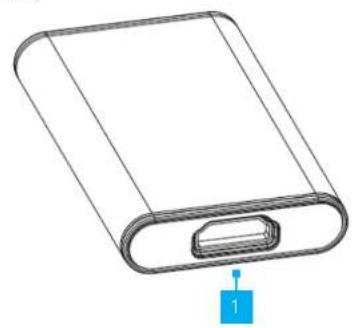
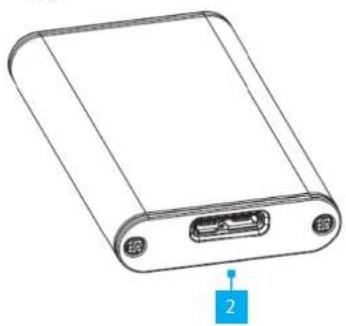
Product Diagram (4K30-HDMI-CAPTURE)
Front
natural_image
Line drawing of a rectangular electronic device with a slot and labeled component (no text or symbols)Rear
natural_image
Line drawing of a rectangular electronic device with ports and a labeled pin (no text or symbols on the body)| Component Function | ||
| 1 | HDMI Input Port | Connect an HDMI Source, using an HDMI Cable |
| 2 | USB Host Connection | Connect to a Host Computer, using the included USB-A to Micro-B Host Cable or the USB-C to Micro-B Host Cable |
Product Information
For the latest manuals, product information, technical specifications, and declarations of conformance, please visit: www.StarTech.com/4K30-HDMI-CAPTURE
Requirements
• HDMI Cable x 1
• HDMI Video Source x 1
- Computer x 1
• Available USB-A or USB-C Port
Package Contents
• Capture Device x 1
- USB-A to Micro USB-B Host Cable x 1
• USB-C to Micro USB-B Host Cable x 1
- Quick-Start Guide x 1
Installation
Install the Capture Device
- Connect an HDMI Cable from the Video Source to the HDMI Input Port on the Capture Device.
- Connect the USB Host Cable to the Capture Device, and to the USB Port on the Host Computer.
NOTE: A SuperSpeed USB 5Gbps (USB 3.2 Gen 1) or higher host port is required for optimal performance. - Your computer automatically installs the necessary drivers when the capture device is connected.
NOTE: No software is included with the 4K30-HDMI-CAPTURE. The capture device works with third-party software (e.g. Teams, Zoom, and OBS) that supports USB Video Class (UVC) devices.
Regulatory Compliance
FCC - Part 15
This equipment has been tested and found to comply with the limits for a Class B digital device, pursuant to part 15 of the FCC Rules. These limits are designed to provide reasonable protection against harmful interference in a residential installation. This equipment generates, uses and can radiate radio frequency energy and, if not installed and used in accordance with the instructions, may cause harmful interference to radio communications. However, there is no guarantee that interference will not occur in a particular installation. If this equipment does cause harmful interference to radio or television reception, which can be determined by turning the equipment off and on, the user is encouraged to try to correct the interference by one or more of the following measures:
- Connect the equipment into an outlet on a circuit different from that to which the receiver is connected.
- Consult the dealer or an experienced radio/TV technician for help
This device complies with part 15 of the FCC Rules. Operation is subject to the following two conditions:
(1) This device may not cause harmful interference, and (2) this device must accept any interference received, including interference that may cause undesired operation. Changes or modifications not expressly approved by StarTech.com could void the user's authority to operate the equipment.
Industry Canada Statement
This Class B digital apparatus complies with Canadian ICES-003.
This device complies with Industry Canada licence-exempt RSS standard(s). Operation is subject to the following two conditions:
(1) This device may not cause interference, and (2) This device must accept any interference, including interference that may cause undesired operation of the device.
Warranty Information
This product is backed by a two-year warranty.
For further information on product warranty terms and conditions, please refer to www.startech.com/warranty.
Limitation of Liability
In no event shall the liability of StarTech.com Ltd. and StarTech.com USA LLP (or their officers, directors, employees or agents) for any damages (whether direct or indirect, special, punitive, incidental, consequential, or otherwise), loss of profits, loss of business, or any pecuniary loss, arising out of or related to the use of the product exceed the actual price paid for the product. Some states do not allow the exclusion or limitation of incidental or consequential damages. If such laws apply, the limitations or exclusions contained in this statement may not apply to you.
| StarTech.com Ltd. | StarTech.com LLP | StarTech.com Ltd. | StarTech.com Ltd. | FR: startech.com/fr |
| 4490 South Hamilton | Unit B, Pinnacle 15 | Siriusdreef 17-27 | DE: startech.com/de | |
| 45 Artisans Cres | Road | Gowerton Rd, | 2132 WT Hoofddorp | ES: startech.com/es |
| London, Ontario | Groveport, Ohio | Brackmills | The Netherlands | NL: startech.com/nl |
| NSV 5E9 | 43125 | Northampton | IT: startech.com/it | |
| Canada | U.S.A. | NN4 7BW | JP: startech.com/jp | |
| United Kingdom |
Brand : StarTech.com
Model : 4K30-HDMI-CAPTURE
Category : Audio/video converter