
HTINT702TA - Video camera Speco Technologies - Free user manual and instructions
Find the device manual for free HTINT702TA Speco Technologies in PDF.


| Product Type | Indoor/Outdoor Surveillance Camera |
| Model | HTINT702TA |
| Brand | Speco Technologies |
| Image Sensor | 1/2.8" Progressive Scan CMOS |
| Effective Pixels | 1920x1080 (2 Megapixels) |
| Min. Illumination | 0.01 Lux (Color), 0 Lux (IR on) |
| Lens | 2.8mm fixed lens, F1.6 |
| Field of View | 85° horizontal |
| Night Vision Distance | Up to 20m (65ft) with IR LEDs |
| Video Compression | H.265 / H.264 |
| Frame Rate | 30 fps at 1080p |
| Power Supply | 12V DC / PoE (802.3af) |
| Power Consumption | 6W (max) |
| Dimensions (WxHxD) | 2.8" x 3.5" x 6" (71 x 89 x 152 mm) |
| Weight | 1.1 lbs (0.5 kg) |
| Protection Rating | IP67 (Weatherproof) |
| Operating Temperature | -30°C to 60°C (-22°F to 140°F) |
| Mounting Type | Wall mount, Ceiling mount (bracket included) |
| Video Output | 10/100Mbps Ethernet (RJ45) |
| Supported Protocols | TCP/IP, HTTP, ONVIF, RTSP |
| Motion Detection | Yes, with area-based configuration |
| Audio Support | Built-in microphone, audio output |
| Storage | MicroSD card slot (up to 128GB) |
| Warranty | 2 years limited |
Frequently Asked Questions - HTINT702TA Speco Technologies
User questions about HTINT702TA Speco Technologies
0 question about this device. Answer the ones you know or ask your own.
Ask a new question about this device
Download the instructions for your Video camera in PDF format for free! Find your manual HTINT702TA - Speco Technologies and take your electronic device back in hand. On this page are published all the documents necessary for the use of your device. HTINT702TA by Speco Technologies.
USER MANUAL HTINT702TA Speco Technologies
• Sony 1/2.9 inch 2.1MP Exmor CMOS Sensor
• 5 \~ 50mm Motorized Zoom & Focus Control
• Supports image resolution up to 1920 x 1080P @ 30fps
• Wide Dynamic Range (15fps)
• Full OSD operation through on-board control and UTC
• 2D & 3D noise reduction
• SENS-UP (Digital Slow Shutter)
• Privacy masking (16zone)
• Dynamic Motion Detection (4zone)
• Defog
• Surge Protect (DC 2KV / Video 3KV)
- Tool-free 3-Axis
• IP67 Weatherproof
• 12VDC / 24VAC Dual Input
• Built-in Heater
DEAR CUSTOMERS!
By selecting this product, you have decided to use a professional device that guarantees highest quality and reliability. We would like to thank you very much for your confidence and kindly ask you to read the following instructions carefully before installation and operation in order to take full advantage of all quality features regarding this product.


The lighting flash with an arrowhead symbol, within an equilateral triangle is intended to alert the user to the presence of non-insulated dangerous voltage within the product's enclosure that may be of sufficient magnitude to constitute a risk of electric shock to persons.
The exclamation point within an equilateral triangle is intended to alert the user to the presence of important operating and maintenance (servicing) instructions in the literature accompanying the appliance.
INFORMATION
This equipment has been tested and found to comply with limits for a Class A digital device, pursuant to part 15 of the FCC Rules. These limits are designed to provide reasonable protection against harmful interference when the equipment is operated in a commercial environment. This equipment generates, uses, and can radiate radio frequency energy and, if not installed and used in accordance with the instruction manual, may cause harmful interference to radio communications.
Operation of this equipment in a residential area is likely to cause harmful interference in which case the user will be required to correct the interference at his own expense.
WARNING
Changes or modifications not expressly approved by the manufacturer could void the user's authority to operate the equipment.
CAUTION – To prevent electric shock and risk of the fire hazards
- Do NOT use power source other than that specified
- Do NOT expose this appliance to rain or moisture.
This installation should be made by a qualified service person and should conform to all local codes.
1. Precautions
- Please read the manual carefully before the installation in order to make use the
camera to be set up correctly and to have the best picture quality. - Please keep the manual in good condition for your future reference and service
application
• Installation and services should only be carried out by an authorized personnel
according to local safety regulations. - If any liquid or solid matter gets into the housing, immediately disconnect the camera from power supply and have it checked by your authorized deals before reviving.
from power supply and have it checked by your authorized dealer before reusing. - Avoid installing the camera at extremely hot or cold places
- If you are not a certified person, never try to dismantle the camera.
To avoid electric shock, never remove the screws or covers. There are no parts inside that need maintenance by the user. All maintenance should be carried out by qualified
that need it personnel - Avoid installing the camera at a place of high humidity
- Avoid installing the camera at the place exposed to gas or oil.
- Keep the top glass of the lens always clean in order to obtain the best picture quality
all the time. Be careful not to be stained by fingerprint. - Don't face the camera directly toward sunlight or sunlight reflecting area.
CMOS may go defective at this condition. - Please give a special attention to keep the unit from dangerous drop or external shock
during the process of transportation or handling. - Never try to touch the camera in wet hand. It may cause an electric shock.
- Do not expose the camera to radioactivity. It causes a serious damage on the CMOS.
2. Limitation of liability
This publication is provided “AS IS” without warranty of any kind, either express or implied, including but not limited to, the implied warranties of merchantability, fitness for any particular purpose, or non-infringement of the third party's right.
This publication could include technical inaccuracies or typographical errors.
Changes are added to the information herein, at any time, for the improvements of this publication and / or the corresponding product(s).
3. Disclaimer of warranty
In no event shall seller be liable to any party or any person, except for replacement or reasonable maintenance of the product, for the cases, including but not limited to below
(1) Any damage and loss, including without limitation, direct or indirect, special, consequential or exemplary, arising out of or relating to the product.
(2) Personal injury or any damage caused by inappropriate use or negligent operation of the user.
(3) Unauthorized disassemble, repair or modification of the product by the user.
(4) Inconvenience or any loss arising when images are not displayed, due to any reason or cause including any failure or problem of the product.
(5) Any problem, consequential inconvenience, or loss or damage, arising out of the system combined by the devices of third party.
(6) Any claim or action for damages, brought by any person or organization being photogenic subject, due to violation of privacy with the result of that surveillance-camera's picture, including saved data, for some reason, becomes public or is used for the purpose other than surveillance.
4. Package

Camera x 1

Manual x 1

Tapping screws x 4

Plastic anchor x 4

L-Wrench (0.16in) x 1

L-Wrench (0.10in) x 1
4. Package
- Junction Box

Top Rubber x 1

Junction Box x 1

Sponge x1

Screw PH (M4 x 0.47in) x 4

Tapping Screws (0 4 x 1.18in) x 4

Plastic Anchor x 4
5. Installation
5-1. How to install on the Wall
- Wall_Junction Box
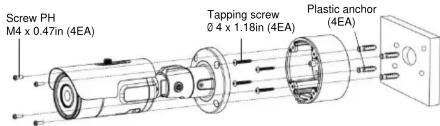
- Wall

① Drill four screw holes on the wall plate to fix four plastic anchors (supplied) in the holes.
② Fix the plastic anchors in the holes.
③ Position the bracket on the screw p
④ Fix the bracket by tightening the screws.
5-2. OSD cap detailed description
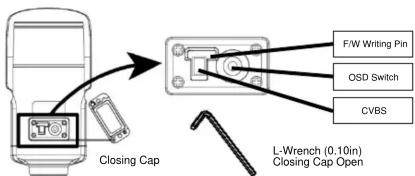
✗ Open the Closing Cap and fasten the Closing Cap well.
5. Installation
5-3. Tool-free 3-Axis mounting mechanism
① Panning 360°
Slightly loosen Pan Bracket nut then adjust pan of the camera and tighten the Bracket nut.
Figure 1.2.3.
② Tilt 0° \~ 100
Slightly loosen Tilt bolt then adjust tilt of the camera and tighten the bolt firmly.
③ Rotation 360°
Slightly loosen Tilt bolt then adjust rotation of the camera and tighten the bolt firmly.
5-4. Application of TVI output
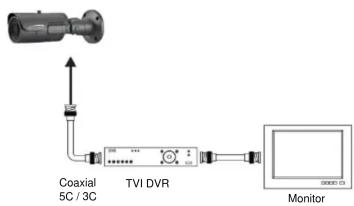
flowchart
graph TD
    A["Coaxial 5C / 3C"] --> B["TVI DVR"]
    B --> C["Monitor"]
    B --> D["Signal Line"]
    style A fill:#f9f,stroke:#333
    style B fill:#ccf,stroke:#333
    style C fill:#cfc,stroke:#333
6. Function and operation
6-1. On Screen Display (On board control and UTC)
| PRESET MENU | |||||
| INDOOR / OUTDOOR / LOW LIGHT / HALLWAY / LOBBY / ELEVATOR | |||||
| SETUP | |||||
| LENS | DC | MANUAL | |||
| EXPOSURE | BRIGHTNESS | SHUTTER | INTENSIFY | AGC | RETURN |
| WHITE BAL | AUTO | AWB | AWC-SET | MANUAL | |
| BACKLIGHT | WDR | BLC | HLC | OFF | |
| DAY&NIGHT | COLOR | B/W | AUTO | ||
| DNR | LOW | MIDDLE | HIGH | RETURN | |
| IMAGE | SHARPNESS ACE | GAMMA DEFOG | COLOR GAIN RETURN | MIRROR | FLIP |
| MOTION | ON | OFF | |||
| SYSTEM | ANALOG HD COLOR BAR RESET | FRAME RATE LANGUAGE RETURN | FREQ CAM TITLE | IMAGE RANGE CAM TITLE | COLOR SPACE HEATER |
| EXIT | |||||
7. Troubleshooting
If there are problems in operating, please refer to the checklist below.
If the problem persists, please contact the agent where this product is purchased.
| Problems | Troubleshooting |
| Nothing appears on the screen. | Please check that the power cord and line connection between the camera and monitor are fixed properly.Please check that you have properly connected Video cable to the camera Video output jack. |
| The dim image on the screen. | Is lens stained with dirt? Clean your lens with soft, clean cloth.Set the monitor to proper condition.If the camera is exposed to too strong light, change the camera position.Please check if the power supply is within the specification & cables.(Due to the voltage drop with distance and gauges, Led will light poor) |
| The dark image on the screen. | Adjust the contrast feature of the monitor.If there is an intermediate device, set the 75Ω / Hi-Z properly.(Please check the impedance) |
| The camera is not working properly, and the body of the camera is hot. | Please check if the power supply is regulated and is within the standard requirement of the products. |
| Color is not correct. | Please check the setting of White Balance setup. |
| The screen is flickering. | Please check if the camera is facing directly towards sunlight or fluorescent light. |
- Dimension (mm)
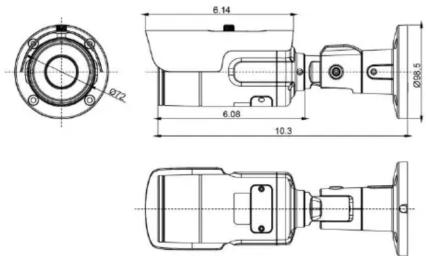
- Specifications
| MODEL | HTINT702TA |
| Image sensor | Sony 1/2.9 inch 2.1MP Exmor CMOS Sensor |
| Total Pixel | 2001(H) x 1121(V) 2.24M Pixels |
| Effective Pixels | 1985(H) x 1105(V) 2.19M Pixels |
| Scanning system | Progressive scan |
| Video output | 1920 x 1080 25p / 30p |
| Output | TVI / CVBS |
| S/N ratio | More than 52dB (AGC OFF / Weight ON) |
| Min. Illumination | 0.01Lux |
| Privacy Mask | ON / OFF (16 zone) |
| Motion Detection | ON / OFF (4 zone) |
| NEG.Image | ON / OFF |
| Mirror / Flip | ON / OFF |
| White Balance | AUTO / AWB / AWB - SET / MANUAL |
| Shutter Speed | AUTO / MANUAL / FLICKER |
| Sens-up | AUTO / OFF (Selectable Limit x2 ~ x32) |
| Backlight | OFF / HLC / BLC / WDR |
| 2D / 3DNR | OFF / LOW / MIDDLE / HIGH |
| Gain Control | 0 ~ 10 (Level adjustable) |
| Day & Night | AUTO / COLOR / B&W |
| Sharpness | 0 ~ 10 (Level adjustable) |
| WDR | NORMAL / ROI |
| Lens Shading | ON / OFF |
| Defog | ON / OFF |
| Language | ENG, CHN, CHN(S), JPN, KOR |
| Lens | 5 ~ 50mm DC Iris Varifocal MFZ Lens |
| Power Source | 12VDC / 24VDC |
| Operating current | 240mA±10%(12VDC) / 120mA±10%(24VAC) |
| Operating Temperature | -4F ~ 122F |
| Storage Temperature | -4F ~ 122F |
| Operating Humidity | 0%RH ~ 90%RH |
| Measurement (in) | ∅ 98.5 x 10.3 Including Bracket |
| Weight(Approx. Ibs) | 2.31lbs (Camera Only) |
* Specifications are subject to change without prior notice for better improvement.
Federal Communications Commission (FCC) Statements
This device complies with Part 15 of the FCC Rules. Operation is subject to the following two conditions (1). This device may not save harmful interference, and
(1) This device may not cause harmful interference, and (2) This device must accept any interference received, including interference that may cause undesired operation.
FCC Responsible Party :
Speco Technologie
200 New Highway
Amityville, NY 11701 www.specotech.com
Brand : Speco Technologies
Model : HTINT702TA
Category : Video camera