TV-15 - Television Carson - Free user manual and instructions
Find the device manual for free TV-15 Carson in PDF.


| Product Type | Television |
| Brand | Carson |
| Model | TV-15 |
| Display Type | LED |
| Screen Size | 15 inches (38 cm) |
| Aspect Ratio | 16:9 |
| Resolution | 1366 x 768 (HD) |
| Refresh Rate | 60 Hz |
| Inputs | HDMI, USB, AV, VGA |
| Outputs | Headphone jack (3.5mm) |
| Power Supply | 100-240V AC, 50/60 Hz |
| Power Consumption | 30 W (typical) |
| Weight | 2.5 kg (5.5 lbs) |
| Dimensions (W x H x D) | 35 x 25 x 8 cm |
| Remote Control | Included (IR) |
| Wall Mountable | Yes (VESA 100x100 mm) |
| Tuner | Digital (ATSC / DVB-T) |
| Speakers | 2 x 5W |
| Energy Class | A+ |
| Additional Features | Sleep timer, child lock, parental control |
| Maintenance & Cleaning | Use a soft, dry cloth for screen and casing |
| Safety | Do not expose to water or block ventilation |
| Spare Parts & Repairability | Contact Carson customer service for spare parts; repairs by qualified personnel |
Frequently Asked Questions - TV-15 Carson
User questions about TV-15 Carson
0 question about this device. Answer the ones you know or ask your own.
Ask a new question about this device
Download the instructions for your Television in PDF format for free! Find your manual TV-15 - Carson and take your electronic device back in hand. On this page are published all the documents necessary for the use of your device. TV-15 by Carson.
USER MANUAL TV-15 Carson
natural_image
Close-up of a black and gray object resembling a stylized hand or device with a circular head and ring (no visible text or symbols)-
Always use with Carson logo facing up.
-
When using a single lens to achieve 5x magnification, use the top lens as shown below...
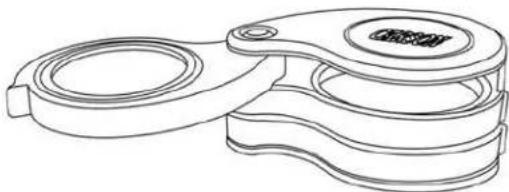
natural_image
Technical line drawing of a mechanical clamp or bracket component (no text or symbols)- When using two lenses to achieve 10x magnification, use the top and bottom lenses as shown below....
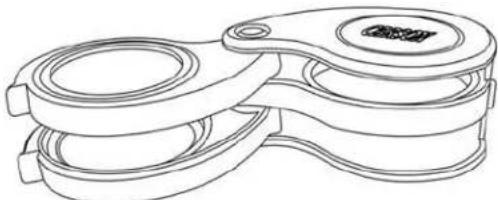
natural_image
Line drawing of a mechanical device with two circular components and a central hub (no text or symbols)- Use all three lenses together to achieve 15x magnification as shown below...
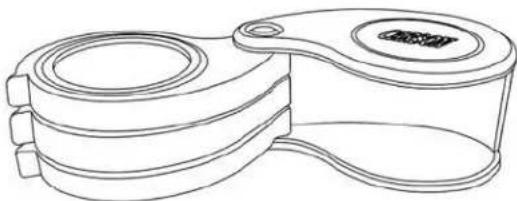
natural_image
Line drawing of a mechanical component with concentric rings and a central hub (no text or symbols)- The higher the magnification you select, the closer your eye must be to the lens and the closer the magnifier must be to your viewing surface.
Brand : Carson
Model : TV-15
Category : Television