BILL-100 - Bill Counter Steren - Free user manual and instructions
Find the device manual for free BILL-100 Steren in PDF.


| Type | Bill counter |
| Brand | Steren |
| Model | BILL-100 |
| Power Supply | 12V DC, 1A |
| Dimensions (W x D x H) | 250 x 150 x 200 mm |
| Weight | 1.5 kg |
| Counting Speed | Up to 1000 bills per minute |
| Hopper Capacity | 200 bills |
| Stacker Capacity | 200 bills |
| Detection Methods | UV, MG, IR, Size |
| User Interface | LED display, control buttons |
| Functions | Count, batch, add, sort |
| Operating Temperature | 0°C to 40°C |
| Humidity Range | 20% to 80% (non-condensing) |
| Included Accessories | Power adapter, cleaning brush, user manual |
| Maintenance | Clean sensors and rollers with brush; avoid dust |
| Safety Features | Auto-stop on jam; error display |
| Compatible Currencies | Multiple (programmable) |
Frequently Asked Questions - BILL-100 Steren
User questions about BILL-100 Steren
0 question about this device. Answer the ones you know or ask your own.
Ask a new question about this device
Download the instructions for your Bill Counter in PDF format for free! Find your manual BILL-100 - Steren and take your electronic device back in hand. On this page are published all the documents necessary for the use of your device. BILL-100 by Steren.
USER MANUAL BILL-100 Steren
natural_image
Line drawing of a 3D printer with internal blades and control panel (no text or symbols)V0.2
0517A
PANTALLA Y PANEL DE CONTROL
natural_image
Line drawing of a medical scanner device with no visible text or symbolsV0.2
0517A
Before using the product, please read the following instructions.
CAUTIONS
- To ensure proper operation it is advisable to clean the equipment once a month.
• This appliance is NOT intended for use by persons Different, unless they are adequately prepared and supervised.
IMPORTANT NOTE
This machine detects counterfeit banknotes by magnetic stripe.
Because Mexican banknotes lack this security element,
The machine will make an error, however, you can count the tickets if you deactiva Detection by magnetic stripe.
Check the security measures of your country's tickets to avoid Detection errors.
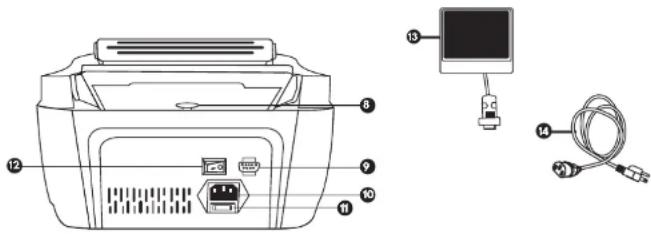
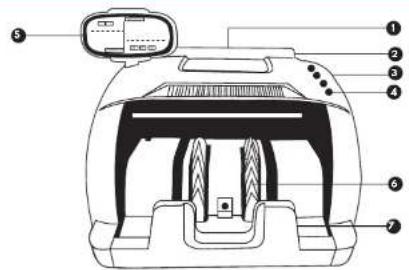
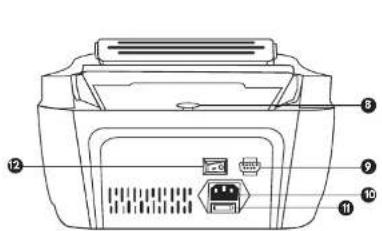
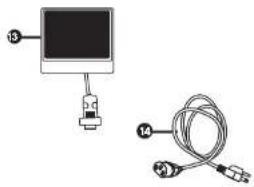
MACHINE STRUCTURE
- Feed Tray
- Handle
- Cover
- Control Panel
- Screen
- Stacker lever
- Stacker
- Adjusting screw
- External display port
- Power socket
- Fuse
- Ignition switch
- External display
- Power cord
natural_image
Diagram showing a device connected to a cable with labeled pins (no text or symbols present)SCREEN AND CONTROL PANEL
- Working Mode Indicator
- Counting screen
- Batch View / Add
- Type change button detection
- Button to select
- Add button
- Clear button
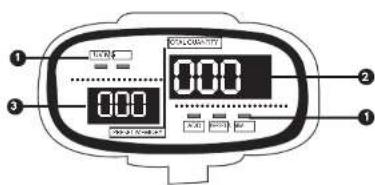
COUNTING AND DETECTION OF FALSE TICKETS
- Select the type of detection: UV-MG or UV
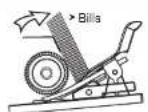
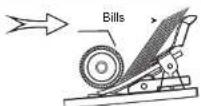
- Place the bills in the feed tray.
If a false ticket is detected, the count will stop, the
Will cause an error on the screen. Remove the ticket or press the RST button to resume the count.
COUNTING AND BONDING
- Select the mode of use: Counting and detection or just counting.
- Press the PST button, then press ADD to select the number of tickets
Which will contain each group (1, 5, 10, 20, 50 or 100).
- Place the bills in the feed tray.
- Remove the bills from the receiving tray to continue with the next grouping.
SPECIFICATIONS
Input: 110 V\~ 60 Hz 40 W
Consumption: < 900 W/h
Stand by consumption: < 3 W/h
Operating temperature: 0 - 40 °C
RH: < 90 % non condensed
BEFORE STARTING
- Connect the external display to the port.
- Connect the power cable to the input
And a power outlet.
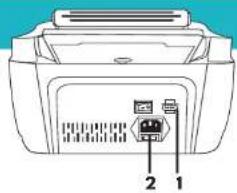
Turning on and selecting mode
- Press the switch to turn on the meter. The UV and MG indicators will light on the screen;
Means that the equipment is in detection mode by ultraviolet light (UV) and magnetic stripe (MG) - If the tickets have no magnetic stripe, press the FNT button to select only UV detection.
- Press FNT again to turn off counterfeit detection and use counting mode only.
The UV and MG indicators should be off.
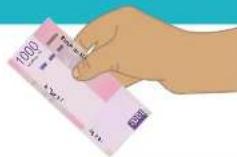
Proper way to place tickets
ERROR CODES
| Code | Cause |
| E01 | The left sensor does not work or is dirty. |
| E02 | The right sensor does not work or is dirty. |
| E03 | The code sensor is dirty or loose. |
| E04 | The jump sensor is broken or dirty. |
| E05 | The output sensor is not working or dirty. |
| E10 | Ambient light is too strong |
| The sensitivity of UV light is too high. | |
| E11 | The plastic button does not work. |
| BF | Wheels that work without bills |
ALARM CODES
| Code | Cause |
| EE1 | A false ticket was detected by UV. |
| EE2 | A false ticket was detected by the magnetic stripe. |
| EE4 | A broken note was detected. |
| Counter sensors are not working or dirty. | |
| EE5 | Two bills are being counted as one. |
| EE6 | A ticket with the magnetic stripe was detected at a different location. |
| EE8 | The ticket is smaller than 30 mm. |
| EE9 | The bill is longer than 75 mm. |
| EEA | Folded notes were detected. |
Brand : Steren
Model : BILL-100
Category : Bill Counter