
Momentum SPK9304 - Keyboard PHILIPS - Free user manual and instructions
Find the device manual for free Momentum SPK9304 PHILIPS in PDF.


Pick your language and provide your email: we'll send you a specifically translated version.
| Product Type | Keyboard |
| Model | Momentum SPK9304 |
| Brand | Philips |
| Connectivity | Bluetooth 5.0 + 2.4 GHz wireless via USB receiver |
| Layout | Full-size QWERTY (US International) |
| Key Switches | Membrane scissor-switch |
| Backlight | RGB per-key lighting with customizable effects |
| Multimedia Keys | Dedicated multimedia controls (play/pause, volume, etc.) |
| Battery Type | Rechargeable Li-Ion 1500 mAh |
| Battery Life | Up to 40 hours with backlight off |
| Charging Port | USB-C |
| Dimensions (W x D x H) | 440 x 130 x 20 mm |
| Weight | 800 g |
| Operating System Compatibility | Windows, macOS, Android, iOS, Linux |
| Maximum Range | 10 m (open area) |
| Key Rollover | N-key rollover via USB, 6-key via Bluetooth |
| Polling Rate | 1000 Hz (wired/wireless USB) |
| Material | ABS plastic with brushed aluminum top plate |
| Included Accessories | USB receiver, USB-C charging cable, user manual |
| Maintenance | Clean with a soft, dry cloth; avoid harsh chemicals |
| Safety Instructions | Keep away from liquids; do not disassemble; avoid extreme temperatures |
| Spare Parts Availability | Replacement USB receivers and keycaps available from Philips support |
| Warranty | 2 years limited warranty |
Frequently Asked Questions - Momentum SPK9304 PHILIPS
How do I connect the Philips Momentum SPK9304 keyboard via Bluetooth?
Ensure the keyboard is powered on (toggle switch on back). Press and hold the Bluetooth pairing button (Fn+1 or dedicated key) for 3 seconds until the LED blinks. On your device, go to Bluetooth settings, search for 'Momentum SPK9304' and select it. The LED will turn solid when connected.
Can I use the keyboard while charging?
Yes, you can use the keyboard in wired mode while charging via the USB-C cable. The keyboard will function normally and the battery will charge simultaneously.
What should I do if the keyboard is not responding?
First, check the power switch is on and the battery is charged. Try reconnecting via Bluetooth or plugging in the USB receiver. If using Bluetooth, remove the device from your PC's Bluetooth list and pair again. Reset the keyboard by pressing the pinhole reset button on the bottom with a paperclip.
How do I change the backlight color and effects?
Use the Fn key combined with the F-row keys (e.g., Fn+Insert to cycle effects, Fn+Home to adjust brightness). Refer to the manual for exact key combinations. You can also use the Philips software (if available) for advanced customization.
How long does the battery last?
With backlight off, the battery lasts up to 40 hours. With moderate backlight use, expect around 15-20 hours. Actual battery life varies depending on settings and usage.
Can I connect the keyboard to multiple devices simultaneously?
Yes, the keyboard supports up to 3 paired devices via Bluetooth and one via the USB receiver. Use the profile keys (Fn+1,2,3) to switch between them quickly.
What is the best way to clean the keyboard?
Unplug the keyboard and turn it off. Use a soft, lint-free cloth slightly dampened with water or isopropyl alcohol to wipe the keys and surface. Do not use bleach or abrasive cleaners. For deep cleaning, use compressed air to remove debris between keys.
Is the keyboard compatible with game consoles?
It works with PS4, PS5, Xbox One, and Xbox Series X/S via USB receiver, but not all games support keyboard input. For Bluetooth, compatibility varies by console. Check your console's documentation for keyboard support.
What should I do if a key is stuck or not registering?
Gently pry the keycap off using a keycap puller or a flat tool. Clean the switch area with compressed air. If the problem persists, contact Philips support for replacement keycaps or further assistance.
How can I update the keyboard firmware?
Visit the Philips support page for the Momentum SPK9304 and download the latest firmware updater tool. Connect the keyboard via USB, run the tool, and follow the on-screen instructions. Do not disconnect during update.
User questions about Momentum SPK9304 PHILIPS
0 question about this device. Answer the ones you know or ask your own.
Ask a new question about this device
No questions yet. Be the first to ask one.
Download the instructions for your Keyboard in PDF format for free! Find your manual Momentum SPK9304 - PHILIPS and take your electronic device back in hand. On this page are published all the documents necessary for the use of your device. Momentum SPK9304 by PHILIPS.
USER MANUAL Momentum SPK9304 PHILIPS
| 大这公差参照 /USPECIFIDN TOLERANCE TO FOLLOW GB/T11804-2000 按照P级/Grade F | > | 0 | 6 | 30 | 120 | 400 | 1000 |
| 6 | 30 | 120 | 400 | 1000 | 2000 | ||
| 公差/TOL.± | 0.05 | 0.10 | 0.15 | 0.20 | 0.30 | 0.50 |
| 版本/Rev | 修订描述/REVISION DESCRIPTION | 修订/REVISED BY | 日期/DATE |
| A1 | 第一次发行 | ||
| 第二次发行 | 陈成 | 2019-06-19 |
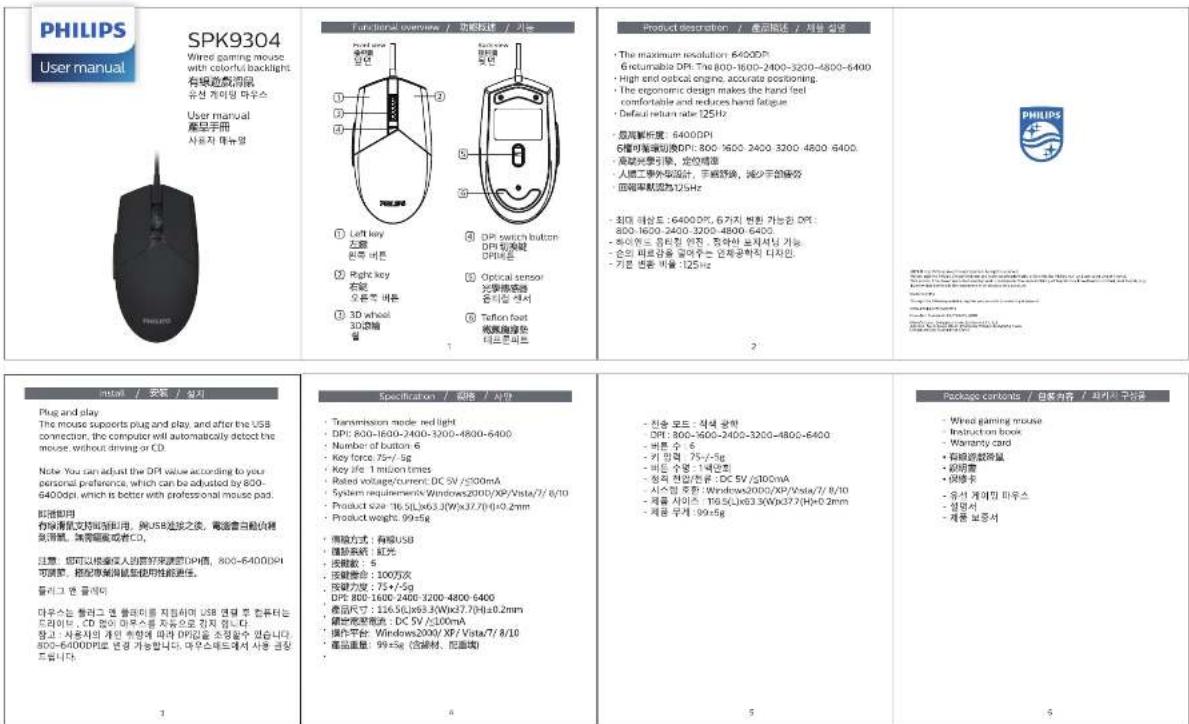
技术要求:
1) 成品尺寸:80*95mm
2) 材质:100g书写纸
3) 工艺:4C印刷,折风琴页
4) 公差:+/-0.5mm
| 设计DRAWN BY | 颜立红 | 2019/05/20 | 零件标号PART NO. | 单位MEDRC | A1MM | ||
| 材质MATERIAL | 1:1 | ||||||
| 表面处理FINISHING | |||||||
| PEACH □RoHS □Ca65 □CFR1303 □PFOS □PAHs □FORMALDEHYDE / 平板<**PPM □HALOGEN FREE / 无卤 | |||||||
| THIS DRAWING, AND IT'S INHERANT DESIGN CONCEPTS, ARE THE PROPERTY OF SOAI AND AS SUCH MAY NOT BE COPIED, REPRODUCED, OR GIVEN TO THIRD PARTIES WITHOUT THE WRITTEN CONSENT OF SOAI | |||||||
控制复印
| 设计DRAWN BY | 颜立红 | 2019/05/20 | 零件标号PART NO. | 单位MEDRC | A1MM | ||
| 材质MATERIAL | 1:1 | ||||||
| 表面处理FINISHING | |||||||
| PEACH □RoHS □Ca65 □CFR1303 □PFOS □PAHs □FORMALDEHYDE / 平板<**PPM □HALOGEN FREE / 无卤 | |||||||
| THIS DRAWING, AND IT'S INHERANT DESIGN CONCEPTS, ARE THE PROPERTY OF SOAI AND AS SUCH MAY NOT BE COPIED, REPRODUCED, OR GIVEN TO THIRD PARTIES WITHOUT THE WRITTEN CONSENT OF SOAI | |||||||