
FIDO-R-MM - Audio/video converter AJA - Free user manual and instructions
Find the device manual for free FIDO-R-MM AJA in PDF.


| Product Type | Audio/Video Converter |
| Brand | AJA |
| Model | FIDO-R-MM |
| Dimensions (W x D x H) | 94 x 48 x 24 mm |
| Weight | 0.1 kg |
| Power Supply | USB powered (5V, 1A) or optional external adapter |
| Input Connectors | 1x BNC SDI, 1x HDMI |
| Output Connectors | 1x BNC SDI, 1x HDMI |
| Supported Video Formats | SD/HD/3G SDI, HDMI up to 1080p60 |
| Audio Support | Embedded SDI/HDMI audio, up to 8 channels |
| Conversion Type | SDI to HDMI, HDMI to SDI, with audio embedding/disembedding |
| Firmware Update | Via USB on AJA website |
| Operating Temperature | 0°C to 40°C |
| Storage Temperature | -20°C to 60°C |
| Mounting | Standalone or optional frame |
| Compliance | CE, FCC, RoHS |
| Cleaning and Care | Wipe with a soft, dry cloth; avoid liquids |
| Safety Precautions | Use only specified power supply; do not expose to moisture; no user-serviceable parts inside |
| Spare Parts and Reparability | Repair by authorized AJA service centers only; no spare parts for end users |
| Warranty | 1 year limited warranty |
Frequently Asked Questions - FIDO-R-MM AJA
User questions about FIDO-R-MM AJA
0 question about this device. Answer the ones you know or ask your own.
Ask a new question about this device
Download the instructions for your Audio/video converter in PDF format for free! Find your manual FIDO-R-MM - AJA and take your electronic device back in hand. On this page are published all the documents necessary for the use of your device. FIDO-R-MM by AJA.
USER MANUAL FIDO-R-MM AJA
OG-FiDO-Series openGear Card

natural_image
Exterior view of a green printed circuit board with multiple AJA connectors and control buttons (no readable text or symbols)Installation and Operation Guide
Trademarks
AJA^® and Because it matters. are registered trademarks of AJA Video Systems, Inc. for use with most AJA products. AJA^TM is a trademark of AJA Video Systems, Inc. for use with recorder, router, software and camera products. Because it matters. is a trademark of AJA Video Systems, Inc. for use with camera products.
Corvid Ultra ^® , Io ^® , Ki Pro ^® , KONA ^® , KUMO ^® , ROI ^® and T-Tap ^® are registered trademarks of AJA Video Systems, Inc.
AJA Control Room™, KiStor™, Science of the Beautiful™, TruScale™, V2Analog™ and V2Digital™ are trademarks of AJA Video Systems, Inc.
All other trademarks are the property of their respective owners.
Copyright
Copyright © 2020 AJA Video Systems, Inc. All rights reserved. All information in this manual is subject to change without notice. No part of the document may be reproduced or transmitted in any form, or by any means, electronic or mechanical, including photocopying or recording, without the express written permission of AJA Video Systems, Inc.
Contacting AJA Support
When calling for support, have all information at hand prior to calling. To contact AJA for sales or support, use any of the following methods:
Telephone +1.530.271.3190
FAX +1.530.271.3140
Web https://www.aja.com
Support Email support@aja.com
Sales Email sales@aja.com
Contents
Notices 2
Trademarks 2
Copyright 2
Contacting AJA Support 2
Chapter 1 – OG-FiDO-Series .....4
Card Series Overview 4
Features....5
Connectors....5
LED Indicators 5
Block Diagram....7
Signal Indicators in the Dashboard Control System 8
User Controls 9
Dashboard Control System....9
openGear and AJA 9
Installation.... 10
Summary 10
Unpacking 10
Parts Supplied....10
Rear OG-FiDO-Series Card Installation 10
Front OG-FiDO-Series Card Installation 11
Cabling 14
Chapter 2 – Operation....15
Using the Dashboard Control System.... 15
Requirements 15
Configuration Settings Stored in OG Card 15
Control Interface Basic Components 15
Basic Tree View of Frames and Cards. 16
Card Information and Status. 16
Parameter Controls. 16
Card Tab Screen....17
Signal Status Tab Screen 18
SFP Tab Screen 19
Setup Tab Screen 20
Uploading New Software....20
Rebooting 23
Appendix A – Specifications .....25
OG-FiDO-TR 25
OG-FiDO-T. 26
OG-FiDO-R. 27
OG-FiDO-2T 28
OG-FiDO-2R....29
OG-FiDO-TR-MM....30
OG-FiDO-T-MM....31
OG-FiDO-R-MM 32
OG-FiDO-2T-MM 33
OG-FiDO-2R-MM....34
Appendix B – Safety and Compliance ..... 35
Warranty and Liability Information....45
Limited Warranty on Hardware. 45
Limitation of Liability 45
Governing Law and Language; Your Rights 45
Chapter 1 – OG-FiDO-Series
natural_image
Green printed circuit board with multiple AJA modules and control buttons (no readable text or symbols)Card Series Overview
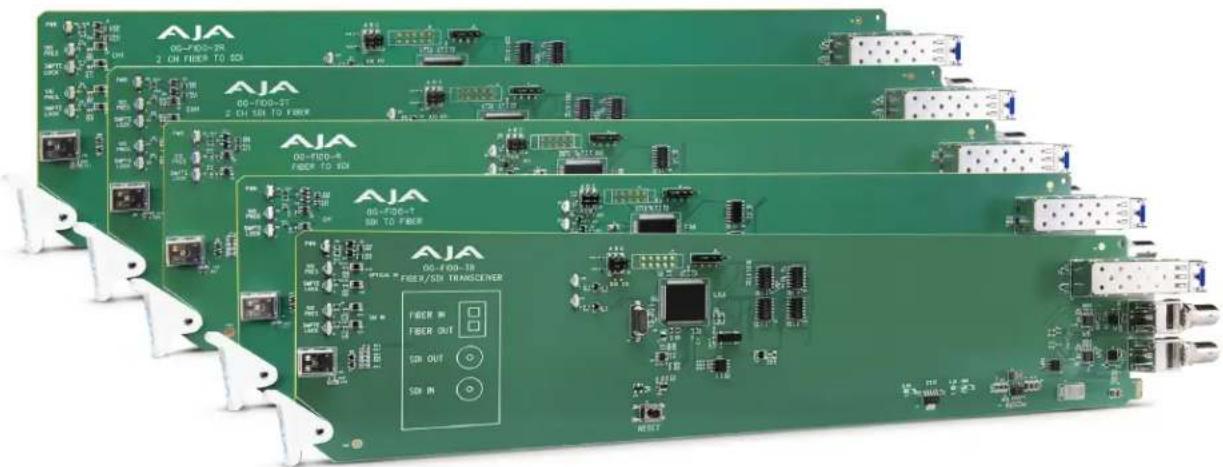
The OG-FiDO-Series cards are state-of-the-art, openGear-compatible, 3G-SDI to/from Fiber converter cards, enabling SDI signals to be extended up to 10km over standard Single-Mode fiber optic cable or 700 m (2296 ft) for OM4 and 300 m (984 ft) for OM3 for Multi-Mode fiber optic cable.
Ten AJA cards are available:
• OG-FiDO TR, 1-Channel 3G-SDI/LC Single-Mode LC Fiber Transceiver
- OG-FiDO-T, 1-Channel 3G-SDI to Single-Mode LC Fiber Transmitter
- OG-FiDO-R, 1-Channel Single-Mode LC Fiber to 3G-SDI Receiver
- OG-FiDO-2T, 2-Channel 3G-SDI to Single-Mode LC Fiber Transmitter
- OG-FiDO-2R, 2-Channel Single-Mode LC Fiber to 3G-SDI Receiver
- OG-FiDO-TR-MM, 1-Channel 3G-SDI/LC Multi-Mode LC Fiber Transceiver
- OG-FiDO-T-MM, 1-Channel 3G-SDI to Multi-Mode LC Fiber Transmitter
- OG-FiDO-R-MM, 1-Channel Multi-Mode LC Fiber to 3G-SDI Receiver
- OG-FiDO-2T-MM, 2-Channel 3G-SDI to Multi-Mode LC Fiber Transmitter
- OG-FiDO-2R-MM, 2-Channel Multi-Mode LC Fiber to 3G-SDI Receiver
The inputs are re-clocked with best-in-class input jitter tolerance. The two channel cards have completely independent paths, allowing different SDI rates to be carried on each channel.
The fiber connector is attached to the main card for added reliability and cost savings.
NOTE: In order to allow direct fiber connection to the card, and avoid problematic optical couplers, AJA FiDO openGear cards have the rear connectors attached to the front card. This means that the card cannot be removed from the frame with the SFP module, cables, and/or BNC retaining nuts installed.
Features
- openGear compatible cards (requires 2 slots per card, rear card included)
• Controlled by DashBoard network control software
• Automatic detection and re-clocking of 270Mb, 1.5Gb, and 3Gb SDI data rates - LC Fiber connectors
- Input Present and Input SMPTE Lock LEDs
- Hot-swap capable
- All SDI or fiber inputs are re-clocked, and SDI inputs are also equalized
- ASI compatible
- Compatible with DFR-8321, OG3 and OGX openGear frames
- Five-year international warranty with unlimited technical support
Connectors
Figure 1. Rear View of Empty Rear Card and Installed Dual Channel FiDO Cards
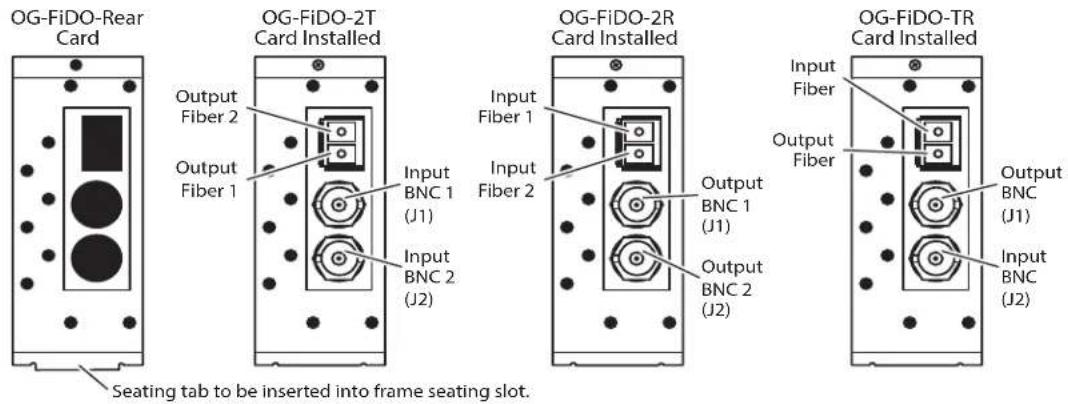
NOTE: On the OG-FiDO-2T card, Output Fiber 2 is located above Output Fiber 1.
Figure 2. Rear View of Empty Rear Card and Installed Single Channel FiDO Cards

LED Indicators
LEDs on the front (near door) of each card indicate, from top to bottom:
2T and 2R Cards
• DC power detected, card is operating correctly (green)
- Input 1 signal present (green)
- Input 1 SMPTE locked (green)
- Input 2 signal present (green)
- Input 2 SMPTE locked (green)
TR Cards
- DC power detected, card is operating correctly (green)
• Optical input signal present (green)
• Optical input SMPTE locked (green)
• SDI input signal present (green)
• SDI input SMPTE locked (green)
Single Channel Cards
- DC power detected, card is operating correctly (green)
- Signal present (green)
- SMPTE locked (green)

Card Alarm State – Yellow
When the SDI signal is not connected, the Dashboard Control System shows a yellow Card State. Under the Signal Status tab, the Signal Status is shown as yellow with "No Signal." The Input Lock is shown as yellow with "No Lock," and the Data Rate is shown as "No Lock."
Figure 3. Signal Status No Signal
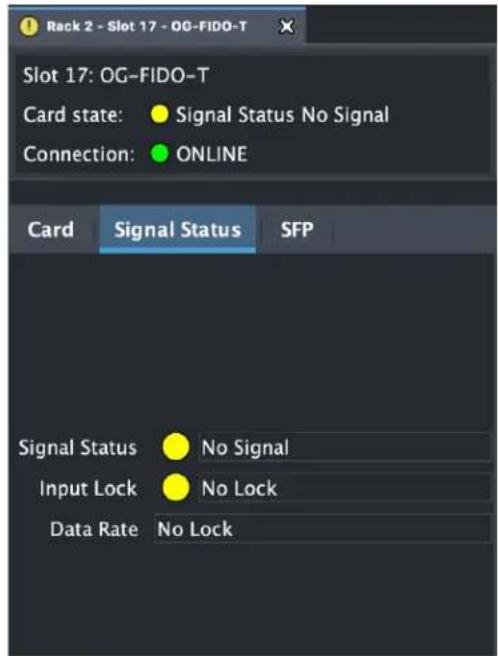
When there is a valid input signal detected, the Dashboard Control System shows a green Card State. Additionally, under the Signal Status tab, the Signal Status is shown as "Signal Present," and the Input Lock is shown as "Locked." The detected Data Rate of the SDI Signal is also indicated (for example, "3 Gbps").
Figure 4. Signal is present and locked

User Controls
The OG-FiDO-Series cards can be used right out of the box for many applications, since they are designed to recognize inputs and perform standard actions automatically. However, you can also remotely monitor the OG-FiDO-Series through the Dashboard Control System for an openGear Frame.
Dashboard Control System
The Dashboard Control System, created by Ross Video, provides a control interface between Windows, macOS and Linux computers and the cards installed in an openGear frame. Dashboard operates through TCP/IP communication and requires an Ethernet connection between the controlling computer and an openGear frame.
For details about acquiring and using the Dashboard Control System, refer to "Using the Dashboard Control System" on page 15.
openGear and AJA
openGear is an open-architecture, modular frame system designed by Ross Video and supported by a diverse range of terminal equipment manufacturers, including AJA. Ross Video manufactures the frames, power supplies and network cards for openGear. AJA is a reseller of the openGear frames.
AJA Video is a leading manufacturer of video interface technologies, converters, digital video recording solutions and professional cameras, bringing high-quality, cost-effective products to the professional, broadcast and post-production markets. AJA products, including openGear cards, are designed and manufactured at our facilities in Grass Valley, California.
Installation


CLASS 1 LASER PRODUCT
Warning! Active fiber-optic cables emit radiation invisible to the human eye. Do not look directly at the end of an active fiber-optic cable or the fiber connector on an OG-FiDO-2T, OG-FiDO-2T-MM, OG-FiDO-TR, OG-FiDO-TR-MM, OG-FiDO-T, OG-FiDO-T-MM; these models are Class 1 Laser Products.
Summary
Installing an OG-FiDO card into a DFR-8321, OG3 or OGX openGear frame consists of the following steps:
- Install a Rear Fiber Card into the frame.
- Ensure the SFP module is removed from the Front FiDO Card.
- Insert the Front FiDO card in the left (odd numbered) slot of the pair.
- Install BNC connector retaining nuts and washers.
- Insert the SFP module into the card from the rear of the frame.
- Connect the BNC and Fiber cabling.

ESD Susceptibility - Static discharge can cause serious damage to sensitive semiconductor devices. Avoid handling circuit boards in high static environments such as carpeted areas, and when wearing synthetic fiber clothing. Always exercise proper grounding precautions when working on circuit boards and related equipment.
Unpacking
Unpack each openGear product you received from the shipping container and ensure that all items are included. If any items are missing or damaged, contact your sales representative or AJA directly.
Parts Supplied
Each OG-FiDO card is shipped with:
• OG-FiDO card in an ESD bag
- Fiber Rear Card
- SFP module in ESD bag
• BNC nuts and star washers
Rear OG-FiDO-Series Card Installation
- Power down the openGear frame.
-
Ensure that the frame is properly installed.
-
Locate the card frame slot on the rear of the openGear frame into which you wish to install the openGear card.
NOTE: An OG-FiDO card occupies two slots in the frame.
- Using a Phillips screwdriver, unscrew the top screw from the desired blank rear plate and remove the rear plate.
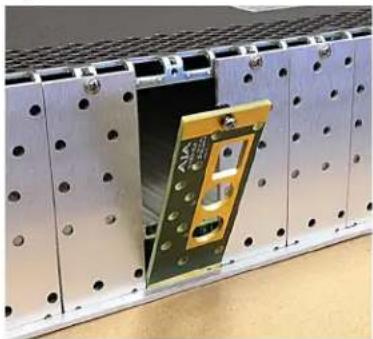
- Seat the bottom of the Rear Card in the seating slot at the base of the frame back plane (Figure 5).
Figure 5. Rear Card Inserted Into Frame Seating Slot
natural_image
Close-up of a metallic electronic component with a small gold-colored circuit board and screw holes, mounted on a perforated metal frame (no visible text or symbols)- Align the top screw of the Rear Card with the screw hole on the top edge of the frame back plane.
- Ensure the Rear Card aligns with the desired card slot before tightening the screw.
NOTE: To correctly orient the rear panel, make sure that the AJA logo is facing out.
- Using a Phillips screwdriver, fasten the Rear Card to the frame back plane. Do not over tighten.
- Ensure proper frame cooling and ventilation by having all rear frame slots covered with rear modules or blank metal plates if plates are not pre-installed.
Front OG-FiDO-Series Card Installation

Caution! The SFP module must be removed from an OG-FiDO card before inserting the card into or removing the card from an openGear frame.
- If necessary, remove the SFP module from the Front Card by lifting the lever and pulling out the module.
- If nuts and washers are pre-installed on the BNC connectors, they must be removed before inserting the card in the frame.
- Open the openGear frame door as follows:
A. Gently pull the side door tabs towards the center of the door, releasing the door from the frame.
B. Using both hands, pull the door towards you. The door extender arms prevent the door from falling.
-
Locate the Rear Card you installed as described above. The interior slot number is dependent on the slot combinations into which you installed the Rear Card. This allows adequate spacing to avoid damaging the card, the cards installed in the neighboring slots, or both.
-
Hold the card by the edges and carefully align the card edges with the rails inside the frame. The slots are numbered starting from the left-most slot when facing the fame front.
NOTE: OG-FiDO cards are installed into the left (odd numbered) slot of the pair.
- Fully insert the card into the frame until the card is properly seated in the Rear Card. There are two stages to inserting the card:
A. After you feel the card's first click, its position in the frame will resemble the photograph below in Figure 6.
B. Next, press against the white plastic tab again until you feel the second click. The card's position will resemble the photograph below in Figure 7.
NOTE: Some cards require more pressure than others to be fully inserted. Make sure that the plastic tab at the bottom of the front edge of the card is completely upright. If it is tilting forward, the card is not yet fully inserted.
Figure 6. The card on the left is already fully inserted. The card on the right is not yet fully inserted, as indicated by the white plastic tab tilting forward.

natural_image
Industrial electronic equipment with green laser indicators and AIA branding, mounted on a metal shelf (no readable text or symbols)Figure 7. The white plastic tab for the card on the right is now upright. Both cards are shown fully inserted.

natural_image
Interior view of an electronic equipment rack with green laser indicators and AJA branding (no readable text or symbols)- Close the frame door as follows:
A. Slide the door into the frame.
B. Pull and release the door tabs to ensure the frame door is securely locked to the frame.
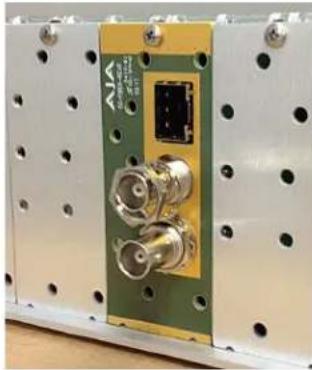
- Secure the card in the frame by the BNC connectors using the star washers and nuts provided (Figure 8).
Figure 8. BNC Star Washer and Nut Installation
natural_image
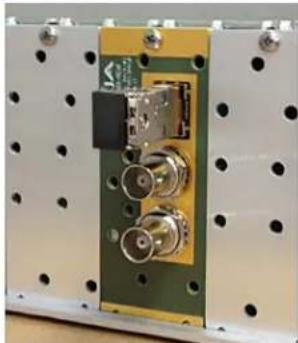
Close-up of a green electronic device with two coaxial connectors and a central connector, mounted on a white perforated base (no visible text or symbols)- Insert the SFP fiber module into the socket until it clicks and locks. The lever handle is on the left (Figure 9).
Figure 9. Fiber SFP Installation
natural_image
Close-up of an electronic circuit board with connectors and mounting holes (no visible text or symbols)NOTE: The SFP module must match the card's capabilities for proper operation. Input and output triangles next to the fiber ports identify which are inputs and which are outputs (Figure 10).
Figure 10. An SFP Module

- Close the frame door as follows:
A. Slide the door into the frame.
B. Pull and release the door tabs to ensure the frame door is securely locked to the frame.
Cabling
Refer to Figure 1 on page 5 and Figure 2 on page 5 to identify the input and output signal connectors.
NOTE: Keep the protective dust cap in the SFP module until the fiber cabling is actually connected to the module.
Using the Dashboard Control System
The Dashboard Control System is available as a free download from the openGear Dashboard Software Download webpage:
https://www.opengear.tv/frame-and-control/control-system/download/
Ross Video offers comprehensive documentation that covers the extensive capabilities of the Dashboard Control System:
https://www.rossvideo.com/support/product-documentation/dashboard/
This AJA OG-FiDO-Series manual addresses only those essential aspects of the Dashboard Control System needed to control the OG-FiDO-Series card.
Requirements
The Dashboard Control System requires the following components:
- openGear frame with a Frame Controller card
- Ethernet connection between the controlling computer and the openGear frame
NOTE: The openGear frame ships from AJA with the MFC-8322-S Frame Controller card for controlling the new AJA Dashboard cards. The openGear frame also supports the MFC-0G3-N Advanced Networking Frame Controller card, which can be used to control compatible OG cards.
Dashboard automatically discovers openGear and Dashboard Connect devices, such as openGear frames and cards that are present and accessible on your network.
Configuration Settings Stored in OG Card
Configuration settings made through Dashboard are stored in the OG-FiDO-Series unit through subsequent power cycles.
Control Interface Basic Components
The basic components of the Dashboard Control System user interface consist of the basic tree view of frames and cards, the card information and status panel, and the parameter controls panel. These elements are shown below.
Figure 11. Main Sections of the Dashboard User Interface
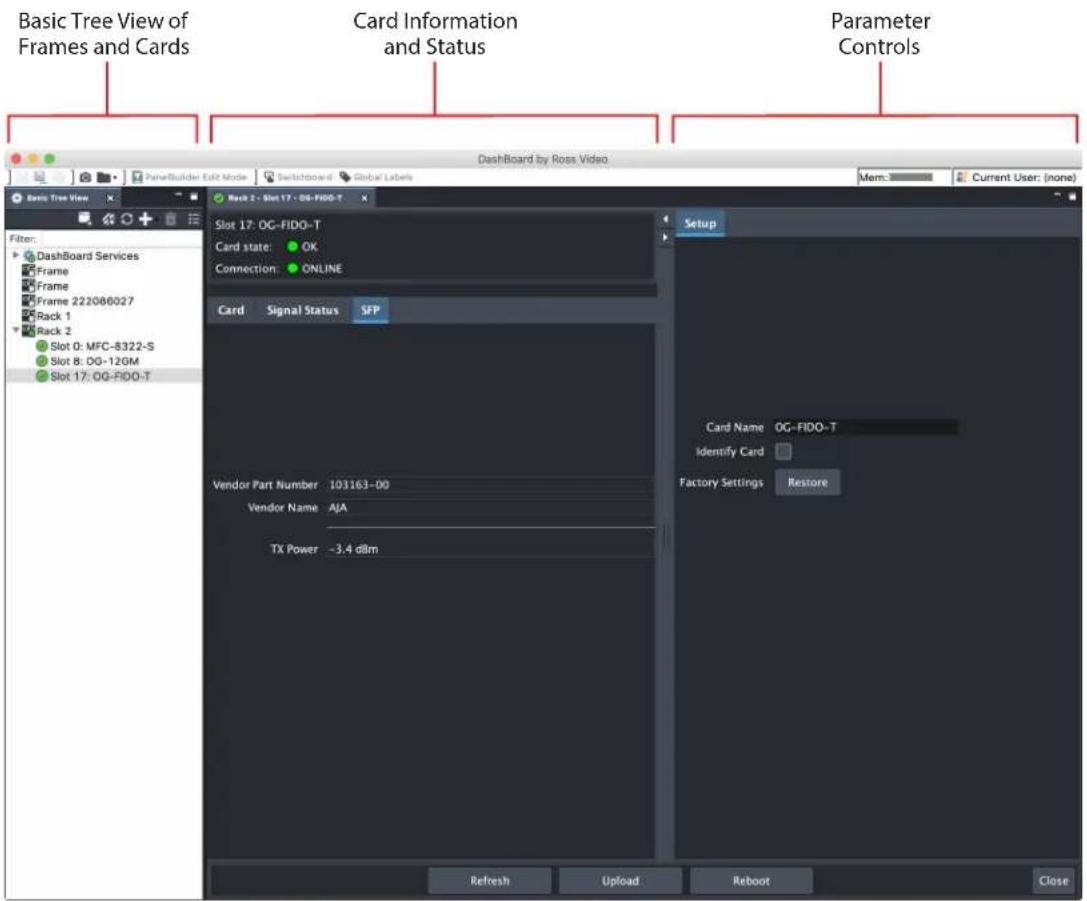
Basic Tree View of Frames and Cards
The basic tree view in the left column shows the frames and cards that are discoverable by Dashboard on your network.
Card Information and Status
The card information and status panel, shown in the middle panel, display the basic status of the card currently selected in Dashboard. The yellow fields in this panel indicate that they are read-only.
Parameter Controls
The parameter controls panel on the right side of Dashboard shows the tabs and parameters that are configurable for the selected card.
Figure 12. OG-FiDO-T Card Tab Screen in Dashboard

The Card tab screen indicates the basic information about the card itself such as the card name, hardware status, product, supplier, assembly, serial number, software version and other items.
Figure 13. OG-FiDO-Series Signal Status Tab Screen in Dashboard
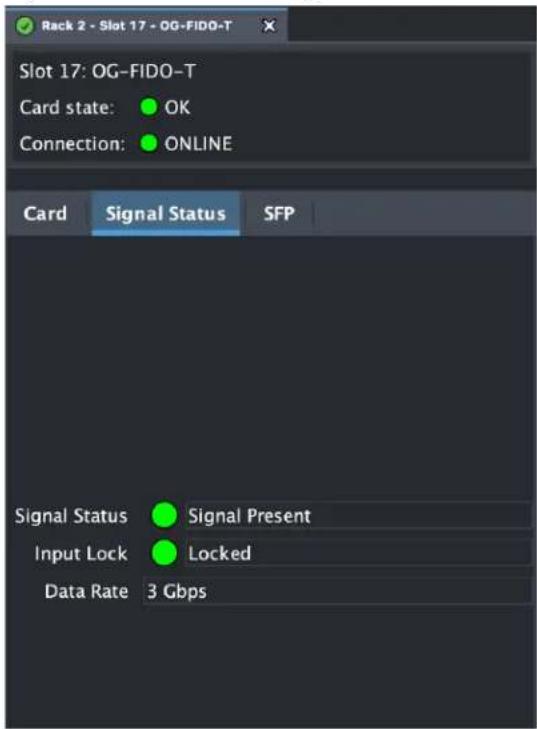
The Signal Status fields report the Signal Status, the Input Lock Status, and the Data Rate.
Figure 14. OG-FiDO-Series SFP Tab Screen in Dashboard

The SFP fields report on the following aspects of the SFP:
• Vendor Part Number
- Vendor Name
- RX Power (as applicable for the specific card)
• TX Power (as applicable for the specific card)
Figure 15. OG-FiDO-Series Setup Tab Screen in Dashboard
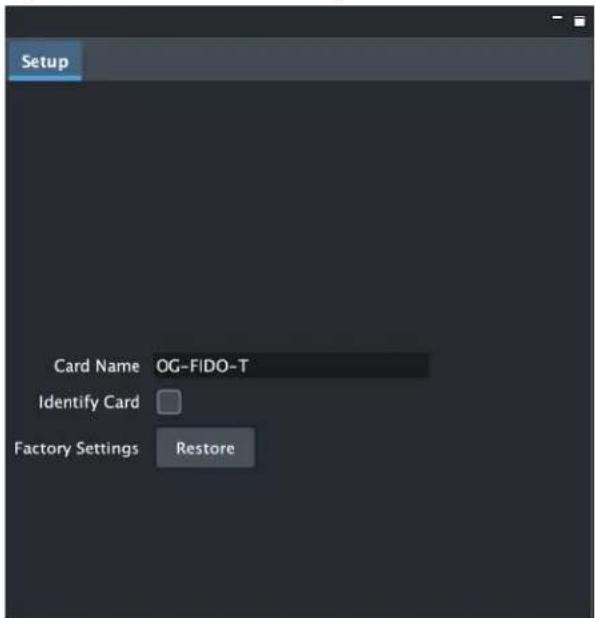
Click on the Setup tab to view and make changes to the card name or to restore card settings to factory default values.
Card Name - By default, this field is pre-populated with the card name (for example, OG-FIDO-T). You can change the card name by editing the text in the Card Name field.
NOTE: Changing the Card Name in the Setup tab also changes the name of the card in the Dashboard tree view.
Identify Card - Select the checkbox to turn on the Identify Card function. When this function is turned on, the Power LED light on the front of the OG-FiDO-Series card inside the openGear frame will blink to help you quickly identify the card. Open the front of the openGear frame in order to see the light blinking.
Factory Settings - If you would like to revert the card settings to factory default values, click Restore.
Uploading New Software
When available, you can upload updated software to the OG-FiDO-Series through the Dashboard Control System by following the steps below.
To Upload New Software
- Check the AJA website for new software for your OG-FiDO-Series. If new software is found, download it and uncompress the file archive (zip).
- Click the Upload button in the lower panel of the Dashboard Control System to open the Upload Software Wizard.
Figure 16. OG-FiDO-Series Upload Software Wizard window in Dashboard

-
From the Upload Software Wizard window, select Browse.
-
Navigate to the location of the downloaded .bin file containing the software update. Select the .bin file, then select Open. The Upload Software Wizard window displays characteristics of the selected file for uploading.

- Click Finish. The uploading process begins.
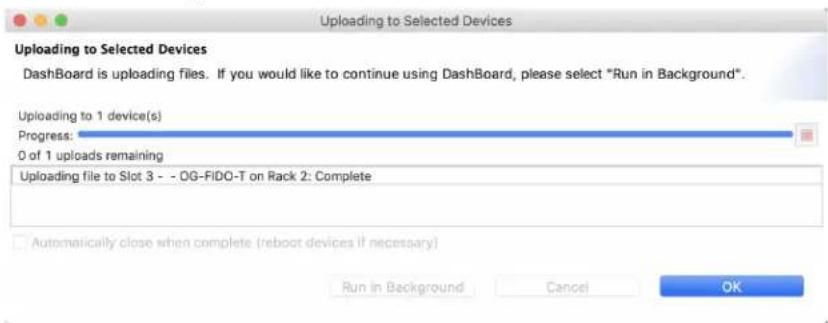
Figure 17. Uploading to Selected Devices window in Dashboard
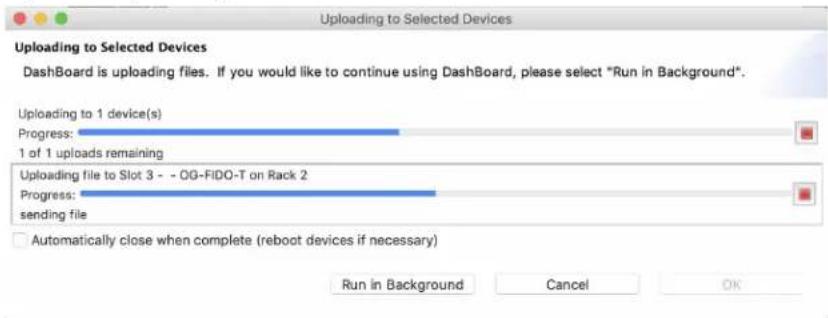
- When the progress bar indicates that the uploading is finished and status indicates "Complete," click OK.
- To verify the version of software or firmware currently installed on your card, select the Card tab from the center panel of Dashboard.
Figure 18. OG-FiDO-Series Card Tab Screen in Dashboard indicating the currently installed software version.

Rebooting
Rebooting is a standard function built in to the Dashboard Control System, and should only be performed if the board has become unresponsive.
WARNING: During a reboot, any card operations will be briefly interrupted, but will be restored once the reboot has completed.
To Reboot the OG-FiDO-Series
- Click the Reboot button in the lower panel of Dashboard. The reboot confirmation message displays.
Figure 19. Reboot confirmation window

- Click Yes. The message "Loading data, please wait. Refreshing device data" displays for a moment. The card will be offline for a few seconds, and any current operations will be interrupted.
Figure 20. The OG-FiDO-Series briefly pauses operations while rebooting
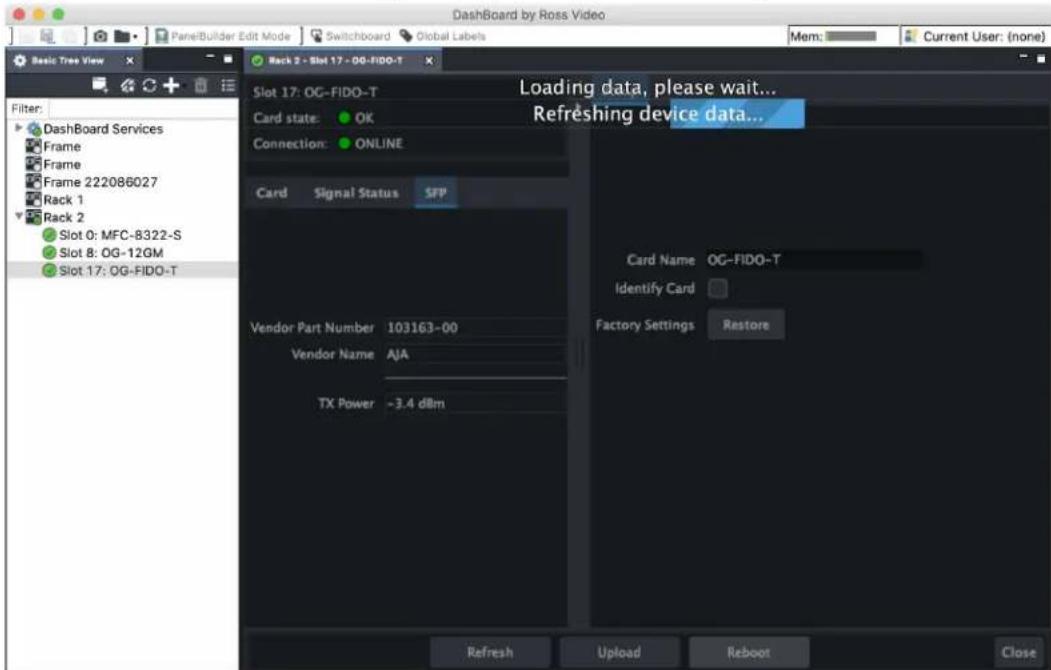
- Following a Reboot operation, the board configuration will return to the settings that were in place at the time of rebooting.
OG-FiDO-TR
Video Formats
• 150 Mbps - 3 Gbps, format agnostic
Video Input Digital
• 1-Channel independent 3G-SDI BNC Input, SMPTE-259/292/424
• 1-Channel Single Mode LC Fiber Input, SMPTE-297
• Nominal Wavelength: 1260-1620 nm
• Optical Sensitivity: -18dBm (min)
• Overload Power: -3dBm (min)
Video Output Digital
• 1-Channel independent 3G-SDI BNC Output, SMPTE-259/292/424
• 1-Channel Single Mode LC Fiber Output, SMPTE-297
• Nominal Wavelength: 1310 nm
• Optical Power: -5dBm (min), 0dBm (max)
• Extinction Ratio: 7.5dB (Typ)
Reclocking
• 270 Mbps, 1.483 Gbps, 1.485 Gbps, 2.966 Gbps, 2.970 Gbps - Auto Select
- All other rates are passed through and not reclocked
User Controls
- openGear Dashboard network control software via Windows, macOS or Linux
Size
- openGear standard form factor, front slot and rear card. Two slots required for each card
Weight
• 0.5 lb (0.3 kg)
Power
- openGear frame compatible, 2.5 watts max per card
Environment
- Safe Operating Temperature: 0 to 40 degrees C (32 to 104 degrees F)
- Safe Storage Temperature (Power OFF): -40 to 60 degrees C (-40 to 140 degrees F)
- Operating Relative Humidity: 10-90% noncondensing
- Operating Altitude: <3,000 meters (<10,000 feet)
Video Formats
• 150 Mbps - 3 Gbps, format agnostic
Video Input Digital
• 1-Channel independent 3G-SDI BNC Input with SDI Loop out, SMPTE-259/292/424
Video Output Digital
• 1-Channel independent 3G-SDI BNC Output, SMPTE-259/292/424
• 1-Channel Single Mode LC Fiber Output, SMPTE-297
• Nominal Wavelength: 1310 nm
• Optical Power: -5dBm (min), 0dBm (max)
• Extinction Ratio: 7.5dB (Typ)
Reclocking
• 270 Mbps, 1.483 Gbps, 1.485 Gbps, 2.966 Gbps, 2.970 Gbps - Auto Select
- All other rates are passed through and not reclocked
User Controls
- openGear Dashboard network control software via Windows, macOS or Linux
Size
- openGear standard form factor, front slot and rear card. Two slots required for each card.
Weight
• 0.5 lb (0.3 kg)
Power
- openGear frame compatible, 2.5 watts max per card
Environment
- Safe Operating Temperature: 0 to 40 degrees C (32 to 104 degrees F)
- Safe Storage Temperature (Power OFF): -40 to 60 degrees C (-40 to 140 degrees F)
- Operating Relative Humidity: 10-90% noncondensing
- Operating Altitude: <3,000 meters (<10,000 feet)
Video Formats
• 150 Mbps - 3 Gbps, format agnostic
Video Input Digital
• 1-Channel Single Mode LC Fiber Input, SMPTE-297
• Nominal Wavelength: 1260 - 1620 nm
• Optical Sensitivity: -18dBm (min)
• Overload Power: -3dBm (min)
Video Output Digital
• 1-Channel Dual matching 3G-SDI BNC Output, SMPTE-259/292/424
Reclocking
• 270 Mbps, 1.483 Gbps, 1.485 Gbps, 2.966 Gbps, 2.970 Gbps - Auto Select
- All other rates are passed through and not reclocked
User Controls
- openGear DashBoard network control software via Windows, macOS or Linux
Size
- openGear standard form factor, front slot and rear card. Two slots required for each card.
Weight
• 0.5 lb (0.3 kg)
Power
- openGear frame compatible, 2.5 watts max per card
Environment
- Safe Operating Temperature: 0 to 40 degrees C (32 to 104 degrees F)
- Safe Storage Temperature (Power OFF): -40 to 60 degrees C (-40 to 140 degrees F)
- Operating Relative Humidity: 10-90% noncondensing
- Operating Altitude: <3,000 meters (<10,000 feet)
Video Formats
• 150 Mbps - 3 Gbps, format agnostic
Video Input Digital
• 2-Channel independent 3G-SDI BNC Inputs, SMPTE-259/292/424
Video Output Digital
• 2-Channel independent Single Mode LC Fiber Outputs, SMPTE-297
• Nominal Wavelength: 1310 nm
• Optical Power: -5dBm (min), 0dBm (max)
• Extinction Ratio: 7.5dB (Typ)
Reclocking
• 270 Mbps, 1.483 Gbps, 1.485 Gbps, 2.966 Gbps, 2.970 Gbps - Auto Select
- All other rates are passed through and not reclocked
User Controls
- openGear DashBoard network control software via Windows, macOS or Linux
Size
- openGear standard form factor, front slot and rear card. Two slots required for each card.
Weight
• 0.5 lb (0.3 kg)
Power
- openGear frame compatible, 2.5 watts max per card
Environment
- Safe Operating Temperature: 0 to 40 degrees C (32 to 104 degrees F)
- Safe Storage Temperature (Power OFF): -40 to 60 degrees C (-40 to 140 degrees F)
- Operating Relative Humidity: 10-90% noncondensing
- Operating Altitude: <3,000 meters (<10,000 feet)
Video Formats
• 150 Mbps - 3 Gbps, format agnostic
Video Input Digital
• 2-Channel independent Single Mode LC Fiber Inputs, SMPTE-297
• Nominal Wavelength: 1260 - 1620 nm
• Optical Sensitivity: -18dBm (min)
• Overload Power: -3dBm (min)
Video Output Digital
• 2-Channel independent 3G-SDI BNC Outputs, SMPTE-259/292/424
Reclocking
• 270 Mbps, 1.483 Gbps, 1.485 Gbps, 2.966 Gbps, 2.970 Gbps - Auto Select
- All other rates are passed through and not reclocked
User Controls
- openGear DashBoard network control software via Windows, macOS or Linux
Size
- openGear standard form factor, front slot and rear card. Two slots required for each card.
Weight
• 0.5 lb (0.3 kg)
Power
- openGear frame compatible, 2.5 watts max per card
Environment
- Safe Operating Temperature: 0 to 40 degrees C (32 to 104 degrees F)
- Safe Storage Temperature (Power OFF): -40 to 60 degrees C (-40 to 140 degrees F)
- Operating Relative Humidity: 10-90% noncondensing
- Operating Altitude: <3,000 meters (<10,000 feet)
Video Formats
• 150 Mbps - 3 Gbps, format agnostic
Video Input Digital
• 1-Channel independent 3G-SDI BNC Input, SMPTE-259/292/424
• 1-Channel Multi-Mode LC Fiber Input, SMPTE-297
• Nominal Wavelength: 850 nm
• Optical Sensitivity: -15dBm (min)
• Overload Power: 0dBm
Video Output Digital
• 1-Channel independent 3G-SDI BNC Output, SMPTE-259/292/424
• 1-Channel Multi-Mode LC Fiber Output, SMPTE-297
• Nominal Wavelength: 850 nm
• Optical Power: -7dBm (min), -2dBm (max)
• Extinction Ratio: 7.5dB (Typ)
Reclocking
• 270 Mbps, 1.483 Gbps, 1.485 Gbps, 2.966 Gbps, 2.970 Gbps - Auto Select
- All other rates are passed through and not reclocked
User Controls
- openGear Dashboard network control software via Windows, macOS or Linux
Size
- openGear standard form factor, front slot and rear card. Two slots required for each card.
Weight
• 0.5 lb (0.3 kg)
Power
- openGear frame compatible, 2.5 watts max per card
Environment
- Safe Operating Temperature: 0 to 40 degrees C (32 to 104 degrees F)
- Safe Storage Temperature (Power OFF): -40 to 60 degrees C (-40 to 140 degrees F)
- Operating Relative Humidity: 10-90% noncondensing
- Operating Altitude: <3,000 meters (<10,000 feet)
Video Formats
• 150 Mbps - 3 Gbps, format agnostic
Video Input Digital
• 1-Channel independent 3G-SDI BNC Input with SDI Loop out, SMPTE-259/292/424
Video Output Digital
• 1-Channel independent 3G-SDI BNC Output, SMPTE-259/292/424
• 1-Channel Multi-Mode LC Fiber Output, SMPTE-297
• Nominal Wavelength: 850 nm
• Optical Power: -7dBm (min), -2dBm (max)
• Extinction Ratio: 7.5dB (Typ)
Reclocking
• 270 Mbps, 1.483 Gbps, 1.485 Gbps, 2.966 Gbps, 2.970 Gbps - Auto Select
- All other rates are passed through and not reclocked
User Controls
- openGear Dashboard network control software via Windows, macOS or Linux
Size
- openGear standard form factor, front slot and rear card. Two slots required for each card.
Weight
• 0.5 lb (0.3 kg)
Power
- openGear frame compatible, 2.5 watts max per card
Environment
- Safe Operating Temperature: 0 to 40 degrees C (32 to 104 degrees F)
- Safe Storage Temperature (Power OFF): -40 to 60 degrees C (-40 to 140 degrees F)
- Operating Relative Humidity: 10-90% noncondensing
- Operating Altitude: <3,000 meters (<10,000 feet)
Video Formats
• 150 Mbps - 3 Gbps, format agnostic
Video Input Digital
• 1-Channel Multi-Mode LC Fiber Input, SMPTE-297
• Nominal Wavelength: 850 nm
• Optical Sensitivity: -15dBm (min)
• Overload Power: 0dBm
Video Output Digital
• 1-Channel Dual matching 3G-SDI BNC Outputs, SMPTE-259/292/424
Reclocking
• 270 Mbps, 1.483 Gbps, 1.485 Gbps, 2.966 Gbps, 2.970 Gbps - Auto Select
- All other rates are passed through and not reclocked
User Controls
- openGear DashBoard network control software via Windows, macOS or Linux
Size
- openGear standard form factor, front slot and rear card. Two slots required for each card.
Weight
• 0.5 lb (0.3 kg)
Power
- openGear frame compatible, 2.5 watts max per card
Environment
- Safe Operating Temperature: 0 to 40 degrees C (32 to 104 degrees F)
- Safe Storage Temperature (Power OFF): -40 to 60 degrees C (-40 to 140 degrees F)
- Operating Relative Humidity: 10-90% noncondensing
- Operating Altitude: <3,000 meters (<10,000 feet)
Video Formats
• 150 Mbps - 3 Gbps, format agnostic
Video Input Digital
• 2-Channel independent 3G-SDI BNC Inputs, SMPTE-259/292/424
Video Output Digital
• 2-Channel independent Multi-Mode LC Fiber Outputs, SMPTE-297
• Nominal Wavelength: 850 nm
• Optical Power: -7dBm (min), -2dBm (max)
• Extinction Ratio: 7.5dB (Typ)
Reclocking
• 270 Mbps, 1.483 Gbps, 1.485 Gbps, 2.966 Gbps, 2.970 Gbps - Auto Select
- All other rates are passed through and not reclocked
User Controls
- openGear DashBoard network control software via Windows, macOS or Linux
Size
- openGear standard form factor, front slot and rear card. Two slots required for each card.
Weight
• 0.5 lb (0.3 kg)
Power
- openGear frame compatible, 2.5 watts max per card
Environment
- Safe Operating Temperature: 0 to 40 degrees C (32 to 104 degrees F)
- Safe Storage Temperature (Power OFF): -40 to 60 degrees C (-40 to 140 degrees F)
- Operating Relative Humidity: 10-90% noncondensing
- Operating Altitude: <3,000 meters (<10,000 feet)
Video Formats
• 150 Mbps - 3 Gbps, format agnostic
Video Input Digital
• 2-Channel independent Multi-Mode LC Fiber Inputs, SMPTE-297
• Nominal Wavelength: 850 nm
• Optical Sensitivity: -15dBm (min)
• Overload Power: 0dBm
Video Output Digital
• 2-Channel independent 3G-SDI BNC Outputs, SMPTE-259/292/424
Reclocking
• 270 Mbps, 1.483 Gbps, 1.485 Gbps, 2.966 Gbps, 2.970 Gbps - Auto Select
- All other rates are passed through and not reclocked
User Controls
- openGear DashBoard network control software via Windows, macOS or Linux
Size
- openGear standard form factor, front slot and rear card. Two slots required for each card.
Weight
• 0.5 lb (0.3 kg)
Power
- openGear frame compatible, 2.5 watts max per card
Environment
- Safe Operating Temperature: 0 to 40 degrees C (32 to 104 degrees F)
- Safe Storage Temperature (Power OFF): -40 to 60 degrees C (-40 to 140 degrees F)
- Operating Relative Humidity: 10-90% noncondensing
- Operating Altitude: <3,000 meters (<10,000 feet)
Appendix B – Safety and Compliance
Federal Communications Commission (FCC) Compliance Notices
Class A Interference Statement
This equipment has been tested and found to comply with the limits for a Class A digital device, pursuant to Part 15, Subpart B of the FCC Rules. These limits are designed to provide reasonable protection against harmful interference in a residential installation. This equipment generates, uses, and can radiate radio frequency energy and, if not installed and used in accordance with the instructions, may cause harmful interference to radio communications. However, there is no guarantee that interference will not occur in a particular installation. If this equipment does cause harmful interference to radio or television reception, which can be determined by turning the equipment off and on, the user is encouraged to try to correct the interference by one or more of the following measures:
- Reorient or relocate the receiving antenna.
- Increase the separation between the equipment and receiver.
- Connect the equipment into an outlet on a circuit different from that to which the receiver is connected.
- Consult the dealer or an experienced radio/TV technician for help.
FCC Caution
This device complies with Part 15 of the FCC Rules. Operation is subject to the following two conditions: (1) This device may not cause harmful interference, and (2) this device must accept any interference received, including interference that may cause undesired operation.
Canadian ICES Statement
Canadian Department of Communications Radio Interference Regulations
This digital apparatus does not exceed the Class A limits for radio-noise emissions from a digital apparatus as set out in the Radio Interference Regulations of the Canadian Department of Communications. This Class A digital apparatus complies with Canadian ICES-003.
European Union and European Free Trade Association (EFTA) Regulatory Compliance
This equipment may be operated in the countries that comprise the member countries of the European Union and the European Free Trade Association. These countries, listed in the following paragraph, are referred to as The European Community throughout this document:
AUSTRIA, BELGIUM, BULGARIA, CYPRUS, CZECH REPUBLIC, DENMARK, ESTONIA, FINLAND, FRANCE, GERMANY, GREECE, HUNGARY, IRELAND, ITALY, LATVIA, LITHUANIA, LUXEMBOURG, MALTA, NETHERLANDS, POLAND, PORTUGAL, ROMANIA, SLOVAKIA, SLOVENIA, SPAIN, SWEDEN, UNITED KINGDOM, ICELAND, LICHTENSTEIN, NORWAY, SWITZERLAND
Marking by this symbol indicates compliance with the Essential Requirements of the EMC Directive of the European Union 2014/30/EU.

This equipment meets the following conformance standards:
EN 60065: 2014 (T-Mark License),
IEC 60065: 2014 (CB Scheme Report/Certificate)
Additional licenses issued for specific countries available on request.
Emissions
EN 55032: 2012 + AC: 2013, CISPR 32: 2015,
EN 61000-3-2: 2014, EN 61000-3-3: 2013
Immunity
EN 55103-2: 2009, EN 61000-4-2:2009, EN 61000-4-3: 2006 + A1:2008 + A2:2010,
EN 61000-4-4: 2004 + A1:2010, EN 61000-4-5:2006, EN 61000-4-6:2009,
EN 61000-4-11:2004
Environments: E2, E3 and E4
The product is also licensed for additional country specific standards as required for the International Marketplace.
Laser
EN 60825-1: 2014 and EN 60825-2: 2004 + A1 + A2,
CDRH Compliant Class 1 (TUV Cert No's. R 50379982 & R 50392421)
Also Licensed for Standards: FDA 21 CFR 1040.10 and 1040.11

Warning! This is a Class A product. In a domestic environment, this product may cause radio interference, in which case, the user may be required to take appropriate measures.
This symbol on the product or its packaging indicates that this product must not be disposed of with your other household waste. Instead, it is your responsibility to dispose of your waste equipment by handing it over to a designated collection point for the recycling of waste electrical and electronic equipment. The separate collection and recycling of your waste equipment at the time of disposal will help conserve natural resources and ensure that it is recycled in a manner that protects human health and the environment. For more information about where you can drop off your waste for recycling, please contact your local authority, or where you purchased your product.
Korea KCC Compliance Statement
사용자 안내문
Taiwan Compliance Statement
警告使用者:
This is a Class A product based on the standard of the Bureau of Standards, Metrology and Inspection (BSMI) CNS 13438, Class A. In a domestic environment this product may cause radio interference in which case the user may be required to take adequate measures.
Japanese Compliance Statement
This is a Class A product based on the standard of the VCCI Council (VCCI-32: 2016). If this equipment is used in a domestic environment, radio interference may occur, in which case, the user may be required to take corrective actions.
Translated Warning and Caution Messages
The following caution statements, warning conventions, and warning messages apply to this product and manual.

Warning Symbol

Hazard Symbol

Caution Symbol
Before Operation Please Read These Instructions

Warning! Read and follow all warning notices and instructions marked on the product or included in the documentation.
Warning! Do not use this device near water and clean only with a dry cloth.
Warning! Do not block any ventilation openings. Install in accordance with the manufacturer's instructions.
Warning! Do not install near any heat sources such as radiators, heat registers, stoves, or other apparatus (including amplifiers) that produce heat.
Warning! Do not defeat the safety purpose of the polarized or grounding-type plug. A polarized plug has two blades with one wider than the other. A grounding type plug has two blades and a third grounding prong. The wide blade or the third prong are provided for your safety. If the provided plug does not fit into your outlet, consult an electrician for replacement of the obsolete outlet.
Warning! Since the Mains plug is used as the disconnection for the device, it must remain readily accessible and operable.
Warning! Protect the power cord from being walked on or pinched particularly at plugs, convenience receptacles, and the point where they exit from the device.
Warning! Unplug this device during lightning storms or when unused for long periods of time.
Warning! Refer all servicing to qualified service personnel. Servicing is required when the device has been damaged in any way, such as power-supply cord or plug is damaged, liquid has been spilled or objects have fallen into the device, the device has been exposed to rain or moisture, does not operate normally, or has been dropped.
Warning! Do not open the chassis. There are no user-serviceable parts inside. Opening the chassis will void the warranty unless performed by an AJA service center or licensed facility.
Warning! Disconnect the external AC power supply line cord(s) from the mains power before moving the unit.
Warning! Only use attachments and accessories specified and/or sold by the manufacturer.
Warning! Active fiber-optic cables emit radiation invisible to the human eye. Do not look directly at the end of an active fiber-optic cable or the fiber connector on an OG-FiDO-2T, OG-FiDO-TR, OG-FiDO-T, OG-FiDO-2T-MM, OG-FiDO-TR-MM, OG-FiDO-T-MM; these models are Class 1 Laser Products.

CLASS 1 LASER PRODUCT
Warning! Ensure Mains Power is disconnected before installing the OG-FIDO Series modules into the frame, or installing and removing options. If a Mains switch is not provided, the power cord(s) of this equipment provide the means of disconnection. The socket outlet must be installed near the equipment and must be easily accessible.
Warning! Dual Power Cord Notice—please read this. To reduce the risk of electrical shock, disconnect both power cords before servicing equipment.
Caution! The OG-X-FR front fan door is heavy. Remove with Caution.
Hazard! High Voltage. This situation or condition can cause injury due to electric shock.
Caution! To meet safety regulations for leakage current, connect the dual power supplies to separate branch circuits.
Warranty and Liability Information
Limited Warranty on Hardware
AJA Video Systems, Inc. (AJA Video) warrants that the hardware product, not including software components, will be free from defects in materials and workmanship for a period of five years from the date of purchase. AJA Video provides a separate software warranty as part of the license agreement applicable to software components.
If the Customer brings a valid claim under this limited warranty for a hardware product (hereafter, a "product") during the applicable warranty period, AJA Video will, at its sole option and as the Customer's sole remedy for breach of the above warranty, provide one of the following remedies:
- Repair or facilitate the repair the product within a reasonable period of time, free of charge for parts and labor.
- Replace the product with a direct replacement or with a product that performs substantially the same function as the original product.
- Issue a refund of the original purchase price less depreciation to be determined based on the age of the product at the time remedy is sought under this limited warranty.
To obtain service under this warranty, the Customer must notify AJA Video of the defect before expiration of the warranty period and make suitable arrangements for the performance of service by contacting AJA Video support through the channels set forth on the support contacts web page at https://www.aja.com/support. Except as stated, the Customer shall bear all shipping, packing, insurance and other costs, excluding parts and labor, to effectuate repair. Customer shall pack and ship the defective product to a service center designated by AJA Video, with shipping charges prepaid. AJA Video shall pay to return the product to Customer, but only if to a location within the country in which the AJA Video service center is located. SOME JURISDICTIONS DO NOT ALLOW THE EXCLUSION OF IMPLIED WARRANTIES OR LIMITATIONS ON APPLICABLE STATUTORY RIGHTS OF A CONSUMER, SO SOME OR ALL OF THE TERMS OF THIS PARAGRAPH MAY NOT APPLY TO YOU.
Limitation of Liability
Under no circumstances shall AJA video BE LIABLE IN ANY WAY FOR ANY LOST, CORRUPTED OR DESTROYED DATA, FOOTAGE OR WORK, OR FOR ANY OTHER INDIRECT, SPECIAL, INCIDENTAL OR CONSEQUENTIAL DAMAGES OR LOST PROFITS, OR FOR ANY THIRD PARTY CLAIM, IN CONNECTION WITH THE PRODUCT, WHETHER RESULTING FROM DEFECTS IN THE PRODUCT, SOFTWARE OR HARDWARE FAILURE, OR ANY OTHER CAUSE WHATSOEVER, EVEN IF AJA VIDEO HAS BEEN ADVISED OF THE POSSIBILITY OF SUCH DAMAGES. AJA VIDEO'S LIABILITY IN CONNECTION WITH THE PRODUCT SHALL UNDER NO CIRCUMSTANCES EXCEED THE PURCHASE PRICE PAID FOR THE PRODUCT. The foregoing limitations apply even if any remedy set forth in this LIMITED WARRANTY fails of its essential purpose. SOME JURISDICTIONS DO NOT ALLOW THE LIMITATION OF LIABILITY FOR PERSONAL INJURY, OR OF INCIDENTAL OR CONSEQUENTIAL DAMAGES, SO SOME OR ALL OF THE TERMS OF THIS PARAGRAPH MAY NOT APPLY TO YOU.
Governing Law and Language; Your Rights
This limited warranty is the only warranty provided by AJA Video on the hardware product. It supersedes all prior or contemporaneous understandings regarding such subject matter. No amendment to or modification of this warranty will be binding unless in writing and signed by AJA Video. The laws of the State of California, USA will govern this warranty and any dispute arising from it. Any translation of this
Agreement is intended for convenience and to meet local requirements and in the event of a dispute between the English and any non-English versions, the English version of this warranty will govern. This limited warranty gives you specific legal rights and you may have other rights that vary from jurisdiction to jurisdiction, some of which are noted above.

- OG-FiDO-Series openGear Card
- Installation and Operation Guide
- Trademarks
- Copyright
- Contacting AJA Support
- Contents
- Notices 2
- Chapter 1 – OG-FiDO-Series .....4
- Chapter 2 – Operation....15
- Appendix A – Specifications .....25
- Appendix B – Safety and Compliance ..... 35
- Warranty and Liability Information....45
- Chapter 1 – OG-FiDO-Series
- Card Series Overview
- Features
- Connectors
- LED Indicators
- 2T and 2R Cards
- TR Cards
- Single Channel Cards
- Card Alarm State – Yellow
- User Controls
- Dashboard Control System
- openGear and AJA
- Installation
- Summary
- Unpacking
- Parts Supplied
- Rear OG-FiDO-Series Card Installation
- Front OG-FiDO-Series Card Installation
- Cabling
- Using the Dashboard Control System
- Requirements
- Configuration Settings Stored in OG Card
- Control Interface Basic Components
- Basic Tree View of Frames and Cards
- Card Information and Status
- Parameter Controls
- Uploading New Software
- To Upload New Software
- Rebooting
- To Reboot the OG-FiDO-Series
- OG-FiDO-TR
- Video Formats
- Video Input Digital
- Video Output Digital
- Reclocking
- Size
- Weight
- Power
- Environment
- Appendix B – Safety and Compliance
- Federal Communications Commission (FCC) Compliance Notices
- Class A Interference Statement
- FCC Caution
- Canadian ICES Statement
- European Union and European Free Trade Association (EFTA) Regulatory Compliance
- Korea KCC Compliance Statement
- Taiwan Compliance Statement
- 警告使用者:
- Japanese Compliance Statement
- Translated Warning and Caution Messages
- Before Operation Please Read These Instructions
- Warranty and Liability Information
- Limited Warranty on Hardware
- Limitation of Liability
- Governing Law and Language; Your Rights
Brand : AJA
Model : FIDO-R-MM
Category : Audio/video converter