Entropy: EQ+ - Audio software Sonible - Free user manual and instructions
Find the device manual for free Entropy: EQ+ Sonible in PDF.


| Product Type | Audio Software (Equalizer Plugin) |
| Brand | Sonible |
| Model | Entropy: EQ+ |
| Category | Audio Software |
| Platform | macOS (10.12+), Windows (10+) |
| Plugin Formats | VST3, AU, AAX |
| Bit Depth | 64-bit |
| Sample Rates | Up to 192 kHz |
| User Interface | Resizable GUI with real-time spectrum |
| Key Features | Entropy-based EQ, Smart Filter, Adaptive Processing |
| Presets | Included factory presets |
| Installation | Download installer from Sonible website |
| Activation | Online activation with license key |
| License | Single-user license, 2 activations |
| Support | Email, knowledge base, manual (PDF) |
| System Requirements | Intel Core i5 or equivalent, 4 GB RAM, 500 MB disk space |
| DAW Compatibility | Pro Tools, Cubase, Logic Pro, Ableton Live, FL Studio, etc. |
| Maintenance | Free updates within major version |
| Demo Version | Limited time trial available |
| Documentation | User manual in PDF (15 pages) |
Frequently Asked Questions - Entropy: EQ+ Sonible
User questions about Entropy: EQ+ Sonible
0 question about this device. Answer the ones you know or ask your own.
Ask a new question about this device
Download the instructions for your Audio software in PDF format for free! Find your manual Entropy: EQ+ - Sonible and take your electronic device back in hand. On this page are published all the documents necessary for the use of your device. Entropy: EQ+ by Sonible.
USER MANUAL Entropy: EQ+ Sonible
welcome to entropy:EQ 3
install 4
authorization 5
updates 6
stay up to date
user interface 7
an overview
user interface 8
menu bar
user interface 9
parameter section
user interface 10
filter types
user interface 11
entropy filter
user interface 12
interactive equalizer section
user interface 13
master section

natural_image
Atomic symbol icon enclosed in a red circular border (no text or labels)welcome to entropy:€Q+
The new dimension of EQing simplifies the postproduction of the harmonic and in-harmonic sound components of audio recordings—seamlessly and extremely fast.
The entropy:EQ ^+ is a plug-in that allows for both harmonic and inharmonic sound portions to be adjusted over the entire frequency range. Take this well-known feeling, for example: you've already run out of patience, but the snare triggers are still too muffled, while the guitar plucking sounds are way too dominant.
Situations like this have encouraged us to seek new ways of EQing and thus put an end to spending countless hours of studio time on postproduction. The entropy:EQ ^+ simplifies the editing process for the impact noise of drums, guitars and other plucking instruments, and introduces you to a whole new world of postproduction creativity. Within seconds, this plug-in will also straighten out your mix in many different fields of applications.
install
Minimum requirements Windows
CPU Intel Core Duo i5
RAM 2GB
Operating systems Windows 7 (32/64 bit) Windows 8 (32/64 bit)
Mac OSX 10.7 and newer

You will need admin rights to successfully install the plug-in.
To start the installation process, extract the downloaded zip-file sonible_entropyeq_win.zip on your hard disk.
To install entropy:EQ+ on your system, please run the installation file entropyeq_installer.exe.
The installer will now guide you through the necessary steps to install entropy:EQ+ as a 32 and/or 64 bit plug-in on your computer.
During installation, you can select which version(s) of entropy:EQ+ should be installed. You can also select custom installation folders for your VST2 plug-ins or simply use the default folders provided by the installer.

The VST3 and AAX version of the plug-in will automatically be installed to the default folders for the respective format.
VST3 (on a 64 bit operating system):
..\Program Files\Common Files\VST3\ ..\Program Files(x86)\Common Files\VST3\
AAX (on a 64 bit operating system)
..\Program Files\Common Files\Avid\Audio Plug-Ins ..\Program Files(x86)\Common Files\Avid\Audio Plug-Ins
After the installation has been completed, entropy:EQ+ will be available as a new plug-in in your favorite DAW.
Mac OSX
To start the installation process, please open the downloaded disk image sonible_entropyeq_mac.dmg.
This will mount the image and open a finder window showing the content of the installation package.
To install entropy:EQ+ on your system, please run the installation file entropyeq_installer.mpkg.
The installer will now guide you through the necessary steps to install entropy:EQ+ on your computer.

entropy:EQ ^- will automatically be installed at the default locations for audio plug-ins:
Audio Unit
/Library/Audio/Plug-Ins/Components/entropyeq.component
VST
/Library/Audio/Plug-Ins/VST/entropyeq.vst
If you need to change the location of the plug-in, please drag the corresponding file(s) manually to the designated folder after the installation has finished.
When opening your favorite DAW, entropy:EQ+ should now be listed as a new plug-in.
authorization
Licensing system
You can select between two licensing systems: machine-based or iLok (USB dongle).
By creating a user account on www.sonible.com and registering your products – if they are not already visible in your Dashboard, you can manage your plug-in activations.
Machine-based
Each license key allows you to install entropy:EQ ^- on two computers with unique system IDs. These system IDs are computed during license activation.
The same license can be used by multiple users, but each user has to individually unlock the full version of entropy:EQ ^+ under their account.
In case a system-ID is changed (e.g. replacement of the hard drive), you can revoke/activate the plug-in next to the respective system-ID in the Dashboard of your sonible user account.
Unlocking
If you purchased a license for entropy:EQ ^+ online, you receive your license key via email.
Machine-based unlocking
When opening entropy:EQ ^+ for the first time, a notification window will be displayed asking you to unlock entropy:EQ ^+ with a valid license key.
- Please make sure that your computer is connected to the internet before starting the registration process.
- Enter your license key and click „register“. The plug-in will now communicate with our server to check if the license is valid. If it is - enjoy! :)
iLok
If you transferred your license to an iLok, simply attach the iLok to your computer. The plug-in will automatically be registered - enjoy!
If you didn't receive the email within minutes please check your junk folder first before getting in contact with our (support@sonible.com).
Trial version
To run entropy:EQ ^- in demo-mode, simply click "try" and you can use entropy:EQ ^- a couple of days without any limitations. (Please refer to our website to find out more about the current demo period of entropy:EQ ^- )
When the demo period is over, you need to purchase a full license to continue to use the plug-in.

iLok
If you want to transfer one activation to your iLok, just make sure the plug-in is registered in your sonible user account. Click on the button „transfer to iLok“ next to the plug-in in your Dashboard and follow the instructions.
Note: 1st gen iLok dongles and the iLok Cloud are currently not supported.

updates
stay up to date
If a new release of the plug-in is available you'll get a notification at the bottom right of the plug-in window. By clicking on the red label you'll be forwarded to a website where you can download the latest version of entropy:EQ+.
To install the latest version of entropy:EQ+, simply follow the installation instructions given in this manual. A reactivation of the plug-in is not necessary.


user interface
an overview
interactive equalizer
Use this section to interactively control the fi iter curves. All parameters (center frequency, quality and gain) can be adjusted freely.
menu bar
In this section you can find all control buttons helping you to improve your workflow.

line
| Frequency (Hz) | Value | | -------------- | ----- | | 40.0 | 0.7 | | 70.2 | 0.7 | | 900 | 0.7 | | 1600 | 1.6 | | 4409 | 2.5 | | 3617 | 0.7 | | 15000 | 0.7 |parameter section
The parameter section offers a complete overview of all fi iter settings.
master section
This section provides some plug-in information and global control parameters
user interface
menu bar

undo & redo With these arrows you can perform an undo or redo action. In this step, the latest parameter changes will be undone or redone.
A/B By clicking on the A/B-button, you can switch between two different states of the plug-in. In each state, all parameter changes are saved. If you save the current state (preset handling), only the active state (A or B) will be saved.
copy The "copy"-button will copy the parameter settings of the active state to the other one.
preset handling To save a preset (all parameter values), just click the fi oppy disk icon. The dialog will ask you to choose a fi lename and press "save". Loading a saved preset is done by choosing an option of the dropdown. The dropdown is refreshed each time you use it. If you want to delete a preset or change its name, go to the preset folder with your local fi le explorer. In this way, you can easily share your presets among different workstations.
All presets are saved with the file extension ".spr" to the following paths:
OSX: \~/Library/Audio/Presets/sonible/entropyEQ Windows: My Documents\sonible\entropyEQ
blind:fl ug A nice little feature of entropy:EQ+ is its "blind:fl ug" mode. This mode replaces the interactive equalizer display with an "old school" view, where all parameters have to be adjusted using rotary encoders. The lack of visual feedback may sometimes help to focus on your ears...

bypass This button can be used to bypass all processing of entropy:EQ+. This interval bypass may be helpful when the bypass function offered by your host leads to glitches or sync-problems with other tracks.
user interface
parameter section

The parameter section shows eight filter bands and their related parameters.
When hovering over the parameter section of a band, the band is highlighted with the color of the related fi Iter curve inside the interactive EQ display.
precision mode
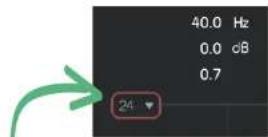
Using the small dropdown on the top left, you are able to change the gain zooming factor (y-axis) of your interactive equalizer window between 24, 12 or 6 dB.
clear solo
This button deletes all active solos of all bands.
flat
The „fl at“-button resets all fi Iter gains to 0 dB. All other fi Iter parameters are retained.
reset
The „reset“-button resets all parameters of the plugin to their default values.
user interface
fi lter types
fi Iter selection
With a click on the fi Iter symbol (cut, shelving, peq, entropy) the fi Iter type of each band can be selected.
With another click on the selected fi Iter symbol, the fi Iter band can be enabled or disabled. A click on the entropy fi Iter will transform the current band to an entropy band (see next page).

changing values
All fi Iter parameters can be changed by dragging the respective value up and down with your mouse. In addition, a double click will allow you to edit the value with your keyboard. These values can also be changed using the thumb control in the interactive equalizer section (see chapter "entropy:EQ - interactive equalizer section").
solo mode
To quickly analyze certain frequency ranges, each fi Iter band can be „soloed“ by clicking on the small „s“-button next to the fi Iter types.
small effect meter
The small effect meters for each band indicate how much signal energy is affected by the applied filter curve.
fi Iter types

low cut

high cut

low shelve

high shelve

bell

entropy
user interface
entropy filter
Bands 3, 4 and 5 of the entropy:EQ+ can be used as so-called "entropy fi Iters". Based on different analysis methods, an entropy fi Iter is able to separate a signal into inharmonic and harmonic signal components.
You can interact with an entropy band as with any "normal" filter (gain, quality and center frequency), but the bell function shown in the gui acts as a weighting function and not as a classical EQ curve.
using an entropy fi iter
- Click the entropy symbol to transform the selected fi Iter band into an entropy band. Please note that the gain label will immediately change from "dB" to "%".
- Once the gain of an active entropy band is changed, a second sum curve (white) will appear inside the interactive equalizer display.
While the red sum curve shows the sum of all "normal" EQ bands, the white curve shows the mixing relation of inharmonic and harmonic signal components across the whole spectrum.
- If you now modify the gain of the band, the filter will not change the spectral balance of the track, but adapt the relation of inharmonic and harmonic components within the selected frequency region.
- positive gain values boost inharmonic components of the track (0% < gain < 100%)
- negative gain values increase the harmonicity of the recording (-100% < gain < 0%)

area
| Point | Value | |-------|-------| | 1 | 0.8 | | 2 | 0.6 | | 3 | 0.4 | | 4 | 0.7 | | 5 | 0.9 | | 6 | 0.5 | | 7 | 0.3 | | 8 | 0.6 | | 9 | 0.8 | | 10 | 0.7 |user interface
interactive equalizer section

line
| x | y | | ---- | ------ | | 50 | -12 | | 200 | -12 | | 500 | -12 | | 1k | -12 | | 2k | -12 | | 5k | -12 | | 10k | -12 |
The interactive equalizer display of entropy:EQ+ allows for a very intuitive and quick control of all parameters of a filter band.
You can simply drag and drop the thumbs related to each filter and immediately see (and hear) the resulting curve.
There are also three complementary key combinations for enhanced parameter control:
| •alt+click+drag | → change quality of the fi iter |
| •shift+click+drag | → lock the center frequency, only change gain |
| •double-click | → reset fi Iter band |
In addition, it is also possible to change the quality of a fi lter using the scroll wheel of your mouse hovering over an active thumb.
output meter
These meters show the output gain level.
precision mode
To zoom the y-axis (gain values), select the appropriate range in the dropdown on the top left.
user interface
master section

This section provides some entropy specific parameters, the master gain slider and some plug-in information.
| entropy | The entropy parameter allows you to globally adjust the relation of inharmonic (>0%) and harmonic signal components (<0%). | master | master gain of the plug-in between -20 dB and +20 dB |
| strength | The strength parameter controls the separation strength between inharmonic and harmonic parts of the audio signal:- Lower values (<50%) lead to a wider transition range between different signal parts and may sound more natural.- Higher values (>50%) result in a harder separation and can be used to get more distinct results. | resizing | In the bottom right corner, you see a triangle that enables you to resize the plug-in. The next time you open the plug-in, the size will be restored. |
| smoothing | Apply a smoothing to the entropy signal:- Low values (<50%) may be used to reduce the amount of smoothing during computation.- High values (>50%) increase the amount of smoothing during computation and may lead to a more natural sound but less distinct results. |
Mac OS is a registered trademark of Apple Inc., registered in the U.S. and other countries. Windows is a registered trademark of Microsoft Corporation in the United States and/or other countries. Intel is a registered trademark of Intel Corporation in the United States and other countries. All other product or company names are trademarks or registered trademarks of their respective holders. Use of them does not imply any affiliation with or endorsement by them.
All specifications are subject to change without notice.
©2020, sonible GmbH. All rights reserved. Engineered & designed by sonible in Austria.

All specifications are subject to change without notice.
©2020, sonible GmbH. All rights reserved.
Engineered & designed by sonible in Austria.
- welcome to entropy:€Q+
- install
- Minimum requirements Windows
- Mac OSX
- Audio Unit
- VST
- authorization
- Licensing system
- Machine-based
- Unlocking
- Machine-based unlocking
- iLok
- Trial version
- updates
- user interface
- interactive equalizer
- precision mode
- clear solo
- flat
- reset
- fi Iter selection
- changing values
- solo mode
- small effect meter
- fi Iter types
- using an entropy fi iter
Brand : Sonible
Model : Entropy: EQ+
Category : Audio software