
MCPUBK - CPU cooler Mars Gaming - Free user manual and instructions
Find the device manual for free MCPUBK Mars Gaming in PDF.


Pick your language and provide your email: we'll send you a specifically translated version.
| Product Type | CPU Air Cooler |
| Compatible Sockets | Intel LGA 1150/1151/1155/1156/1200/1700, AMD AM4/AM5 |
| Fan Size | 120 mm |
| Fan Speed | 800-1800 RPM ±10% |
| Airflow | 56 CFM |
| Noise Level | 20-35 dBA |
| Bearing Type | Hydraulic Bearing |
| Cooling Capacity (TDP) | 130W |
| Heat Pipes | 4 x 6 mm Direct Contact |
| Material | Aluminum Fins, Copper Base |
| Dimensions (with fan) | 126 x 69 x 136 mm |
| Weight | 580 g |
| Power Connector | 4-Pin PWM |
| Voltage | 12 V DC |
| Installation Type | Push-pin or Screw Mount |
| Maintenance | Dust cleaning with compressed air every 6 months |
| Safety | Keep away from liquids, avoid overheating by ensuring adequate case airflow |
| Spare Parts | Fan, mounting kits, thermal paste available separately |
| Repairability | Fan replaceable, heat sink re-usable |
Frequently Asked Questions - MCPUBK Mars Gaming
What is the TDP rating of the Mars Gaming MCPUBK cooler?
The Mars Gaming MCPUBK is rated for a thermal design power (TDP) of up to 130W, suitable for mid-range CPUs.
Which CPU sockets are compatible with the MCPUBK?
It supports Intel LGA 1150/1151/1155/1156/1200/1700 and AMD AM4/AM5 sockets. Check the manual for exact compatibility.
How do I install the Mars Gaming MCPUBK cooler?
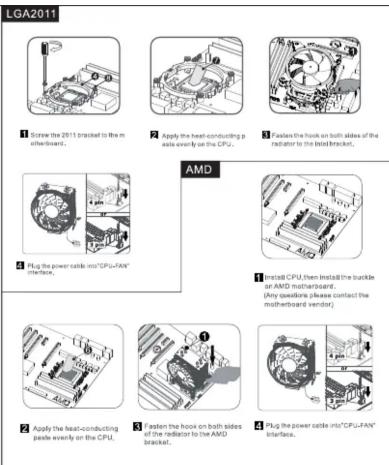
Apply thermal paste, align the cooler with the mounting bracket, and secure using the provided screws or push-pins. Connect the fan to the CPU fan header. Detailed steps are in the manual.
What is the noise level of this cooler?
Noise ranges from 20 to 35 dBA depending on fan speed. At low speeds it is quiet, but at maximum RPM it becomes audible.
Can I use this cooler for overclocking?
It can handle moderate overclocking on CPUs up to 130W TDP. For heavy overclocking, a larger cooler is recommended.
How do I clean the MCPUBK cooler?
Use compressed air to blow dust off the fins and fan. Avoid water or harsh chemicals. Clean every 6 months or as needed.
Is thermal paste included with the cooler?
Yes, a small syringe of thermal paste is included. For best results, replace with a high-performance paste after several uses.
Does the cooler come with a warranty?
Mars Gaming typically offers a 2-year warranty. Check with your retailer for specific warranty terms.
What is the fan size and connector type?
It uses a 120mm fan with a 4-pin PWM connector for automatic speed control.
Can I replace the fan on the MCPUBK?
Yes, the fan is removable and replaceable with any standard 120mm fan using the provided clips or screws.
User questions about MCPUBK Mars Gaming
0 question about this device. Answer the ones you know or ask your own.
Ask a new question about this device
No questions yet. Be the first to ask one.
Download the instructions for your CPU cooler in PDF format for free! Find your manual MCPUBK - Mars Gaming and take your electronic device back in hand. On this page are published all the documents necessary for the use of your device. MCPUBK by Mars Gaming.
USER MANUAL MCPUBK Mars Gaming

Manual assistant
Powered by Anthropic
Waiting for your message
Product information
Brand : Mars Gaming
Model : MCPUBK
Category : CPU cooler