
True Glow PED2CRP - Foot bath Conair - Free user manual and instructions
Find the device manual for free True Glow PED2CRP Conair in PDF.


| Product Type | Pediatric Callus Remover / Foot Bath |
| Brand | Conair |
| Model | True Glow PED2CRP |
| Power Source | 3 AAA batteries (not included) |
| Battery Life | Depends on usage, replace when slow |
| Speed Settings | Single speed (ON/OFF) |
| Attachments Included | Callus remover heads |
| Attachment Replacement | Every 60 days recommended |
| Dimensions | Approximately 6 x 2 x 2 inches (handheld) |
| Weight | Approximately 0.5 lbs (with batteries) |
| Material | Plastic with textured grip |
| Water Resistance | Not specified; avoid immersion |
| Cleaning Method | Wipe handle with damp cloth; rinse heads with warm soapy water and air-dry |
| Storage | Store in clean, dry place; use protective cover on heads |
| Warranty | 1 year limited (U.S. and Canada) |
| Safety Certifications | Not listed; follow safety instructions |
| Intended Use | Foot exfoliation for calluses and rough skin |
| Not for | Medical conditions; not for children |
| Contact Information | Conair Corporation, 1-800-3-CONAIR |
Frequently Asked Questions - True Glow PED2CRP Conair
User questions about True Glow PED2CRP Conair
0 question about this device. Answer the ones you know or ask your own.
Ask a new question about this device
Download the instructions for your Foot bath in PDF format for free! Find your manual True Glow PED2CRP - Conair and take your electronic device back in hand. On this page are published all the documents necessary for the use of your device. True Glow PED2CRP by Conair.
USER MANUAL True Glow PED2CRP Conair
USER MAINTENANCE INSTRUCTIONS
CARING FOR YOUR TRUE GLOW® PEDICURE CALLUS REMOVER
- After each use, clean the callus remover handle with a damp cloth to remove any residue.
- Clean unit thoroughly each week to help remove residue, wipe with a dry cloth and store unit in its box or in a clean, dry place.
- Remove callus remover heads once a week and rinse under warm, soapy water to remove residue accumulated during treatment. Allow callus remover heads to air-dry. Store in a clean, dry place.
- Do not use abrasive cleaners for cleaning.
- Do not put unit in dishwasher for cleaning.
- When storing the callus remover off the unit, use the protective cover.
Note: It is recommended to replace the callus remover attachments every 60 days, as they wear over time and lose their efficacy.
TROUBLE-SHOOTING GUIDE
| THE CALLUS REMOVER IS NOT WORKING. | 1. Make sure the contacts on the unit and base are clean. See User Maintenance Instructions for cleaning procedure.2. Make sure the batteries are installed properly |
| THE CALLUS REMOVER OPERATES AT A SLOW SPEED. | Replace the batteries. |
| THE CALLUS REMOVER VIBRATES OR FALLS OFF DURING USE. | 1. Make sure the callus remover head is snapped on properly.2. Replace the callus remover head. |
LIMITED ONE YEAR WARRANTY (U.S. AND CANADA ONLY)
Conair will repair or replace (at our option) your unit free of charge for 12 months from the date of purchase if the appliance is defective in workmanship or materials.
To obtain service under this warranty, return the defective product to the service center listed on back that is nearest you, together with your purchase receipt and \$3.00 for postage and handling. California residents need only provide proof of purchase and should call 1-800-3-CONAIR for shipping instructions. In the absence of a purchase receipt, the warranty period shall be 12 months from the date of manufacture.
ANY IMPLIED WARRANTIES, OBLIGATIONS, OR LIABILITIES, INCLUDING BUT NOT LIMITED TO THE IMPLIED WARRANTY OF MERCHANTABILITY AND FITNESS FOR A PARTICULAR PURPOSE, SHALL BE LIMITED IN DURATION TO THE 12-MONTH DURATION OF THIS WRITTEN, LIMITED WARRANTY. Some states do not allow limitations on how long an implied warranty lasts, so the above limitations may not apply to you.
IN NO EVENT SHALL CONAIR BE LIABLE FOR ANY SPECIAL, INCIDENTAL, OR CONSEQUENTIAL DAMAGES FOR BREACH OF THIS OR ANY OTHER WARRANTY, EXPRESS OR IMPLIED, WHATSOEVER. Some states do not allow the exclusion or limitation of special, incidental, or consequential damages, so the above limitation may not apply to you.
This warranty gives you specific legal rights, and you may also have other rights, which vary from state to state.
CAUTION: Any changes or modifications not expressly approved by Conair Corporation, the manufacturer of this product and the party responsible for compliance could void the user's authority to operate the equipment.
Please register this product at www.conair.com/registration
SERVICE CENTERS
CONAIR CORPORATION
Service Department
150 Millford Road East Windsor, NJ 08520
CONAIR CORPORATION
Service Department
7475 North Glen Harbor Blvd. Clendalo, AZ 85207
alondale, N° 00087
Visit us on the web at: www.conair.com
©2016 Conair Corporation
East Windsor, NJ 08520 Glendale, AZ 85307
PED2
15PS016532
true glow®
Footcare Solution for Professional Results
natural_image
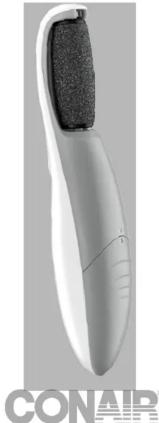
White handheld device with black textured handle and 'CONAIR' watermark (no visible text on device body)Model PED2
IMPORTANT SAFETY INSTRUCTIONS
When using battery-operated appliances, especially when children are present, basic safety precautions should always be taken, including the following:
READ ALL INSTRUCTIONS BEFORE USING THE PEDICURE CALLUS REMOVER
- Close supervision is required when this product is used on, by or near children or people with certain disabilities.
- Use product only for its intended use as described in this instruction booklet. Do not use attachments not recommended by the manufacturer.
- Keep the unit away from heated surfaces.
- Never use while sleeping.
- Do not use outdoors or where oxygen is being administered or where aerosol (spray) products are being used.
- Never operate if the product is damaged.
- This product is not applicable to children.
The True Glow® Pedicure Callus Remover handle has no serviceable parts. Call 1-800-3-CONAIR for instructions to purchase replacement callus remover heads.
SENSITIVITY AND CAUTIONS SPECIAL CAUTIONS FOR DELICATE AREAS
The True Glow® Pedicure Callus Remover is a foot-smoothing device that is intended to help you achieve softer, healthy-looking skin. The True Glow® Pedicure Callus Remover is not a medical device and is not intended to be used to treat any medical conditions.
If you are under a doctor's care for any skin condition or if you think you have very sensitive skin, please consult your physician before use. We recommend not sharing the callus remover heads; each user should have their own.
Do not use with exfoliation creams with rough or jagged particles.
If you experience any pain or discomfort during use, stop using and consult your physician.
Do not apply pressure to feet when using callus remover; let the rotation perform the exfoliation. When finished, rinse feet with water and dry with a clean towel.
TRUE GLOW® PEDICURE CALLUS REMOVER FEATURES


OPERATING INSTRUCTIONS
NOTE: The True Glow® Pedicure Callus Remover operates on 3 AAA batteries (not included).
- Remove the battery cover from the unit.
- Install 3 AAA batteries (not included) as per the markings in the battery compartment.
- Slide the battery cover back onto the unit until the battery door is firmly closed.
- Select the desired attachment and push it down onto the mounting post until firmly in place.
STARTING THE PEDICURE CALLUS REMOVER Slide the ON/OFF button up one time to turn on the unit.
STOPPING THE PEDICURE CALLUS REMOVER Slide the ON/OFF button to "O" to turn off the unit.
BATTERY WARNING
- Always purchase the correct size and grade of battery most suitable for the intended use.
- Replace all batteries of a set at the same time.
- Clean the battery contacts and also those of the device prior to battery installation.
-
Ensure the batteries are installed correctly with regard to polarity (+ and -).
-
Remove batteries from equipment which is not to be used for an extended period of time.
- Remove used batteries promptly.
- Do not mix old and new batteries. Do not mix alkaline, standard (carbon-zinc), or rechargeable batteries.
INSTRUCTIONS FOR USING THE PEDICURE CALLUS REMOVER
- Select attachment and attach to power handle.
- Turn the callus remover ON.
- Do not press the callus remover hard against your skin, as it will reduce the motion and effectiveness. Keep the callus remover in light contact and flush against the skin.
- Move the callus remover in a slow, back-and-forth motion around your feet. Let the rotation do the exfoliating.
- When finished, rinse your feet with water and dry with a towel.
Service Department 150 Milford Road
150 Milloru Road East Windsor, NJ
East Windsor, No 00520 CONAIR CORPORATION
Service Department
7475 North Glen Harbor Blvd.
Glendale, AZ 85307
Visítenos en www.conair.com
©2016 Conair Corporation
East Windsor, NJ 08520 Glendale, AZ 85307
PED2
15PS016532
trueglow®
natural_image
Exterior view of a white handheld device with black textured handle and 'CONAIR' branding (no other text or symbols)Modelo PED2
- USER MAINTENANCE INSTRUCTIONS
- LIMITED ONE YEAR WARRANTY (U.S. AND CANADA ONLY)
- Please register this product at www.conair.com/registration
- true glow®
- IMPORTANT SAFETY INSTRUCTIONS
- READ ALL INSTRUCTIONS BEFORE USING THE PEDICURE CALLUS REMOVER
- SENSITIVITY AND CAUTIONS SPECIAL CAUTIONS FOR DELICATE AREAS
- OPERATING INSTRUCTIONS
- BATTERY WARNING
- INSTRUCTIONS FOR USING THE PEDICURE CALLUS REMOVER
- trueglow®
Brand : Conair
Model : True Glow PED2CRP
Category : Foot bath