
RA102 - Headphone amplifier ROLLS - Free user manual and instructions
Find the device manual for free RA102 ROLLS in PDF.


| Product Type | Headphone Amplifier |
| Brand | Rolls |
| Model | RA102 |
| Input Connector | 1/8" Stereo Mini Jack |
| Output Connector | 1/4" Stereo Headphone Jack |
| Power Supply | 9V DC (AC adapter included) |
| Dimensions (W x D x H) | 4.25 x 2.5 x 1.5 in (108 x 63 x 38 mm) |
| Weight | 0.5 lb (227 g) |
| Controls | Volume Knob |
| Signal-to-Noise Ratio | >90 dB |
| Total Harmonic Distortion (THD) | <0.05% |
| Frequency Response | 20 Hz – 20 kHz |
| Input Impedance | 32 Ohms |
| Maximum Output Power | 50 mW per channel |
| Construction | Metal chassis |
| Included Accessories | AC adapter, User manual |
| Maintenance | Clean with dry cloth; avoid liquids. |
| Safety Precautions | Do not expose to moisture; unplug during cleaning. |
| Spare Parts & Repairability | Contact Rolls distributor for replacement parts. |
| General Information | Designed for personal audio monitoring and headphone amplification. |
Frequently Asked Questions - RA102 ROLLS
User questions about RA102 ROLLS
0 question about this device. Answer the ones you know or ask your own.
Ask a new question about this device
Download the instructions for your Headphone amplifier in PDF format for free! Find your manual RA102 - ROLLS and take your electronic device back in hand. On this page are published all the documents necessary for the use of your device. RA102 by ROLLS.
USER MANUAL RA102 ROLLS
WARNING: THE MINIMUM HEADPHONE IMPEDANCE FOR THE RA102 IS 8 OHMS. THE MAXIMUM HEADPHONE IMPEDANCE IS 1000 OHMS. IF YOU CONNECT AND USE THE RA102 WITH A LOWER HEADPHONE IMPEDANCE THAN LISTED ABOVE YOU WILL DAMAGE THE UNIT AND POSSIBLY OTHER EQUIPMENT THAT IS CONNECTED TO THE RA102.

ROLLS
ROLLS CORPORATION
SALT LAKE CITY, UTAH
3/09

ROLLS
RA102
Ten Channel
Pro Headphone Amplifi er
SPECIFICATIONS
Input Impedance: 10K Ohms unbalanced
Max Input Level: +18 dBV
Input Connectors: RCA, R & L balanced XLR
Outputs: 10: 1/4" TRS Stereo jacks
10: 1/8" (3.5 mm) TRS Stereo jacks
Max Gain: 20 dB/Channel
Frequency Response: 20 Hz - 30 kHz
S/N Ratio: 90 dB
THD: <.008%
IMD: <.008%
Phase Shift (In to Out): 0 deg
Slew Rate: 2 V per microsecond
Crosstalk: - 65 dB
Power Rolls Model PS15 or PS12
Weight: 7 lbs (3KG)
Size: 19" x 1.75" x 3.125" (48cm x 4.5cm x 17cm)
Headphone impedance: 8 Ohms to 1000 Ohms
OPERATION GUIDE
INTRODUCTION
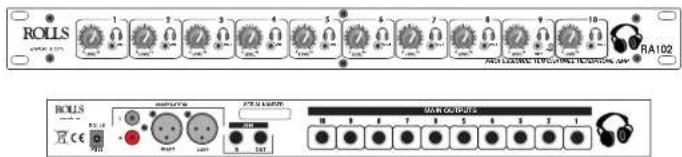
Thank you for your purchase of the Rolls RA102 Professional Stereo Headphone Amplifier. The ROLLS RA102 is a ten-channel headphone amplifier for professional audio monitoring. A variety of input options are available including RCA and balanced XLR separate right and left. The JOIN section is for connecting more than one RA102 directly together without any signal loss or impedance issues. You can connect many RA102's together with the JOIN function. Each channel has a 1/4" headphone output jack on the rear for professional installations and a 1/8" jack on the front for ease of operation (both jacks may be used at the same time if needed).
NOTE: THIS MANUAL ASSUMES THE USER HAS A WORKING KNOWLEDGE OF AUDIO ELECTRONICS, BALANCED AND UNBALANCED CONNECTIONS, AND PROPER SIGNAL LEVEL SETTING.
INSPECTION / WARRANTY
- Unpack and inspect the RA102 box and package.
If obvious physical damage is noticed, contact the carrier immediately to make a damage claim. We suggest saving the shipping carton and packing materials for safely transporting the unit in the future. 2. Please visit our web site at www.rolls.com and click on the Register Your Warranty Here button, or complete the Warranty Registration Card and return it to the factory.

FRONT PANEL
Note: Descriptions for Channel One through Channel Ten are identical.
OUTPUTS 1 - 10 : 1/8" (3.5 mm) Tip-Ring-Sleeve jacks for connection to a standard pair of headphones or earphones.
VOLUME 1 - 10: Controls the amount of output signal from the indicated channel for both the front 1/8" and rear 1/4" jacks.
POWER LED: Indicates that the RA102 is connected to the power supply and is on.

REAR PANEL
POWER INPUT: Connects to the Rolls PS15 or Rolls PS12 (Included).
INPUTS: Left and Right - Balanced XLR jacks
- RCA Unbalanced jacks
Note: Descriptions for Channel Six through Channel One are identical. OUTPUT: 1/4" TRS jack - parallels the channel's front panel 1/8" Output jack. JOIN: 2 X 1/4" TRS jacks (IN and OUT) for joining RA102's together
CONNECTION
Connect the AC adapter to an outlet with the proper voltage. For installations there is intentionally no Power switch designed on the front of the unit. To turn the RA102 off the power must be terminated at the adapter. The RA102 was designed for professional applications were most functions are not accessed from the front. In these applications it is acceptable for the unit to be left on. No damage will occur to the RA102 in this application, it was designed for it.
Mono/Stereo Operation:
Determine which input configuration you will use; either RCA or XLR stereo. Mono can be achieved by connecting the mono input signal to both left and right inputs at the same time.
For a discreet right/left input configuration, connect a balanced XLR, or RCA plug containing the "Right" portion of the stereo signal to the Right Main Input. Connect a balanced XLR, or RCA plug containing the "Left" portion of the stereo signal to the Left Input.
For a TRS stereo input configuration, connect a Tip-Ring-Sleeve stereo to dual Tip-sleeve (mono) RCA jack cable. This is a very specific jack referred to as an insert jack and must be purchase at a specialty store, to the rear panel LEFT and RIGHT RCA Input's on the RA102. This cable may come from a mixer's AUX output for example.
To send a mono signal to the RA102: connect a mono XLR or RCA to both the LEFT and RIGHT inputs at the same time this will require a specialty cable. The mono signal will be fed to both the right and left sides of the headphone outputs.
JOIN EXPLANATION:
The JOIN section is for connecting RA102's directly together so you can use one source plugged into the first RA102 and by connecting them with the JOIN in and outs you can have as many headphone outs as you have units.
To properly connect the JOIN: Plug source material into the first RA102, then plug a TRS 1/4" cable (also referred to as a 1/4" stereo cable) from the JOIN OUT of the first unit into the JOIN IN of the second unit. Repeat the JOIN in and out scheme for as many RA102's as you need, only plugging the source material in the very first unit in the chain.
WARNING
USING THIS SYSTEM AT EXCESSIVE VOLUMES CAN CAUSE
PERMANENT HEARING DAMAGE.
USE AS LOW A VOLUME AS POSSIBLE
In order to use this system safely, avoid prolonged listening at excessive sound pressure levels. Please use the following guidelines established by the Occupational Safety Health Administration (OSHA) on maximum time exposure to sound pressure levels before hearing damage occurs. 90 dB SPL at 8 hours

95 dB SPL at 4 hours
100 dB SPL at 2 hours
105 dB SPL at 1 hour
110 dB SPL at 1/2 hour
115 dB SPL at 15 minutes
120 dB SPL - avoid or damage may occur
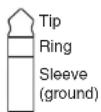
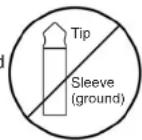
CAUTION: Plugging a mono 1/4" or 1/8" TS plug into the Headphone Outputs on the front or rear of the RA102 will cause permanent damage to the unit because one side would be shorted to ground. Never plug a mono plug into any of the Headphone Outputs THE RA102 WILL BE PERMANENTLY DAMAGED.
This is a TRS or stereo jack that is compatible with the RA102 Headphone Outputs.
This is a MONO jack and should never be plugged into the Headphone Output of a RA102.

- ROLLS
- RA102
- Ten Channel
- Pro Headphone Amplifi er
- SPECIFICATIONS
- INTRODUCTION
- NOTE: THIS MANUAL ASSUMES THE USER HAS A WORKING KNOWLEDGE OF AUDIO ELECTRONICS, BALANCED AND UNBALANCED CONNECTIONS, AND PROPER SIGNAL LEVEL SETTING.
- FRONT PANEL
- REAR PANEL
- CONNECTION
- Mono/Stereo Operation:
- JOIN EXPLANATION:
- WARNING
- USING THIS SYSTEM AT EXCESSIVE VOLUMES CAN CAUSE
Brand : ROLLS
Model : RA102
Category : Headphone amplifier