
HDV-WTX2 - Video camera Extech - Free user manual and instructions
Find the device manual for free HDV-WTX2 Extech in PDF.


| Product Type | Video Inspection Camera |
| Model | HDV-WTX2 |
| Brand | Extech |
| Display | 3.5-inch LCD color display |
| Camera Resolution | 1280 x 720 pixels (HD) |
| Camera Head Diameter | 8.5 mm |
| Camera Cable Length | 1 meter (3.3 ft) |
| Waterproof Rating | IP67 (camera head and cable) |
| Frame Rate | 30 fps |
| Focus Range | 5 cm to infinity |
| Light Source | 4 adjustable LEDs |
| Memory | MicroSD card slot (up to 32 GB) |
| Output | AV out, USB 2.0 |
| Power Supply | Rechargeable Li-ion battery (3.7V, 2600mAh) |
| Operating Time | Approx. 4 hours |
| Dimensions (Main Unit) | 220 x 110 x 55 mm (8.7 x 4.3 x 2.2 in) |
| Weight | 450 g (15.9 oz) including battery |
| Languages | English, French, German, Spanish, Italian |
| Spare Parts | Replacement camera head, battery, charger, cable |
Frequently Asked Questions - HDV-WTX2 Extech
User questions about HDV-WTX2 Extech
0 question about this device. Answer the ones you know or ask your own.
Ask a new question about this device
Download the instructions for your Video camera in PDF format for free! Find your manual HDV-WTX2 - Extech and take your electronic device back in hand. On this page are published all the documents necessary for the use of your device. HDV-WTX2 by Extech.
USER MANUAL HDV-WTX2 Extech
Wireless Articulating Semi-Rigid Probe For use with the HDV600 Borescope only
Thank you for purchasing this professional camera probe. This sheet covers the warning and specifications for the probe only. Instructions regarding the usage of the HDV600 Borescope are provided in the Borescope User Guide.
Note: The camera LEDs become warm when set to maximum intensity
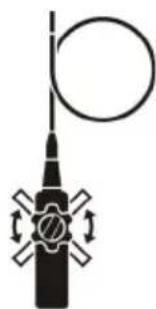
CAUTION: For the Articulating Probe, do not operate the articulation knob with the probe in a coiled configuration. This will damage the articulation controls!
CAUTION: Always return the articulation and tension knobs to the neutral position before removing the probe from the inspection area.
The label on the probe provides the Serial Number and Part Number in the format shown below. Please do not remove this label; otherwise the warranty will be invalid.
natural_image
Pure mechanical diagram of a vertical rod with circular head and four cross-shaped arms, no text or symbols present.Part No.TX1 F/M/R (flex/macro/rigid) Serial No: HDV110001
Warnings
• Do not bend to a smaller diameter than 10cm (4")
• Warranty is invalid if stickers, tags, or labels are removed
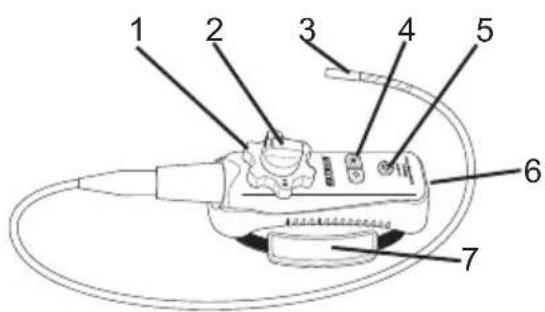
Articulating Probe Description
- Articulation knob
- Articulation tension knob
- Articulating camera
- Light intensity buttons
- Power button
- AC Adaptor and extension cable sockets
- Carrying strap
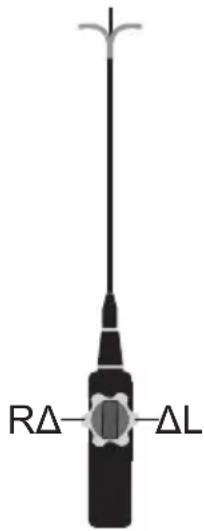
The articulation direction and orientation may change if the probe is twisted and coiled during use or when stored. To re-orient the probe:
- Place the extended probe on a flat surface
- Set the tension "F" knob to the left or released position.
- Set the articulation knob to the center position with the R and L labels in the horizontal position.
- Manually adjust the probe and camera to the zero degree position.
- Rotate the articulation knob clockwise for a 90^ bend.
- If necessary, manually adjust the probe so that the camera lays flat on the surface with a 90° articulation
- Rotate the articulation knob counter-clockwise and confirm proper orientation.
Charging the Battery
The AC charger port and charging status LED are located in the bottom access compartment. Connect the charger to the probe and observe the color of the LED. Red indicates the battery is charging. Green indicates the battery is fully charged.
Note: The rechargeable battery is not user replaceable.
Specifications
| Resolution | 640 x 480 pixels |
| Length | 2m (6.6') |
| Outer diameter (O.D.) | 6mm (0.24") |
| Battery | 3.7V rechargeable Li-Polymer |
| Focus distance | 2 to 6cm (0.79 to 2.36") |
| Housing | Stainless Steel |
| Field of View | 60° |
| Number of LEDs | 4 |
| Lamp Output | 3500 Lux at 20mm |
| Operating Temperature | -20 to 70°C (-4 to 158°F) |
| Storage Temperature | -20 to 70°C (-4 to 158°F) |
| Warranty | 1 year |
Brand : Extech
Model : HDV-WTX2
Category : Video camera