
GPK-800 - Karaoke GEMINI - Free user manual and instructions
Find the device manual for free GPK-800 GEMINI in PDF.


| Product Type | Karaoke Machine |
| Model | GPK-800 |
| Brand | Gemini |
| Dimensions (W x D x H) | 12.6 x 8.3 x 7.1 inches (32 x 21 x 18 cm) |
| Weight | 5.5 lbs (2.5 kg) |
| Power Source | AC 100-240V, 50/60Hz or 6 x C batteries (not included) |
| Speaker Power | 20W RMS |
| Display | LED with scrolling lyrics |
| Disc Formats Supported | CD, CD+G, CD-R/RW |
| Microphone Inputs | 2 x 1/4" (6.35 mm) with independent volume controls |
| Audio Outputs | 1 x RCA L/R line out, 1 x 3.5mm headphone jack |
| Other Features | Echo control, key control, vocal cancel, built-in recording, Bluetooth streaming |
| Bluetooth Version | 5.0 with range up to 33 ft (10m) |
| USB Port | Yes, for playing MP3 files and recording |
| Remote Control | Included |
| Microphone Type | 2 x wired dynamic microphones (included) |
| Cleaning Instructions | Wipe with a soft, dry cloth. Use mild soap for stubborn stains. Do not use solvents. |
| Safety Warnings | Do not expose to moisture or extreme temperatures. Unplug when not in use. Keep away from children. |
| Spare Parts Availability | Replacement microphones, power adapter, and remote control available from Gemini or authorized dealers. |
| Warranty | 1 year limited warranty |
Frequently Asked Questions - GPK-800 GEMINI
User questions about GPK-800 GEMINI
0 question about this device. Answer the ones you know or ask your own.
Ask a new question about this device
Download the instructions for your Karaoke in PDF format for free! Find your manual GPK-800 - GEMINI and take your electronic device back in hand. On this page are published all the documents necessary for the use of your device. GPK-800 by GEMINI.
USER MANUAL GPK-800 GEMINI
At Gemini, our highest priority is making your experience unforgettable. Need help setting up, troubleshooting, or looking for some tips? We're here for you, Monday through Friday 9-5PM EST.

1-844-GEMINI9

hello@geminisound.com

www.geminisound.com
Love coupon codes and an extended warranty?
E-mail us a link to your product review and we'll send you a coupon code for our website and extend your warranty 3 months.
*US ONLY*
Innovative Concepts and Design LLC
458 Florida Grove Road
Perth Amboy, NJ 08861
gemini®
Empower Your Sound
natural_image
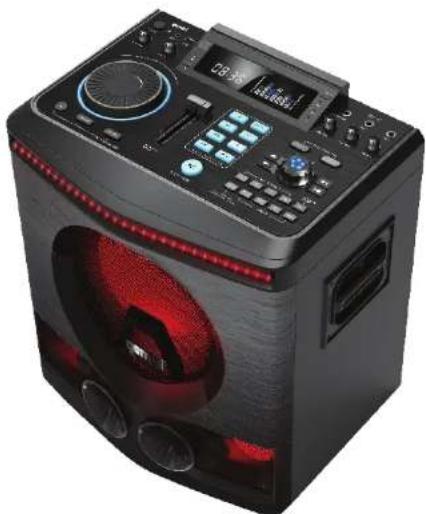
Black electronic device with red LED and control panel, no visible text or symbolsGPK-800
Home Karaoke Party Speaker
2
GPK-800
Home Karaoke Party Speaker

3
Index 2
What's Included 2
Features 3
Product Overview 4
Introduction 8
Precautions 8
FCC Compliance Statement 9
Limited Warranty 11
Return/Repair 11
FEATURES
Wirelessly stream music from any Bluetooth device
Play music from any storage device with built-in USB port and AUX input
Built-In FM radio with Internal antenna
2400 Watts Peak Power(PMPO) through 8" woofer
And twin 3" Tweeter for crisp,clear,deep powerful sound
Wired microphone Included with microphone volume, Bass, Treble, echo
and Mic-Priority
Guitar input with dedicated volume control allows for live performance
Use 3D effect for spacious Surround Sound
Eight background effects
Remote control included
MICROPHONE
Microphone input for the included wired
microphone. Microphone volume and Mic Priority setting.
Microphone Echo, Bass and Treble for all your karaoke needs.
What's Included
Please ensure that you find these
accessories included with your
GPK-800 speaker:
(1) GPK-800
(1) Wired Microphone
(1) Remote Control
(1) Power Cable
(1) Manual
natural_image
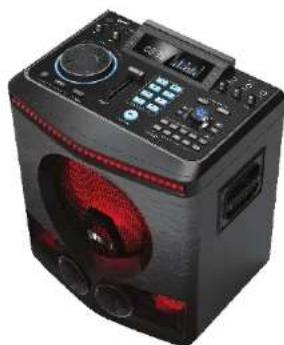
Black electronic device with red speaker grille and control panel (no visible text or symbols)TOTAL CONTROL
Music Volume Control Rotary Knob
Main Volume Control
Power Switch
MIXED MEDIA
Aux input to connect any external device
USB input to play your digital music collection
4
GPK-800
Home Karaoke Party Speaker

5
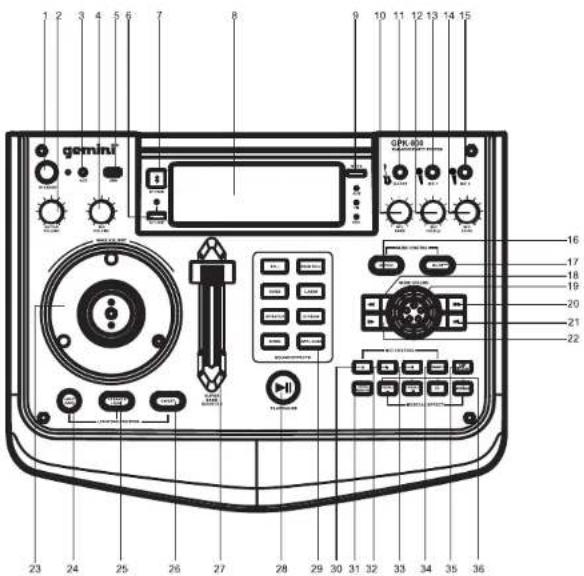
- Standby Button
Press STANDBY button to suspend unit from power
- Guitar Volume Adjustment
Turn GUITAR VOL knob to adjust the output guitar
- AUX Insert Jack
Insert 1/8" cable to AUX jack to connect to the external device
- Microphone Volume Adjustment
Use MIC VOL knob to adjust the sound level of microphone
- USB Insert Jack-1
Insert the USB device to USB jack to play MP3 & WAV files
- TWS Function button
Use TWS to pair with another GPK speaker
- Bluetooth Function Button
Activate Bluetooth mode
- Display Window
Displays playback info and an audio spectrum visualizer
- Function Switching Button
Switch between Bluetooth,USB and AUX
- Microphone Bass Volume Adjustment
Turn MIC BASS knob to adjust the bass sound level of microphone
- Guitar Insert Jack
Connect guitar with standard 1/4" cable
- Microphone Treble Volume Adjustment
Turn MIC TREBLE knob to adjust the treble sound level of microphone
- Microphone Insert Jack-1
Insert wired microphone to the MIC1 jack
- Microphone Echo Volume Adjustment
Turn MIC ECHO knob to adjust the echo sound level of microphone
- Microphone Insert Jack-2
Insert wired microphone to the MIC2 jack
- Repeat Button
There are two repeat modes: one or all.
- Mute Button
i. Press this button for mute function.
ii. Press mute button for about 3 seconds can turn on the voice prompt function, the display will show "V-ON".
iii. When the speaker on V-ON mode, press mute button for about 3 seconds can turn off the voice prompt function, the display will show "V-OFF
- Backward Button
Seek backward during playback(rewind)
- Music Volume Control Rotary Knob
Control music playback volume in relation to other inputs
6
GPK-800
Home Karaoke Party Speaker
gemini®
7
20. Next Track Button
Press this button to next track
21. Previous Track Button
Press this button to previous track
22. Forward Button
Seek ahead during playback(fast forward)
23. Main Volume Control Rotary Knob
Turn MAIN VOL knob to adjust the sound level (This knob controls the sound of all source, when the speaker is playing music and the microphone, you can turn this knob to control the sound level of both.)
24. Disco LED Light Control Button
Press this "LED" button to switch the different running effect.
25.Speaker Light Control Button
Press this button to switch the different light effect of the speakers. Note: The speaker light color defaults to random when powered on, press this button to select speaker color.
26. ON/OFF Control Button
Press this button to turn on or off the Disco Light and Speakers Light.
27. Bass Booster Volume Control
Push the booster volume control to adjust the sound level of bass.
28. Play/Pause Button
Notes: when in FM mode, press this button for a few seconds to search and save stations automatically.
29. Sound Effects
8 DJ style sound effect included
30. b Button (Pitch Shift down)
i. Press this button to shift tone down the musical scale when using the microphone. ii. Press one time for one level, there are 12 levels can be selected.
31. Vocal EQ Button
Press this button for the weakening of human voice in music.
32. Treble Volume- Button
i. Press this button to increase treble volume level when playing music. ii. Press one time for one level, there are 7 levels can be selected.
33. # Button (Pitch Shift up)
i. Press this button to Shift tone up the musical scale when Using microphone ii. Press one time for one level, there are 12 levels can be selected.
34. Treble Volume+ Button
i. Press this button to decrease treble volume level when playing music. ii. Press one time for one level, there are 7 levels can be selected.
35. Microphone Priority Button
Press this button to lower music playback volume when using the microphone.
36. 3D Button
Press one time to turn on the 3D surround sound effect when playing music, press again to turn off the effect.
37. REC Button
i. Press this button to record FM/Microphone/AUX to USB when playing music.
ii. Press one time to open the recording and the music of FM/Microphone/AUX will store automatically into USB.
iii. Press again to stoping the recording and you can play the recorded music from the usb. Note: USB music can not record to USB.
38. Normal Button
Press this button to resume default EQ setting Notes: when NORMAL button is pressed, the 3D surround sound effect function will turn on, you can press 3D button to turn off if you do not need this effect.
INTRODUCTION
Thank you for purchasing our GPK-800. We are confident that the Gemini platform of products will not only make your life easier through the use of the latest technological advancements in cross-platform connectivity and sound reproduction but will raise the bar for DJ and pro audio products. With the proper care & maintenance, your unit will likely provide years of reliable, uninterrupted service. All Gemini products are backed by a 1-year limited warranty*.
PREPARING FOR FIRST USE
Please ensure that you find these accessories included with the MPA-k650:
(1) Power Cord
(1) Operating Instructions
(1) Warranty Card
PRECAUTIONS
- All operating instructions should be read before using this equipment.
- To reduce the risk of electrical shock, do not open the unit. There are NO USER REPLACEABLE PARTS INSIDE. Please refer servicing to a qualified Gemini Sound Products service technician. Do not attempt to return this equipment to your dealer.
- Do not expose this unit to direct sunlight or to a heat source such as a radiator or stove.
- This unit should be cleaned only with a damp cloth. Avoid solvents or other cleaning detergents.
- When moving this equipment, it should be placed in its original carton and packaging. This will reduce the risk of damage during transit.
- DO NOT EXPOSE THIS UNIT TO WATER OR HEAT.
- DO NOT USE CLEANING PRODUCTS OR LUBRICANTS ON THE CONTROLS OR SWITCHES.
CONNECTIONS
Make sure your equipment is completely OFF and also lower ALL
VOLUME, LEVEL, & GAIN controls before powering speaker on.
DECLARATION OF CONFORMITY
Safety And EMC Compliance Specifications
The purpose of the statement described above is consistent with applicable union harmonization legislation:
RED 2014/53/EU
ETSI EN 300 328 V2.1.1(2016-11)
ETSI EN 301 489-1 V2.1.1(2017-02)
ETSI EN 301 489-17 V3.1.1(2017-02)
EN 62479:2010
EN 60950-1:2006+A11:
2009+A1:2010+A12:2011+A2:2013
EN 60065:2014
The RoHSDirective 2011/65/EU
IEC 62321-3-1:2013
IEC 62321-5:2013
IEC 62321-4:2013
IEC 62321-6:2015
IEC 62321-7-1:2015
IEC 62321:2008 ANNEX C
FCC Compliance Statement
This device complies with Part 15 of the FCC Rules.
The operation is subject to the following two conditions:
(1) This device may not cause harmful interference, and
(2)This device must accept any interference received,including interference that may cause undesired operation.
Note: This equipment has been tested and found to comply with the limits for a class B digital device, pursuant to Part 15 of the FCC Rules. These equipment generates uses and can radiate radio frequency energy and if not installed and used in accordance with the instructions, may cause harmful interference to radio communications. However, there is no guarantee that interference will not occur in a particular installation. If this equipment does cause interference to radio or television reception, which can be determined by turning the equipment off and then on, the user is encouraged to try to correct the interference by one or more of the following
Measures:
" Reorient or relocate the receiving antenna.
“ Increase the separation between the equipment and receiver.
"Connect the equipment to a different outlet so that the equipment and receiver are on different branch circuits.
"Consult the dealer or an experienced radio/TV technician for help.
FCC ID: 2AE6G-GPK1200
LEGALITY & SAFETY
The device is not intended for use by people (including children) with reduced physical, sensory or mental capacity. People who have not read the manual, unless they have received an explanation by someone responsible for their safety, should not use this unit. Children should be monitored to ensure that they do not play with the device. The device should always be readily accessible. The device should not be exposed to water. No objects filled with liquids, such as vases, shall be placed on the device. Always leave a minimum distance of 10 cm around the unit to ensure sufficient ventilation. Open flame sources, such as candles, should not be placed on top of the device. The device is intended for use only in a temperate climate. At full volume, prolonged listening may damage your hearing and cause temporary or permanent deafness, hearing drone, tinnitus, or hyperacusis. Listening at high volume is not recommended. One hour per day is not recommend either. Danger of explosion if battery is incorrectly replaced or not replaced by the same type or equivalent. The battery should not be exposed to excessive heat such as sunshine or fire. Different types of batteries, or new and used batteries, should not be mixed. The battery must be installed according to its polarity. If the battery is worn, it must be removed from the product. The battery must be disposed of safely.
Always use collection bins to protect the environment. The battery can only be replaced by the maker of this product, the sales department, or a qualified person. Switch the device off where the use of the device is not allowed or where there is a risk of causing interference or danger - for examples: on an aircraft, or near medical equipment, fuel, chemicals or blasting sites. Check the current laws and regulations regarding the use of this device in the areas where you drive. Do not handle the device when driving. Concentrate fully on
driving. All wireless devices are susceptible to interference which may affect their performance. All our devices conform to international/national standards and regulations, and we aim to limit user exposure to electromagnetic fields. These standards and regulations were adopted after the completion of extensive scientific research. This research established no link between the use of the mobile headset and any adverse effects on health if the device is used in accordance with standard practices. Only qualified people are authorized to install or repair this product. Only use batteries, chargers and other accessories which are compatible with this equipment. Do not connect incompatible products. This equipment is not waterproof. Keep it dry. Keep your device in a safe place, out of the reach of young children. The device contains small parts which may present achoking hazard to kids.
WARRANTY
A. Gemini guarantees its products to be free from defects in materials and workmanship for one (1) year from the original purchase date. Exceptions: Laser assemblies on CD Players, batteries, cartridges, and crossfaders are covered for 90 days.
B. This limited warranty does not cover damage or failure caused by abuse, misuse, abnormal use, faulty installation, improper maintenance or any repairs other than those provided by an authorized Gemini Service Center.
C. There are no obligations of liability on the part of Gemini for consequential damages arising out of or in connection with the use or performance of the product or other indirect damages with respect to loss of property, revenues, of profit, or costs of removal, installation, or reinstallation. All implied warranties for Gemini, including implied warranties for fitness, are limited in duration to one (1) year from the original date of purchase, unless otherwise mandated by local statutes.
RETURN/REPAIR
A. In the U.S.A. please call our helpful Customer Service Representatives at (732) 348-0061, and they will be happy to give you a Return Authorization Number (RA#) and the address of an authorized service center closest to you.
B. After receiving an RA#, include a copy of the original sales receipt, with defective product and a description of the defect. Send by insured freight to: Gemini and use the address provided by your customer service representative. Your RA# must be written on the outside of the package, or processing will be delayed indefinitely!
C. Service covered under warranty will be paid for by Gemini and returned to you. For non-warrantied products, Gemini will repair your unit after payment is received. Repair charges do not include return freight. Freight charges will be added to the repair charges.
D. On warranty service, you pay for shipping to Gemini, we pay for return shipping within the continental United States. Alaska, Hawaii, Puerto Rico, Canada, Bahamas, and the Virgin Islands will be charged for freight.
E. Please allow 2-3 weeks for return of your product. Under normal circumstances your product will spend no more than 10 working days at Gemini. We are not responsible for shipping times.
- gemini®
- GPK-800
- Home Karaoke Party Speaker
- FEATURES
- MICROPHONE
- TOTAL CONTROL
- MIXED MEDIA
- Next Track Button
- Previous Track Button
- Forward Button
- Main Volume Control Rotary Knob
- Disco LED Light Control Button
- 25.Speaker Light Control Button
- ON/OFF Control Button
- Bass Booster Volume Control
- Play/Pause Button
- Sound Effects
- b Button (Pitch Shift down)
- Vocal EQ Button
- Treble Volume- Button
- # Button (Pitch Shift up)
- Treble Volume+ Button
- Microphone Priority Button
- 3D Button
- REC Button
- Normal Button
- INTRODUCTION
- PREPARING FOR FIRST USE
- PRECAUTIONS
- CONNECTIONS
- DECLARATION OF CONFORMITY
- Safety And EMC Compliance Specifications
- LEGALITY & SAFETY
- WARRANTY
- RETURN/REPAIR
Brand : GEMINI
Model : GPK-800
Category : Karaoke