KASBD60SA - Soundbar Kogan - Free user manual and instructions
Find the device manual for free KASBD60SA Kogan in PDF.


| Product Type | 2.1CH Dolby Soundbar with Built-in Subwoofer |
| Model | KASBD60SA |
| Brand | Kogan |
| Dimensions (W x H x D) | 940 x 92 x 63 mm |
| Weight | ~2.5 kg (estimated) |
| Power Output | 60W RMS (15W x 2 + 30W) |
| Power Supply | AC/DC adaptor 100-240V~50/60Hz |
| Speaker Frequency Range | 50Hz - 15kHz |
| Bluetooth Version | 5.0 (A2DP, AVRCP) |
| Bluetooth Range | Up to 10m |
| Inputs | HDMI (ARC), Optical, AUX (RCA), Line In (3.5mm), USB |
| Sound Modes | Music, Movie, Dialogue |
| Audio Controls | Bass, Treble adjustment via remote |
| Remote Control | Included (requires 1x AAA battery) |
| Wall Mountable | Yes (brackets and screws included) |
| Box Contents | Soundbar, Remote, Power Adapter, RCA Cable, Wall Mount Kit, User Guide, Warranty Card |
| Display | LED display for status and volume |
| Buttons on Unit | Power/Source, Volume +/-, Bluetooth pairing |
| Safety | Do not expose to water or heat; use correct voltage |
| Cleaning | Wipe with a soft dry cloth |
| Repairability | No user-serviceable parts; contact Kogan support |
Frequently Asked Questions - KASBD60SA Kogan
User questions about KASBD60SA Kogan
0 question about this device. Answer the ones you know or ask your own.
Ask a new question about this device
Download the instructions for your Soundbar in PDF format for free! Find your manual KASBD60SA - Kogan and take your electronic device back in hand. On this page are published all the documents necessary for the use of your device. KASBD60SA by Kogan.
USER MANUAL KASBD60SA Kogan
natural_image
Black cylindrical electronic device with a small display screen (no visible text or symbols)2.1CH DOLBY SOUNDBAR WITH BUILT-IN SUBWOOFER
(60W RMS)
KASBD60SA
SAFETY & WARNINGS
Ensure you have read and understood these instructions before using the product. The contents of this User Guide may change without further notice due to changes in product performance and functionality.
- Do not use the appliance in humid environments or under water
- Do not use the appliance near sources of heat or in high temperature areas
- Avoid exposure to direct sunlight for an extended period.
- Ensure the appliance is either placed on a level and stable surface or is correctly wall-mounted to minimise the chance of falls or drops.
- Do not attempt to modify or disassemble the appliance without authorisation
Warning
 | The product should never be exposed to water droplets or water splashing. Avoid placing the product near liquid-filled items such as vases. |
 | To avoid fire or electric shock, ensure the household voltage matches the voltage specified on the product before use. |
IN THE BOX
- 1x Soundbar
• 1 x User Guide
• 1 x remote control - 1 x power adaptor
- 1x RCA cable
• 1 x wall-mount screws
• 2x wall-mount brackets - 1x Warranty card
OVERVIEW
Buttons
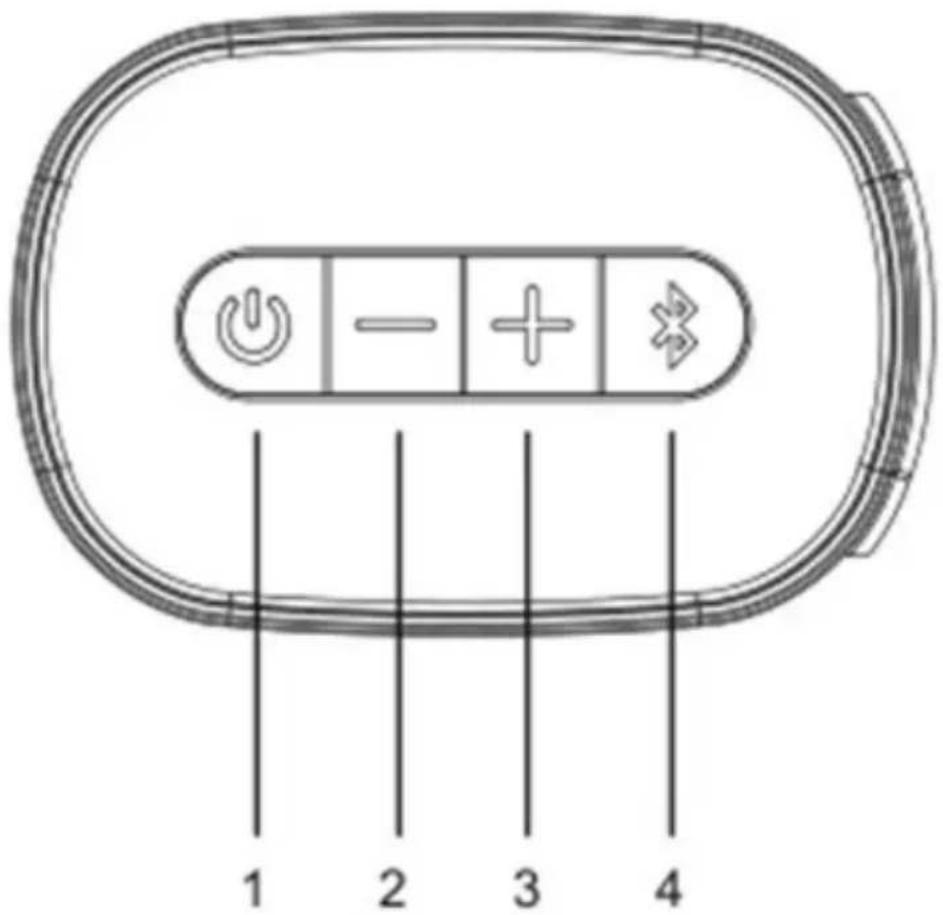
- ⏻: Short press to power on, short press to switch function, hold to power off
- —: Press for volume down
- +: Press for volume up
- ✗: Press for Bluetooth pairing
Connections
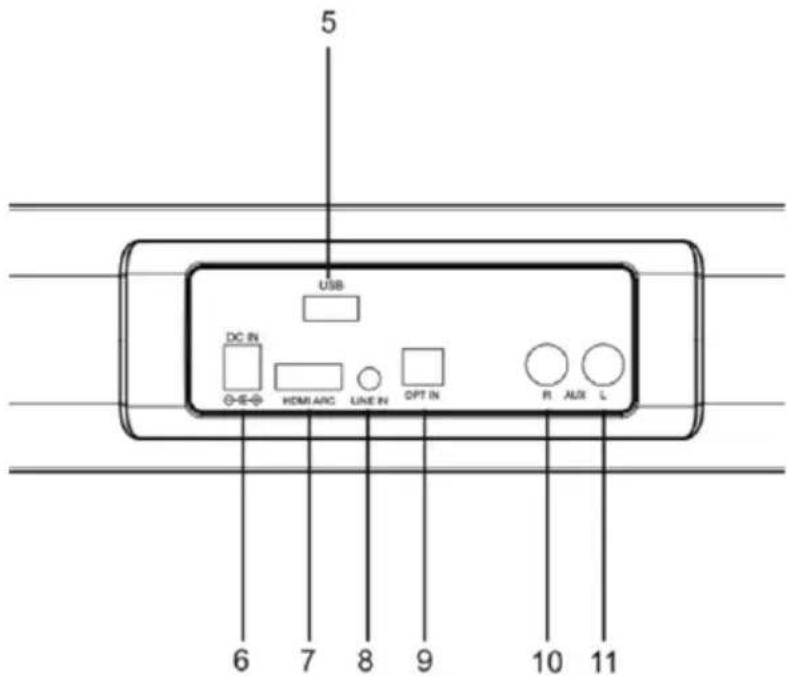
- USB: USB port
- DC IN: DC input
- HDMI: HDMI in (ARC)
- LINE IN: 3.5mm connector
- OPT: Optical input
- AUX IN (R): For external audio input (RCA/Phono)
- AUX IN (L): For external audio input (RCA/Phono)
LED Display
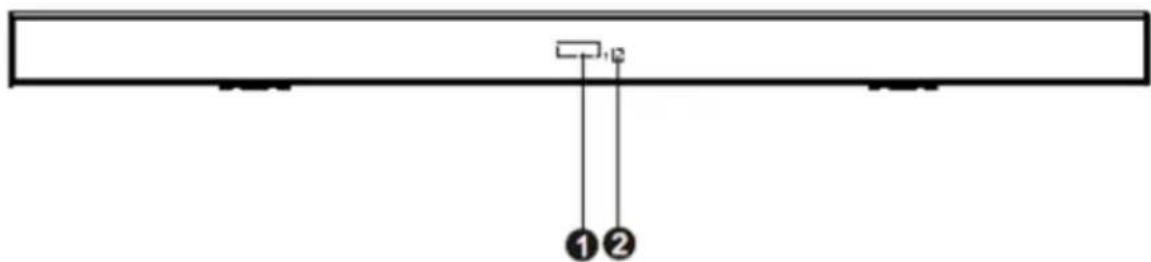
- LED Display
- Remote control sensor
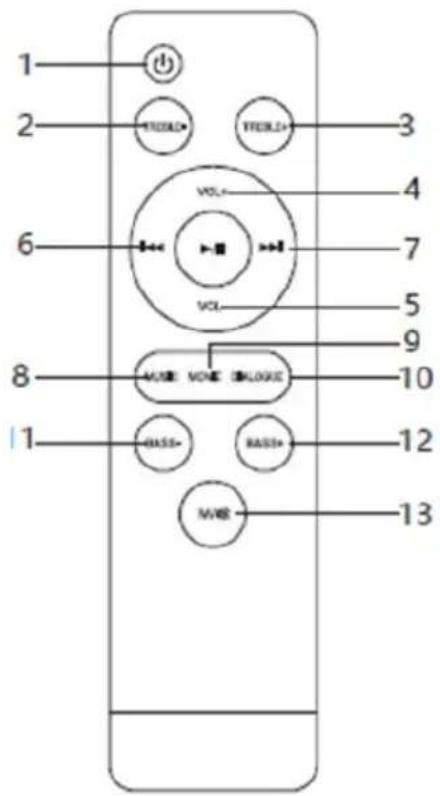
| 1 |  | Press to power on and standby |
| 2 | TREBLE- | Press to decrease treble |
| 3 | TREBLE+ | Press to increase treble |
| 4 | VOL+ | Press to increase volume |
| 5 | VOL- | Press to decrease volume |
| 6 |  | Press to previous song in Bluetooth or USB mode |
| 7 |  | Press to next song in Bluetooth or USB mode |
| 8 |  | Press to play or pause in Bluetooth or USB mode |
| 9 |  | Press to select the Music sound mode |
| 10 |  | Press to select the Movie sound mode |
| 11 |  | Press to select the Dialogue sound mode |
| 12 |  | Press to decrease bass sound |
| 13 |  | Press to increase bass sound |
| 14 |  | Short press to change between HDMI/OPTICAL IN/LINE IN/AUX IN/USB mode, long press to toggle mute on/off |
INSTALLATION
• Unpack all parts and remove protective material.
- Do not connect the unit to the mains before checking the mains voltage and before all other connections have been made.
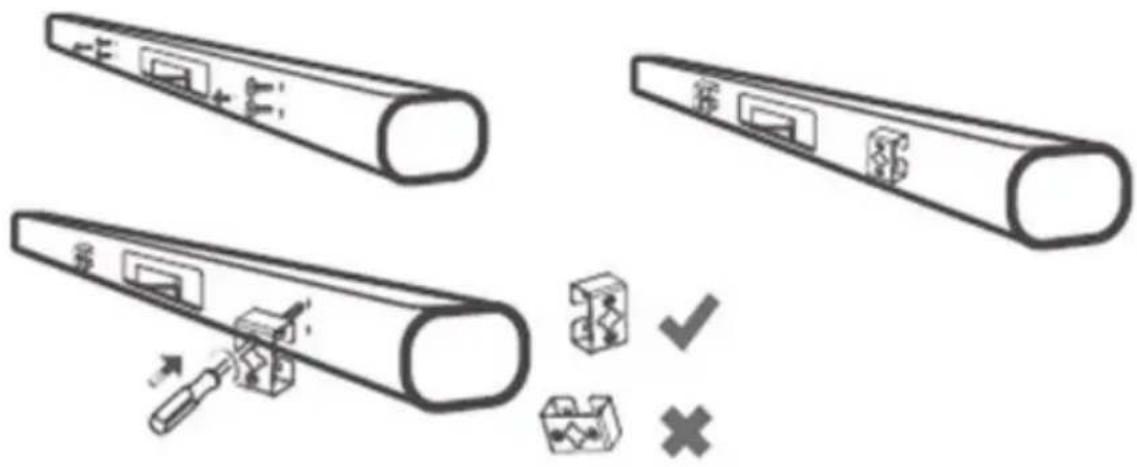
Attaching mounting brackets (optional)
- Using a screwdriver, remove the four mounting screws from the rear of the product as shown.
- Seat the two included mounting brackets vertically over the screw holes. Do not attach the brackets horizontally.
- Reinsert the screws into the holes and tighten, attaching the brackets to the soundbar.
OPERATION
- Make sure you have made all the necessary cable connections before connecting the Soundbar to a wall outlet, the soundbar will enter to standby mode, the LED display will show “--”.
- Insert a AAA battery into the remote control to activate it.
Note:
The remote control works within a range of 6 metres.
- Short press the Power/Source button on unit or remote control to turn on the soundbar.
- Press the Power/Source button on the soundbar or the Mode/Mute button on the remote control to select from various sources.
1. Bluetooth Mode
After powering on, the soundbar will enter Bluetooth mode automatically. You can also select Bluetooth mode as described above.
- Place the audio source device (smartphone, etc.) within 3 meters of the soundbar.
- Activate the Bluetooth function of the audio source device, so that it starts to search for nearby Bluetooth devices (please refer to the device's instructions for details).
- Select "KASBD60SA" from the discovered device list and click to connect.
- If the device asks for a password, enter "0000" and press confirm button to pair the device with the soundbar.
- Make sure that the distance between the soundbar and phone is less than 10m and there are no obstacles in the space. Music can now be played through the soundbar over Bluetooth.
- Short press the Play/Pause button to play and pause music. Short press the Previous or Next buttons to play the previous or next song.
- To disconnect, short press or long-press the Bluetooth button on the soundbar. At this time, another mobile phone device can be used to connect Bluetooth playing. If another connection is not selected, the soundbar will remain discoverable over Bluetooth until it is powered off or another mode is selected.
2. Line in mode
After powering the unit on, connect an external audio source to the LINE IN jack of the soundbar by using a 3.5mm audio cable, then short press the Power/Source button on the soundbar or the Mode/Mute button on the remote control to switch to "LINE IN". Adjust the external audio source to a moderate volume and begin playback.
3. AUX in mode
After powering the unit on, connect an external audio source to the AUX IN jack of the soundbar by using the included RCA cable, then short press the Power/Source button on the soundbar or the Mode/Mute button on the remote control to switch to “AUX IN”. Adjust the external audio source to a moderate volume and begin playback.
4. HDMI mode
Short press the Power/Source button on the soundbar or the Mode/Mute button on the remote control to switch to "HDMI" mode. Connect a HDMI cable to the HDMI (ARC) port on your TV and then to the HDMI IN (ARC) port on the rear of the soundbar. Ensure the HDMI ARC function is activated on your TV and digital output is set to PCM/Dolby.
5. Optical mode
Short press the Power/Source button on the soundbar or the Mode/Mute button on the remote control to switch to “OPTICAL”. Connect the DVD audio and equipment to the soundbar’s OPT IN jack with an optical audio cable. This machine decodes optical fiber digital to restore sound through power amplifier. Ensure your TV’s digital output is set to PCM/Dolby.
6. USB mode
After powering the soundbar on, insert a USB drive into the USB port of the soundbar. The product will automatically enter USB playback mode and plays any supported audio files found on the USB. Press the Play/Pause button to play and pause the music. Short press the Previous or Next button to skip back/forward between songs.
Volume and sound mode
- After powering the sound bar on, in any mode of playback, short press or long press the volume “-” button on the soundbar or remote control to decrease the volume. Short press or long press the volume “+” button on the soundbar or remote control to increase the volume.
Note:
During volume increase and decrease, the LED display will show the volume level as it is set (between 0–32).
- After powering on, in any mode of playback, short press the relevant button on the remote control to choose a sound effect mode: MUSIC, MOVIE or DIALOGUE.
Note:
In MOVIE, MUSIC and DIALOGUE modes, the BASS and TREBLE settings can be adjusted from the remote control.
Power off
When powered on, long press the Power/Source button on the soundbar or short press the Power/Standby button on remote control to power the unit off. If unplugged from power the supply, the machine will be completely powered off.
Device compatibility
The product theoretically supports all mobile phones with Bluetooth functionality and any related equipment that connects to Bluetooth and plays music.
SPECIFICATIONS
| Output power | 15W x 2+30W |
| AC/DC adaptor | 100-240V~50/60Hz |
| Speaker frequency | 50Hz - 15kHz |
| Bluetooth version | 5.0, A2DP, AVRCP |
| Bluetooth range | Up to 10m |
| Dimensions | 940 x 92 x 63mm |
TROUBLESHOOTING
| Issue | Possible solution |
| Bluetooth device cannot be paired | Another device is already paired to the soundbar. When powered on, the soundbar will automatically find the paired device and connect. Turn off the Bluetooth function on the connected device, and the soundbar will be discoverable again. |
| Bluetooth playback volume is low | Adjust the output volume on the Bluetooth audio device. |
| Short Bluetooth connection distance | Obstruction exists between the soundbar and Bluetooth device. Remove any obstructions that may be present. |
| Bluetooth connection is interrupted (broken sound) | 1. Obstruction exists between the soundbar and Bluetooth device. Remove any obstructions that may be present.2. The Bluetooth device is beyond the maximum connection range. Shorten the distance between the soundbar and Bluetooth device. |
Note:
If the above methods are ineffective, contact Kogan.com for further support.
Need more information?
We hope this User Guide has given you
the assistance needed for a simple set-up.
For the most up-to-date guide for your product,
as well as any additional assistance you may require,
head online to help.kogan.com
kōgan
- 2.1CH DOLBY SOUNDBAR WITH BUILT-IN SUBWOOFER
- SAFETY & WARNINGS
- Warning
- IN THE BOX
- OVERVIEW
- Buttons
- Connections
- LED Display
- INSTALLATION
- Attaching mounting brackets (optional)
- OPERATION
- Note:
- Bluetooth Mode
- Line in mode
- AUX in mode
- HDMI mode
- Optical mode
- USB mode
- Volume and sound mode
- Power off
- Device compatibility
- SPECIFICATIONS
- TROUBLESHOOTING
- Need more information?
Brand : Kogan
Model : KASBD60SA
Category : Soundbar