
FM-F65RW - Loudspeaker Fusion - Free user manual and instructions
Find the device manual for free FM-F65RW Fusion in PDF.


| Product Type | Portable Wireless Speaker |
| Brand | Fusion |
| Model | FM-F65RW |
| Dimensions (W x H x D) | Approx. 20 x 10 x 10 cm |
| Weight | Approx. 0.5 kg |
| Power Source | Built-in rechargeable battery (USB-C charging) |
| Battery Life | Up to 6 hours (varies with volume and usage) |
| Bluetooth Version | Bluetooth 5.0 |
| Wireless Range | Up to 10 meters (33 feet) |
| Supported Audio Sources | Bluetooth, AUX-in, FM Radio, USB drive (MP3) |
| Speaker Type | Full-range driver with passive radiator |
| Speaker Power Output | 5W RMS |
| Frequency Response | 80 Hz – 20 kHz |
| Impedance | 4 ohms |
| Water Resistance | Not specified (assume not waterproof) |
| Controls | Power, Volume, Play/Pause, Next/Previous track, Mode |
| Indicators | LED for power, Bluetooth pairing, charging |
| Included Accessories | USB-C charging cable, AUX cable, user manual |
| Compatible Devices | Smartphones, tablets, laptops, MP3 players |
| Material | Plastic with fabric grille |
| Color | Black (as per model number RW probable) |
| Safety | Do not expose to extreme temperatures or moisture. Keep away from children. |
| Maintenance | Clean with a dry, soft cloth. Do not use abrasive cleaners. |
| Reparability | User-replaceable battery? Not specified; contact support for repairs. |
Frequently Asked Questions - FM-F65RW Fusion
User questions about FM-F65RW Fusion
0 question about this device. Answer the ones you know or ask your own.
Ask a new question about this device
Download the instructions for your Loudspeaker in PDF format for free! Find your manual FM-F65RW - Fusion and take your electronic device back in hand. On this page are published all the documents necessary for the use of your device. FM-F65RW by Fusion.
USER MANUAL FM-F65RW Fusion
Flush Mount Series Speaker and Subwoofer Installation Instructions
Important Safety Information
WARNING
See the Important Safety and Product Information guide in the product box for product warnings and other important information.
WARNING
This device must be installed according to these instructions.
Disconnect the vehicle's or vessel's power supply before beginning to install this device.
CAUTION
Continuous exposure to sound pressure levels over 100 dBA may cause permanent hearing loss. The volume is typically too loud if you cannot hear people speaking around you. Limit the amount of time you listen at high volume. If you experience ringing in your ears or muffled speech, stop listening and have your hearing checked.
Always wear safety goggles, ear protection, and a dust mask when drilling, cutting, or sanding.
NOTICE
When drilling or cutting, always check what is on the opposite side of the surface.
It is strongly recommended that you have your audio system installed by a professional installer to ensure optimum performance.
You must read all installation instructions before beginning the installation. If you experience difficulty during the installation, go to www.fusionentertainment.com for product support.
After installing the subwoofer, you should run the subwoofer at low to medium volumes for the first few hours of use. This helps to improve the overall sound by gradually loosening up the moving components of the subwoofer, such as the cone, spider, and surround
Tools Needed
• Phillips screwdriver
- Torque screwdriver with a Phillips bit
- Appropriate saw or utility knife to cut surface material
• 18 AWG (0.82 mm 2 ) speaker wire
• Marine sealant such as 3M ™ 4200 or 5200
- Speaker spade connectors (recommended)
- Wire strippers (optional)
- Crimping tool (optional)
• Electrical tape (optional)
NOTE: For customized installations, additional tools and materials may be needed.
Mounting Considerations
NOTICE
When mounting the speaker in an area exposed to weather or water, you must mount the speaker on a vertical surface. If you mount the speaker on a horizontal surface facing up, water can gather in and around the speaker, causing damage over time.
If you intend to mount the speakers outside the boat, you must mount them in a location well above the waterline, where they are not submerged or damaged by docks, pilings, or other pieces of equipment. When mounted correctly, these speakers are rated for protection from the front of the speaker. Water exposure and damage to the rear of the speaker voids the warranty.
You must turn off the audio system before making any connections to the stereo, amplifier, or speakers. Failure to do so could result in permanent damage to the audio system.
You should protect all terminals and connections from grounding and from each other. Failure to do so could result in permanent damage to the audio system and void the product warranty.
When selecting a mounting location for the speakers, observe these considerations:
- You must select mounting locations that provide sufficient clearance for the mounting depth of the speakers as specified in the product specifications.
- You must select a mounting location where the panel thickness is not thinner or thicker than specified in the product specifications.
- You should select a flat mounting surface for the best seal.
- You should protect the speaker wires from sharp objects and always use rubber grommets when wiring through panels.
- To avoid interference with a magnetic compass, you should not mount the speakers closer to a compass than the compass-safe distance value listed in the product specifications.
Selecting the correct mounting location optimizes the performance of each speaker. FUSION® speakers are designed to perform in the widest possible range of mounting locations, but the more you plan the installation, the better the speakers will sound. For more information on speaker placement and specifications, go to www.fusionentertainment.com.
Mounting the Speakers
1 Use the included template with a rotary tool or jigsaw to cut the hole for the speaker.
2 Connect the speaker wires while observing polarity (Speaker Wiring, page 2).
3 Apply marine sealant on the speaker and the mounting surface.
4 Place the speaker in the cutout.
5 Using a #2 Phillips screwdriver, turn the screws ① to extend the mounting tabs ② slightly hold the speaker to mounting surface.

NOTICE
Although you may use a power screwdriver to initially turn the screws on the mounting tabs, you must use a torque screwdriver to complete the installation. Using power tools to
fully tighten the screws can damage the speaker housing and make it difficult to install the speaker grille.
6 Using a torque screwdriver, tighten the screws by hand to 1.0 Nm (0.74 lbf-ft) on the FM-F65/F77 speaker models or 1.5 Nm (1.11 lbf-ft) on the FM-S10 subwoofer models.
7 With the speaker mounted, place the grille onto the speaker, and push to secure it.
Speaker Wiring
When connecting the speakers or subwoofer to your stereo or amplifier, observe these considerations.
- Speaker wire is not included with the speakers or subwoofer. You should use 18 AWG (0.82 mm 2 ) speaker wire to connect the speakers or subwoofer to the stereo or amplifier.
- The leads on the speakers and subwoofer are terminated using male spade connectors. You should use female spade connectors (not included) to connect the speaker wire to the leads for the best connection.
- The subwoofer features a dual 2 Ohm voice coil that can be configured for 2.1 operation (two speakers and one subwoofer) when connected to a compatible FUSION stereo (Configuring the Subwoofer for 2.1 Operation, page 2).
You can use these tables to identify the polarity and spade-connector sizes of the leads on the speakers or subwoofer.
FM-F65/F77 Speakers
| Lead color Polarity Spade connector size | ||
| White Positive (+) 6.3 mm | ||
| White with a black stripe Negative (-) 4.8 mm | ||
FM-S10 Subwoofer
| Lead color Polarity Spade connector size | ||
| White Positive (+) 6.3 mm | ||
| Gray with a black stripe Negative (-) 4.8 mm | ||
Gray and white with a black stripe wires are connected to jumper terminals on the back of the subwoofer. These wires must remain connected to the jumper terminals for normal use (4 Ohm) and should be disconnected only when configuring the subwoofer for 2.1 operation.
Configuring the Subwoofer for 2.1 Operation
The subwoofer features dual 2 Ohm voice coils and is pre-configured for 4 Ohm operation. You can change the configuration of the subwoofer for 2.1 operation (two speakers and one subwoofer) when connected to a FUSION 2 Ohm-stable stereo with DSP capability, such as an Apollo™ RA770. See www.fusionentertainment.com for more information about compatible stereos.
1 Disconnect the gray wire and the white with a black stripe wire from the jumper terminals on the back of the subwoofer.
2 Connect the wires from the subwoofer to the stereo using the following table as a reference.
| Subwoofer lead Stereo connection | |
| White Zone 2 right positive (+) | |
| White with a black stripe Zone 2 right negative (-) | |
| Gray Zone 2 left positive (+) | |
| Gray with a black stripe | Zone 2 left negative (-) |
3 Turn on the connected stereo.
4 Launch the FUSION-Link™ app, and select the 2.1 option for the connected stereo.
The subwoofer operates in 2.1 mode, with the volume control tied to zone 1 on the stereo. The zone 2 volume control and the zone 2 line out connectors are disabled.
Speaker Information
True-Marine™ Products
True-Marine products are subjected to rigorous environmental testing under harsh marine conditions to surpass industry guidelines for marine products.
Any product that bears the True-Marine stamp of assurance has been designed for simplicity of use and combines advanced marine technologies to deliver an industry leading entertainment experience. All True-Marine products are supported by the FUSION 3-year worldwide limited consumer warranty.
Registering Your Flush Mount Series
Help us better support you by completing our online registration today.
- Go to www.fusionentertainment.com.
- Keep the original sales receipt, or a photocopy, in a safe place.
Cleaning the Speakers
NOTE: When mounted correctly, these speakers are rated IP65 for dust and water ingress protection under normal conditions. They are not designed to withstand high pressure water spray, which may occur when you wash down your vessel. Failure to carefully spray-clean the vessel may damage the product and void the warranty.
NOTICE
Do not use harsh or solvent-based cleaners on the speakers. Using such cleaners may damage the product and void the warranty.
1 Clean all salt water and salt residue from the speaker with a damp cloth soaked in fresh water.
2 Use a mild detergent to remove a heavy buildup of salt or stains.
Specifications
| Specification | FM-F65 | FM-F77 | FM-S10 |
| Peak power (Watts) | 120 W | 200 W | 400 W |
| RMS power (Watts) | 30 W | 50 W | 120 W |
| Sensitivity (1 W/ 1 m) | 87 dB | 91 dB | 87 dB |
| Frequency response | 100 Hz to 18 kHz | 80 Hz to 18 kHz | 30 Hz to 2 kHz |
| Nominal impedance | 4 Ohms | 4 Ohms | 4 Ohms |
| Recommended amplifier power (RMS) | 15 to 80 W per channel | 20 to 150 W per channel | 40 to 300 W per channel |
| Min. panel thickness | 3 mm ( 1/8 in.) | 3 mm ( 1/8 in.) | 6 mm ( 1/4 in.) |
| Max. panel thickness | 25 mm (1 in.) | 25 mm (1 in.) | 25 mm (1 in.) |
| Min. mounting depth (clearance) | 70 mm ( 23/4 in.) | 83 mm ( 31/4 in.) | 140 mm ( 51/2 in.) |
| Mounting diameter (clearance) | Round ∅: 138 mm ( 57/16 in.)Square: 138 × 138 mm ( 57/16 in.) | Round ∅: 165 mm ( 61/2 in.)Square: 165 × 165 mm ( 61/2 in.) | Round ∅: 269 mm ( 109/16 in.)Square: 269 × 269 mm ( 109/16 in.) |
| Optimal enclosure size | 4 L | 8 L | 40 L |
| Specification FM-F65 FM-F77 FM-S10 | |||
| Operating temperature range | From 0 to 50°C (from 32 to 122°F) | From 0 to 50°C (from 32 to 122°F) | From 0 to 50°C (from 32 to 122°F) |
| Storage temperature range | From -20 to 70°C (from -4 to 158°F) | From -20 to 70°C (from -4 to 158°F) | From -20 to 70°C (from -4 to 158°F) |
| Compass-safe distance | From the rear: 245 cm (96.5 in.) From the front: 235 cm (92.5 in.) From the sides: 195 cm (76.8 in.) | From the rear: 290 cm (114.2 in.) From the front: 275 cm (108.3 in.) From the sides: 245 cm (96.5 in.) | From the rear: 381 cm (150 in.) From the front: 350 cm (137.8 in.) From the sides: 320 cm (126 in.) |
| Cone/surround material | Aluminum dome tweeter, polypropylene cone, rubber surround | Aluminum dome tweeter, polypropylene cone, cloth surround | Polypropylene cone, rubber surround |
| Water and dust rating (from the front) | IEC 60529 IP65 1 | IEC 60529 IP65 I | IEC 60529 IP65 |
Speaker Dimensions
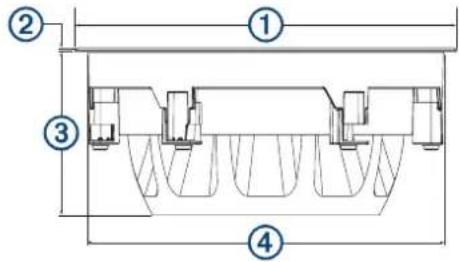
| Dimension FM-F65 FM-F77 FM-S10 | |||
| 1 | Round ∅: 153 mm(6 in.)Square: 153 ×153 mm (6 in.) | Round ∅: 181 mm( 71/8 in.)Square: 181 ×181 mm ( 71/8 in.) | Round ∅: 284 mm( 113/16 in.)Square: 284 ×284 mm( 113/16 in.) |
| 2 | 2.5 mm ( 1/8 in.) 2.5 | mm ( 1/8 in.) 2.5 | mm ( 1/8 in.) |
| 3 | 67.1 mm ( 25/8 in.) | 80.4 mm( 33/16 in.) | 137 mm ( 53/8 in.) |
| 4 | 135 mm( 55/16 in.) | 162 mm ( 63/8 in.) | 266 mm ( 101/2 in.) |
FUSON®
Flush Mount Series
FM-F65R Speakers
∅ 138 mm
(5 7/16 in.)
FUSION
Important Safety and Product Information....2
Important Safety and Product Information
WARNING
Failure to heed the following warnings could result in an accident resulting in death or serious injury.
Marine Operation Warnings
- You are responsible for the safe and prudent operation of your vessel. This device does not relieve you from the responsibility of safely operating your vessel. Avoid navigational hazards and never leave the helm unattended.
• Always be prepared to promptly regain control of the vessel. Use caution near hazards in the water, such as docks, pilings and other vessels.
Hearing Damage Warning
Listening to the stereo at high volume can cause damage to your hearing.
Product Environmental Programs
Information about the Garmin® product recycling program and WEEE, RoHS, REACH, and other compliance programs can be found at www.garmin.com/aboutGarmin/environment.
Declaration of Conformity
Hereby, Garmin declares that this product is in compliance with the essential requirements and other relevant provisions of Directive 1999/5/EC. To view the full Declaration of Conformity, go to www.fusionentertainment.com.
Software License Agreement
BY USING THE DEVICE, YOU AGREE TO BE BOUND BY THE TERMS AND CONDITIONS OF THE FOLLOWING SOFTWARE LICENSE AGREEMENT. PLEASE READ THIS AGREEMENT CAREFULLY. Garmin Ltd. and its subsidiaries ("Garmin") grant you a limited license to use the software embedded in this device (the "Software") in binary executable form in the normal operation of the product. Title, ownership rights, and intellectual property rights in and to the Software remain in Garmin and/or its third-party providers.
You acknowledge that the Software is the property of Garmin and/or its third-party providers and is protected under the United States of America copyright laws and international copyright treaties. You further acknowledge that the structure, organization, and code of the Software, for which source code is not provided, are valuable trade secrets of Garmin and/or its third-party providers and that the Software in source code form remains a valuable trade secret of Garmin and/or its third-party providers. You agree not to decompile, disassemble, modify, reverse assemble, reverse engineer, or reduce to human readable form the Software or any part thereof or create any derivative works based on the Software. You agree not to export or re-export the Software to any country in violation of the export control laws of the United States of America or the export control laws of any other applicable country.
Limited 3-Year Marine Consumer Warranty
Garmin New Zealand Limited, trading as FUSION Entertainment ('FUSION'), warrants that this FUSION Marine product is free from defects in material and workmanship, according to the following terms and conditions:
- The limited warranty for the FUSION product purchased extends to 36 months beginning on the date of purchase of the product.
- The limited warranty extends only to consumers who purchase the product in one of the countries (or areas) set forth on www.fusionentertainment.com. The limited warranty is only valid in FUSION's intended country (or area) of sale of the product.
- During the limited warranty period, FUSION or its authorised service network will repair or replace (at FUSION's discretion), any defective product or parts thereof with new and return the product to the consumer in working condition. No charge will be made to the consumer for either parts or labour in repairing or replacing the product. All replaced parts and cosmetic parts should be free of defects at the time of shipment and, therefore shall not be covered under these limited warranty terms.
- Repaired product will be warranted for the balance of the original warranty period or for ninety (90) days from the date of repair, whichever is longer.
- All warranty claims must be accompanied with a copy of this warranty card, and a copy of proof of purchase.
The consumer shall have no coverage or benefits under this limited warranty if any of the following conditions are applicable: - The product has been subject to: abnormal use, abnormal conditions, improper storage, unauthorised modifications, unauthorised connections, unauthorised repair including but not limited to use of unauthorised spare parts in repairs, misuse, neglect, abuse, accident, alteration, improper installation, acts of God, spill of foods or liquids, maladjustment of customer controls or other acts which are beyond the reasonable control of FUSION, including deficiencies in consumable
parts such as fuses, and breakage or damage to antennae unless caused directly by defects in materials or workmanship, and normal wear and tear of the product.
- FUSION was not notified by the consumer of the alleged defect or malfunction of the product during the applicable limited warranty period.
• The product serial number or the accessory date code has been removed, defaced or altered.
- The product was used with or connected to an accessory not supplied by FUSION or fit for use with FUSION product, or used in a manner other than its intended use.
If a problem develops during the limited warranty period, the consumer should take the following step-by-step procedure:
1 The consumer shall return the product to any authorised FUSION dealer in authorised sales countries for repair or replacement processing. FUSION assumes no freight or shipping responsibility for returning goods to an authorised FUSION dealer, or return freight from an authorised dealer to the consumer submitting the warranty claim.
2 The consumer shall be charged for any parts or labour charges not covered by this limited warranty. The consumer shall be responsible for expenses related to removal and reinstallation of the product.
3 If the product is returned to FUSION after the expiration of the warranty period, FUSION's normal service policies shall apply and the consumer will be charged accordingly.
The benefits conferred by this warranty apply to the extent that they are not superseded by any other rights and remedies available under any applicable legislation that cannot be excluded. In jurisdictions where implied or legal warranties may be excluded, any implied or legal warranty is hereby excluded and the foregoing warranty is the purchaser's sole and exclusive remedy and is in lieu of all other warranties, express or implied.
• Some states in America do not allow the exclusion or limitation of consequential damages, so the above limitation and
exclusion may not apply to you. This warranty gives you specific legal rights which may vary from state to state.
- FUSION neither assumes nor authorises any authorised service centre or any person or entity to assume for it any other obligation or liability beyond that which is expressly provided for in this warranty.
- All warranty information, product features and specifications are subject to change without notice.
Limited 3-Year Marine Consumer Warranty for Australian Consumers
Garmin Australasia, 30 Clay Place, Eastern Creek, NSW 2766, Australia.
EMAIL: australia@fusionentertainment.com PHONE: 1800 235 822
THE FUSION PROMISE OF QUALITY LIMITED 3-YEAR CONSUMER WARRANTY
This warranty is given in addition to other rights and remedies available to the consumer under Australian Consumer Law. In addition to the FUSION Warranty, our goods come with guarantees that cannot be excluded under the Australian Consumer Law. You are entitled to a replacement or refund for a major failure and for compensation for any others reasonably foreseeable loss or damage. You are also entitled to have the goods repaired or replaced if the goods fail to be of acceptable quality and the failure does not amount to a major failure.
Garmin New Zealand Limited, trading as FUSION Entertainment ('FUSION'), warrants this FUSION Product including, Speaker, Subwoofer, Amplifier, Head Unit, or genuine FUSION Accessory 'product' is free from defects in materials and workmanship, in accordance with the following terms and conditions:
• The limited warranty for the FUSION product purchased is only available for (36) months after the date of purchase.
- The limited warranty extends only to the original consumer of the product and may not be assigned or transferred to any other person or consumer without FUSION's prior written consent being provided.
- During the limited warranty period, FUSION or its authorised service network will repair or replace any defective or faulty product or parts at its own cost.
- Repaired or replaced product will be warranted for the balance of the original warranty period or for ninety (90) days after the date of repair, whichever is longer.
- All warranty claims must be notified to FUSION or its authorised Dealer in writing during the warranty period accompanied with a copy of this warranty card, proof of purchase date and the product with an intact and unaltered serial number or accessory date code.
This warranty will not apply if:
The consumer causes the Product to be of unacceptable quality or fails to take steps to prevent the product from becoming of unacceptable quality and/or it is damaged by abnormal use. Examples of goods becoming of unacceptable quality or of abnormal use by the consumer include:
• Storage of product under improper conditions.
• Exposure to excessive moisture or dampness.
• Exposure to excessive temperature extremes or other adverse environmental conditions.
- Unauthorised modifications of product, connections or otherwise unauthorised repairs including, but not limited, to the use of unauthorised parts in the repair of products.
- Improper use of or installation of, or interference with, product adjustments or controls and or including antenna breakage or damage due to misuse.
• Damage caused by consumables or by electricity supply.
- Acts of god (force majeure), exposure of product to food spills, or any other type of fluid ingress.
- Using the product in a way for which was not intended to be used or connecting it to an accessory not supplied by, specified by, or authorised by FUSION.
• Any other abnormal use of or conduct causing product to become of unacceptable quality.
Other exclusions:
- This warranty extends to the repair or replacement of FUSION product only and the consumer is responsible for any expenses relating to the removal or installation of the product or related services including the cost of delivering the product to FUSION or its authorised dealer.
- Repair work conducted by FUSION after this warranty has expired or if this warranty for any other reason this Fusion warranty does not apply is subject to FUSION's normal service policies and FUSION charges for labour and material may apply.
- This is a manufacturers warranty provided to consumers of FUSION products. Variations to this warranty may only be made by FUSION and will be notified to the customer in writing or issued on the FUSION website. Fusion Dealers, agents and authorised dealers are not authorised to make changes or vary this FUSION warranty.
- All warranty information, product features and specifications are subject to change without notice.
- FUSION is not responsible for replacing or the cost of replacing any consumer data lost occurring either due to equipment failure or during the repair and replacement process.
- FLUSH MOUNT SERIES SPEAKER AND SUBWOOFER INSTALLATION INSTRUCTIONS
- IMPORTANT SAFETY INFORMATION
- WARNING
- CAUTION
- NOTICE
- TOOLS NEEDED
- MOUNTING CONSIDERATIONS
- MOUNTING THE SPEAKERS
- SPEAKER WIRING
- CONFIGURING THE SUBWOOFER FOR 2.1 OPERATION
- SPEAKER INFORMATION
- TRUE-MARINE™ PRODUCTS
- REGISTERING YOUR FLUSH MOUNT SERIES
- CLEANING THE SPEAKERS
- FUSON®
- FLUSH MOUNT SERIES
- FM-F65R SPEAKERS
- FUSION
- IMPORTANT SAFETY AND PRODUCT INFORMATION
- MARINE OPERATION WARNINGS
- HEARING DAMAGE WARNING
- PRODUCT ENVIRONMENTAL PROGRAMS
- DECLARATION OF CONFORMITY
- SOFTWARE LICENSE AGREEMENT
- LIMITED 3-YEAR MARINE CONSUMER WARRANTY
- THIS WARRANTY WILL NOT APPLY IF
Brand : Fusion
Model : FM-F65RW
Category : Loudspeaker