
NI-L66E - Iron press PANASONIC - Free user manual and instructions
Find the device manual for free NI-L66E PANASONIC in PDF.


| Product Type | Clothes Press / Ironing Press |
| Brand | Panasonic |
| Model | NI-L66E |
| Power Consumption | 1200 W |
| Voltage | 220-240 V |
| Frequency | 50/60 Hz |
| Soleplate Material | Stainless Steel |
| Water Tank Capacity | 200 ml |
| Steam Output | Adjustable |
| Temperature Settings | Variable |
| Auto Shut-off | Yes |
| Anti-drip System | Yes |
| Self-cleaning Function | Yes |
| Cord Length | 2 m |
| Dimensions (W x D x H) | 30 x 20 x 15 cm |
| Weight | 2.5 kg |
| Safety Features | Overheat protection, auto shut-off |
| Maintenance | Regular descaling, clean soleplate |
| Spare Parts Availability | Water tank, soleplate, etc. |
| Included Accessories | Measuring cup, instruction manual |
Frequently Asked Questions - NI-L66E PANASONIC
User questions about NI-L66E PANASONIC
0 question about this device. Answer the ones you know or ask your own.
Ask a new question about this device
Download the instructions for your Iron press in PDF format for free! Find your manual NI-L66E - PANASONIC and take your electronic device back in hand. On this page are published all the documents necessary for the use of your device. NI-L66E by PANASONIC.
USER MANUAL NI-L66E PANASONIC
natural_image
Line drawing of a Panasonic air conditioner with a box beside it (no text or symbols)Panasonic®
使用说明书
Operating Instructions
无绳蒸汽电熨斗
Electric Cordless Steam Iron
型号/Model No. NI-L66E
安全信息
GENERALLY MALFUNCTION AND
TACKLING METHOD 15
AFTER SERVICE
AFTER SERVICE 15
衷心感谢使用松下电器蒸汽电熨斗!
Sincerely thanks for using Electric Steam Iron of Matsushita Electric.
Before operating this unit, please read these instructions completely and save these instructions carefully.
松下·万宝(广州)电熨斗有限公司
Panasonic Wanbao Home Appliances Electric Iron (Guangzhou) Co., Ltd.
Wanbao Base Zhongcun Town Panyu District Guangzhou City Guangdong Province China
Matsushita Electric customer and service hot line: 800-810-0781
电熨斗的安全使用
您和他人的安全是最重要的
This product is designed by Matsushita Electric in Japan, conforms to GB4706.2-2003 Iron Standard.
功能表 FUNCTION
| NI-L66E | 无绳Cordless | 收藏箱Cover case | 喷射蒸汽/垂直喷射蒸汽Jet of steam/Vertical jet of steam | 自动断水Automatic water seal | 钛涂层底板Titanium coated soleplate |
规格
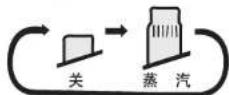
蒸汽按钮(每按一次如下图切换)

喷射蒸汽的使用
Your safety and the safety of others are very important
We have provided important safety messages in this manual and on your appliance. Always read and obey all safety messages.

This is the safety alert symbol. It is used to alert you to potential hazards that can kill or injure you and others. The safety messages will follow the safety alert symbol and either the word "WARNING" or "CAUTION". These words mean:

WARNING
You can be killed or seriously injured if you don't follow these instructions.

CAUTION
You can be exposed to a potentially hazardous situation which, if not avoided, may result in minor or moderate injury.
The safety messages will tell you what the potential hazard is, how to reduce the chance of injury, and what can happen if the instructions are not followed.
Thank you for purchasing a Panasonic Iron
Your iron is an appliance to be used only for ironing fabrics on an ironing board.
IMPORTANT SAFETY INSTRUCTIONS

WARNING
To reduce the risk of burns, electric shock, fire, or injury during the usage of this iron,
basic safety precautions should always be followed, including the following:
READ ALL INSTRUCTIONS BEFORE USING THE IRON
- Do not leave the iron unattended while it is connected to the electrical source. Keep it away from children.
- Do not loop cord around iron soleplate.
- If the supply cord is damaged it must be replaced by our service agent in order to avoid a hazard.
- During operating, should prevent such high-temperature parts as the soleplate or heat-insulated plate etc., from contacting body and thermo-labile objects so as not to scald or damage of objects.
- Should unplug and cut off the power supply before you add in or empty out water from water tank.
-
This iron must be used with its Power Base.
-
This iron must use the electrical outlet with earth connection.
- Should stop using and pull out the plug immediately while abnormal occurs (such as scorch, smoke etc.) to avoid fire or electric shock, then contact with our service agent.
- If the iron was damaged or has been dropped and there are visible signs of damage or if it is leaking. Do not repair the iron by yourself, it should be repaired by the designated service center; otherwise the user should take all responsibilities of damage.
- The iron must be used and rested on a stable surface. When placing the iron on its power base, ensure that the surface under the power base is stable.
- Do not use the appliance with the cord in tangled condition. The supply cord might be damaged soon.
Warning
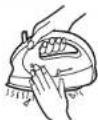
Don't touch the high temperature parts(such as soleplate surface, heat-insulated plate, underside of the water tank).

Don't touch.
(May be scalded.)
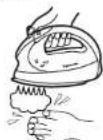
Don't touch the hot steam with your hands or other parts of your body.

(May be scalded.)

Please set the iron back to power base while you don't iron clothes.
(To avoid scratch on the surface or hurt by the dropped iron.)
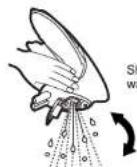
Don't slant or shake the iron too much.

(May be scalded by hot water.)
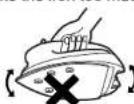

Prohibit such accident
occurring

Operating according to
the drawing
SPECIAL INSTRUCTIONS

To reduce the risk of electric shock or fire:
Do not operate another high wattage appliance in the same circuit, to avoid a circuit overload.
! CAUTION
To reduce the risk of personal injury and damage to your iron:
- Never use steam iron cleaning products in the iron, as they may damage working parts of the iron.
- Do not use water additives or substitute water such as linen or scented water in the steam iron. They can stain fabrics.
- If the Steam Button is not at Dry position after using, remaining water will move into the Soleplate and can result in burns at the next use of the iron.
SPECIFICATION
| Rated voltage | 220V~ 50Hz | Function | steam iron /dry iron |
| Power | 1400W | Steam generation way | drop |
| Plug/Cords | single-phase three pole plug(1.8m long) | Thermostat | temperature range:1-3(8°C-257) |
| Dimensions | 28cm long 17cm width 21cm height | Iron surface | 130 cm^2 |
| Weight | (restored) about 1.8kg, (Iron) about 0.85kg | Reservoir capacity | 80ml |
| Stand mode | power base | Lamp | temperature indicator |
AUTOMATIC WATER SEAL
Auto-valve system built-in the soleplate, when the temperature of the soleplate drops below 110°C, the valve for the vaporizing chamber in the iron automatically closes and stops the water from going in further. This prevents from water spitting out the soleplate, staining the cloth.
Besides it is unnecessary for you to heat the soleplate again and it will automatically dry, store the iron when it cools down.
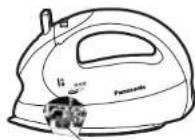
Automatic water seal
ANTI CALCIUM FUNCTION
- The built-in anti calcium cassette in the water tank, soften water; continuously reduces mineral contain in the water. Reduce scale buildup in the vaporizing chamber of the iron, makes it possible to use steam function for a long period of time.
- Ordinary water can be used in this iron for a long time, and steam function doesn't weaken.
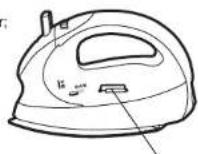
Anti calcium cassette
HOW TO USE AS A STEAM IRON
For low, medium temperature and heat-sensitive fabric, try to iron invisible place of fabric; if necessary use a press cloth on top of fabric.

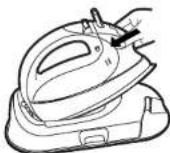
Remove the cover case: Place the unit on a firm and stable surface, while pulling the case lock outside, lift the cover case to open.
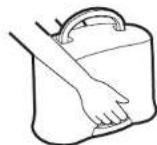
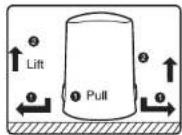

Pull the hide-wire plate, get the AC Power Cord; insert AC Power Cord into Power Base.
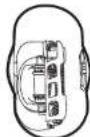
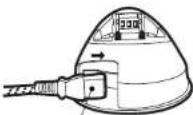
AC Power Cord Adapter
Notice: The power cord adapter must be inserted into power base securely.

a) Press the steam button down to "关" position. b) Press the water tank release button, take out the water tank.
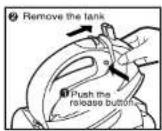

a) Open the water fill cover.
b) Fill the tank up to "满水" line. Notice: ① Observe the volume of water at upright position, do not overfill above "满水" indication. ② Using pure tap water.
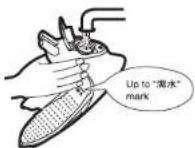

a) Close the water fill cover. b) Re-install the water tank to the main unit.

a) Plug the AC cord into electrical outlet, connect to power supply.
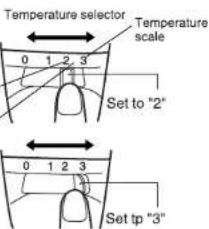
b) Move the Temperature Select and choose temperature within the temperature selector dial(2-3 scale).
Notice: When use regular steam or jet of steam, please set the temperature selector dial to "3" zone. Low temperature will lead to water leakage.

a) Preheat the iron until the indicator light goes out. b) Press steam button, select steam quantity, and start ironing.
Notice: The iron should be set on the Power Base securely for connecting to power supply. While not in use, please set back Power Base, the Power Base will maintain the selected temperature. Just put the iron on Power Base, don't put it on other place.
Steam button (switch as the following)
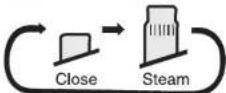

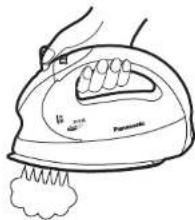
How to use the jet of steam feature
② Pump the jet of steam button several times before using for the first time at each ironing session.
③ The interval should not less than 2 seconds when using the jet of steam, to avoid the hot water dripped from the soleplate.
① When using vertical steam, hang the garment on a clothes hanger. Hold the iron away from your body close to but not touching the fabric. Pull the fabric tight with your free hand and after 2 seconds press the jet of steam button.
Notice: a) When using jet of steam, keep the steam button in the close position, and set the temperature selector dial to *3" zone, or some water will drop from iron. b) Never iron clothes on the body or point your iron at anyone when steaming.

The water volume can be observed very clearly whatever in vertical or horizontal position. Please pull out the plug when the volume of water is low. And refill the iron according to the step 3-5.
natural_image
Line drawing of a hand using a steam iron with a sponge, no text or symbols present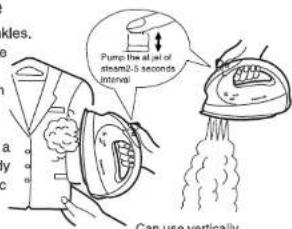
10
a) After ironing, set temperature selector dial to "0", pullout plug.
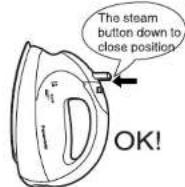
b) Depress the steam button down into the "Close" position, press the water tank release button, take out the water tank.
c) Empty water from water tank.
d) Re-install water tank, keep the steam button in the close position.
11
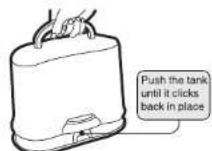
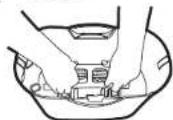
After ironing, while cool down and store; always keep the steam button in the close iron position; set the iron back to Power Base. Bundle the power cord, put it back to cover case; enclose cord-holder, push the cover case vertically until heard the sound clicks; then store the iron at safe place.
Notice: 1. While put power cord back to cover case, always put the plug at the side of cord-holder with nick, or cord-holder will be blocked by plug and can't be fixed.
- While pressing cord-holder, please press the underside of cord-holder until a click sound is heard.
HOW TO USE AS A DRY IRON
- Remove the cover case same as step 1-2 of "HOW TO USE AS A STEAM IRON". Press the steam button down to close position.
- Set the iron on the Power Base securely, plug the AC cord into electrical outlet; connect to power supply.
- According to
set the temperature selector dial to the desired position. Preheat the iron until the indicator light goes out, and start to iron. - After ironing, pullout plug, set the iron back to Power Base. Bundle the power cord, put it back to cover case; enclose cord-holder, push the cover case vertically until heard the sound clicks; then store the iron at safe place.
FABRIC AND IRONING RECOMMENDATIONS
| Notes:1. For heat-sensitive fabric, try to iron using a press cloth on top of fabric, otherwise it will ruin or damage.2. Iron belended fabrics, setting temperature for lower-temperature fiber.3. Iron clothes with worse heat resistance first while ironing the different kinds of cloth. | ||
| Fabric | Temperature setting | Ironing recommendations |
| ACRYLIC ACETATE | 1 | Dry iron on reverse side, or use a press cloth on top of fabric. |
| NYLON SILK | Dry iron on reverse side. | |
| POLYESTER RAYON | 2 | Dry iron on reverse side. To touch-up collars, cuffs, pockets, etc., iron lightly on right side. |
| WOOL VELVET | Iron lightly on right side. | |
| COTTON | 3 | Steam ironing is suggested, iron dark fabrics on reverse side to avoid unwanted sheen. |
| LINEN | ||
MAINTENANCE
Unplug iron, wait until iron cools completely.
● Wipe off iron soleplate and other part with a damp and soft cloth.
● For serious stain, use a neutral detergent
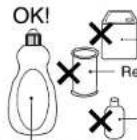
Neutral detergent
Banana liquid
Remove stain powder
Volatile detergent
Self-cleaning
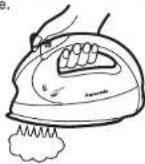
- Cleaning the steam chamber of solepate and steam vents with jet of steam, according to (How to use the jet of steam feature) (P13), pump the jet of steam button several times until steam is invisible.
GENERALLY MALFUNCTION AND TACKLING METHOD (please check with this table)
| Malfunction\Check | Plug | Temperature control pad | Steam button | Jet of steam button | Steam hold | The way of drainage | Temperature select indicator |
| No steam | ○ | ○ | ○ | ○ | |||
| Too small steam | ○ | ○ | ○ | ||||
| Dripping | ○ | ○ | ○ | ||||
| Corroding | ○ | ||||||
| No heat | ○ | ○ | |||||
| Scorch | ○ | ○ | |||||
| Dealing method (Contact with sales agent if can't deal with) | Connect well? | Position is correct? | Press steam button 2·3 times, reset to steam position, keep on close position while storing. | The interval time of pressing button should be 2-5 seconds. | Cleaning according to "MAIN-TENANCE". | Drainage before the iron cooling. | Select temperature accord indication or use a press cloth. |
AFTER SERVICE
| For after service, if there are any questions, please inquiry to shop or telephone 800-810-0781. | ||
| 1 Warranty card(append) | Get the warranty card from shop when purchases this product. Read completely and store carefully, confirm the warranty card have been recorded [purchased date, name of the shop etc.]. | |
| 2 Require repairing | Contact with sales agent if can't deal according to above table. | |
| Warranty period According to the warranty card, provide the shop with the electric iron and warranty card. | ||
| Exceed Warranty period Repair by sales agent, it will be charged according to regulations, if repair by others, please contact with the nearby service agent. | ||
PWHAEIG 0503-01
i8200ö-öM72G
- Panasonic®
- 安全信息
- AFTER SERVICE
- 松下·万宝(广州)电熨斗有限公司
- 电熨斗的安全使用
- 喷射蒸汽的使用
- IMPORTANT SAFETY INSTRUCTIONS
- READ ALL INSTRUCTIONS BEFORE USING THE IRON
- Warning
- SPECIAL INSTRUCTIONS
- ! CAUTION
- AUTOMATIC WATER SEAL
- ANTI CALCIUM FUNCTION
- HOW TO USE AS A STEAM IRON
- How to use the jet of steam feature
- 10
- 11
- HOW TO USE AS A DRY IRON
- MAINTENANCE
- Self-cleaning
Brand : PANASONIC
Model : NI-L66E
Category : Iron press