
DRU-170C - DVD Burner SONY - Free user manual and instructions
Find the device manual for free DRU-170C SONY in PDF.


| Product Type | Internal DVD Burner |
| Model | DRU-170C |
| Brand | Sony |
| Interface | ATAPI (IDE) |
| Form Factor | 5.25-inch half-height |
| Disc Capacity | DVD: 4.7 GB (single layer), 8.5 GB (dual layer); CD: 700 MB |
| Write Speed DVD-R | 16x |
| Write Speed DVD+R | 16x |
| Write Speed DVD+R DL | 4x |
| Write Speed CD-R | 48x |
| Read Speed DVD-ROM | 16x |
| Read Speed CD-ROM | 48x |
| Buffer Size | 2 MB |
| Loading Mechanism | Tray |
| Operating Temperature | 5°C to 45°C |
| Dimensions (W x H x D) | 148 x 42 x 170 mm |
| Weight | 0.8 kg |
| Power Consumption | 12 W (typical) |
| Laser Type | Class 1 laser product |
| Supported Media | DVD±R, DVD±RW, DVD+R DL, CD-R, CD-RW, CD-ROM |
| Maintenance | Keep the tray clean; use a lens cleaning disc if necessary |
| Safety | Do not look directly into the laser beam |
| Spare Parts | Not available; device is not user-serviceable |
Frequently Asked Questions - DRU-170C SONY
User questions about DRU-170C SONY
0 question about this device. Answer the ones you know or ask your own.
Ask a new question about this device
Download the instructions for your DVD Burner in PDF format for free! Find your manual DRU-170C - SONY and take your electronic device back in hand. On this page are published all the documents necessary for the use of your device. DRU-170C by SONY.
USER MANUAL DRU-170C SONY
You are cautioned that any changes or modifications not expressly approved in this manual could void your authority to operate this equipment.
To reduce the risk of fire or electric shock, do not expose this apparatus to rain or moisture. To avoid electrical shock, do not open the cabinet. Refer servicing to qualified personnel only.
CAUTION:
As the laser beam used in the DRU-170C is harmful to the eyes. do not attempt to disassemble the cabinet. Refer servicing to qualified personnel only.
The use of optical instruments with this product will increase eye hazard.
The use of controls or adjustments or performance of procedures other than those specified herein may result in hazardous radiation exposure.
This label is located on the top of the drive unit enclosure.
The DRU-170C is classified as a CLASS 1 LASER PRODUCT.
The CLASS 1 LASER PRODUCT label is located at the top of the enclosure.
CLASS 1 LASER PRODUCT LASER KLASSE 1 PRODUKT
LUOKAN 1 LASERLAITE
KLASS 1 LASER APPARAT
Power-Burn
• Power-Burn and Power-Burn- are trademarks of Sony Corporation.
• Pentium is a registered trademark of Intel Corporation.
• Microsoft, MS, MS-DOS, Windows, and Windows Vista are registered trademarks of Microsoft Corporation.
- Other system and product names used herein are registered trademarks or trademarks of their respective manufacturers, although the ^TM and ^ marks are not used in the text.
Before using this device, be sure to read the end-user license agreements for the software provided with your computer.
Our product warranty is valid only when the supplied accessories (including software) are used in the specified or recommended system environment, in accordance with the documentation, and applies only to this DVD/CD rewritable drive. Our customer service and user support apply only under these product warranty conditions.
☐ Please note that we cannot accept responsibility for failure of the computer or other devices, incompatibility with special hardware, operating problems caused by improper installation of software, loss of data, discs or other accidental or incidental damage that might occur when using this product.
☐ The guarantee and user support for this product are valid only within the countries or sales regions specified on the warranty card.
☐ Copyright laws prohibit the copying in part or in full of the supplied software and documentation, or loaning the software, without obtaining permission of the copyright holder.
☐ We cannot accept responsibility for any direct or indirect financial damage or loss of profit that might occur when using the supplied software.
☐The supplied software can only be used with this product.
☐ Specifications of the supplied software may be changed without notice in the interest in product improvement.
DVD/CD Rewritable Drive
Product Information
Included Documents
□ Quick Start Guide
□ Electronic manual on the software disc
□ Warranty card (for US and Canada)
□ Product Information (this document)
DRU-170C
© 2006 Sony Corporation Printed in China P/N: 78199E00003WA
English
Please refer to this manual together with the "ATAPI Interface Drive User's Guide" in the attached Software Disc, which carries more detailed information.
Français
This product offers the following features.
☐ An internal DVD/CD rewritable drive with ATAPI (EIDE) interface for computers.
☐ Can be used horizontally or vertically.
☐ The drive can write to DVD+R Double Layer and DVD-R Dual Layer discs.
☐ You can write at a maximum of 18× when using high speed DVD+R, DVD-R discs.
☐ The drive can write to DVD-RAM discs.
□ Features the Power-Burn. conformed technology to prevent buffer underrun errors.
System Requirements
The drive should be used with a system that meets the following requirements ^1 .
☐ PC/AT-compatible computer
☐ CPU: Pentium III, 800 MHz or higher (Pentium 4, 2.0 GHz or higher recommended)
☐ 256 MB RAM (512 MB RAM for Windows Vista) or more
☐ 1 GB (10 GB for DVD creation) free hard disk space
☐ One available EIDE (ATAPI) interface connection with DMA capability ^21
☐ One empty 5-inch half-height drive bay
☐ One available internal +12 V/+5 V power connector ^3)
☐ Operating system:
Windows 2000 Professional SP4 (referred to as Windows 2000 SP4), Windows XP Home Edition SP2/Windows XP Professional SP2 (referred to as Windows XP SP2), or Windows Vista Home Basic/Windows Vista Home Premium/Windows Vista Business/Windows Vista Ultimate
^1 The above requirements the minimum necessary requirements to write to disc normally. Under actual operating conditions, the requirements imposed by your software must also be met. For details, refer to your software documentation. ^2 The drive does not support connection to an ATAPI interface card. Connect the drive to the IDE (ATAPI) interface connector of your computer's motherboard.
The drive consumes a lot of power when operating at high speeds. You should therefore make sure that the rated power output of the power outlet where you connect all your drives is sufficient to power all the drives, including this one. For details about each drive's power consumption rating, refer to their documentation.
Package Contents
Please verify that the package includes the following accessories with the drive when unpacking.
If any of these items appears to be missing or damaged, please contact your supplier.
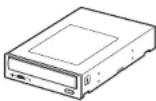
- Drive
- Screws (×4)
• Product Information (this document) - Quick Start Guide
- Software disc
• Warranty card (for US and Canada)
Note
Make sure that you back up the supplied software disc on another disc because the software disc is not distributed independently.
Please Record Responsibly
Before copying anything onto a disc, please be sure that you are not violating copyright laws. Most software companies allow you to make a backup or archive copy of software. Check your software's license agreement for details.
DVD region codes
The playback of DVD-Video (DVD discs) is protected and controlled by a region code setting. For the drive to play back DVD-Video, the region code on the DVD disc, the region code of the drive, and the region code of the DVD-Video software must all match.
With this drive, the region code can be set up to five times, including the initial assignment (RPC phase 2 standard). After setting the region code five times, the setting becomes permanent and can no longer be changed. From this point on, you are only able to play
back DVD-Video whose region code matches the one set the fifth time.
Do not attempt to make unauthorized changes to the region code. Any problems resulting from doing so are not covered by the warranty.
Hint
You can change the region code of the drive on it's properties dialog box accessible from the Device Manager.
Precautions for Use
Avoiding condensation problems
As much as possible, avoid sudden temperature changes. Do not attempt to use the drive immediately after moving it from a cold to a warm location, or raising the room temperature suddenly, as condensation may form within the drive. If the temperature changes suddenly while using the drive, stop using it but keep the power on for at least an hour.
Attention Regarding DualDisc Software
A DualDisc is a two sided disc product which mates DVD recorded material on one side with digital audio material on the other side. However, since the audio material side does not conform to the Compact Disc (CD) standard, playback on this product is not guaranteed.
Specifications
Compatible discs Read Write
| (max.) (max.) | |
| DVD+R | 16×-CAV 18×-CAV |
| DVD+R Double Layer 12 | ×-CAV 8×-ZCLV |
| DVD+RW 13 | ×-CAV 8×-ZCLV |
| DVD-R 16 | ×-CAV 18×-CAV |
| DVD-R Dual Layer 12 | ×-CAV 8×-ZCLV |
| DVD-RW 13 | ×-CAV 6 × |
| DVD-RAM(5×) ^1) | 5× 5× |
| DVD-RAM(12×) ^1) | 12×-PCAV 12×-PCAV |
| DVD-ROM 16 | ×-CAV - |
| DVD-Video 16 | ×-CAV - |
| CD-R 48 | ×-CAV 48×-CAV |
| CD-RW | 40×-PCAV 4× |
| CD-RW(High Speed) | 40×-PCAV 10× |
| CD-RW(Ultra Speed) | 40×-PCAV 24×-ZCLV |
| CD-RW(Ultra Speed Plus) | 40×-PCAV 32×-ZCLV |
| CD-ROM 48 | ×-CAV - |
| CD-DA ^2) | 10×-CAV - |
| CD-DA (DAE) 40 | ×-PCAV - |
Disc diameters
| DVD | 12 cm | √ | √ |
| 8 cm ^3) | √ | - | |
| CD | 12 cm | √ | √ |
| 8 cm ^3) | √ | √ |
^1) Use a non-cartridge-type disc or a cartridge from which the disc can be ejected.
^23 This product is designed to playback discs that conform to the Compact Disc (CD) standard. Recently, various music discs encoded with copyright protection technologies are marketed by some record companies. Please be aware that among those discs, there are some that do not conform to the CD standard and may not be playable by this product. When you use this unit as an audio CD player, please use compact discs with the following mark.

^3) With 8 cm discs, you must place the drive horizontally.
Drive
Data transfer rate
DVD: 24.9 MB/s (18× speed ^4 )
CD: 7.2 MB/s (48× speed ^4 )
Access time
Average random stroke
Approx. 160 ms (DVD)
Approx. 140 ms (CD)
^15 Maximum data transfer rate depends on the capabilities of the host computer.
Buffer under-run error protection
Power-Burn-technology
Operating Environment
5 to 40 °C
Power and Miscellaneous
Power source
DC +5 V 1.6 A max.
DC +12 V 1.8 A max.
Size
Approx. 146 × 41.3 × 170 mm (W×H×D) (excluding front panel)
Weight
Approx. 0.7 kg (drive only)
Laser
CD
Wavelength: 783 nm
Output power (max): 100 mW (CW)
DVD
Wavelength: 658 nm
Output power (max): 100 mW (CW)
Interface
Drive interface
ATAPI (EIDE)-compliant
Buffer capacity
2 MB
Drive product number (Inquiry)
SONY DVD RW AW-G170A
Design and specifications are subject to change without notice.
Product and Support Information
Sony Global Sites Information (As of February, 2007)
Product purchased in the USA:* http://sony.storagesupport.com/
Product purchased in Canada: http://www.sony.ca/
Product purchased in Singapore: http://www.sony-asia.com/storage/
* Local Web sites for computer peripheral products
About the Bundled Writing Software Detailed information about the supplied writing software is available on the Web sites of the software manufacturers and software distributors. (Accessible from the links in each software application)
Technical Support
Please consult the Sony global sites listed before calling with questions about using this product, or with technical questions about the drive or the supplied software. If using telephone or e-mail support, please have the following information available:
• Model number: DRU-170C
- Serial number
• Date and place of purchase
• Computer maker and model number
- Computer specifications (CPU speed, memory size, OS version, etc.)
- Writing software used (version, etc.)
Local technical support is only available in the specified sales regions. The customers in these regions should be provided with a warranty card for this product. For contact information, refer to the warranty card.
Note that technical support conditions may vary according to the locality, and that charges and/or limited service may apply in some regions.
- CAUTION:
- Power-Burn
- DVD/CD Rewritable Drive
- Product Information
- Included Documents
- DRU-170C
- English
- Français
- System Requirements
- Package Contents
- Note
- Please Record Responsibly
- DVD region codes
- Hint
- Precautions for Use
- Avoiding condensation problems
- Attention Regarding DualDisc Software
- Specifications
- Drive
- Data transfer rate
- Access time
- Buffer under-run error protection
- Operating Environment
- Power and Miscellaneous
- Size
- Weight
- Laser
- DVD
- Interface
- Drive interface
- Buffer capacity
- Drive product number (Inquiry)
- Product and Support Information
- Sony Global Sites Information (As of February, 2007)
- Technical Support
Brand : SONY
Model : DRU-170C
Category : DVD Burner