EE-5201 - Air purifier Crane - Free user manual and instructions
Find the device manual for free EE-5201 Crane in PDF.


| Product Type | Air Purifier |
| Brand | Crane |
| Model | EE-5201 |
| Dimensions (H x W x D) | 50 cm x 30 cm x 20 cm |
| Weight | 5 kg |
| Power Supply | AC 120V/60Hz |
| Power Consumption | 50 Watts |
| Filtration System | Pre-filter + HEPA H13 + Activated Carbon |
| Fan Speeds | 3 speeds (Low, Medium, High) |
| Timer Function | 2, 4, 8 hours |
| Auto Mode | Yes (with air quality sensor) |
| Coverage Area | Up to 30 m² |
| Noise Level | 25 – 50 dB |
| Replacement Filter | Model: CR-202 (replace every 6-12 months) |
| Filter Cleaning | Pre-filter washable every 2 weeks |
| Auto Shut-Off | Yes (when filter door open or timer ends) |
| Control Type | Touch panel with LED indicators |
| Display | PM2.5 readout, air quality index |
| Sleep Mode | Yes (dimmed lights, silent operation) |
| Safety Features | Overheat protection, child lock |
| Warranty | 1 year limited |
| Included Accessories | Pre-installed filter, power cord, user manual |
Frequently Asked Questions - EE-5201 Crane
User questions about EE-5201 Crane
0 question about this device. Answer the ones you know or ask your own.
Ask a new question about this device
Download the instructions for your Air purifier in PDF format for free! Find your manual EE-5201 - Crane and take your electronic device back in hand. On this page are published all the documents necessary for the use of your device. EE-5201 by Crane.
USER MANUAL EE-5201 Crane
DESIGN FOR BETTER LIVING
INSTRUCTION MANUAL
FOR THE FOLLOWING MODELS:
EE-5201A
EE-5201W
EE-5201GR
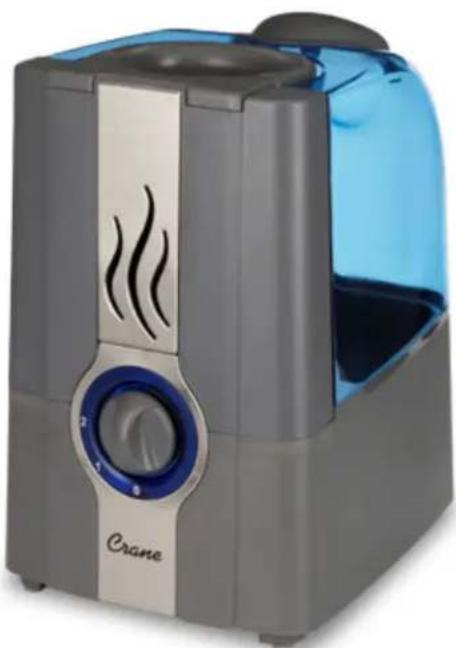
natural_image
Exterior view of a modern water purifier with a blue lid and control knob (no text or symbols visible)If you have any questions about the operation of your warm mist humidifier, please contact Crane Customer Care.
Toll Free: 888-599-0992
Email: customer-service@crane-usa.com

PLEASE READ AND SAVE ALL INSTRUCTIONS TO ENSURE THE SAFE AND EFFECTIVE USE OF THIS APPLIANCE.
TABLE OF CONTENTS
| Table of Contents, Humidifier Models | P. 1 |
| Safety Instructions | P. 2-3 |
| List of Main Parts, Technical Specifications | P. 4 |
| Operation and Use | P. 5-7 |
| Maintenance | P. 7 |
| Trouble Shooting | P. 8 |
| Customer Care | P. 9 |
| Warranty | P. 10 |
HUMIDIFIER MODELS
This instruction manual applies to the following models of the Warm Mist Humidifiers product line:
| Color Model # | |
| Aqua EE-5201A | |
| White EE-5201W | |
| Grey EE-5201GR |
For information about all CRANE Humidifiers,
Please visit http://www.crane-usa.com.
WARNING! READ AND SAVE THESE INSTRUCTIONS. Failure to follow all the instructions listed below may result in electric shock, fire and/or serious personal injury.
- DO NOT carry Water Tank by handle when it is filled with water. It is advisable to carry filled Water Tank with two hands.
- DO NOT operate outdoors. This humidifier is intended for indoor use only.
- DO NOT TOUCH STEAM MIST. Steam can cause burns.
- DO NOT remove the water tank during operation, or within 15 minutes after the humidifier is turned off and unplugged. Serious injury may result.
- DO NOT operate without water. Always have water in the water tank when operating the unit.
- Use only clean, cool tap water to fill the tank. DO NOT use hot water.
- DO NOT pour water into any openings other than the water tank.
- Do not cover any openings on the unit, or insert objects into any openings.
- Be sure that the water tank cap is firmly tightened. DO NOT aim mist directly at children, walls, furniture or electrical appliances.
- Use only a 110-120VAC outlet. ALWAYS plug and unplug unit with dry hands to avoid electric shock.
- Never operate the unit with a damaged cord or plug.
- Always place the unit on a smooth, flat, lint-free, non-metallic, waterproof and level surface and position unit away from direct sunlight. Keep the cord away from heated surfaces and areas where it could be walked on or tripped over. Unplug the unit when not in use and whenever you clean or move the unit.
- Do NOT add medication of any type into the Water Basin or Water Tank. Do not cover any openings on the unit or insert objects into any openings. ONLY add liquid vapor medicine to the medicine cup include with this humidifier.
- The unit should not be left unattended in a closed room, as the air could become saturated and leave condensation on walls or furniture. Leave room door partly open.
- The humidifier requires daily and weekly cleaning to operate appropriately. Refer to cleaning instructions.
- NEVER use detergents, gasoline, glass cleaner, furniture polish, paint thinner or other household solvents to clean any part of the humidifier.
- Do not tilt, tip or attempt to empty or fill the unit while it is in operation.
SAVE THESE INSTRUCTIONS!

GENERAL SAFETY INSTRUCTIONS
WARNING! Read and understand all instructions. Failure to follow all instructions listed below may result in electric shock, fire or serious personal injury. The warnings, cautions, and instructions discussed in this instruction manual cannot cover all possible conditions and situations that may occur. It must be understood by the user that common sense and caution are a factor which cannot be built into this product, but must be supplied by the user.
THIS HUMIDIFIER IS NOT A TOY!
Do not let your child play with this humidifier. Serious injury and electrocution might be possible. This humidifier has to be operated by an adult only. Children should be supervised to ensure that they do not play with the humidifier.
SAVE ALL INSTRUCTIONS!
CAUTION: A short Power Supply Cord is provided to reduce the risk of personal injury resulting from becoming entangled in or tripping over a longer cord. Extension cords are available from local hardware stores and may be used if care is exercised in their use. If an extension cord is required, special care and caution is necessary. Also the extension cord must be (1) marked with an electrical rating of 125 V and at least 13 A., 1625 W., and (2) the cord must be arranged so that it will not drape over the countertop or tabletop where it can be pulled on by children or accidentally tripped over.
ELECTRIC POWER
If the electric circuit is overloaded by other appliances, your humidifier and/or appliances may not operate properly. The humidifier should be operated on a separate electrical circuit from other operating appliances.
POLARIZED PLUG
This humidifier has a polarized plug (one blade is wider than the other). As a safety feature to reduce the risk of electrical shock, this plug is intended to fit in a polarized outlet only one way. If the plug does not fit fully in the outlet, reverse the plug. If it still does not fit, contact a qualified electrician. Do not attempt to defeat this safety feature.
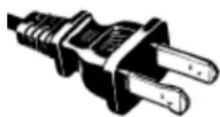

SAFETY WARNING
Although your humidifier is easy to operate, for your safety, the below warnings must be followed:
- Do not place the humidifier near a heat source.
- Never leave the humidifier unattended while connected to the electrical outlet.
- To avoid any accidents, never cover the Mist Lid when the humidifier is in operation.
-
Use the humidifier on a smooth, flat, lint-free, non-metallic, waterproof, and level surface away from water.
-
Do not unplug from the wall socket by pulling on the supply cord.
-
The humidifier must be unplugged:
A. Before either filling or emptying the Water Basin and/or Water Tank.
B. Before any cleaning or maintenance is performed.
C. After each use.
D. If it appears to be faulty.
THIS PRODUCT IS INTENDED FOR HOUSEHOLD USE ONLY.
LIST OF MAIN PARTS
- Mist Chamber
- Humidifier Base
- Water Level Sensor
- Tip Over Switch (on bottom of base)
- Heating Element
- Control Knob
- Indicator Light
- Reset Button (on bottom of base)
- Medicine Cup
- Water Tank
- Water Tank Cap

natural_image
Red plastic component with ventilation slots and a labeled arrow pointing to part 1 (no text or symbols on the object itself)
natural_image
Close-up of a gray plastic component with a circular hole and a small hole, labeled with number 9 (no text or symbols on the object itself)

natural_image
Transparent 3D model of a mechanical component with a curved base and circular top, labeled with number 10 (no text or symbols on the object itself)
TECHNICAL SPECIFICATIONS:
| Rating Voltage 120V | |
| Frequency 60Hz | |
| Power 280W | |
| Water Tank Capacity Approx. 1 Gallon | |
| Run Time Per Tank Up to 25 Hours | |
OPERATION AND USE
BEFORE EACH USE
CHECK HUMIDIFIER PLACEMENT
Place the Humidifier on an elevated, non-metallic, lint-free, waterproof, level surface at least 2 feet above the floor.
- DO NOT place the humidifier on carpet or a towel. The fan vent is located on the bottom of the humidifier base. The fan vent MUST NOT be obstructed.
- DO NOT place the humidifier on a wood surface or near furniture that can be damaged by too much moisture.
CHECK WATER LEVEL SENSOR
Make sure that the Water Level Sensor is secured properly and not obstructed.
CAUTION
DO NOT attempt to operate the humidifier without water in the Water Tank.
DO NOT plug or unplug the Power Cord with wet hands as electric shock could occur.
ASSEMBLY
CAUTION: DO NOT TOUCH STEAM MIST WHEN HUMIDIFIER IS ON. STEAM MAY CAUSE BURNS. ALWAYS USE CAUTION!
- Turn Water Tank upside down and unscrew Water Tank Cap.
- Fill Water Tank with cool water. DO NOT fill water all the way to the rim.
DO NOT CARRY FULL WATER TANK BY HANDLE. ALWAYS HOLD WATER TANK WITH TWO HANDS.

natural_image
Close-up of a gray plastic mechanical component with a circular button and central hub (no text or symbols visible)DO NOT use hot water. Use cool tap water.
DO NOT add any medication, essential oils, or salt to water. USE ONLY included medicine cup for liquid vapors.
DO NOT pour water into Mist Channel.
DO NOT overfill medicine cup and allow medication to spill into mist chamber.
- Screw Water Tank Cap back onto Water Tank. Turn the Water Tank over and place on Humidifier Base, making sure it fits perfectly.
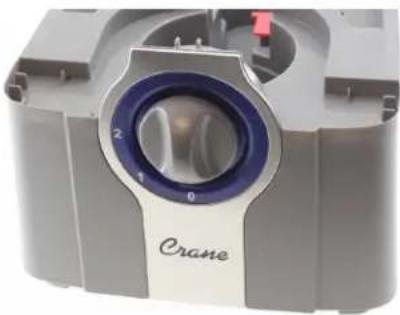
- Plug the power cord into a wall socket and turn on the unit by using the Control Knob. The power light will turn BLUE.
natural_image
Close-up of a Crane brand air vent with blue and purple glass components (no visible text or symbols)-
Use the Control Knob to adjust the intensity of the mist output.
-
When the humidifier runs out of water, the BLUE power light will turn off, and the mist output will stop. This safety feature uses a water level sensor to stop the heating element once the water level sinks below the required level in the humidifier base. A small ORANGE light will turn on (light will appear near the "2" on Control Knob) to
indicate that the humidifier has automatically turned off. Turn the humidifier off and unplug before removing and refilling the Water Tank.
IMPORTANT: OVERHEAT RED LIGHT
When the humidifier runs out of water, the BLUE light will turn off and mist will stop. If the unit has overheated, a small RED light will turn on (light will appear near the "2" on Control Knob). The RED light indicates that the unit has overheated. Turn humidifier off, unplug the unit, allow humidifier base and water to cool then empty water in humidifier base. Turn humidifier base over and press the Reset Button, with a pen or pencil tip, on the bottom of the humidifier base. This will reset the humidifier.
USING THE MIST CHAMBER AND MEDICINE CUP
MIST CHAMBER
- To remove Mist Chamber, slide Mist Chamber Latch to left. Carefully lift Mist Chamber off of Humidifier Base.
- To attach the Mist Chamber, slide Mist Chamber Latch to left and place the Mist Chamber onto Humidifier Base. Release the latch to secure the Mist Chamber to Humidifier Base.
NOTE: The humidifier will not operate when the Mist Chamber is not properly in place. This is a safety feature which helps to avoid overheating.

natural_image
Red plastic industrial component with conical top, side holder, and side outlet (no text or symbols visible)MEDICINE CUP
The Medicine Cup allows the addition of medications recommended for use with warm mist humidifiers only.
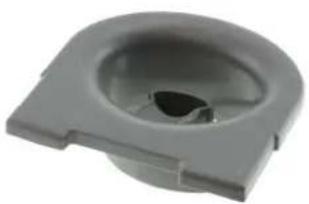
- Remove the Medicine Cup from the top of the Mist Channel for easier filling.
- BE CAREFUL not to overfill the Medicine Cup. Overfilling may cause medicine to spill into Mist Channel. Medicine in the Mist Channel may affect the operation of the humidifier.
- Place Medicine Cup on top of the Mist Channel.
- DO NOT add any medication or other additives directly to the water.
natural_image
Gray plastic mechanical component with a circular opening and flange (no text or symbols visible)A NOTE ABOUT HUMIDITY
- It is best to keep the humidity level at about 40%-50% of relative humidity.
- In cold weather, windows and even some walls may fog or develop frost from excessive indoor humidity. If this occurs, reduce the mist output setting to avoid damage from condensed water dripping onto windowsills.
- Too much humidity in the room may allow moisture to accumulate on surfaces where bacteria and fungi can grow. Moisture that gathers may also damage furniture and walls, especially wallpaper.
- To reduce excessive humidity, especially in small rooms, leave the room door open and adjust the mist intensity control setting.
MAINTENANCE
IMPORTANT: Failure to keep this humidifier clean from mineral deposits normally contained in any water supply will affect the efficiency of the operation. Customer failure to follow these instructions may void warranty
DO NOT leave water in Water Tank or Humidifier Base when unit is not in use as it may result in the buildup of mineral deposits and bacteria that can inhibit the output efficiency of the humidifier. If water remains in the Water Tank for more than a day or two, bacterial growth is possible.
DAILY MAINTENANCE
- Always turn off and unplug from outlet before cleaning.
- Empty water from the water tank and humidifier base daily.
- Wipe and dry humidifier base with a clean, dry cloth or paper towel.
- Replace the water tank.
WEEKLY MAINTENANCE
- Always turn off and unplug from outlet before cleaning.
- Empty water from the water tank and humidifier base.
- Fill the water tank with about a half-gallon of warm water. Add 2 Tablespoons of white vinegar. Shake vigorously and let sit for 20-30 minutes. Shake vigorously again and empty the water. Rinse water tank.
- Make similar white vinegar/water solution. Pour into humidifier base. Let sit for 20-30 minutes, and then empty. Rinse humidifier base. Wipe dry with a clean, soft cloth.
- Wipe the exterior surface water tank and humidifier base with a soft, dry cloth. NEVER IMMERSE HUMIDIFIER BASE IN WATER.
HOW TO CLEAN HEATING ELEMENT
- Remove the mist chamber.
- Fill the heating element with undiluted white vinegar.
- Let stand for 20 minutes. Dampen soft, clean cloth or sponge with undiluted white vinegar and wipe out heating element to remove scale. DO NOT use soap, detergents or abrasive cleaners.
- Rinse heating element using clean warm water, being careful not to submerge the base in the water. Dry thoroughly. DO NOT IMMERSE WATER BASIN IN WATER.
- Soak the removable mist chamber in a solution of 12 white vinegar and 12 water for 20 minutes. Rinse thoroughly and then wipe dry with a soft clean cloth.
END-OF-SEASON MAINTENANCE & STORING YOUR HUMIDIFIER
- Always turn off and unplug from outlet before cleaning.
- Empty water from the water tank and humidifier base.
- Disinfect water tank and humidifier base with the white vinegar and water solution.
- Make sure that water tank has air dried without the water cap secured.
- Make sure the humidifier base and water tank are completely dry before end of season storage. Store the humidifier in a cool dry place.
- DO NOT place any heavy items on top of humidifier during storage as this may result in possible damage of the humidifier.
- Store the cord in a clean, dry location away from metal objects. Always check the plug before use to ensure metal items have not become attached.
TROUBLE SHOOTING
DO NOT attempt to repair the motor or nebulizer yourself. If the humidifier continues to not operate please contact Crane Customer Care: 888-599-0992 or customer-service@crane-usa.com.
| Problem | Solution |
| If humidifier does not have any power: | · Ensure unit is properly plugged into a power outlet.· Check that the Control Knob is turned to the ON position.· If Power On indicator light does not come on, contact Crane Customer Care. |
| Condensation forms around humidifier and windows: | · Adjust Control Knob to decrease mist output to low.· Leave room door cracked open during humidifier operation. |
| If humidifier has stopped, BLUE light is off and small RED light is on: | · Adjust Control Knob to turn humidifier off and unplug. Empty humidifier base, turn over and press Reset Button on bottom of humidifier. |
| If there is a strange odor: | · Clean the Water Tank with the water and vinegar solution and rinse with clean water.· Leave the empty Water Tank open for some time (without the Water Tank Cap attached) in a cool place. |
| The power indicator light is blue, but there is no mist being emitted: | · Check that there is water in the Water Tank.· Make sure that nothing is blocking the mist output.· Check that the Fan Vent on the bottom of the humidifier is not blocked.· Empty and rinse the Humidifier Base with cool tap water.· Check for possible mineral deposits on the Water Level Sensor and Heating Element. |
CUSTOMER CARE
If you have any questions with regard to the operation of this humidifier or are in need of a spare part, please contact Crane Customer Care.
Crane USA, Inc.
621 IL Route 83, Suite 202
Bensenville, Illinois 60106
Toll Free: 1-888-599-0992 (Monday - Friday 9:00am - 4:00pm CST)
Email: customer-service@crane-usa.com
Website: http://www.crane-usa.com
NOTE: Spare Parts can also be purchased online at http://www.crane-usa.com.
ENVIRONMENTAL PROTECTION

If the humidifier should no longer operate, please be sure to dispose of the unit in an environmentally friendly way by taking it into a public collection point. Please do not place broken humidifiers with your regular household waste.
LIMITED WARRANTY
Thank you for purchasing a Crane product. This Warm Mist Humidifier was tested and meets our stringent quality standards. This product is warranted to be free from manufacturing defects under normal use and conditions for 1 year.
PLEASE DO NOT RETURN THIS PRODUCT TO THE STORE. CALL US FOR PROBLEMS AND QUESTIONS. WE CAN HELP.
If you experience unsatisfactory operation, first refer to the troubleshooting section in the manual to ensure that it is not due to care or cleaning. Follow Care and Cleaning Instructions from manual. You can also visit www.crane-usa.com Customer Care for information.
If you have any questions or comments, please call Crane Customer Care, Toll Free: 888-599-0992 or Email customer-service@crane-usa.com. Please specify the style and model number so our Customer Care Department can assist you.
WARRANTY REQUIRES A DATED PROOF OF PURCHASE.
This warranty is void if the defect is due to accidental damage, misuse, abuse, neglect, improper repair or alteration by unauthorized persons, or a failure to follow operating instructions provided with the product. This warranty does not apply to normal wear and tear or commercial use.
The warranty is non-transferable and applies only to the original purchaser and does not extend to subsequent owners of the product. Liability under this warranty is limited to repair or replacement. In no event shall liability exceed the purchase price paid by the purchaser of the product. Under no circumstances shall there be liability for any loss - direct, indirect or incidental – or consequential damage arising out of, or in connection with the use of this product.
This warranty is valid only in the 48 contiguous states plus the District of Columbia and excludes Puerto Rico and the Virgin Islands. This warranty is effective only if the product is purchased and operated in the United States of America.
This warranty gives you specific legal rights; however you may have other rights that vary from state to state. Some states do not allow limitation on implied warranties or exclusion of consequential damages; therefore these restrictions may not apply to you.
Any instructions or warranty included in this manual may be subject to change without notice. For the most up-to-date instructions and warranty information, please contact us or visit our website.
To receive warranty instructions and return authorization, please call or email Crane Customer Care.
Crane USA, Inc.
621 Route 83, Ste 202, Bensenville, Illinois 60106
Toll Free: 1-888-599-0992 (Monday - Friday 9:00am - 4:00pm CST)
Email: customer-service@crane-usa.com
Website: http://www.crane-usa.com


- INSTRUCTION MANUAL
- HUMIDIFIER MODELS
- SAVE THESE INSTRUCTIONS!
- GENERAL SAFETY INSTRUCTIONS
- THIS HUMIDIFIER IS NOT A TOY!
- SAVE ALL INSTRUCTIONS!
- ELECTRIC POWER
- POLARIZED PLUG
- SAFETY WARNING
- THIS PRODUCT IS INTENDED FOR HOUSEHOLD USE ONLY.
- LIST OF MAIN PARTS
- TECHNICAL SPECIFICATIONS:
- OPERATION AND USE
- BEFORE EACH USE
- CHECK HUMIDIFIER PLACEMENT
- CHECK WATER LEVEL SENSOR
- CAUTION
- ASSEMBLY
- IMPORTANT: OVERHEAT RED LIGHT
- USING THE MIST CHAMBER AND MEDICINE CUP
- MIST CHAMBER
- MEDICINE CUP
- A NOTE ABOUT HUMIDITY
- MAINTENANCE
- DAILY MAINTENANCE
- WEEKLY MAINTENANCE
- HOW TO CLEAN HEATING ELEMENT
- END-OF-SEASON MAINTENANCE & STORING YOUR HUMIDIFIER
- TROUBLE SHOOTING
- CUSTOMER CARE
- ENVIRONMENTAL PROTECTION
- LIMITED WARRANTY
- PLEASE DO NOT RETURN THIS PRODUCT TO THE STORE. CALL US FOR PROBLEMS AND QUESTIONS. WE CAN HELP.
- WARRANTY REQUIRES A DATED PROOF OF PURCHASE.
- This warranty is valid only in the 48 contiguous states plus the District of Columbia and excludes Puerto Rico and the Virgin Islands. This warranty is effective only if the product is purchased and operated in the United States of America.
- Crane USA, Inc.
Brand : Crane
Model : EE-5201
Category : Air purifier