
RS831S - NAS SILVERSTONE - Free user manual and instructions
Find the device manual for free RS831S SILVERSTONE in PDF.


| Product Type | NAS Enclosure |
| Brand | Silverstone |
| Model | RS831S |
| Drive Bays | 8 x 3.5" Hot-Swap |
| Form Factor | 3U Rackmount |
| Dimensions (W x H x D) | 430 x 132 x 660 mm |
| Weight | 12 kg |
| Power Supply | Standard ATX PSU (not included) |
| Drive Interface | SATA 3.0 (up to 6 Gbps) |
| Backplane | Single backplane with one SFF-8087 connector |
| Cooling | 2 x 120mm exhaust fans (rear) |
| Front Panel I/O | 1 x USB 3.0, power button, LED status indicators |
| Drive Trays | Tool-less, lockable |
| Material | Steel chassis with plastic bezel |
| Color | Black |
| Supported OS | Windows, Linux, macOS, FreeNAS, etc. |
| Noise Level | < 25 dBA (with standard fans) |
| Maintenance | Removable dust filter on front bezel; fans easily replaceable |
| Safety Features | Anti-vibration drive trays; lockable front bezel |
| Spare Parts Available | Drive trays, fan unit, power supply bracket, screws |
| Included Accessories | Rackmount ears, screws, drive tray keys, user manual |
Frequently Asked Questions - RS831S SILVERSTONE
User questions about RS831S SILVERSTONE
0 question about this device. Answer the ones you know or ask your own.
Ask a new question about this device
Download the instructions for your NAS in PDF format for free! Find your manual RS831S - SILVERSTONE and take your electronic device back in hand. On this page are published all the documents necessary for the use of your device. RS831S by SILVERSTONE.
USER MANUAL RS831S SILVERSTONE
Designing Inspiration
SilverStone Technology Co., Ltd.
www.silverstonetek.com
support@silverstonetek.com
RS831S MANUAL
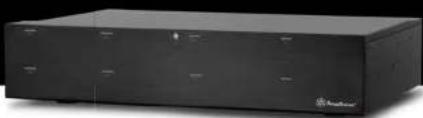
Eight Bay 2U Rackmount
with Mini-SAS interface
natural_image
Exterior view of a black rectangular electronic device with no visible text or symbols on its bodyRS831S
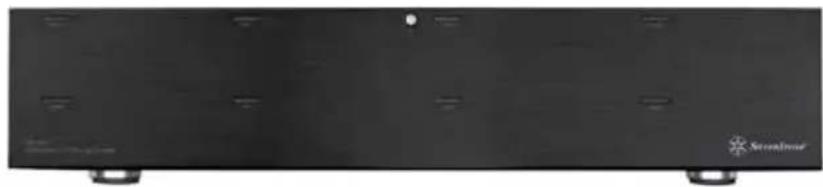
Eight Bay 2U Rackmount with Mini-SAS interface
natural_image
Front view of a black electronic device with two wheels and a small LED indicator (no visible text or symbols)Features
• Support Eight 3.5" SATA HDD
• Built-in power supply and dual 80mm fans
- Compact and screw-less design for easy HDD installation
- Plug and Play
• Support Mini-SAS maximum 6Gbps transfer speed
Specifications
| Model No. | SST-RS831S |
| Enclosure Material | Aluminum + SECC |
| Color | Black |
| Power Supply | Internal universal power supply switch (115V/230V)Input: AC 100-130V/200-260V, 50Hz/60HzOutput: DC +5V/14.5A +12V/19A |
| Drive Size Support | 3.5" SAS/SATA HDD/SSD |
| Drive Interface Support | SAS*, SATA I / II / III*Please see footnote at bottom of page |
| Enclosure Interface | Mini-SAS port x2 (SFF-8088 connector) |
| Cooling FAN | 80mm fan x 2 |
| Net Weight | 7850g±20g |
| Dimension | 440mm (D) x 302mm (W) x 88mm (H) |
| Computer System Requirements | Windows XP, Vista, 7Mac OS 10.xLinux Kernel 2.6.31 or above |
*Your system must have SAS controller if you want to use SAS HDD
*Hard drive capacity and RAID support is dependent on mini-SAS controller used
PRODUCT INTRODUCTION
SilverStone created an incredible 2U rackmount storage product in the RS831S. It connects to the PC via 6Gbps SAS/Mini-SAS interface which enables data transfer with maximum compatibility and stability. The RS831S offers a convenient and economical way to store data and is suitable for all users that require frequent backup and data manipulation.
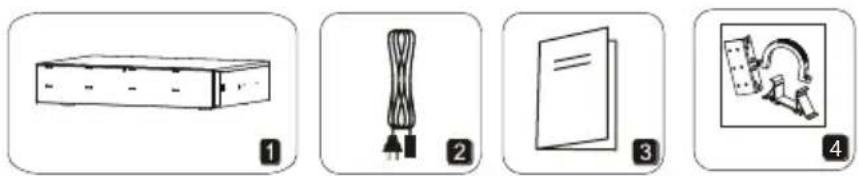
PACKAGE CONTENT
- RS831S external enclosure
- Power Cord
- User Manual
- Accessory pack
natural_image
Four-panel diagram showing different types of objects: a rectangular box, a rope knot, a closed book, and a framed picture (no text or symbols)HARDWARE GUIDE
Front View
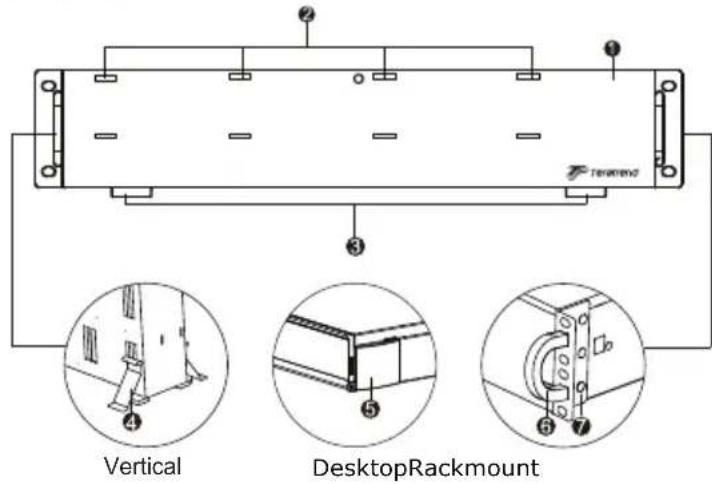
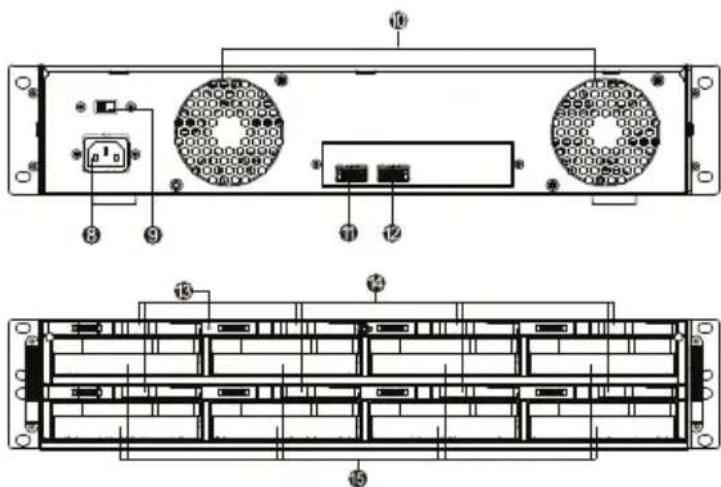
Front Open View
- Door 6. Door handles
- HDD LED 7. Angle bracket
- Rubber feet 8. Power socket
- Feet frame 9. Voltage switch
-
Rubber caps 10. Fans
-
MiniSAS Port1(SFF-8088 connector)
- MiniSAS Port2(SFF-8088 connector)
- Power button
- HDD release latches
- HDD slots
Hard drive installation
1
ENGLISH
РУССКИЙ
natural_image
Technical line drawing of a server rack with internal components and a circular inset showing a rotating mechanism (no text or symbols)DEUTSCH
natural_image
Technical line drawing of a mechanical assembly with an inset showing a component detail (no text or symbols present)ENGLISH
РУССКИЙ
Slide the HDD in until the latch click Переместите жесткий диск до щелчка
DEUTSCH
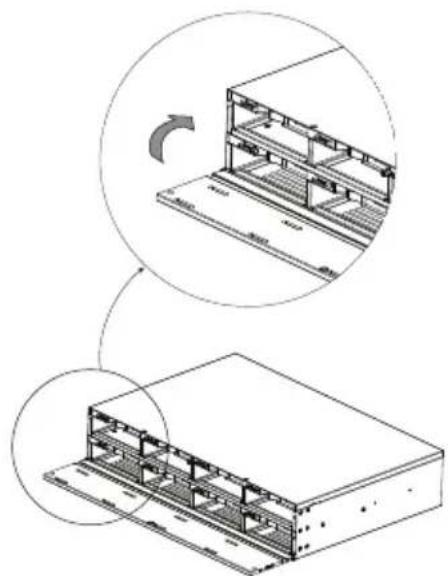
Hard drive installation
3
natural_image
Technical line drawing of a server rack with internal components and a circular inset showing a rotating mechanism (no text or symbols)ENGLISH
РУССКИЙ
ENGLISH
The HDD might be damaged if not installed correctly
РУССКИЙ
Open the door and release the latch. The HDD will pop out slightly then pull the HDD out gently with your hands.
DEUTSCH
Connect power cable and the Mini-SAS cable and switch on the power.
DEUTSCH
Warranty Information
This product has a limited 2 year warranty in North America, Europe, and Australia.
For information on warranty periods in other regions, please contact your reseller or SilverStone authorized distributor.
Warranty terms & conditions
- Product component defects or damages resulted from defective production is covered under warranty.
Defects or damages with the following conditions will be fixed or replaced under SilverStone Technology's jurisdiction.
a) Usage in accordance with instructions provided in this manual, with no misuse, overuse, or other inappropriate actions.
b) Damage not caused by natural disaster (thunder, fire, earthquake, flood, salt, wind, insect, animals, etc...)
c) Product is not disassembled, modified, or fixed. Components not disassembled or replaced.
d) Warranty mark/stickers are not removed or broken.
Loss or damages resulted from conditions other than ones listed above are not covered under warranty. - Under warranty, SilverStone Technology's maximum liability is limited to the current market value for the product (depreciated value, excluding shipping, handling, and other fees). SilverStone Technology is not responsible for other damages or loss associated with the use of product.
- Under warranty, SilverStone Technology is obligated to repair or replace its defective products. Under no circumstances will SilverStone Technology be liable for damages in connection with the sale, purchase, or use including but not limited to loss of data, loss of business, loss of profits, loss of use of the product or incidental or consequential damage whether or not foreseeable and whether or not based on breach of warranty, contract or negligence, even if SilverStone Technology has been advised of the possibility of such damages.
- Warranty covers only the original purchaser through authorized SilverStone distributors and resellers and is not transferable to a second hand purchaser.
- You must provide sales receipt or invoice with clear indication of purchase date to determine warranty eligibility.
- If a problem develops during the warranty period, please contact your retailer/reseller/SilverStone authorized distributors or SilverStone http://www.silverstonetek.com.
Please note that: (i) You must provide proof of original purchase of the product by a dated itemized receipt; (ii) You shall bear the cost of shipping (or otherwise transporting) the product to SilverStone authorized distributors. SilverStone authorized distributors will bear the cost of shipping (or otherwise transporting) the product back to you after completing the warranty service; (iii) Before you send the product, you must be issued a Return Merchandise Authorization ("RMA") number from SilverStone. Updated warranty information will be posted on SilverStone's official website. Please visit http://www.silverstonetek.com for the latest updates.
Additional info & contacts
For North America (usasupport@silverstonetek.com)
SilverStone Technology in North America may repair or replace defective product with refurbished product that is not new but has been functionally tested. Replacement product will be warranted for remainder of the warranty period or thirty days, whichever is longer. All products should be sent back to the place of purchase if it is within 30 days of purchase, after 30 days, customers need to initiate RMA procedure with SilverStone Technology in USA by first downloading the "USA RMA form for end-users" form from the below link and follow its instructions.
http://silverstonetek.com/contactus.php
For Australia only (support@silverstonetek.com)
Our goods come with guarantees that cannot be excluded under the Australian Consumer Law.
You are entitled to a replacement or refund for a major failure and for compensation for any other reasonably foreseeable loss or damage.
You are also entitled to have the goods repaired or replaced if the goods fail to be of acceptable quality and the failure does not amount to a major failure.
Please refer to above "Warranty terms & conditions" for further warranty details.
SilverStone Technology Co., Ltd. 12F No. 168 Jiankang Rd., Zhonghe Dist., New Taipei City 235 Taiwan R.O.C. + 886-2-8228-1238
(standard international call charges apply)
For Europe (support.eu@silverstonetek.de)
For all other regions (support@silverstonetek.com)
Brand : SILVERSTONE
Model : RS831S
Category : NAS