
SHS-221BT-BU - Headphones Fantec - Free user manual and instructions
Find the device manual for free SHS-221BT-BU Fantec in PDF.


| Product Type | Bluetooth Stereo Headphones |
| Brand | Fantec |
| Model | SHS-221BT-BU |
| Weight | 108 g |
| Bluetooth Version | V2.1 + EDR |
| Bluetooth Profiles | HSP, HFP, A2DP, AVRCP |
| Wireless Range | Up to 10 meters |
| Music Playback Time | Up to 7 hours |
| Standby Time | Up to 180 hours |
| Charging Time | 2.5 - 3 hours (2.5 - 3 hours after initial 12-hour charge) |
| Battery Capacity | 130 mAh |
| Input Voltage | DC 5 V ±0.25 V |
| Charging Current | 500 mA (recommended USB port) |
| Driver Unit | Not specified |
| Frequency Response | Not specified |
| Impedance | Not specified |
| Microphone | Built-in |
| Headband | Adjustable |
| Controls | Multifunction button, Volume +/-, Skip next/previous |
| LED Indicator | Red (charging), Blue (power on), Blue/Red (pairing) |
| Included Accessories | Headphones, USB cable, Manual, Warranty card |
| Compatible Devices | Smartphones, tablets, computers, Bluetooth-enabled devices |
| Operating Temperature | +5°C to +35°C |
| Warranty | Limited warranty (excludes misuse, unauthorized repair, etc.) |
Frequently Asked Questions - SHS-221BT-BU Fantec
User questions about SHS-221BT-BU Fantec
0 question about this device. Answer the ones you know or ask your own.
Ask a new question about this device
Download the instructions for your Headphones in PDF format for free! Find your manual SHS-221BT-BU - Fantec and take your electronic device back in hand. On this page are published all the documents necessary for the use of your device. SHS-221BT-BU by Fantec.
USER MANUAL SHS-221BT-BU Fantec
natural_image
Black smartwatch with a digital display showing control buttons (no text or symbols visible)- Introduction......2
1.1 Preface....2
1.2 Packing List....2
1.3 Cautions 2
-
Specification ....3
-
Operation....3
3.1 Charging the headphones ....3
3.2 General function .... 3
- Connectivity ....5
4.1 Supported Bluetooth devices....5
4.2 How to pair....5
-
Warranty ....5
-
Copyrights and Trademarks ....5
1. Introduction
1.1 Preface
Thank you very much for purchasing the FANTEC SHS-221BT Bluetooth stereo headphones. We hope you will enjoy using it as a great home entertainment partner. The following manual describes all functions and properties of the device.
Note: All the information contained in this manual was correct at the time of publication. However, as our engineers are always updating and improving the product, your device's software may have a slightly different appearance or modified functionality than presented in this manual.
1.2 Packing List
| Part | Quantity |
| Headphones | 1 |
| USB cable | 1 |
| Manual | 1 |
| Warranty card | 1 |
Note: The actual contents in the package might be different from the packing list in the manual.
1.3 Cautions
The FANTEC SHS-221BT Bluetooth headphones design and manufacture has your safety in mind. In order to safely and effectively use this device, please read the following before usage.
1.3.1 Usage Cautions
User should not modify this device. The environmental temperature should be within +5°C \~ +35°C.
1.3.2 Radio Interference
- If not properly shielded, almost all electronic devices will get radio interference. Under some conditions, your headphones might get interference.
- The design of this headphones has followed the FCC/CE standard, and has followed the following rules:
(1) The headphones may not cause harmful interference;
(2) The headphones could accept some interference received including interference that may cause undesired operation.
1.3.3 Repair
If the headphones has a problem, you should take it to an appointed repair centre and let the specialists do the repair, never repair the headphones yourself, you might damage the headphones or endanger yourself.
1.3.4 Disposing of the headphones
When you dispose of the headphones, be sure to dispose it appropriately. Some countries may regulate disposal of electrical device, please consult with your local authority.
1.3.5 Others
When using this headphones, please do not let the headphones come into contact with water or other liquid, if water is accidentally spilled on the headphones, please use a dry cloth to absorb the spillage.
Electronic products are vulnerable, when using please avoid shaking or hitting the player, and do not press the buttons too hard.
Do not let the headphones come into contact with water or other liquid.
Do not disassemble the headphones, repair the headphones or change the design of the headphones, any damage done will not be included in the repair policy.
Do not press the buttons of the headphones too hard.
Avoid hitting the headphones with hard object, avoid shaking the headphones, and stay away from magnetic fields.
2. Specification
Bluetooth Version: V2.1 + EDR
Bluetooth Profile: Hands-Free Headset, A2DP, AVRCP, Headphones
A2DP Advanced Audio Distribution Profile (audio transmission)
(Volume control, remote control of play/pause and next/previous track)
AVRCP Audio/Video Remote Control Profile (remote control functions)
HSP Headset Profile (headset functions)
HFP Hands-free Profile (hands-free functions)
(Accept/ end/ volume control)
Range: up to 10 meters
Music playback time: up to 7 hours
Standby time: up to 180 hours
Input voltage: DC + 5.0V ±0.25VA
Capacity: 130mA
Charging time: 2.5 - 3 hours
Weight: 108g
3. Operation
3.1 Charging the headphones
3.1.1 Initial charging
Please charge the headphones for about 12 h for the first and second time of usage. Afterward it's enough to charge it for about 2.5 to 3 h.
3.1.2 Charging
Before starting the operation, make sure to charge the headphones. Please connect it to an USB port (500mA) by the use of the provided USB cable. While the device is connected to the USB port, the LED on the headphones will light in red.
3.1.3 Parallel usage
It is not suggested to charge the headphones while in use.
3.2 General function
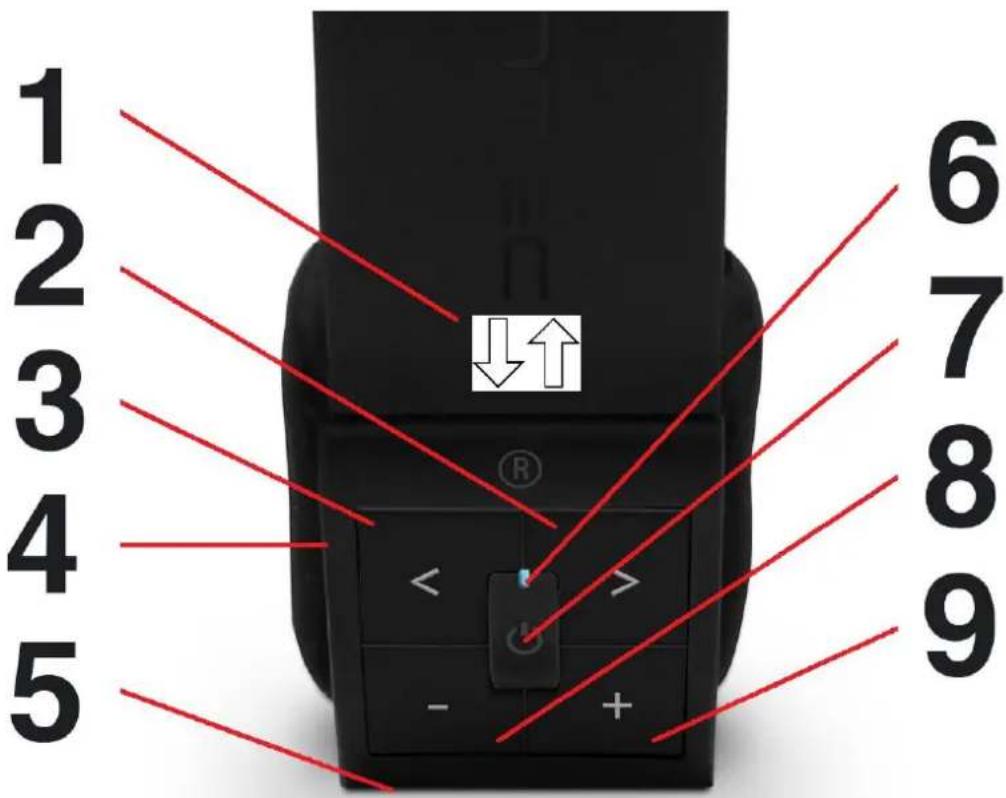
-
Adjustable headband
-
Skip to previous track*
-
Skip to next track*
-
USB port
-
Microphone
-
LED indicator
-
Multifunction button
-
Volume down
-
Volume up
-
Use the adjustable headband to adapt the headphones to the size of your head.
-
Skip to the previous track.*
-
Skip to the next track.*
-
USB port for charging the headphones.
-
Built-in microphone in order to use the headphones as a Bluetooth headset.
-
LED indicator to show ON/OFF mode, Bluetooth connection or pairing mode.
-
Multifunction button to:
a) Turn ON/OFF the device
b) PLAY/PAUSE music playback*
c) ANSWER/HANG UP a call
d) Start the PAIRING mode
*If the music player application is running in the background, this function might be not working.
| Function | Operation |
| Turn ON / OFF | ON: Press the Multifunction button for about 2 seconds to power the headphones on. The LED will twinkle blue if the device is on.OFF: Press the Multifunction button for about 5 seconds to turn the headphones off. The LED will twinkle red and then turn off. |
| Pairing mode | Press the Multifunction button for about 8 seconds. The LED will twinkle in blue/red for about 3 minutes and during that time you can pair the headphones with your Bluetooth device. |
| Pairing | Start up the pairing mode at your Bluetooth device (e.g. tablet PC, Smartphone, Computer, etc.) and search for available devices. You should find a device named “FANTEC 221BT”. Please make up the connection and if necessary set the Bluetooth headphones as standard audio output device. If you’re requested to enter a code, please use “0000”. |
| Answer a call / End a call | Press the Multifunction button to pick up a call and press it again to hang up a call. |
| Play / Pause* | Press the Multifunction button during music playback in order to pause the playback. Press it again to continue the playback. *If the music player application is running in the background, this function might be not working. |
| Skip to next* / previous track* | Press the NEXT / PREV buttons in order to start the next or previous track. *If the music player application is running in the background, this function might be not working. |
| Volume up / down | Press the VOL +/- button to turn up or down the volume of the headphones. |
4. Connectivity
4.1 Supported Bluetooth devices
- Connect with mobile phone, Smartphone such as iPhone, Android devices or similar, PDA.
- Connect with Bluetooth dongle, or computer based on MS Windows, Mac OS, Linux.
- Connect with tablet PC such as iPad, Android devices or similar.
- Connect with video game consoles such as Playstation III or similar.
4.2 How to pair
Pair the headphones with a Smartphone or other device. To use your Bluetooth headphones, you must firstly pair your headphones with a Smartphone or a computer. Once your Bluetooth headphone is paired with a specific Smartphone, they will remain paired and automatically recognize each other whenever they are within range.
- Turn on the headphones and switch to the pairing mode.
- Turn on your Smartphone and ensure its Bluetooth function is activated.
- Search for Bluetooth devices on your Smartphone by following the Smartphone's instructions. Refer to your Smartphone's user manual for more information.
- After a few seconds the Smartphone should list "FANTEC 221BT" as an available device. Select it and follow your Smartphone's instruction to connect with "FANTEC 221BT".
- Now you can playback music, watch TV or movie and play games with your Smartphone and will be able to hear all the sound on the headphones. You also can control the Smartphone by operating the headphone and automatically switch between hands-free telephony and music playback and you'll never miss any phone calls.
Note: Once the pairing is done, and the Bluetooth headphone is connected, but no sound is hearable, please check whether it is set as standard audio output device.
5. Warranty
What your warranty does not cover:
-Acts of nature, such as fire, static discharge.
-Damage from unauthorized repair, alteration or accident.
-Damage from misuse or neglect.
-A unit that has been modified or incorporated into other products or is used for institutional or other commercial purposes.
-Improper handling or installation.
6. Copyrights and Trademarks
Copyrights
All rights reserved. No part of this manual may be reproduced, or transmitted in any form or by any means, whether by electronically or mechanically, without the express written permission from the copyright holder. Copyrighted materials, such as software, music files, or movies, are protected by local law, and may not be illegally copied or used without permission from the copyright owner.
Trademarks
The Bluetooth® trademark is owned by the Bluetooth® SIG. The brand iPad is a registered trademark of Apple Inc., Cupertino, CA., U.S. of America. All other trademarks are property of their respective holders.
- Introduction
- Preface
- Cautions
- Usage Cautions
- Radio Interference
- Repair
- Disposing of the headphones
- Others
- Specification
- Operation
- Charging the headphones
- Initial charging
- Charging
- Parallel usage
- General function
- Connectivity
- Supported Bluetooth devices
- How to pair
- Warranty
- What your warranty does not cover:
- Copyrights and Trademarks
- Copyrights
- Trademarks
Brand : Fantec
Model : SHS-221BT-BU
Category : Headphones