VIP-998 - Uncategorized Valcom - Free user manual and instructions
Find the device manual for free VIP-998 Valcom in PDF.


| Product Type | Paging Speaker |
| Brand | Valcom |
| Model | VIP-998 |
| Dimensions (H x W x D) | 8.5 x 5.5 x 4.0 inches |
| Weight | 1.2 lbs |
| Power Source | 24V DC, 100mA |
| Audio Output | 1W RMS |
| Frequency Response | 200 Hz - 10 kHz |
| Impedance | 8 ohms |
| Mounting Type | Wall mount with bracket |
| Input Type | Screw terminals |
| Operating Temperature | 32°F to 104°F (0°C to 40°C) |
| Functions | Paging, background music, tone generation |
| Maintenance | Wipe with dry cloth; no liquid cleaners |
| Safety | Indoor use only; keep away from moisture |
| Spare Parts | Replacement speaker grille and bracket available |
| Repairability | User replaceable speaker element |
| Included Accessories | Mounting bracket, screws, quick-start guide |
| Certifications | UL, CE, RoHS |
Frequently Asked Questions - VIP-998 Valcom
User questions about VIP-998 Valcom
0 question about this device. Answer the ones you know or ask your own.
Ask a new question about this device
Download the instructions for your Uncategorized in PDF format for free! Find your manual VIP-998 - Valcom and take your electronic device back in hand. On this page are published all the documents necessary for the use of your device. VIP-998 by Valcom.
USER MANUAL VIP-998 Valcom
(Amber, Blue or White)
INTRODUCTION
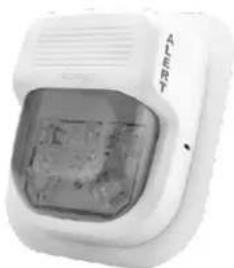
The VIP-998 SIP Strobe Alert is a private mode notification appliance providing bright strobe functionality with both power and activation provided by the IP network. The VIP-998 is available in three different colored flashers. Multiple strobes may be synchronized to flash in unison.
SPECIFICATIONS
Features
- Cost effective and versatile solution to applications requiring visual alerts or strobes
• Power over Ethernet (PoE) 802.3af compatible - SIP Night Ring functionality in conjunction with other Valcom IP speakers
- Synchronized strobing when used with additional Valcom IP strobes
• Available in Amber, Blue or White Flashers
Activation Methods
- Valcom Group Page
- SIP Phone Call
Dimensions / Weight
- 5.5"H x 5"W x 2.0"D (13.9cm H x 12.7cm W x 5.08cm D)
• 0.62 lbs. (0.27 kg)
Nominal Power Requirements
• Via 802.3af PoE Ethernet Switch 6W
Environment
• Temperature: 0 to +40°C
• Humidity: 0 to 85% non-precipitating Suitable for indoor installation
natural_image
White emergency alert device with a glass display and 'A Alert' branding (no visible text or symbols on the device itself)These products are intended for use with a UL Listed power source marked "Class 2" or "LPS" rated 24VDC, or 48VDC (PoE). PoE and all interconnected ITE are intended for intra-building.
Precautionary Designations
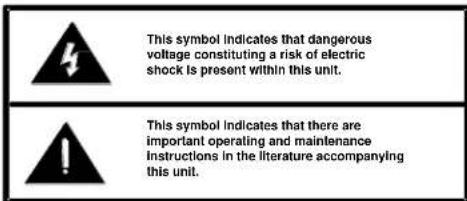
IMPORTANT SAFETY INFORMATION
CONSIGNES DE SÉCURITÉ IMPORTANTES
Read these instructions.
- Keep these instructions.
Conservez ces instructions.
- Heed all warnings
- Follow all instructions
-
Do not use this apparatus on water
-
Do not use this apparatus near water. No nees utiliser est appareil près de l'eau
-
Clean folk with dry cloth
-
Clean only military cloth.
- Do not block any ventilation openings. Install in accordance with the manufacturer's
- Do not install near any heat sources such as radiators, heat registers, stoves or other apparatus (including amplifiers) that produce heat.
- Do not defeat the safety purpose of the polarized or grounding-type plug. A polarized plug has two blades with one wider than the other. A grounding type plug has two blades and a third grounding prong. The wide blade and the third prong are provided for your safety. If the provided plug does not fit into your outlet consult an electrician for replacement of the obsolete outlet.
- Protect the power cord from being walked on or pinched particularly at plugs, convenience
receptacles and the point where they exit from the apparatus.
- Only use attachments/accessories specified by the manufacturer.
- Use only with the cart, stand, tripod, bracket or table specified by the manufacturer or sold with the apparatus. When a cart is used, use caution when moving the cart/apparatus combination to avoid injury from tin-over.
-
Unplug this apparatus during lightning storms or when unused for a long period of time. Débranchez cet appareil pendant les orages ou lorsqu'il n'est pas utilisé pendant une longue période de temps.
-
Refer all servicing to qualified service personnel. Servicing is required when the apparatus has been damaged in any way. Such as when the power supply cord or plug is damaged, liquid has been spilled, objects have fallen into the apparatus or the apparatus has been exposed to rain or moisture and does not operate normally or has been dropped.
This equipment has been tested and found to comply with the limits for a Class A digital device, pursuant to Part 15 of the FCC Rules. These limits are designed to provide reasonable protection against harmful interference when the equipment is operated in a commercial environment. This equipment generates, uses and can radiate radio frequency energy and if not installed and used in accordance with the instruction manual, may cause harmful interference to radio communications. Operation of this equipment in a residential area may cause harmful interference in which case the user will be required to correct the interference at his own expense.
INSTALLATION
Operation
The VIP-998 provides private mode notification via network connection. Activation of the strobe is triggered by including the VIP-998 as a member of a Valcom IP Paging group. The VIP-998 can also operate as a visual Night Ring device in conjunction with a SIP PBX and can provide audio Night Ring to other Valcom IP speakers when activated. Interface to customer telephone system can be via SIP registration to a Voice over IP (VoIP) telephone system, or FXO port (when used with a Valcom Enhanced Station Port).
Mounting
The VIP-998 is designed for double gang FD electrical box mounting. Verify depth of electrical box is adequate for mounting the VIP-998. (See Figure 1)
NOTE: The VIP-998 can synchronize with other Valcom IP strobes, but not with other manufacturer's devices. Therefore, it must not be installed where the flash from other, non-Valcom IP strobes may be seen.
Power Connections
The only method of powering the VIP-998 is via a Power over Ethernet (PoE) switch or power injector meeting the 802.3af specification. Make all required signal connections before connecting to Ethernet switch or power injector meeting the 802.3af specification.
Network Connection
The VIP-998 has one RJ-45 Network connector.
Green LED: (Link) Indicates Ethernet connection when illuminated.
Yellow LED: (Activity) Indicator flashes to indicate network activity.
Use a standard Ethernet patch cable to connect the NETWORK connector to an Ethernet switch.
Setup
Information specific to your application will need to be programmed into the VIP-998 using a computer. The PC used for programming should be connected to the same subnet as the VIP-998. Setup will be done using the IP Solution Setup Tool. Download the latest version of the free IP Solutions Setup Tool from the Valcom web site at www.valcom.com/vipsetuptool.
TECHNICAL ASSISTANCE
Assistance in troubleshooting is available from the factory. Call (540) 563-2000 and press 1 for Technical Support or via email at support@valcom.com.
When requesting assistance, you should include all available information. General information and troubleshooting procedures are available on the Valcom website at www.valcom.com.
Valcom equipment is not field repairable. Valcom, Inc. maintains service facilities in Roanoke, VA.
Should repairs be necessary, attach a tag to the unit clearly stating your company name, address, phone number, contact person and the nature of the problem. Send the unit to:
Valcom, Inc.
Repair & Return Dept.
5614 Hollins Road
Roanoke, Va. 24019-5056
WARRANTY
Warranty information may be found on our website at www.valcom.com/warranty
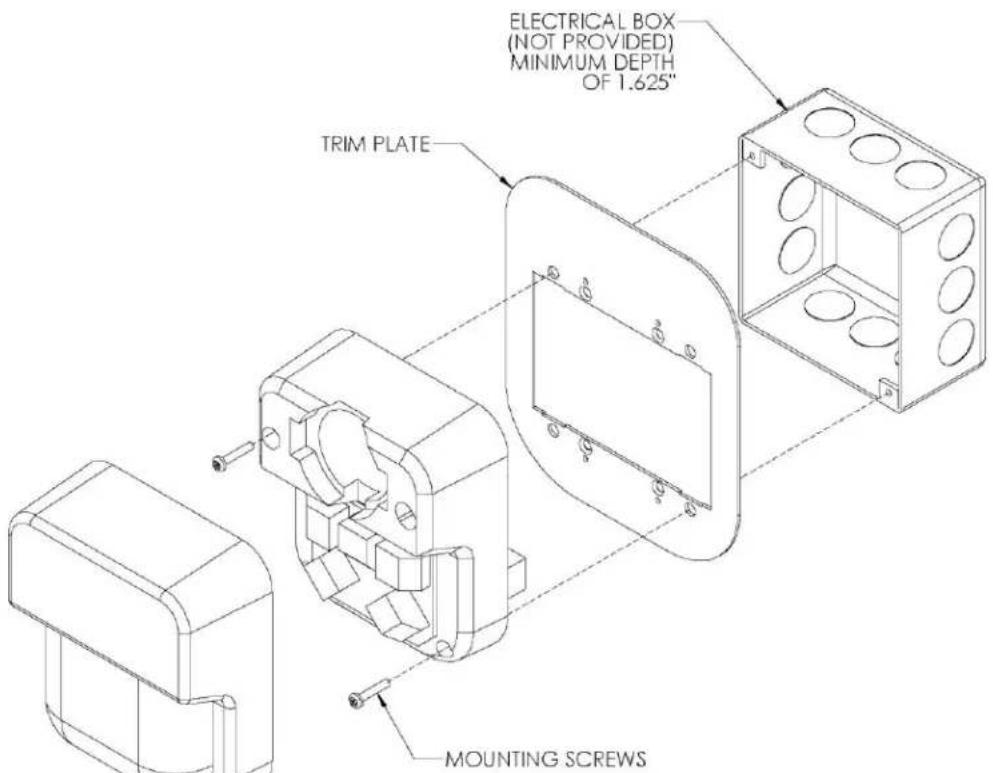
Figure 1
- (Amber, Blue or White)
- INTRODUCTION
- SPECIFICATIONS
- Features
- Activation Methods
- Dimensions / Weight
- Nominal Power Requirements
- Environment
- Precautionary Designations
- IMPORTANT SAFETY INFORMATION
- CONSIGNES DE SÉCURITÉ IMPORTANTES
- INSTALLATION
- Operation
- Mounting
- Power Connections
- Network Connection
- Setup
- TECHNICAL ASSISTANCE
- WARRANTY
Brand : Valcom
Model : VIP-998
Category : Uncategorized