
GT-DB-01b - Doorbell DELTA - Free user manual and instructions
Find the device manual for free GT-DB-01b DELTA in PDF.


| Product Type | Wireless Door Chime |
| Brand | Delta |
| Model | GT-DB-01b |
| Power Source | 2x AA batteries (not included) |
| Operating Range | Up to 100 meters (open space) |
| Number of Melodies | 8 selectable chime tones |
| Volume Control | Adjustable (low, medium, high) |
| LED Indicator | Flashing light on chime unit |
| Dimensions (Chime Unit) | 10.5 x 10.5 x 3.5 cm |
| Weight (Chime Unit) | 150 g (without batteries) |
| Button Dimensions | 4.5 x 4.5 x 2 cm |
| Mounting | Wall-mounted (screws and double-sided tape included) |
| Weather Resistance (Button) | IP44 (splash-proof) |
| Frequency | 433 MHz |
| Number of Buttons Supported | Up to 8 |
| Low Battery Indication | Audible beep and LED flash |
| Cleaning | Wipe with a soft, dry cloth; avoid liquids |
| Safety | Do not disassemble; keep away from water sources |
| Spare Parts Availability | Contact Delta customer service via website |
| Warranty | 1 year limited warranty |
Frequently Asked Questions - GT-DB-01b DELTA
User questions about GT-DB-01b DELTA
0 question about this device. Answer the ones you know or ask your own.
Ask a new question about this device
Download the instructions for your Doorbell in PDF format for free! Find your manual GT-DB-01b - DELTA and take your electronic device back in hand. On this page are published all the documents necessary for the use of your device. GT-DB-01b by DELTA.
USER MANUAL GT-DB-01b DELTA

Kinetic wireless doorbell
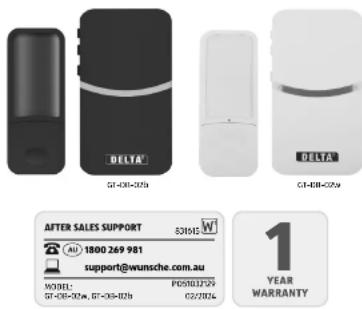
Model
GT-DB-02w / GT-DB-02b
In the box
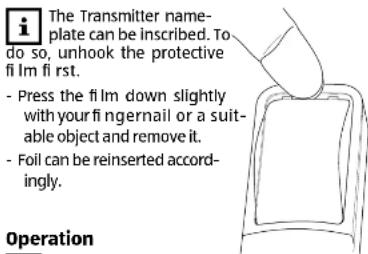
- Transmitter (doorbell, inscribable), incl. mounting plate, 2 wall plugs, 2 screws and double-sided adhesive foam.
- Receiver (mains connection plug)
- Operating instructions incl. warranty
Explanation of symbols
WARNING! This symbol/signal word indicates a hazard with a moderate risk which, if it is not avoided, can result in fatal or serious injury.
NOTE
This signal symbol/word warns of possible material damage.
This symbol gives you additional useful information on the layout or operation of the product.
Class III: appliances in this class are operated with safety extra-low voltage (SELV).
Class II: increased or double insulation between active and touchable parts. Mostly without connection to the protective conductor.
IPX4 Protection against splashing water.
IP20: Protected against penetration by solid objects with a diameter >12.5 mm. No protection against water.
Transmitter: suitable for indoor and outdoor use.
Receiver: only for use indoors
\~Alternating current
RCM (Regulatory Compliance Mark) The product complies with the requirements of the applicable Australian standards.
Application notes and warnings
Before starting up the product, please read and follow the instructions, particularly the safety and installation instructions.
Keep the instructions for reference later and pass them on to any subsequent owner.
The Transmitter (doorbell) is suitable for indoor and outdoor use.
The Receiver (mains connection plug) is only suitable for indoor use.
The product is designed for private use.
Metal objects can have a negative effect on the range between the Transmitter and Receiver. Do not position the Transmitter and Receiver on or near metal objects.
⚠ WARNING! Risk of suffocation! Children playing with the packaging film can become entangled in it and choke.
This electrically operated product is not a toy. Do not children play with the product or the packaging film. Keep the product out of reach of children.
This product can be used by children from age 8 and by persons with reduced physical, sensory, or mental skills or lack of experience and/or knowledge, if they are supervised or have been instructed in safe use of the product and have understood the resulting dangers.
Cleaning and maintenance may not be carried out by unsupervised children.
⚠ WARNING! Risk of electric shock! Do not operate the Receiver (mains connection plug) with wet hands.
Keep the Receiver away from contact with moisture/water or any other liquid.
Checking the package contents
⚠ WARNING! Risk of electric shock! Do not make any technical changes to the Transmitter and Receiver. Do not open the housing and do not insert any objects into the inside of the housing
If parts are visibly damaged, stop using the product to prevent hazards.
Remove all parts from the packaging and check that the contents are complete and undamaged. Contact the service address given on the guarantee card if necessary.
Dispose of the packaging material in an environmentally friendly way.
Starting up
WARNING!
Fire risk!
Do not cover the connected Receiver (mains connection plug), e.g. with fabric, paper or plastic.
NOTE Risk of damage!
Only connect the Receiver (mains connection plug) if the mains voltage of the power socket matches the data on the nameplate.
Connect the Receiver only to an easily accessible socket, so that you can disconnect it from the mains quickly in the event of a fault.
Installation
Before you install the Transmitter in the planned place, make sure that it functions properly. The Transmitter and Receiver must be connected first if necessary (radio connection).
- Connect the Receiver to the planned power socket.
- Press the Bell button on the Transmitter:
No signal at the receiver? -> Keep Melody button 1 pressed for approx. 3 seconds until 2 short sounds can be heard.
Press the Bell button 2 briefly within 30 seconds.
- Position the Transmitter in the planned place and press the Bell button to make sure that the Receiver receives the signal from the transmitter.
The distance may be too large, or the signal is disrupted by metal objects. In this case, you can remove the reception by moving the Transmitter or Receiver.
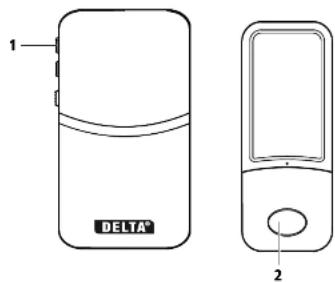
Disconnecting the connection between the Receiver and Transmitter
If you want to disconnect the Transmitter (doorbell) from the Receiver, press the Melody button1 for approx. 10 seconds. After 2 short sounds can be heard for the second time, the radio connection no longer exists.
Attaching the Transmitter with the adhesive foam
i With the help of the foam, the Transmitter (doorbell) can be connected horizontally or vertically to a smooth surface. It can then be removed from the mounting plate, if necessary, by pushing in the direction of the labelling field.
Attaching the Transmitter with wall plugs and screws
⚠ WARNING! Risk of electric shock! Before installing, make sure that there are no water pipes or power cables in the area of the drillholes!
NOTE
Risk of damage!
DIY skills and tools are required for the permanent installation. Contact an experienced fitter if necessary.
- Push the mounting plate in the direction of the Bell button to remove it from the back of the Transmitter.
- Use a screwdriver, for example, to clear the screw holes provided.
- Position the mounting plate in the planned place and mark the drilling points.
- Use a 6 mm drill bit to drill holes 35 mm deep.
- Insert the wall plugs and screw on the mounting plate.
Use the elongated screw retainer of the mounting plate to align the plate horizontally or vertically before tightening the screw if the drilled holes are not exactly horizontal or vertical.
- Position the Transmitter on the mounting plate and push it in the direction of the Bell button.
The Receiver has 18 melodies to choose from as a signal sound and a signal light. The sound volume can be set to 4 levels.
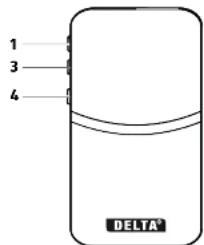
Setting the volume
Press the Volume button 3 repeatedly to increase the signal volume in 4 levels.
Setting the melody
Press the Melody button 1 repeatedly to select the required signal melody (18 melodies).
Setting the signal type
You can choose between the following with the position of the selector switch 4:
- melody signal only (switch in top position), - light signal only (switch in middle position),
- melody with light signal (switch in bottom position).
Cleaning and Storage

NOTE
Risk of damage!
Do not use abrasive, solvent, or sharp-edged tools!
Clean the product with a slightly dampened cloth and a mild washing up liquid.
Leave the product to properly dry and ideally store it in its original packaging.
Disposal
Disposing of the packaging
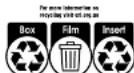
Dispose of the packaging separated into single type materials. Dispose of cardboard and carton as waste paper and foils via the recyclable material collection service.
Disposing of old devices

Should the device no longer be capable of being used at some point in time, dispose of it in accordance with the regulations in force in your city or state.
Please ensure your recycling information applies to the local regulations.
Technical data
Receiver (mains connection plug)
(Class II, suitable for indoors)

Input:
220-240 V\~, 50 Hz
Range:
approx. 100 m (clear view)
Frequency:
433,05 - 434,79 MHz
Transmitter (doorbell)
(Class III, suitable for indoors and outdoors)

Range:
approx. 100 m (clear view)
Frequency:
433,05 - 434,79 MHz
Signal strength:
max. 10 dBmv
Design and technical changes are possible, as we continuously develop and improve our products.
These operating instructions can also be downloaded from our website www.gt-support.de as a PDF file.

DELTA®
Kinetic wireless doorbell
Warranty Details
REGISTER YOUR PURCHASE AT www.aldi.com.au/en/about-aldi/product-registration/TO-KEEP UP-TO-DATE WITH IMPORTANT PRODUCT INFORMATION
The product is guaranteed to be free from defects in workmanship and parts for a period of 12 months from the date of purchase. Defects that occur within this warranty period, under normal use and care, will be repaired, replaced or refunded at our discretion. The benefits conferred by this warranty are in addition to all rights and remedies in respect of the product that the consumer has under the Competition and Consumer Act 2010 and similar state and territory laws.
Our goods come with guarantees that cannot be excluded under the Australian Consumer Law. You are entitled to a replacement or refund for a major failure and for compensation for any other reasonably foreseeable loss or damage. You are also entitled to have the goods repaired or replaced if the goods fail to be of acceptable quality and the failure does not amount to a major failure.


DELTA
Kinetic wireless doorbell
Repair and Refurbished Goods or Parts Notice
REGISTER YOUR PURCHASE AT www.aidl.com.au/en/about-aidl/product-registration/TO USED UP TO DATE WITH IMPORTANT PRODUCT INFORMATION
Unfortunately, from time to time, faulty products are manufactured which need to be returned to the Supplier for repair. Please be aware that if your product is capable of retaining user-generated data (such as files stored on a computer hard drive, telephone numbers stored on a mobile telephone, songs stored on a portable media player, games saved on a games console or files stored on a USB memory stick) during the process of repair, some or all of your stored data may be lost.
We recommend you save this data elsewhere prior to sending the product for repair.
You should also be aware that rather than repairing goods, we may replace them with refurbished goods of the same type or use refurbished parts in the repair process.
Please be assured though, refurbished parts or replacements are only used where they meet ALDI's stringent quality specifications. If at any time you feel your repair is being handled unsatisfactorily, you may escalate your complaint. Please telephone us on 1800 269 981 or write to us at:
Munarche (Australia) Pty Ltd co Installand To Solutions Pty Ltd Unit 1.9 Singbury Street Brendle, Queensland 4500 AUSTR404 Hodine: 1600200381 Operating hours: 8:10-6:00 pm Monday-Friday wanger@munarche.com.au
AFTER SALES SUPPORT 18024 269 9357
support@wanche.com.au

ALDI guarantees that our exclusive brand products are developed to our stringent quality specifications. If you are not entirely satisfied with this product, please return it to the nearest ALDI store within 60 days from the date of purchase, for a full refund or replacement, or take advantage of our after sales support by calling the supplier's Customer Service Hotline.
AU
Made in China
DELTA® is a registered trademark of ALDI Stores
DISTRIBUTED BY:
ALDI STORES
1 SARGENTS ROAD
MINCHINBURY NSW 2770
www.aldi.com.au
Brand : DELTA
Model : GT-DB-01b
Category : Doorbell