
TwinScreen 16 - Screen PRESTIGIO - Free user manual and instructions
Find the device manual for free TwinScreen 16 PRESTIGIO in PDF.


| Product Type | Portable Monitor |
| Model | TwinScreen 16 (PPM101FHD16) |
| Screen Size | 15.6 inches |
| Panel Type | IPS |
| Resolution | 1920 x 1080 (Full HD) |
| Aspect Ratio | 16:9 |
| Refresh Rate | 60 Hz |
| Response Time | 30 ms |
| Brightness | 270 cd/m² |
| Contrast Ratio | 700:1 |
| Viewing Angle | 178° (H: 85°/85°, V: 85°/85°) |
| Color Gamut | 45% sRGB |
| Color Depth | 262K colors |
| Net Weight | 670 g |
| Gross Weight (with accessories) | 2355 g |
| Power Supply | Input: 100-240V AC, 50/60 Hz; Output: 5V/2A |
| Audio | Built-in 1W speaker |
| Input Interfaces | Mini-HDMI, 2x Full-Function USB-C, Micro-USB (OTG only) |
| Operating Temperature | 0°C to +40°C |
| Operating Humidity | Up to 85% RH |
| Included Accessories | Mini-HDMI cable, USB-C cable, USB-A/USB-C power cable, Mini DisplayPort-HDMI adapter, power adapter (5V/2A), multi-functional case, screen protector, quick start guide, warranty certificate |
| Compatibility | Laptops (USB-C/HDMI), smartphones (Android 7+/iOS 11+), game consoles (PS3/4, Xbox One, Switch) |
| Warranty | 1 year manufacturer warranty |
| Certifications | CE, RoHS, EAC |
Frequently Asked Questions - TwinScreen 16 PRESTIGIO
User questions about TwinScreen 16 PRESTIGIO
0 question about this device. Answer the ones you know or ask your own.
Ask a new question about this device
Download the instructions for your Screen in PDF format for free! Find your manual TwinScreen 16 - PRESTIGIO and take your electronic device back in hand. On this page are published all the documents necessary for the use of your device. TwinScreen 16 by PRESTIGIO.
USER MANUAL TwinScreen 16 PRESTIGIO
natural_image
Abstract logo design featuring a stylized letter 'P' within a shield shape (no text or symbols)Portable Monitor
TwinScreen 16
PPM101FHD16
User Manual
Version 1.0
Introduction
The Prestigio Portable Monitor is a simple way to expand your laptop display screen or to increase the size of the display of your mobile device. Thanks to the monitor, you'll be able to increase your productivity and improve your entertainment experience. The device is of a far more compact design compared to its desktop counterparts which makes it an ideal choice for working, for example, when you're not in the office.
To ensure the Prestigio Portable Monitor's lasting performance and to extend its service life, please observe the instructions in the following manual.
This manual contains a full description of the device and the instructions for configuration and setup procedures.
Copyright
Copyright ©Prestigio. All rights reserved.
All names and trademarks, as well as logos and other symbols mentioned herein are the property of their respective owners*.
Prestigio reserves the right to amend this document without prior notice to its customers, and it will not be held liable for any negative consequences that may result from technical and/or typographic errors in this document and/or from using an outdated version of this document.
Any possible references to other company names, trademarks, and equipment are solely for the purposes of explanation and description of the device operation and are not an infringement of any intellectual property rights.
* iOS is the registered trademark of CISCO TECHNOLOGY, INC., Android – is the registered trademark of Google Inc., Samsung – is the registered trademark of Samsung Electronics Co., Dell – is the registered trademark of Dell Inc., Apple – is the registered trademark of Apple Inc., Google – is the registered trademark of Google LLC, Microsoft – is the registered trademark of Corporation One Microsoft Way, Lenovo – is the registered trademark of Lenovo (Beijing) Limited,
HUAWEI – is the registered trademark of HUAWEI TECHNOLOGIES CO., LTD., ASUS – is the registered trademark of ASUSTeK Computer Inc., HP– is the registered trademark of Hewlett Packard Enterprise Development LP, Razer – is the registered trademark of RAZER (ASIA-PACIFIC) PTE LTD, Oneplus – is the registered trademark of OnePlus Technology (Shenzhen) Co., Ltd., OPPO – is the registered trademark of GUANGDONG OPPO MOBILE TELECOMMUNICATIONS CORP., LTD., LG – is the registered trademark of LG Corp, MAC OS – is the registered trademark of Apple Inc., Windows – is the registered trademark of Microsoft Corporation, HTC – is the registered trademark of Corporation.
Liability and support
This document has been prepared in accordance with all applicable requirements and contains the most recent detailed information for the device installation, setup, and operation.
Prestigio reserves the right to modify the device and edit and amend this document without prior notification to users and will not be liable for any negative consequences that may result from using an outdated version of the document, for possible technical errors and typos, and for indirect or consequential damages that may arise following the release of this document or the use of devices.
Prestigio offers no warranty as to the contents of this document including but not limited to the device merchantability and fitness for any particular use.
For any technical questions, contact your local Prestigio representative or technical support at www.prestigio.com/use. The most common problems are described in Section 7 of this document and on the web site at www.prestigio.com, where you can also download the latest version of this manual.
Manufacturer details:
Prestigio Plaza Ltd. (Prestigio)
Cyprus, Limassol 4040, Spyrou Kyprianou 26.
Country of origin: China.
www.prestigio.com
Applicable standards

The device is type-approved with the EU Certificate of Conformity and complies with the following European Union Directives:
• Electromagnetic Compatibility Directive 2014/30/EU;
- Low Voltage Directive 2014/35/EU.

The device has passed all evaluation procedures required by the Custom Union Regulations and conforms to the standards of the Customs Union member countries.

The device meets the requirements of the RoHS Directive 2011/65/EU o limiting the content of hazardous substances.

The device complies with the Republic of Belarus TR 2018/024/BY Technical Regulation (“Telecommunications Equipment. Safety”).

The Ukrainian National Conformity Mark designating that the device meets all required technical regulations.

natural_image
Simple line drawing of a trash bin with crossed lines indicating no waste or plastic discharge (no text or symbols)The device may not be disposed with household waste in accordance with the Waste Electrical and Electronic Equipment Directive 2002/96/EC (WEEE)
To protect the environment and public health, the device shall be disposed of in accordance with the approved safe disposal instructions. To find out more about appropriate disposal methods, contact the device seller or the loc waste disposal authorities.

The details of available certificates are described in Section 6 of this document. You can find copies of certificates and reports in the appropriate section at www.prestigio.com/certificates.
Limitations and warnings
Prior to installation and operation of the device, read carefully the information contained in this section of the document.
ATTENTION! The warnings, precautions, and instructions in this document may not cover all possible and hazardous situations. Please, use common sense when operating the device.
Safety Guidelines
- Before connecting the portable monitor, read carefully all documents provided.
- Before using the portable monitor, make sure that all cables are properly connected and that the power leads are not damaged. If any components are damaged, immediately contact the seller or call a special service facility.
- Use only the original power supply unit included in the product package to charge the device. Using a non-original power supply unit will void the manufacturer's warranty.
- Never use the power supply unit to supply any incompatible devices.
- The manufacturer is not responsible for any consequences, direct or indirect, resulting from the power supply unit's use in a manner not intended by the manufacturer, or caused by supplying power to a device that is not part of this Product Package.
- In order to prevent fire or electric shock, do not expose the portable monitor to moisture or rain. Do not place the device in locations where it can get wet.
- Do not use the Micro-USB port to charge the device.
- Do not drop, throw, dismantle or open the device housing.
- Avoid exposure of the device to dust and extreme temperatures.
- Prevent liquids or particles from entering the holes in the device housing.
- Position the monitor on a stable surface. Do not leave it in an unstable state or at a height accessible to children.
- If the portable monitor experiences technical problems, contact a qualified repair person or the seller.
- Use only the power sources that are shown in the device specifications with the monitor.
- Unplug the device from the power mains during electric storms or if it is not expected to be used for a long period. This precaution will protect the monitor from damage caused by voltage drops in the mains power.
- Do not exceed the permissible electric loads on power dividers and extension cords. Overloading can cause fire or electric shock.
- Do not place any items on the monitor.
- Do not move sharp objects close to the monitor.
Study all the instructions and precaution measures contained in the quick start guide and the manual. Failure to observe the manufacturer instructions may cause fire, electric shock or other hazardous situations including injuries.
ATTENTION! All products and mobile apps of the Company (including any future software and hardware of proprietary and third-party design) are not intended to be used for emerging response nor they can be used for extinguishing fire and/or accident damage control including, among other things, fires, floods, spills or gas explosions, burglary and theft, natural disasters and other force majeure events that lead to damage and/or losses sustained by the user or incurred to his estate, property and/or other products, devices, personal data and privacy.
Contents
Introduction....2
Copyright....2
Liability and support....3
Applicable standards....4
Limitations and warnings....6
Contents....8
- General description and characteristics....9
1.1. Purpose of the device 9
1.2. Functions of buttons, connectors, and indicators 10
1.3. Technical Specifications .... 11
1.4. Product Bundle....12
1.5. Packaging and marking....12
- Operating instructions ....13
2.1. Principle of operating menu interface....13
2.2. Connections to devices....13
2.3. Compatibility with devices....14
2.4. Supported devices and models....15
2.5. System requirements .... 16
-
Maintenance and repair ....17
-
Warranty statement....18
-
Storage, transportation, and disposal....21
-
Miscellaneous information....22
-
Troubleshooting....24
-
Glossary....26
Illustrations and tables
Figure 1 – Exterior view ...... 9
Figure 2 – Assembly diagram and components....10
Table 1 – Led indicators .... 11
Table 2 – Main technical specifications of portable monitor ....11
Table 3 – Laptops/Tablet PCs....15
Table 4 – Phones....16
Table 5 – Typical errors and remedies....24
1. General description and characteristics
1.1. Purpose of the device
Even though gadgets today many benefits, sometimes they still need a second monitor to ensure that multiple tasks can be easily handled simultaneously. This is especially true in case of smartphones that can hardly be a match for large displays.
Portable monitors are the solution for users who value the comfort of a multi-screen space and would like to have it even on the go.
Main advantages of using the Prestigio Portable Monitor:
- As the main feature of this product, a smartphone can be converted into a fully functional laptop or tablet PC for comfortable work or learning. It can help create a work station or use the display to enjoy watching video, images or playing games.
- The portable monitor offers high mobility and facilitates everyone's routine not only by enhancing viewing experiences but also by improving your lifestyle.
- Prestigio TwinScreen 16 is a lightweight 15.6 inch monitor with an IPS matrix. The IPS panel provides a wide-angle view of 178^ .
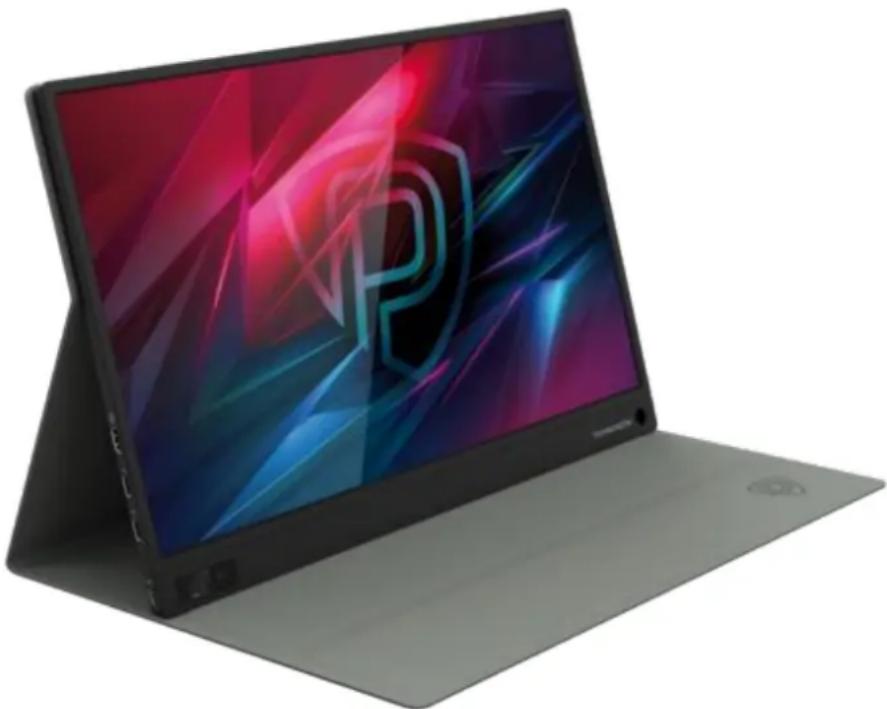
natural_image
Modern flat-screen laptop with a colorful abstract screen displaying a stylized 'P' logo (no text or symbols visible on the device body)Figure 1 – Exterior view
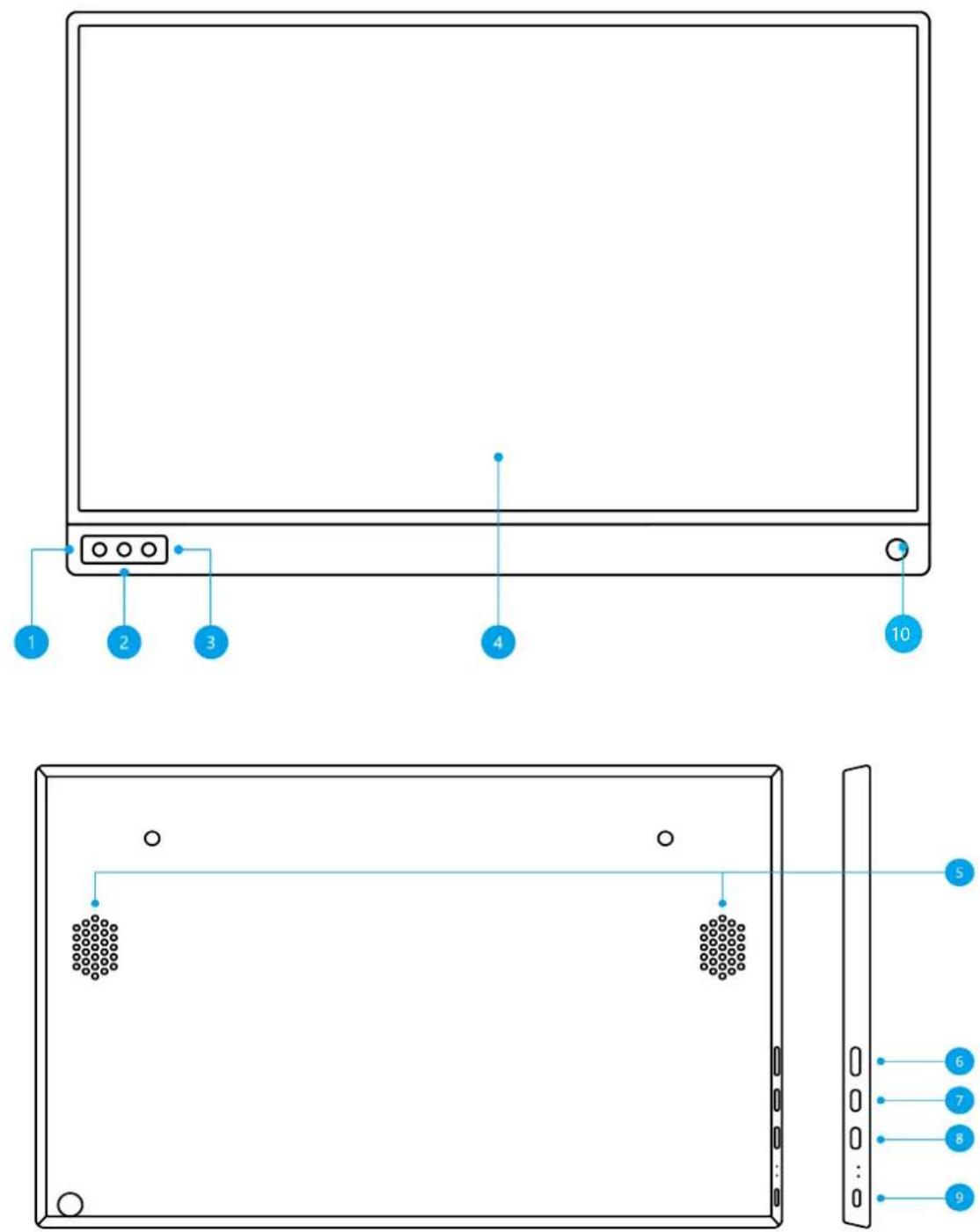
Figure 2 – Assembly diagram and components
1.2. Functions of buttons, connectors, and indicators
- Key to enter the device configurations menu.
- Adjustment of brightness/volume (+).
- Adjustment of brightness/volume (-).
- Monitor.
- Speakers.
- Mini-HDMI port: video and audio transmission.
- Full-function USB-C port: video and audio transmission.
- Full-function USB-C port: video and audio transmission.
-
Micro-USB port for connecting OTG cable*.
-
Special hole. When the case is removed, this hole can be used to fit a pencil or a similar sized object for propping up your Prestigio TwinScreen 16.
*Do not use the Micro-USB port to charge the device.
Table 1 – Led indicators
| LED | LED status | Description |
| Red | Red LED is on | The portable monitor is connected to mains |
| Blue | Blue LED is on | Signal indicator |
| Red and blue | Two LEDs are on | Both LEDs are lit up during startup |
1.3. Technical Specifications
Table 2 – Main technical specifications of the portable monitor
| Parameter | Value |
| Item | PPM101FHD16 |
| Name of the product | TwinScreen 16 |
| Net weight | 670 g |
| Gross weight | 2355 g |
| Visual area | 345.96 x 193.74 mm |
| Screen size | 15.6" |
| Type of panel | IPS |
| Aspect ratio | 16:9 |
| Resolution | 1920x1080 |
| Response time | 30 ms |
| Screen color | 262K |
| Color temperature | 9300K |
| Viewing angle | H: 85°/85° Min.V: 85°/85° Min. |
| Contrast | 700:1 |
| Brightness | 270cd/m2 |
| Gamma | 45%sRGB |
| Refresh rate | 60 Hz |
| Power supply | 100-240VAC, 50/60 Hz 0.3 A5W/2A |
| Speakers | On-board speaker (1W) |
| Input interface | Mini-HDMI (audio and video), full-function USB-C (video data, power source), Micro-USB (keyboard, mouse only via OTG cable)* |
| Operating temperature | 0 ... +40°C |
| Max. relative humidity in operation | Up to 85% |
*Do not use the Micro-USB port to charge the device.
1.4. Product Bundle
The Prestigio TwinScreen Product Bundle includes the following devices and components:
- Portable Monitor PPM101FHD16 1 pce
- Mini-HDMI cable 1 pce
- USB-C cable 1 pce
- USB-A/USB-C (1.5 m) power lead 1 pce
- Mini DisplayPort-HDMI adapter 1 pce
- Power supply 5V/2A 1 pce
- Multi-functional case 1 pce
- On-screen protective film 1 pce
- Quick Start Guide 1 pce
- Certificate of warranty 1 pce
1.5. Packaging and marking
The portable monitor is supplied in a 400 mm x 270 mm x 60 mm (W x D x H) individual cardboard package containing its full name and marking, list of included components and basic technical specifications, and also the manufacturer's details.
Cardboard package weight:
- net weight: 0.6 kg
- gross weight: 0.9 kg
2. Operating instructions
2.1. Principle of operating menu interface
Volume adjustment
First, press the "+" button. The volume bar will be displayed, then adjust the volume by pressing the "+/-" button.
Brightness adjustment
First, press the "-" button. The brightness bar will be displayed, then adjust the brightness by pressing the "+/-" button.
Navigation in setup menu
To navigate between menu options, use the "+" and "-" keys. Use the "Menu" key to confirm the selection. To exit a menu sub item, hold the "Menu" key for 3 seconds. You'll be returned to the previous option.
NOTE
The volume and brightness cannot be adjusted simultaneously. Please, adjust one setting at a time.
2.2. Connections to devices
1. Laptop (with USB-C port).
Connections to laptop computers are made via a USB-C cable.

flowchart
graph LR
    A["Laptop"] -->|USB-C to USB-C| B["S1"]
    B -->|USB-A to USB-C| C["Power Supply"]
The laptop must be capable of video transmission through Type C connections (support DisplayPort or Thunderbolt protocols).
NOTE
- When the brightness and volume are adjusted above 80%, please, connect your Prestigio TwinScreen 16 to an external power source.
- Not all laptop computers with USB-C port are able to work with Prestigio TwinScreen 16 with such a connection. It all depends on the USB-C port function of your laptop computer.
2.3. Compatibility with devices
PC/Laptop (with HDMI port)
Compatible with most PC/laptop computers w/HDMI port.

flowchart
graph LR
    A["Laptop"] -->|Mini HDMI to HDMI Cable| B["S1"]
    B -->|USB-A to USB-C| C["Device"]
Laptop (with Mini Display Port)
Compatible with most PC/laptop computers w/Mini Display Port.

flowchart
graph LR
    A["Laptop"] -->|HDMI to Mini DisplayPort| B["Mini HDMI to HDMI Cable"]
    B --> C["S1"]
    C --> D["USB-A to USB-C"]
Devices on iOS/Android
Compatible with devices on Android (version 7 and higher) or iOS (version 11 and later) operating systems.

flowchart
graph LR
    A["Device with USB-C"] --> B["S1"]
    B --> C["USB-A to USB-C"]
    style A fill:#f9f,stroke:#333
    style B fill:#ccf,stroke:#333
    style C fill:#cfc,stroke:#333
To connect an iOS device to the Prestigio TwinScreen 16, a Lightning to HDMI adapter is required (not included).
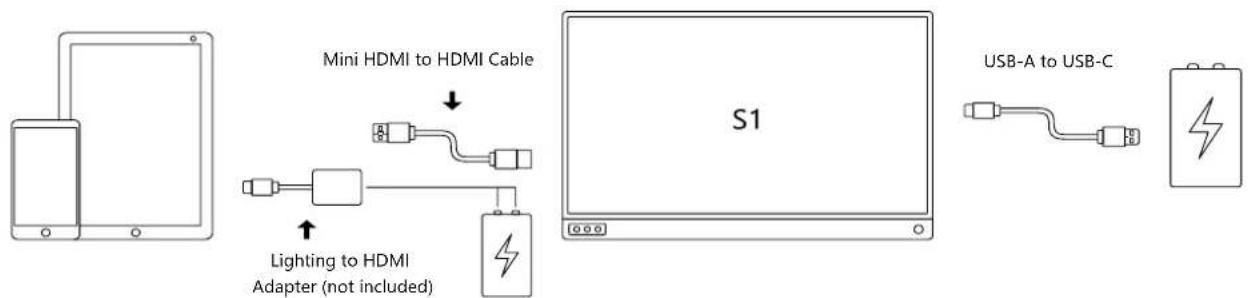
flowchart
graph LR
    A["Smartphone"] --> B["Mini HDMI to HDMI Cable"]
    B --> C["Lighting to HDMI Adapter (not included)"]
    C --> D["S1"]
    D --> E["USB-A to USB-C"]
NOTE
- To successfully connect to Prestigio TwinScreen 16 your Android must support the USB Type C PD protocol.
- To achieve a HDMI connection, the Prestigio TwinScreen 16 should be connected to external power using a USB-C cable.
- When the Prestigio TwinScreen 16 is not connected to an external power source, it is powered by the mobile phone battery. However, if the phone battery is discharged, it cannot supply power to the Prestigio TwinScreen 16, therefore, you should connect it to an external power source.
Other devices
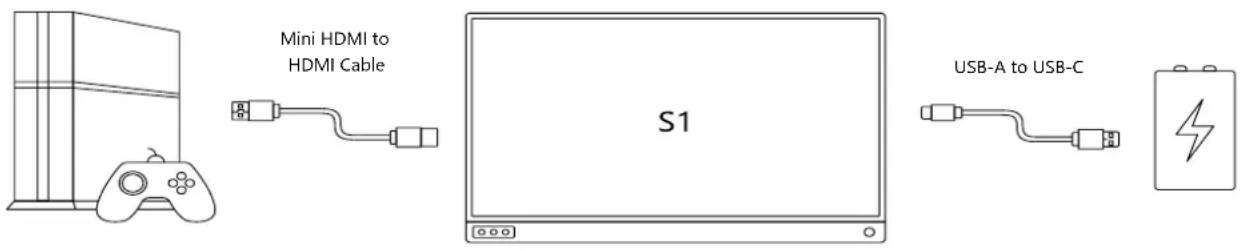
Prestigio TwinScreen 16 is compatible with PS3, PS4, Xbox One, Xbox, Switch and other devices featuring a standard HDMI output.
2.4. Supported devices and models
Table 3 – Laptops/Tablet PCs
| Brand | Model |
| Apple | MacBook 12", MacBook Pro2016/2017/2018/2019, MacBook Air 2018/2019, iPad Pro2018/2019/2020 |
| ChromeBook Pixels, Pixelbook Pen | |
| Microsoft | Surface Laptop, Surface Book, Surface Go, Surface Pro |
| Lenovo | Savior Y70000, Savior Y7000P, Savior Y9000K, Yoga 6 Pro, ThinkpadX1 Carbon, Yoga 5 Pro, Miix 720 |
| Huawei | MateBook D, MateBookX, MateBook Pro, MateBook E, MateBook 13 MatePad, MediaPad M6 |
| Dell | G3/G5/G7 Series, Inspiron 5000, Inspiron 7000, XPS13, XPS15 |
| ASUS | ZenBook3/3 Pro, ZenBook X series, U4100UN, U5100UQ, ROG Series U306, U321 Series |
| HP | EliteBook 1050 G1, EliteBook Folio G1, Omen 4 Pro, Pavilion X2 |
| Razer | Blade Stealth |
Please, see the updated list of devices on our web site at www.prestigio.com.
Table 4 – Phones
| Brand | Model |
| Apple | iPhone Series |
| Samsung | DEX, S8, S8+, S9+, S10, S20, S20+, Fold, Z flip, Note Series |
| Huawei | P40, P40 Pro, P30, P30 Pro, P20, P20 Pro, Mate 10, Mate 10 Pro, Mate 20 X, Mate 20 Pro, Mate RS, Honor Note 10 |
| Oneplus | One Plus8, One Plus8 Pro, One Plus7T Pro, OnePlus 7T |
| OPPO | R17 Pro, Reno |
| Razer | Razer Phone, Razer Phone 2 |
| LG | G5 |
| HTC | U Ultra |
| ASUS | ROG Gaming Phone |
See the updated list of devices on our web site at www.prestigio.com.
2.5. System requirements
Minimum requirements:
• OS Windows 7 with CPU Core 2 Duo 1.4 GHz
- RAM 1 GB
Recommended requirements:
- OS Windows 7 w/CPU Core 2 Duo 1.4 GHz or higher
• RAM 2 GB
Video playback recommendations:
• Windows Media Player (WMP)
- CyberLink PowerDVD
- Core WinDVD
3. Maintenance and repair
The Prestigio TwinScreen 16 portable monitor requires no special maintenance during operation. However, to ensure its proper condition and reliable operation, we recommend you to do the following periodically:
- Observe the rules for using the device safely.
- Clean the screen to remove dirt and dust using a soft, dry cloth or alcohol-free wipes for cleaning office equipment. Prior to cleaning, turn off the monitor and disconnect the cable.
- Use LCD screen cleaners. Never spray the cleaner directly onto the screen, otherwise it could penetrate inside and cause an electric shock.
• The portable monitor should be repaired only at service facilities.
If warranty repair or replacement is required, contact the seller with the receipt and the purchased device.
To receive detailed information about portable monitor replacement and repair, contact our local representative or technical support at www.prestigio.com.
4. Warranty statement
Service life - two (2) years. The manufacturer warranty is one (1) year from the date the product was sold by the retailer.
More rights may be granted in accordance with consumer laws in your country. Any such rights are not affected by this Limited Warranty.
To receive service under the certificate of warranty, the following conditions should be met: all fields in the certificate are completed in clear handwriting, the seller's stamp is present and corresponds to the seller's details shown in the certificate.
The certificate of warranty is deemed to be valid only if it is completed by the selling company correctly and in full. When purchasing the device, be sure to check that its serial number and model correspond to the details shown in the certificate of warranty.
If the certificate of warranty is filled in ineligible or is not completed in full, it is deemed as invalid. In this case, you should contact the seller to obtain a properly completed certificate of warranty. Also, you can show the invoice and the cash receipt to prove the fact and date of the product sale transaction. The sales date is the date displayed on the invoice/cash receipt or any other appropriate document. If the sales date cannot be found out, the warranty period begins on the date of manufacture of the device.
The manufacturer warrants that the Prestigio brand products are free from defects in materials, components, and workmanship on condition that normal operation is maintained during the warranty period. The limited warranty covers only the original purchaser of the Prestigio product and may not be transferred to any subsequent purchaser.
For warranty replacement, the device must be returned to the selling company along with the cash receipt. Warranties for the Prestigio products are granted only in the country of purchase.
WARRANTY SERVICE PROCEDURE
If product failure or defect is suspected, the purchaser should, before the warranty expires, contact an authorized service center and present the following:
- The device with suspected failure or defect.
- The certificate of warranty executed in accordance with applicable laws or the original proof of purchase clearly stating the name and address of the selling company, the date and location of purchase.
DISCLAIMER
The Prestigio brand products are NOT liable for free warranty service if the following failures or defects are found:
- Faults caused by force majeure, accidents, gross negligence, deliberate acts (omissions) by the purchaser or third parties;
- Failures caused by other media including, inter alia, the effects of moisture, dampness, extreme temperatures or environmental conditions (or their sudden changes), corrosion, oxidation, ingress of food or liquids and effects of chemicals, animals, insects, and their excreta;
- If the device (accessories, components) has been tampered with (seals have been broken), modified or repaired by any person other than an authorized service facility or using uncertified spare parts;
• Defects or damage resulting from incorrect operation of the device, improper use including use that fails to comply with operating manuals;
• Defects caused by normal wear and tear including the bags, housings, battery kits or operating manuals; - If the serial number (labels), date of manufacture or model name on the product housing have been in any way removed, erased, damaged, altered or become unreadable.
- If the device is improperly used under inappropriate conditions or if it is not installed as required by the operating manual;
- Cracks and scratches as well as other defects that occur as a result of handling, use by the purchaser or the purchaser's carelessness;
• Physical damage that occurs following the device delivery to the user including damage caused by sharp objects, bending, compression, fall, etc.; - Failures that result from non-compliant power supply, telecommunications, cabling systems and similar external factors.
THIS LIMITED WARRANTY IS THE SOLE EXCLUSIVE WARRANTY AVAILABLE THAT SUPERSEDES ANY OTHER EXPRESS AND IMPLIED WARRANTIES. THE MANUFACTURER SHALL PROVIDE NO WARRANTY WHATSOEVER, EXPRESS OR IMPLIED, OUTSIDE THE SCOPE DESCRIBED IN THIS DOCUMENT INCLUDING AN IMPLIED WARRANTY OF PRODUCT MERCHANTABILITY AND FITNESS FOR PARTICULAR USE. THE USE OF A MALFUNCTIONING, DEFECTIVE DEVICE OR A DEVICE THAT IS NOT CLEARED FOR USE SHALL BE AT THE PURCHASER'S SOLE DISCRETION. THE MANUFACTURER SHALL NOT BE HELD LIABLE FOR DAMAGES CAUSED TO OTHER PROPERTY DUE TO ANY DEFECTS OF THE DEVICE, LOSS OF USE, LOSS OF TIME AND FOR ANY SPECIAL, ACCIDENTAL, INDIRECT OR CONSEQUENTIAL DAMAGE, PUNITIVE DAMAGES OR LOSSES INCLUDING BUT NOT LIMITED TO COMMERCIAL LOSSES, LOSS OF PROFIT, LOSS OF OPPORTUNITY, LOSS OF CONFIDENTIAL AND OTHER INFORMATION, LOSSES CAUSED BY INTERRUPTION IN COMMERCIAL OR MANUFACTURING ACTIVITIES BECASUE THE DEVICE WAS IDENTIFIED AS NON-OPERATIONAL, DEFECTIVE AND NON-CLEARED FOR USE.
NOTE
The manufacturer does not produce equipment for “vitally critical” applications. The “vitall critical” devices are life support systems, medical equipment, implantation-related medical devices, commercial transport, nuclear equipment or systems and any other applications where equipment failures can be harmful or lethal to people or can cause damage to property.
5. Storage, transportation, and disposal
The device is not intended for use in zones with safety and occupational hazards.
Long-term storage is permitted only in the original packaging in dark, dry, clean, well-ventilated closed spaces.
Similar regulatory requirements apply to storage conditions at the supplier's warehouse.
NOTE
During transportation and storage of the devices, observe the temperature and humidity conditions set out in respective specification tables in this manual.
The product may be shipped by any means of transport over any distance. During shipment, the device and its accessories must be contained in the original packaging.
Do not dispose of the device with unsorted municipal waste as this will be harmful to environment.
For disposal, take the device to the local waste recycling facility.
To find out more about the recycling of this device, contact the urban waste removal service.
6. Miscellaneous information
Manufacturer details
| Name | Prestigio Plaza Ltd. (Prestigio) |
| Address | Cyprus, Limassol 4040, Spyrou Kyprianou 26 Country of origin: China |
| Contact information | www.prestigio.com |
Importer details
Russian Federation:
| Name | OOO “ASBIS” |
| Address | 129515, Moscow, Ul. Akademika Koroleva, 13, bldg 1 |
| Contact information | Phone +7(495)775-06-41, www.asbis.ru |
Republic of Belarus:
| Name | SZAO "ASBIS" |
| Address | 220118, Minsk, Ul. Mashinostroitelei, 29, of. 212 |
| Contact information | Phone+375(17)279-36-36, www.asbis.by |
Details of warranty service and quality claim processing organization
Russian Federation:
| Name | OOO "Garant.ru" |
| Address | Moscow, Ul. Gostinichnaya, 7A, est. 2, room 2-19 |
| Contact information | 8-800-100-92-78 |
Republic of Belarus:
| Name | Unitary enterprise “ASBC” |
| Address | 220101, Minsk, pr-t Rokossovskogo, 136A, room 2 |
| Contact information | 8-820-049-100-27 |
The service facility addresses can be found at www.prestigio.ru/use/www.prestigio.by/use in Support section, or call the common technical support number (8-800-551-54-94 (Russia) or 8-820-032-100-34 (Belarus) – toll free) to receive additional information.
Available certificates and declarations of conformity
| Certificates | Certificate of Conformity EEU RU C-CY.HB29.B.00977/20 seriesRU No 0293642 of 29.10.2020 |
| Declarations | Certificate of Conformity EEU N RU Д-CY.HB11.B.21100/20 of 19.10.2020 |
7. Troubleshooting
The table below lists the common errors and problems that may occur when connecting and configuring the portable monitor.
Table 5 – Typical errors and remedies
| No/ No | Problem | Possible cause | Solution |
| 1. | Power LED is not lit. | 1. Portable monitor is off.2. USB cable is not correctly connected to the monitor. | 1. Press the button to make sure that the portable monitor is on.2. Check that the USB cable is correctly connected to the monitor and the mains. |
| 2. | No image is displayed or the screen. | 1. Portable monitor is off.2. USB cable is not correctly connected to the monitor.3. The pins in the cable connector are damaged. | 1. Make sure that the portable monitor is on.2. Check that the USB cable is correctly connected to the monitor.3. Check the cable connectors and ensure the pins are not bent. |
| 3. | The image on the screen is too bright or too dark. | Incorrect settings in the screen menu. | Using the screen menu, adjust the monitor brightness. |
| 4. | The on-screen image is shaky or rippling. | 1. USB cable is not correctly connected to the monitor.2. There are electrical devices in the vicinity producing interference. | 1. Check that the USB cable is correctly connected to the monitor.2. Remove the electrical devices that may be producing the interference. |
| 5. | The image has color defects (the white color does not look white). | The pins in the cable connector are damaged. | Check the USB cable and ensure its pins are not bent. |
| 6. | Dark or color spot on the screen. | Frequently appears when the monitor is tapped on, less frequent if touched by the fingers. | Matrix replacement is required. Contact a special service facility. |
| 7. | The monitor inadvertently turns off or turns on after a delay. | 1. Micro cracks in the board.2. Faulty IC. | Contact a special service facility. |
8. Glossary
IPS type matrix
A variation of TFT technology to build LCD screens.
DisplayPort protocol
Signaling interface standard for digital monitors.
Thunderbolt protocol
Hardware interface used to connect various peripherals to a computer.
- Portable Monitor
- TwinScreen 16
- Introduction
- Copyright
- Liability and support
- Applicable standards
- Limitations and warnings
- Safety Guidelines
- Contents
- Illustrations and tables
- General description and characteristics
- Purpose of the device
- Main advantages of using the Prestigio Portable Monitor:
- Functions of buttons, connectors, and indicators
- Technical Specifications
- Product Bundle
- Packaging and marking
- Operating instructions
- Principle of operating menu interface
- Volume adjustment
- Brightness adjustment
- Navigation in setup menu
- NOTE
- Connections to devices
- Laptop (with USB-C port).
- Compatibility with devices
- PC/Laptop (with HDMI port)
- Laptop (with Mini Display Port)
- Devices on iOS/Android
- Other devices
- Supported devices and models
- System requirements
- Minimum requirements:
- Recommended requirements:
- Video playback recommendations:
- Maintenance and repair
- Warranty statement
- WARRANTY SERVICE PROCEDURE
- DISCLAIMER
- Storage, transportation, and disposal
- Miscellaneous information
- Details of warranty service and quality claim processing organization
- Troubleshooting
- Glossary
Brand : PRESTIGIO
Model : TwinScreen 16
Category : Screen