PR-0808 - Audio/video converter AMX - Free user manual and instructions
Find the device manual for free PR-0808 AMX in PDF.


| Product Type | Audio/Video Converter |
| Model | PR-0808 |
| Brand | AMX |
| Number of Inputs | 8 |
| Number of Outputs | 8 |
| Video Formats Supported | Composite, S-Video, Component, VGA, DVI, HDMI |
| Audio Formats Supported | Stereo analog, digital optical/coaxial |
| Maximum Video Resolution | 1920x1200 (1080p) |
| Bandwidth | 350 MHz (-3dB) |
| Dimensions (W x D x H) | 17.0 x 6.5 x 1.75 inches (43.2 x 16.5 x 4.4 cm) |
| Weight | 5.5 lbs (2.5 kg) |
| Power Supply | 100-240V AC, 50/60Hz, internal |
| Power Consumption | 25W max |
| Control Interface | RS-232, Ethernet, IR, front panel |
| Rack Mountable | Yes, 1U |
| Operating Temperature | 32°F to 104°F (0°C to 40°C) |
| Storage Temperature | -4°F to 140°F (-20°C to 60°C) |
| Humidity | 10% to 90%, non-condensing |
| Included Accessories | Power cord, RS-232 cable, rack ears, user manual |
| Warranty | 3 years limited |
| Compliance | FCC, CE, RoHS |
Frequently Asked Questions - PR-0808 AMX
User questions about PR-0808 AMX
0 question about this device. Answer the ones you know or ask your own.
Ask a new question about this device
Download the instructions for your Audio/video converter in PDF format for free! Find your manual PR-0808 - AMX and take your electronic device back in hand. On this page are published all the documents necessary for the use of your device. PR-0808 by AMX.
USER MANUAL PR-0808 AMX
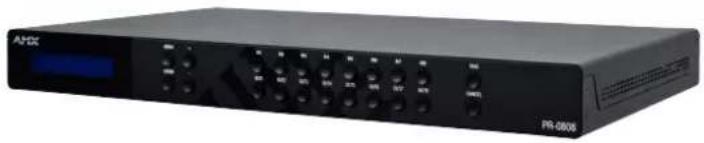
This guide pertains to the PR-0808 Precis 8x8 4K60 HDMI Switcher. The purpose of this document is to illustrate how the device is to be installed and set up in its simplest configuration by a trained technician.
natural_image
Black rectangular electronic device labeled PR-0808, showing ports and control buttons (no readable text beyond branding)What's in the box
The following items are included with the PR-0808:
• [1] 12V/7.5A DC Power Adapter
• [1] AC Power Cable with US Pins
• [1] AC Power Cable with UK Pins
• [1] AC Power Cable with EU Pins
• [9] 3-Pin Terminal Blocks
• [2] Mounting Ears
• [6] Mounting Screws
Power
Active power requirements:
• Voltage, DC: 12V/7.5A
• Power consumption (max): 73.6W
Environmental Requirements
The environmental requirements for the PR-0808 are as follows:
- Operating Temperature: 32^ F (0°C) to 104^ F (40°C)
- Storage Temperature: -4^ (-20°C) to 140^ (60°C)
- Operating Humidity: 5% to 90% (RH (non-condensing))
• Storage Humidity: 5% to 90% (RH (non-condensing))
Installation
- Attach the proper cables from HDMI video source (such as a PC, Blu-ray player, game console, satellite/cable box, media server, etc.) to HDMI Input 1 on the 8x8 HDMI matrix switcher. Continue for HDMI Inputs 2-8.
- Attach the proper cables from the HDMI matrix switcher HDMI Output ports to displays, projectors or other sink devices.
- If required, connect an AV receiver, amplifier or other audio device to the audio output port on the PR-0808.
- Power on PR-0808 using the correct DC power cable (supplied in the box) that meets your location's requirements.
Switching Operation
PR-0808 supports manual control from the front panel. If you want to select a specific input port using input selection buttons:
- First press the appropriate Input Select Button to select a desired input port.
- Then press the Output Select Button to select which output channels to be routed.
- Finally press the Take button to finish switching.
Identify the IP address of the PR-0808
Press the MENU button to enter the main menu, and then use the UP and DOWN buttons to search for the "NETWORK STATUS" page. Press the ENTER button to enter the selected page. The current IP address of the device will be presented on the device's front display.
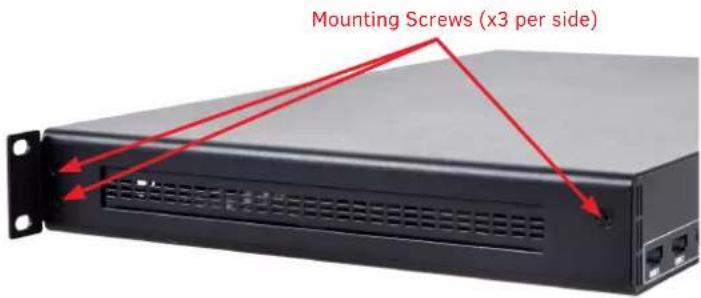
Attaching Installation Brackets
To attach the installation brackets:
- First remove the screws mounted on the side.
- Attach the installation bracket to the enclosure using the longer screws that were provided in the package separately.
- The bracket is attached to the enclosure as shown.
- Repeat steps 1-3 for the other side of the unit.
AMX Precis PR-Series Matrix Switcher Instruction Manual
Additional documentation for this device is available at www.amx.com. Refer to the Instruction Manual - Precis PR-Series Matrix Switchers for additional details on installing, upgrading, and controlling the device.
See the Important Safety Instructions, available to view or download from the www.amx.com.
Brand : AMX
Model : PR-0808
Category : Audio/video converter