
382202 - Power Supply Extech - Free user manual and instructions
Find the device manual for free 382202 Extech in PDF.


| Product Type | DC Power Supply |
| Brand | Extech |
| Model | 382202 |
| Input Voltage | 100-240 VAC, 50/60 Hz |
| Output Voltage Range | 0-30 V |
| Output Current Range | 0-5 A |
| Display | Dual LED display (voltage and current) |
| Resolution | 10 mV / 10 mA |
| Protection | Overload, short circuit, over-temperature |
| Cooling | Fan cooled |
| Dimensions (W x H x D) | 200 x 150 x 300 mm |
| Weight | 2.5 kg |
| Output Terminals | Binding posts (red/black) |
| Operating Temperature | 0-40 °C |
| Storage Temperature | -20-60 °C |
| Accessories Included | Power cord, user manual |
| Safety Compliance | CE, RoHS |
| Maintenance | Keep vents clean; disconnect power before cleaning |
Frequently Asked Questions - 382202 Extech
User questions about 382202 Extech
0 question about this device. Answer the ones you know or ask your own.
Ask a new question about this device
Download the instructions for your Power Supply in PDF format for free! Find your manual 382202 - Extech and take your electronic device back in hand. On this page are published all the documents necessary for the use of your device. 382202 by Extech.
USER MANUAL 382202 Extech
DC Regulated Power Supplies
Model 382200 (1 Amp) and 382202 (3 Amp)
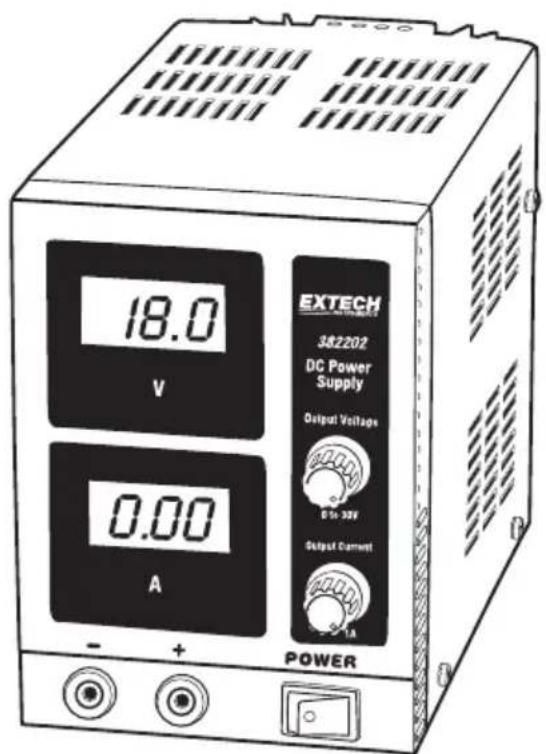
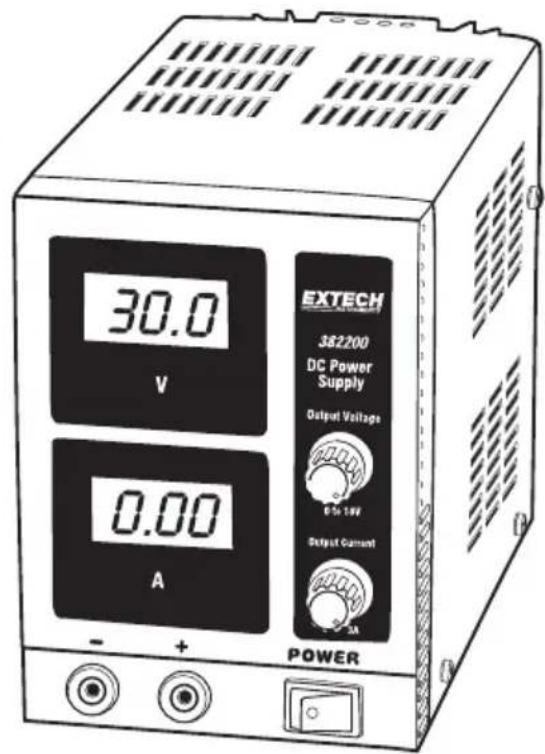
Introduction
Congratulations on your purchase of the Extech DC Regulated Power Supply. These units are solid state, compact, regulated supplies suitable for many applications including bench testing, field service, hobby and telecommunication equipment use. This meter is shipped fully tested and calibrated and, with proper use, will provide years of reliable service. . Please visit the Extech Instruments website (www.extech.com) to check for the latest version of this User Guide and to register this product.
Specifications
| Model 382200 | 382202 | |
| Display | Dual | |
| Display Accuracy (V) ±(1.5%rdg +5D) | ||
| Display Accuracy (A) ±(2.0%rdg + 5D) | ||
| Voltage Output, DC 30.0 Volts 18.0 Volts | ||
| Current Output, DC 0 – 1.00 Amp 0 – 3.00 Amps | ||
| Ripple and Noise <0.5mV/<3mA | ||
| Line Regulation < 0.01% + 3mV/< 0.2% + 3mA | ||
| Load Regulation < 0.01% + 2mV/< 0.2% + 3mA | ||
| Power | 115/230VAC | |
| Dimensions 9.4 x 4.25 x 6" (240 x 108 x 154mm) (W x H x D) | ||
| Weight 4.4lbs. (2 kg) | 6.6lbs. (3kg) | |
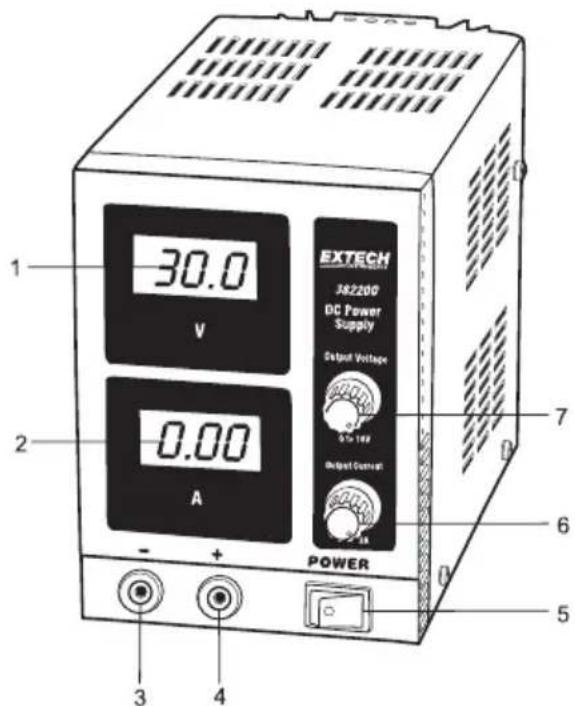
Meter Description
- Voltage display
- Current display
- Negative (-) output terminal
- Positive (+) output terminal
- Illuminated On/Off switch
- Current adjustment
- Voltage adjustment
CAUTION: Verify that the AC voltage setting and fuse rating matches the power source being used BEFORE applying power to the instruments. Do not connect to a voltage source that is greater.
CAUTION: Limit full load operation (>25watts for the 382200 and >45watts for the 382202) to 15 minutes continuous operation. Always allow a cool down period after full load operation.
- The Power Supply must be powered using the rated line voltage within +10%.
- Before turning the power supply ON, remove any load and set the Voltage and Current Adjustment Knobs to their full counter-clockwise positions.
- Use the Current and Voltage Adjustment knobs for setting variable Current and Voltage output signals respectively.
- The LCD displays will indicate actual current and voltage outputs.
- Keep the meter's cooling vents (top and sides) clear of obstacles to prevent overheating.
Current Limit
To avoid having the load draw too much current, a current limit can be set as follows:
- With the voltage and current output adjustments set fully off, carefully short the positive and negative output terminals together.
- Turn the Output Voltage knob clockwise to the 25% position (approx.).
- Adjust the Output Current knob clockwise until the desired current level is displayed.
- Turn the Output Voltage knob counter-clockwise (current display will go to 0.00).
- Connect a load to the output terminals and adjust the voltage to the desired level.
Fuse Replacement
The fuse receptacle is located on the back of the unit next to the power cable input. Each unit comes with one 115V 2A fuse installed in the unit. Three spare fuses are included, a second 115V 2A fuse, and two 230V 1A fuses. See below for the fuse specifications.
| 115V | 230V | ||
| 382200 | 2A | 1A | |
| 382202 | 2A | 1A | |
230V Operation
- Replace the 2A (115V) fuse with a 1A (230V) fuse.
- Toggle the switch located on the rear of the unit from 115V to 230V.
- Use a power cord that matches the outlet for the country in question.
Warranty
FLIR Systems, Inc. warrants this Extech Instruments brand device to be free of defects in parts and workmanship for one year from date of shipment (a six month limited warranty applies to sensors and cables). If it should become necessary to return the instrument for service during or beyond the warranty period, contact the Customer Service Department for authorization. Visit the website www.extech.com for contact information. A Return Authorization (RA) number must be issued before any product is returned. The sender is responsible for shipping charges, freight, insurance and proper packaging to prevent damage in transit. This warranty does not apply to defects resulting from action of the user such as misuse, improper wiring, operation outside of specification, improper maintenance or repair, or unauthorized modification. FLIR Systems, Inc. specifically disclaims any implied warranties or merchantability or fitness for a specific purpose and will not be liable for any direct, indirect, incidental or consequential damages. FLIR's total liability is limited to repair or replacement of the product. The warranty set forth above is inclusive and no other warranty, whether written or oral, is expressed or implied.
Calibration, Repair, and Customer Care Services
FLIR Systems, Inc. offers repair and calibration services for the Extech Instruments products we sell. NIST certification for most products is also provided. Call the Customer Service Department for information on calibration services available for this product. Annual calibrations should be performed to verify meter performance and accuracy. Technical support and general customer service is also provided, refer to the contact information provided below.
Support Lines: U.S. (877) 439-8324; International: +1 (603) 324-7800
Technical Support: Option 3; E-mail: support@extech.com
Repair & Returns: Option 4; E-mail: repair@extech.com
Product specifications are subject to change without notice
Please visit our website for the most up-to-date information
www.extech.com
FLIR Commercial Systems, Inc., 9 Townsend West, Nashua, NH 03063 USA
ISO 9001 Certified
Copyright © 2014-2015 FLIR Systems, Inc.
All rights reserved including the right of reproduction in whole or in part in any form
www.extech.com
Brand : Extech
Model : 382202
Category : Power Supply