DD78HC-1-S - Beer dispenser Beverage-Air - Free user manual and instructions
Find the device manual for free DD78HC-1-S Beverage-Air in PDF.


| Product Type | Beer Dispenser / Kegerator |
| Brand | Beverage-Air |
| Model | DD78HC-1-S |
| Keg Capacity | Two 1/2 barrel kegs (15.5 gallons each) |
| Number of Taps | 2 |
| Temperature Range | 32°F to 40°F (adjustable digital thermostat) |
| Cooling System | Forced air circulation |
| Compressor Power | 1/4 HP |
| Refrigerant | R290 (environmentally friendly) |
| Exterior Dimensions (W x D x H) | 30.25 x 24 x 33.5 inches |
| Interior Dimensions (W x D x H) | 24 x 20 x 30 inches (approx.) |
| Weight | 145 lbs (66 kg) |
| Electrical Requirements | 115V, 60Hz, 3.5 Amps, NEMA 5-15P |
| Exterior Finish | Stainless steel front and sides |
| Drip Tray | Stainless steel, removable for cleaning |
| Insulation | High-density polyurethane foam |
| Warranty | 1 year parts and labor (details in manual) |
| Certifications | ETL, NSF-7 (commercial grade) |
| Included Accessories | CO2 regulator, beer lines, 2 tap handles, keg couplers |
| Maintenance | Clean beer lines every 2 weeks; replace CO2 as needed |
| Safety Features | Auto-defrost, leveling legs, front breathing grille |
| Spare Parts Availability | Through authorized Beverage-Air service centers |
Frequently Asked Questions - DD78HC-1-S Beverage-Air
User questions about DD78HC-1-S Beverage-Air
0 question about this device. Answer the ones you know or ask your own.
Ask a new question about this device
Download the instructions for your Beer dispenser in PDF format for free! Find your manual DD78HC-1-S - Beverage-Air and take your electronic device back in hand. On this page are published all the documents necessary for the use of your device. DD78HC-1-S by Beverage-Air.
USER MANUAL DD78HC-1-S Beverage-Air
INSTALLATION AND OPERATING INSTRUCTIONS for all Hydrocarbon DD Direct Draw Dispenser Models
natural_image
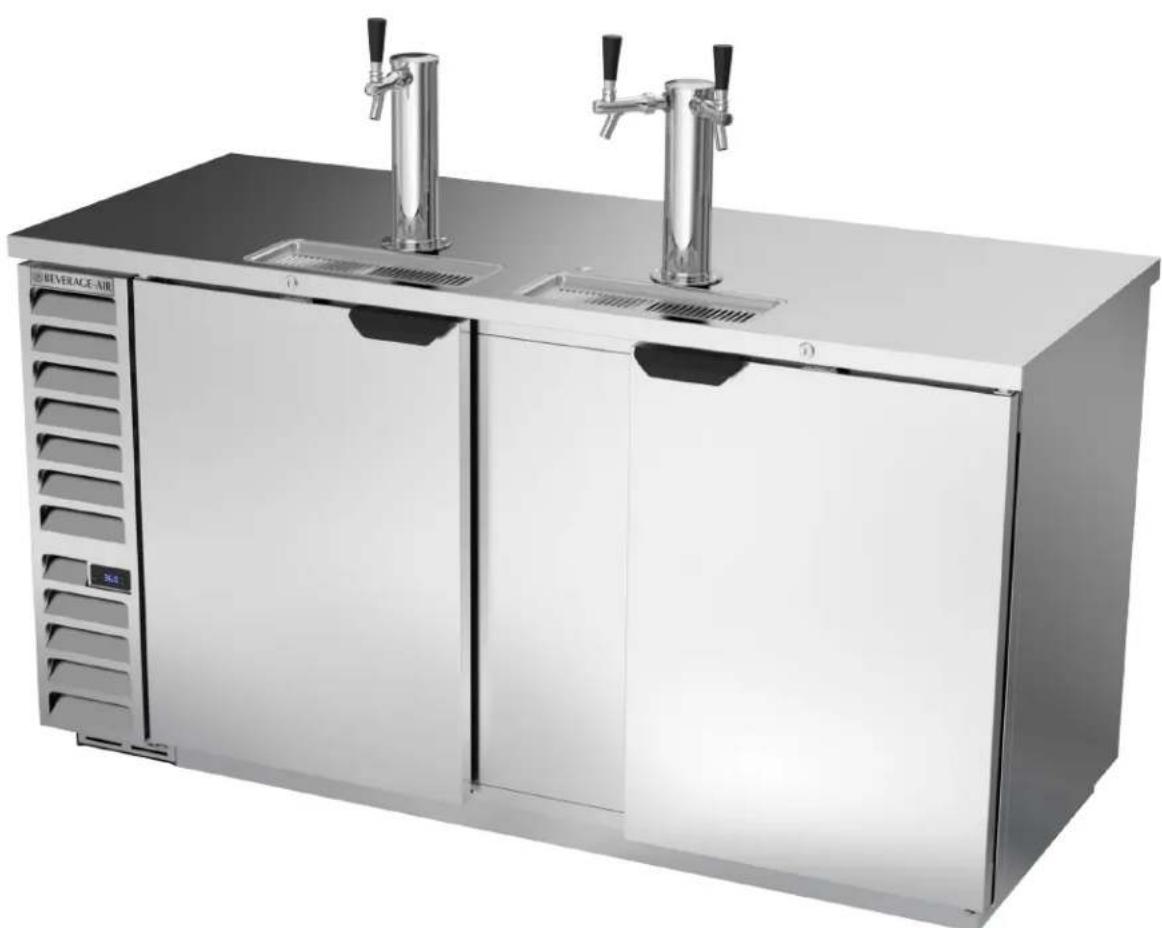
Exterior view of a beverage air control cabinet with two vertical slamps (no text or symbols visible)User Manual for DD Refrigerators Beverage-Air
WELCOME
Thank you for purchasing a Beverage-Air cabinet. This series has passed our strict quality control inspection and meets the high standards set by Beverage-Air! You have made a quality investment that with proper maintenance will give you many years of reliable service!
Important Information
- PLEASE READ THESE INSTRUCTIONS CAREFULLY BEFORE INSTALLING OR USING, IF RECOMMENDED PROCEDURES ARE NOT FOLLOWED, WARRANTY CLAIMS MAY BE DENIED.
- Your warranty registration information is located with this manual. Please complete the card and submit it to Beverage-Air within TEN days of installation. Failure to properly register equipment may limit or void the warranty.
Please read the following installation and maintenance instructions before installing or using your unit. If you have any questions, Please call our Technical Service Department at (800) 684-1199. 8:00 AM to 5:00 PM EST.
- Beverage-Air reserves the right to change specifications and product design without notice. Such revisions do not entitle the buyer to corresponding changes, improvements, additions, or replacements for previously purchased equipment.
Safety 3
Important information....4
Airflow 5
Product information Clearance and Placement 6
Clearance 7
Unpacking and Set Up 8
Keg installation 10
Electrical 11
Using The Unit Danfoss Controller (except for the DD24HC models) 12
Sequence of Operations (except for the DD24HC models). 13
Using The Unit Eliwell Controller (except for the DD24HC models) 17
Sequence of Operations (except for the DD24HC models). 18
Using The DD24HC 21
Cleaning and Maintenance 23
Condenser Cleaning. 24
Methods For Cleaning Stainless Steel....25
Help 26
For The Service Tech - R290 27
For The Service Tech - Wiring Diagrams 28
Limited Warranty 31
Limited Warranty (continued) 32
User Manual for DD Refrigerators Beverage-Air
SAFETY
This appliance is not intended for use by persons (including children) with reduced physical, sensory or mental capabilities, or lack of experience and knowledge, unless they have been given supervision or instruction concerning use of the appliance by a person responsible for their safety.
Children should be supervised to ensure that they do not play with the appliance

CAUTION
Use: When using this unit, please:
- Move it carefully. If on casters be sure the casters do NOT run over the power cord.
- Lock the casters when in use.
- Seek help. This machine is heavy! Be sure to move with enough help to avoid tipping or dropping the cabinet.

CAUTION
Maintenance
Do NOT:
- Clean a frozen evaporator with a sharp object
- Clean a dirty condenser with a sharp object.
-
Store gasoline, kerosene or any other flammable material near the cabinet.
-
Prevent children from playing in or on the cabinet. Persons unable to use this product must be prevented access.
- Follow all instructions. There are many safety labels and directions on the unit. Heed them.
- Watch your fingers. There may be pinch points near the door hinges.
Do ALWAYS
- Use a Beverage-Air recommended technician certified to repair R290 equipment.
- Use ONLY Beverage-Air factory service parts. Use of non OEM parts can be dangerous because of the design changes needed to safely use R290.
Important Information to Add
Record the model number, serial number and the date of installation here for future reference. The model and serial numbers are on the unit's serial number dataplate, which is located on the left inside wall.
| Model Number | |
| Serial Number | |
| Date of Installation | |
| Purchased From |

CAUTION

WARNING
Observe the Caution and Warning notices. They are indicators of important safety information. Keep this manual for future reference.
User Manual for DD Refrigerators Beverage-Air
IMPORTANT INFORMATION
This unit is intended to be used in a commercial application. That includes bars and restaurants.
If installed in a residence some commercial service companies may not be able to service it on site.
The manufacturer has designed and produced this machine with the finest in materials. The manufacturer assumes no liability for units that have been altered in any way. Alterations or part substitutions will void the warranty.
Limitations
The machine is designed for use indoors in a controlled environment. It must be kept dry, not overheated or subjected to excessive cold. May only be connected to a dedicated electrical circuit. Extension cords are not permitted.
| Minimum Maximum | ||
| Voltage 103.5 126.5 | ||
| Room Air Temp 60° | F 100° F |
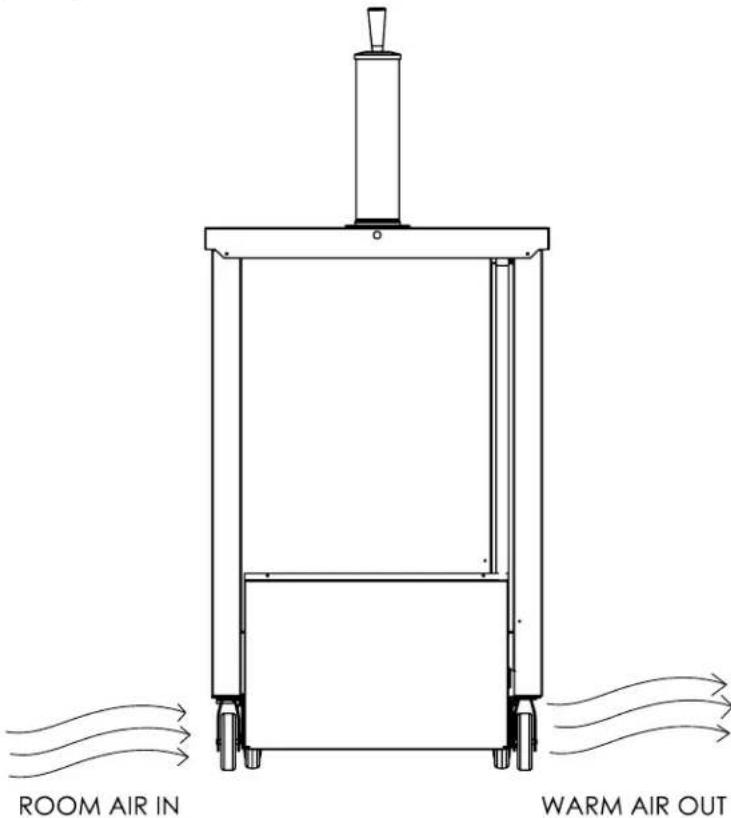
Air Flow, 24 inch Models (DD24).
Agency Approvals
These marks appear on the dataplate or serial tag, located in the inside of the left wall. The dataplate also contains the model and serial numbers as well as electrical requirements.



User Manual for DD Refrigerators Beverage-Air
AIRFLOW
DD36, DD48, DD50
Note: Compressor and Airflow can be on left or right end of cabinet.
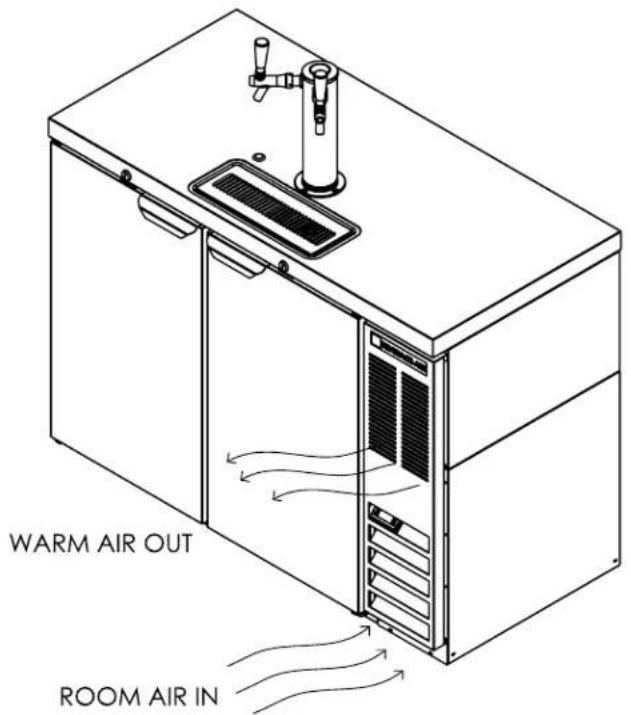
Note: Compressor and Airflow can be on left or right end of cabinet.
User Manual for DD Refrigerators Beverage-Air
PRODUCT INFORMATION CLEARANCE AND PLACEMENT
| Model | Cabinet Dimensions w x d x h (Inches) | Door Count | Glass or Solid Door | Full Load Amps | Power Cord Plug (NEMA) | Refrigerant Type / Charge (g) / (oz) |
| DD24HC-1 24 x 30 1/8 x 53 1 Solid 2 5-15P R-290 / 55 / 1.94 | ||||||
| DD36HC-1* 36 x 24 1/4 x 51 1/4 1 Solid 2.5 5-15P R-290 / 90 / 3.3 | ||||||
| DD48HC-1 | 48 x 24 1/4 x 51 1/4 2 Solid 2.5 5-15P R-290 / 90 / 3.3 | |||||
| DD50HC-1 | 50 1/2 x 29 x 52 1/2 | 2 Solid | 2.5 5-15P | R-290 / 95 / 3.36 | ||
| DD58HC-1 | 59 x 29 x 52 1/2 | 2 Solid | 2.5 5-15P | R-290 / 95 / 3.36 | ||
| DD68HC-1 | 69 x 29 x 52 1/2 | 2 Solid | 5.5 5-15P R-290 / 115 / 4.1 | |||
| DD72HC-1 | 72 x 24 3/8 x 51 1/4 | 3 | Solid | 3.1 | 5-15P | R-290 / 80 / 2.5 |
| DD78HC-1 | 79 x 29 x 52 1/2 | 3 | Solid 5.5 5-15P R-290 / 115 / 4.1 | |||
| DD94HC-1 | 95 x 29 x 52 1/2 | 3 Solid | 5.5 5-15P R-290 / 115 / 4.1 |
Height includes casters and tap when supplied
• All models will maintain product temperature between 35.5 and 40.5 degrees F. at the factory setting of 38.°F.
• All models are 115 volts, 60 Hz AC.
• ALWAYS REFERENCE YOUR EQUIPMENT DATA PLATE AMPS, REFRIGERANT AND REFRIGERANT CHARGE FOR THE MOST UP TO DATE AND ACCURATE VALUES.
• There are no access valves on the refrigeration system.
Placement
Consider the following when selecting a location for your Refrigerator:
Floor Drain: A floor drain is needed for draft arm area draining.
Floor Load: The floor on which the Refrigerator is located must be even and level, free from vibrations, and strong enough to support the combined weights of the unit and maximum product load.
Ventilation: Grille area at front must be free and clear of any object or wall.
Power Outlet: The installation of this appliance requires a dedicated power outlet located within the length of the unit's power cord and be accessible for the purpose to disconnect power
User Manual for DD Refrigerators Beverage-Air
CLEARANCE
DD36, DD48, DD50
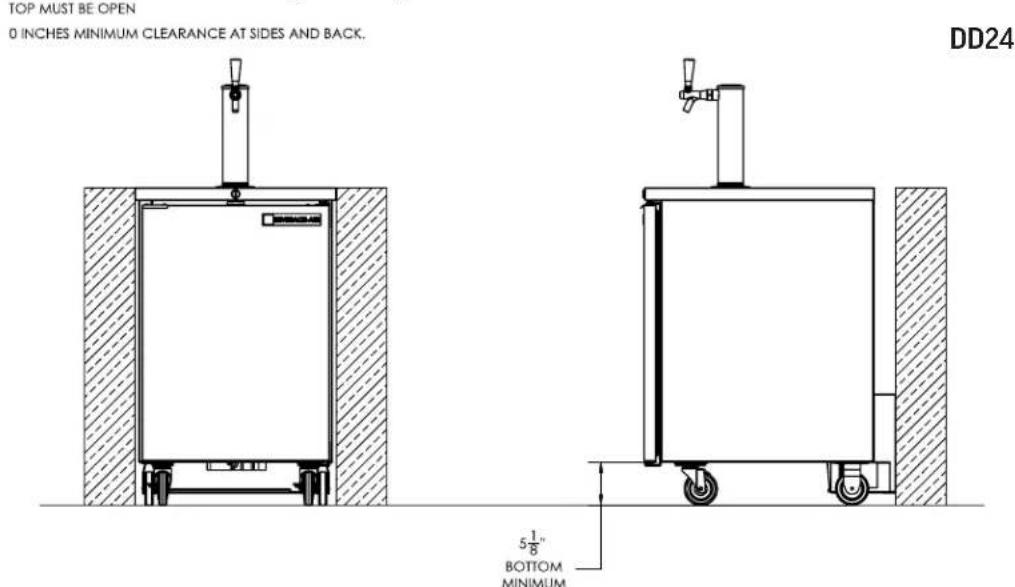
TOP MUST BE OPEN
0 INCHES MINIMUM CLEARANCE AT BOTTOM, SIDES AND BACK.
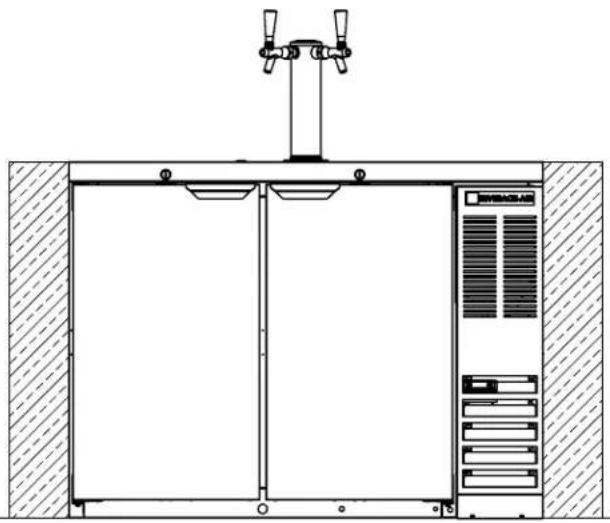
natural_image
Technical line drawing of a mechanical or electrical enclosure with two vertical gauges and a central control panel (no text or symbols)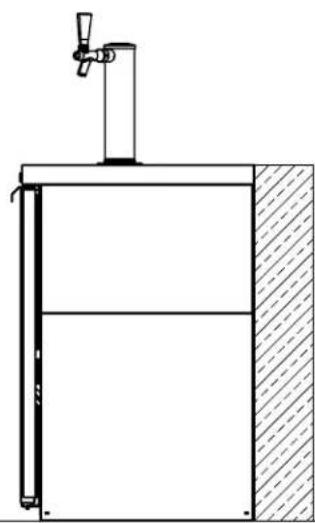
natural_image
Technical line drawing of a mechanical assembly with a vertical plate and handle (no text or symbols)natural_image
Technical line drawing of a dual-chamber HVAC unit with two vertical-mounted fans and a front panel, enclosed in a hatched enclosure (no text or symbols)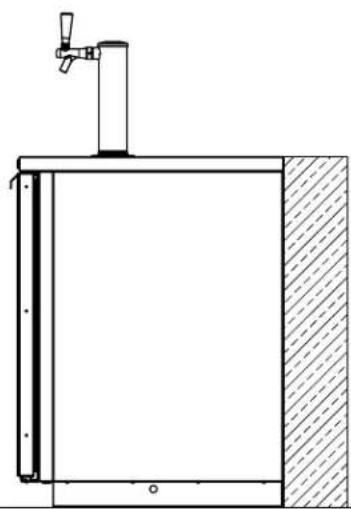
natural_image
Technical line drawing of a vertical shelf or drain unit with a faucet and base wall (no text or symbols)User Manual for DD Refrigerators Beverage-Air
UNPACKING AND SET UP
Carefully inspect the shipping carton for damage. This is the only time that shipping damage may be claimed. If damage is suspected, open the carton immediately and, if there is damage, retain the carton and contact the shipper to make a claim. Do NOT contact the manufacturer.
Uncrating
Tools Needed: 34 " box wrench, adjustable wrench, level, flat head screw driver, and box cutter.
- Remove the cardboard top capping, all clear tape, and all staples including those at the bottom of the cardboard carton and skid.
- Start from the top of the carton. Using the box cutter, carefully make one continuous cut to the bottom of the skid. Remove cardboard carton and discard.
Skid Removal and Caster Attachment
Tip the unit forward and remove the skid.
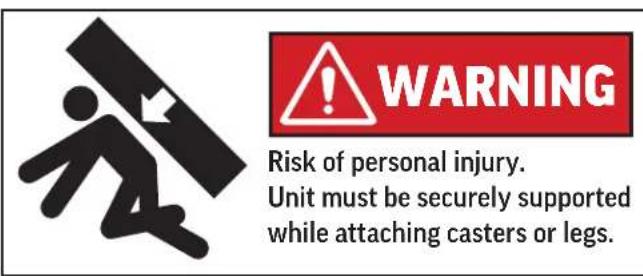
- Remove the shipping bolts using the 34 " box wrench while cabinet is held in one direction. Repeat the process while the cabinet is held in the opposite direction.
- None of the threads on the leg or caster stem should be visible once screwed in.
- Tilt the cabinet in one direction approximately 8" and block it securely with pieces of 2x4 lumber or other suitable material.
- Thread the stem casters or legs into the 12 -13 holes in the bottom of the cabinet. Tighten by hand as much as possible. Some models may already have levelers installed. If so, then the levelers will need to first be removed and discarded.
- Once the caster or leg cannot be turned any further, use a 3/4 inch wrench to tighten the nut in between the mounting plate and the wheel of the caster until snug.
Note: additional clear plastic protective wrap is applied directly to any product with a glass door.
- Move unit as close to final position as possible before removing the skid.
Note: The skid must be removed before the casters or legs can be attached.
Do NOT tip unit on its front or sides. If tipped onto the back, unit must not be started for 3 hours.
- Repeat this procedure with unit secured in the opposite direction so as to access the remaining legs/casters/levelers.
- If plate casters or legs are installed instead of stem casters or legs, then repeat step 3 above and secure the plate with either #14 AB screws, or ¼-20 screws, depending upon which are required.
- If levelers are employed, then repeat step 3 above and thread the leveler in place. Then repeat step 6.
User Manual for DD Refrigerators Beverage-Air
UNPACKING AND SET UP (CONTINUED)
Leveling:
Cabinets must be leveled when installed. Level should be measured on the headrail.
Failure to level your cabinet may result in door not sealing, closing correctly, or condensed water draining not draining properly.
For cabinets with legs, rotate the foot of the leg with an adjustable wrench to achieve desired height for leveling.
For cabinets with casters, leveling can be achieved by placing large washers in between the 12 ' stud and the holes located on the bottom of the case.
Do NOT loosen casters to level the cabinet. Casters MUST be tightly secured to cabinet for full strength.
Install or attach any accessories that will be used Remove any plastic covering the stainless steel.
Installation of Draft Arms
Place rubber washer over draft arm mounting holes in cabinet top and put beer line connector down through the hole. Secure each draft arm with the four bolts provided. Place air hose clip over beer line and insert one inch plastic hose in draft arm being careful not to disturb insulation. Remove top cover of draft arm and attach air hose clip to the 14 " stainless steel elbow at faucet connection. Replace top cover. This clip assures that the air hose remains in place to keep the beer faucet cold.
CO2 Line Routing
For permanent installations a "knockout" plug has been provided through which the CO2 line can be extended
User Manual for DD Refrigerators Beverage-Air
KEG INSTALLATION
Safety First! If in doubt about how to handle the CO2 system contact your dealer/distributor
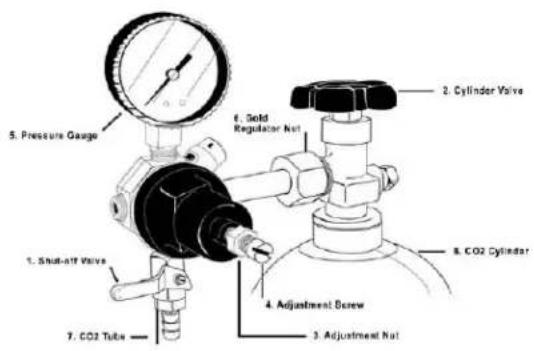
How to Install a CO2 Regulator and Replace an Empty CO2 Cylinder
- Shut off gas pressure to dispenser by closing the Cylinder Valve and the Shut off Valve.
- Loosen the Adjustment Nut (counter-clockwise) and then unscrew the Adjustment Screw (counter-clockwise) as far out as it will go to put the regulator in the 'Off' position.
- Remove the regulator from the cylinder by loosening the Gold Regulator Nut.
- Remove the dust cap from the new cylinder and attach the regulator to the new cylinder with the Gold Regulator Nut. Make sure all sealing washers are in place before connecting.
-
Open the Cylinder Valve all of the way. This is important because the cylinder valve seals in two places.
-
Screw the Adjustment Screw counterclockwise until the required pressure is reached on the Pressure Gauge.
-
Open the Shut Off Valve
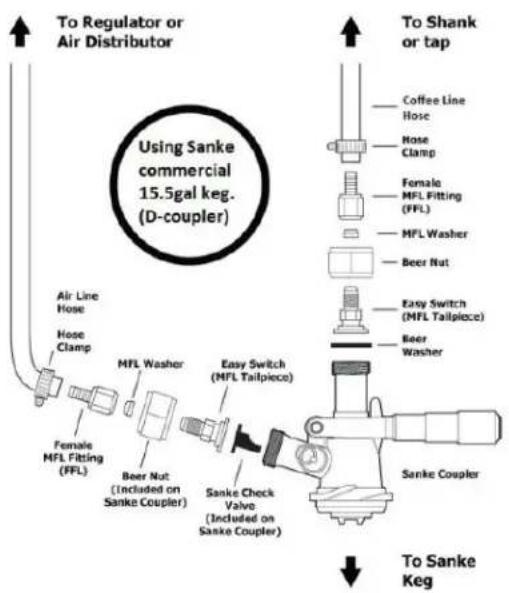
How to tap a keg with a Sanke device.
- Connect the line from the pressure source to the Female MFL Fitting using a hose clamp.
- Align the Sanke Coupler with the lugs in the beer keg and insert.
- Turn the Sanke Coupler 14 turn clockwise until tight in the keg.
- Rotate the Handle down 90° to assure the gas ports in the keg are fully opened.
- Open the pressure source
User Manual for DD Refrigerators Beverage-Air
ELECTRICAL
This is a cord-connected unit, and must be connected to its own dedicated power supply. Check the dataplate on the machine to confirm the voltage and per the dataplate use the correct fuses or HACR circuit breakers.
Note: Do not connect to GFI / GFCI outlets. Connection to that type of outlet can result in product loss due to unsafe cabinet temperature when GFI device trips from moisture.
Power Cord
This 115 volt model is equipped with a cord and 5-15P plug.
If the power cord becomes damaged, it must be replaced with the identical cord.
Follow All National and Local Codes
This unit must be grounded. Do not use extension cords and do not disable or by-pass ground prong on electrical plug.
Initial Start Up
Plug the power cord into the proper power supply.
The cabinet will soon begin to blow warm air out, and cool air will flow from the inside blower.
The cabinet temperature has been set at the factory and should not need adjustment, however if it was changed, the standard setting is 38^ F.
Cautions
Care must be taken whenever moving or servicing the unit. The refrigerant is contained in a sealed system, but if released it may be flammable.
User Manual for DD Refrigerators Beverage-Air
USING THE UNIT - DANFOSS CONTROLLER - (EXCEPT FOR THE DD24HC MODELS)
Operation is simple, just keep it connected to the correct power supply and the refrigerator will maintain the internal temperature it has been set to. Keep the door closed as much as possible to avoid unnecessary run time.
NOTE: Once the unit has been started and reaches proper storage temperatures, it may be loaded with product. No provision is made in the cabinets to quickly pull a keg of beer down to temperature. Best results are obtained when a pre-chilled keg is used. Otherwise it can take several hours to reduce the keg to the desired temperature.
The controller displays the current internal temperature.
Adjusting the set temperature lower will NOT cause the system to lower the temperature faster. When on, the refrigeration system is always operating at maximum.
The temperature was set at the factory at 38°F, but you can adjust it to your own selected temperature. 30 seconds after adjustment, the display automatically
reverts to showing the current temperature.
The Refrigerator will automatically defrost as needed, there is no set time for defrost. Push and immediately release the "melting" or defrost button for a manual defrost.
Note: Holding the defrost button in too long will shut the controller off.
The internal fan will be on when the compressor is on and when the doors are closed.
The compressor and condenser fan motor will only be on when the controller senses an increase in internal cabinet temperature passed the set point.
If equipped with glass doors, holding the SC button in will turn the cabinet light on or off.
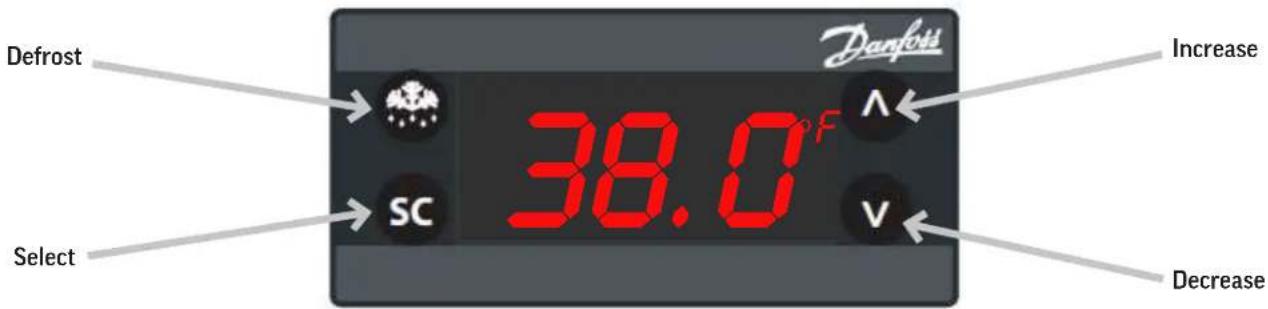
In most cases the only thing displayed will be the cabinet temperature. When something other than normal operation has occurred, a message will be shown.
| Message Displayed Why What to do | ||
| dEF | Unit is defrosting Nothing. Normal operation. | |
| H1 | Cabinet temperature too warm Confirm doors or drawers are closed. | |
| dOR | Door is open Close door, if message does not change, call for service. | |
| LER | Compressor run time too long Check doors closed. If yes, call for service. | |
| EO1, E02, E03, E04 | Sensor unplugged or has failed Call for service. | |
SEQUENCE OF OPERATIONS REFRIGERATOR - DANFOSS CONTROLLER - (EXCEPT FOR THE DD24HC MODELS)
The refrigerator operates based on the air temperature measured by the probe located at the return air.
| ON OFF | ||||
| COMPONENT OPERATION CONTROLLED ACTION CONTROLLED ACTION | ||||
| COMPRESSOR | Compressor turns on when the air temperature at the probe is above the sum of the set point +2 | The Compressor Contact is energized | Compressor turns off when the air temperature at probe is equal to or less than the set point -2 | The Compressor Contact is de-energized |
| (ERC 112 - Terminal #1) | (ERC 112 - Terminal #1) | |||
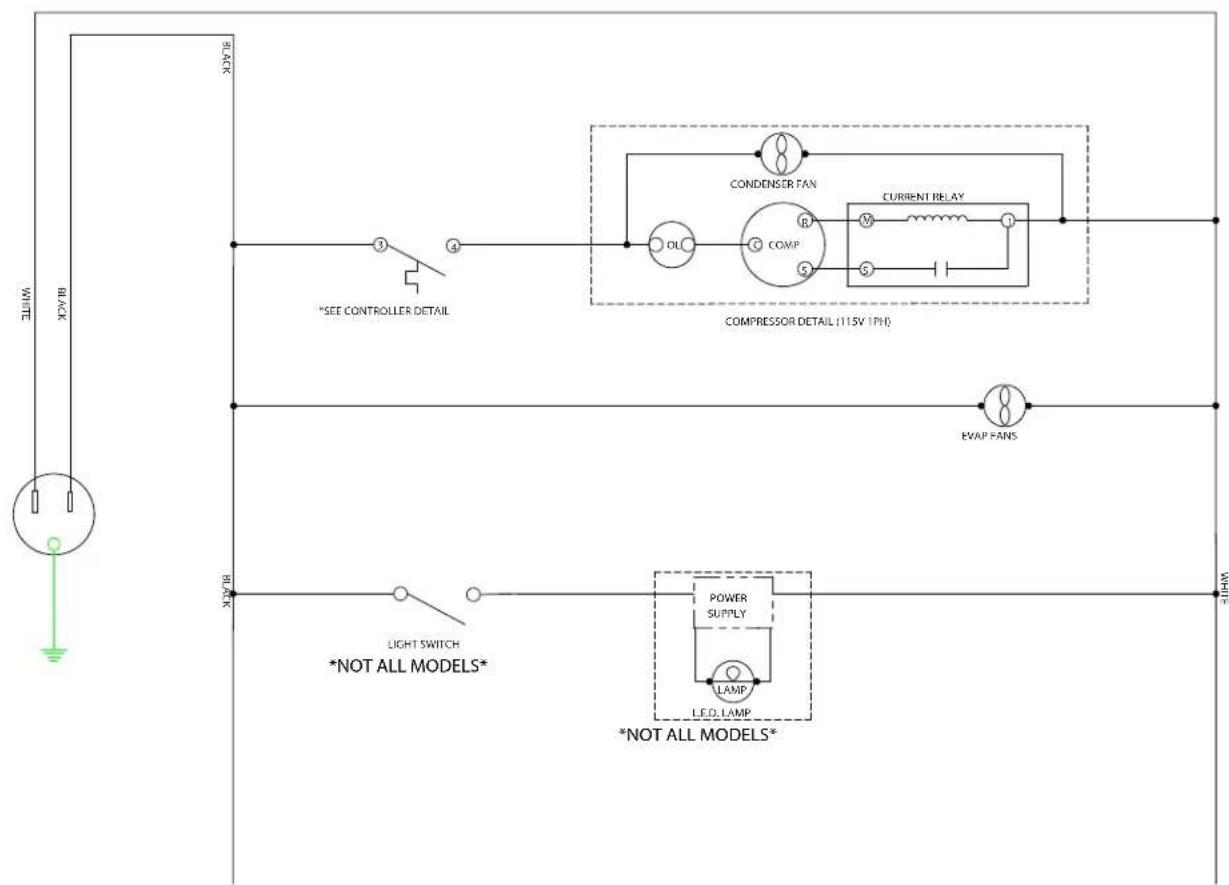
| CONDENSER FAN | The Condenser Fan turns on when the Compressor is running | The Condenser Fan is wired directly to the Compressor, not through the controller | The Condenser Fan turns off when the Compressor is not running | The Condenser Fan is wired directly to the Compressor, not through the controller |
| EVAPORATOR FAN | The Evaporator Fan runs continuously in refrigerators. When the unit is plugged in, the Evaporator Fan will run. | The Evaporator Fan is connected directly to incoming power, not through the controller. | The Evaporator Fan runs continuously. When the unit is plugged in, The Evaporator Fan will run. | The Evaporator Fan is connected directly to incoming power, not through the controller. |
| Condition | Compressor | Condenser Fan | Evaporator Fan |
| Cabinet Temp > Set point + 2 ON ON ON | |||
| Cabinet Temperature <= Set point - 2 OFF OFF ON | |||
| Defrost OFF OFF ON |
User Manual for DD Refrigerators Beverage-Air
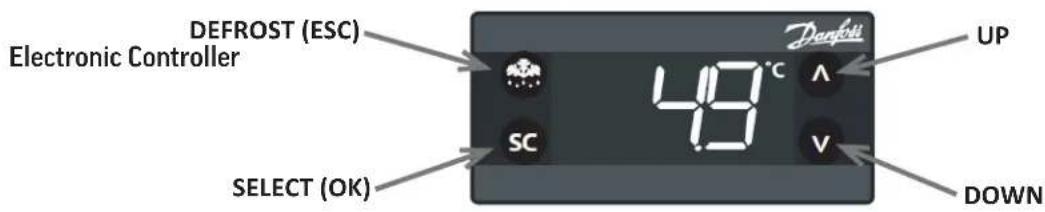
Control Panel Display
 | Defrost LED Alarm LED |  | |||
| On fixed: Defrost active On fixed: ALARM Pre | |||||
| Off: Defrost off Flashing: ALARM Silenced | |||||
| Off: No Alarm | |||||
 | Fan LED Compressor LED |  | |||
| On fixed: | Fan active | On fixed: Compressor active | |||
| Off: | Fan Off | Flashing: Delay, protection or activation blocked | |||
| Off: No Alarm | |||||
NOTE: When switched on, the instrument panel performs a lamp test for a few seconds. Keyboard Functions
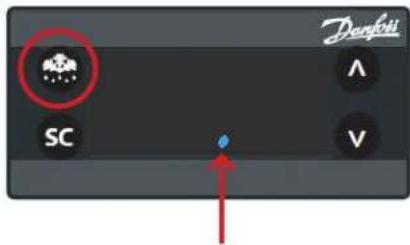
Note: When the controller is in a Standby Mode, a blue dot will be displayed as shown here. To switch out of Standby Mode, push and hold the Defrost button until the display reads ON.
User Manual for DD Refrigerators Beverage-Air

UP
Quick press and release
• Increases Set Point
Long press and release
• Increases display brightness

DOWN
Quick press and release
• Decreases Set Point
Long press and release
• Decreases display brightness

DEFROST (ESC)
Quick press and release
- Activates manual defrost
Long press and release
- Controller enter stand-by mode

SET (ENTER)
Quick press and release
- Toggles lights on/off
Long press and release
- Toggles display °F/°C
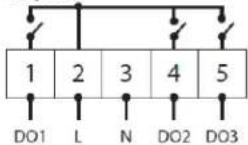
Control Panel Connections
Current temperature
1.
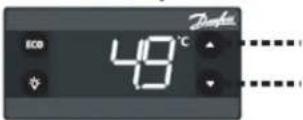
The display shows the current temperature
Flashing temperature setpoint
2.
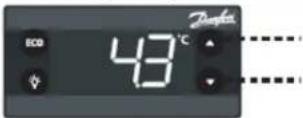
Press: UP/DOWN to adjust setup
3.
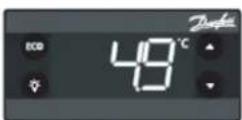
After 30 seconds, the display automatically reverts to showing the current temperature
ERC 112D
100 - 240 V AC ± 10% 50/60 Hz 0T55
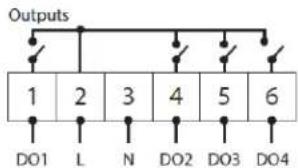
flowchart
graph TD
    A["1"] --> B["2"]
    B --> C["3"]
    C --> D["4"]
    D --> E["5"]
    E --> F["6"]
    G["DO1"] --> H["L"]
    I["N"] --> J["D02"]
    K["D03"] --> L["D04"]
Inputs
| S1 | S2 | S3 | S4 | di |
ERC 112C
100 - 240 V AC ± 10% 50/60 Hz 0T55
Outputs
Inputs
| S1 | S2 | S3 | S4 | di |
User Manual for DD Refrigerators Beverage-Air
The alarm condition is always signaled by the alarm icon 🔔.
Press any button to silence the alarm, the relative icon will continue flashing.
| Alarm Code | Trigger | Automatic Clearance | Outputs | Comments |
| "Hi" | Air temperature is higher than "ALA->Hat• for "ALA->Htd" | User configured | Blink "Hi" with the highest temperature; If configured: cut in alarm relay, beep the buzzer | High temperature alarm |
| "Lo" | Air temperature is lower than "LAt" for "Ltd" | User configured | Blink "Lo" with the lowest temperature. If configured: cut in alarm relay, beep the buzzer | Low temperature alarm |
| "Con" | Condenser temperature is too high or too low | User configured | Blink "Con". If configured: cut in alarm relay, beep the buzzer | Condenser alarm |
| "dor" | Door open for more than | Always | Blink "dor". If configured: cut in alarm relay, beep the buzzer | Door open alarm |
| "uHi" | Line voltage is higher than "Cop->uHi" | Always | Blink "uHi". If configured: cut in alarm relay, beep the buzzer | High voltage alarm |
| "uLi" | Line voltage is higher than "Cop->uLi" | Always | Blink "uLo". If configured: cut in alarm relay, beep the buzzer. | Low voltage alarm |
| "LEA" | Compressor continuous running for more than "ALA->LEA" | Always | Blink "LEA". If configured: cut in alarm relay, beep the buzzer | Leakage alarm |
| "E01" | "S1" error | Always | Blink "E01 ". If configured: cut in alarm relay, beep the buzzer | "S1" sensor failure (short or open) |
| "E02" | "S1" error | Always | Blink "E02". If configured: cut in alarm relay, beep the buzzer | "S2" sensor failure (short or open) |
| "E03" | "S1" error | Always | Blink "E03 ". If configured: cut in alarm relay, beep the buzzer | "S3" sensor failure (short or open) |
| "E04" | "S1" error | Always | Blink "E04 ". If configured: cut in alarm relay, beep the buzzer | "S4" sensor failure (short or open) |
How to Acknowledge Alarms:
NOTE: If alarm exclusion times are in progress (ALA folder of the parameter table), the alarm is not signaled.
1.
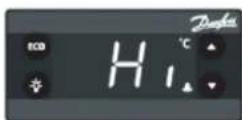
The alarm code flashing alternately with the temperature and the alarm symbol is displayed
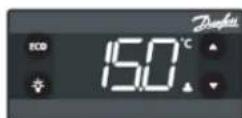
Press any button to acknowledge
2.
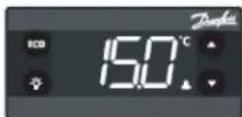
After the acknowledge the temperature is displayed and the alarm symbol remains shown
User Manual for DD Refrigerators Beverage-Air
USING THE UNIT - ELIWELL CONTROLLER - (EXCEPT FOR THE DD24HC MODELS)
Operation is simple, just keep it connected to the correct power supply and the refrigerator will maintain the internal temperature it has been set to. Keep the door closed as much as possible to avoid unnecessary run time.
NOTE: Once the unit has been started and reaches proper storage temperatures, it may be loaded with product. No provision is made in the cabinets to quickly pull a keg of beer down to temperature. Best results are obtained when a pre-chilled keg is used. Otherwise it can take several hours to reduce the keg to the desired temperature.
The controller displays the current internal temperature.
Adjusting the set temperature lower will NOT cause the system to lower the temperature faster. When on, the refrigeration system is always operating at maximum.
The temperature was set at the factory at 38°F, but you can adjust it to your own selected temperature. 30 seconds after adjustment, the display automatically reverts to showing the current temperature.
The Refrigerator will automatically defrost as needed, there is no set time for defrost. Push and immediately release the "melting" or defrost button for a manual defrost.
Note: Holding the defrost button in too long will shut the controller off.
The internal fan will be on when the compressor is on and when the doors are closed.
The compressor and condenser fan motor will only be on when the controller senses an increase in internal cabinet temperature passed the set point.
If equipped with glass doors, holding the SC button in will turn the cabinet light on or off.
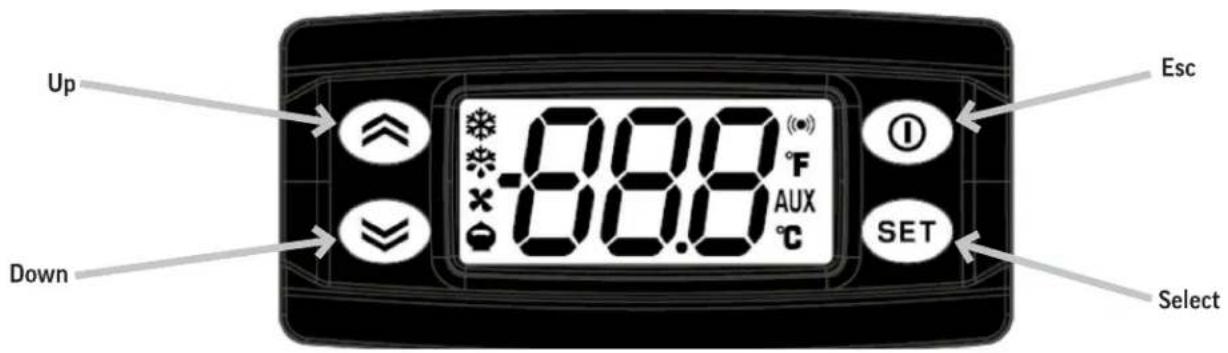
In most cases the only thing displayed will be the cabinet temperature. When something other than normal operation has occurred, a message will be shown.
| Message Displayed | Why | What to do |
| dEF | Unit is defrosting | Nothing. Normal operation. |
| AH1 | Cabinet temperature too warm | Confirm doors or drawers are closed. |
| OPd | Door is open | Close door, if message does not change, call for service. |
| E1, E2, E3, E4 | Sensor unplugged or has failed | Call for service. |
SEQUENCE OF OPERATIONS REFRIGERATOR - ELIWELL CONTROLLER - (EXCEPT FOR THE DD24HC MODELS)
The refrigerator operates based on the air temperature measured by the probe located at the return air.
| ON | OFF | |||
| COMPONENT | OPERATION | CONTROLLER ACTION | OPERATION | CONTROLLER ACTION |
| COMPRESSOR | Compressor turns on when the air temperature at the probe is above the sum of the set point + 4 | The Compressor Contact is energized | Compressor turns off when the air temperature at probe is equal to or less than the set point | The Compressor Contact is de-energized |
| (EW+978 - Terminal #1) | (EW+978 - Terminal #1) | |||
| CONDENSER FAN | The Condenser Fan turns on when the Compressor is running | The Condenser Fan is wired directly to the Compressor, not through the controller | The Condenser Fan turns off when the Compressor is not running | The Condenser Fan is wired directly to the Compressor, not through the controller |
| EVAP FAN | The Evaporator Fan turns on when the unit is powered on. | The Evaporator Fan is wired to constant power | The Evaporator Fan turns off when the unit is unplugged or put into standby. | The Evaporator Fan is wired to constant power |
| Some models will be wired to the fan relay (EW+978 - Terminal #3) | Some models will be wired to the fan relay (EW+978 - Terminal #3) | |||
| Condition | Compressor | Condenser Fan | Evaporator Fan |
| Cabinet Temp > Set point + 4 | ON | ON | ON |
| Cabinet Temperature <= Set point - 4 | OFF | OFF | ON |
| Defrost | OFF | OFF | ON |
User Manual for DD Refrigerators Beverage-Air
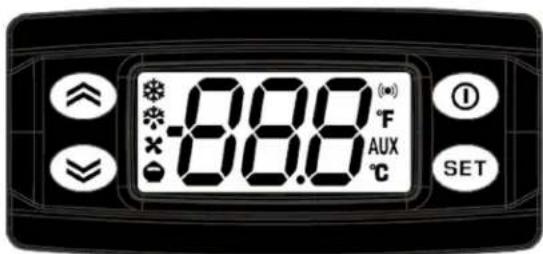
Controller Symbols
 | Reduced SET / EconomyPermanently on: Energy Saving ModeFlashing: Reduced Set ModeQuick Flashing: Access to level 2 parameters |  | AUXPermanently on: Aux ActiveFlashing: Deep Cooling Cycle Active |
 | CompressorPermanently On: Compressor ActiveFlashing: Delay, protection or blocked start-up |  | DefrostPermanently on: Defrost ActiveFlashing: Manual or D.I. activation |
 | AlarmPermanently on: Alarm ActiveFlashing: Alarm Acknowledged |  | FanPermanently on: Fans Active |
 | CelsiusPermanently On: °C Setting |  | FahrenheitPermanently on: °F Setting |
Controller Buttons
 | UpPress and release• Scrolls through menu items• Increases ValuesPress for at least 5 seconds• Activates the manual defrost |  | Stand-byPress and release• Returns to the previous menu level• Confirm parameter valuePress for at least 5 seconds• Activates the stand-by function |
 | DownPress and release• Scrolls through menu items• Decreases valuesPress for at least 5 seconds• No Function |  | Set (Enter)Press and release• Displays alarms• Opens the machine status menuPress for at least 5 seconds• Opens the programming menu• Confirms commands |
User Manual for DD Refrigerators Beverage-Air
Alarms are always indicated by the buzzer (if present) and the alarm icon. To switch off the buzzer, press and release any key, the relative icon will continue to flash.
NOTE: If alarm exclusion times have been set (see AL folder in the parameters table), the alarm will not be signaled.
| Alarm Code | Trigger | Automatic Clearance | Outputs | Comments |
| "AH1" | Pb1 probe HIGH Temperature alarm | User configured | Label AH1 displayed alternately with the actual value read by the probe Pb1 | High temperature alarm |
| "AL1" | Pb1 probe LOW Temperature alarm | User | Label AL1 displayed alternately with the actual value read by the probe Pb1 | Low temperature alarm |
| "OPd" | Door open for more than | Always | Label OPd displayed alternately with the actual value read by probe Pb1 | Door open alarm |
| "E1" | "E1" error | Always | Blink "E1". If configured: cut in alarm relay, beep the buzzer | "PB1" sensor failure (short or open) |
| "E2" | "E2" error | Always | Blink "E2". If configured: cut in alarm relay, beep the buzzer | "PB2" sensor failure (short or open) |
| "E3" | "E3" error | Always | Blink "E3". If configured: cut in alarm relay, beep the buzzer | "PB3" sensor failure (short or open) |
| "E4" | "E4" error | Always | Blink "E4". If configured: cut in alarm relay, beep the buzzer | "PB4" sensor failure (short or open) |
User Manual for DD Refrigerators Beverage-Air
USING THE DD24HC
Operation is simple, just keep it connected to the correct power supply and the refrigerator will maintain the internal temperature it has been set to. Keep the door closed as much as possible to avoid unnecessary run time.
NOTE: Once the unit has been started and reaches proper storage temperatures, it may be loaded with product. No provision is made in the cabinets to quickly pull a keg of beer down to temperature. Best results are obtained when a pre-chilled keg is used. Otherwise it can take several hours to reduce the keg to the desired temperature.
Adjusting the set temperature lower will NOT cause the system to lower the temperature faster. When on, the refrigeration system is always operating at maximum.
The internal fan will remain on when ever the unit is connected to power.
The compressor and condenser fan motor will only be on when the controller senses an increase in internal cabinet temperature passed the set point.
Before making temperature adjustments, allow the unit to stabilize for 1 hour and verify that a temperature adjustment is needed. If an adjustment is needed; turn knob one number and allow the unit to stabilize for 1 hour before rechecking the cabinet temperature. If additional adjustment is needed, repeat process to achieve the desired operation temperature.
$$ \text { Clockwise } = \text { Colder } $$
Counter Clockwise = Warmer
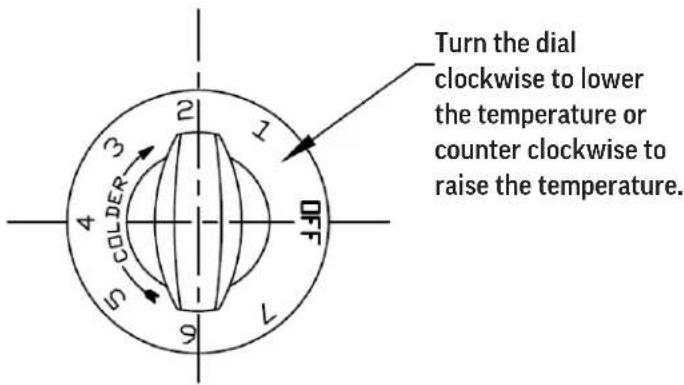
Excessive tampering with temperature control could lead to service difficulties.
* For operation above 3000-ft altitude, have thermostat adjusted by a qualified technical service representative.
Cautions
Care must be taken whenever moving or servicing the unit. The refrigerant is contained in a sealed system, but if released it may be flammable.
User Manual for DD Refrigerators Beverage-Air
The refrigerator operates based on the air temperature measured by the probe located at the return air.
| ON OFF | ||||
| COMPONENT OPERATION CONTROLLED ACTION CONTROLLED ACTION | ||||
| COMPRESSOR | Compressor turns on when the air temperature at the probe is above the sum of the set point | The Compressor Contact is energized | Compressor turns off when the air temperature at probe is equal to or less than the set point | The Compressor Contact is de-energized |
| (502-519D - Terminal #4) | (502-519D - Terminal #4) | |||
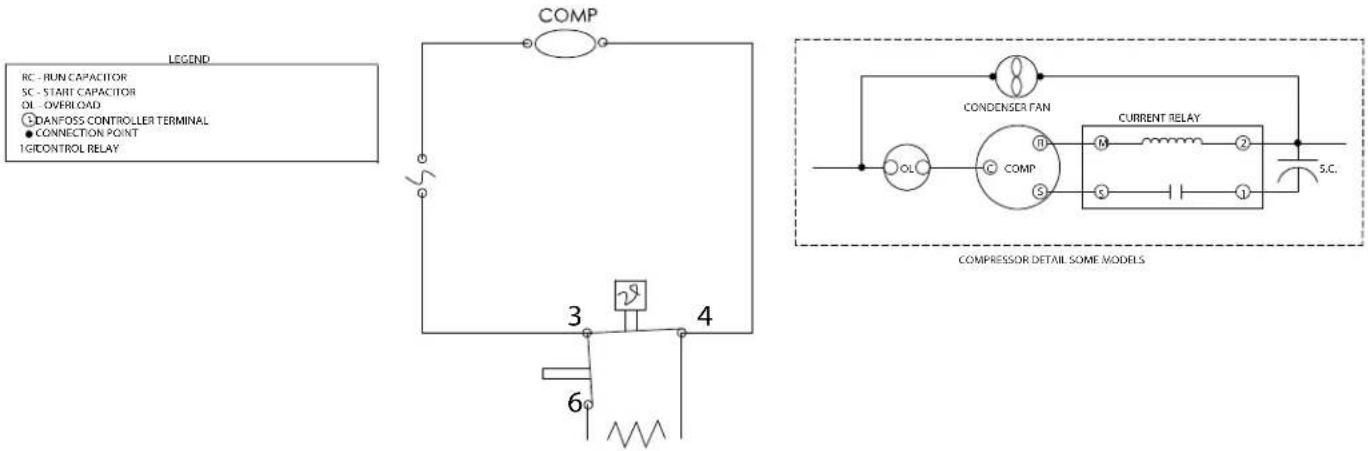
| CONDENSER FAN | The Condenser Fan turns on when the Compressor is running | The Condenser Fan is wired directly to the Compressor, not through the controller | The Condenser Fan turns off when the Compressor is not running | The Condenser Fan is wired directly to the Compressor, not through the controller |
| EVAPORATOR FAN | The Evaporator Fan runs continuously. When the unit is plugged in, the Evaporator Fan will run. | The Evaporator Fan is connected directly to incoming power, not through the controller. | The Evaporator Fan runs continuously. When the unit is plugged in, The Evaporator Fan will run. | The Evaporator Fan is connected directly to incoming power, not through the controller. |
| Condition | Compressor | Condenser Fan | Evaporator Fan |
| Cabinet Temp > Set point + 2 ON ON ON | |||
| Cabinet Temperature <= Set point - 2 OFF OFF ON | |||
| Defrost OFF OFF ON |
User Manual for DD Refrigerators Beverage-Air
CLEANING AND MAINTENANCE
Cleaning Schedule:
| Cabinet | Condenser coil | Gaskets | Routine maintenance |
| Daily wipe down | Quarterly cleaning | Daily inspection, check that hinges are tight to the cabinet. | Annually |
| Weekly interior |
Daily Exterior Cleaning
It is much easier to clean on a regular basis than to have to remove stains once they have built up.
-
Wash with a clean sponge and a mild detergent that does not contain chlorine.
-
Polish with a soft cloth, wiping with the grain.
-
Rinse with clean water.
-
Wipe weekly with stainless steel cleaner.
-
Dry with a soft cloth.
Weekly Interior Cleaning
- Remove all food, food related items and shelves. Store the food at a safe temperature.
- Disconnect power to the unit (unplug it or switch the breaker off).
- Remove all loose food particles from the inside walls, floor, door liner and ceiling.
-
Scrub all interior surfaces and door gaskets with a warm (100°F to 110°F) detergent solution and a soft scrub brush.
-
Rinse with clean water and allow to air dry.
- Return the shelves to the unit and secure them.
- Restore power.
- Return food to the unit when it has reached a safe temperature.
Condensate Drainage and Cleaning
The condensate from the evaporator and spillage from the draft arm areas are connected together to a single hose which exits the unit in the bottom front. This combined drain must be connected to a floor drain system for proper disposal of condensate and spillage.
Faucet Cleaning
The faucet should be cleaned weekly. Disassemble with the provided spanner wrench clean with hot water and detergent.
It is recommended to follow the dispenser system cleaning guidelines found in the Draught Quality Manual which can be found at, https://www.brewersassociation.org/educational-publications/draught-beer-quality-manual/
User Manual for DD Refrigerators Beverage-Air
CONDENSER CLEANING
The condenser coil is located right behind the front grille on models with end mounted condensing units, and behind the rear grille on the DD24HC model. It should be inspected once a month and cleaned as required.
- Remove power from the unit.
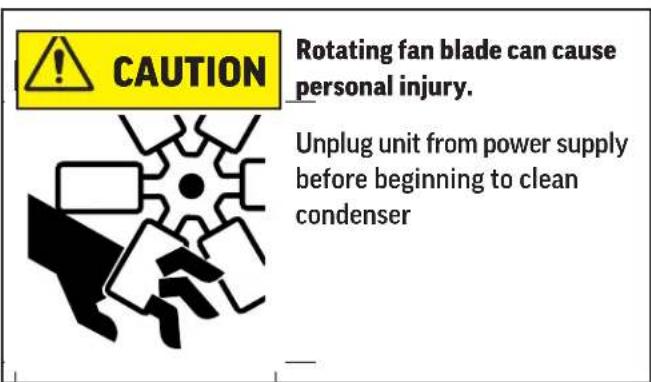
- Vacuum clean all surfaces of the condenser.
- Some coils will have an extreme layer of dirt, dust and grease covering the exterior. This should be removed with a wire brush, industrial vacuum or low pressure clean water before attempting to was with coil cleaner.
- Make sure no fins are bent or damaged in the process. If there are bent fins, carefully straighten them so that air can flow through the coils. Failure to keep the condenser coil clean will lead to poor performance, excessive power consumption and compressor failure and may result in loss of property. Failure to keep the condenser coil clean may void the limited warranty.
Chemical Cleaning
- Remove power from the unit.
- A chemical condenser cleaning can be extremely messy so it is good practice to take the unit to a low traffic area or outside to do the cleaning whenever possible.
- Remove cover grille.
- Slide out condensing assembly if necessary.
- Using the directions on the coil cleaning container, mix the cleaner and water into your sprayer.
- Starting at the top with the tip about 6 inches away, begin spraying down the coil.
- Spray side to side then go down to the next section of the coil. Repeat this until the coil is saturated.
- Allow cleaner to soak into the dirty coil for a few minutes and then begin to rinse the coil.
- Clean with a SMALL amount of water pressure. Too much pressure could cause the protective fins to fold over further blocking air flow through the coil.
- Repeat this process as needed.
- Let the unit dry off for a few minutes and replace the grille cover
User Manual for DD Refrigerators Beverage-Air
METHODS FOR CLEANING STAINLESS STEEL
| Cleaning Needed Cleaning | Agent Method of Application Affect on Finish | ||
| Smears and fingerprints | Areal 20, Lac-O-Nu, Lumin Wash O'Cedar Cream Polish, Stainless Shine. | Rub with cloth as directed on the package. | Satisfactory for use on all finishes.Provides barrier film to minimize prints. |
| Stubborn Spots and Stains, Baked-On Splatter, and Other Light Discolorations | Allchem Concentrated Cleaner. | Apply with damp sponge or cloth.Rub with damp cloth. | Use in direction of polish lines on No. 4 (polished) finish. May scratch No.2 (mill) and Nos. 7 and 8 (polished) finishes. |
| Samae, Twinkle or Cameo Copper Cleaner | Rub with damp cloth. | ||
| Grade FFF Italian pumice, whiting, or talc. | Rub with dry cloth. | ||
| Liquid NuSteelPaste NuSteel or DuBois Temp.Copper's Stainless Steel CleanerRevere Stainless CleanerHousehold cleansers, such as Old Dutch, Lighthouse, Sunbrite,Wyandotte, Bab-O, Gold Dust,Sapolio, Bon Ami, Ajax, or Comet Grade F Italian Pumice, Steel Bright, Lumin Cleaner, Zud,Restore, Sta-Clean, or Highlite.Penny-Brite or Copper-Brite. | Use small amount of cleaner.Rub with dry cloth using a small amount of cleaner.Apply with damp sponge or cloth.Rub with a damp cloth. May contain chlorine bleaches.Rinsethoroughly after use.Rub with a damp cloth.Rub with a dry cloth using a small amount of cleaner. | ||
| Heat tint or discoloration | Penny-Brite or Copper-Brite.Past NuSteel, DuBois Temp,or Tarnite. Revere Stainless Steel Cleaner. Allen Polish, Steel Bright,Tenacious Deposits,Rusty Discolorations,IndustrialAtmospheric Stains Wyandotte,Bab-O or Zud. | Rub with a dry cloth.Rub with a dry cloth or stainless steel wool.Apply with damp sponge or cloth.Rub with a damp cloth. | |
| Burnt-On Foods and Grease Fatty Acids,Milkstone (where swabbing or rubbing is not practical) | Easy-Off, De-Grease-It, 4 to 6% hot solution of such agents as trisodium phosphate or sodium tripolyphosphate or 5 to 15% caustic soda solution | Apply generous coating. Allow to stand for 10-15 minutes.Rinse.Repeated application may be necessary. | Excellent removal, satisfactory for use on all finishes. |
| Tenacious Deposits,Rusty Discolorations,IndustrialAtmospheric Stains | Oakite No. 33, Dilac Texo 12, Texo NY,Flash-Klenz, Caddy Cleaner,Turco Scale 4368 or Permag 57. | Swab and soak with clean cloth.Let stand 15 minutes or more according to directions on package, then rinse and dry. | Satisfactory for use on all finishes |
| Hard Water Spots and Scale | Vinegar.5% oxalic acid, 5% sulfamic acid, 5 to 10% phosphoric acid, or Dilac, Oakite No. 33, Texo 12, Texo N.Y. | Swab or wipe with cloth. Rinse with water and dry.Swab or soak with cloth. Let stand 10-15 minutes. Always follow with neutralizer rinse, and dry. | Satisfactory for all finishes.Satisfactory for all finishes.Effective on tenacious deposits or where scale has built up. |
User Manual for DD Refrigerators Beverage-Air
HELP
| Trouble Diagnosis for the User | ||
| Malfunction Possible Cause Likely Solution | ||
| No cooling - unit is silent | Unit not plugged in.Fuse or circuit breaker tripped.Power cord plug loose in outlet. | Connect to proper voltage circuit Replace fuse or reset breaker.Check outlet for loose connection, replace as needed |
| Unit cools but seems to be on all the time Dirty condenser Clean condenser | ||
| Space temperature too high | Dirty condenserEvaporator iced over Unit in high temperature environment | Clean condenser Defrost evaporatorReduce temperature of room |
| Space temperature too low Temperature control Adjust or replace control | ||
| Trouble Diagnosis for the Technician | ||
| No cooling - compressor does not hum Temp | control stuck in open position Replace temp | control. |
| No cooling - compressor hums but does not start | Low voltage to unit.Compressor starting system failure | Check voltage, correct as needed. Check start relay and start capacitor. See next step. |
| No cooling - compressor starts but shuts off | Compressor start relay failure Compressor start capacitor failure | Replace relay. Replace capacitor. |
| No cooling - compressor cycles on and off Overheating weak overload | Clean condenser, check fan motor and blade. Check refrigerant charge. Replace overload. | |
| Unit cools, but is slow to pull cabinet temperature down | Evaporator fan not turning | Check fan(s), on multiple fan units one fan may be turning slowly and will need to be replaced. |
| Unit cools but turns on and off frequently | No product in cabinet. Temperature control defective Refrigeration issue | Fill cabinet Replace controlHave system checked |
| Makes excessive noise | Tubing rattle Loose partsBent or broken fan blade Noisy fan motor | Check tubing for routing Check for loose components Replace fan bladeReplace fan motor |
User Manual for DD Refrigerators Beverage-Air
FOR THE SERVICE TECH - R290
Refrigeration service should only be attempted by a trained trade professional certified to work on R290 systems.
Here are some critical service items.
This list does not qualify anyone to service the unit. It is a reminder and checklist for the service tech. Keep these in mind for R290 service:
- Wire nuts are NOT to be used when changing an electrical part.
- The switches in this product are sealed, only exact replacements may be used.
- The process tubes are to be used for service access.
- Cut out (with tubing cutter) refrigeration components that are to be replaced. Do NOT un-braze.
- Because R290 can be vented into the air during service, the venting MUST be in an area free from flame or spark. It must be near an open window or door.
- A sign noting service of a system containing propane must be attached to the unit during refrigeration service.
- A combustible gas leak detector must be used to inform anyone in the area when propane is present in the air.
Other Information:
Evacuation: It is critical that a refrigeration system be leak free and internally dry. A thorough evacuation with a good vacuum pump with a micron gauge attached is the only way to ensure that the system is dry and ready for a charge of refrigerant.
Charging: The system is critically charged and the proper type and amount MUST be weighed in.
Overcharge symptoms: Unit will cool properly but the suction line temperature will be unusually cold. Compressor run time will be longer than normal.
Undercharge symptoms: Long run time, poor cooling and a hot compressor dome are the main symptoms of an undercharge.
User Manual for DD Refrigerators Beverage-Air
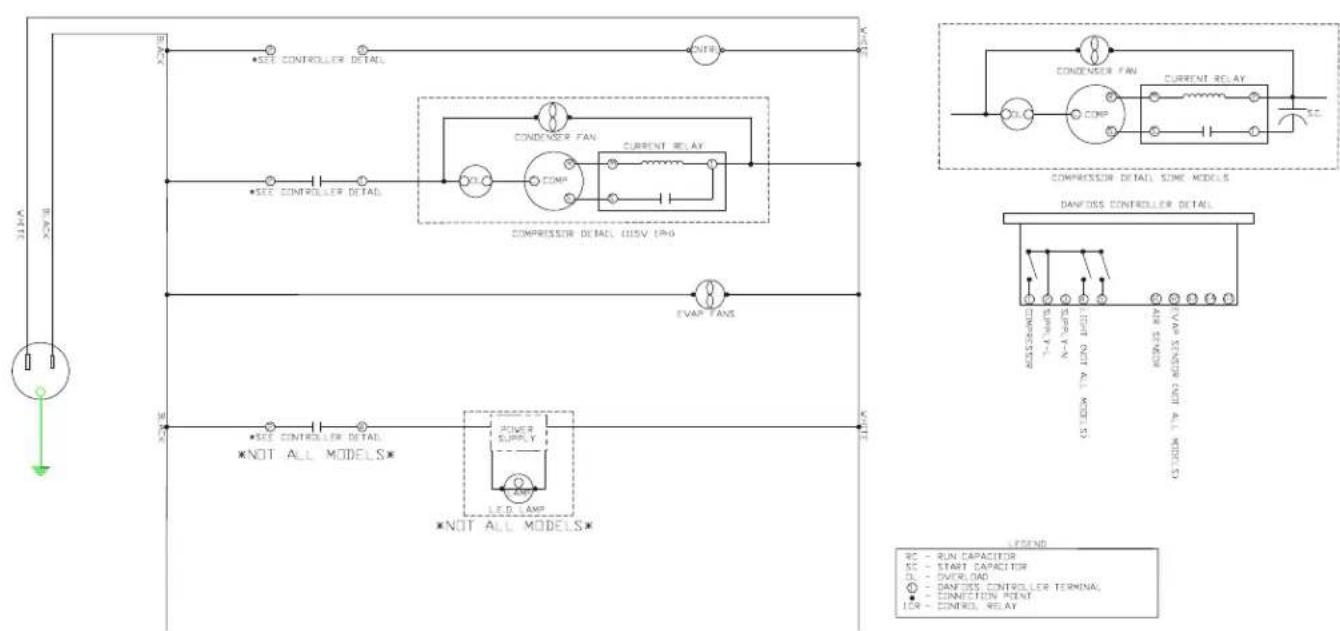
FOR THE SERVICE TECH - DANFOSS WIRING DIAGRAM - EXCLUDING DD24HC
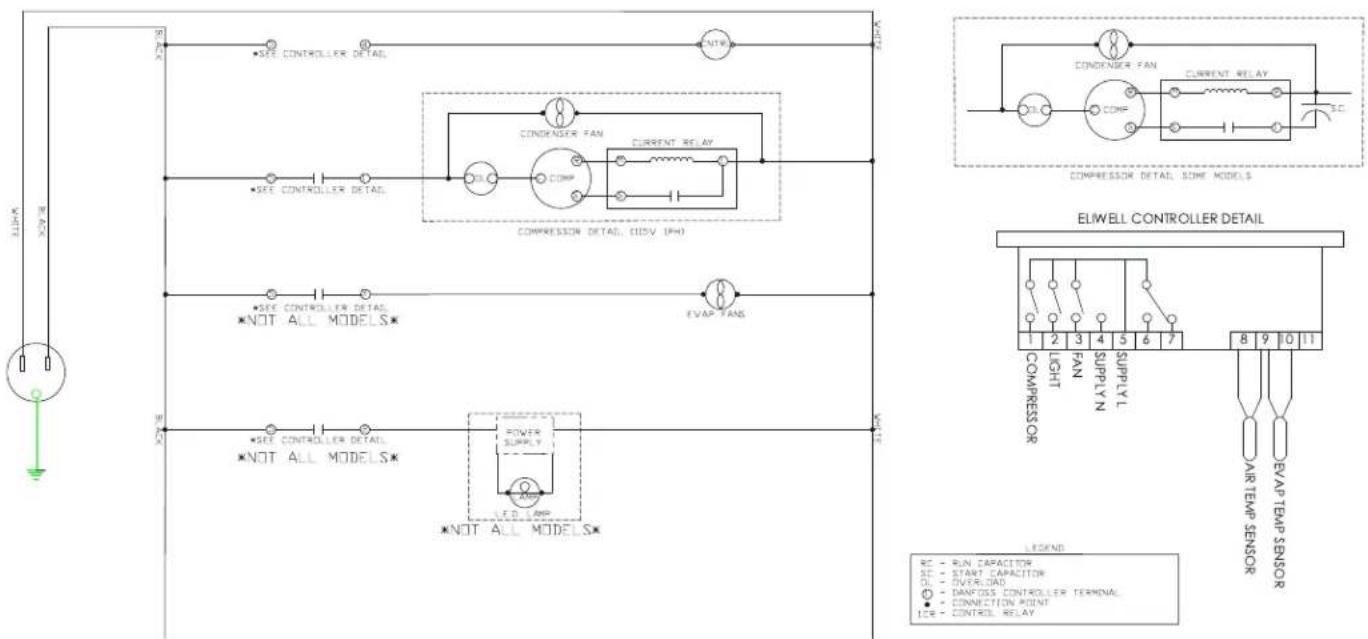
FOR THE SERVICE TECH - ELIWELL WIRING DIAGRAM - EXCLUDING DD24HC
FOR THE SERVICE TECH - WIRING DIAGRAM FOR THE DD24HC MODELS
User Manual for DD Refrigerators Beverage-Air
LIMITED WARRANTY
WARRANTY (Warranty valid in USA and Canada)
THREE (3) YEAR PARTS AND LABOR WARRANTY:
Beverage-Air Corporation warrants to the original purchaser of Beverage-Air branded equipment, including all parts thereof, that such equipment is free from defects in material and workmanship, under normal use, proper maintenance, and service as indicated by Beverage-Air installation and operation instructions, for a period of three (3) years from the date of installation, or thirty-nine (39) Months from the date of shipment from the manufacturer, whichever is earlier.
ADDITIONAL FOUR (4) YEAR COMPRESSOR PART
WARRANTY*: In addition to the warranty set forth above, Beverage-Air warrants the hermetically/semi-hermetically sealed compressor (part only) for an additional FOUR (4) years beyond the first three (3) years warranty period; not to exceed eighty-seven (87) months from the date of shipment from Beverage-Air, provided upon receipt of the compressor, manufacturer examination shows the sealed compressor to be defective. This extended warranty does not cover freight for the replacement compressor or freight for the return of the failed compressor.
* Units shipped after 03/01/2020. Previous warranty applies to units shipped prior.
EXCEPTIONS:
CT96 Models carry a one (1) year parts and labor warranty, limited to fifteen (15) months from date of shipment from Beverage-Air. These are excluded from additional compressor warranty.
SR/SF (Slate) models carry a two (2) year parts and labor warranty, limited to twenty-seven (27) months from date of shipment from the Beverage-Air.
Blast Chillers carry a three (3) year parts and labor warranty; additional two (2) years compressor part only.
Units installed in Residential applications will be not covered under this warranty. Units are intended for Commercial use only.
BEVERAGE-AIR
Also, this extended compressor-part only warranty does NOT apply to any electrical controls, condenser, evaporator, fan motors, overload switch, starting relay, capacitors, temperature control, filter/drier, accumulator, refrigeration tubing, wiring harness, labor charges, or supplies which are covered by the warranty above.
Normal wear type parts, such as light bulbs/lamps and gaskets are not covered by this warranty. For the purpose of this warranty, the original purchaser shall be deemed to mean the individual or company for who the product was originally installed.
Our obligation under this warranty shall be limited to repairing or replacing, including labor, any part of such product, which proves thus defective. Beverage-Air reserves the right to examine any product claimed to be defective.
The labor warranty shall be for self-contained units only and for standard straight time, which is defined as normal service rate time, for service performed during normal working hours. Any service requested outside of a servicer's normal working hours will be covered under this warranty at the normal rate and any additional overtime rate will be at the responsibility of the equipment purchaser.
Any part or accessory determined to be defective in the product should be returned to the company within thirty (30) days under the terms of this warranty and must be accompanied by a record of the cabinet model, serial number, and identified with a return material authorization number (RMA#) issued by the manufacturer.
Special installation/applications, including remote locations, are limited in coverage by this warranty. Any installation that requires extra work, and/or travel, to gain access to the unit for service is the sole responsibility of the equipment purchaser.
Improper operation resulting from factors, including but not limited to, improper or negligent cleaning and maintenance, low voltage conditions, inadequate wiring, outdoor use (unless otherwise specified) and accidental damage are no manufacturing defects and are strictly the responsibility of the purchaser.
User Manual for DD Refrigerators Beverage-Air
LIMITED WARRANTY (CONTINUED)
With the exception of Blast Chillers product is designed for maintaining temperature and not bringing food to a desired temperature therefore cannot be held responsible for this function under warranty.
Units must be in a conditioned environment or warranty will be void.
Condensing coils must be cleaned at regular intervals. Failure to do so can cause compressor malfunction and will void warranty. Although cleaning requirements vary in accordance with operation of various products, Beverage-Air recommends a minimum monthly cleaning.
NO CLAIMS CAN BE MADE AGAINST THIS WARRANTY FOR SPOILAGE OF FOOD. PRODUCTS, LOSS OF SALES OR CONSEQUENTIAL DAMAGES.
THE FOREGOING WARRANTIES ARE EXPRESSLY GIVEN IN LIEU OF ALL OTHER WARRANTIES, EXPRESS, IMPLIED, OR STATUTORY, INCLUDING THE IMPLIED WARRANTIES OF MERCHANTABILITY AND FITNESS FOR A PARTICULAR PURPOSE, WHICH ARE HERBY DISCLAIMED, ALL OTHER OBLIGATIONS OR LIABILITIES ON OUR PART, AND WE NEITHER ASSUME, NOR AUTHORIZE ANY OTHER PERSON TO ASSUME FOR US, ANY OBLIGATION OR LIABILITY IN CONNECTION WITH THE SALE OF SAID REFRIGERATION UNITS OR ANY PARTS THERE OF.
This warranty shall not be assignable and shall be honored only in so far as the original purchaser. This warranty does not apply outside the limits of the United States of America and Canada, nor does it apply to any part that has been subject to misuse, neglect alteration, accident, or to any damage caused by transportation, flood, fire, acts of terrorism, or acts of God.
LIMITATION OF LIABILITY:
Beverage-Air Corporation or their affiliates shall not be liable for any indirect, incidental, special or consequential damages, or losses of a commercial nature arising out of malfunction equipment or its parts components thereof, as a result of defects in material or workmanship.
THE ORIGINAL OWNER'S SOLE AND EXCLUSIVE REMEDY AND BEVERAGE-AIR'S SOLE AND EXCLUSIVE LIABILITY SHALL BE LIMITED TO THE REPAIR OR REPLACEMENT OF PARTS OR COMPONENTS CONTAINED IN THE EQUIPMENT IDENTIFIED ABOVE WHICH UNDER NORMAL USE AND SERVICE MALFUNCTION AS A RESULT OF DEFECTS IN MATERIAL OR WORKMANSHIP, SUBJECT TO THE APPLICABLE PROVISIONS AND LIMITATIONS STATED ABOVE.
Warranty Registration
Register your product online at beverage-air.com/parts-service or fill out and mail the form below.
Cabinet Model Number: Date Of Installation:
Cabinet Serial Number: ____
Location Of Product
Business Name: ____
Business Street:
Business City: ____ State: ____ Postal Code: ____
Mail to: Beverage-Air, 3779 Champion Blvd, Winston-Salem, NC 27105
Rev. 04/22
- INSTALLATION AND OPERATING INSTRUCTIONS for all Hydrocarbon DD Direct Draw Dispenser Models
- User Manual for DD Refrigerators Beverage-Air
- WELCOME
- Important Information
- SAFETY
- CAUTION
- Use: When using this unit, please:
- Maintenance
- Do NOT:
- Do ALWAYS
- Important Information to Add
- WARNING
- Limitations
- Agency Approvals
- AIRFLOW
- Placement
- CLEARANCE
- UNPACKING AND SET UP
- Uncrating
- Skid Removal and Caster Attachment
- UNPACKING AND SET UP (CONTINUED)
- Leveling:
- Installation of Draft Arms
- CO2 Line Routing
- KEG INSTALLATION
- ELECTRICAL
- Power Cord
- Follow All National and Local Codes
- Initial Start Up
- Cautions
- USING THE UNIT - DANFOSS CONTROLLER - (EXCEPT FOR THE DD24HC MODELS)
- SEQUENCE OF OPERATIONS REFRIGERATOR - DANFOSS CONTROLLER - (EXCEPT FOR THE DD24HC MODELS)
- UP
- DOWN
- DEFROST (ESC)
- SET (ENTER)
- Control Panel Connections
- USING THE UNIT - ELIWELL CONTROLLER - (EXCEPT FOR THE DD24HC MODELS)
- SEQUENCE OF OPERATIONS REFRIGERATOR - ELIWELL CONTROLLER - (EXCEPT FOR THE DD24HC MODELS)
- USING THE DD24HC
- CLEANING AND MAINTENANCE
- Daily Exterior Cleaning
- Weekly Interior Cleaning
- Condensate Drainage and Cleaning
- Faucet Cleaning
- CONDENSER CLEANING
- Chemical Cleaning
- FOR THE SERVICE TECH - R290
- Here are some critical service items.
- Other Information:
- FOR THE SERVICE TECH - DANFOSS WIRING DIAGRAM - EXCLUDING DD24HC
- FOR THE SERVICE TECH - ELIWELL WIRING DIAGRAM - EXCLUDING DD24HC
- FOR THE SERVICE TECH - WIRING DIAGRAM FOR THE DD24HC MODELS
- LIMITED WARRANTY
- ADDITIONAL FOUR (4) YEAR COMPRESSOR PART
- EXCEPTIONS:
- BEVERAGE-AIR
- LIMITED WARRANTY (CONTINUED)
- Warranty Registration
- Location Of Product
Brand : Beverage-Air
Model : DD78HC-1-S
Category : Beer dispenser