
SKS-M1J-G - Sound alarm PATLITE - Free user manual and instructions
Find the device manual for free SKS-M1J-G PATLITE in PDF.


| Brand | PATLITE |
| Model | SKS-M1J-G |
| Product Type | Sound Alarm / Audible Signal Device |
| Rated Voltage | 24 V DC (typical) |
| Current Consumption | Approx. 50 mA |
| Sound Output | ≥ 85 dB at 1 m |
| Operating Temperature | -10°C to +50°C |
| Enclosure Material | Flame-retardant resin |
| Dimensions (W x H x D) | Approx. 50 x 80 x 40 mm |
| Weight | Approx. 70 g |
| Mounting Type | Surface mount or panel mount |
| Connection | Screw terminals |
| Protection Rating | IP54 (dust and splash water protected) |
| Sound Type | Continuous or intermittent tone |
| Application | Industrial warning, machinery alarm, status indication |
| Maintenance | Periodic cleaning with dry cloth; avoid solvents |
| Safety | Use within rated voltage; do not expose to extreme humidity |
| Spare Parts | Contact PATLITE for replacement units |
| Manual Availability | Free PDF download from notice-facile.com |
Frequently Asked Questions - SKS-M1J-G PATLITE
User questions about SKS-M1J-G PATLITE
0 question about this device. Answer the ones you know or ask your own.
Ask a new question about this device
Download the instructions for your Sound alarm in PDF format for free! Find your manual SKS-M1J-G - PATLITE and take your electronic device back in hand. On this page are published all the documents necessary for the use of your device. SKS-M1J-G by PATLITE.
USER MANUAL SKS-M1J-G PATLITE
INSTRUCTION MANUAL Rotating Beacons
TYPE SKS / SKH / SKP
Multi-function Beacons
TYPE SF08 / SF10
Flashing Beacons
TYPE SL08 / SL10 / SL15
Notice to Customer
Thank you very much for purchasing our Patite products.
- Request the installation and wiring be performed by a professional apparatus if construction work is involved.
- Prior to installation, read this manual thoroughly before using this
product to ensure correct use.
- In addition, please store this manual for future performing maintenance repairs or instructions
•For pensions and repair parts, please visit our website
(https://www.pallite.com).
- If there are any questions concerning this product, refer to the contact information at the end of the following contact information
Information at the end of this document and contact your nearest BATLIFE Sales Recommendation
PALENE GREEN REP
1 Read this First (Safety Precautions)
Warning Failure to observe the following may result in
Warning death or serious injury.
- To prevent from short-circuits or damage, observe the following:
- Be sure the power is disconnected before replacement or repair, including the replacement at the fuse.
- Use this product in a properly restrained condition. (Replace or repair if the
gctbe, case, cts. are damaged.)
■ If following the product, it includes construction costs, ask a special case in order to several fees, or personnel injury.
- When this product is used for security purposes, it should be inspected only.
In case a malfunction should occur, it is recommended that you use this product together with other non-ship procedures.
- After installation, do not use this product to climb up onto the equipment with.
Failure to comply will result in product damage and/or failing off the machinery.
Caution Failure to comply with the following points may
Caution result in injury, physical loss or damage.
- Be sure to put a fuse in the wiring circuit between the power source and
equipment for protection. If a fuse is not added, it may result in product and/or equipment failure.
- Be sure to prevent electrostatic damage due to discharge when working with
this product for wiring, exchanging units, selling up parameters, etc. by
The following side: which they do your body, he:
Do not disassessments of citizen during operations
2 Model Number Configuration
- SE4 SI Models
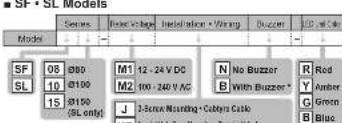
R1
2018年1月1日
KT
[1] J. H. G. M. L. B. E. R.
• 050 • 12 - 24 V DC • 2-point hole type mounting - Tammal blocks
■ Terminal block type T KT

Accessory List
| Name/Model | QTY | |
| SF□□□□KT/SL□□□□KT | Mounting Bracket, Waterproof Sheet | 1 |
| SF08-□□J5L06-□□J5KS Model | M4 Nut, Plain Washer | 3 |
| SF 10-□□J5L10-□□J5KII Model | M5 Nut, Plain Washer | 3 |
| SL-15-□□J5KP Model | M8 Nut, Plain Washer | 3 |
4 Installation

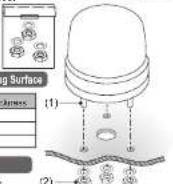
■ 3-Screw Mounting Type J T
(1) Insert the bolts of the beacon into Installation Example
the holes of the mounting surface.
(2) Use the nuts and washer
(accessory) to secure in place
Maximum Board Thickness of Mounting Surface

Installation Dimensions
Refer to the "Installation Manual"

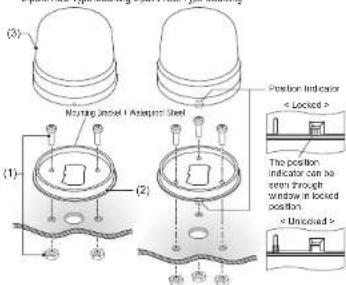
■ 2-point Hole Type Mounting (SF • SL Models)
3-point Hole Type Mounting (SL15 Model Only) RT
(1) Use the screws or balls, nuts, to secure the mounting bracket
(accessory) to the mounting surface. (installation comms and nuts are not included with this product
(Installation screws and nuts are not included within this product. Binding head screws or pan head screws are recommended.)
| Model | Screw Hole Depth of Mounding Bracket | Nominal Diameter |
| SF00*SL00 | 4.5 mm | M4 |
| SF10*SL10 | 5.7 mm | M5 |
| SL15 | 4.8 mm | M8 |
(2) Check that the O-ring is not twisted
(3) Align the main unit of product with the positioning Indicator and turn it clockwise to lock it.
Installation Example
2-point Hole Type Mounting Special Hole Type Mounting
Installation Dimensions
Refer to the "Installation Manual"
Caution • Use a soft dust moistened with water to clean ≥ globe in case. (Can use 2 inches, 1000m, 600m or 400 m)
Note The type with a buzzer, if the buzzer opening is splashed with water, the Sound Pressure Level may drop.
5 Wiring
Caution • Make sure the power is OFF before wring. A short circuit
may damage Internal circuits.
• Ensure a damage.
• Do not pull the wire, or stuff it inside of this case.
- Be sure the wiring is done properly. Any mistake in wiring may result in damage
- In the M2 mode, do not perform blinking control by turning the power supply ON/OFF. Any mislose to win up may result in damage.
- Do not apply a voltage to the common wire. (M1 type)
Do not apply a voltage to any wire other than the power supply wire. (M2 type)
• Do not expose the wiring from the device. If screen is applied to the wire, the
wiring may be disconnected, resulting in a short circuit or an electric shock.
- Use either a Contact Switch or Contact Relay for External Contacts that power
supply MW of 31°, 21°, 30°, 40° and 50°/24° MW of 21° (bpm). Partite company may result in few product malfunction.
Notice • The protection rating does not include the Cavitye Cable
erds. If too ends of the it are a master with writer or grooved to draw or
In the case of the water is described with water of water, and it has a consideration, refer to the indications below to draw the wire ends for water.
The following table is in the following table:
- Connect the it ends in a location which will not expose the ends to water.
- Use filters, such as silicon, etc., to seal the ends.

[External contact capacity of power supply who]
| M1 | M2 | |
| Current Capacity (B) | 3A or more | 1A or more |
[External contact capacity of signal wire and buzzer wire]
SE + SE - Ncdnke
| M1 | M2 | |
| Current Capacity (Is) | 10 mA or more | 10 mA or more |
| Wheat and Voltage (Vs) | 20 V or more | 20 V or more |
| Leakage Curver (L) | 0.1 mA or less | 0.1 mA or less |
- When using an NPN open collector transistor
SK Model
| M1 | M2 | |
| Current Capacity (kV) | 0.5 A or more | 0.5 A or more |
| Voltage Voltage (Vdc) | 35 V or more | 20 V or more |
Fuer Rating 250V1A
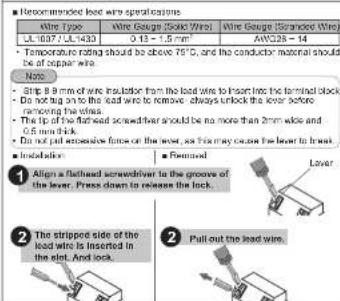
Wire Type / Wire Gauge
Wire Type : UL2454
Wm Cen. 1 M1 A/W022
二
M2 Power Supply Wm AWG18
Exciting Power Supply wire: A77521
Wiring Example
Refer to the "Installation Manual".
Terminal Block Wiring
6 Specifications
| Model | Rated voltage |
| SF08-M1,SF1C-M1 | 12 - 24 V DC (Non-polar) |
| SF08-M2,SF1C-M2 | 100 - 240 V AC (5060 Hz) |
| SL08-M1,SL10-M1,SL15-M1 | 12 - 24 V DC (Non-polar) |
| SL08-M2,SL10-M2,SL15-M2 | 100 - 240 V AC (5060 Hz) |
| SKS M1/SKH M1/SKP-M1J | 12 - 24 V DC (Non-polar) |
| SKS-M2/SKH-M2/SKP-M2J | 100 - 240 V AC (5060 Hz) |
| SKH-M1T | 12 - 24 V DC (Non-polar) |
| SKH-M2T | 100 - 240 V AC (5060 Hz) |
Conformity Standards
• EMC Directive (EN61000-9-4, EN61000-9-2)
• RoHS Directive (ENSC581
• CLHIS, CBA-C22.2 No. 14 (File No. EXTRIM) • ECG-Part 15 Schmid B Class 0
This product conforms to EN standards and shows the CE Marking. This product has been tested and found to comply with the limits for a Class A device, pursuant to EMC DIRECTIVE. There limits are designed to provide reasonable protection against harmful references when the equipment is accessed in a commercial environment. This product must not be used in residential stress.
*Community to FCC Compliance* This equipment has been tested and found to comply with the limits for a Class A digital device, pursuant to Part 16 of the FCC Rules. These limits are designed to provide reasonable protection against harmful interference when the equipment is operated in a commercial environment. The equipment generates, uses, and can radiate radio frequency energy and, if not installed and uses in accordance with the instruction manual, may cause harmful interference to radio communications. Operation of this equipment in promotional area is likely to cause harmful interference in which case the user will be required to correct the interference at his own expense.
(Note: • Dimensions set specifications may change without notice due to
• PATLITE and the PATLITE logo is a trademark, or registered trademark of the PATLITE Corporation of Japan and each country.
computer for EU; PATLITE Europe GmbH Am Scekremnas 8, D-85399 Halbengmacs, Germany
- INSTRUCTION MANUAL Rotating Beacons
- Notice to Customer
- Read this First (Safety Precautions)
- Warning Failure to observe the following may result in
- Caution Failure to comply with the following points may
- Caution result in injury, physical loss or damage.
- Model Number Configuration
- - SE4 SI Models
- KT
- ■ Terminal block type T KT
- Accessory List
- Installation
- ■ 3-Screw Mounting Type J T
- Maximum Board Thickness of Mounting Surface
- Installation Dimensions
- ■ 2-point Hole Type Mounting (SF • SL Models)
- Installation Example
- Wiring
- Wire Type / Wire Gauge
- Wiring Example
- Specifications
Brand : PATLITE
Model : SKS-M1J-G
Category : Sound alarm