
AC19MS - Air conditioner Campomatic - Free user manual and instructions
Find the device manual for free AC19MS Campomatic in PDF.


| Product Type | Air Conditioner |
| Model | AC19MS |
| Brand | Campomatic |
| Cooling Capacity | 19000 BTU/h |
| Energy Efficiency Ratio (EER) | 11.0 |
| Power Supply | 220-240 V, 50 Hz |
| Power Consumption (Cooling) | 1800 W |
| Airflow (High Speed) | 350 m³/h |
| Noise Level (Indoor) | 52 dB(A) |
| Dimensions (W x H x D) | 46 cm x 35 cm x 45 cm |
| Weight | 30.5 kg |
| Refrigerant | R32 |
| Operating Modes | Cool, Fan, Dehumidify |
| Fan Speeds | 3 (Low, Medium, High) |
| Remote Control | Yes (with batteries included) |
| Timer | 24-hour programmable |
| Air Filter | Washable mesh filter |
| Self-Cleaning Function | Yes |
| Sleep Mode | Yes |
| Safety Protection | Overheat protection, anti-icing, compressor delay |
| Installation Type | Window or through-wall |
| Maintenance | Clean filter every 2 weeks; drain water if used in dehumidify mode |
| Warranty | 2 years (parts and labor) |
Frequently Asked Questions - AC19MS Campomatic
User questions about AC19MS Campomatic
0 question about this device. Answer the ones you know or ask your own.
Ask a new question about this device
Download the instructions for your Air conditioner in PDF format for free! Find your manual AC19MS - Campomatic and take your electronic device back in hand. On this page are published all the documents necessary for the use of your device. AC19MS by Campomatic.
USER MANUAL AC19MS Campomatic
Before using your air conditioner, please read this manual carefully and keep it for future reference.
SPLIT- TYPE ROOM AIR CONDITIONER
USER'S MANUAL
Read This Manual
Inside you will find many helpful hints on how to use and maintain your air conditioner properly. Just a little preventative care on your part can save you a great deal of time and money over the life of your air conditioner. You'll find many answers to common problems in the chart of troubleshooting tips. If you review the chart of Troubleshooting Tips first, you may not need to call for service.
CONTENTS
SOCIABLE REMARK
Sociable remark....2
SAFETY PRECAUTIONS
Warning 3
Caution 4
OPERATING INSTRUCTIONS
Parts names .... 5
Operating temperature....6
Manual operation 6
Airflow direction control 7
How the air conditioner works 8
CARE AND MAINTENANCE
Care and maintenance 9
OPERATION TIPS
Operation tips ....11
TROUBLESHOOTING TIPS
Troubleshooting tips 13

CAUTION
- Contact an authorised service technician for repair or maintenance of this unit.
- Contact the installer for installation of this unit.
- The air conditioner is not intended for use by young children or invalids without supervision.
- Young children should be supervised to ensure that they do not play with the air conditioner.
- If the power cord is to be replaced, replacement work shall be performed by authorised personnel only.
- Installation work must be performed in accordance with the national wiring standards by authorised personnel only.
When using this air conditioner in the European countries, the follow informations must be followed:
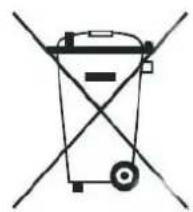
DISPOSAL: Do not dispose this product as unsorted municipal waste. Collection of such waste separately for special treatment is necessary.
It is prohibited to dispose of this appliance in domestic household waste.
For disposal, there are several possibilities:
A) The municipality has established collection systems, where electronic waste can be disposed of at least free of charge to the user.
B) When buying a new product, the retailer will take back the old product at least free of charge.
C) The manufacture will take back the old appliance for disposal at least free of charge to the user.
D) As old products contain valuable resources, they can be sold to scrap metal dealers.
Wild disposal of waste in forests and landscapes endangers your health when hazardous substances leak into the ground-water and find their way into the food chain.
natural_image
Simple line drawing of a trash bin with crossed lines indicating no waste or discharge (no text or symbols)
To prevent injury to the user or other people and property damage, the following instructions must be followed. Incorrect operation due to ignoring of instructions may cause harm or damage. The seriousness is classified by the following indications.
| WARNING | This symbol indicates the possibility of death or serious injury. |
| CAUTION | This symbol indicates the possibility of injury or damage to property. |
■ Meanings of symbols used in this manual are as shown below.
| Never do this. | |
| Always do this. |
WARNING
Connect with the power properly.
- Otherwise, it may cause electric shock or fire due to excess heat generation.
Do not modify power cord length or share the outlet with other appliances
- It may cause electric shock or fire due to heat generation.
Always ensure effective earthing.
- No earthing may cause electric shock.
○ Disconnect the power if strange sounds, smell, or smoke comes from it.
- It may cause fire and electric shock.
Use the correctly rated breaker or fuse.
- There is risk of fire or electric shock.
Ventilate room before operating air conditioner if there is a gas leakage from another appliance.
- It may cause explosion, fire and, burns.
Do not operate or stop the unit by switching on or off the power.
- It may cause electric shock or fire due to heat generation.
Do not operate with wet hands or in damp environment.
- It may cause electric shock.
Do not allow water to run into electric parts.
- It may cause failure of machine or electric shock.
Do not drink water drained from air conditioner.
- It contains contaminants and could make you sick.
Do not use the power cord close to heating appliances.
- It may cause fire and electric shock.
Do not damage or use an unspecified power cord.
- It may cause electric shock or fire.
Do not direct airflow at room occupants only.
● This could damage your health.
Always install circuit breaker and a dedicated power circuit.
- No installation may cause fire and electric shock.
Do not open the unit during operation.
- It may cause electric shock.
Do not use the power cord near flammable gas or combustibles, such as gasoline, benzene, thinner, etc.
- It may cause an explosion or fire.
Do not disassemble or modify unit.
- It may cause failure and electric shock.
CAUTION
When the air filter is to be removed, do not touch the metal parts of the unit.
- It may cause an injury.
Do not clean the air conditioner with water.
● Water may enter the unit and degrade the insulation. It may cause an electric shock.
Ventilate the room well when used together with a stove, etc.
- An oxygen shortage may occur.
When the unit is to be cleaned, switch off, and turn off the circuit breaker.
- Do not clean unit when power is on as it may cause fire and electric shock, it may cause an injury.
Do not put a pet or house plant where it will be exposed to direct air flow.
- This could injure the pet or plant.
Do not use for special purposes.
- Do not use this air conditioner to preserve precision devices, food, pets, plants, and art objects. It may cause deterioration of quality, etc.
Stop operation and close the window in storm or hurricane.
● Operation with windows opened may cause wetting of indoor and soaking of household furniture.
Do not place obstacles around air-inlets or inside of air-outlet.
- It may cause failure of appliance or accident.
① Turn off the main power switch when not using the unit for a long time.
- It may cause failure of product or fire.
Do not use strong detergent such as wax or thinner. Use a soft cloth for cleaning.
● Appearance may be deteriorated due to change of product color or scratching of its surface.
Ensure that the installation bracket of the outdoor appliance is not damaged due to prolonged exposure.
- If bracket is damaged, there is concern of damage due to falling of unit.
① Always insert the filters securely. Clean filter once every two weeks.
● Operation without filters may cause failure.
Do not place heavy object on the power cord and take care so that the cord is not compressed.
- There is danger of fire or electric shock.
Use caution when unpacking and installing. Sharp edges could cause injury.
If water enters the unit, turn the unit off and disconnect the power, contact a qualified service technician.
Parts names
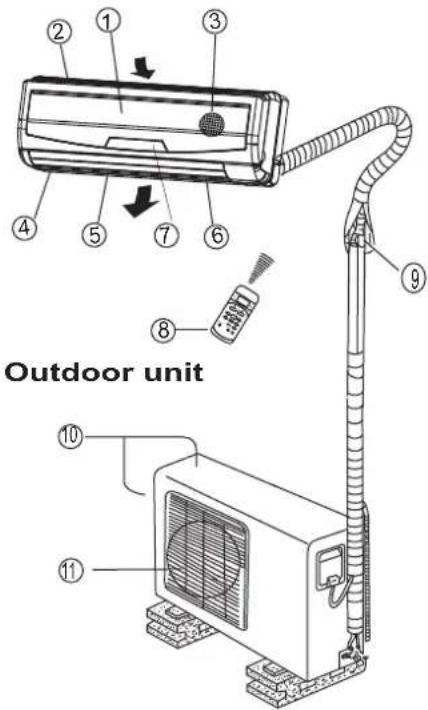
Indoor unit
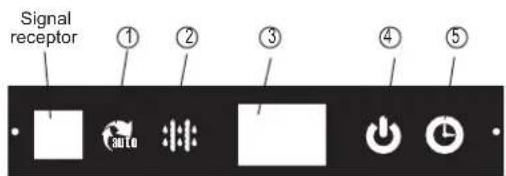
Indicator Lights on Display panel
The display panel on the indoor unit would look like one of the following:
Indoor unit
- Front panel
- Air inlet
- Air filter
- Air outlet
- Horizontal air flow grille
- Vertical air flow louver
- Display panel
- Remote controller
Outdoor unit
- Connecting pipe, drain hose
- Air inlet (side and rear)
- Air outlet
NOTE:
All the pictures in this manual are for explanation purpose only. Your air conditioner may be slightly different. The actual shape shall prevail.
① AUTO indicator:
This indicator illuminates when the air conditioner is in AUTO operation.
② DEFROST Indicator
(For cooling& heating model only):
This indicator illuminates when the air conditioner starts defrosting automatically or when the warm air control feature is activated in heating operation.
③ DIGITAL DISPLAY:
Displays the current setting temperature when the air conditioner is in operation.
④ OPERATION indicator:
The indicator flashes once every second after power is on and illuminates when the air conditioner is in operation.
⑤ TIMER indicator:
The indicator illuminates when TIMER is set ON/OFF.
NOTE: This manual does not include Remote Controller Operations, see the <
Operating temperature
| ModeTemperature | Cooling operation | Heating operation | Drying operation |
| Room temperature | 17°C~ 32°C | 0°C~ 30°C | 10°C~32°C(<21000Btu/h models) |
| 17°C~32°C(>21000Btu/h models) | |||
| Outdoor temperature | 18°C~ 43°C | -7°C~ 24°C | 11°C~43°C(<21000Btu/h models) |
| (-5°C~ 43°C:For the models with low temperature cooling system) | 18°C~43°C(>21000Btu/h models) | ||
| (21 °C~ 52°C:For special tropical models | 21 °C~ 52°C(For special tropical models) | ||
| NOTE:1. If air conditioner is used outside of the above conditions, certain safety protection features may come into operation and cause the unit to function abnormally.2. Room relative humidity less than 80%. If the air conditioner operates in excess of this figure, the surface of the air conditioner may attract condensation. Please sets the vertical air flow louver to its maximum angle (vertically to the floor), and set HIGH fan mode.3. Optimum performance will be achieved within these operating temperature. | |||
Manual operation
Manul operation can be used temporarily in case the remote controller is disable or maintenance necessary.
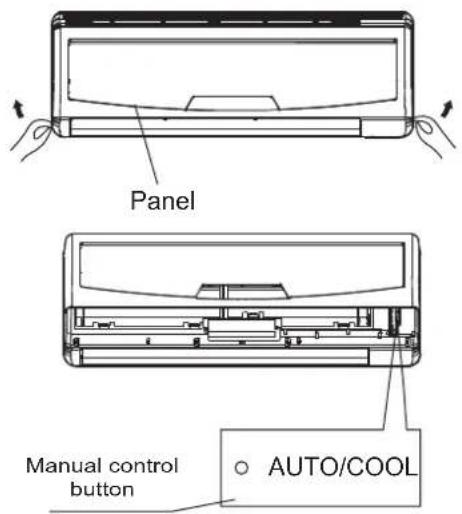
① Open and lift the front panel up to an angle until it remains fixed with a clicking sound.
② Push the button until the AUTO indicator is lit, the unit will work in forced AUTO mode (the default setting temperature is 24^ C).
③ Close the panel firmly to its original position.
CAUTION:
- Once you push the manual button, the operation mode is shifted in an order as: AUTO, COOL, OFF.
● This is used for testing purposes only. - To restore the remote controller operation, use the remote controller directly.
Airflow direction control
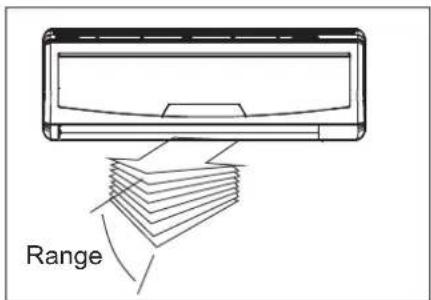
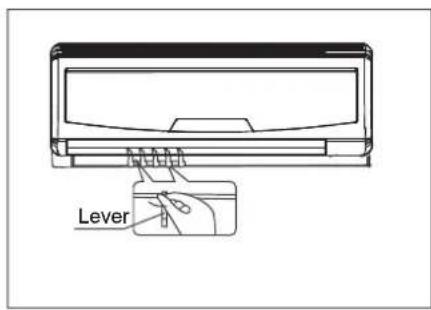
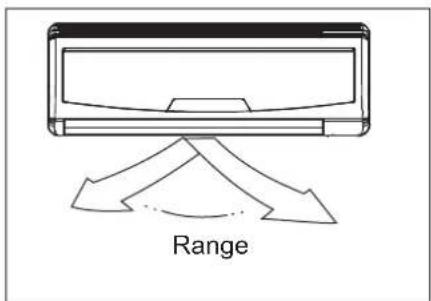
- Adjust the air flow direction properly otherwise, it might cause discomfort or cause uneven room temperatures.
- Adjust the horizontal louver using the remote controller.
- Adjust the vertical louver manually.
To set the vertical air flow(Up--Down) direction
Perform this function while the unit is in operation. Use the remote controller to adjust the air flow direction. The horizontal louver can be moved at a angle of 6^ for each press or set to move up and down automatically. Please refer to the “REMOTE CONTROLLER ILLUSTRATION” for details.
To set the horizontal air flow direction (left - right)
Adjust the vertical louver manually using the lever on the left or right side of the vertical louver arm (Depending on model). Take care not to catch fingers on the fan, horizontal louver or to damage vertical louvers. When the air conditioner is in operational and the horizontal louver is in a specific position, move the lever at left (or right, depending on model) end of the air outlet to the desired position.
CAUTION
- The SWING and AIR DIRECITON button will be disabled when the air conditioner is not in operation (including when the TIMER ON is set).
- Do not operate the air conditioner for long periods with the air flow direction set downward in cooling or dry mode. Otherwise, condensation may occur on the surface of the horizontal louver causing moisture to drop on to the floor or on furnishings.
- Do not move the horizontal louver manually. Always use the SWING or AIR DIRECTION button. If you move this louver manually, it may malfunction during operation. If the louver malfunctions, stop the air conditioner once and restart it.
- When the air conditioner is started immediately after it was stopped, the horizontal louver might not move for approximately 10 seconds.
- Open angle of the horizontal louver should not be set too small, as COOLING or HEATING performance may be impaired due to too restricted air flow area.
- Do not operate unit with horizontal louver in closed position.
- When the air conditioner is connected to power (initial power), the horizontal louver may generate a sound for 10 seconds, this is a normal operation.
How the air conditioner works
Cooling
Heating
AUTO operation
- When you set the air conditioner in AUTO mode, it will automatically select cooling, heating(cooling/heating models only), or fan only operation depending on what temperature you have selected and the room temperature.
- The air conditioner will control room temperature automatically round the temperature point set by you.
- If the AUTO mode is uncomfortable, you can select desired conditions manually.
SLEEP operation
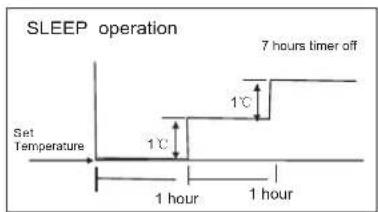
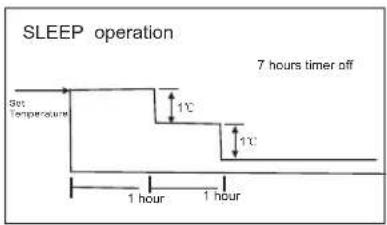
When you push SLEEP button on remote controller during cooling, heating(cooling only type without), or AUTO operation, the air conditioner will automatically increase (cooling) or decrease (heating) 1°C per hour.
The set temperature will be steady 2 hours later. And the air conditioner will be timer off in 7 hours. The fan speed will be automatically controlled. This feature can maintain the most comfortable temperature and save more energy for you.
DRYING operation
- The temperature is regulated while dehumidifying by repeating turning on and off of the cooling operation or fan only. The fan speed indicator will display AUTO and low speed will be used.
Optimal operation
To achieve optimal performance, please note the following:
- Adjust the air flow direction correctly so that it is not directed on people.
- Adjust the temperature to achieve the highest comfort level. Do not adjust the unit to excessive temperature levels.
- Close doors and windows on COOL or HEAT modes, or performance may be reduced.
- Use TIMER ON button on the remote controller to select a time you want to start your air conditioner.
- Do not put any object near air inlet or air outlet, as the efficiency of the air conditioner may be reduced and the air conditioner may stop running.
- Clean the air filter periodically, otherwise cooling or heating performance may be reduced.
- Do not operate unit with horizontal louvre in closed position.
Care and maintenance
natural_image
Diagram of two hands inserting a rectangular device into a housing (no text or symbols visible)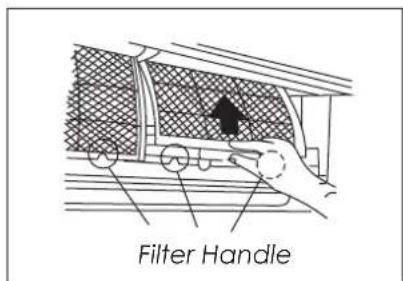
natural_image
Line drawing of a hand pressing down on a textured panel with a black arrow indicating downward motion (no text or symbols)Cleaning the Grille, Case and Remote Controller
- Turn the system off before cleaning. To clean, wipe with a soft, dry cloth. Do not use bleach or abrasives.
NOTE: Supply power must be disconnect before cleaning the indoor unit.
CAUTIONS
- A cloth dampened with cold water may be used on the indoor unit if it is very dirty. Then wipe it with a dry cloth.
- Do not use a chemically treated cloth or duster to clean the unit.
- Do not use benzine, thinner, polishing powder, or similar solvents for cleaning. These may cause the plastic surface to crack or deform.
- Never use water hotter than 40 °C to clean the front panel, it could cause deformation of discoloration.
Cleaning the air filter
A clogged air filter reduces the cooling efficiency of this unit. Please clean the filter once every 2 weeks.
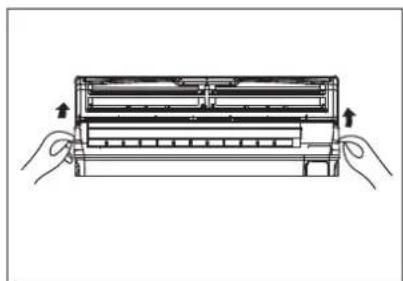
- Lift the indoor unit panel up to an angle until it stops with a clicking sound.
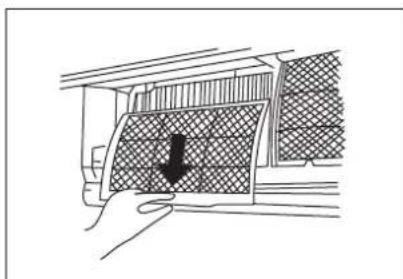
- Take hold of the handle of the air filter and lift it up slightly to take it out from the filter holder, then pull it downwards.
-
Remove the AIR FILTER from the indoor unit.
-
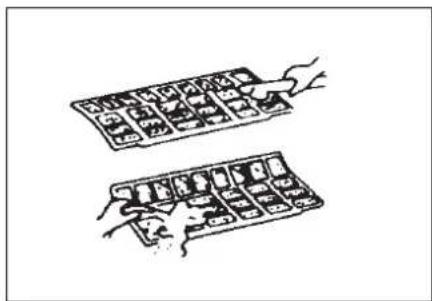
Clean the AIR FILTER once two weeks.
- Clean the AIR FILTER with a vacuum cleaner or water, then dry it up in cool place.
natural_image
Illustration of two hands holding a grid of small objects, no text or symbols present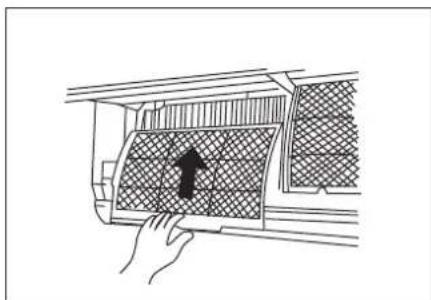
natural_image
Line drawing of a hand pressing down on a textured panel with a black arrow pointing to it (no text or symbols)-
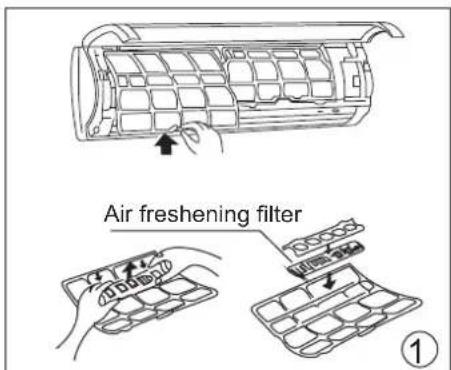
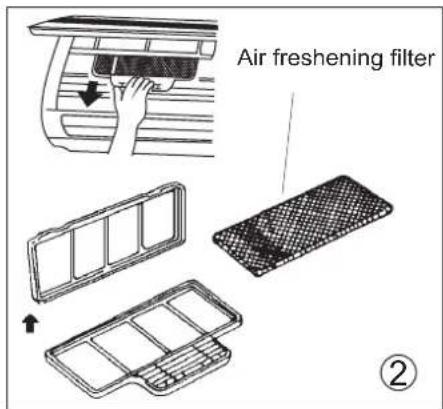
Remove the Air Freshening Filter(Optional filter included: Plasma Dust Collector/Silver Ion filter / Bio filter /Vitamin C filter/3M air purifier filter) from its support frame.(The removing and installation method are slightly difference, see the pictures marked ① and ② on the left.
-
Clean the air freshening filter at least once a month, and replace it every 4-5 months.
- Clean it with vacuum cleaner, then dry it in cool place.
Do not touch the Plasma Dust Collector Filter within 10 minutes after opening the front panel, it may cause an electric shock.
- Install the air freshening filter back into position.
- Insert the upper portion of air filter back into the unit, taking care that the left and right edges line up correctly and place filter into position.
Maintenance
If you plan to idle the unit for a long time, perform the following:
(1) Operate the fan for about half a day to dry the inside of the unit.
(2) Stop the air conditioner and disconnect power. Remove the batteries from the remote controller.
(3) The outdoor unit requires periodic maintenance and cleaning. Do not attempt to do this yourself. Contact your dealer or servicer.
Checks before operation
- Check that the wiring is not broken off or disconnected.
- Check that the air filter is installed.
- Check if the air outlet or inlet is blocked after the air conditioner has not been used for a long time.

Caution
- Do not touch the metal parts of the unit when removing the filter. Injuries can occur when handling sharp metal edges.
- Do not use water to clean inside the air conditioner. Exposure to water can destroy the insulation, leading to possible electric shock.
- When cleaning the unit, first make sure that the power and circuit breaker are turned off.
The following events may occur during normal operation.
1. Protection of the air conditioner.
Compressor protection
- The compressor can't restart for 3 or 4 minutes after it stops.
- The unit is designed not to blow cold air on HEAT mode, when the indoor heat exchanger is in one of the following three situations and the set temperature has not been reached.
Anti-cold air (Cooling and heating models only)
A) When heating has just starting.
B) Defrosting.
C) Low temperature heating.
- The indoor or outdoor fan stop running when defrosting (Cooling and heating models only).
Defrosting (Cooling and heating models only)
- Frost may be generated on the outdoor unit during heat cycle when outdoor temperature is low and humidity is high resulting in lower heating efficiency of the air conditioner.
- During this condition air conditioner will stop heating operation and start defrosting automatically.
- The time to defrost may vary from 4 to 10 minutes according to the outdoor temperature and the amount of frost build up on the outdoor unit.
- Frost may be generated on the outdoor unit during heat cycle when outdoor temperature is low and humidity is high resulting in lower heating efficiency of the air conditioner. - During this condition air conditioner will stop heating operation and start defrosting automatically. - The time to defrost may vary from 4 to 10 minutes according to the outdoor temperature and the amount of frost build up on the outdoor unit.
2. A white mist coming out from the indoor unit
- A white mist may generate due to a large temperature difference between air inlet and air outlet on COOL mode in an indoor environment that has a high relative humidity.
- A white mist may generate due to moisture generated from defrosting process when the air conditioner restarts in HEAT mode operation after defrosting.
3. Low noise of the air conditioner
- You may hear a low hissing sound when the compressor is running or has just stopped running. This sound is the sound of the refrigerant flowing or coming to a stop.
- You can also hear a low "squeak" sound when the compressor is running or has just stopped running. This is caused by heat expansion and cold contraction of the plastic parts in the unit when the temperature is changing.
- A noise may be heard due to louver restoring to its original position when power is first turned on.
4. Dust is blown out from the indoor unit.
This is a normal condition when the air conditioner has not been used for a long time or during first use of the unit.
5. A peculiar smell comes out from the indoor unit.
This is caused by the indoor unit giving off smells permeated from building material, from furniture, or smoke.
6. The air conditioner turns to FAN only mode from COOL or HEAT (For cooling and heating models only) mode.
When indoor temperature reaches the temperature setting on air conditioner, the compressor will stop automatically, and the air conditioner turns to FAN only mode. The compressor will start again when the indoor temperature rises on COOL mode or falls on HEAT mode (For cooling and heating models only) to the set point.
- Dripping water may generate on the surface of the indoor unit when cooling in a high relatively humidity (relative humidity higher than 80%). Adjust the horizontal louver to the maximum air outlet position and select HIGH fan speed.
8. Heating mode (For cooling and heating models only)
The air conditioner draws in heat from the outdoor unit and releases it via the indoor unit during heating operation. When the outdoor temperature falls, heat drawn in by the air conditioner decreases accordingly. At the same time, heat loading of the air conditioner increases due to larger difference between indoor and outdoor temperature. If a comfortable temperature can't be achieved by the air conditioner, we suggest you use a supplementary heating device.
9. Auto-restart function(optional)
Power failure during operation will stop the unit completely. For the unit without Auto-restart feature, when the power restores, the OPERATION indicator on the indoor unit starts flashing. To restart the operation, push the ON/OFF button on the remote controller. For the unit with Auto-restart feature, when the power restores, the unit restarts automatically with all the previous settings preserved by the memory function.
- Lightning or a car wireless telephone operating nearby may cause the unit to malfunction. Disconnect the unit with power and then re-connect the unit with power again. Push the ON/OFF button on the remote controller to restart operation.
Troubleshooting Tips
| Stop the air conditioner immediately if one of the following faults occur. Disconnect the power and contact the nearest customer service center. | |
| Trouble | OPERATION indicator or other indicators flash rapidly (5 times every second) and this flash can't be fixed by disconnecting the power, and then connect it in again. |
| Fuse blows frequently or circuit breaker trips frequently. | |
| Other objects or water penetrate the air conditioner. | |
| The remote controller won't work or works abnormally. | |
| Other abnormal situations. | |
| Malfunctions | Cause | What should be done? |
| Unit does not start | Power cut | Wait for power to be restored. |
| Unit may have become unplugged. | Check that plug is securely in wall receptacle. | |
| Fuse may have blown. | Replace the fuse. | |
| Battery in Remote controller may have been exhausted. | Replace the battery. | |
| The time you have set with timer is incorrect. | Wait or cancel timer setting. | |
| Unit not cooling or heating (Cooling/ heating models only) room very well while air flowing out from the air conditioner | Inappropriate temperature setting. | Set temperature correctly. For detailed method please refer to "Using remote control section. |
| Air filter is blocked. | Clean the air filter. | |
| Doors or Windows are open. | Close the doors or windows. | |
| Air inlet or outlet of indoor or outdoor unit has been blocked. | Clear obstructions away first, then restart the unit. | |
| Compressor 3 or 4 minutes protection has been activated. | Wait. | |
| If the trouble has not been corrected, please contact a local dealer or the nearest customer service center. Be sure to inform them of the detailed malfunctions and unit model. | ||
Notes: Do not attempt to repair the unit yourself.
Always consult an authorised service provider.
The design and specifications are subject to change without prior notice for product improvement. Consult with the sales agency or manufacturer for details.
CS421-U
202000180057
20100706
- SPLIT- TYPE ROOM AIR CONDITIONER
- USER'S MANUAL
- Read This Manual
- CONTENTS
- SOCIABLE REMARK
- SAFETY PRECAUTIONS
- OPERATING INSTRUCTIONS
- CARE AND MAINTENANCE
- OPERATION TIPS
- TROUBLESHOOTING TIPS
- CAUTION
- When using this air conditioner in the European countries, the follow informations must be followed:
- WARNING
- Parts names
- Indicator Lights on Display panel
- Indoor unit
- Outdoor unit
- NOTE:
- Manual operation
- CAUTION:
- Airflow direction control
- To set the vertical air flow(Up--Down) direction
- To set the horizontal air flow direction (left - right)
- How the air conditioner works
- AUTO operation
- SLEEP operation
- DRYING operation
- Optimal operation
- Cleaning the Grille, Case and Remote Controller
- CAUTIONS
- Cleaning the air filter
- Do not touch the Plasma Dust Collector Filter within 10 minutes after opening the front panel, it may cause an electric shock.
- Maintenance
- Checks before operation
- Protection of the air conditioner.
- Compressor protection
- Anti-cold air (Cooling and heating models only)
- Defrosting (Cooling and heating models only)
- A white mist coming out from the indoor unit
- Low noise of the air conditioner
- Dust is blown out from the indoor unit.
- A peculiar smell comes out from the indoor unit.
- The air conditioner turns to FAN only mode from COOL or HEAT (For cooling and heating models only) mode.
- Heating mode (For cooling and heating models only)
- Auto-restart function(optional)
Brand : Campomatic
Model : AC19MS
Category : Air conditioner