
Amanda - Tablet MIO - Free user manual and instructions
Find the device manual for free Amanda MIO in PDF.


Pick your language and provide your email: we'll send you a specifically translated version.
| Product Type | Tablet |
| Brand | Mio |
| Model | Amanda |
| Operating System | Android |
| Display Size | 10.1 inches |
| Display Resolution | 1280 x 800 pixels |
| Processor | Quad-core 1.3 GHz |
| RAM | 2 GB |
| Internal Storage | 32 GB |
| Battery Capacity | 5000 mAh Lithium-ion |
| Connectivity | Wi-Fi 802.11 b/g/n, Bluetooth 4.0 |
| Cameras | Front 2 MP, Rear 5 MP |
| Dimensions | 240 x 170 x 8 mm |
| Weight | 500 g |
| Power Supply | 5V/2A charger (included) |
| Cleaning Instructions | Wipe with soft dry cloth; avoid liquids |
| Safety Warnings | Do not expose to heat, avoid drops, use only provided charger |
| Spare Parts | Battery and screen replaceable by authorized service |
| Repair | Contact Mio support for repairs |
| General Information | User manual available for download at notice-facile.com |
Frequently Asked Questions - Amanda MIO
How do I charge the Mio Amanda tablet?
Connect the included charger to the tablet's charging port and plug into a power outlet. The battery icon indicates charging status. For best battery life, avoid fully discharging the lithium-ion battery.
How to connect to Wi-Fi on my Mio Amanda?
Go to Settings > Wi-Fi. Toggle Wi-Fi on, select your network, enter the password, and tap Connect.
What should I do if the screen is cracked?
Stop using the tablet immediately to avoid further damage. Contact Mio service center or an authorized repair shop for a screen replacement.
How to perform a factory reset?
Back up your data first. Go to Settings > Backup & Reset > Factory Data Reset. Confirm and the tablet will restore to original settings.
How to clean the tablet safely?
Use a soft, lint-free dry cloth to wipe the screen and body. Do not use water or cleaning liquids. Keep the charging port dry.
How to extend battery life?
Reduce screen brightness, turn off unused wireless connections (Wi-Fi, Bluetooth), close background apps, and enable Battery Saver mode in Settings.
How to update the operating system?
Go to Settings > About Tablet > System Updates. If an update is available, follow on-screen instructions to download and install.
How to transfer files between tablet and computer?
Use a USB cable to connect to your computer. On the tablet, swipe down and select File Transfer mode. Your computer will detect the tablet as a removable drive.
What to do if the tablet freezes?
Press and hold the Power button for about 10 seconds until the device restarts. If the problem persists, try a hard reset via Recovery mode.
How to check storage space?
Go to Settings > Storage. You will see used and available space. To free up space, delete unused apps or files.
User questions about Amanda MIO
0 question about this device. Answer the ones you know or ask your own.
Ask a new question about this device
No questions yet. Be the first to ask one.
Download the instructions for your Tablet in PDF format for free! Find your manual Amanda - MIO and take your electronic device back in hand. On this page are published all the documents necessary for the use of your device. Amanda by MIO.
USER MANUAL Amanda MIO
6.3 X 35mm
AX8
BX8
C X 1


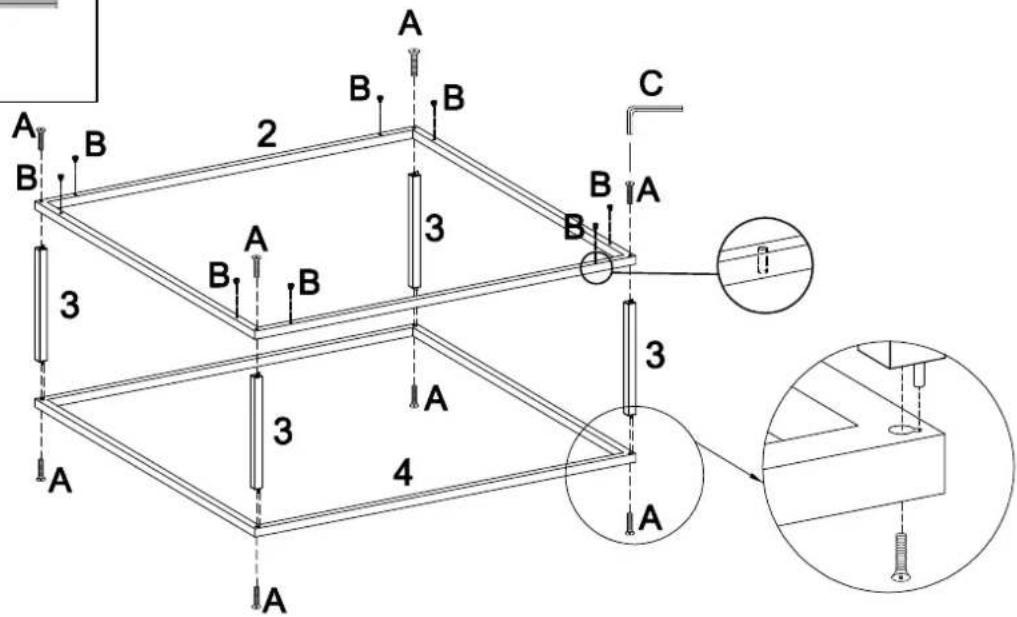
natural_image
Isometric line drawing of a rectangular frame with labeled points B (no text or symbols beyond labels)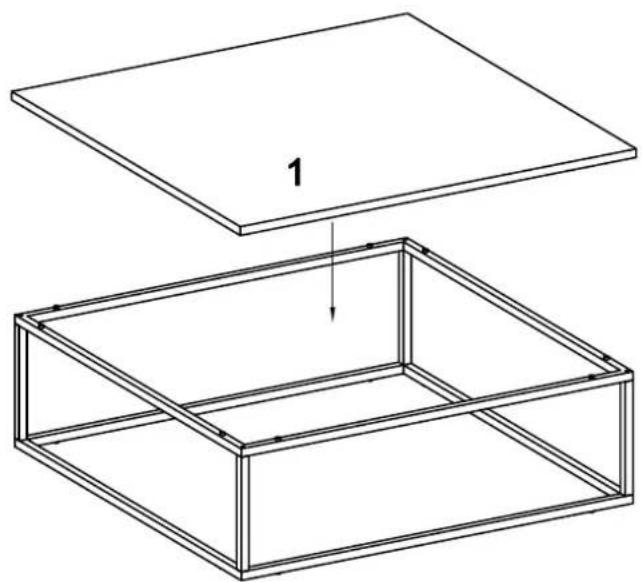
natural_image
Technical line drawing of a two-part wooden box assembly with a flat top and internal frame (no text or symbols)
Manual assistant
Powered by Anthropic
Waiting for your message
Product information
Brand : MIO
Model : Amanda
Category : Tablet