
Cornwall - Table MIO - Free user manual and instructions
Find the device manual for free Cornwall MIO in PDF.


Pick your language and provide your email: we'll send you a specifically translated version.
| Product Type | Portable GPS Navigation Device |
| Model | Cornwall |
| Brand | Mio |
| Display | Color LCD Touchscreen, 3.5 inches |
| Dimensions | 100 x 60 x 20 mm |
| Weight | 120 g |
| Power Source | Rechargeable Lithium-ion Battery, 1000 mAh |
| Battery Life | Up to 4 hours continuous use |
| Navigation Features | GPS, GLONASS, Turn-by-Turn Directions, Points of Interest |
| Maps | Pre-loaded Maps of North America and Europe |
| Connectivity | USB 2.0, Bluetooth (optional) |
| Memory | Internal 4 GB, MicroSD Card Slot up to 32 GB |
| Water Resistance | IPX4 (Splash Resistant) |
| Operating Temperature | -10°C to 50°C |
| Mounting | Windshield Suction Cup Mount Included |
| Accessories Included | Car Charger, USB Cable, User Manual |
| Cleaning Instructions | Wipe with a soft, dry cloth; avoid harsh chemicals |
| Safety Warnings | Do not disassemble; avoid exposure to extreme heat or moisture |
| Repair and Spare Parts | Contact Mio support or authorized service centers |
| Warranty | 1 Year Limited Warranty |
| Certifications | CE, FCC, RoHS |
Frequently Asked Questions - Cornwall MIO
How do I turn on the Mio Cornwall?
Press and hold the power button located on the top edge for 3 seconds until the device vibrates and the screen lights up.
How can I update the maps on my Mio Cornwall?
Connect the device to a computer via USB and open the MioMore Desktop software. Follow the on-screen instructions to update maps.
What should I do if my GPS is not acquiring a signal?
Ensure you are outdoors with a clear view of the sky. Restart the device and try again. If the issue persists, perform a factory reset.
Can I use the Mio Cornwall while driving?
Yes, but it is recommended to set the destination before driving and use voice prompts to minimize distraction. Mount the device securely on the windshield.
How do I change the language on the device?
Go to Settings > Language and select your preferred language from the list. The interface will update immediately.
What type of memory card does the Cornwall support?
It supports MicroSD cards up to 32 GB. Insert the card into the slot on the side of the device.
How do I perform a factory reset?
Go to Settings > System > Restore Factory Defaults. Confirm the action. The device will restart and erase all user data.
The battery drains quickly. What can I do?
Reduce screen brightness, turn off Bluetooth if not in use, and close unnecessary apps. If the problem continues, contact support for a battery replacement.
Is the Mio Cornwall waterproof?
It has an IPX4 rating, meaning it is splash-resistant but not waterproof. Avoid submerging it in water.
How do I contact Mio customer support?
Visit the official Mio website at www.mio.com/support or call the support hotline listed in the user manual.
User questions about Cornwall MIO
0 question about this device. Answer the ones you know or ask your own.
Ask a new question about this device
No questions yet. Be the first to ask one.
Download the instructions for your Table in PDF format for free! Find your manual Cornwall - MIO and take your electronic device back in hand. On this page are published all the documents necessary for the use of your device. Cornwall by MIO.
USER MANUAL Cornwall MIO
ASSEMBLY INSTRUCTION FOR PRODUCT CODE :
CD024
A
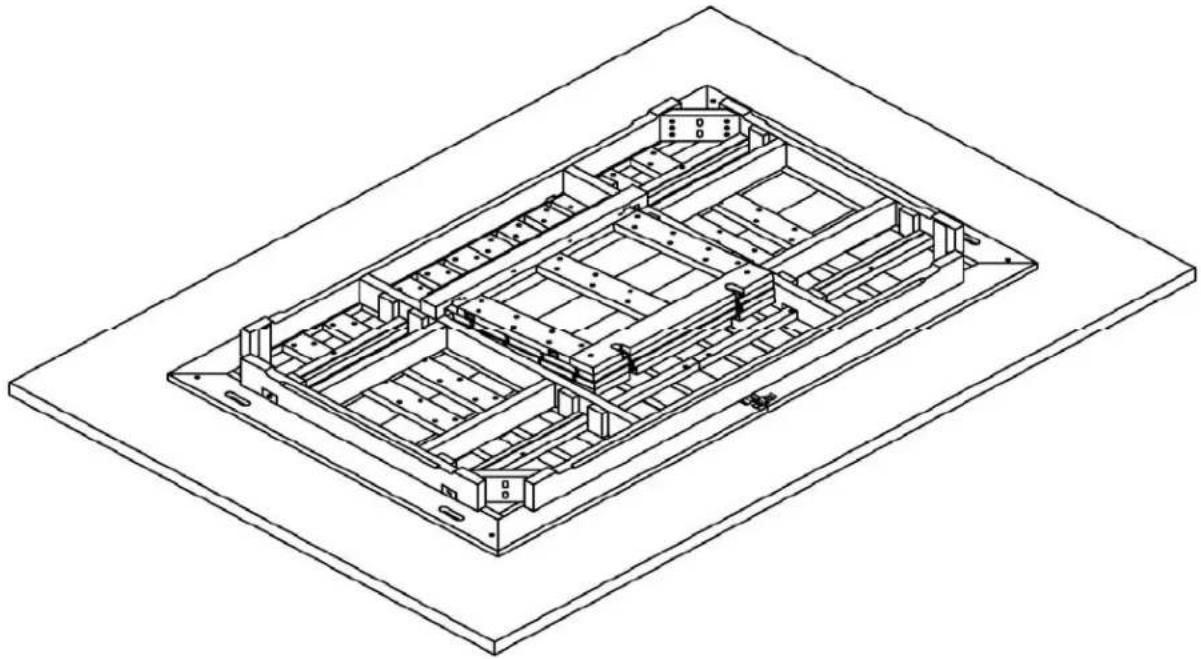
- Assembly requires two adults.
- Lay table top on carpet or large blanket to protect the top (as pictured).
- Unlock locking clips.
B

| HARDWARE | QUANTITY | ||
| A | BOLT φ 10 × 80 | 8 | |
| B | WASHER φ 11 × 26 × 1.8 | 8 | |
| C | RING SPANNERK17 x 25 x 135 | 1 | |
- Assemble: left and right leg ends (as pictured). Tighten all bolts (do not use power tools).
ASSEMBLY INSTRUCTION FOR PRODUCT CODE :
CD024
C

- Carefully turn table over and stand on its loegs. Re-tighten all bolts.
D

- Pull apart the top to engage the leaf.
- Remove the leaf holders.
ASSEMBLY INSTRUCTION FOR PRODUCT CODE :
CD024
E
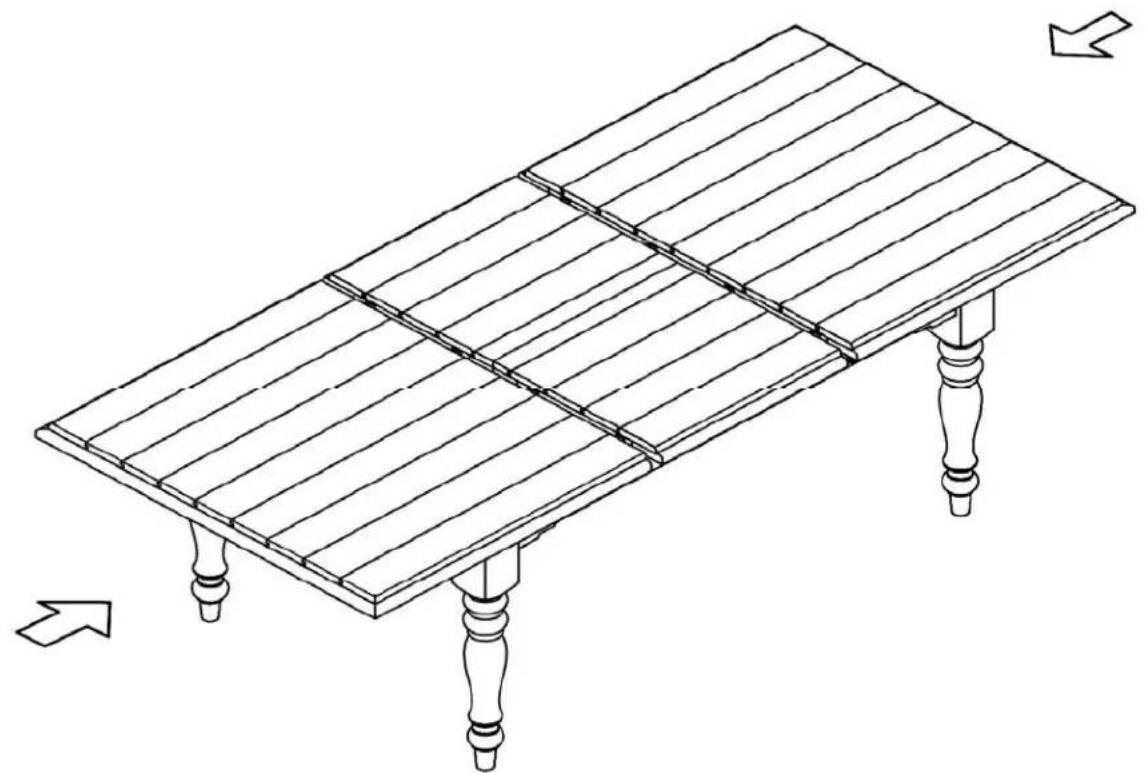
- Open leaf up (as pictured) and close table top.
F
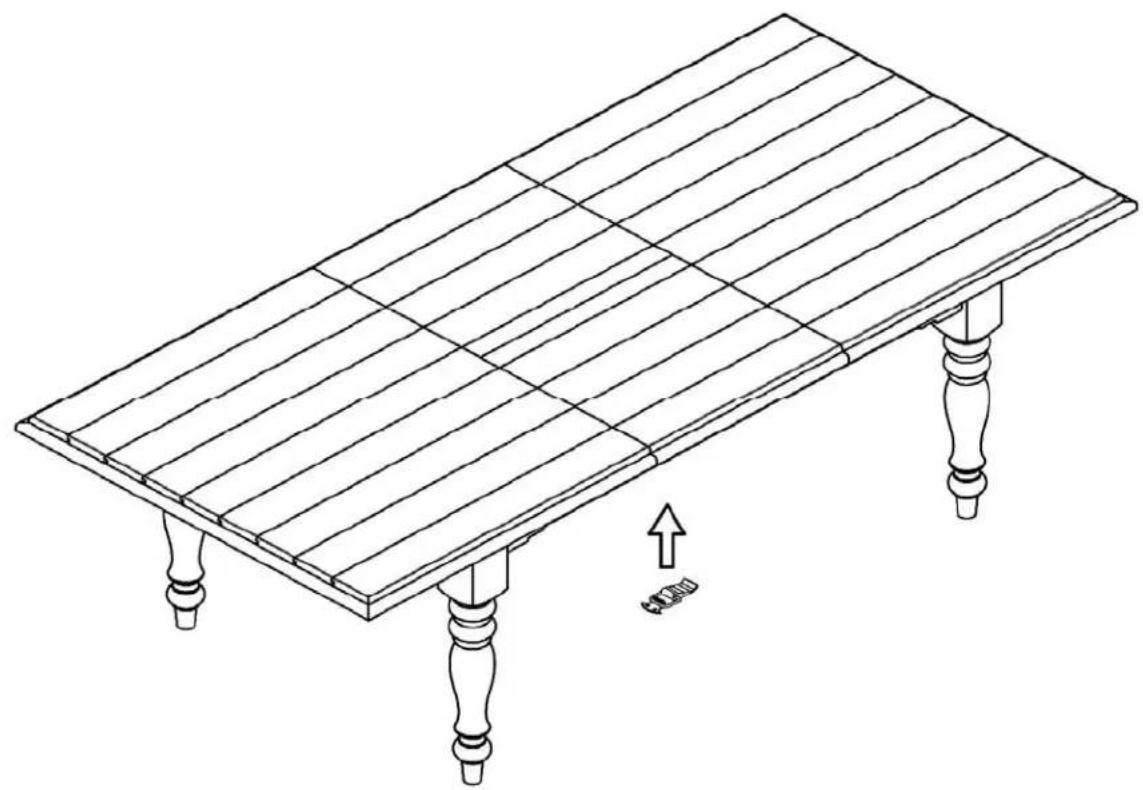
- Engage locking clip (as pictured)
Table of contents
Click a title to access it
Manual assistant
Powered by Anthropic
Waiting for your message
Product information
Brand : MIO
Model : Cornwall
Category : Table