
ACMK01 - Camcorder NEDIS - Free user manual and instructions
Find the device manual for free ACMK01 NEDIS in PDF.


| Type | Camcorder |
| Brand | Nedis |
| Model | ACMK01 |
| Dimensions (HxWxD) | 50 x 70 x 120 mm |
| Weight | 250 g |
| Power Supply | Rechargeable Li-ion battery (3.7V, 1000mAh) via USB |
| Video Resolution | Full HD 1080p (1920x1080) at 30fps |
| Photo Resolution | 16 MP (interpolated) |
| Storage | MicroSD card slot (up to 32GB) |
| Lens | Fixed focal length, f/2.0 aperture |
| Digital Zoom | 4x |
| Display | 2.0 inch LCD screen |
| Connectivity | USB 2.0, HDMI |
| Battery Life | Up to 1.5 hours recording |
| Functions | Video recording, photo capture, playback |
| Maintenance | Clean with dry soft cloth; avoid solvents |
| Safety | Keep away from water, do not disassemble |
| Spare Parts | Replacement battery, charger |
Frequently Asked Questions - ACMK01 NEDIS
User questions about ACMK01 NEDIS
0 question about this device. Answer the ones you know or ask your own.
Ask a new question about this device
Download the instructions for your Camcorder in PDF format for free! Find your manual ACMK01 - NEDIS and take your electronic device back in hand. On this page are published all the documents necessary for the use of your device. ACMK01 by NEDIS.
USER MANUAL ACMK01 NEDIS
Action Cam Mounting Kit
Package includes:


Bike Mount Kit


Helmet Front Mount Kit

Helmet Side Mount Kit


Chest Mount Kit

Head Mount Kit
Spanner/Adapter
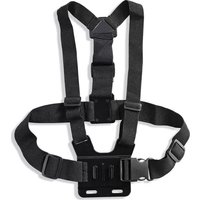
Brand : NEDIS
Model : ACMK01
Category : Camcorder