
WK-350 - Piano NUX - Free user manual and instructions
Find the device manual for free WK-350 NUX in PDF.


| Product Type | Digital Piano |
| Model | NUX WK-350 |
| Keyboard | 88 keys, scaled hammer action with four dynamic curves |
| Sound Source | European DSP chip, 5 dynamic levels stereo piano sampling, harmonic series simulation |
| Polyphony | 64x2 |
| Number of Tones | 300 tones + 10 percussion kits + 1 synthetic set |
| Demo Songs | 88 demo songs |
| Rhythm Styles | 160 |
| Effects | Reverb (8 types), Chorus (8 types), Effect (10 types) |
| Functions | Dual Voice, Split/Dual Keyboard, Transposition, Metronome, Recording (up to 48000 notes), Accompaniment with Auto Chord |
| Pedals | Soft (left), Damper (middle), Sustain (right) |
| Connections | USB MIDI, Headphone (6.35mm), LINE IN (R/L), LINE OUT (R/L), Pedal Jack, Power Jack |
| Power Supply | DC 12V, 2000mA (adapter included) |
| Power Consumption | 20W x 2 |
| Dimensions (L x W x H) | 1360 x 320 x 770 mm |
| Weight | 44 kg |
| Accessories | AC adapter, Owner's Manual |
| Cleaning | Wipe with a dry cloth; do not use solvents or abrasive cleaners. |
| Safety | Do not open; avoid liquids, extreme temperatures, and unstable surfaces. Use only provided power cable. |
| Repairability | Contact qualified NUX service staff for repairs. No user-serviceable parts inside. |
Frequently Asked Questions - WK-350 NUX
User questions about WK-350 NUX
0 question about this device. Answer the ones you know or ask your own.
Ask a new question about this device
Download the instructions for your Piano in PDF format for free! Find your manual WK-350 - NUX and take your electronic device back in hand. On this page are published all the documents necessary for the use of your device. WK-350 by NUX.
USER MANUAL WK-350 NUX
Add: Room507, Block 1, Nanhai E-Cool, No.6 Xinghua Road, Shekou, Nanahan District, Shenzhen, Guangdong, China.
Tel: +86 755 2010 5804
E-mail: info@shenatechnology.com

Digital Piano
WK-350
Owner's Manual
NUX
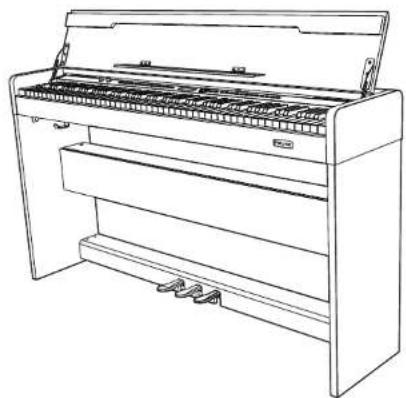
natural_image
Line drawing of a piano with open lid and visible wood shavings (no text or symbols)Cherub Technology Co., Ltd.
Copyright 2016 Cherub Technology Co., Ltd. All rights reserved.
Strictly prohibit reproducing or spreading any part of this publication in any manner without the authorization of Cherub Technology Co., Ltd.
Owner's Manual
WK-350
SAFETY GUIDELINE
Before playing the digital piano, please read the following content.
Please put this instruction book in a safety place, in order to read it in the future.
WARNING
In case of getting seriously injured or killed because of electric shock, short circuit, damage, fire or other dangers, please obey the following warnings. These warnings include but not limited to the following situations:
Power/Electric Cable
* The rated voltage of this device is fixed. The required voltage is printed on the nameplate of this device.
* Check the plug regularly, clean the dirt and ash piled up on the plug.
* This digital piano only matches with the provided power cable and plug.
* Please don't put electric cable beside heaters or radiators. Don't bend too much or cause damage to electric cable. Don't put any heavy stuff on the wire. Don't put it where it may be run over or trampled to make people stumble.
Do Not Open
* Please do not open this device and try to dismantle inner components or transform it in any ways. This device does not include any components for users to fix. If you find any problems, please stop using and ask qualified NUX service staffs to examine and repair the device.
Owner's Manual
WK-350
Warning about humidity
* In case of any liquid splashing into the device, please do not get this device rained or use it nearby water, in a wet surrounding or put a container of liquid on it. If any liquid, like water, splashes into the instrument, please cut off power and pull out the electric cable from the AC socket immediately. Then ask qualified NUX service staffs to examine and repair the device.
* Do not plug with wet hands.
Fire
* Do not place any burning stuff, like candle, on the instrument. It may cause fire.
* When sensing any unusual situations, such as worn away and damage of power cable, sound suddenly stops during playing and the smell and smoke it causes, please turn off the power immediately and pull out plug from the socket. Ask qualified NUX service staffs to examine and repair the device.

Attention
In case that people around you and you get injured or get loss of device and property, please obey the following basic instructions. These instructions include but not limited to following situations.
Power/Electric Cable
* When pulling out plug from socket, please grab the plug instead of power cable. Drawing directly will cause damage to the power cable.
* If not using the instruments for a long time or during a lighting storm, please pull out plug from the socket.
* Do not connect the instrument to the socket by multiple connector, or it will lower the sound quality, or it will make socket overheat.
Assemble & Use
* Please carefully read the attachment that explains the assemble process. If assembling the instrument in a wrong order, it will damage the instrument and hurt the user.
* Please connect the external equipment while the digital piano is off.
Owner's Manual
WK-350
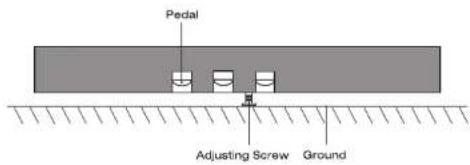
* Before using, please install the supporting screw and adjust it close to the ground, in case of trampling pedal.
Mount Position
* In case of deformation of control panel and damage to inner components, please do not place this device in an environment with a lot of dirt, vibration, extreme cold and hot (such as, direct sunshine, closing to heater and inside a car under the burning sun)
* Please do not use this device near the television, radio, stereo, cell phone or other electronic devices. This may make noise on the device itself and television or radio nearby.
* Please do not put this device on unstable place, or it may cause a sudden fall down.
* Before moving the device, please pull out all electric cables from the socket.
* When you set this device, please confirm the AC socket going to be used is reachable. The device should be connected to the socket with protecting grounding connection. If you find any problems and questions, please immediately turn off the power and pull out the plug from the socket. Even though the power is turned off, there is still a small amount of electricity current flowing though it. If you decide not using this device for a long time, please pull out the plug from AC socket.
* This product uses all extreme power switch as a device to cut off from network power. The power switch button is on the right side of the keyboard. When the power button is pressed, it is switched on. When the power button up rises, it is switched off.
★ The graphic and screen in this hand book is only for introduction purpose. It may be different from the instrument you buy.
Owner's Manual
WK-350
Catalogue
Quick Installation Guide 06
Control Panel 10
Before You Play 11
Power On 11
Volume Control 11
Headphone Connection 12
Performing 12
Sound Control 12
Touch 13
Transposition.... 13
Dual Keyboard 14
Dual Voice 15
Percussion.... 16
Reverb....16
Chorus 17
Effect 17
Memory Setting 18
Accompaniment Function 18
Practicing 21
Metronome 21
Beat Setting 22
Recording Function 22
Demo Songs 23
04
Owner's Manual WK-350
USB MIDI Function 23
Audio Connection 23
Specification 25
Sound List 27
Percussion Kit 37
Rhythm List 38
Demo Songs 41
Trouble Shooting 43
Quick Installation Guide
Assembly Components List

Mounting Components
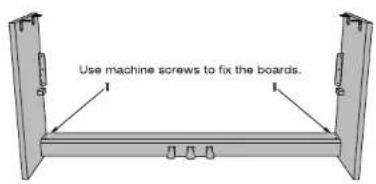
- Mount left side board, right side board and pedal.
Owner's Manual
- Mount adjusting screw.
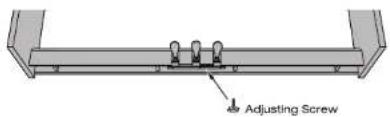
NOTE: Please make sure that the adjusting screw under the pedal must be screwed close to the ground. Or it will be easily broken down.
- Mount speaker box.

Owner's Manual
WK-350
- Mount headphone hook.

- Mount main body.
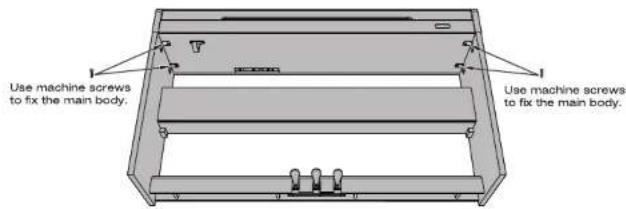
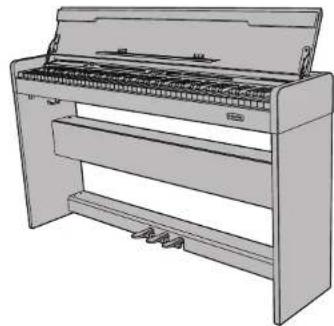
- Installation complete.
natural_image
Line drawing of a piano with extended handle and stand (no text or symbols)08
Owner's Manual
WK-350
Thank you for choosing NUX Digital Piano. No matter you are a student, piano hobbyist or a professional player, this digital piano will impress you with its perfect sound and fashion design. It can be competent with piano studying, music listening, MIDI production, which satisfies your entertainment demand. It also has grand hammer dynamics keyboard, making you express yourself easily.
For further information about this new digital piano, we suggest you should read this hand book carefully in order to make full use of its advanced and convenient functions. Meanwhile, we also suggest you should keep this hand book well for reference in the future.
If you like NUX digital piano, please recommend NUX to your friends.
09
Owner's Manual
WK-350
Control Panel

LCD Display

Right Control Panel

Back Panel Interface

Power Supply
Connect to a power adapter (DC 12V, 2000mA, ⊙⊕⊕)
USB MIDI Jack
Connect the computer to the USB MIDI Jack in the back panel to get MIDI Production Function.
INPUT R/L Jacks
Connect the external instrument/audio device to the built-in speaker system.
OUTPUT R/L Jacks
Connect the digital piano to a peripheral speaker system.
Headphone Jack
Standard stereo headphone jack(6.35mm). The built-in speaker system is invalid when this jack is connected.
10
Owner's Manual
WK-350
Pedal Jack
Connect the pedal cable to this jack.
Pedal

NOTE: The screws under the pedal must be screwed close to the ground. Or it will be easily broken down.
Before You Play
Power On
Connect the plug to a proper socket and then press the [POWER] button on the left side of the keyboard to turn on the power. The default sound is grand piano.

Volume Control
Turn the [MASTER VOLUME] knob on the control panel to set the volume. Turn the knob clockwise to raise volume. Turn the knob anticlockwise to reduce volume.
Warning: Too loud sound, especially when you wear the headphone, will do damage to hearing.

11
Owner's Manual
WK-350
Headphone Connection
Apart from the built-in speaker system, you can also connect a standard stereo headphone(6.35mm).
Headphone jack is on the backboard of the piano. The built-in speaker system doesn't work after connecting the headphone. Adjust the headphone volume by turning the [Master volume] knob.
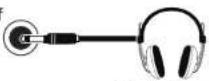
The built-in speaker system is invalid when the headphone is connected to this jack.
Performing
Sound Control
1) WK-350 has 300 tones in total.
2) The default tone is grand piano (No.000). Press [VOICE] button, and then use [DATA TEMPO +/-] button or [DATA] knob to select tone within 3 seconds. (The tone list is in the appendix)

flowchart
graph LR
    A["VOICE"] --> B["SoundR1: Brit Piano\nNo.: 009 TIP: 128"]
    B --> C["DATA\n- TEMPO +"]
Back to Grand Piano Tone
No matter in what playing status, press [VOICE] button and the digital piano will return to default tone, which is grand piano.

Owner's Manual
WK-350
Touch
1) WK-350 has three dynamic status: light, medium, heavy (000-002) and dynamic on/off switch. The default dynamic status is 000. The [TOUCH] indicator light turning on means the dynamic function is on.

2) Long press [TOUCH] button, the indicator light flashes quickly and enter the dynamic status setting interface. Use [DATA +/-] button or [DATA] knob to select dynamic status: 000-002.
3) Press [TOUCH] button again. The indicator light turns off and dynamics function is off.

flowchart
graph TD
    A["TOUCH"] --> B["TouchType: 300 No.:1003 11:128"]
    B --> C["DATA - TEMPO +"]
Transposition
1) This function can make tone move up and down by 12 semitones within an octave range.
2) Short press [TRANS.] button, the indicator light flashes quickly and enter the transposition setting interface. Use [DATA +/-] button or [DATA] knob to adjust the semitone: -12\~+12. After that, press [TRANS.] button again, the indicator light turns on and the transposition function has been activated.

flowchart
graph TD
    A["TRANS"] --> B["Transpose: 000\nNo.:000 TP:120"]
    B --> C["DATA\n- TEMPO +"]
3) Press [TRANS.] button again, the indicator light turns off and the transposition function is off. When the semitone value is adjusted to 0, the indicator light will turn off automatically.
Owner's Manual
WK-350
Dual Keyboard
This function can divide the keyboard into two individual playing zones.

1) Before pressing [SPLIT] button, select sound for the left keyboard; Press [SPLIT] button and the indicator light turns on to enter split function. The keyboard is divided into two individual zones. The split point is F4. Select sound for the right keyboard by [DATA] knob and [DATA TEMPO-/+] button. (010 BrtPno1 is the sound for right keyboard as below)

flowchart
graph LR
    A["SPLIT"] --> B["SoundR1:Br+Pno.1\nNo.:010 TP:120"]
    B --> C["DATA - TEMPO +"]
2) Press [SPLIT] button again, and the split function is off when the indicator light turns off.
Split Point Setting:
Long press [SPLIT] button to enter split point setting status and the indicator light flashes quickly. Press any key or if there is no operation within 5 seconds on the keyboard to be the split point. Press [SPLIT] button again, the indicator light stops flashing and the split point has been set.

flowchart
graph LR
    A["SPLIT"] --> B["SplitPoint: 045\nNo.:010 TP:120"]
    B --> C["Final Output"]
14
Owner's Manual
WK-350
Dual Voice
When this function is turned on, playing one note can have two voices.
1) Press [DUAL] button and the indicator light turns on and enter dual voice status. The display shows the default 2nd voice: 180 STRINGS1. Select another 2nd voice by [DATA +/-] button or [DATA] knob. 1st sound should be adjusted before pressing [DUAL] button.

flowchart
graph LR
    A["DUAL"] --> B["SoundR1:Strings1\nNo.:180 TP:120"]
    B --> C["DATA TEMPO +"]
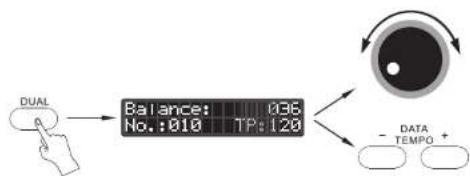
2) Long press [DUAL] button to enter sound balance adjusting status, and the indicator light flashes quickly. Balance the two voices by [DATA TEMPO-/+] button or [DATA] knob: 000-127. Press [DUAL] button again or if there is no operation within 5 seconds, the indicator light stops flashing, and the balance value has been set.
flowchart
graph LR
    A["DUAL"] --> B["Balance: 036\nNo.:010 TP:120"]
    B --> C["DATA TEMPO +"]
3) Press [DUAL] button again, and the dual voice effect is off when the indicator light turns off. It returns to 1st sound.
15
Owner's Manual
WK-350
Percussion
1) Press [DRUM] button. The indicator light turns on and percussion function is activated. Switch among 000 to 010 by [DATA TEMPO -/+ ] button or [DATA] knob to select a percussion kit.
2) Press [DRUM] button again. The indicator light turns off and percussion is off. The digital piano returns to the original sound.

flowchart
graph LR
    A["DRUM"] --> B["Standard Kit\nNo.:000 TP:1.20"]
    B --> C["DATA\n- TEMPO +"]
    D["000.Standard Drums\n001.China Drums\n002.Room Kit\n003.Jazz Kit\n004.Power Kit\n005.Electric Kit"] --> E["006.TR808 Kit\n007.Dance Drum\n008.Brush Kit\n009.Orchestra Kit\n010.Sfx.Kit"]
Reverb
1) Press [REVERB] button. The indicator light turns on and reverb function starts.
2) Long press [REVERB] button to enter reverb function selection and the indicator light flashes quickly. Switch among 000 to 007 by [DATA] knob or [DATA TEMPO-/+] button. The screen will display corresponding number. Press [REVERB] button again or if there is no operation within 5 seconds, the indicator light stops flashing, and the reverb type has been set.

flowchart
graph TD
    A["REVER"] --> B["ReverType: 004\nNo.:010 TP:120"]
    B --> C["DATA - TEMPO +"]
3) Press [REVERB] button again. The reverb indicator light turns off and reverb function is off.
16
Owner's Manual
WK-350
Chorus
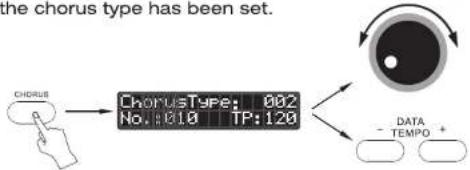
1) Press [CHORUS] button. The indicator light turns on and chorus function starts. 2) Long press [CHORUS] button to enter chorus function selection and the indicator light flashes quickly. Switch among 000 to 007 by [DATA] knob or [DATA TEMPO-/+] button. The screen will display corresponding number. Press [CHORUS] button again or if there is no operation within 5 seconds, the indicator light stops flashing, and the chorus type has been set.
flowchart
graph TD
    A["Chorus"] --> B["ChorusType: 002\nNo.:010 TP:120"]
    B --> C["DATA - TEMPO +"]
3) Press [CHORUS] button again. The chorus indicator light turns off and chorus function is off.
Effect
1) Press [Effect] button. The indicator light turns on and effect function is activated. The sound of the digital piano will have special effect. 2) Long press [Effect] button to enter effect selection and the indicator light flashes quickly. Switch among 000 to 009 by [Data] knob or [Data Tempo-/+] button to select your required effect. Press [EFFECT] button again or if there is no operation within 5 seconds, the indicator light stops flashing, and the effect type has been selected.

flowchart
graph TD
    A["EFFECT"] --> B["EffectType: 005 No.:01.0 TP:120"]
    B --> C["DATA - TEMPO +"]
3) Press [EFFECT] button again. The indicator light turns off and effect function is off.
17
Owner's Manual
WK-350
Memory Setting
WK-350 has 3 memory slots.
Set panel function properly. Press and hold [MEMORY SET] button, then press any memory button, and the functions you set can be saved. MEMORY M1 M2 M3

Memory setting includes the following functions:
Tone
Dual Voice
Dual Keyboard
Percussion
Reverb
Chorus
Dynamics
Transposition
Beat
Accompaniment Style
Velocity
Accompaniment Mode
Call Memory
Press corresponding memory button, the indicator light turns on, and the function that you set up previously has been activated. Press corresponding memory button again, the indicator light turns off, and the digital piano can be back to the status before calling memory.
Accompaniment Function
Select Rhythm
1) WK-350 has 160 rhythm styles in total (000-159).
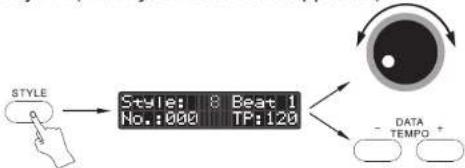
2) The default rhythm is 000. Press [STYLE] button to activate rhythm selection. Press [DATA TEMPO-/+] button or turn [DATA] knob to select rhythm. (The rhythm list is in the appendix)
flowchart
graph LR
    A["STYLE"] --> B["Style: 8 Beat 1\nNo.:000 TP:120"]
    B --> C["DATA TEMPO +"]
Adjust accompaniment volume
Turn [ACMP VOLUME] knob on the left side of the panel to adjust accompaniment volume.

18
Owner's Manual
WK-350
Adjust accompaniment velocity
1) Press [DATA TEMPO-/+] button to adjust automatic accompaniment velocity: 20bpm-280bpm.

2) Choose the rhythm When the accompaniment stops, the velocity will be the default value. Choose the rhythm when the accompaniment is on, the velocity will remain the current value. 3) Press [DATA +/-] two buttons at the same time, the velocity will be back to default value immediately.
Start Accompaniment
1) Press [SYNC START] and the indicator light flashes. Press any key to start automatic accompaniment function. Press [SYNC START] or [START/STOP] button again to stop automatic accompaniment.

2) Manual Start
Press [START/STOP] button, the accompaniment will start immediately; Press [START/STOP] button again, the accompaniment will stop immediately.

Intro/Ending
Press [INTRO/ENDING] button before automatic accompaniment starts. Then press [START/STOP] button to start prelude and enter the main musical A status.

19
Owner's Manual
WK-350
Press [INTRO/ENDING] button when automatic accompaniment is playing. Automatic accompaniment will play a piece of Coda automatically and stop.
Auto Fill In
In automatic accompaniment status, press [FILL IN] button and the accompaniment will automatically insert a piece of rhythm.
Variation A-B
In automatic accompaniment status, press [A-B Variation] button and the accompaniment will automatically enter the main musical A or B status.


Auto Chord
This digital piano provides two chord modes, which are single finger and multi-fingered mode. The digital piano can automatically recognize them. Press [Auto Chord] button, and the light turns on to start automatic chord mode. Play any key of the left side keyboard, the digital piano will respond the corresponding chord.
The methods of single chord playing can refer to the following chart.

20
Owner's Manual
WK-350
The method of multi-fingered chord playing can refer to the following chart.

NOTE: All the settings will not be saved after power off. It will return to default setting when power on again.
Practicing
Metronome
1) Press [Metronome] button. The indicator light turns on and the metronome function is activated. The default velocity is 120bpm.
2) Press [DATA TEMPO +/-] button to set velocity: 20-280bpm.
3) Press [METRONOME] button again to exit metronome function. The current setting will be saved.
NOTE: The velocity will be back to the default value after restarting the digital piano.

Owner's Manual
WK-350
Beat Setting
Long press [METRONOME] button to enter beat setting status and the indicator light flashes quickly. Select beat from 001 to 007 by [DATA] knob or [DATA TEMPO +/-] button. Press [METRONOME] button again or if there is no operation within 5 seconds, the indicator light stops flashing, and the beat has been set.

flowchart
graph TD
    A["Input"] --> B["MetronomType: 004\nNo.: 010 TP: 120"]
    B --> C["Data\n- DATA TEMPO +"]
Recording Function

1) Start Recording
Press [RECORD] button to enter the recording standby status, the indicator light turns on. At the same time, the metronome turns on. If you do not need it, you can turn it off manually. Play any key and the recording will start automatically.
2) End Recording
Automatic Stop:
During the recording process, when the storage space is full, recording will end automatically. The number of max. recording notes is 48000.
Manual Stop:
Press [RECORD] button again during the recording progress, the indicator light turns off and the recording stops.
NOTE: The recording content will not be saved after powering off.
Recording Playback:
When recording is over, press[PLAY/STOP] button to playback the recording. Press [PLAY/STOP] button again to stop playing.
Owner's Manual
WK-350
Demo Songs
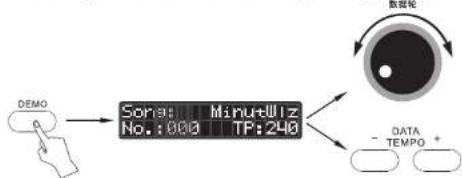
Songs: There are 88 demo songs totally. Press [DEMO] button to start to play. Press [DEMO] button again to stop playing.
Select Song: During the playing status, Turn [DATA] knob or press [DATA TEMPO-/+] button to select corresponding song.
flowchart
graph LR
    A["DEMO"] --> B["Song: 000 MHz\nNo.: 000\nTP: 240"]
    B --> C["DATA TEMPO +"]
    D["数据轮"] --> C
USB MIDI Function
Connect the computer to the USB MIDI Jack in the back panel to get MIDI Production Function.

flowchart
graph LR
    A["Computer"] --> B["USB Cable"]
    B --> C["Digital Piano"]
Audio Connection
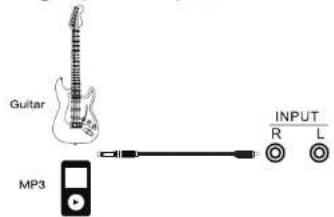
Audio Input:
Connect the musical instrument to the built-in speaker system, regarding the digital piano as speaker.
Owner's Manual
WK-350
Output:
Connect the digital piano to the external speaker system, regarding it as sound source.

natural_image
Diagram showing two speaker units connected to a output line with labeled terminals (R, L, OUTPUT)Amp
Owner's Manual
WK-350
Specification
Exterior: Standard Upright
Surface: Dark Wooden PVC
Keyboard: 88 keys scaled hammer action keyboard with four dynamic curves.
Sound Source: European Top DSP chip; Five dynamic levels of stereo piano sampling; Harmonic Series Simulation and Sympathetic Resonance Technology.
Polyphony: 64x2
Sound: 300 tones + 10 standard percussion kits + 1 synthetic tone set
Demo Song: 88 Demo Songs
Dynamics: 4 kinds of standard piano dynamics curves (soft, standard, hard, dynamic on/off)
Rhythm Style: 160
Metronome: Velocity 20-280bpm, beat 1-7.
Function Option: Recording Function, Reverb, Chorus, Dual Voice, Dual Keyboard/Dual Piano
Pedal Function: Soft Pedal(left), Damper Pedal(Middle), Sustain Pedal(Right)
Jack: USB MIDI Jack, Power Jack, Pedal Jack, Headphone Jack, LINE IN R/L Jack, LINE OUT R/L Jack
Power: 20Wx2 DC12V 2000mA
Dimensions: 1360(L)x 320(W)x 770(H)mm
Weight: 44kg
Accessories: AC Adapter, Owner's Manual
★ Specifications may change without notice.
Owner's Manual
WK-350
Note: This device has been tested and is qualified with safety regulations of the state, EMC and other regulations. Radio communication may jam this device. On the other hand, this device may have effect on radio or television signal. Users should take one of the following or more methods to solve the problem:
● Relocate or use another receiving antenna.
- Increase the distance between the device and receiving device.
●The receiving device shall be connected to different sockets
● Enquiry to the sales agency or experienced radio/television skilled personnel.
Warning: Any unreasonable fixes or modifications may have effect on users' normal operation on the device.
Owner's Manual
WK-350
Sound List
| Number | Instrument | LCD |
| PIANO | ||
| 000 | GRAND PIANO 1 | "GrdPno 1" |
| 001 | GRAND PIANO 2 | "GrdPno 2" |
| 002 | GRAND PIANO /W 1 | "GrdPnoW1" |
| 003 | GRAND PIANO /W 2 | "GrdPnoW2" |
| 004 | BRIGHTNESS PIANO 1 | "GrdPnoB1" |
| 005 | BRIGHTNESS PIANO 2 | "GrdPnoB2" |
| 006 | GRAND PIANO DARK | "GrdPnoDk" |
| 007 | VELOCITY CROSS PIANO | "GrdPnoVc" |
| 008 | SOFT GRAND PIANO | "GrdPnoSf" |
| 009 | STEREO BRIGHT PIANO | "BrtPiano" |
| 010 | BRIGHT PIANO 1 | "BrtPno 1" |
| 011 | BRIGHT PIANO 2 | "BrtPno 2" |
| 012 | BRIGHT PIANO 3 | "BrtPno 3" |
| 013 | BRIGHT PIANO /W | "BrtPno W" |
| 014 | SOFT BRIGHT PIANO | "BrtPnoSf" |
| 015 | DEEP BRIGHT PIANO | "DpBrtPno" |
| 016 | VELOCITY CROSS BRIGHT PIANO | "BrtPnoVc" |
| 017 | PIANO ELEC | "EtrPiano" |
| 018 | DETUNED E.PIANO | "E.PnoDe" |
| 019 | BRIGHT E.PIANO 1 | "E.Pno B1" |
| 020 | BRIGHT E.PIANO 2 | "E.Pno B2" |
| 021 | E.PIANO /W 1 | "E.Pno W1" |
| 022 | E.PIANO /W 2 | "E.Pno W2" |
| 023 | DARK E.PIANO 1 | "E.Pno D1" |
| 024 | DARK E.PIANO 2 | "E.Pno D2" |
| 025 | HONKY-TONK | "HonkTonk" |
| 026 | SOFT HONKY-TONK | "HnkTkSft" |
| 027 | VELOCITY CROSS HONKY-TONK | "HnkTkVc" |
Owner's Manual
WK-350
| Number | Instrument | LCD |
| 028 | DARK HONKY-TONK 1 | "HnkTkDk1" |
| 029 | DARK HONKY-TONK 2 | "HnkTkDk2" |
| 030 | HONKY-TONK /W 1 | "HnkTk W1" |
| 031 | HONKY-TONK /W 2 | "HnkTk W2" |
| 032 | SHORT HONKY-TONK 1 | "StHnkTk1" |
| 033 | SHORT HONKY-TONK 2 | "StHnkTk2" |
| 034 | E PIANO1 | "E Piano1" |
| 035 | E PIANO2 | "E Piano2" |
| 036 | E PIANO 1/W | "E.P /W1 " |
| 037 | E PIANO 2/W | "E.P /W2 " |
| 038 | E PIANO 3/W | "E.P /W3 " |
| 039 | E PIANO 4/W | "E.P /W4 " |
| 040 | SOFT E.PIANO 1 | "Sft E.P1" |
| 041 | SOFT E.PIANO 2 | "Sft E.P2" |
| 042 | HARD E.PIANO 1 | "HardE.P1" |
| 043 | HARD E.PIANO 2 | "HardE.P2" |
| 044 | SHORT E.PIANO 1 | "ShtE.P 1" |
| 045 | SHORT E.PIANO 2 | "ShtE.P 2" |
| 046 | BRIGHTNESS E.P 1 | "E.P Brt1" |
| 047 | BRIGHTNESS E.P 2 | "E.P Brt2" |
| 048 | GRAND HARPSICHORD | "GdHapChd" |
| 049 | HARPSICHORD 1 | "HapChd 1" |
| 050 | HARPSICHORD 2 | "HapChd 2" |
| 051 | SOFT HARPSICHORD | "SftHpChd" |
| 052 | BRIGHT HARPSICHORD | "BrtHpChd" |
| 053 | DARK HARPSICHORD | "DakHpChd" |
| 054 | HARD HARPSICHORD | "HadHpChd" |
| 055 | CLAVI CHORD 1 | "Clavi 1" |
| 056 | CLAVI CHORD 2 | "Clavi 2" |
| 057 | CLAVI /W | "Clavi /W" |
Owner's Manual
WK-350
| Number | Instrument | LCD |
| 058 | BRIGHT CLAVI | "BrtClavi" |
| 059 | DARK CLAVI | "DrkClavi" |
| 060 | PERCHY CLAVI | "PerClavi" |
| GLOCK | ||
| 061 | CELESTA | "Celesta " |
| 062 | BRIGHT CELESTA | "BrCelest" |
| 063 | SHORT CELESTA | "StCelest" |
| 064 | PERCHY CELESTA | "PrCelest" |
| 065 | DUET CELESTA | "DuCelest" |
| 066 | GLOCKENSPIEL 1 | "GlockSI1" |
| 067 | GLOCKENSPIEL 2 | "GlockSI2" |
| 068 | BRIGHT GLOCKENSPIEL | "BrGlockS" |
| 069 | DARK GLOCKENSPIEL | "DkGlockS" |
| 070 | MUSIC BOX 1 | "MusicBx1" |
| 071 | MUSIC BOX 2 | "MusicBx2" |
| 072 | MUSIC BOX 3 | "MusicBx3" |
| 073 | TOY MUSIC BOX | "ToyMusic" |
| 074 | BRIGHT MUSIC BOX | "BrtMusic" |
| 075 | VIBRAPHONE 1 | "VbPhone1" |
| 076 | VIBRAPHONE 2 | "VbPhone2" |
| 077 | VIBRAPHONE 3 | "VbPhone3" |
| 078 | HARD VIBRAPHONE | "VbPhoneH" |
| 079 | VIBRAPHONE /W 1 | "VbPhonW1" |
| 080 | VIBRAPHONE /W 2 | "VbPhonW2" |
| 081 | MARIMBA 1 | "Marimba1" |
| 082 | MARIMBA 2 | "Marimba2" |
| 083 | MARIMBA /W | "MarimbaW" |
| 084 | DARK MARIMBA | "MarimbaD" |
| 085 | XYLOPHONE 1 | "XyPhone1" |
Owner's Manual
WK-350
| Number | Instrument | LCD |
| 086 | XYLOPHONE 2 | "XyPhone2" |
| 087 | VELOCITY CROSS XYLOPHONE | "XyPhoneV" |
| 088 | TUBULR BELLS 1 | "TubBell1" |
| 089 | TUBULR BELLS 2 | "TubBell2" |
| 090 | TUBULR BELLS 3 | "TubBell3" |
| 091 | TUBULR BELLS 4 | "TubBell4" |
| 092 | DULCIMER 1 | "Dulcime1" |
| 093 | DULCIMER 2 | "Dulcime2" |
| 094 | SANTUR | *Santur " |
| ORGAN | ||
| 095 | HAMND ORGAN | "HamndOrg" |
| 096 | SOFT HAMND ORGAN | "SftHdOrg" |
| 097 | BRIGHT SOFT HAMND ORGAN | "BrtHdOrg" |
| 098 | HAMND ORGAN DETUNED | "DutHdOrg" |
| 099 | PERCHY ORGAN 1 | "PercOrg1" |
| 100 | PERCHY ORGAN 2 | "PercOrg2" |
| 101 | BRIGHT PERCHY ORGAN | "BrtPrOrg" |
| 102 | ROCK ORGAN | "Rock Org" |
| 103 | ROTART ORGAN | "RotOrgan" |
| 104 | CHURCH ORGAN 1 | "ChrhOrg1" |
| 105 | CHURCH ORGAN 2 | "ChrhOrg2" |
| 106 | BIRGHT CHURCH ORGAN | "BrChrOrg" |
| 107 | REED ORGAN | "Reed Org" |
| 108 | ACCORDN 1 | "Accordn1" |
| 109 | ACCORDN 2 | "Accordn2" |
| 110 | ACCORDN 3 | "Accordn3" |
| 111 | HARMONICA 1 | "Harmoni1" |
| 112 | HARMONICA 2 | "Harmoni2" |
| 113 | HARMONICA 3 | "SwtHarmo" |
| 114 | TANGO ACCORDN 1 | "TgAccord1" |
Owner's Manual
WK-350
| Number | Instrument | LCD |
| 115 | TANGO ACCORDN 2 | "TgAccord2" |
| GUITAR | ||
| 116 | GUITAR NYLON 1 | "GtrNyIn1" |
| 117 | GUITAR NYLON 2 | "GtrNyIn2" |
| 118 | GUITAR NYLON RELEASE | "GtrNyInR" |
| 119 | VELOCITY CROSS RUITAR | "GtrNyInV" |
| 120 | DETUNED GUITAR NYLON | "GtrNyInD" |
| 121 | BIRGHT GUITAR | "GtrNyInB" |
| 122 | GUITAR STEEL 1 | "GtrStl 1" |
| 123 | GUITAR STEEL 2 | "GtrStl 2" |
| 124 | VELOCITY CROSS GUITAR STEEL | "GtrStl V" |
| 125 | DARK GUITAR STEEL | "GtrStIDk" |
| 126 | BRIGHT GUITAR STEEL | "GtrStIBr" |
| 127 | GUITAR JAZZ 1 | "GtrJazz1" |
| 128 | GUITAR JAZZ 2 | "GtrJazz2" |
| 129 | DARK GUITAR STEEL | "GtrJazzD" |
| 130 | GUITAR CLEAN 1 | "GtrClen1" |
| 131 | GUITAR CLEAN 2 | "GtrClen2" |
| 132 | GUITAR CLEAN 3 | "GtrClen3" |
| 133 | VELOCITY CLEAN GUITAR | "GtrClenV" |
| 134 | DUTED CLEAN GUITAR | "GtrClenD" |
| 135 | BRIGHT CLEAN GUITAR | "GtrClenB" |
| 136 | GUITAR MUTED 1 | "GtrMute1" |
| 137 | GUITAR MUTED 2 | "GtrMute2" |
| 138 | GUITAR OVRDRV | "GtrOvrdr" |
| 139 | FUNK GUITAR | "FunkGtr" |
| 140 | GUITAR DISTRT 1 | "GtrDist1" |
| 141 | GUITAR DISTRT 2 | "GtrDist2" |
| 142 | GUITAR DISTRT 3 | "GtrDist3" |
Owner's Manual
WK-350
| Number | Instrument | LCD |
| 143 | GUITAR HRMNX | "GtrHrmnx" |
| BASS | ||
| 144 | ACOUSTIC BASS 1 | "AcoBass1" |
| 145 | ACOUSTIC BASS 2 | "AcoBass2" |
| 146 | DETUNED BASS | "Det Bass" |
| 147 | BASS AND FILTER | "FiltBass" |
| 148 | FINGER BASS 1 | "FigBass1" |
| 149 | FINGER BASS 2 | "FigBass2" |
| 150 | ELECT BASS 1 | "E.Bass 1" |
| 151 | ELECT BASS 2 | "E.Bass 2" |
| 152 | ELECT BASS 3 | "E.Bass 3" |
| 153 | ELECT BASS 4 | "E.Bass 4" |
| 154 | PICK BASS | "PickBass" |
| 155 | FRETLS BASS | "FrtIBass" |
| 156 | FRETLESS BASS | "Fre Bass" |
| 157 | SLAP BAS 1 | "SlapBas1" |
| 158 | SLAP BAS 2 | "SlapBas2" |
| 159 | SLAP BAS 3 | "SlapBas3" |
| 160 | SLAP BAS 4 | "SlapBas4" |
| 161 | SYN BASS 1 | "SynBass1" |
| 162 | SYN BASS 2 | "SynBass2" |
| 163 | SYN BASS 3 | "SynBass3" |
| 164 | SYN BASS 4 | "SynBass4" |
| STRING | ||
| 165 | VIOLIN 1 | "Violin 1" |
| 166 | VIOLIN 2 | "Violin 2" |
| 167 | VIOLIN 3 | "Violin 3" |
| 168 | VIOLA 1 | "Viola 1" |
| 169 | VIOLA 2 | "Viola 2" |
| 170 | DARK VIOLA | "ViolaDrk" |
Owner's Manual
WK-350
| Number | Instrument | LCD |
| 171 | CELLO 1 | "Cello 1 " |
| 172 | CELLO 2 | "Cello 2 " |
| 173 | DARK CELLO | "CelloDrk" |
| 174 | CONTRABASS 1 | "CntBass1" |
| 175 | CONTRABASS 2 | "CntBass2" |
| 176 | STR TREM | "Str Trem" |
| 177 | STR PIZZ | "Str Pizz" |
| 178 | HARP | "Harp " |
| 179 | TIMPANI | 'Timpani " |
| CONCERT | ||
| 180 | STRINGS 1 | "Strings1" |
| 181 | STRINGS 2 | "Strings2" |
| 182 | STRINGS 3 | "Strings3" |
| 183 | STRINGS 4 | "Strings4" |
| 184 | STRINGS 5 | "Strings5" |
| 185 | SLOW STRINGS | "SlwStrig" |
| 186 | STR SYN 1 | "Str Syn1" |
| 187 | STR SYN 2 | "Str Syn2" |
| 188 | STR SYN 3 | "Str Syn3" |
| 189 | CHOIR AAHS 1 | "ChoiAah1" |
| 190 | CHOIR AAHS 2 | "ChoiAah2" |
| 191 | VOICE OOHS 1 | "VoicOoh1" |
| 192 | VOICE OOHS 2 | "VoicOoh2" |
| 193 | VOICE SYN | "VoiceSyn" |
| 194 | ORCH HIT | "Orch Hit" |
| BRASS | ||
| 195 | TRUMPT 1 | "Trumpt 1" |
| 196 | TRUMPT 2 | "Trumpt 2" |
| 197 | TRUMPT 3 | "Trumpt 3" |
| 198 | DARK TRUMPT | "DkTrumpt" |
Owner's Manual
WK-350
| Number | Instrument | LCD |
| 199 | TROMBONE 1 | "Trombon1" |
| 200 | TROMBONE 2 | "Trombon2" |
| 201 | TUBA 1 | "Tuba 1 " |
| 202 | TUBA 2 | "Tuba 2" |
| 203 | MUTE TPT | "Mute Tpt" |
| 204 | FR HORN 1 | "FrhHorn1" |
| 205 | FR HORN 2 | "FrhHorn2" |
| 206 | BRASS SECT | "BrassSec" |
| 207 | BRASS SYN 1 | "BrassSy1" |
| 208 | BRASS SYN 2 | "BrassSy2" |
| PIPE | ||
| 209 | SAX SOPRANO | "SaxSopra" |
| 210 | SAX ALTO | "SaxAlto " |
| 211 | SOFT SAXALTO | "SftSaxAl" |
| 212 | SLOW SAXALTO | "SlwSaxAl" |
| 213 | SAX TENOR 1 | "SaxTeno1" |
| 214 | SAX TENOR 2 | "SaxTeno2" |
| 215 | SWEET SAXTENOR | "SweetSax" |
| 216 | DARK SAXTENOR | "Dark Sax" |
| 217 | SAX BTONE 1 | "SaxBton1" |
| 218 | SAX BTONE 2 | "SaxBton2" |
| 219 | OBOE 1 | "Oboe 1 " |
| 220 | OBOE 2 | "Oboe 2 " |
| 221 | ENG HORN 1 | "EngHorn1" |
| 222 | ENG HORN 2 | "EngHorn2" |
| 223 | BASSON 1 | "Bassoon1" |
| 224 | BASSON 2 | "Bassoon2" |
| 225 | CLARINET | "Ciarine1" |
| 226 | CLARINET | "Ciarine2" |
| WOODPIPE | ||
Owner's Manual
WK-350
| Number | Instrument | LCD |
| 227 | PICCOLO | "Piccolo " |
| 228 | FLUTE | "Flute " |
| 229 | RECORDER | "Recorder" |
| 230 | PAN FLUTE | "PanFlute" |
| 231 | BOTTLE BLOWN | "BtIBlown" |
| 232 | SHAKHACHI | "ShkHachi" |
| 233 | WHISTLE | "Whistle " |
| 234 | OCARINA | "Ocarina " |
| SYNTH PIPE | ||
| 235 | SQR WAVE | "SqurWave" |
| 236 | SAW TOOTH | "SawTooth" |
| 237 | CALLIOPE | "Calliope" |
| 238 | CHIFF | "Chiff " |
| 239 | CHARANG | "Charang " |
| 240 | VOICE LEAD | "VoicLead" |
| 241 | 5TH LEAD | "5th Lead" |
| 242 | BASS LEAD | "BassLead" |
| SYNTH VOICE | ||
| 243 | NEW AGE | "New Age " |
| 244 | WARM PAD | "WarmPad " |
| 245 | POLY SYNTH | "PlySynth" |
| 246 | CHOIR PAD | "ChoirPad" |
| 247 | BOW GLASS | "BowGlass" |
| 248 | METAL PAD | "MetalPad" |
| 249 | HALO PAD | "HaloPad " |
| 250 | SWEEP | "Sweep " |
| SYNTH EFFECT | ||
| 251 | RAIN FX | "Rain Fx" |
| 252 | SNDTRK FX | "SndtrkFx" |
| 253 | CRYSTAL FX | "CrystIFx" |
Owner's Manual
WK-350
| Number | Instrument | LCD |
| 254 | ATMOSPH FX | "AtmospFx" |
| 255 | BRIGHT FX | "BrightFx" |
| 256 | GOBLIN FX | "GoblinFx" |
| 257 | ECHO FX | "Echo Fx" |
| 258 | SCI-FI FX | "Scifi Fx" |
| FOLK SOUND | ||
| 259 | SITAR | "Sitar " |
| 260 | BANJO | "Banjo " |
| 261 | SHAMISEN | "Shamisen" |
| 262 | KOTO | "Koto " |
| 263 | KALIMBA | "Kalimba " |
| 264 | BAGPIPE | "BagPipe " |
| 265 | FIDDLE | "Fiddle " |
| 266 | SHANAI | "Shanai " |
| PERCUSSION | ||
| 267 | TINKLE BELL | "TinkBell" |
| 268 | AGOGO | "Agogo " |
| 269 | STEEL DRM | "SteelDrm" |
| 270 | WOODBLK | "WoodBlk " |
| 271 | TAIKO DRM | "TaikoDrm" |
| 272 | MLDY TOM | "MelodyTm" |
| 273 | SYNTH DRM | "SynthDrm" |
| 274 | REVRS CYM | "RevrsCym" |
| EFFECT | ||
| 275 | GTR NOISE | "GtrNoise" |
| 276 | BREATH | "Breath " |
| 277 | SEASHORE | "SeaShore" |
| 278 | BIRD TWEET | "BrdTweet" |
| 279 | TELEPHONE | "TelPhone" |
| 280 | HELICOPTER | "Helicptr" |
Owner's Manual
WK-350
| Number | Instrument | LCD |
| 281 | APPLAUSE | "Applause" |
| 282 | GUNSHOT | "GunShot " |
| CHINESE INSTRUMENT | ||
| 283 | Yun Luo | "YunLuo" |
| 284 | GanMeiLa | "GanMeila" |
| 285 | BianMang | "BianMang" |
| 286 | YangQin | "YangQin" |
| 287 | LuSheng | "LuSheng" |
| 288 | PiPa | "Pi Pa " |
| 289 | LiuQin | "LiuQin" |
| 290 | YueQin | "YueQin" |
| 291 | DaRuan | "DaRuan" |
| 292 | ZhonRuan | "ZhonRuan" |
| 293 | GaoHu | "GaoHu" |
| 294 | ErHu | "Er Hu " |
| 295 | ZhongHu | "ZhongHu" |
| 296 | ErHuEb1 | "ErHu Eb1" |
| 297 | ErHuEb2 | "ErHu Eb2" |
| 298 | ZhHuEb | "ZhHu Eb2" |
| 299 | BangDi | "Bang Di " |
Percussion Kit
| Number | Instrument | LCD |
| 0 | Standard Drums | "Std. Kit" |
| 1 | China Drums | "ChinaKit" |
| 2 | Room Drums | "Room Kit" |
| 3 | Jazz Drums | "Jazz Kit" |
| 4 | Pwr.Drums | "Pwr. Kit" |
| 5 | Electinic Drums | "ElectKit" |
| 6 | T808 Drums | "T808 Kit" |
Owner's Manual
WK-350
| Number | Instrument | LCD |
| 7 | Dance Drums | "DanceKit" |
| 8 | Brush Drums | "BrushKit" |
| 9 | Orche Drums | "OrcheKit" |
| 10 | Sfx.Drums | "Sfx. Kit" |
Rhythm List
| Category | Number | LCD |
| 8 Beat | 000 | "8Beat 1" |
| 001 | "8Beat 2" | |
| 002 | "8Beat 3" | |
| 003 | "8Beat 4" | |
| 004 | "8Beat 5" | |
| 005 | "8Beat 6" | |
| 006 | "8Beat 7" | |
| 007 | "8Bt Head" | |
| 008 | "8BtSoft " | |
| 009 | "8Bt Pop1" | |
| 010 | "8Bt Pop2" | |
| 011 | "8Bt Pop3" | |
| 012 | "8Bt Pop4" | |
| 16 Beat | 013 | "16Beat 1" |
| 014 | "16Beat 2" | |
| 015 | "16Beat 3" | |
| 016 | "16Beat 4" | |
| 017 | "16Beat 5" | |
| 018 | "16Beat 6" | |
| 019 | "16Beat 7" | |
| 020 | "16Beat 8" | |
| 021 | "16BtPop1" | |
| 022 | "16BtPop2" |
| Category | Number | LCD |
| 16 Beat | 023 | "16BtBald1" |
| 024 | "16BtBald2" | |
| 025 | "16BtFunk" | |
| 026 | "FunkyPop" | |
| 027 | "HipHop1" | |
| 028 | "HipHop2" | |
| Ballad | 029 | "Ballad 1" |
| 030 | "Ballad 2" | |
| 031 | "Ballad 3" | |
| 032 | "Ballad 4" | |
| 033 | "GuitBlad" | |
| 034 | "OrgnBald" | |
| 035 | "BlusBald" | |
| 036 | "EpicBald" | |
| 037 | "RockBald" | |
| 038 | "SlowBald" | |
| 039 | "PopBald1" | |
| 040 | "PopBald2" | |
| 041 | "PopBald3" | |
| 042 | "PopBald4" | |
| 043 | "PopBald5" | |
| 044 | "E.Ballad" | |
| 045 | "PolkBald" |
Owner's Manual
WK-350
| Category | Number | LCD | Category | Number | LCD |
| Ballad | 046 | "AnlogPop" | Dance | 079 | "DiscoHnd" |
| 047 | "CntyBald" | 080 | "TwoStep" | ||
| Country | 048 | "Blugras1" | 081 | "Tip 1 " | |
| 049 | "Blugras2" | 082 | "Tip 2 " | ||
| 050 | "Country1" | 083 | "EuroBt 1" | ||
| 051 | "Country2" | 084 | "EuroBt 2" | ||
| 052 | "CntyRock" | 085 | "FunckyTp" | ||
| 053 | "CntyShuf" | 086 | "Techno 1" | ||
| 054 | "CntySwin" | 087 | "Techno 2" | ||
| 055 | "CntyBald" | 088 | "FunckyTp" | ||
| 056 | "CntyWalt" | 089 | "Polk Pop" | ||
| 057 | "CntyPop1" | 090 | "Waltz 1" | ||
| 058 | "CntyPop2" | 091 | "WalzPop1" | ||
| Dance | 059 | "House 1" | 092 | "WalzPop2" | |
| 060 | "House 2" | Jazz & Swing | 093 | "Boogie " | |
| 061 | "CoolDnc1" | 094 | "FunkyPop" | ||
| 062 | "CoolDnc2" | 095 | "80sFusin" | ||
| 063 | "SlowFox " | 096 | "JazzRock" | ||
| 064 | "V Waltz1" | 097 | "Swing 1" | ||
| 065 | "V Waltz2" | 098 | "Dixielad" | ||
| 066 | "Salsa 1" | 099 | "JazzSamb" | ||
| 067 | "Salsa 2" | 100 | "Jive " | ||
| 068 | "Disco " | 101 | "Trance 1" | ||
| 069 | "70'Disco" | 102 | "Trance 2" | ||
| 070 | "80'Disco" | 103 | "Entrance" | ||
| 071 | "DiscoSol" | 104 | "Handbag" | ||
| 072 | "DiscoTrp" | 105 | "Bebop " | ||
| 073 | "Electro" | Latin | 106 | "BossaNv1" | |
| 074 | "HipHopPo" | 107 | "Bossa " | ||
| 075 | "AnlogPop" | 108 | "GitBossa" | ||
| 076 | "ClubDnc1" | 109 | "PopBossa" | ||
| 077 | "ClubDnc2" | 110 | "Tango " | ||
| 078 | "DiscoTro" | 111 | "Cha Cha " |
Owner's Manual
WK-350
| Category | Number | LCD |
| Latin | 112 | "Rhumba" |
| 113 | "Pasodob" | |
| 114 | "Quikstp" | |
| 115 | "TEX TEX " | |
| 116 | "Soul " | |
| 117 | "Gosp!Slf" | |
| 118 | "SoulShlf" | |
| Poetry & Blues | 119 | "CGO.Blus" |
| 120 | "GospelFs" | |
| 121 | "Big Band " | |
| 122 | "Rap " | |
| 123 | "SlwGospe" | |
| 124 | "Blues 1" | |
| 125 | "Blues 2" | |
| 126 | "Blues 3" | |
| 127 | "6/8Blues" | |
| 128 | "BluesRok" | |
| 129 | "Gosp!Shf" | |
| 130 | "SlwBlues" | |
| 131 | "Foxtrot " | |
| Rock & Metal | 132 | "50'sRock" |
| 133 | "HevyMetl" | |
| 134 | "Rock 1 " | |
| 135 | "Rock 2 " | |
| 136 | "Rock 3 " | |
| 137 | "Rock 4 " | |
| 138 | "Rock 5 " | |
| 139 | "6/8Blues" | |
| 140 | "SoftRock" | |
| 141 | "SlowRock" | |
| 142 | "HardRock" | |
| 143 | "RBShuffle" | |
| 144 | "Rok&Rol1" |
| Category | Number | LCD |
| Rock & Metal | 145 | "Rok&Rol2" |
| 146 | "R&B 1 " | |
| 147 | "R&B 2 " | |
| 148 | "R&B 3 " | |
| 149 | "R&B 4 " | |
| 150 | "RokShuff" | |
| March | 151 | "March 1" |
| 152 | "March 2" | |
| 153 | "US.March" | |
| 154 | "Samba " | |
| 155 | "Polka " | |
| 156 | "PolkaObr" | |
| 157 | "Tarantla" | |
| 158 | "SloWaltz" | |
| 159 | "ObrWaltz" |
Owner's Manual
WK-350
Demo Songs
| Number | LCD |
| 000 | MinutWiz |
| 001 | DJ Dance |
| 002 | Fountian |
| 003 | SpanGirl |
| 004 | SonataPn |
| 005 | SuperSng |
| 006 | LittlBee |
| 007 | HorseRac |
| 008 | Nocturne |
| 009 | TheSpain |
| 010 | BusyTran |
| 011 | Mexico |
| 012 | MozartPn |
| 013 | Minuet |
| 014 | Nifuma |
| 015 | Disco |
| 016 | FolkSong |
| 017 | Girl Sea |
| 018 | LittStar |
| 019 | KindeGtn |
| 020 | Wahaha |
| 021 | Duck&Cik |
| 022 | Humorous |
| 023 | Joy Song |
| 024 | GoingHom |
| 025 | Dove |
| 026 | Auldlang |
| 027 | Moonligh |
| 028 | HappyBirh |
| 029 | PraiseSng |
| Number | LCD |
| 030 | Dolly |
| 031 | Market |
| 032 | Family |
| 033 | A cradle |
| 034 | At Home |
| 035 | Seasons |
| 036 | YearsAgo |
| 037 | Pigeons |
| 038 | InnerVic |
| 039 | Violin |
| 040 | Swan |
| 041 | Musettes |
| 042 | GypsyRnd |
| 043 | Serenade |
| 044 | Polka |
| 045 | SoilPull |
| 046 | Trout |
| 047 | Send-off |
| 048 | March |
| 049 | ForElise |
| 050 | SwaniRiv |
| 051 | France |
| 052 | Danube |
| 053 | Hungary |
| 054 | Spaceman |
| 055 | Patriot |
| 056 | Cuckoo |
| 057 | SingKite |
| 058 | TongChil |
| 059 | DoReMi |
Owner's Manual
WK-350
| Number | LCD |
| 060 | We Happy |
| 061 | LittlBee |
| 062 | Russia |
| 063 | Plaster |
| 064 | Folson |
| 065 | JingleBe |
| 066 | PaperBoy |
| 067 | Swallow |
| 068 | New Year |
| 069 | Edelweis |
| 070 | MoonRivr |
| 071 | Beyer 10 |
| 072 | Beyer 20 |
| 073 | Beyer 30 |
| 074 | Beyer 40 |
| 075 | Beyer 50 |
| 076 | Beyer 60 |
| 077 | Beyer 70 |
| 078 | Beyer 71 |
| 079 | Beyer 72 |
| 080 | Beyer 75 |
| 081 | Beyer 76 |
| 082 | Beyer 77 |
| 083 | Beyer 78 |
| 084 | Beyer 79 |
| 085 | Beyer 80 |
| 086 | Beyer 90 |
| 087 | Beyer 98 |
Owner's Manual
WK-350
| Trouble | Possible Reason/Solution |
| The digital piano will puff when it is switched on. | Don't worry. This is normal. |
| Pressing key makes no sound after the power is on. | Please confirm whether the master volume button is set properly or confirm whether the headphone jack is linked to other devices, which will automatically cut off the built-in speaker system. |
| Notes have different quality under the same sound. | This is normal because different sound sampling ranges make different sound quality. |
| In pedal sustain function, some sound sustains longer, others shorter. | This is normal. The tenuto of different sounds of this digital piano has been set to optimized length. |
| The sound is too small. | Please confirm whether the master volume button is set properly. |
| Some MIDI Data can not be transmitted correctly (Even the MIDI cable is linked correctly). | This is normal. It is related to the original setting. |
| The speaker will make noise when cell phone is nearby. | The cell phone will jam when it is nearby. The cell phone should be turned off or keep the cell phone away from the digital piano to avoid the jam. |
| The pitch doesn't match with key actual place while playing. | Maybe the double keyboard function or transposition function is turned on. Turn off double keyboard or reset transposition to zero can solve the problem. |
Owner's Manual
WK-350
| Trouble | Possible Reason/Solution |
| The sound can not be changed while playing. The pitch doesn't match with key actual place. | Maybe the double keyboard function is turned on and the split point is set to the highest pitch. Turn off double keyboard function and set split point to original status can solve the problem. |
| The demo song distorts or interrupts. | Maybe it has been playing in maximum power for a long time so that the circuit board self-protection system is activated in case of overheat. Turn down the volume or turn off power for a while can solve the problem. |
| There are two sounds at the same time while playing. | Maybe you turn on dual voice function. Turn off dual voice function can solve the problem. |
| The tone's pitch is wrong. | Set scale and tones or set temperament parameter values to zero. |
| No automatic accompaniment chord. | Confirm whether accompaniment volume or chord function is turned on. |
| Dynamics is different from before. | This digital piano has four dynamics, light, standard, heavy, off. Maybe you have chosen different dynamics. You can choose the dynamics again according to your demand or reset it. |
Owner's Manual
WK-350
THE FCC REGULATION WARNING (for U.S.A.)
This equipment has been tested and found to comply with the limits for a Class B digital device, pursuant to Part 15 of the FCC Rules. These limits are designed to provide reasonable protection against harmful interference in a residential installation. This equipment generates, uses, and can radiate radio frequency energy and, if not installed and used in accordance with the instructions, may cause harmful interference to radio communications. However, there is no guarantee that interference will not occur in a particular installation. If this equipment does cause harmful interference to radio or television reception, which can be determined by turning the equipment off and on, the user is encouraged to try to correct the interference by one or more of the following measures:
- Reorient or relocate the receiving antenna.
- Increase the separation between the equipment and receiver.
- Connect the equipment into an outlet on a circuit different from that to which the receiver is connected.
- Consult the dealer or an experienced radio/TV technician for help.
CE mark for European Harmonized Standards
CE Mark which is attached to our company's products of Battery mains the product is in fully conformity with the harmonized standard(s) EN 61000-6-3:2007+A1:2011 & EN 61000-6-1:2007 Under the Council Directive 2004/108/ EC on Electromagnetic Compatibility.
- SAFETY GUIDELINE
- WARNING
- Power/Electric Cable
- Do Not Open
- Warning about humidity
- Fire
- Attention
- Assemble & Use
- Mount Position
- Catalogue
- Quick Installation Guide
- Mounting Components
- Owner's Manual
- WK-350
- Power Supply
- USB MIDI Jack
- INPUT R/L Jacks
- OUTPUT R/L Jacks
- Headphone Jack
- Pedal Jack
- Before You Play
- Power On
- Volume Control
- Headphone Connection
- Performing
- Sound Control
- Back to Grand Piano Tone
- Touch
- Transposition
- Dual Keyboard
- Split Point Setting:
- Dual Voice
- Percussion
- Reverb
- Chorus
- Effect
- Memory Setting
- Call Memory
- Accompaniment Function
- Start Accompaniment
- Intro/Ending
- Auto Fill In
- Variation A-B
- Auto Chord
- Practicing
- Metronome
- Beat Setting
- 1) Start Recording
- 2) End Recording
- Automatic Stop:
- Manual Stop:
- Recording Playback:
- Demo Songs
- USB MIDI Function
- Audio Connection
- Specification
- THE FCC REGULATION WARNING (for U.S.A.)
- CE mark for European Harmonized Standards
Brand : NUX
Model : WK-350
Category : Piano