Discovery - Wristwatch Daniel Steiger - Free user manual and instructions
Find the device manual for free Discovery Daniel Steiger in PDF.


| Brand | Daniel Steiger |
| Model | Discovery |
| Product Type | Watch |
| Movement Type | Quartz |
| Case Material | Stainless Steel |
| Case Diameter | 42 mm |
| Case Thickness | 11 mm |
| Dial Color | Black |
| Crystal Type | Mineral |
| Strap Material | Stainless Steel Bracelet |
| Clasp Type | Fold-over with Safety |
| Water Resistance | 50 meters (5 ATM) |
| Battery Type | SR626SW |
| Battery Life | Approx. 2 years |
| Functions | Hour, Minute, Second, Date |
| Weight | Approx. 150 g |
| Warranty | 2 years |
| Cleaning | Wipe with a soft, dry cloth |
| Service Interval | Every 2-3 years |
Frequently Asked Questions - Discovery Daniel Steiger
User questions about Discovery Daniel Steiger
0 question about this device. Answer the ones you know or ask your own.
Ask a new question about this device
Download the instructions for your Wristwatch in PDF format for free! Find your manual Discovery - Daniel Steiger and take your electronic device back in hand. On this page are published all the documents necessary for the use of your device. Discovery by Daniel Steiger.
USER MANUAL Discovery Daniel Steiger
This is a genuine item from the Daniel Steiger range.
And is covered by our
5 YEAR UNLIMITED MOVEMENT WARRANTY
For all queries call our customer services team toll free on: 1 888 768 4468
Discovery Watch
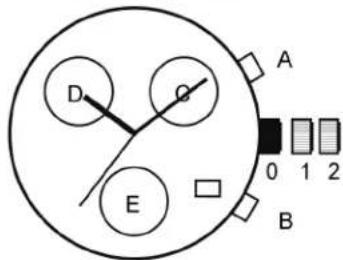
C: Second Hand
D: Stopwatch minutes
E: Day
How to set the Time, Date & Day: Pull the crown out to position 1. Turn the crown clockwise to set date. Pull the crown out to position 2 & rotate crown clockwise to set the day, and then set the time. Push the crown back to position 0. Do not change the date between 9.pm & 1.am as it may not change properly.
How to operate the Stopwatch:
Restart & stop the stopwatch by pressing pusher A. To stop & reset the stopwatch press B
Brand : Daniel Steiger
Model : Discovery
Category : Wristwatch