
Zoom MS6010 - Skin Care Device PHILIPS - Free user manual and instructions
Find the device manual for free Zoom MS6010 PHILIPS in PDF.


| Product Type | Skin care device |
| Brand | Philips |
| Model | Zoom MS6010 |
| Primary Function | Facial cleansing and exfoliation |
| Additional Functions | Gentle massage, anti-aging stimulation |
| Power Source | Rechargeable lithium-ion battery |
| Charging Method | USB cable (included) |
| Battery Life | Approximately 30 minutes per charge |
| Water Resistance | IPX5 (splash-proof, safe for use in shower) |
| Material | Medical-grade silicone brush head, ABS handle |
| Dimensions (L x W x H) | 18 x 4 x 4 cm |
| Weight | 180 g |
| Speed Settings | 3 adjustable intensity levels |
| Compatible Accessories | Replacement brush heads (model: MS6010-C) |
| Cleaning and Maintenance | Rinse brush with water after use; wash handle with damp cloth |
| Safety Features | Auto shut-off after 2 minutes of inactivity |
| Skin Types | Suitable for normal, oily, and combination skin |
| Warranty | 1 year limited warranty |
Frequently Asked Questions - Zoom MS6010 PHILIPS
User questions about Zoom MS6010 PHILIPS
0 question about this device. Answer the ones you know or ask your own.
Ask a new question about this device
Download the instructions for your Skin Care Device in PDF format for free! Find your manual Zoom MS6010 - PHILIPS and take your electronic device back in hand. On this page are published all the documents necessary for the use of your device. Zoom MS6010 by PHILIPS.
USER MANUAL Zoom MS6010 PHILIPS
Register your product and get supported at www.phips.com/welcome
MSUC
Specifications are subject to change without notice © 2020 Karinklijke Philips NV.
All rights reserved.
3000 024 67772

English
1
Introduction
Congratulations on your HydraCube purchase and welcome to Philip The Philips HydraCube portable make enhance the successful posturing you are and you can get an instant hydration. Enjoy moisturizing and refreshing your skin syndrome anyone ever!
2 Important
Face this user manual carefully before you use the appliance and keep it for future reference.
- Only use the appliance as described in this user manual.
- Keep the appliance and the USB cable dry
- If you want to charge the appliance with a supply unit, only use the supplied cable.
- Do not insert material into the USB socket to avoid short circuiting.
- Do not use the USB cable if it is damaged.
• Always use distilled water. Do not use tap water or any uncleaned water. Do not add toner and other cosmetic products to the appliance.
- Do not use hot water. Always use water in cool or room temperature.
- Do not use the appliance with self-made cleansers, creams, oils or cosmetic products containing harsh chemicals or rough particles.
- Regular cleaning of the appliance ensures optimal results and a longer life of the appliance.
AB

If you do not utilize all the water within one day, you may keep it in
the water tank but DO NOT keep it for more
NOI keep it for more days. You must clean t
tank thoroughly after 3
If you do not use the appliance
for a certain period of time, dispose any remaining water
out and air dry the tank.
Do not block the nozzle of the mist while in use.
Do not put the appliance or any part in the dishwasher.
Do not immerse the appliance
into water for cleaning/
descaling or for other purpose. For hygienic reasons, we advise you not to share the appliance with other people.
If you have any skin reactions after use (itch or pain), stop using the product and consult your physician.
If you have a significant
skin condition, consult your physician before you start using the appliance.
If the water enters your eyes and causes uncomfortable feeling, stop using the product immediately and consult physician if necessary.
This appliance can be used by children aged from 8 years and above and persons with reduced physical, sensory or mental capabilities or lack of experience and knowledge if they have been given
supervision or instruction concerning use of the appliance in a safe way and understand the hazards involved. Children shall not play with the
appliance. Cleaning and user maintenance shall not be made by children without supervision. Stay away from magnetic source to prevent from unintended operation.
This appliance must only be supplied at safety extra low voltage corresponding to the marking on the appliance.
Only use this product for its intended purpose and follow the general and battery safety instructions as described in this
user manual. Any misuse can cause electric shock, burns, fire and other or injuries.
Do not use an extension cord.
Charge, use and store the product at a temperature between 10 °C and 35 °C
Always unplug the product when it is fully charged.
Do not burn products and their batteries and do not expose them to direct sunlight or to high temperatures (e.g. in hot cars or near hot stoves). Batteries may explode if overheated.
if the product becomes
abnormally hot, gives off an abnormal smell, changes color or if charging takes much
longer than usual, stop using
and charging the product and contact your local Philips dealer. Do not place products and their batteries in microwave ovens or on induction cookers.
This product contains a
rechargeable battery that is non-replaceable. Do not open the product to replace the rechargeable battery.
When you handle batteries, make sure that your hands, the product and the batteries are dry.
To prevent batteries from heating up or releasing toxic or hazardous substances, do not modify, pierce or damage products and batteries and do not disassemble, short circuit, overcharge or reverse charge batteries.
To avoid accidental short-circuiting of batteries after removal, do not let battery terminals come into contact with metal object (e.g. coins, hairpins, rings). Do not wrap batteries in aluminium foil.
Tape battery terminals or put batteries in a plastic bag before you discard them.
If batteries are damaged or leaking, avoid contact with the skin or eye. If this occurs, immediately rinse well with water and seek medical care
C
Electromagnetic fields (EMF)
This Philadelphia appliance supplies with all applicable devices and electronic reporting materials to electroplastic fields.
Recycling
This symbol means that this product shall not be disposed of with non-a household waste (2017/9/EU)
This symbol means that this product contains a built-in red bag on battery with shall not be discovered at with one or more build water (2006, 165, 80). We strongly serve you to take your product. Can't off at the launch point or a Phase Service line to have a successful or more effective battery.
• close your country's rules for me separate collector
Balance. Correct disposal helps prevent negative
1. Be not throw away the product with the normal
household waste at the end of its life, our hand it is a official's advice and the saying by doing it is a help to present the need needed.
This product contains a built-in rechargeable battery which is not to be disposed of with a small household meal.
• allow the resolutions to set the following the approach bottle to cover the bottle:
Removing the rechargeable battery
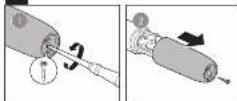
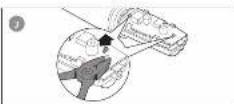
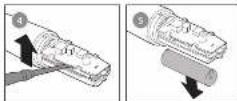
Only remove the rechargeable battery when you discard the product. Before you remove the battery, make sure that the product is disconnected from the wall socket and that the battery is completely empty.
Take any necessary safety prices from when you handle tools to open the product and when you dispose of the rechargeable battery.
Do not correct the appearance in the D&I part again after you have removed the pattern.
1. Name the USB slot from the USB port, and the
2. If the appliance can be able to slope, achieve
1 (FpD-1) Lesse and humus, the snow on the bottom of the substance.
4. (PgD 2) Take off the body off hand.
= (Pg D-34.5) Cut the better bags to use a fat-free large driver to cut loose or then remove the
rechargeable battery carefully
3 Overview
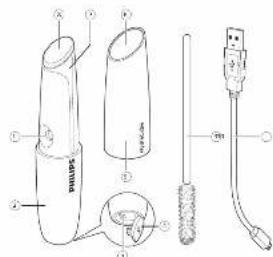
| 1) | Water tap | 2) | Handle |
| 3) | USB cup | 4) | USB port house |
| 6) | Sewing cover | 5) | Mirror surface |
| 7) | Water tank | 8) | Grass lamblad |
| 9) | Clearing brush | 9) | USB cable |
4 How to use
Before use:
Charging the appliance
Make sure the appliance is fully charged before you use it for the first time. I take approximately 2.5 hours in fully charged the appliance. A fully charged appliance is recommended to make 30 times a
-
Make sure the sliding covers closed
-
In a 3, the micro USB plug in the six-2 of the audio or and out the USB plug into the character device. The
appliance can't be used while charging. During charging, the delivery was able
- When the battery is fully charged, the charging indicator
Note: Numbers were 158 and were after changes to
turgdesing
Battery-low indicator
How to use
Other the history, simply simply (i.e. less than 1 application), the charging indicator flashes during use. Other the history simply, the shorter exercises might slow?
Note: If you wear glasses, make sure you have them off before start or be treatment.
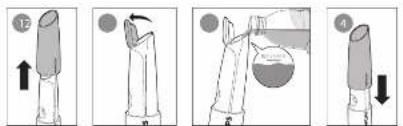
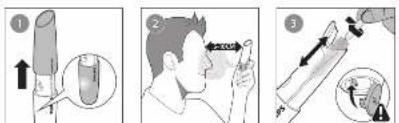
1. (FpE-1) Release the sharp onset after five e-value
2. (Fig 1-2) Quasi-Iber warst halle
1. (PPE 3) Film distance water 1.25 V, AChl 14.
2. Do not exceed the kix water level irradiation
• Always use distilled water in the appliance. Other types of water may affect the misting performance.

Depending on your usage time, a full tank will
approximately 15% of the 2-3 freedom
-
- C-1 To him to the purpose, part of the
shing, case of the "clark" board by: T. G. and (or vice lights)
- (A) 2) Part of the image at the source of S-131m
stay from your bare. Keep moving the appliance to a
Note: The spray will, be automatically stopped after 1
measure of mechanical operation 2. In particular, the appliance simply includes one component
Ips and Irate
- Further money started, please note the sharing case downward and then a push upwards to re start the unit.
-
If you plan to stop in the middle of the transaction simply push the side price movements.
-
The appliance should be hold vertically for optimal performance, since the availability of these products is
perpetual of, what the natural be used. Of operation, upon, and may not take into the per-stated
- Malt box may be efficient during space and its normal to use
- Wind from air conditioner or electric fan may affect and change mix direction. To optimize mulling performance please avoid wind from air conditioner or electric fan while using the appliance.
6 Droplets of water may be generated at most hours and this is normal. But if many water droplets remain at most hours, it may affect the most volume. Please remove water droplets with issue paper immediately?
- If you plan not to use the appliance for a period or time, down the unit thoroughly before the day.
- Do not use detergent, red polisher removal, etc. to clear
After use:
: send the appliance with home paper series inlet, respectively.
2. (Fig. 3) Use the applied brush to close the material
- It's very recommended to empty the water tank and
dian, he is a worker of every day.
• Aluma make sure the US\$1 cover is closed behind.
clearing
6ex:10
5 Troubleshooting
This chapter summarizes the most common problems, yet some encounter with the appearance. If you are unable to raise the problem with the information boxes, visit
www.phiza.com/su301- or a class of requirements for 24-25
| Problem | Solution |
| The appliance does not charge. | Make parts the use of or the USB set to which you connect the appliance or more USB is like. If the appliance is fully discharge, please charge the appliance but for how much to act as the appliance to charge it. When the charging light on the appliance still does not get up on when the appliance will do does or change take into your computer dealer or the appliance. Prices Service Center. |
| The appliance checked work together. | Make parts, clings, and parts in place. Change the appliance is around the price range and the price range. The appliance cannot choose during charging. Phone can use the USB name. Make a phone to use completely during charging. |
| I need that I have come out from the appliance, or the write mask. | Make part one, the first order in the appliance. I need an other type of product may be used. The handling process must be clear. I need the device to work out your phone. Make the appliance regularly during charging. |
| In appliance has other normal notes during use. | The power level may be able to provide the water tank. |
| In appliance has two days of using your sonor today. | Please find a device to make your device to be able to know your handling job. |

Guarantee and service
繁體中文
1 簡介
2 重要事项
Brand : PHILIPS
Model : Zoom MS6010
Category : Skin Care Device