
ST12MHDLAN4R - AV Extender StarTech.com - Free user manual and instructions
Find the device manual for free ST12MHDLAN4R StarTech.com in PDF.


| Product Type | HDMI Over IP Receiver for ST12MHDLAN4K |
| Brand | StarTech.com |
| Model | ST12MHDLAN4R |
| Power Supply | DC 9-12V, universal power adapter (NA, EU, UK, ANZ) included |
| Video Resolution | Up to 4K30 (3840x2160 @ 30Hz) |
| Video Input | HDMI (via transmitter) |
| Video Output | HDMI (audio/video) + 3.5 mm analog audio output |
| Network Interface | RJ-45 LAN port (Gigabit) |
| Extension Distance | Up to 330 ft (100 m) over Gigabit network (dependent on network equipment) |
| Audio Support | HDMI audio or external 3.5 mm analog audio source (selectable via switch) |
| RS-232 Extension | Yes, via RJ11 port (serial extension for RS-232 signal) |
| IR Extension | IR ports present but not supported by StarTech.com (requires external IR blaster/receiver) |
| Configuration | Rotary DIP switch for group setting; video resolution selection switch; Function buttons |
| Management Software | Mobile app for iOS and Android (free download) for video wall and IP distribution control |
| Mounting | Mounting bracket included |
| Package Contents | Receiver, universal power adapter, mounting bracket, CAT5 cable, RJ11 to RS232 adapter, RJ11 cable, plastic screwdriver, quick-start guide |
| Regulatory Compliance | FCC Class A, ICES-003 |
| Warranty | 2 years |
Frequently Asked Questions - ST12MHDLAN4R StarTech.com
User questions about ST12MHDLAN4R StarTech.com
0 question about this device. Answer the ones you know or ask your own.
Ask a new question about this device
Download the instructions for your AV Extender in PDF format for free! Find your manual ST12MHDLAN4R - StarTech.com and take your electronic device back in hand. On this page are published all the documents necessary for the use of your device. ST12MHDLAN4R by StarTech.com.
USER MANUAL ST12MHDLAN4R StarTech.com
HDMI® Over IP Receiver for ST12MHDLAN4K
ST12MHDLAN4R
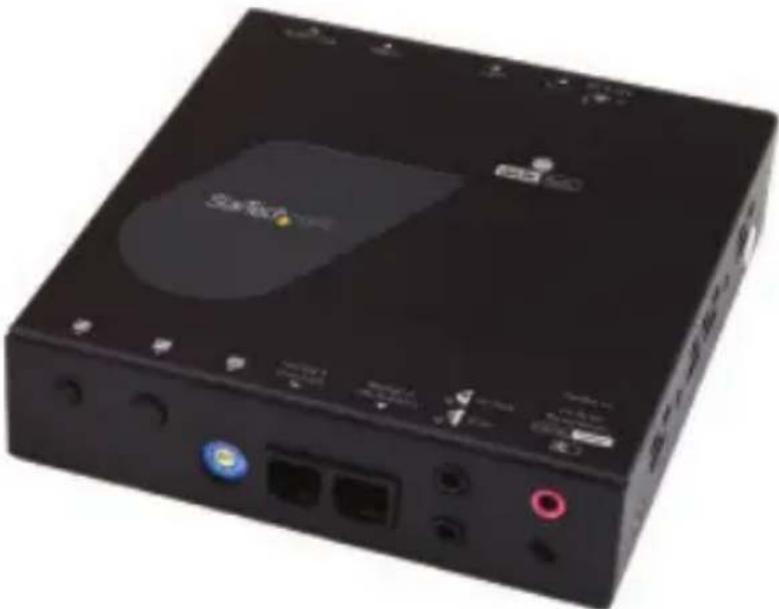
natural_image
Black electronic device with ports and indicator lights (no visible text or symbols)*actual product may vary from photos
For the latest information, technical specifications, and support for this product, please visit www.startech.com/ ST12MHDLAN4R.
FCC Compliance Statement
This equipment has been tested and found to comply with the limits for a Class A digital device, pursuant to part 15 of the FCC Rules. These limits are designed to provide reasonable protection against harmful interference in a residential installation. This equipment generates, uses and can radiate radio frequency energy and, if not installed and used in accordance with the instructions, may cause harmful interference to radio communications. However, there is no guarantee that interference will not occur in a particular installation. If this equipment does cause harmful interference to radio or television reception, which can be determined by turning the equipment off and on, the user is encouraged to try to correct the interference by one or more of the following measures:
- Reorient or relocate the receiving antenna.
- Increase the separation between the equipment and receiver.
- Connect the equipment into an outlet on a circuit different from that to which the receiver is connected.
- Consult the dealer or an experienced radio/TV technician for help.
This device complies with part 15 of the FCC Rules. Operation is subject to the following two conditions:
(1) This device may not cause harmful interference, and (2) this device must accept any interference received, including interference that may cause undesired operation. Changes or modifications not expressly approved by StarTech.com could void the user's authority to operate the equipment.
Industry Canada Statement
This Class A digital apparatus complies with Canadian ICES-003.
This device complies with Industry Canada licence-exempt RSS standard(s). Operation is subject to the following two conditions:
(1) This device may not cause interference, and (2) This device must accept any interference, including interference that may cause undesired operation of the device.
Use of Trademarks, Registered Trademarks, and other Protected Names and Symbols
This manual may make reference to trademarks, registered trademarks, and other protected names and/or symbols of third-party companies not related in any way to
StarTech.com. Where they occur these references are for illustrative purposes only and do not represent an endorsement of a product or service by StarTech.com, or an endorsement of the product(s) to which this manual applies by the third-party company in question. Regardless of any direct acknowledgement elsewhere in the body of this document, StarTech.com hereby acknowledges that all trademarks, registered trademarks, service marks, and other protected names and/or symbols contained in this manual and related documents are the property of their respective holders.
Table of Contents
Introduction......1
Packaging contents....1
System requirements....1
Product View....2
Installation 3
Preparing your site....3
Hardware installation ....3
Software installation....5
Technical support......6
Warranty information....6
Introduction
Packaging contents
• 1 x HDMI over IP receiver
• 1 x universal power adapter (NA, EU, UK, ANZ)
- 1 x mounting bracket
- 1 x CAT5 cable
• 1 x RJ11 to RS232 adapter
- 1 x RJ11 cable
- 1 x plastic screwdriver
- 1 x quick-start guide
System requirements
• The ST12MHDLAN4K HDMI over IP Distribution Kit - 4K
- An HDMI video source with cabling such as a computer or Blu-ray™ player
- An HDMI display device(s) such as a television or projector (one for each receiver)
- A run of Network cabling for the transmitter and each receiver
Note:
The transmitter and receivers referenced in this manual support IR extension. However, the IR blaster and IR receiver must be sourced externally.
Product View
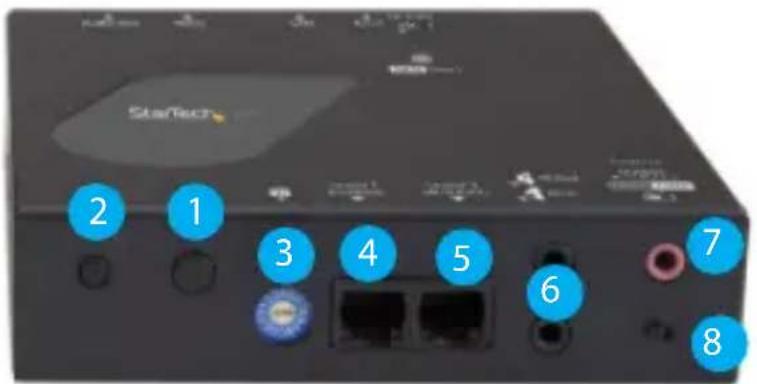
Front view
Additional receiver units sold separately:
StarTech.com SKU: ST12MHDLAN4R
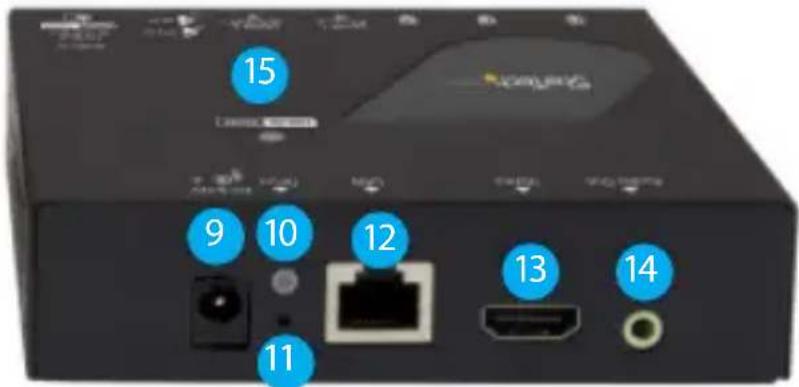
Back view
- Function 1 button
- Function 2 button
- Dip rotary switch
- Serial control (not active)*
- Serial extension (for extending RS-232 signal)
-
Infrared (in) and (out) ports***
-
Audio in port**
-
Video resolution selection switch
-
DC 9-12V power jack
-
Network status LED
-
Reset button
-
LAN port (RJ-45)
-
HDMI output port (audio/video)
-
3.5 mm output port (audio)
-
Link and power LED
* Serial control port is not active. To control the ST12MHDLAN4K download our free mobile application. (see Page 6).
**Audio in port is not functional in Video Wall or Point to Multi-Point configurations.
*** IR port functionality is not supported by StarTech.com
Installation
Preparing your site
Note: This device will only work with the ST12MHDLAN4K HDMI® Extender kit. Please review site preparation steps from the ST12MHDLAN4K manual prior to installing additional receivers. The ST12MHDLAN4K HDMI extender kit lets you extend your 4K30 video over a Gigabit LAN network, beyond the typical cable length restriction of 330 ft. (100m) of Gigabit network portals.
Refer to the manufacturer of the network equipment to determine the length restriction and to ensure the transmitter unit and receiver unit(s) are all within the restricted range of the nearest network portal.
Note: Ensure the transmitter unit, and receiver unit(s) are all situated near AC electrical outlets.
- Determine where the local video source (i.e. computer, Blu-ray player) will be located and set up the transmitter device near that location.
- Determine where the remote display will be located and set up the receiver near that location.
- (Optional) If using additional displays determine where they will be located and set the additional receiver unit(s) near that location.
Hardware installation
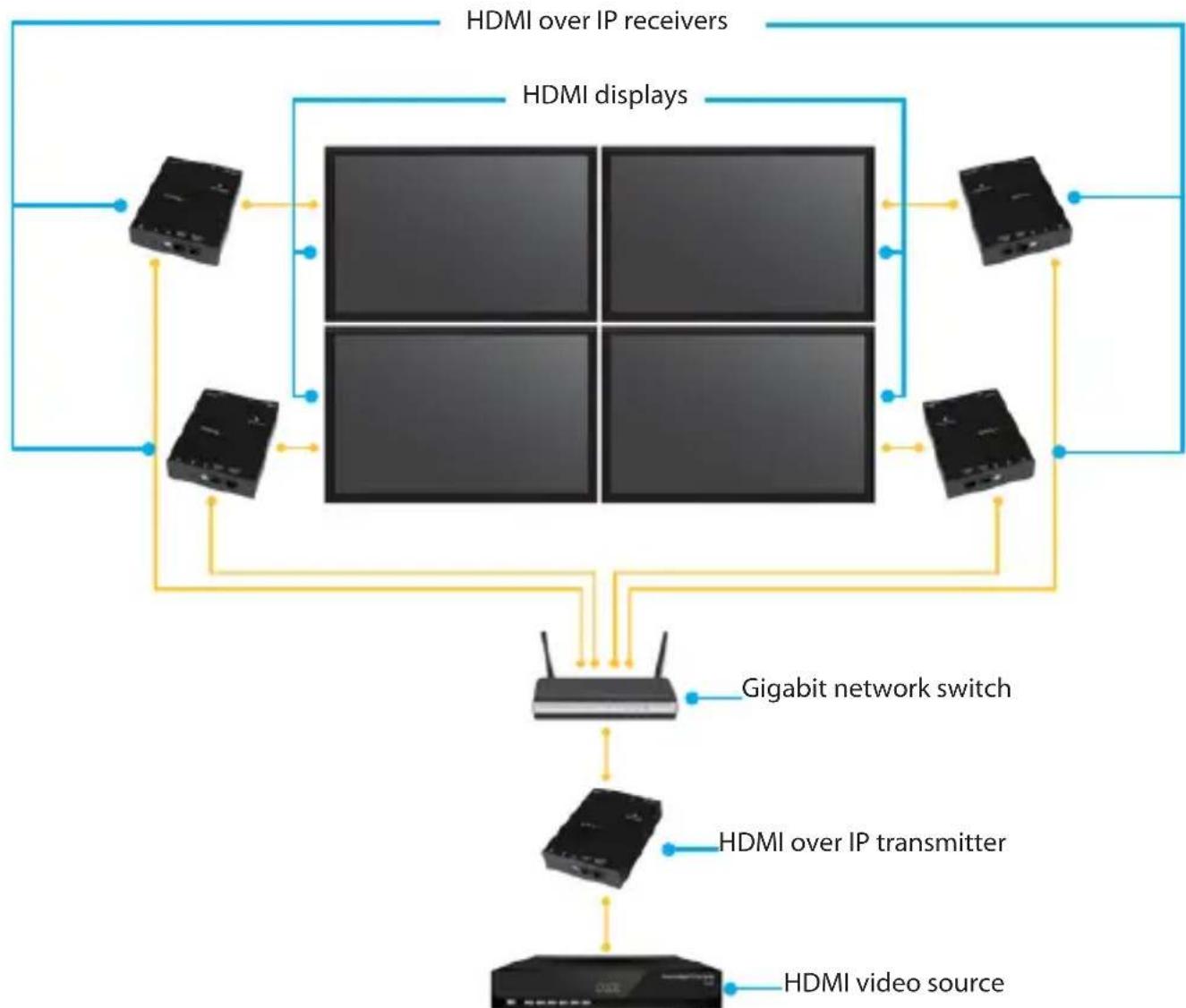
Video wall or point to multi-point installation with a Gigabit LAN network
- Install the transmitter unit
a) Connect a video source device, such as a computer or Blu-ray player, to the transmitter's video input port.
b) Connect the transmitter's DC 9-12V power jack to an AC electrical outlet, using one of the included power adapters.
c) (Optional) If you intend to add a separate 3.5 mm audio source that can be embedded into the HDMI signal and selected as the audio source, connect a 3.5 mm audio cable to your audio source device and to the transmitter's analog audio source port. - Install the receiver unit(s)
a) Connect a display to the receiver unit's video output port using an HDMI cable.
b) Connect the receiver unit's power jack to an AC electrical outlet, using one of the included power adapters.
c) (Optional) If you are using additional ST12MHDLAN4R receivers (sold separately), repeat steps [a) through c)] for each additional receiver.
Note: The rotary dip switches on the transmitter and each receiver connected to the network must be set in the same position for the devices to communicate.
- Connect the devices to a Gigabit LAN network
a) Connect an RJ-45 terminated Cat5e or Cat6 Ethernet cable to the LAN port on the transmitter unit, and to each of the receiver units.
b) Connect the other end of the Cat5e or Cat6 cable to a Gigabit LAN hub, router or switch.
Note: Your router must support IGMP snooping. Please refer to your network switch or router documentation to ensure IGMP snooping is supported and enabled.
- Verify that the image from your video source appears on video display(s) attached to the receiver unit(s).
flowchart
graph TD
    A["HDMI over IP receivers"] --> B["4"]
    C["HDMI displays"] --> B
    D["Gigabit network switch"] --> E["4"]
    F["HDMI over IP transmitter"] --> E
    G["HDMI video source"] --> E
    B --> H["4"]
    B --> I["4"]
    B --> J["4"]
    B --> K["4"]
    B --> L["4"]
    B --> M["4"]
    B --> N["4"]
    B --> O["4"]
    B --> P["4"]
    B --> Q["4"]
    B --> R["4"]
    B --> S["4"]
    B --> T["4"]
    B --> U["4"]
    B --> V["4"]
    B --> W["4"]
    B --> X["4"]
    B --> Y["4"]
    B --> Z["4"]
    B --> AA["4"]
    B --> AB["4"]
    B --> AC["4"]
    B --> AD["4"]
    B --> AE["4"]
    B --> AF["4"]
    B --> AG["4"]
    B --> AH["4"]
    B --> AI["4"]
    B --> AJ["4"]
    B --> AK["4"]
    B --> AL["4"]
    B --> AM["4"]
    B --> AN["4"]
    B --> AO["4"]
    B --> AP["4"]
    B --> AQ["4"]
    B --> AR["4"]
    B --> AS["4"]
    B --> AT["4"]
    B --> AU["4"]
    B --> AV["4"]
    B --> AW["4"]
(Additional receiver units sold separately, StarTech.com SKU: ST12MHDLAN4R)
- (Optional) Connect external 3.5 mm speakers to your remote receiver(s) Analog audio output port.
- Select your audio source.
a) If you'd like the remote device(s) (external speakers and HDMI displays) to output the native HDMI audio that's on your HDMI source, set the transmitter's audio selection switch to Video.
b) If you'd like to use the 3.5mm audio source that you connected to the Analog audio source port, set the transmitter's audio selection switch to Audio In.
Note: Both the HDMI output port and the Analog audio output will output whatever audio source is selected.
Software installation
The HDMI distribution kit features video control software that helps you manage your IP video distribution and video wall configuration. The software is available on iOS for iPhone or iPad, and Android ^™ for smartphones or tablets.
To install the software:
- Visit http://www.StarTech.com/ST12MHDLAN4K, using the device you intend to install software on.
- Under the overview tab, select the link for the store that corresponds with your device.


- Select the option to download and install the software from the store page.
- Open the software, to verify that it has installed correctly.
Please note: A full production manual with details regarding operation of the application is available at: http://www.startech.com/ST12MHDLAN4K
Technical support
StarTech.com's lifetime technical support is an integral part of our commitment to provide industry-leading solutions. If you ever need help with your product, visit www.startech.com/support and access our comprehensive selection of online tools, documentation, and downloads.
For the latest drivers/software, please visit www.startech.com/downloads
Warranty information
This product is backed by a two-year warranty.
StarTech.com warrants its products against defects in materials and workmanship for the periods noted, following the initial date of purchase. During this period, the products may be returned for repair, or replacement with equivalent products at our discretion. The warranty covers parts and labor costs only. StarTech.com does not warrant its products from defects or damages arising from misuse, abuse, alteration, or normal wear and tear.
Limitation of liability
In no event shall the liability of StarTech.com Ltd. and StarTech.com USA LLP (or their officers, directors, employees or agents) for any damages (whether direct or indirect, special, punitive, incidental, consequential, or otherwise), loss of profits, loss of business, or any pecuniary loss, arising out of or related to the use of the product exceed the actual price paid for the product. Some states do not allow the exclusion or limitation of incidental or consequential damages. If such laws apply, the limitations or exclusions contained in this statement may not apply to you.
Hard-to-find made easy. At StarTech.com, that isn't a slogan. It's a promise.
StarTech.com is your one-stop source for every connectivity part you need. From the latest technology to legacy products — and all the parts that bridge the old and new — we can help you find the parts that connect your solutions.
We make it easy to locate the parts, and we quickly deliver them wherever they need to go. Just talk to one of our tech advisors or visit our website. You'll be connected to the products you need in no time.
Visit www.StarTech.com for complete information on all StarTech.com products and to access exclusive resources and time-saving tools.
StarTech.com is an ISO 9001 Registered manufacturer of connectivity and technology parts. StarTech.com was founded in 1985 and has operations in the United States, Canada, the United Kingdom and Taiwan servicing a worldwide market.
Reviews
Share your experiences using StarTech.com products, including product applications and setup, what you love about the products, and areas for improvement.

StarTech.com Ltd.
45 Artisans
Crescent
London, Ontario
N5V 5E9
Canada
StarTech.com LLP
4490 South
Hamilton Road
Groveport, Ohio
43125
U.S.A.
StarTech.com Ltd.
Unit B, Pinnacle 15
Gowerton Road
Brackmills,
Northampton
NN4 7BW
United Kingdom
StarTech.com Ltd.
Siriusdreef 17-27
2132 WT
Hoofddorp
The Netherlands
FR: fr.startech.com
DE: de.startech.com
ES: es.startech.com
NL: nl.startech.com
IT: it.startech.com
JP: jp.startech.com
- HDMI® Over IP Receiver for ST12MHDLAN4K
- FCC Compliance Statement
- Industry Canada Statement
- Use of Trademarks, Registered Trademarks, and other Protected Names and Symbols
- Table of Contents
- Introduction......1
- Installation 3
- Technical support......6
- Warranty information....6
- Introduction
- Packaging contents
- System requirements
- Note:
- Product View
- Front view
- Back view
- Installation
- Preparing your site
- Hardware installation
- Software installation
- Technical support
- Warranty information
- Limitation of liability
- Hard-to-find made easy. At StarTech.com, that isn't a slogan. It's a promise.
- Reviews
- StarTech.com Ltd.
- StarTech.com LLP
Brand : StarTech.com
Model : ST12MHDLAN4R
Category : AV Extender