RF-VMU5 - Smartphone accessory Rocketfish - Free user manual and instructions
Find the device manual for free RF-VMU5 Rocketfish in PDF.


| Product Type | Video Monitoring Unit |
| Brand | Rocketfish |
| Model | RF-VMU5 |
| Dimensions (W x H x D) | 4.5 x 2.8 x 1.2 inches |
| Weight | 5.3 oz (150 g) |
| Power Source | USB 5V DC, 500mA |
| Video Input | Composite (RCA) or HDMI (via adapter) |
| Video Output | USB 2.0 to computer |
| Maximum Resolution | 720p (1280x720) @ 30fps |
| Audio Input | 3.5mm stereo jack |
| Compatibility | Windows 10/11, macOS 10.14+, Linux |
| Included Accessories | USB cable, composite video cable, quick start guide |
| Primary Function | Convert analog video to digital for recording or streaming |
| Construction Material | Plastic casing with metal connectors |
| Operating Temperature | 32°F to 104°F (0°C to 40°C) |
| Certifications | FCC, CE, RoHS |
| Warranty | 1 year limited |
Frequently Asked Questions - RF-VMU5 Rocketfish
User questions about RF-VMU5 Rocketfish
0 question about this device. Answer the ones you know or ask your own.
Ask a new question about this device
Download the instructions for your Smartphone accessory in PDF format for free! Find your manual RF-VMU5 - Rocketfish and take your electronic device back in hand. On this page are published all the documents necessary for the use of your device. RF-VMU5 by Rocketfish.
USER MANUAL RF-VMU5 Rocketfish
Car mount for smartphones
RF-VMU5
Important Safety Instructions
Choking Hazard
WARNING! This product may contain small parts which may be a choking hazard to children under 3. Keep small parts away from children.
Road Hazard
WARNING! Risk of severe injury or death. This product requires in-car installation. Do not attempt to install or set up this equipment while your vehicle is moving.
WARNING! Risk of severe injury or death. Do not install this equipment in a way that it will obstruct the view of the driver. Some jurisdictions have restrictions regarding the installation of after-market accessories. Consult and obey the local laws and regulations.
Notices
- The vent mount attaches to the horizontal vent louvers found in most vehicles.
Note: Does not work with circular/round type vents found in some vehicles. Removing the vent mount can be difficult. It is designed to be attached to your car's vents only once, and will not transfer easily from car to car. - Check the state and local laws and ordinances where you drive. Some state laws prohibit drivers from using mounts on their windshields while operating motor vehicles. Other state laws allow the mount to be located only in specific locations on the windshield. It is the user's responsibility to mount the device in compliance with all applicable laws and ordinances.
- Do not install this or any product over an air bag cover or within the air bag deployment zone. Rocketfish assumes no responsibility of liability for injury or death as a result of car crashes and/or air bag deployment.
- Rocketfish is not responsible for any damages caused to your car, your device, or yourself due to the installation or use of the mounts.
- Rocketfish does not assume any responsibility for any fines, penalties, or damages that may be incurred as a result of any state or local law or ordinance relating to the use of your device.
- This product is designed for mobile phones only. It may not accommodate the weight of a GPS or other device. Maximum weight of your device should not exceed 1.77 lbs. (0.8 kg).
Package contents
• Car Air Vent Mount
- Car Window Mount
- Holder
- User Guide
Features
Your Rocketfish car mount securely holds a smartphone to your car air vent or car window. Make sure that your smartphone is securely fastened to the mount before you begin your trip.
Caution: This mount is not intended for extreme off-road use. Excessive bumping and jarring may result in damage to your device.
Car Air Vent Mount

Car Window Mount

Holder Front

Holder Back

Placing a smartphone in the holder
1 Repeatedly press the release button on the side of the holder. The clamps open.
2 Unfold the feet on the bottom of the holder.
3 Adjust the clamps to fit the width of your smartphone.
4 Place your smartphone in the holder and close the clamps by squeezing them together tightly until your phone is secure.
Attaching to air vent louvers
1 Insert the swivel head into the slot on the back of the holder and slide it into place until it is secure.

natural_image
3D mechanical component with directional arrows indicating movement or assembly (no text or symbols)2 Align the clip stops with the edge of an air vent louver, slowly push the mount back until it clicks into place, then release the mount. Make sure both hooks are attached to the louver.

natural_image
Close-up of a mechanical assembly with visible gears and shafts, no text or symbols present3 Position the kickstand so it rests against other louvers or the dash for support.
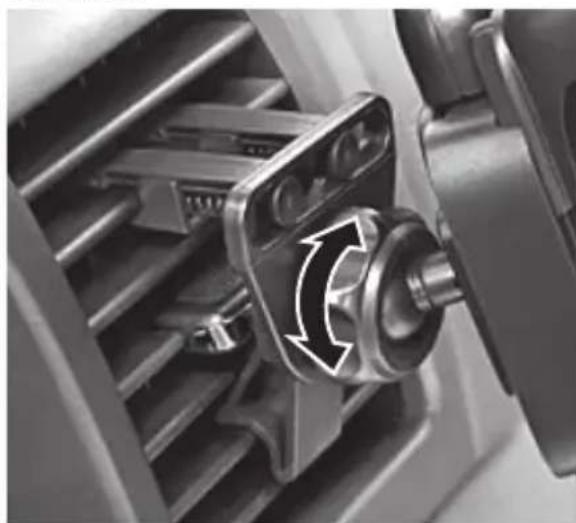
4 Loosen the swivel head knob, adjust the viewing angle, then fully tighten the knob.
natural_image
Close-up of a mechanical component with a rotating shaft and housing, showing motion arrows (no text or symbols)Caution: Do not adjust your Rocketfish car mount while driving.
Attaching to a car window
1 Clean the window with a clean cloth.
2 Insert the swivel head into the slot on the back of holder and slide it into place until it is secure.

natural_image
Close-up of a black automotive electrical plug with a cable, showing a mechanical joint and a white arrow pointing to a component (no text or symbols visible)3 Remove the clear film from the suction cup.
4 Push the release button on the car window mount, press the suction cup to the desired location on the clean window, then press the lever down.
The mount adheres to the window.

natural_image
Close-up of a black car head with attached cable and connector (no visible text or symbols)5 Loosen the adjustment knob, adjust the viewing angle, then fully tighten the knob.
Caution: Always loosen the adjustment knob before changing the viewing angle.
6 Bend the fl exible arm to further adjust the viewing angle.
7 To remove the mount, press the release button, then pull the suction cup tab.
Caution: Do not adjust your Rocketfish car mount while driving.
Removing your smartphone from the holder
1 Hold your smartphone and repeatedly press the release button on the bottom of the holder. The clamps open.
2 Remove your smartphone.
One-year limited warranty
Visit www.rocketfi shproducts.com for details.
Contact Rocketfi sh:
For customer service please call 1-800-620-2790
www.rocketfi shproducts.com
Distributed by Best Buy Purchasing, LLC
7601 Penn Avenue South, Richfi eld, Minnesota, U.S.A. 55423-3645
© 2010 BBY Solutions, Inc.
All rights reserved. ROCKETFISH is a trademark of BBY Solutions, Inc. Registered in some countries. All other products and brand names are trademarks of their respective owners.


Distributed by Best Buy Purchasing, LLC 7601 Penn Avenue South, Richfield, Minnesota, U.S.A. 55423-3645
© 2010 BBY Solutions, Inc.
All rights reserved. ROCKETFISH is a trademark of BBY Solutions, Inc. Registered in some countries. All other products and brand names are trademarks of their respective owners.
Brand : Rocketfish
Model : RF-VMU5
Category : Smartphone accessory