
ACSMAUFL - Coaxial cable Mikrotik - Free user manual and instructions
Find the device manual for free ACSMAUFL Mikrotik in PDF.


| Product Type | Coaxial Cable |
| Brand | Mikrotik |
| Model | ACSMAUFL |
| Category | Coaxial Cable |
| Impedance | 50 ohms |
| Connector Type | SMA Male |
| Cable Length | 1 meter |
| Outer Diameter | 5 mm |
| Shielding | Double braid |
| Center Conductor | Copper clad steel |
| Dielectric | Foam PE |
| Operating Temperature | -40°C to +85°C |
| Frequency Range | DC to 6 GHz |
| Color | Black |
| Weight | 50 g |
| Compliance | RoHS, CE |
| Warranty | 2 years |
| Usage | Antenna connection, wireless equipment |
| Packaging | Retail box |
| Maintenance | Keep connectors clean; avoid sharp bends |
| Safety | Do not exceed rated power; avoid moisture |
| Repairability | Replaceable connectors; solder repair possible |
| Spare Parts | Available from Mikrotik distributors |
Frequently Asked Questions - ACSMAUFL Mikrotik
User questions about ACSMAUFL Mikrotik
0 question about this device. Answer the ones you know or ask your own.
Ask a new question about this device
Download the instructions for your Coaxial cable in PDF format for free! Find your manual ACSMAUFL - Mikrotik and take your electronic device back in hand. On this page are published all the documents necessary for the use of your device. ACSMAUFL by Mikrotik.
USER MANUAL ACSMAUFL Mikrotik
wAP R accessories guide
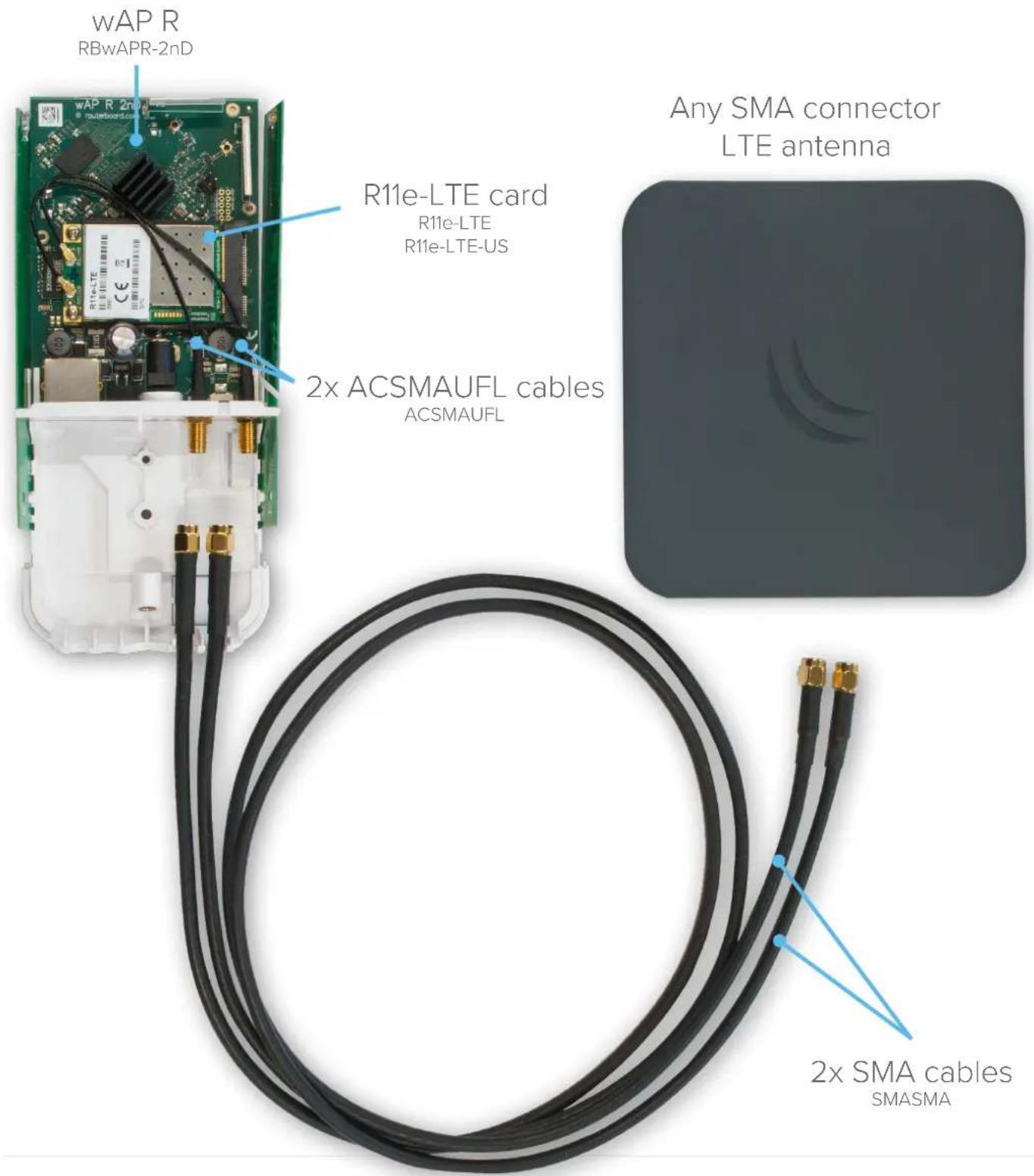
We are offering full range of accessories in order to connect external LTE antennas to our LTE product line. R11e-LTE or R11e-LTE-US miniPCIe card can be installed to wAP R unit.R11e-LTE / R11e-LTE-US cards have two U.fl connectors, where ACSMAUFL pigtails can be connected. ACSMAUFL pigtails have SMA connectors, that fit nicely in special mounting places of wAP R. SMASMA cables then can be used to connect ACSMAUFL pigtails to any external LTE antenna with SMA connectors.
Brand : Mikrotik
Model : ACSMAUFL
Category : Coaxial cable