AlertWerks EME1SS-005 - Alarm system Black Box - Free user manual and instructions
Find the device manual for free AlertWerks EME1SS-005 Black Box in PDF.


| Product Type | Alarm System |
| Brand | Black Box |
| Model | AlertWerks EME1SS-005 |
| Dimensions (H x W x D) | 4.5 x 3.2 x 1.2 inches |
| Weight | 0.5 lbs |
| Power Supply | DC 12V adapter or battery backup |
| Battery Type | CR123A (3V lithium) |
| Battery Life | Up to 1 year |
| Connectivity | Wireless (Z-Wave) |
| Sensor Type | Motion, door/window |
| Alarm Sound | 85 dB siren |
| Range | Up to 100 feet (line of sight) |
| Operating Temperature | 32°F to 120°F |
| Humidity | 5% to 95% non-condensing |
| Compatibility | Works with most Z-Wave smart home hubs |
| Installation | Wall mount, adhesive tape included |
| Material | ABS plastic |
| Color | White |
| Certifications | FCC, CE |
| Included Accessories | Main unit, sensors (2), mounting hardware, user manual |
| Maintenance | Test weekly, replace batteries annually |
| Safety Features | Tamper-resistant design, low battery alert |
| Spare Parts Availability | Available from Black Box |
Frequently Asked Questions - AlertWerks EME1SS-005 Black Box
User questions about AlertWerks EME1SS-005 Black Box
0 question about this device. Answer the ones you know or ask your own.
Ask a new question about this device
Download the instructions for your Alarm system in PDF format for free! Find your manual AlertWerks EME1SS-005 - Black Box and take your electronic device back in hand. On this page are published all the documents necessary for the use of your device. AlertWerks EME1SS-005 by Black Box.
USER MANUAL AlertWerks EME1SS-005 Black Box
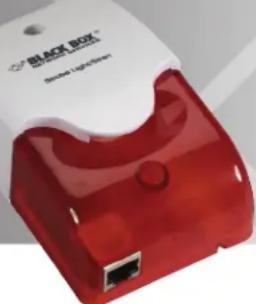
AlertWerks™ Siren and Strobe Light
Siren sounds at 100 ±3 dB at 100 cm.
Supports maximim cable runs of up to 1000 feet (304.8 m). Can be triggered by any other sensor connected to the AlertWerks Hub.
natural_image
Red and white photo of a black box device with a USB port (no visible text or symbols)Specifications
Communications Cable — RJ-45 jack to sensor using UTP CAT5 cable
Alarm Sound —100 ±3 db @ 100 cm
Light Source — (8) super bright LEDs
Maximum Extension Cable Length — 1000 ft. (304.8 m) with approved low-capacitance shielded cable or UTPI
Measurement Range — Alarm or normal
Measurement Rate — Multiple readings every second
Maximum Number of Sensors Used — Up to (2) sensors per AlertWerks Jr. (EME102A), and up to (8) sensors per ServSensor Hub (EME108A) or V4E (EME134A)
Sensor Type — Open/closed contact switch
Strobe Flash Frequency — 400 times/minute
Power — Powered by the AlertWerks Hub. No additional power is needed.
Size — 4.8"H x 2.8"W x 1.8"D (12.3 x 7.2 x 4.5 cm)
Overview
The combined siren and strobe light sensor adds eye-catching visual and audio alarms to the AlertWerks Hubs. When triggered, the siren generates a loud alarm sound and the strobe light flashes brightly, alerting you to an alarm condition.
The siren and alarm are incorporated into one device. Connect up to two sirens and strobes to the intelligent sensor ports on the hub (EME108A, EME134A) or hub expansion module (EME1X8). Each device comes with a 5-foot (1.5-m) CAT5 cable. You can connect the siren/strobe light using up to 1000 feet (304.8 m) of your own CAT5 cable, positioning the sensors in hot spots.
When you plug a combined siren/strobe light into the intelligent sensor port, the base unit will also detect the sensor. It displays the device's status. You can trigger the siren/strobe light manually via the Web interface or you can configure it to turn on at certain times.
To continue, turn this page over...
The device can be triggered by any sensor connected to an AlertWerks hub (EME108A) or V4E (EME134A), or by an alarm condition generated by the base unit. You can fully integrate it with the sensor notification matrix on the V4E (EME134A). Each device has its own SNMP OID so that status can be collected over the network. You can also control the siren and strobe via SNMP across a network.
SNMP Commands
Control the sensor manually using the following SNMP commands:
1 = allow-sensor control
8 = cycle-On-Off-On
7 = cycle-Off-On-Off
3 = turn-on
4 = turn-off

BLACK BOX®
NETWORK SERVICES
© Copyright 2011. Black Box Corporation. All rights reserved. Printed in U.S.A. Black Box ^® and the Double Diamond logo are registered trademarks, and AlertWerks is a trademark, of BB Technologies, Inc. Any third-party trademarks appearing in this publication are acknowledged to be the property of their respective owners.
EME1SS-005, version 1
Brand : Black Box
Model : AlertWerks EME1SS-005
Category : Alarm system